





Data Migration Service Explained for Singapore SMEs
You're replacing a staff laptop, upgrading a work phone, or moving files from an old desktop that has started freezing at the worst possible time. The device swap itself is easy to picture. The stressful part is everything attached to it. Email accounts, saved passwords, customer spreadsheets, WhatsApp images, browser bookmarks, accounting records, app settings, staff permissions.
That's where a data migration service becomes useful. It isn't only about copying files from one machine to another. It's about moving the right information, in the right order, with enough control that you can keep working afterwards. For a family user, that might mean making sure photos, contacts, and app logins still appear on a new phone. For an SME, it often means protecting business continuity, reducing privacy risk, and avoiding a messy handover when old devices are sold, reused, or recycled.
In Singapore, migration sits inside a much bigger shift. One market estimate says the Singapore cloud migration services market generated USD 772.8 million in 2024 and is projected to reach USD 3,581.5 million by 2030, implying a 29.1% CAGR from 2025 to 2030, with the solution segment accounting for 66.95% of 2024 revenue and the service segment identified as the fastest-growing platform area in the forecast period, according to this Singapore cloud migration market estimate. That tells you migration is no longer a small IT errand. Organisations are treating it as infrastructure planning.
A sensible migration also fits into a broader device lifecycle decision. If a device still has useful life, you may want to repair it, redeploy it to another staff member, or pass it on responsibly. If it's leaving the business, the migration process should support secure handover, not just quick transfer.
Table of Contents
- Introduction to Data Migration Services in Singapore
- What a Data Migration Service Really Does
- Common Migration Methods and Key Risks to Understand
- How a Typical Data Migration Process Works Step by Step
- In House Migration Versus Using a Provider
- Pricing Considerations and Hidden Costs to Plan For
- How myhalo Supports Secure Migration and Longer Device Life
Introduction to Data Migration Services in Singapore
A common Singapore scenario looks like this. A small business owner buys three replacement laptops for a sales team. The old laptops still contain quotation templates, CRM exports, browser-saved passwords, finance attachments, and years of downloaded documents. One staff member wants everything copied exactly. Another only needs current work folders. A third uses a legacy application that may not behave the same way on the new machine.
This is why migration planning matters. A rushed transfer often creates two problems at once. People either move too much, including outdated or duplicated data, or they move too little and discover missing items only after the old device has already been wiped, traded in, or packed away.
Why migration matters in Singapore
Singapore organisations usually can't treat device changes casually. Privacy obligations, cloud usage, and regulated data handling shape how information should move. The public sector's own migration journey shows the scale and seriousness of this shift. Government agencies had collectively migrated close to 60% of workloads to the commercial cloud and were targeting 70% by Q3 2023, and a later update stated that by 2024 the government had exceeded that goal with over 80% of eligible systems migrated to the Government on Commercial Cloud, while 95% of government transactions had been completed digitally end-to-end, based on this Singapore government cloud migration update.
For business owners, the lesson is straightforward. Migration affects service delivery, access control, and day-to-day operations. It's not only an IT issue.
Practical rule: If losing access to the data for even a few hours would disrupt sales, operations, or customer support, treat the move as a migration project, not a casual file copy.
What good looks like
A good result isn't “everything was copied somewhere”. It's more specific:
- Users can work normally: Staff can sign in, open key apps, and find current files.
- Sensitive data stays controlled: Access rights and storage locations remain appropriate.
- Old devices can be handled properly: They can be reused, traded in, stored, or recycled with less uncertainty.
- Support questions are anticipated: The provider has a method, not just a cable and a guess.
If you want a broader planning framework for larger programmes, Kagool's guide on data and analytics migration strategy is a useful companion because it connects migration to wider operational decisions.
What a Data Migration Service Really Does
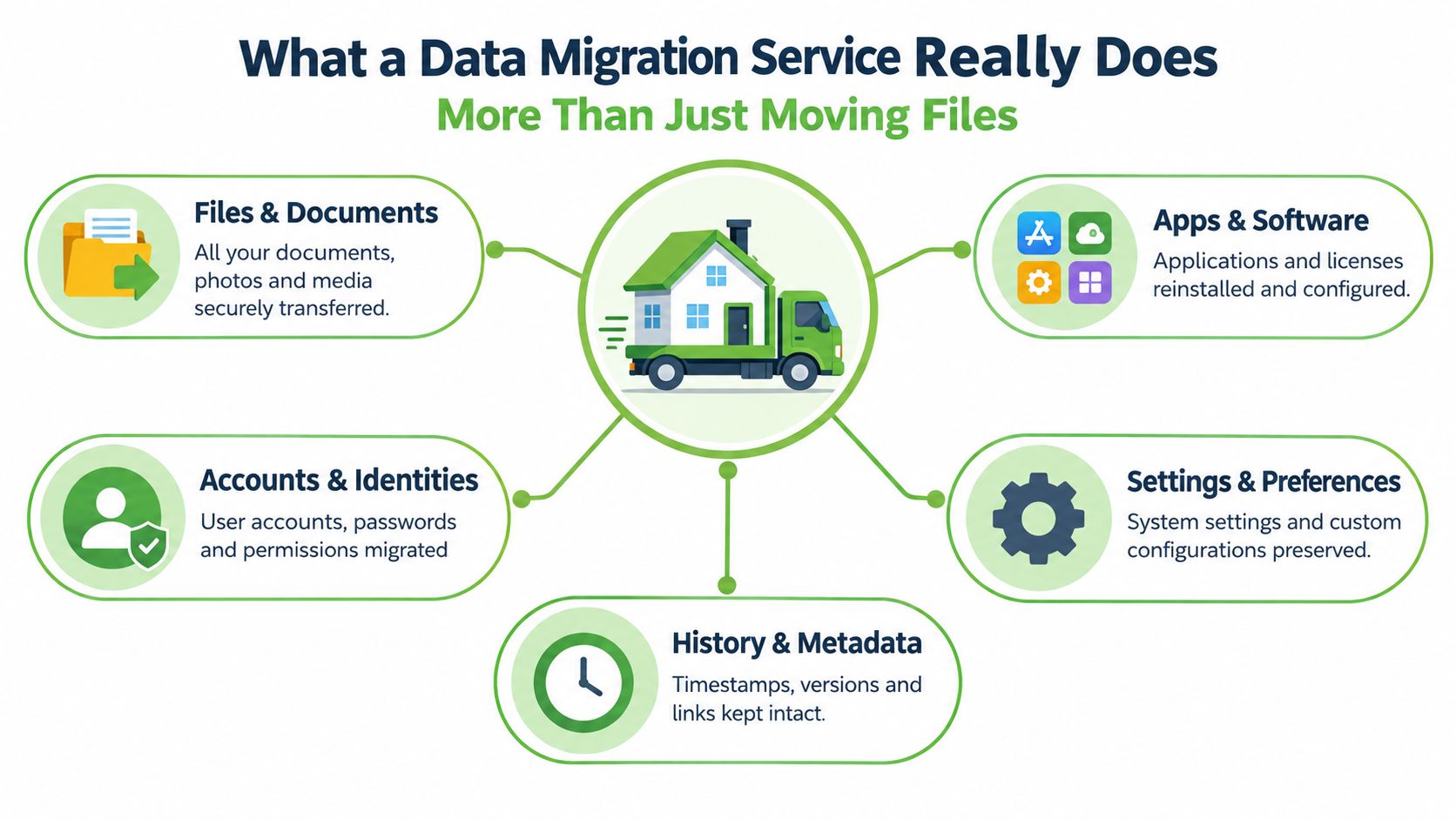
People often think migration means dragging folders from one screen to another. That's only one layer. A proper data migration service is closer to moving house. You're not just transporting loose items. You're deciding what belongs in the new place, what needs special handling, what must stay organised, and what should be discarded before the move.
More than files
At the simplest level, migration may include documents, photos, spreadsheets, and downloaded files. But many people expect much more without realising it. They assume email signatures will still be there, printers will still work, bookmarks will still load, and business apps will still open with the same permissions.
That expectation is reasonable. A modern migration often covers several categories at once:
- Files and folders: Documents, media, templates, archives.
- Applications: Installation, activation, and in some cases licence transfer.
- Accounts and identities: User profiles, login-linked settings, shared access.
- System preferences: Wi-Fi settings, shortcuts, browser setup, printer mappings.
- Metadata and history: Modified dates, folder structure, sync state, version relationships.
Migration is not the same as backup
This point confuses many buyers.
A backup is a safety copy. It helps you recover after something goes wrong. A sync keeps selected folders matched across locations. A migration is a controlled move into a new environment where the goal is usable continuity.
If you back up an old laptop to an external drive, you haven't completed migration. You've only preserved a copy. Someone still has to restore the right items, check whether they open properly, and confirm the user can work normally on the replacement device.
A backup answers, “Can I recover this later?” Migration answers, “Can I use this properly now?”
Three layers people usually miss
A practical way to understand migration is to think in three layers.
Storage migration
This is the easiest to imagine. Files move from one device, server, or cloud folder to another. A consumer phone upgrade usually sits here.
Database migration
This matters more for SMEs. Customer records, inventory lists, POS histories, or finance data may sit inside a database rather than in ordinary folders. Those records need structured transfer, not random copying.
Application migration
This is the most overlooked layer. Apps depend on settings, licences, plug-ins, user roles, and connected services. Moving a staff laptop without checking those dependencies often leads to Monday morning surprises.
A well-run migration service verifies all three where relevant. That's why it feels more deliberate than a quick transfer cable session.
Common Migration Methods and Key Risks to Understand
Not every migration uses the same route. The right method depends on the amount of data, the number of devices, how much downtime you can tolerate, and how sensitive the information is.
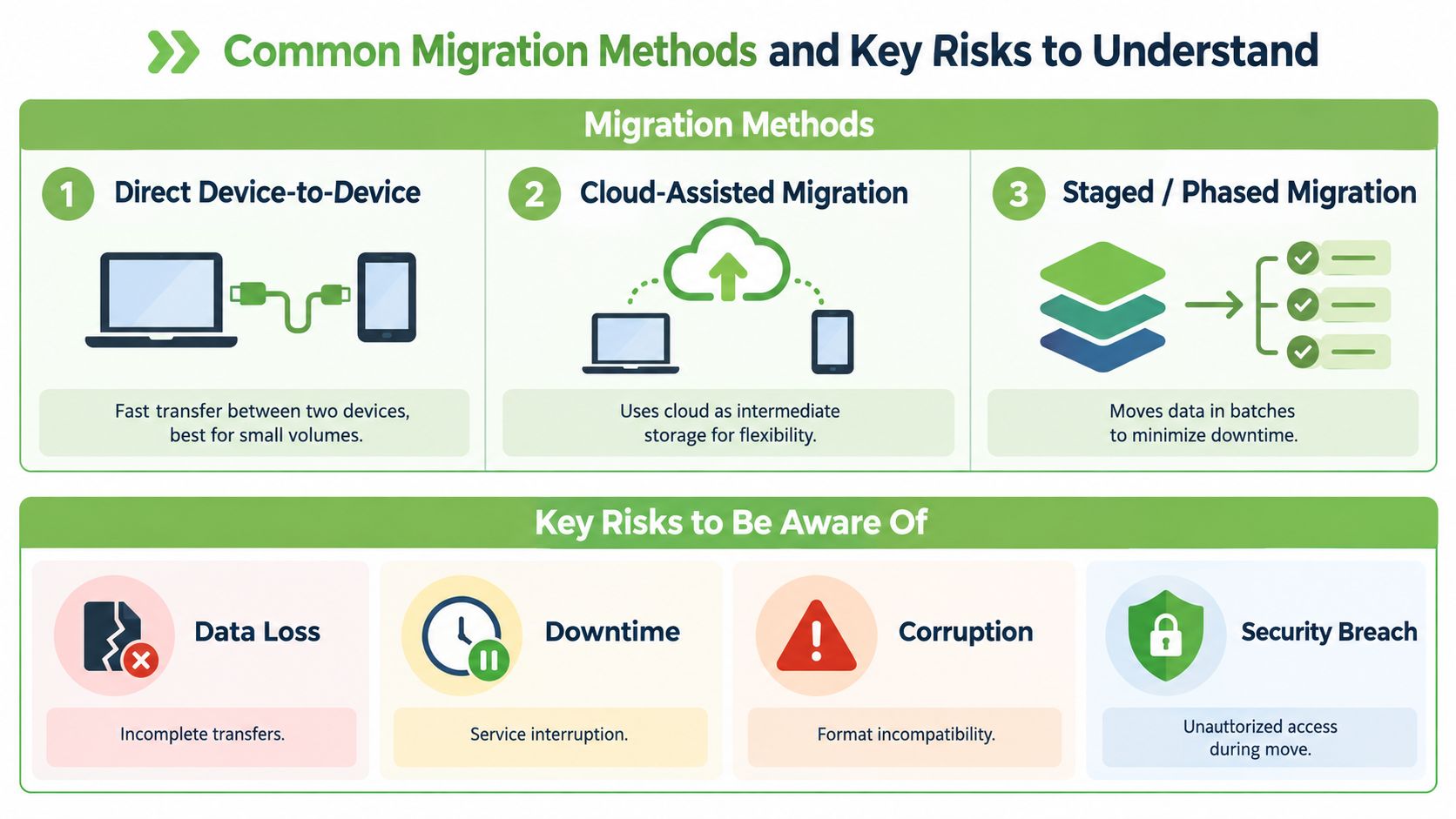
Three common ways data gets moved
Direct device-to-device transfer
This is common for personal phones, tablets, and one-off laptop replacements. The old and new devices are connected directly through cable, network link, or vendor migration tool.
It's usually the most straightforward option when both devices are accessible and compatible. The limitation is that it can become awkward if the source device is damaged, the amount of data is large, or the new environment needs cleanup before the move.
Cloud-assisted migration
Here, data moves through a managed cloud service or cloud storage layer before landing on the new device or system. This often suits teams already using cloud email, cloud drives, or shared workspaces.
In Singapore, this can also align better with privacy handling. The Personal Data Protection Commission states that organisations transferring personal data overseas must ensure comparable protection or legally enforceable safeguards, including when using cloud service providers, and it identifies portable computing devices such as smartphones, tablets, laptops, and portable hard disks as common risk points in handling personal data, as outlined in this PDPC guidance on protecting personal data on portable devices and overseas transfers.
Staged or phased migration
This method breaks the move into batches. One department, one system, or one dataset is migrated first, then validated before the next batch moves.
It's slower to plan, but often safer for SMEs that can't afford everyone being disrupted at once. It also gives teams more time to identify duplicates, obsolete folders, and permission mistakes.
Method choice affects performance
For some projects, location matters. In Singapore-to-Singapore scenarios, Tencent Cloud's migration specification lists a measured network-latency band of 240–2.45 microseconds minimum/maximum for intra-region traffic, with a migration throughput tier of 2,000–7,000 RPS depending on instance size, according to Tencent Cloud's intra-region migration specification. In plain language, local transfers inside the same region can support very responsive synchronisation, which matters when live systems need to stay usable during cutover.
Risks that deserve attention
The biggest risks usually aren't dramatic. They're ordinary mistakes that surface later.
- Incomplete transfers: Some folders are excluded, hidden, or stored in app-specific locations.
- Permission errors: A file arrives, but the right staff member can't open it.
- Format or compatibility issues: Legacy software behaves differently on the new system.
- Privacy exposure: Temporary copies end up on removable media or unmanaged storage.
Singapore guidance also points to safer transfer options such as internal network shared folders and cloud-based file sharing services instead of relying on portable storage devices, as noted in this cybersecurity and PDPA handling guidance.
Watch for this signal: If someone says, “We'll just copy everything to a portable drive first,” pause and ask how access, deletion, and verification will be controlled afterwards.
How a Typical Data Migration Process Works Step by Step
A professional migration should feel organised from the first conversation. You should be able to tell what will be moved, what won't, how the transfer will be checked, and what happens after the new device or system goes live.
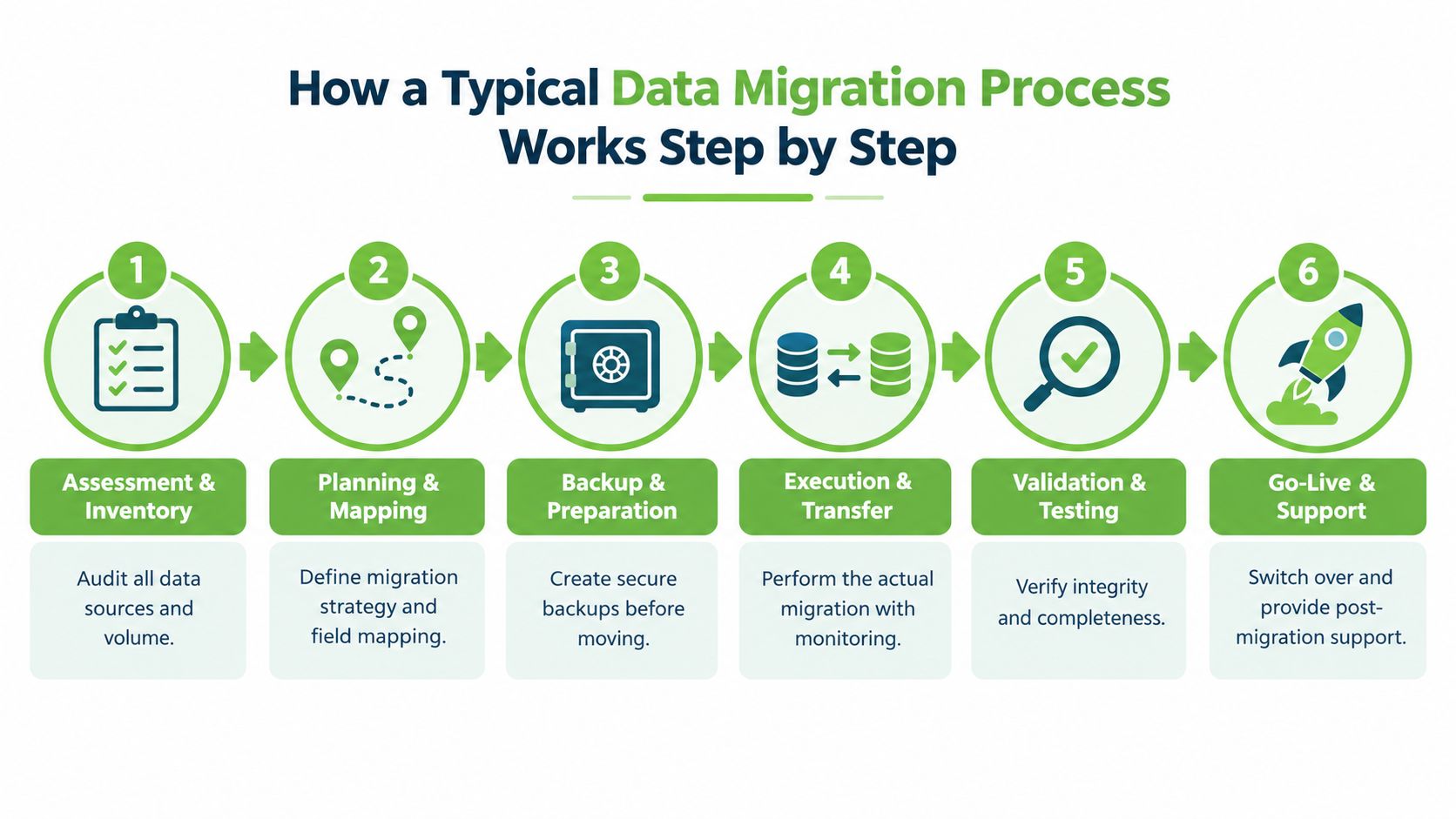
Assessment and inventory
First, someone needs to identify what exists. That includes devices, user accounts, shared folders, app dependencies, and sensitive records.
For a consumer, this may be as simple as checking whether photos live on the phone, in iCloud, in Google Photos, or in all three. For an SME, it often means listing laptops, shared drives, mailbox archives, finance exports, and line-of-business tools.
Planning and backup
Once the inventory is clear, the migration path gets designed. That includes deciding the order of transfer, the transfer method, fallback options, and who signs off each stage.
A proper backup happens before anything changes. If the migration is small, this may be a full device image or a secure cloud copy. If it's larger, it may involve staged snapshots and rollback planning.
Here's a useful short explainer before going further:
Cleansing and mapping
This stage saves time later. Old duplicates, outdated folders, abandoned user profiles, and wrongly named records get reviewed before transfer.
For structured systems, mapping matters. One field in the old system may not match neatly with one field in the new system. If you skip this, the transfer may complete technically while producing messy results operationally.
If you're comparing planning approaches, this expert guide to data migration offers a helpful overview of why mapping and validation deserve attention before the move starts.
Execution and synchronisation
Now the actual move happens. Good providers monitor the transfer instead of launching it and hoping for the best.
For business users, this stage may happen after office hours or in waves to keep disruption low. For a laptop refresh, it may mean transferring core data first so the user can resume work quickly, then syncing non-essential archives later.
Validation and handover
A migration isn't finished when the progress bar reaches 100 per cent. It's finished when people can work properly.
Use this checklist when reviewing the handover:
- Check usability: Can the user sign in, open key applications, and locate active files?
- Check completeness: Are recent documents, email data, and shared folders present?
- Check permissions: Do the right people have access, and the wrong people not have access?
- Check evidence: Ask whether the provider keeps a record of what was moved and verified.
- Check quality controls: If the migration is part of a replacement device programme, review whether the destination device has documented inspection steps, such as these quality check standards.
A careful migration reduces disruption twice. First during the move, then again later when users don't need to spend days hunting for what went missing.
In House Migration Versus Using a Provider
Some migrations are perfectly reasonable to handle internally. Others become expensive precisely because the business tries to save money upfront and ends up paying in staff time, disruption, and avoidable mistakes.
A single personal laptop with cloud-synced files is one thing. Ten staff devices, shared folders, finance records, and reused hardware are something else.
A practical decision matrix
| Criteria | In House Approach | Provider Service |
|---|---|---|
| Skills and time | Works if someone on the team understands accounts, backups, app setup, and verification | Useful when internal staff are already stretched or lack migration experience |
| Tooling | Often limited to built-in utilities, external drives, or basic sync tools | Usually more structured, with repeatable workflows and validation steps |
| Risk ownership | Your team carries the consequences of missing data or weak documentation | Shared more formally through a scoped service process |
| Security and compliance | Depends on internal discipline and handling habits | Often better suited when personal data and controlled access matter |
| Downtime tolerance | Acceptable if users can absorb delays | Better when the business needs tighter scheduling and smoother cutover |
| After-move support | Usually ad hoc | More likely to include troubleshooting and handover support |
When in-house is often enough
DIY can make sense when:
- One device is involved: A straightforward phone-to-phone or laptop-to-laptop move is easier to supervise.
- Most data already lives in managed cloud services: There's less hidden local storage to discover.
- The old device is staying with the same user: You can verify gradually without disposal pressure.
When a provider usually adds value
A provider becomes more useful when the migration is tied to larger lifecycle decisions such as resale, redeployment, or trade-in. That's especially true if the old devices need secure handover afterwards. If your plan includes monetising old equipment, this guide on how to sell a used laptop in Singapore is relevant because migration quality affects whether a device is ready to leave the business cleanly.
If the project involves multiple users, mixed devices, or personal data, the real question isn't “Can we copy the data?” It's “Can we prove we moved it properly?”
Pricing Considerations and Hidden Costs to Plan For
The price of a data migration service can vary a lot because the visible transfer is only part of the work. Two jobs may both involve “moving data”, yet one is a clean phone upgrade and the other is a multi-device SME transition with user permissions, software dependencies, and old data that needs sorting.
In Singapore SME settings, one local cost analysis says cloud migration typically ranges from S$10,000 to S$150,000+, and notes that 60% of SMEs overlook data cleansing and re-platforming costs, which can add 10–20% to the migration budget if not planned for, according to this Singapore SME cloud migration cost analysis. Even when your project is smaller than a full cloud programme, the lesson still applies. Hidden work tends to appear around data quality, compatibility, and post-move support.
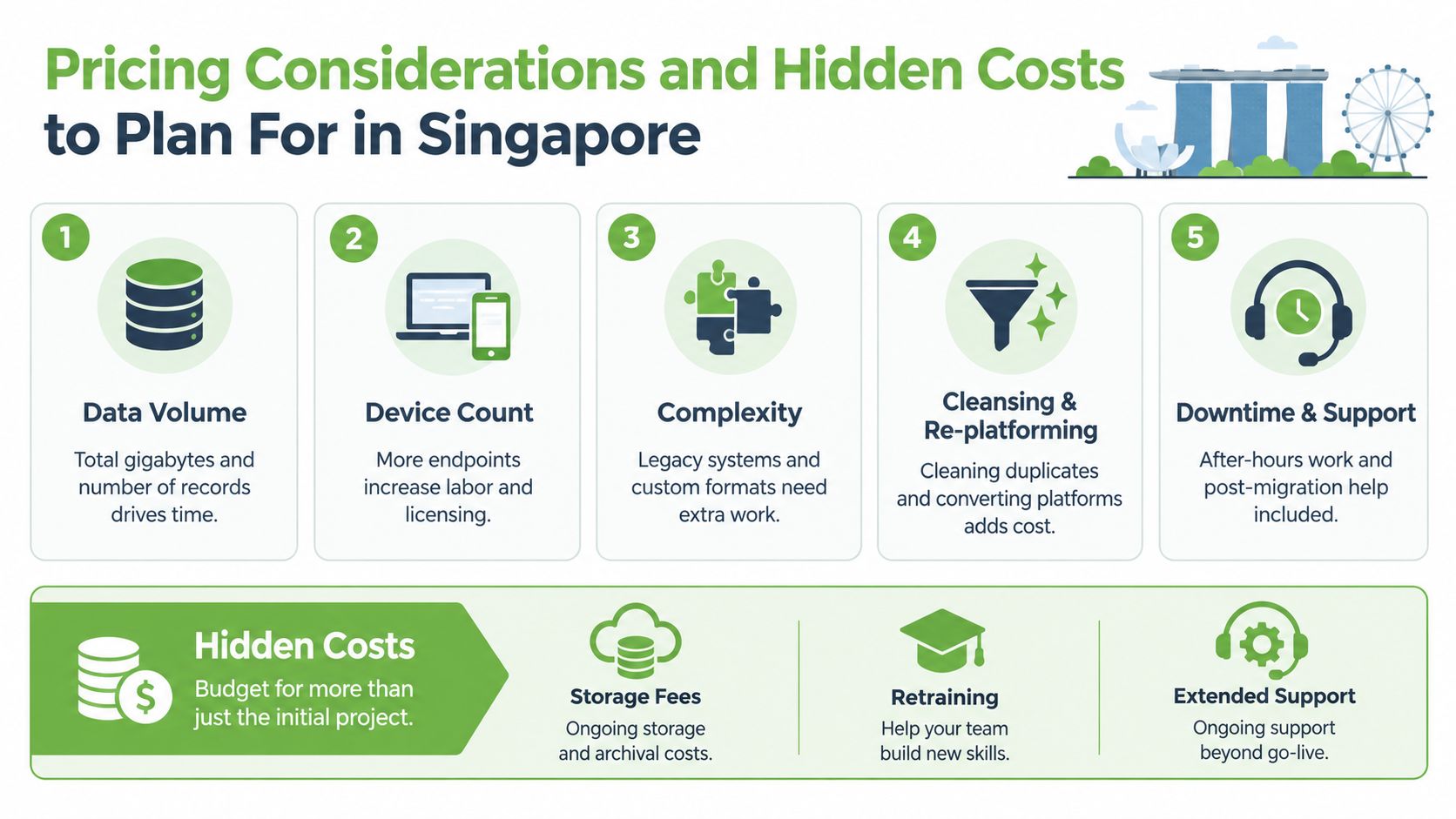
What usually drives the quote
A provider is usually pricing several moving parts at once.
- Data volume: More files, records, or mail history means more time to assess, move, and verify.
- Device count: One executive laptop is different from onboarding a full batch of replacement devices.
- Complexity: Legacy software, custom folder structures, and mixed operating systems increase effort.
- Cleansing work: Duplicate files, obsolete user profiles, and broken file structures need sorting.
- Support window: After-hours work, cutover supervision, and post-migration troubleshooting affect cost.
The line items many buyers miss
Some quotes look lower because they exclude the difficult parts.
A few examples:
- Data cleansing gets left out, so teams pay later to sort duplicates and stale folders.
- Re-platforming gets treated as someone else's problem, even when app data won't map neatly to the new system.
- Operating spend after migration is ignored, especially when cloud storage, integration, or support needs continue.
For SMEs, price shouldn't be viewed only as an upfront transfer fee. It should be assessed against avoided downtime, cleaner handover, and whether the old devices can be reused, redeployed, or disposed of without extra firefighting.
Questions worth asking before you accept a quote
- What exactly is included: Files only, or also settings, user profiles, and app setup?
- What has been excluded: Data cleaning, software reinstallation, user verification, old device preparation?
- How is post-migration support handled: Is there a defined support period or only best-effort help?
- What happens if something doesn't map cleanly: Is remediation included or separately charged?
A cheaper quote can still be more expensive if it leaves your team doing the hard parts later.
How myhalo Supports Secure Migration and Longer Device Life
A useful migration partner should understand that the job doesn't end when data lands on a new device. The wider question is what happens across the whole lifecycle. Can the existing device be repaired, passed to another employee, prepared for resale, or moved into responsible recycling only after the data has been handled correctly?
That lifecycle view matters in Singapore because device turnover has a real operational footprint. Singapore generates more than 60,000 tonnes of e-waste each year, about half estimated to come from households, and one study found households recycled only about 6% of the estimated 30,000 tonnes of electrical and electronic goods thrown out annually, with around one-quarter discarded with general waste, according to this Channel NewsAsia report on Singapore e-waste. The country's Extended Producer Responsibility scheme has also collected more than 34,000 tonnes of electronic waste since 2021, with close to 10,000 tonnes collected in the first part of 2025, and all community centres are scheduled to have e-waste bins by June 2026, as reported by The Straits Times on e-waste collection in Singapore.
A lifecycle approach instead of a one-time transfer
myhalo approaches migration as part of device stewardship, not just a checkout add-on. That means the transfer sits alongside repair, redeployment, Certified ReLoved devices, Certified Surplus products, and responsible handover decisions. For customers comparing options, the practical value is that a migration can support reuse and cost control, not only replacement.
What careful handling looks like in practice
The useful signals are process-based, not marketing-based:
- ISO 9001 Certified: This points to documented quality processes.
- ISO 27001 Certified: This supports disciplined information security handling.
- 30-point quality checks: Helpful when migration is paired with device replacement.
- Transparent device grading and battery health disclosure: Important when choosing reused devices for staff or family members.
- RescueAdvise and mylo AI Assistant: These can help customers work through repair, replacement, and support decisions more clearly.
- Protection planning: For ongoing device care, customers can review how myhalo Protect supports device protection.
Migration is often the turning point where a business decides whether to buy new, reuse existing equipment, assign a Certified ReLoved unit to another staff member, or channel an outgoing device into a cleaner end-of-life path.
A calm, well-documented migration supports all of those choices better than a hurried transfer ever will.
If you're planning a device refresh, staff laptop swap, or secure handover of old tech, myhalo offers migration support as part of a broader lifecycle approach that includes repair, reuse, Certified ReLoved and Certified Surplus devices, and responsible aftercare. If you want help making a practical plan before your next upgrade, visit myhalo and explore the options that fit your devices, data, and handover needs.