





Used iPad SG: A Smart Buyer's Guide for 2026
You're probably here because a brand-new iPad feels hard to justify, but a random second-hand listing feels risky. That's a common spot for buyers in Singapore. You want something that still feels premium, still runs smoothly, and doesn't turn into a repair bill a few weeks later.
That's where the used iPad SG market gets interesting. There's real value here, but only if you judge the device by total value, not just sticker price. A cheaper iPad with poor battery health, weak warranty coverage, or short remaining software life can cost more in the long run than a slightly pricier unit that's been properly checked and backed.
Table of Contents
Why Buy a Used or Refurbished iPad in Singapore
You see a used iPad listing at a price that looks hard to ignore. The photos are clean, the screen looks fine, and the seller says it works well. A week later, you find out the battery drains fast, the model is near the end of software support, or there is no practical return path if something goes wrong. That is how a cheap iPad becomes poor value.
A better reason to buy used is simple. You can often get a more capable iPad for the same budget, or spend less and still cover what you need. The key is to judge total value, not just sticker price. For iPads, that means looking at battery condition, expected software life, and after-sales protection alongside the upfront cost.
That's an important consideration, as iPads tend to stay useful for a long time. A well-chosen pre-owned unit can still serve students, families, and light business users reliably, especially if the hardware is healthy and the model is not too old.
Used and refurbished are not the same thing
These terms get mixed together in local listings, but the buying risk is different.
- Used from an individual seller often means the iPad is sold as-is. The price may be lower, but you carry more of the risk if the battery is worn, a component has an intermittent fault, or the device history is unclear.
- Professionally refurbished usually means the iPad has been inspected, cleaned, tested, and sold with a stated warranty or exchange policy.
- Condition descriptions still need context. A tidy exterior does not tell you much about battery wear or long-term value, which is why a clear tablet condition grading reference helps when you compare listings.
A used iPad is only good value if the condition is clear, the remaining lifespan makes sense, and the seller is still accountable after payment.
Why buyers choose pre-owned
The practical appeal is easy to see. A fixed budget may stretch from a base model into more storage, a laminated display, better accessory support, or a newer chip that will stay usable for longer. In the workshop, that trade-off usually matters more than buying a brand-new unit with the lowest specs.
There is also a reuse argument that makes financial sense. Schools, households, and small companies often buy refurbished devices because the value curve is better once the first owner has absorbed the steepest depreciation. If you are comparing refurbished buying decisions across categories, this guide for businesses to save on IT gives a useful outside perspective.
The value test that actually matters
Start with three questions. How much useful battery life is left? How many more years of software support is realistic? What protection do you have if the device shows a fault after purchase?
A used iPad SG deal works when those answers line up with the price. It fails when the discount is small, the battery is tired, or the model is so old that you save money now and lose it again on repairs, replacement, or shorter usable life.
Decoding Condition Grades and Warranties
Condition grades confuse a lot of buyers because there's no universal rule. One seller's “excellent” can look like another seller's “fair”. That's why you should treat cosmetic labels as a starting point, not the decision.
What condition grades actually mean
Most grading systems describe appearance, not long-term value. A clean housing, polished screen, and tidy photos can make an iPad look safer than it really is.
In practice, cosmetic grades usually tell you things like:
- Light wear such as minor hairline marks
- Visible wear such as edge scuffs or surface scratches
- Heavy wear such as dents, deeper marks, or obvious signs of long use
What they often don't tell you clearly is whether the battery is tired, whether the charging port is loose, or whether the previous owner used it heavily on mobile data, travel, and daily charging cycles.
For buyers who want a more transparent reference point, some retailers publish specific condition frameworks. One example is this tablet condition grading reference, which lays out categories in a more structured way than vague marketplace wording.
Why warranty terms matter more than seller promises
A warranty is where condition claims become real. If a seller says the iPad is “tested” but offers no meaningful return path, you're still carrying most of the risk.
By contrast, Apple's own refurbished iPad store states that refurbished models come with a 1-year warranty and savings of up to 15%, which gives buyers a useful benchmark for how the market prices lower risk versus lower upfront cost (refurbished iPad options and warranty benchmark).
Practical rule: A shorter warranty can still be acceptable on a cheaper device, but only if the battery condition and model choice are strong enough to justify the trade-off.
Here's a simple way to read grades and warranties together.
myhalo Condition Grades Explained
| Grade | Cosmetic Condition | Warranty | Best For |
|---|---|---|---|
| As-New | Very close to new condition, with minimal visible wear | 6-month warranty | Buyers who want a cleaner finish and longer peace of mind |
| ReLoved Premium | Light cosmetic wear | 30-day warranty | Budget-conscious buyers who still want a presentable device |
| ReLoved Excellent | Noticeable but moderate signs of use | 30-day warranty | Users who care more about function than appearance |
| ReLoved Value | More obvious wear but still suitable for daily use | 30-day warranty | Buyers chasing value over looks |
| ReEco | Fully functional with stronger cosmetic wear | Varies by listing or seller terms | Secondary devices, kids' use, or strict budgets |
A strong used iPad buy isn't the prettiest one. It's the one where the cosmetic grade, warranty, and actual device health all line up.
The Single Most Important Check Battery Health
Most buyers spend too much time looking at scratches and too little time asking about battery condition. That's backwards.
For a used iPad in Singapore, battery health is the most practical technical filter. Apple rates many iPads at up to 10 hours of Wi-Fi video or web use on a full charge, so when the battery has aged, the drop shows up directly in daily use. That's why used-device checklists commonly recommend checking capacity and preferring devices with at least 80% remaining capacity for reliable everyday use (Apple battery life guidance for iPad buyers in Singapore).
Why battery health affects real daily use
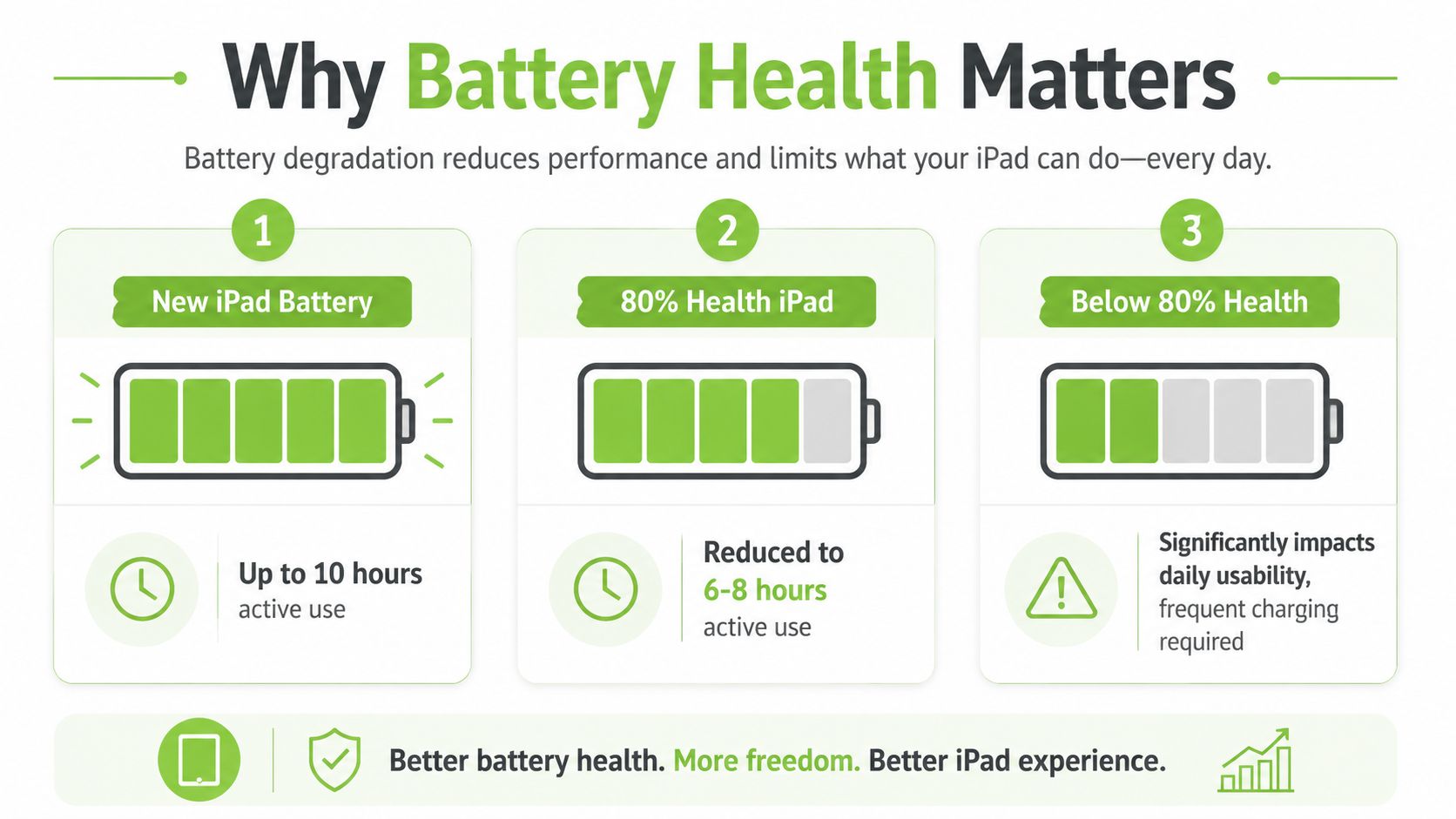
A used iPad can look excellent and still feel frustrating if the battery is weak. You'll notice it in the afternoon when the charge drops faster than expected, during video calls, or when heavier apps make the device feel less steady under load.
Battery wear also changes how the iPad fits your routine. A student who needs it across classes, a sales rep who carries it all day, or a parent who hands it to a child during travel all need predictable uptime. Cosmetic flaws don't usually ruin that. Battery wear does.
A cheap iPad can become expensive fast
Sellers in Singapore often promote battery thresholds such as 90%+ for near-pristine units and 70%+ for lower-priced value units. The problem is that many listings stop there. They don't explain what those numbers mean for lifespan, comfort, or whether a lower purchase price still makes sense once battery service is on the horizon.
That's why I treat battery health as the line between “good deal” and “future hassle”. If the figure is healthy, you can live with a few scuffs. If the figure is weak, the iPad needs to be cheap enough, or protected enough by warranty, to offset the likely inconvenience.
If you want a deeper look at what replacement involves before buying, this guide on iPad battery replacement and what to consider is worth reviewing.
Buy the battery first, then the casing. A tidy shell with a tired battery is the easier mistake to regret.
Choosing the Right Used iPad Model in 2026
Model choice matters more than most buyers think. Not because every user needs the newest chip, but because the model family affects app compatibility, likely remaining software life, and resale appeal later on.
Apple's long support horizon means even older iPads can still be sensible buys, but the safer move is usually the model that balances battery condition, warranty length, and expected remaining iPadOS support, rather than chasing the newest-looking device with more wear (used iPad model family and resale considerations).

For students and everyday work
For note-taking, browsing, video classes, and office apps, the sweet spot is often an iPad Air or a standard iPad that still has solid software runway left. These models tend to be easier to justify because they cover daily tasks well without forcing you into Pro-level pricing.
What matters here is balance. A slightly older Air with stronger battery condition and a clear warranty can be the smarter buy than a newer base model that has been heavily used.
For creative work and heavier apps
Creative users should think less about branding and more about workload. If you edit, sketch, multitask heavily, or keep large apps open for long stretches, an older iPad Pro can make more sense than a newer entry-level iPad.
That doesn't mean “buy any Pro you find”. It means checking whether the device still sits in a healthy support window and whether the battery condition matches the demands of heavier use. Pro models can be excellent value when they've been maintained properly.
For family use and casual media
A family iPad has a different job. It needs to stream reliably, handle browsing, cope with casual games, and survive everyday handling without becoming a fussy device.
For that role, the standard iPad is often enough. You don't need to overpay for performance you won't use. You do need a model that still feels responsive for common apps and won't feel outdated too quickly.
A practical filter for used iPad SG buyers is this:
- Choose Air if you want a lighter, more premium daily device
- Choose Pro if your apps are heavier and your budget allows for better battery and warranty
- Choose standard iPad if the job is media, school basics, and shared household use
Where to Buy a Used iPad Safely in Singapore
You find two iPads in Singapore at nearly the same price. One comes from a casual seller who says it is "working well". The other comes from a refurbisher with a written grade, a clear exchange policy, and warranty terms in black and white. The cheaper-looking deal can easily cost more once you factor in battery wear, account lock problems, or a fault that shows up three days later.
That is the key buying question. Not just where to find a used iPad SG listing, but which seller gives you the best total value after price, battery risk, software lifespan, and post-sale protection are all considered together.
Peer-to-peer vs professional refurbisher
Peer-to-peer marketplaces can still make sense for experienced buyers who know how to inspect a device quickly and are comfortable accepting some risk. You may get a lower sticker price, but you are also taking on more of the troubleshooting yourself.
The usual weak points are practical, not theoretical:
- Usage history is often unclear, so it is hard to judge whether the battery and charging port have seen heavy daily use
- After-sales support is limited, which matters if a touchscreen issue, speaker fault, or charging problem appears after handover
- Activation Lock risk is higher if the seller has not signed out properly or reset the iPad correctly
- Condition descriptions can be misleading, because many private listings focus on storage size and cosmetics instead of long-term usability
A professional refurbisher usually costs a bit more upfront. In return, you are paying for screening, testing, and a defined path if something goes wrong. For many buyers, that is the better value equation. A used iPad with a modestly higher price but a real warranty and exchange support is often the safer purchase than a private deal with no fallback at all.
For buyers who are tempted by liquidation lots or bid-based listings instead of standard retail, these effective auction bidding tactics can help you judge risk before you commit.
What a safer buying environment looks like
A safer seller gives you specific answers. What grade is the device? What does that grade mean? Is there a written warranty? Is there an exchange window? Has the iPad been tested for charging, speakers, cameras, Wi-Fi, and account status?
One local example is myhalo, which lists used and refurbished iPads in Singapore with published grading and stated post-sale terms. That matters because it shifts the deal from informal promises to written conditions you can check before payment.
From a technician's point of view, that paperwork matters more than polished photos. A clean-looking iPad can still have poor battery endurance or hidden repair history. A trustworthy seller reduces those unknowns and explains the trade-off clearly if a lower-priced unit has heavier cosmetic wear or a shorter warranty.
If a seller cannot explain the grade, battery condition, and post-sale policy clearly, walk away.
The safest place to buy is rarely the one shouting the biggest discount. It is the seller that makes the risk visible before you pay, so you can judge the total value instead of guessing.
Your Pre-Purchase Inspection Checklist
A fast inspection can save you a lot of trouble. You don't need specialist tools. You just need to be methodical and willing to stop the deal if something feels off.
Start with the physical checks first.
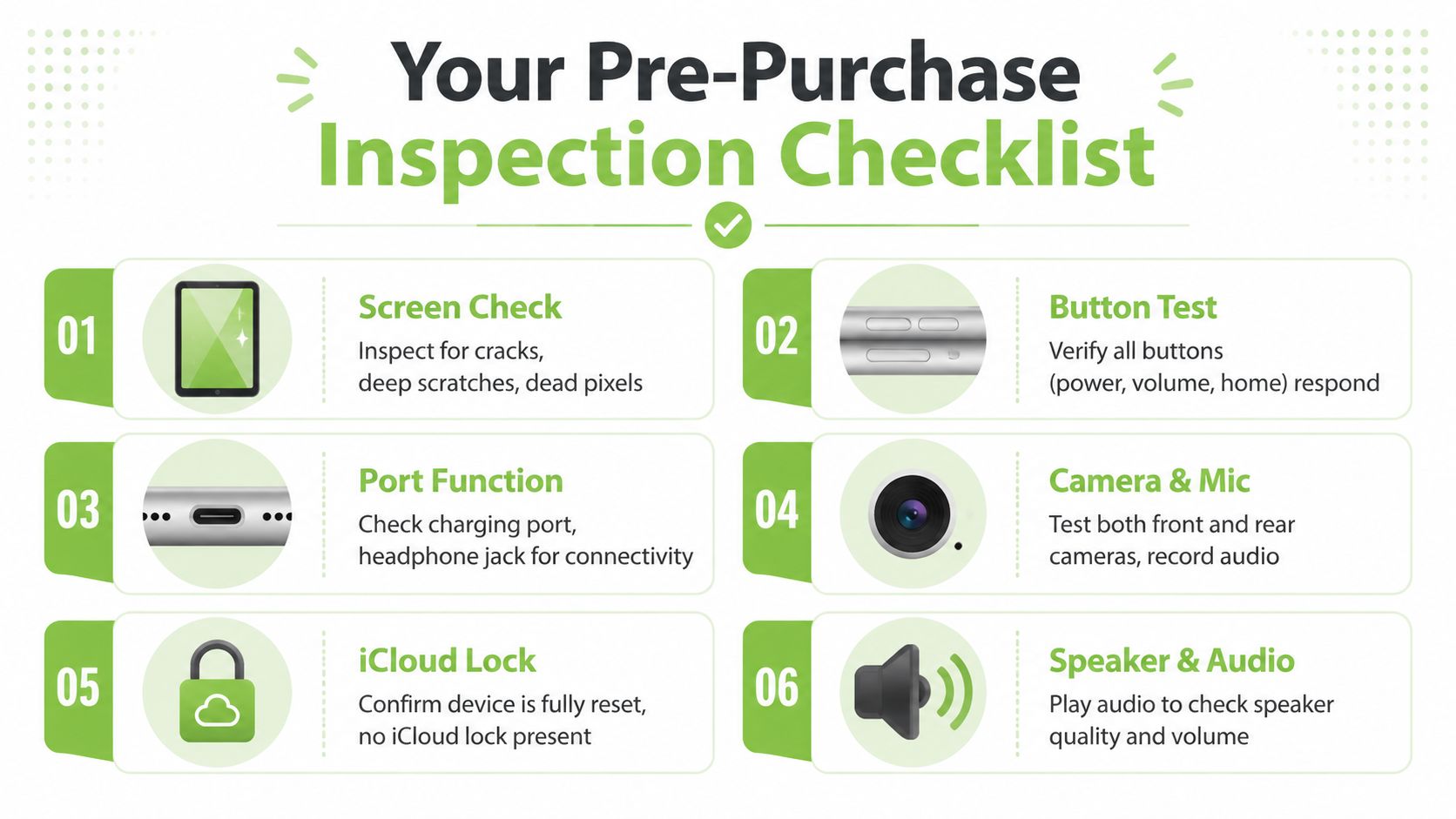
Physical checks you can do on the spot
- Screen surface. Look for cracks, pressure spots, discolouration, and deep scratches that interfere with viewing.
- Buttons. Press power, volume, and home button if the model has one. They should feel responsive, not mushy or intermittent.
- Charging port. Plug in a cable and make sure the connection is firm, not loose or angle-sensitive.
- Speakers and microphones. Play audio, raise and lower volume, then record a short voice note and play it back.
- Cameras. Open both front and rear cameras. Check focus, image clarity, and whether the app switches between lenses properly.
Software and connectivity checks that buyers miss
Apple provides a dedicated Mobile Data menu on iPads with cellular support in Singapore, including usage management features, a Reset Statistics function, and dual-SIM tracking on supported devices. Apple also notes that the most accurate data usage figures should come from the network provider, not only the device itself (Apple Singapore mobile data settings for iPad).
That makes cellular testing especially relevant for local buyers. If you're buying a cellular model, don't just check that a SIM tray exists. Open the settings and verify that mobile data controls are present and working as expected.
A practical on-the-spot checklist:
- Activation status. Confirm the iPad has been fully reset and isn't tied to the previous owner's iCloud account.
- Wi-Fi connection. Join a network and browse briefly to make sure connection is stable.
- Cellular menu. On supported models, open Mobile Data settings and confirm they load normally.
- Bluetooth. Pair a simple accessory if possible, such as earbuds or a keyboard.
- App launch behaviour. Open several standard apps and watch for abnormal lag, freezing, or sudden battery drop.
- Serial and listing match. Make sure the model, storage, and colour match what was advertised.
Before you meet a seller, it helps to watch a quick visual walkthrough of common checks:
Don't let a rushed meetup decide for you. If the seller won't give you a few minutes to test the iPad properly, that's already useful information.
Beyond the Purchase Trade Ins Repairs and Protection
The smart buy doesn't end at checkout. A used iPad gives the best value when you also think about what happens later, whether that's repair, trade-in, or protecting it from damage.
Think in lifecycle value
If you're replacing an older tablet, phone, or laptop, a trade-in can lower the cost of the next device. That's one of the easiest ways to make refurbished buying work better financially. It also keeps more devices in circulation instead of sitting unused in a drawer.
Repairs matter too. A used iPad with accessible servicing is often worth more than a marginally cheaper one that becomes difficult to maintain. Buyers tend to focus only on purchase price, but long-term value usually comes from how easy the device is to keep useful.
Protect the value you just bought
A standard seller warranty covers certain faults. It usually doesn't cover everything that happens in daily life. Drops, liquid exposure, and accidental damage are a different category of risk.
That's why it's worth thinking about basic protection straight away, even something as simple as using the right case and cover. If you're comparing practical options, this guide to covers for the iPad and how to choose one is a good place to start.
A used iPad is a better purchase when you treat it like an asset with a full lifecycle, not a one-time bargain hunt.
If you want a simpler way to shop for a used iPad in Singapore, myhalo offers refurbished Apple devices, transparent condition grading, warranty-backed listings, and support options that help you compare total value instead of guessing from marketplace photos alone.