





Your Smart Home Device Guide for Singapore (2026)
You leave for work, get halfway to the MRT, and that familiar thought lands. Did I turn off the aircon? Did I lock the front door? Is the hallway light still on?
That's the moment a smart home device starts making sense. Not as a flashy gadget, but as a practical fix for ordinary lapses in a busy Singapore routine. A few taps on your phone can settle the question, and in some homes the system handles it automatically before you even think about it.
Singaporeans have been adopting smart home setups quickly because the benefits are immediate. You feel it in convenience, energy control, and peace of mind. The shift is visible in the numbers too. The number of smart homes in Singapore rose from 266,100 in 2019 to 712,200 in 2024, a growth of over 167% in five years, and it's projected to exceed 1.5 million by 2028, according to Home Team NS on smart home adoption in Singapore.
Table of Contents
- What Is a Smart Home and Why It Is Popular in Singapore
- Common Smart Home Device Categories
- How Smart Devices Communicate Connectivity Explained
- Protecting Your Digital Home Security and Privacy
- Smart Living and Sustainability Extending Device Lifecycles
- A Practical Buying Guide for Smart Devices in Singapore
What Is a Smart Home and Why It Is Popular in Singapore
A smart home is a home where devices connect so you can monitor, control, or automate them through an app, voice assistant, or scheduled routine. That could mean a smart bulb that turns on at sunset, a lock that lets you check door status remotely, or an aircon controller that switches off when nobody's home.
The easiest way to understand a smart home device is to forget the marketing language and look at what it does on a Tuesday night. If it reduces one repetitive task, gives one useful alert, or helps you avoid one mistake, it's doing its job. In practice, that matters more than whether the box says “AI”, “premium ecosystem”, or “next-gen automation”.
A local use case that feels familiar
In Singapore, the strongest smart home use cases tend to be small, practical, and repeatable. People don't start with a full showroom-style setup. They start with one problem. Leaving the fan on in the study. Wanting the corridor lights to come on before an elderly parent reaches the gate. Checking whether the front door was locked after a late Grab ride home.
Practical rule: Buy your first smart home device to solve one recurring nuisance, not to build a futuristic house overnight.
That's one reason adoption keeps rising here. Our homes are compact, our schedules are packed, and many households want convenience without major renovation. Smart devices fit neatly into that reality, especially when they work with existing lighting, Wi-Fi, and appliances rather than demanding a full rewiring job.
Why it keeps growing
Smart homes also suit how Singaporeans already live. Phone-first habits are normal. Remote control feels natural. Households want convenience, but they also want order. A good automation routine supports both.
What works well locally is not complexity. It's reliability. Lights that come on when you arrive. Cameras that notify you without endless false alarms. Aircon control that fits real usage patterns rather than forcing you into a rigid system. The appeal isn't novelty. It's fewer things to remember, fewer wasted trips home, and fewer little household errors.
Common Smart Home Device Categories
It's easy to get overwhelmed because “smart home device” sounds like one huge category. It isn't. The easiest way to shop well is to split the space into a few core groups and match them to your actual routine.
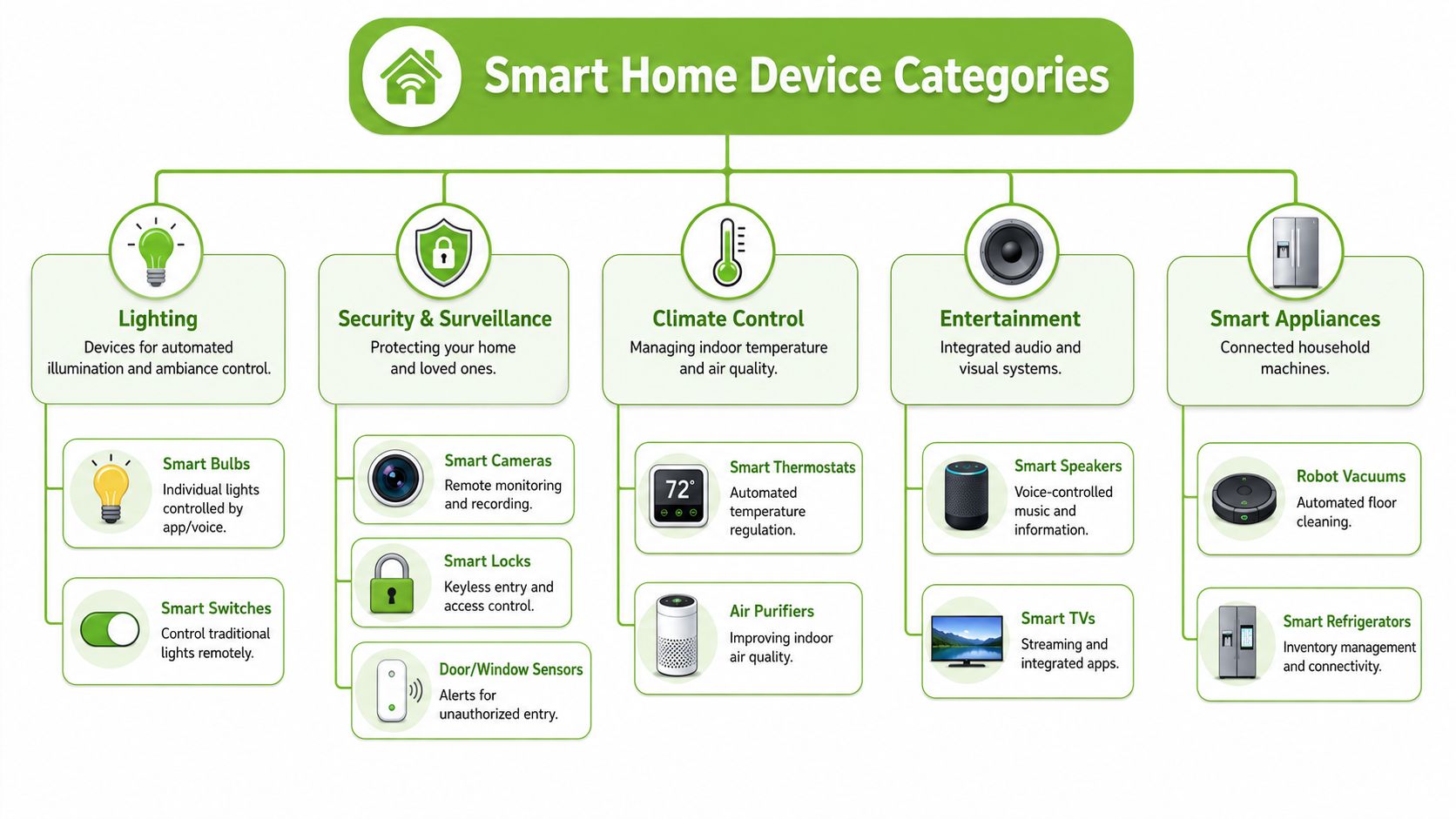
Lighting that removes daily friction
Smart lighting is usually the lowest-risk place to begin. You can start with bulbs, plugs, or switches depending on your home.
- Smart bulbs: Good for bedrooms, floor lamps, and mood lighting. They're easy to install, but they only work well if the wall switch stays on.
- Smart switches: Better when you want the whole household to use lights normally. This is often the more practical choice in shared homes.
- Smart plugs: Useful for table lamps, fans, and older appliances that don't need full smart integration.
For many homes, lighting automation earns its keep fastest. Scheduled lights can make the flat feel occupied when you're out, and motion-based lighting helps in passageways or bathrooms at night.
Security that solves real worries
Security devices cover smart cameras, smart locks, door sensors, window sensors, and video doorbells. This category has become especially important across the region. In the Asia-Pacific region, security solutions led smart market share with 29.32% in 2025, as households prioritise cameras, video doorbells, and smart locks, based on Koble's overview of smart home trends.
A few examples make the differences clearer:
- Smart cameras: Best when you need visibility, such as checking deliveries, pets, or elderly family members.
- Smart locks: Great for homes where key management is a daily annoyance.
- Door and window sensors: Small, simple, and often underrated. They're useful for alerts without needing constant video.
If you're comparing options for entry systems, a practical guide to easy home intercom setup is worth reading because it helps you think through range, access control, and visitor flow before you buy hardware.
Security works best when each device answers a specific question. Who's at the door? Was the gate opened? Did anyone enter while I was out?
Climate, entertainment and useful automation
Climate control often means smart aircon controllers, thermostats, air purifiers, or connected fans. In Singapore, this category matters because aircon use is tied directly to comfort and household bills. The key is sensible automation, not overengineering. If the app lets you schedule cooling around your real routine, that's already useful.
Voice assistants and hubs act as the control layer. They tie devices together, so one command can trigger lights, music, or a routine such as “good night”. If you want a simple entry point, a compact speaker such as the Google Home Mini smart speaker can anchor basic voice control without taking over the whole house.
Smart appliances sit in a broader bucket. Robot vacuums, smart speakers, smart TVs, and connected kitchen devices can all fit here. These products are best when they reduce repetitive work. A robot vacuum that handles daily dust is practical. A connected appliance with a cluttered app and no clear purpose usually isn't.
How Smart Devices Communicate Connectivity Explained
A common Singapore flat setup goes wrong in a very ordinary way. Someone buys a smart bulb on sale, adds a camera later, then picks up a door sensor from another brand. Each device works. The problem starts when routines fail, apps multiply, and one gadget needs a hub nobody planned for.
Smart devices communicate through different wireless standards. That choice affects setup, battery life, response speed, and whether your next purchase will fit the system you already have. It also affects long-term value. A cheaper device that only works inside one fading app ecosystem can become e-waste much faster than a product built around widely supported standards.
The main standards you will see
Wi-Fi connects devices straight to your home router. It suits products that send more data or need direct remote access, such as cameras, video doorbells, and smart speakers. Setup is usually simple, but a home with many Wi-Fi devices can put more strain on an older router, especially in larger HDB flats or multi-storey landed homes.
Zigbee is built for low-power, short-range communication and often creates a mesh between compatible devices. That makes it a practical choice for sensors, buttons, and some lighting products. The trade-off is clear. You will often need a compatible hub, and not every Zigbee product works equally well across every platform.
Matter is a newer interoperability standard designed to make cross-brand smart homes easier to build. The promise is useful, especially for buyers who do not want to get trapped in one brand's app. Still, Matter support varies by device type and brand, so it helps to check the product page carefully instead of assuming the logo solves everything.
Check compatibility before features. A long spec sheet means very little if the device cannot join the setup you plan to keep for the next few years.
Smart Home Connectivity Standards Compared
| Standard | How It Works | Pros | Cons |
|---|---|---|---|
| Wi-Fi | Connects directly to your home router | Easy setup, no separate hub for many devices, good for cameras and speakers | Can crowd your network, battery devices may be less efficient |
| Zigbee | Uses a low-power mesh network, often through a hub | Good for sensors and switches, efficient for battery-powered devices, scales well | Usually needs a hub, compatibility depends on ecosystem |
| Matter | A common application standard designed for broader interoperability | Easier cross-brand support, more flexible future expansion | Support still depends on the device maker and the rest of your setup |
What to check before you buy
Before adding any smart home device to cart, check these points:
- Control method: Does it work only in the brand's own app, or can it join Google Home, Apple Home, or another wider platform?
- Hub requirement: If it needs a hub, is that hub sold separately, and will you still be able to use the device if the brand stops supporting its app well?
- Power type: Battery devices often benefit from low-power standards such as Zigbee. Plugged-in products have more flexibility.
- Home layout: Concrete walls, long corridors, and router placement all affect reliability in Singapore homes.
- Lifecycle value: Can the device be repaired, traded in, or reused in another room later? Open standards usually give you more options than locked ecosystems.
For connectivity, the network foundation matters more than many buyers expect. If your home already handles streaming, gaming, and work calls, adding cameras and speakers can expose weak spots fast. In those cases, a stronger router or mesh setup can improve stability across the whole system. A product such as the Nest Wifi router with Google Assistant can make sense before you add more devices.
One practical buying habit saves money here. Start with one ecosystem, one room, and one clear use case. It is easier to expand a system that uses common standards than to replace a pile of mismatched gadgets a year later. That approach is better for your budget and better for reducing premature disposal.
Protecting Your Digital Home Security and Privacy
The same convenience that makes a smart home device useful can also create a weak spot if you set it up carelessly. A camera, lock, speaker, or plug is part of your home now. Treat it with the same seriousness you'd give a front gate key.
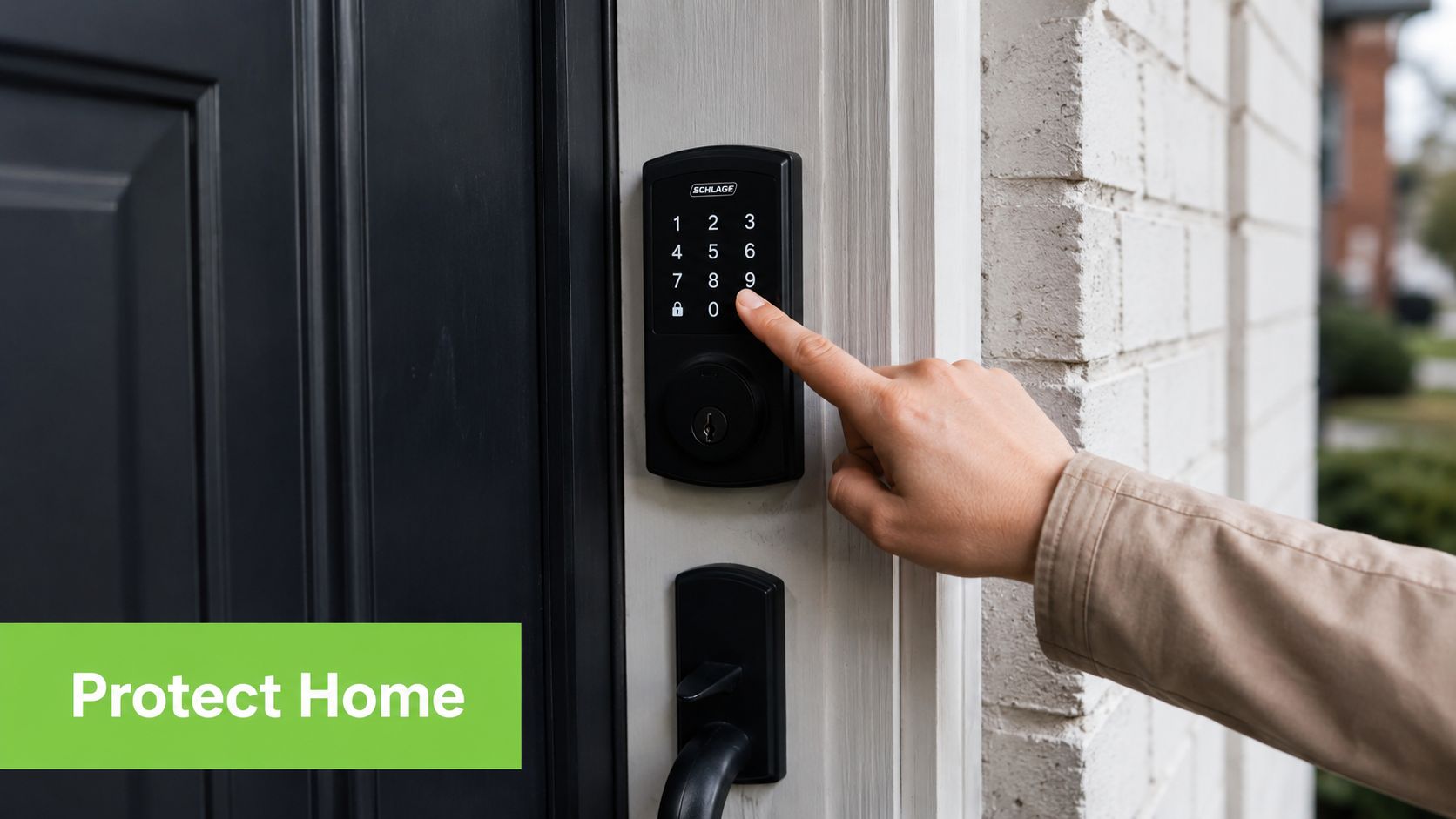
Start with your accounts
Most smart home problems begin before the hardware does. They start with weak account habits. If you reuse the same password across your email, shopping apps, and smart home platforms, one breach elsewhere can create risk at home.
A safer setup is boring on purpose:
- Use unique passwords: Each smart home account should have its own password.
- Turn on 2FA: If the brand supports two-factor authentication, enable it.
- Separate important access: Your lock, camera, and alarm accounts deserve stronger protection than casual gadgets.
The goal isn't perfection. It's to avoid easy mistakes that attackers count on.
Treat updates like lock maintenance
Firmware updates aren't optional housekeeping. They're part of keeping your devices safe and stable. If a brand stops maintaining its products, that's a buying warning sign.
This also affects long-term value. A cheap smart camera that never receives updates can become a liability. A slightly less exciting device from a better-supported brand often ages more gracefully.
Security habit: If a device app keeps nagging you to update, don't postpone it for months.
For a visual walkthrough of common smart home security basics, this video gives a helpful starting point.
Be selective with app permissions
Some apps ask for more access than they need. Microphone, contacts, location, notifications, photo library. Not every request is unreasonable, but every request should make sense.
A practical rule is to ask one question before approving anything: does this permission help the device do the job I bought it for? A smart speaker may need microphone access. A lighting app usually doesn't need your contacts.
Keep your system tidy as well:
- Remove unused devices: Old accounts and retired gadgets shouldn't stay linked forever.
- Review shared access: Ex-housemates, former helpers, or old family permissions should be cleaned up.
- Name devices clearly: “Bedroom lamp left” is safer and easier to manage than five devices all named “light”.
A secure smart home doesn't require technical obsession. It requires consistent, ordinary discipline.
Smart Living and Sustainability Extending Device Lifecycles
People often talk about smart living as if it only means automation. In practice, it should also mean making better decisions about how long devices last, how often you replace them, and what happens when they stop fitting your setup.
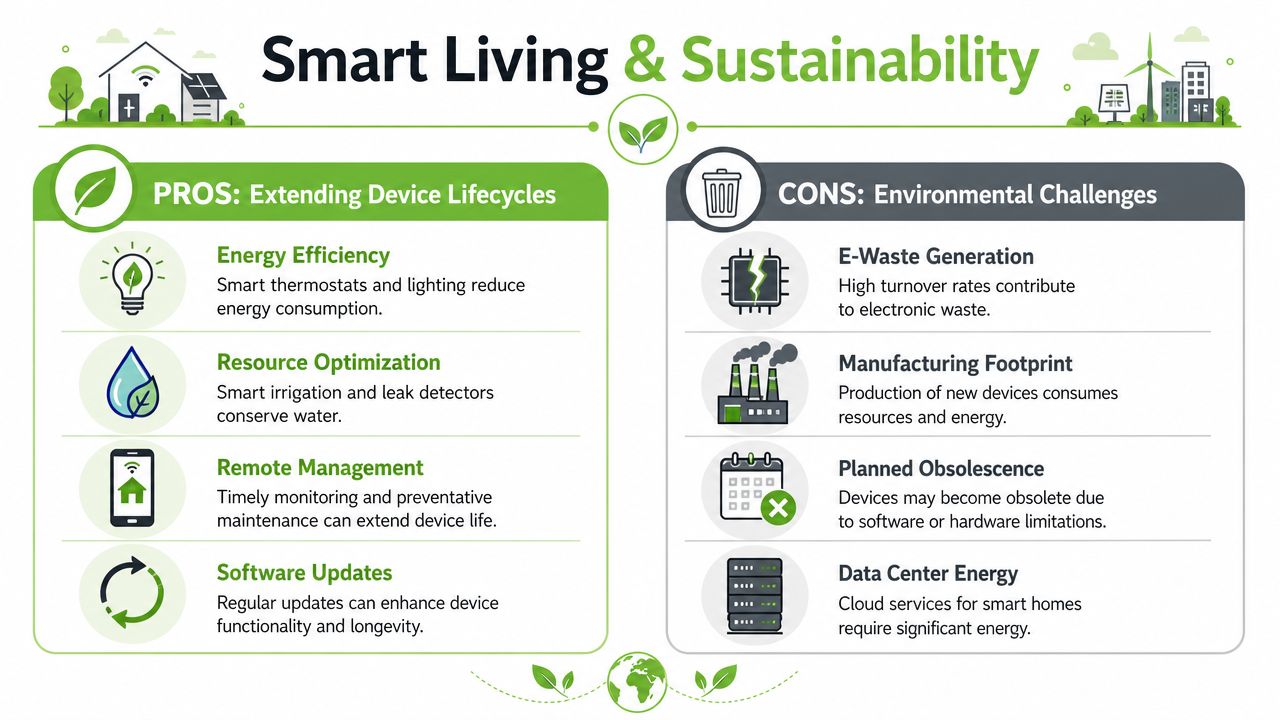
Efficiency matters, but so does lifespan
Smart homes can reduce waste in daily use. Timed lighting, more disciplined aircon control, and better visibility into device usage can all make a household more deliberate. But there's another side to the story. A home full of short-lived gadgets isn't very smart if you're replacing products constantly.
That matters in Singapore because unused electronics pile up. Working Singaporean adults own an average of 3.3 inactive small electronic devices at home, many of which are partially functional or non-functional, contributing to e-waste, as noted in myhalo's De-Clutter Your e-Clutter initiative overview.
A common pattern is easy to recognise. Someone buys a smart speaker, then upgrades. A tablet becomes a wall controller for a while, then ends up in a drawer. An old phone could run a home dashboard, door viewer, or family intercom app, but instead it sits uncharged and forgotten.
Why refurbished can be the smarter move
Refurbished tech changes the buying conversation. Instead of asking only, “What's the newest model?”, ask, “What device does this job reliably, affordably, and with the least waste?”
That question is especially useful for supporting devices in a smart home setup:
- Tablets as control panels: A refurbished tablet can run lighting, camera, or intercom apps perfectly well.
- Speakers and hubs: If the product is still supported and in good condition, brand-new isn't always necessary.
- Backup phones: Older phones can become dedicated controllers for elderly parents or children.
A smart home device shouldn't be judged only by how advanced it is. It should be judged by how well it fits the job and how long you can keep it useful.
There's also a sustainability mindset that helps avoid bad purchases in the first place:
- Buy systems, not impulses: A random discounted gadget often creates more clutter than value.
- Prefer repairable paths: Devices with ongoing support and service options usually stay useful longer.
- Trade out responsibly: When a device no longer fits your home, don't let it become drawer waste if it can be repaired, resold, or reused.
The most sensible smart home setups aren't packed with novelty. They're organised around function, maintenance, and lifespan.
A Practical Buying Guide for Smart Devices in Singapore
You get home after work, the corridor is dark, the fan is still running in the bedroom, and a parcel is sitting outside the door. That is the point where smart home buying becomes practical. The right device saves a daily annoyance. The wrong one adds another app, another charger, and another item that will be replaced too soon.
In Singapore, good buying decisions usually come down to four things. Your flat layout, your Wi-Fi strength, local after-sales support, and whether the device still makes sense to repair, resell, or reuse later.
Set a budget around the problem, not the category
Smart home costs in Singapore can stay modest or climb quickly, especially once installation is involved. According to StarHub's smart home guide for Singapore, a full setup with lighting, aircon control, security sensors, and smart locks can cost far more than a few starter devices such as plugs or switches.
That is why I usually suggest starting with the one problem that causes the most friction at home. If the aircon gets left on, start with control and scheduling. If visitors, deliveries, or elderly family access are the issue, look at entry devices first. If rising electricity bills are the headache, smart plugs with monitoring can be a better first purchase than decorative lighting.
Check the boring details before you pay
Here, many bad purchases happen.
Before recommending any device for an HDB flat or condo, I would check these points first:
- Local warranty and service: A low online price loses its appeal fast if warranty claims require overseas shipping or unclear support.
- Installation fit: Battery devices are easier to start with. Wired switches and locks may need a proper installer and may not suit every existing setup.
- App quality and update history: A device is only as good as its app. Slow apps, poor translations, and irregular updates create daily frustration.
- Shared household use: Parents, children, tenants, and helpers should be able to use the basics without a long tutorial.
- Ecosystem fit: Check whether it works with the voice assistant, phone platform, or hub you already use.
- Power and charging habits: Some devices look tidy on the shelf but become annoying once you realise they need frequent charging or a nearby socket.
For apartments and managed buildings, camera placement, door hardware changes, and shared corridor views can overlap with building rules. This guide on home security and strata laws is useful for the questions to raise before installation.
Buy for lifespan, not just setup day
A smart device should still make sense a year from now.
That means checking whether replacement parts, accessories, software support, and trade-in options are realistic in Singapore. It also means being honest about whether a brand-new product is necessary. For supporting roles such as a control tablet, hub screen, or dedicated family-use phone, refurbished gear can be the more sensible buy if it has been properly inspected and sold with clear condition grading.
I would also avoid buying too many categories at once. A home with one reliable routine often feels smarter than a home packed with half-used gadgets.
A practical buying flow looks like this:
- Name the exact household problem.
- Choose the smallest device category that solves it.
- Confirm compatibility with your current network and ecosystem.
- Compare new and refurbished options based on support, condition, and price.
- Decide what happens at end of use. Repair, trade-in, resale, or reuse.
If you want to compare options without hopping across multiple brands, a curated smart home collection for Singapore shoppers can make shortlisting easier.