





Samsung Battery Replacement in Singapore: A Practical Guide
Your Galaxy phone dies at 30% while you're travelling on the MRT. Later, it shuts down during a video call, runs warm while you're only browsing, or takes far too long to charge. At that point, the question isn't whether the phone feels old. It's whether the battery is failing, whether another component is responsible, and whether replacement still makes financial sense.
For Singapore owners, the sensible answer depends on symptoms, warranty status, service route, data protection and end-of-life handling. Samsung's local support guidance directs customers with unexpected shutdowns or a drastic decrease in battery life to a Samsung Support Centre for checking, and says warranty coverage may make eligible battery servicing free. Samsung also gives an average Galaxy battery replacement time of about one hour, which makes same-day planning realistic for many cases. (Samsung's Galaxy battery guidance)
Table of Contents
- When a Samsung Battery Actually Needs Replacing
- Common Symptoms of a Failing Samsung Battery
- DIY Versus Authorised Samsung Service in Singapore
- OEM Versus Third-Party Samsung Batteries
- Cost and Turnaround Time in Singapore
- Safety Tips and Data Preparation Before Replacement
- Your Decision Checklist and the Lifecycle View
When a Samsung Battery Actually Needs Replacing
A lithium-ion battery doesn't fail only when it reaches zero capacity. It gradually stores less energy and may struggle to deliver enough voltage when the phone suddenly demands power. Heat, intensive use and charging habits can accelerate that wear, especially in Singapore's warm climate.
Phone age matters, but it isn't the only test. A heavily used Galaxy that spends much of the day on mobile data, navigation, video calls and fast charging may show trouble earlier than a lightly used device of the same age. Start with four questions:
- How old is the phone? Older devices are more likely to have a materially worn cell, but age alone doesn't prove the battery is faulty.
- What does daily use look like? Frequent top-ups, gaming, hotspot use and long video sessions place heavier demands on the cell.
- How do you charge it? Excessive heat during charging, poor-quality chargers and demanding tasks while plugged in can make the phone behave worse.
- Does the problem survive basic troubleshooting? Test a known-good charger and cable, review battery usage, update the software and restart the phone. If rapid drain or shutdowns continue, hardware becomes the stronger suspect.
Samsung Members provides a useful diagnostic route. A StarHub service page states that Samsung devices are eligible for its battery service when Samsung Members shows the battery status as “bad” or “weak”. (StarHub's Samsung battery eligibility guidance)
A reset won't restore capacity that has physically been lost. It may, however, help when a rogue application, corrupted setting or background process is consuming power. Don't replace the battery because one app drained the phone during a single afternoon. Look for persistent behaviour across normal use.
Practical rule: If the phone is unreliable after charger checks, software updates and battery diagnostics, arrange an inspection rather than guessing.
Samsung's official network gives owners a clear first option. Its Singapore support pages list centres including VivoCity at 1 Harbourfront Walk #02-28/29, Bedok Mall, Causeway Point, Jem and Westgate. Samsung also notes that Plaza Singapura is permanently closing from 27 April 2026 onward, so verify the current location before travelling. Bring proof of purchase or a warranty card if you want warranty verification. (Samsung Singapore support)
Common Symptoms of a Failing Samsung Battery
The symptom matters because it points to a different failure pattern. A phone that loses power under load may need a battery, while a phone that refuses to charge may have a damaged port, cable, charger or charging circuit.
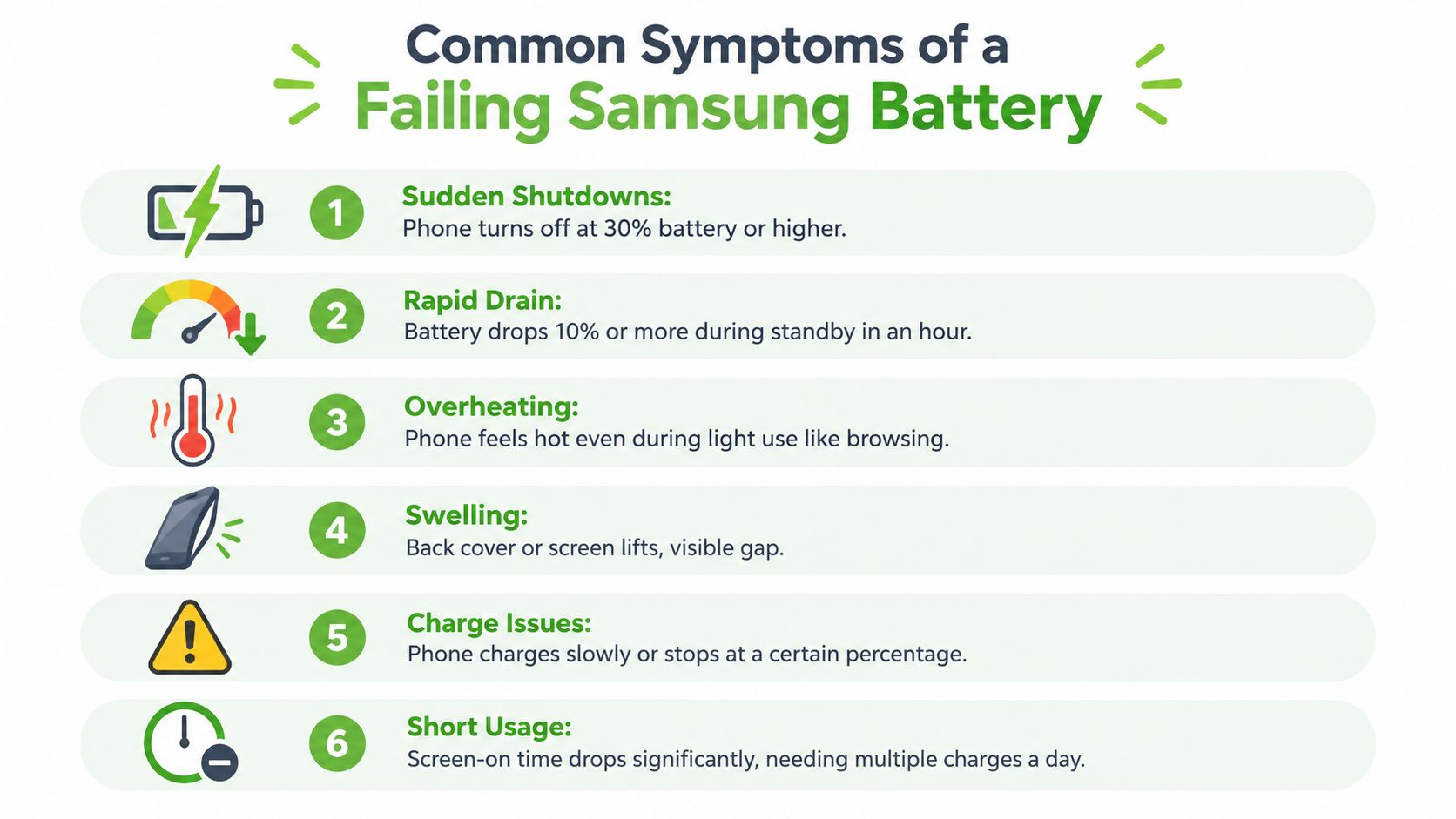
What the symptoms usually indicate
Unexpected shutdowns at a high percentage often happen when a worn cell experiences a voltage drop during demanding tasks. The phone still displays charge, but the battery can't provide stable output when the processor, camera or mobile modem draws more power. Samsung specifically identifies unexpected shutdowns and drastic battery-life decreases as reasons to seek a support-centre check. (Samsung battery issue guidance)
Rapid standby drain may indicate reduced capacity, but it can also come from poor signal, background applications or location services. Check the battery-usage screen before approving a replacement. If the drain continues with ordinary settings and no obvious rogue app, the cell becomes more suspect.
Heat during light use deserves attention. A battery can run warm when it's working hard, but unusual heat while reading, messaging or browsing may indicate internal resistance, a charging problem or another hardware fault. Ask for a diagnosis rather than assuming the battery is the only cause.
A lifted back cover or screen is a safety warning. Gas can build up as a damaged cell breaks down, causing the battery to expand. Power the phone off, don't charge it, don't press the lifted panel back into place and don't attempt DIY removal. Singapore repair guidance treats swelling as an urgent case and warns that delays can increase cost if the cell damages nearby components. (Singapore swollen-battery repair guidance)
Charging problems need diagnosis
Charging that stops below full, restarts from zero or moves unusually slowly can come from the battery, port, cable, adapter or charging IC. A technician should isolate those possibilities before quoting a replacement.
Hissing, a chemical smell, visible leakage or intense heat changes the priority from convenience to safety. Don't leave the phone in a bag, under a pillow or on a soft sofa. Move away from charging sources, keep handling minimal and contact a service provider for safe transport advice.
DIY Versus Authorised Samsung Service in Singapore
DIY battery replacement looks simple in videos, but modern Galaxy phones are sealed with strong adhesive and contain fragile flex cables. Opening the back cover can crack glass, damage the fingerprint or NFC components, puncture the cell, or compromise the phone's original sealing. I don't recommend DIY for a current flagship, a device still under warranty or any phone showing swelling.
Authorised service is the safest route for warranty decisions and Samsung-specific diagnostics. Samsung says the support centre should check a Galaxy with battery symptoms, and proof of purchase or a warranty card supports warranty verification. A reputable independent shop can be sensible for an older out-of-warranty phone when speed and price matter more than manufacturer handling.
| Factor | DIY at Home | Authorised Samsung Service | Third-Party Repair Shop |
|---|---|---|---|
| Safety | Highest risk if tools or technique are inadequate | Trained process and controlled handling | Depends on technician and workshop standards |
| Warranty | May affect remaining coverage | Best route for Samsung warranty assessment | Ask how the repair affects coverage |
| Parts | Quality depends entirely on the kit | Samsung service parts where applicable | May offer original-grade or tested alternatives |
| Data | You control the device, but damage can create data risk | Back up before handover and confirm the workflow | Ask whether data access is required |
| Turnaround | Unpredictable, especially for first attempts | Samsung cites about one hour as an average Galaxy replacement benchmark | Local listings commonly describe same-day work |
| Best fit | Experienced repairers with older devices | Covered, valuable or newer Galaxy phones | Older devices needing a practical repair |
Before choosing a workshop, ask whether the quote includes inspection, adhesive replacement, post-repair testing and any resealing work. Repair records also matter for organisations managing fleets. Resources covering repair data in product identity platforms can help SMEs think beyond the single transaction and keep clearer device histories.
For Samsung's current centre locations, operating hours and practical expectations, check this Singapore Samsung service centre guide before setting off. If the phone is swollen, skip DIY and don't continue charging it.
OEM Versus Third-Party Samsung Batteries
I'd choose an OEM Samsung battery for a newer flagship, a phone still covered by Samsung Care or a device that needs to remain dependable for work. The main advantage isn't just the label. A genuine part is designed to communicate correctly with the phone's battery-management system, provide traceable service documentation and match the device's expected capacity and protection behaviour.
A vetted third-party battery can be reasonable for an older Galaxy where resale value is limited and the owner wants more usable life without paying for a premium service route. The critical word is vetted. A reputable technician should be able to explain the part grade, warranty handling and expected compatibility, rather than quoting only an attractive capacity figure.
No-name marketplace batteries are a poor compromise. Inflated capacity labels, missing protection circuits, inconsistent quality and unclear recycling arrangements create risks that aren't visible from a product photograph. A cheap cell may also produce incorrect readings, charging warnings or unreliable runtime.
| Factor | OEM Samsung Battery | Vetted Third-Party Battery |
|---|---|---|
| Compatibility | Designed for the specific Galaxy model | Depends on supplier and model matching |
| Device communication | More likely to work correctly with the phone's battery management | May vary by part and firmware compatibility |
| Traceability | Clearer route for warranty and service records | Depends on the repairer's documentation |
| Upfront cost | Usually higher | Often lower |
| Best use | Newer flagships, warranty-covered phones and long-term ownership | Older budget or out-of-warranty devices |
| Recommendation | Choose when reliability and lifecycle value matter most | Choose only when the supplier and workmanship are transparent |
The right question isn't “Which battery is cheapest?” It's “How much reliability does this phone still need to deliver?” For an SME employee's primary work phone, OEM handling is easier to justify. For an older secondary handset, a tested alternative may be commercially sensible.
myhalo offers Samsung battery checks and replacement options, including genuine Samsung batteries and tested third-party alternatives, so the choice can be discussed against the device's condition and intended lifespan rather than made from a vague low-price quote.
Cost and Turnaround Time in Singapore
Singapore market pricing is relatively straightforward at independent shops. One local provider advertises Samsung battery replacement at S$40, with typical job times of 30 to 60 minutes. Another lists Original Grade Samsung battery replacement at S$40 to S$70 nett, depending on model, while a separate local service describes most Samsung battery jobs as taking 30 to 45 minutes. (Singapore Samsung repair pricing and timing)
Samsung's own local guidance gives a useful planning benchmark of about one hour for an average Galaxy battery replacement. The actual appointment can take longer if the centre needs to diagnose another fault, order a part or manage a busy queue. (Samsung's replacement timing guidance)
| Galaxy Model Tier | Authorised Service (SGD) | myhalo Service (SGD) | Third-Party Shop (SGD) | Typical Turnaround |
|---|---|---|---|---|
| Galaxy model needing warranty assessment | Coverage may apply after inspection | Quote after diagnosis | Quote after diagnosis | Same-day may be possible, depending on part availability |
| Common out-of-warranty Galaxy models | Model-dependent | Model-dependent | S$40 to S$70 at listed independent benchmarks | Commonly 30 to 60 minutes at listed independent services |
| Device with swelling or secondary damage | Inspection required | Inspection required | Inspection required | Urgent handling, timing depends on stock and damage |
A quote changes with the Galaxy model, battery grade, adhesive work, diagnostic requirements and the condition of the back cover or screen. Ask directly whether the service includes the replacement part, labour, testing and any new adhesive. Water resistance should never be assumed after a phone has been opened, even if a shop performs resealing work.
A suspiciously low quote may exclude diagnosis, use an unsuitable part or leave out proper closure materials. A fast repair is useful, but only when the technician confirms the phone charges normally, reports a stable battery reading and checks for heat or panel separation.
For broader context on how battery service fits into device ownership costs, compare it with this guide to battery replacement costs for iPhone users. The principle is the same, a small repair can preserve the value of a device that still meets your needs, but only when the repair quality matches the phone's remaining lifecycle.
Safety Tips and Data Preparation Before Replacement
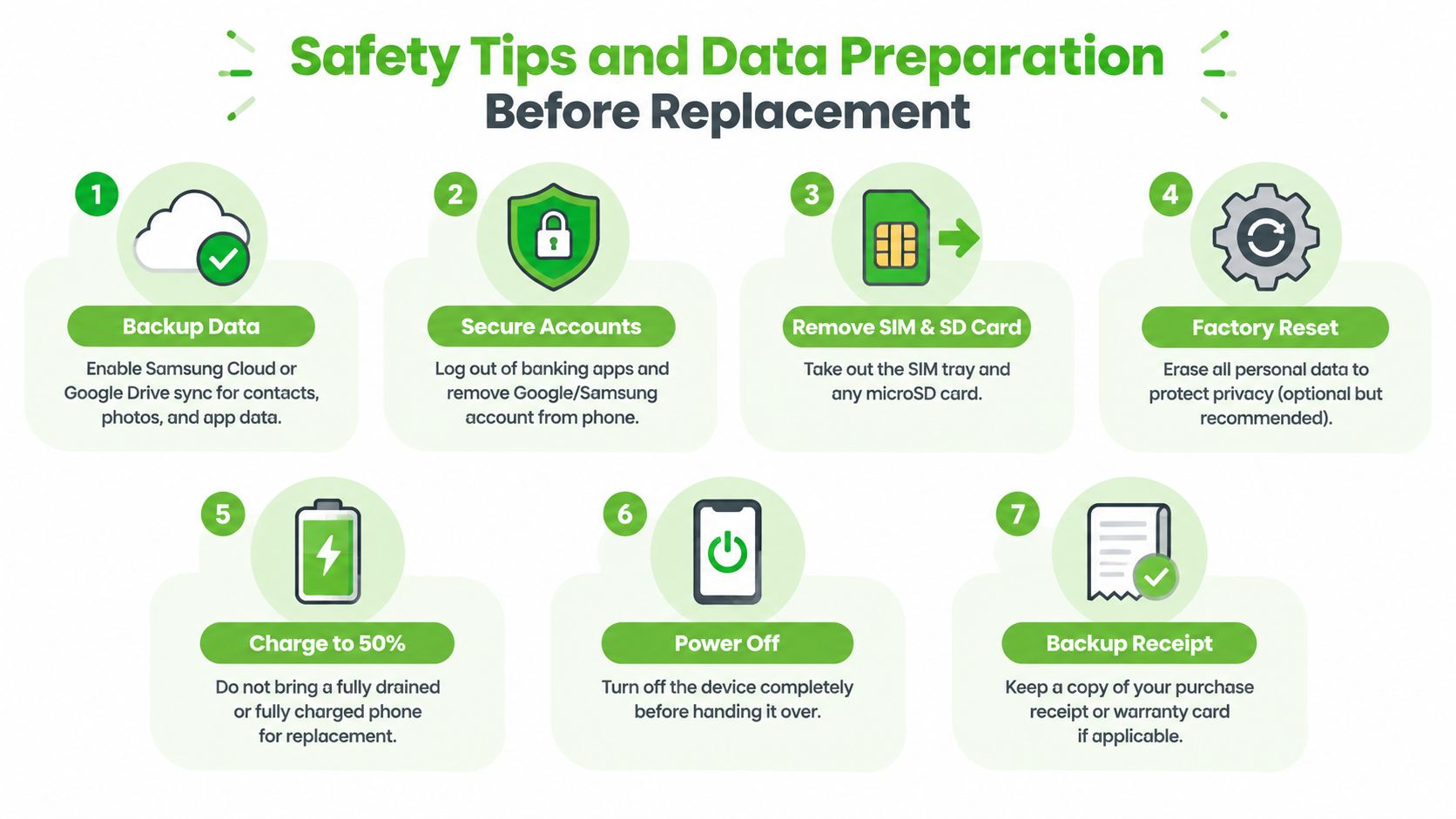
Back up the phone before handing it over. Samsung's Singapore guidance explicitly tells customers to back up data before repair, and that advice matters even when a battery swap is expected to preserve personal files. (Samsung repair preparation guidance)
Use Samsung Cloud or Google Drive for supported contacts, photos and app data, then make a second local copy with Smart Switch on a PC or external drive. Sign out of banking applications where appropriate, remove the SIM and microSD card, and ask the technician whether the screen lock needs to be disabled for testing. A factory reset is a privacy choice for some repairs, not something to do blindly before confirming your backup.
Treat swelling as an urgent safety issue
A lifted screen or back cover, unusual bulging, sharp chemical smell, hissing or abnormal heat means you should stop using the device. Don't press the panel down, puncture the battery, place the phone under bedding or keep charging it. Power it off if you can do so without pressing the damaged area, and ask the service provider how to transport it safely.
A Singapore repair guide says swollen-battery replacement can take 45 to 60 minutes when the correct part is in stock and no additional damage is found. It also says data loss isn't expected in that workflow, but a backup remains essential because technicians can't promise that every damaged device will behave normally. (Local swollen Samsung battery service guidance)
Bring your purchase receipt or warranty card if you want Samsung to verify coverage. For removed cells, don't use household bins. NEA says rechargeable batteries can be recycled through designated e-waste collection points, and Singapore has a national e-waste system covering portable batteries and mobile phones. (NEA e-waste information)
If you want a broader explanation of safe handling, this cell phone battery disposal guide is a useful reference. Ask the repairer whether it retains the old cell for recycling or returns it to you, then use an approved collection route.
For readers comparing preparation steps across devices, this guide to iPad battery replacement reinforces the same practical principle: protect the data first, then deal with the hardware safely.
Your Decision Checklist and the Lifecycle View
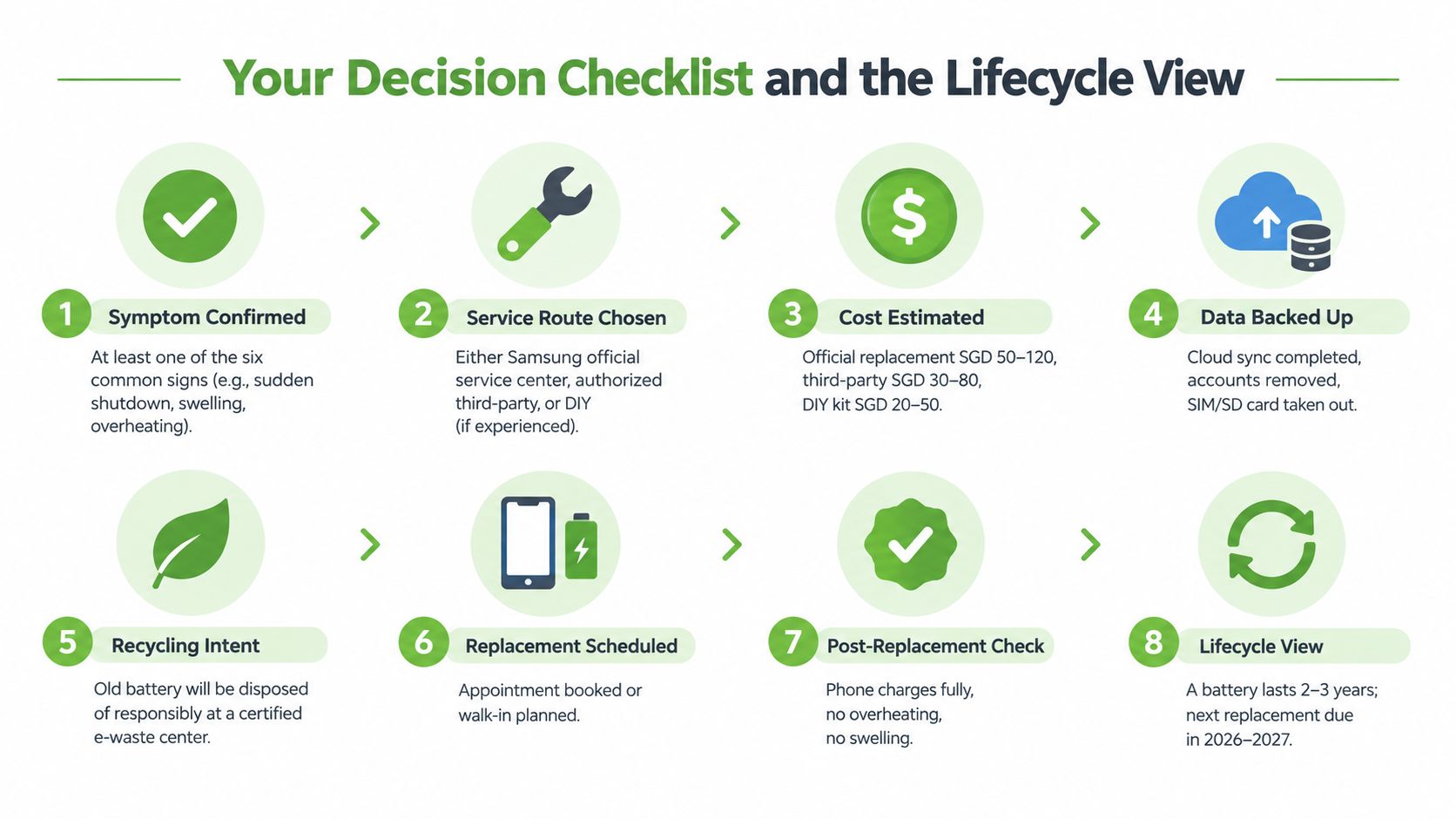
A battery replacement should be a lifecycle decision, not an automatic response to an inconvenient afternoon. Use this checklist before approving the job:
- Confirm the symptom. Check Samsung Members and rule out a damaged charger, cable, port or power-hungry application.
- Check warranty status. Find your proof of purchase or warranty card and verify the current Samsung service-centre location.
- Choose the route. Use Samsung for covered or valuable devices, a reputable independent shop for an older out-of-warranty phone, and DIY only if you already have the tools and repair experience.
- Ask what the quote includes. Confirm the battery grade, labour, adhesive, diagnostics, testing and any warranty terms.
- Back up and protect access. Complete cloud and local backups, remove SIM and microSD cards, and clarify account or screen-lock requirements.
- Plan the removed battery's route. Ensure the old cell goes to a designated e-waste collection point rather than household waste.
- Check the phone after repair. Test charging, shutdown behaviour, cameras, speakers, wireless functions and the fit of the screen or back cover.
Singapore's formal e-waste system gives owners a responsible option for removed batteries, while the wider repair decision also affects business resilience. Extending a reliable handset's working life can delay replacement spending, preserve familiar workflows and reduce disruption for staff. For consumers, repair, reuse, Certified ReLoved devices and Certified Surplus products offer alternatives to replacing every device as soon as one component wears out.
A technology lifecycle partner should look beyond the battery itself. myhalo's approach includes repair, reuse, device grading, battery health disclosure, trade-in and responsible recycling, supported by 30-point quality checks, ISO 9001 certification and ISO 27001 certification. It also provides RescueAdvise and the mylo AI Assistant for practical device guidance, while its Certified ReLoved and Certified Surplus categories help buyers choose equipment according to condition, budget and expected use.
If your Galaxy is shutting down, swelling or losing charge unusually quickly, don't keep compensating with power banks and repeated recharges. Visit myhalo to arrange a Samsung battery assessment, discuss a suitable replacement option and plan what happens to the old battery. myhalo can also help you consider repair, reuse, trade-in or a Certified ReLoved or Certified Surplus device when replacement is no longer the sensible lifecycle choice.