





POS System for Small Business: Your 2026 Guide
You're probably reading this after another messy close of business. The queue built up at lunch, one item was sold even though the shelf was already empty, and now someone has to match card payments, QR payments, cash, and handwritten notes before the day ends. That setup works for a while, until it starts eating time, margin, and staff patience.
A good POS system for small business fixes that by turning checkout into an organised workflow instead of a daily patch job. In Singapore, that matters even more because customers expect quick, cashless payment options and business owners can't afford slow processes in a high-cost environment. The key question isn't whether you need a POS. It's which setup gives you the lowest long-term cost, the least friction, and enough reliability to support growth without forcing you into constant replacement.
Table of Contents
- Why Your Small Business Needs More Than a Cash Register
- What a Modern POS System Really Does
- Finding Your Fit Cloud vs On-Premise and Other POS Types
- Essential Software Features for Singaporean Businesses
- Your POS Hardware Checklist and Cost Breakdown
- Smart and Sustainable POS Setups with Refurbished Tech
- Your Actionable POS Implementation Checklist
- Frequently Asked Questions
Why Your Small Business Needs More Than a Cash Register
A basic cash register records a sale. That's all. It doesn't tell you whether the last unit of a fast-moving item was sold online an hour ago, whether a staff member refunded the wrong product, or whether your card totals match what reached your bank.
That gap gets bigger in Singapore because payment behaviour has already changed. Visa's 2023 consumer payments data reported that 97% of Singaporeans used cashless payments in the prior year, and 81% of their purchases were cashless, as noted in this small business POS overview from the U.S. Chamber of Commerce. Once most customers are tapping, scanning, or paying through digital channels, the checkout counter becomes the control point for the whole business.
Here's what I see most often in smaller shops and service counters:
- Queues grow for preventable reasons. Staff search for products manually, key in discounts by memory, or split payment handling across separate devices.
- Stock errors pile up undetected. One spreadsheet says five units. The shelf says two. The online store says available.
- End-of-day reconciliation takes too long. Instead of a clean closing report, someone pieces together transactions from multiple systems.
A modern POS isn't fancy shop furniture. It's the operating layer that stops small errors from becoming expensive habits.
For a retailer, repair shop, beauty business, or café, the practical shift is simple. A POS system for small business becomes the point where sales, payments, stock, and reporting meet. When it's configured properly, staff can process sales faster, inventory updates happen automatically, and you spend less time fixing avoidable admin mistakes later.
That's why calling it a “cash register” no longer fits. A register takes money. A POS runs the transaction, records the context, and leaves a usable trail behind.
What a Modern POS System Really Does
A modern POS works like your business's central nervous system. The customer only sees the payment screen, but behind that screen the system is sending signals everywhere else: stock count, receipt record, sales report, staff activity, and sometimes online inventory too.
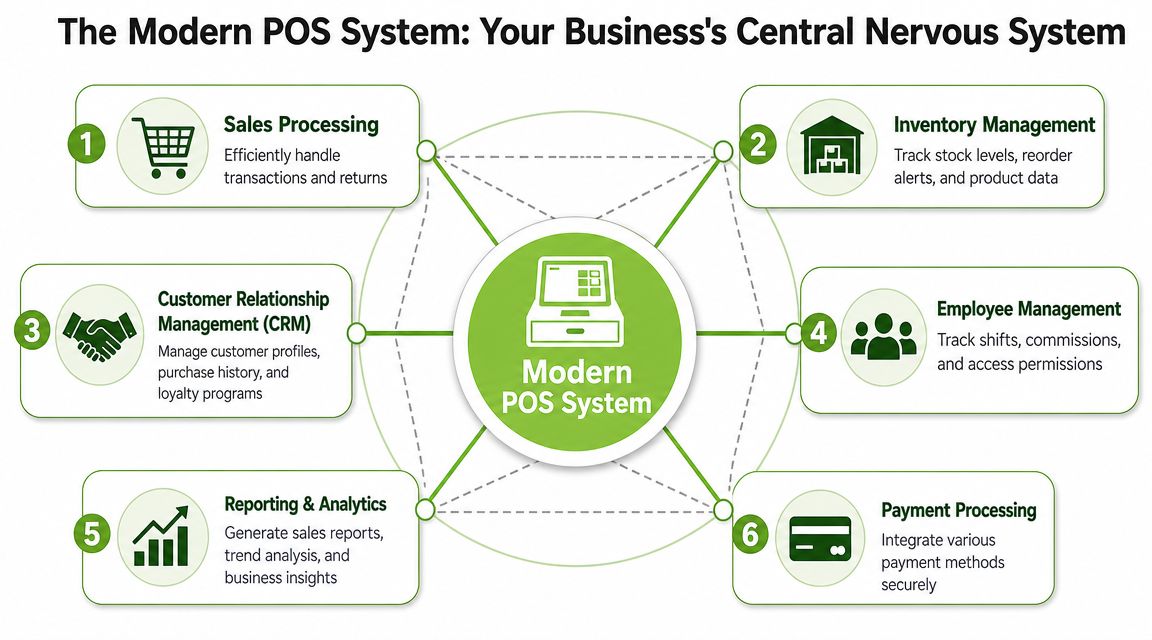
It connects the front counter to the back office
The first job is still checkout. Sales need to move quickly, discounts need approval rules, and returns need to be traceable. If staff have to jump between a card terminal, a notebook, and a separate stock file, the process breaks down.
A usable system usually handles these functions in one place:
- Sales processing. Ring up items, apply promotions, issue receipts, and manage returns without creating a second admin task later.
- Inventory management. Deduct sold items automatically, flag low stock, and keep product details organised.
- Customer records. Save purchase history, contact details, or warranty information where relevant.
- Staff controls. Limit who can void sales, edit prices, or issue refunds.
- Reporting. Show daily sales, item movement, and transaction patterns clearly enough that an owner can act on them.
If you run both physical and online sales, inventory discipline becomes even more important. Good POS design overlaps with stock control. If you need a deeper accounting-focused view of stock workflows, this guide to inventory software for UK businesses is useful because it shows how inventory tools support the financial side of operations too.
The useful part is the data trail
Most business owners don't need more dashboards. They need fewer surprises.
A strong POS leaves a clean trail after every transaction. That means you can answer practical questions fast. Which products are moving. Which staff member processed a refund. Whether a promotion is helping or just cutting margin. Whether the same item is being returned repeatedly.
Practical rule: If your POS can't help you close the day faster and order stock more accurately, it's not solving the real problem.
This is also why flashy features are often overrated. Many SMEs buy based on the demo screen, then realise later that the core value was in routine tasks: functional barcode scanning, product search that's fast, and reports that don't need manual cleanup before they mean anything.
A POS system for small business should reduce friction first. Better insight comes after that.
Finding Your Fit Cloud vs On-Premise and Other POS Types
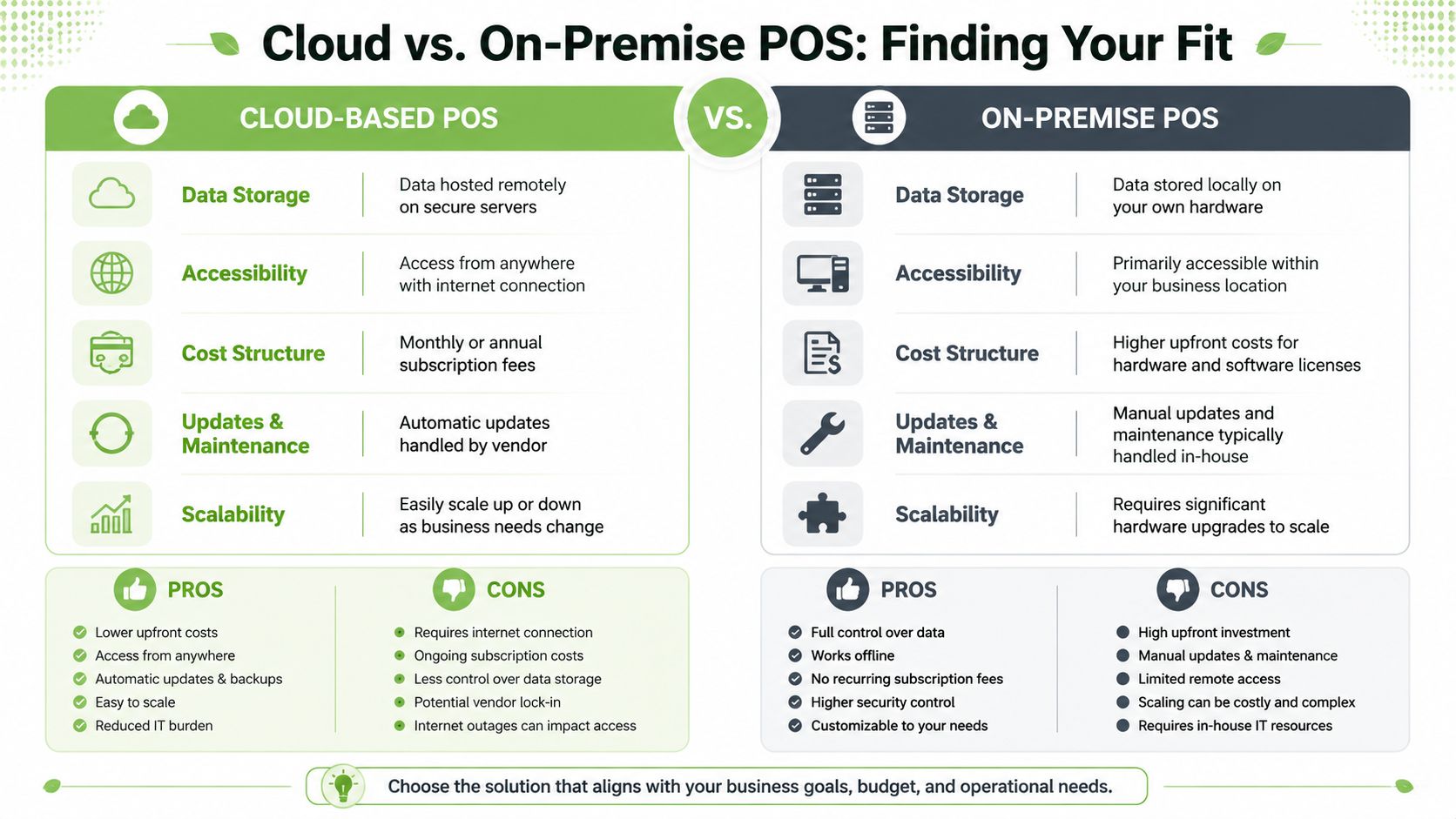
The most important architecture decision is whether your POS lives mainly in the cloud or mainly on-site. That choice affects cost, maintenance, resilience, and how much flexibility you have later.
Why cloud is now the default for most SMEs
For most small businesses in Singapore, cloud POS is the practical default. You log in through an app or browser, the vendor manages updates, and your data is available without being tied to one back-office machine.
That direction isn't random. The global cloud POS market was valued at US$2.24 billion in 2020 and was projected to reach US$13.24 billion by 2028, according to industry reporting summarised here. That projection reflects the wider move towards cloud-based tools that Singapore SMEs are already part of.
Cloud POS usually works better for SMEs because it supports real operating habits:
- Owners check the business remotely. You can review sales without being on-site.
- Updates are easier. You don't need to schedule manual patching on every terminal.
- Expansion is simpler. A second outlet or temporary booth doesn't require rebuilding the whole setup.
- Omnichannel is more realistic. In-store and online workflows are easier to connect.
To see a retail terminal format that suits a fixed counter setup, you can look at an example like the HP Engage Flex Pro-C retail system PC. The important point isn't the brand. It's the format: stable hardware, retail-ready layout, and room for the right peripherals.
A quick explainer can help if you're comparing setups visually:
When on-premise still makes sense
On-premise POS stores more of the system locally. Some businesses still choose it for specific reasons, such as strict internal IT control, niche legacy requirements, or environments where they want less dependence on a subscription model.
But smaller firms often underestimate the burden. Someone still has to manage backups, updates, device failures, and version control. If that “someone” is the owner or an already overloaded admin team, the system becomes fragile.
If your team doesn't have in-house IT discipline, on-premise often gives you more responsibility than control.
Other POS formats worth considering
Not every POS has to be a traditional countertop terminal. The right format depends on how you sell.
| POS type | Best fit | Main trade-off |
|---|---|---|
| Countertop POS | Fixed retail counters, clinics, service desks | Less portable |
| Tablet POS | Boutiques, cafés, lighter retail setups | Needs the right stand, case, and peripheral support |
| Mobile POS | Pop-ups, events, queue busting, field sales | Smaller screen can slow complex transactions |
| Hybrid setup | Shops that want a main counter plus roaming device | Slightly more setup planning |
For most SMEs, cloud plus practical hardware wins. It's easier to support, easier to scale, and less likely to trap you in yesterday's workflow.
Essential Software Features for Singaporean Businesses
A POS can have a polished interface and still be the wrong system. Software quality shows up in ordinary tasks: editing a product, handling a return, checking GST settings, finding a past receipt, or confirming whether a QR payment was recorded properly.
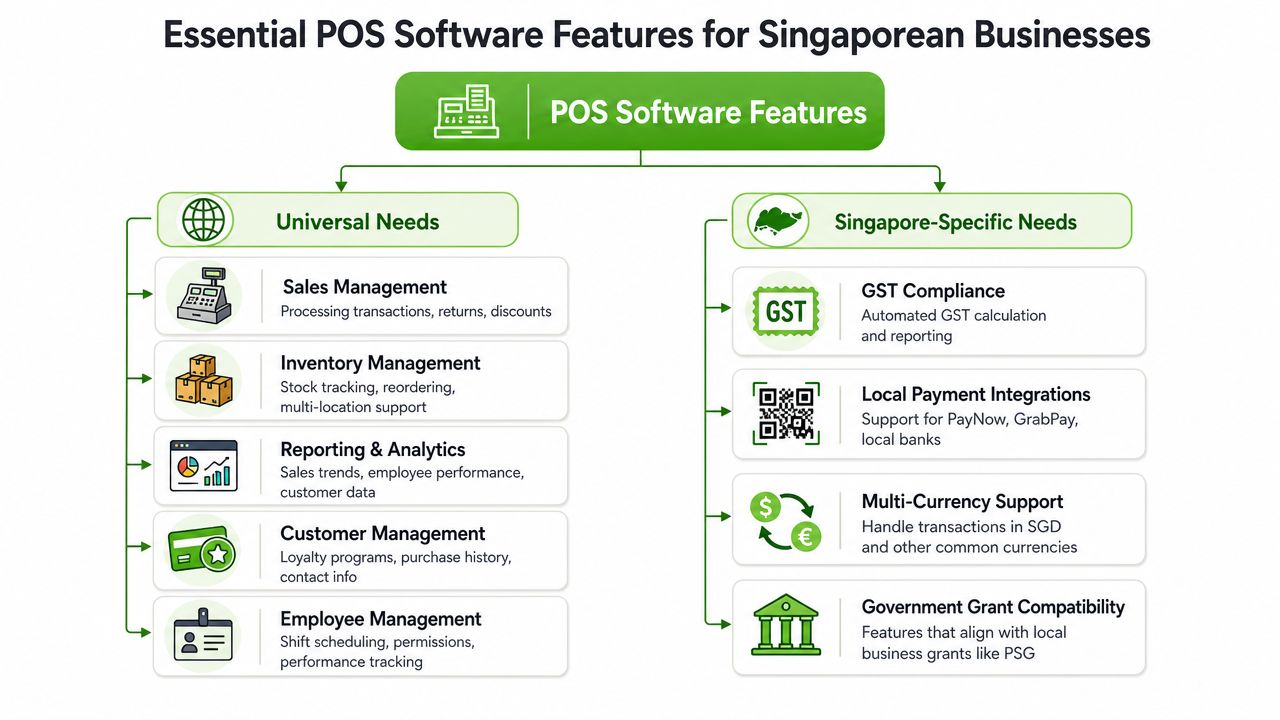
Features that matter in any small business
Start with the basics that affect daily speed and accuracy.
Inventory control comes first for most retailers. If the system can't track stock reliably, everything downstream gets noisy. You'll see wrong reorder decisions, awkward customer conversations, and manual checking that defeats the point of having software.
Sales reporting matters next, but only if it's readable. Many small firms don't need advanced analytics. They need clean daily totals, product movement, gross sales by category, and visibility into voids, refunds, and discounts.
Employee permissions are often overlooked until something goes wrong. Even in a small team, not everyone should be able to change prices, backdate transactions, or open the cash drawer without a recorded reason.
Customer records are useful when they support real workflows. Warranty claims, membership tracking, repeat purchase history, and digital receipts can all save time. If you're not using customer data actively, don't overpay for a bloated CRM layer.
A practical shortlist looks like this:
- Fast transaction flow. Staff should complete normal sales and returns with minimal taps.
- Real-time stock updates. Especially important when one item can sell across multiple channels.
- Clear reporting. Owners need visibility without exporting raw data every day.
- Role-based access. Reduce preventable misuse and accidental errors.
- Search and barcode support. This sounds basic, but poor item lookup slows the whole counter.
Features Singapore businesses should check carefully
Generic guides usually fall short on a critical point. They spend pages on loyalty tools and almost nothing on local workflow fit.
A major gap is Singapore-specific compliance and payments integration. As noted in this POS buyer guide from Square, most generic POS guides rarely answer practical Singapore questions such as GST handling, IRAS-compliant records, PayNow or QR acceptance, and local receipt workflows.
That means your evaluation shouldn't stop at “does it take payments?” Ask sharper questions:
- GST handling. Can the software apply tax correctly and keep records in a format your accountant can work with?
- IRAS-friendly records. Can you retrieve clean transaction histories, adjustment logs, and audit trails when needed?
- Local payment methods. Does it support the payment flows your customers use, including QR-based payments?
- Receipt workflow. Can it handle digital and printed receipts in a way that suits your operation?
- Accounting integration. Will your finance team receive clean sales data, or another reconciliation headache?
The best POS for a Singapore SME is often not the one with the most features. It's the one that fits local payment, tax, and reporting habits without workarounds.
If you run a service business, also check whether the system handles deposits, partial payments, or linked service records cleanly. If you run retail, pay close attention to variants, returns, exchanges, and stock transfers. The software should match how your staff already think. If it forces strange workarounds, you'll end up paying for those workarounds every day in labour and mistakes.
Your POS Hardware Checklist and Cost Breakdown
Hardware decisions shape the actual checkout experience. Software may be the brain, but hardware is the pair of hands your staff use all day. If the scanner lags, the printer jams, or the main terminal feels underpowered, people blame the “POS system” even when the actual issue is a poor hardware fit.
What you actually need on the counter
A cost-optimised rollout for a Singapore SME should be sized around 1% to 1.5% of annual sales volume for the system investment, based on this POS cost guidance from GoDaddy. That same guidance also lists common hardware ranges for small businesses.
At minimum, most setups need:
- Primary device. A tablet, laptop, desktop, or dedicated retail terminal that runs the POS software reliably.
- Card reader. For chip, tap, and other card-present transactions.
- Receipt printer. Still useful even if many receipts are digital, especially for retail and service counters.
- Cash drawer. Necessary if you still take any cash at all.
- Barcode scanner. Important for speed and stock accuracy in retail environments.
If you want to compare common device and accessory options, browsing a curated POS hardware collection can help you visualise the full setup rather than buying parts one by one without checking compatibility.
Budget for the whole system, not just the terminal
Many owners underbudget because they price only the main screen. That's like budgeting for a delivery van and forgetting tyres, fuel, and servicing.
Here are the typical hardware benchmarks cited in the source above:
| Hardware Component | Typical Cost Range (SGD) |
|---|---|
| Card reader | $50 to $300 |
| Receipt printer | $150 to $400 |
| Cash drawer | $100 to $300 |
| Barcode scanner | $50 to $500 |
Those ranges are useful as planning markers, not as a reason to chase the cheapest unit in each category. In practice, what matters is fit.
A low-cost scanner that misreads barcodes or disconnects intermittently slows staff down. A flimsy receipt printer creates support calls and queue friction. A consumer tablet stand that wobbles under daily use becomes a replacement cost you didn't expect.
Here's how I'd think about the hardware trade-off:
- Spend on reliability where transaction speed matters. Scanner, payment device, and main terminal affect every sale.
- Don't overspend on cosmetic “retail-grade” hardware if a stable business device will do. Many SMEs need dependability, not prestige hardware.
- Check offline behaviour and recovery. If the internet drops, what still works and how cleanly does the system recover later?
- Look at support access before purchase. Hardware downtime is an operations problem, not just a warranty issue.
Cheap hardware can become expensive labour. Every extra second at checkout gets multiplied by every transaction.
The right POS hardware setup should feel boring in the best way. It powers on, connects properly, scans fast, prints when needed, and stays out of the way.
Smart and Sustainable POS Setups with Refurbished Tech
A lot of small businesses assume POS hardware has to be brand new. That's often unnecessary. For many SMEs, the smarter move is to put budget into the parts that specifically need to be purpose-built, then use professionally refurbished devices where they perform just as well.
Where refurbished hardware fits well
Refurbished tech works especially well for the main computing device in a POS setup. A refurbished laptop, desktop, or tablet can run modern POS software perfectly well if the specifications match the workload and the unit has been tested properly.
This matters for total cost of ownership. If you reduce upfront hardware spend without compromising stability, you free budget for better peripherals, staff training, support coverage, or a second terminal during peak periods.
There's also a sustainability angle that makes practical sense, not just moral sense. Reusing business-grade devices cuts waste and extends the working life of hardware that was often built better than entry-level new consumer models. For SMEs watching both margin and environmental impact, that's a sensible combination.
If you're weighing the pros and cons, this refurbished laptop guide gives a useful overview of what to look for when buying refurbished machines for business use.
What to check before you buy refurbished
Refurbished only works when the sourcing and testing are professional. A cheap second-hand device with unknown battery health or no support is not the same thing.
Check these points carefully:
- Condition grading. You want transparent grading, not vague claims.
- Warranty coverage. Even a short but clear warranty is better than verbal reassurance.
- Testing process. Business buyers should know whether devices were function-checked properly.
- Port and peripheral compatibility. A POS setup depends on stable connections to printers, scanners, and payment devices.
- Local support options. If something fails, can you get help in Singapore without shipping delays and guesswork?
This is one area where a local provider can make more sense than a random marketplace seller. For example, myhalo offers new and professionally refurbished devices, along with services such as repairs, migration, trade-ins, and device care support. For an SME building a practical POS environment, that kind of local service layer can matter as much as the device itself.
The broader point is simple. Sustainable POS planning isn't about buying the absolute cheapest device. It's about buying hardware with the right lifespan, support path, and replacement logic for your business.
Your Actionable POS Implementation Checklist
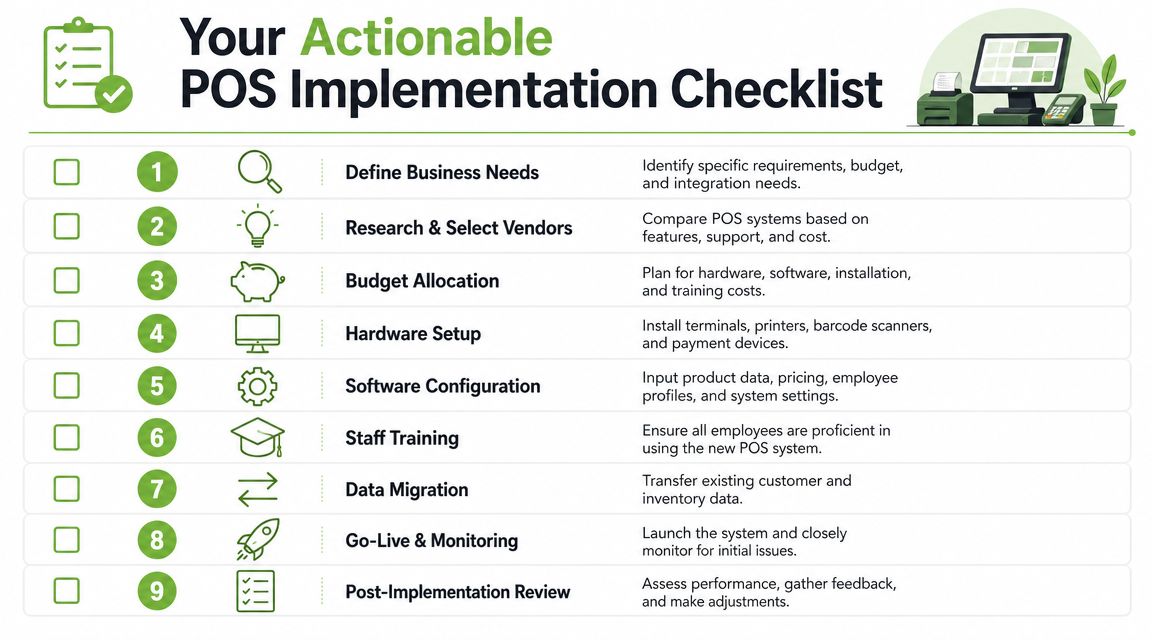
Choosing the system is only half the job. The rollout is where budgets get stretched and teams get frustrated. A clean implementation keeps the business running while the new setup takes over.
Before you buy anything
Start with business reality, not software demos.
-
List your real workflows
Write down how a normal sale, return, discount, stock check, and end-of-day close works today. If the vendor can't support those cleanly, move on. -
Set a full budget
Include software, hardware, accessories, setup time, and training. Don't forget replacement risk and support needs. -
Shortlist by fit, not hype
Remove systems that don't support your payment flow, stock complexity, or reporting needs. -
Ask local questions early
GST workflow, receipt handling, and payment method support should be confirmed before any contract discussion.
One useful habit is to look outside POS-specific industries for buying discipline. For example, this piece on Allied Drinks Systems' refurbished equipment is about commercial coffee equipment, but the principle applies directly here: refurbished business equipment can be a rational way to lower upfront cost without automatically sacrificing function.
During setup and launch
Once you've chosen the system, move in a fixed order.
- Prepare your product and price data. Clean names, variants, SKUs, and categories before import.
- Assign permissions properly. Decide who can refund, void, discount, and edit settings.
- Test the full transaction cycle. Normal sale, split payment, refund, receipt issue, and stock deduction should all be checked.
- Train with real scenarios. Don't train staff on menu tours. Train them on the transactions they perform.
- Launch in a quieter window. Avoid your busiest trading period if you can.
- Review the first week closely. Watch for stock mismatches, payment confusion, and reporting gaps.
Good implementation is less about speed and more about sequencing. The fastest rollout often becomes the slowest recovery.
A practical launch checklist should also include a fallback plan. If a printer fails, if the internet drops, or if staff can't find a product, who handles it and what's the temporary process? When that's decided in advance, the system feels professional from day one instead of improvised.
Frequently Asked Questions
Can I use my existing iPad or laptop for a POS system
Often, yes. Many cloud POS platforms run well on tablets, laptops, or standard desktops. The key question isn't whether the device turns on. It's whether it can run the software smoothly, stay connected to peripherals, and handle long daily operating hours without becoming unreliable.
For fixed counters, I'd also check stand stability, port availability, and whether the device can stay powered all day without heat or battery issues.
What happens if my internet connection goes down
That depends on the POS platform and payment setup. Some systems keep certain functions running offline and sync later, while others lose major capabilities until the connection returns.
Ask vendors for a plain-language answer to three things: what still works offline, what gets queued, and what staff should do during the outage. Don't accept vague reassurance.
How secure is a cloud POS
Cloud POS can be secure, but security isn't automatic. You still need proper staff permissions, strong account controls, clean device management, and a vendor that handles updates responsibly.
From an SME point of view, the practical question is whether the system gives you control over user access, transaction logs, and recovery when something goes wrong.
Do I need a barcode scanner if I'm a small shop
Not always, but retail businesses usually benefit from one quickly. A scanner improves speed, reduces keying mistakes, and keeps item tracking more consistent.
If you sell a small number of services or only a handful of products, manual lookup may be fine. Once your product range grows, scanning starts paying for itself in reduced friction.
Is a free POS good enough
Sometimes. It depends on the complexity of your operation. For a very simple setup, a lighter plan may be enough to start. But many businesses outgrow “free” once they need better reporting, inventory control, staff permissions, or local workflow support.
The safer approach is to compare total cost of ownership, not just monthly software price.
Should I buy brand-new hardware for every part of the setup
No. Some parts may justify buying new, especially payment devices or specialised peripherals. But for the main computing device, professionally refurbished hardware can be a sensible option if it's tested properly, graded clearly, and backed by local support.
If you're planning a POS setup and want practical hardware options without overspending, myhalo is worth considering for new and professionally refurbished business devices, plus local support services that can help SMEs build a more sustainable setup.