





Laptop Service Singapore 2026: Your Complete Repair Guide
Your laptop usually doesn't fail at a convenient time. It dies before a presentation, refuses to charge before class, or starts freezing when you've got invoices, photos, and browser tabs you can't afford to lose. In that moment, Singaporeans often do the same thing. They search for a fast fix, compare a few vague listings, and hope they don't overpay or hand their data to the wrong shop.
That's the wrong way to think about laptop servicing.
A better approach is to treat laptop service in Singapore as part of your device's full lifecycle. Repair is one decision. Upgrade is another. Trade-in, refurbished replacement, battery health, data migration, and responsible disposal all belong in the same conversation. If you look at the problem that way, you'll usually make a better decision for your budget and get more useful years from your tech.
Table of Contents
Your Laptop Is Down Now What
The first job is simple. Don't panic, and don't rush into the first repair quote you see.
If the screen is black, the charging light is inconsistent, or the keyboard has suddenly stopped responding, you need to separate urgent action from expensive action. They're not the same thing. A dead laptop can mean anything from a failed charger to a damaged motherboard. Guessing costs money.
This is a common problem in Singapore, not a niche one. Laptop and notebook access among households reached 88.72% in 2025, up from 80.73% in earlier years, which means portable computers are now part of daily work, school, and home admin. That broad reliance also means hardware failures, battery wear, and accidental damage show up often enough to need local service support, as reflected in the Singapore household access data.
Don't decide between repair and replacement while you're still guessing what actually failed.
Start with three checks before you spend anything:
- Power path: Try another charger if you have one from the same model family, check the power adapter, and test a different wall socket.
- Display path: Connect to an external monitor if possible. A working external display can point to a panel or display cable issue rather than a dead laptop.
- Boot behaviour: Note exactly what happens. No lights, fan spin but no image, login loop, random shutdown, or overheating all point in different directions.
If you're a business user or running a small team, downtime is a significant cost. If you're a student, it's usually data access and missed deadlines. Either way, the best move is to treat the repair decision as part of a wider lifecycle plan. Fix what's worth fixing. Replace only when repair no longer creates value. Keep the old device in the loop through trade-in, reuse, or responsible recycling instead of treating it as junk.
Understanding Common Laptop Failures
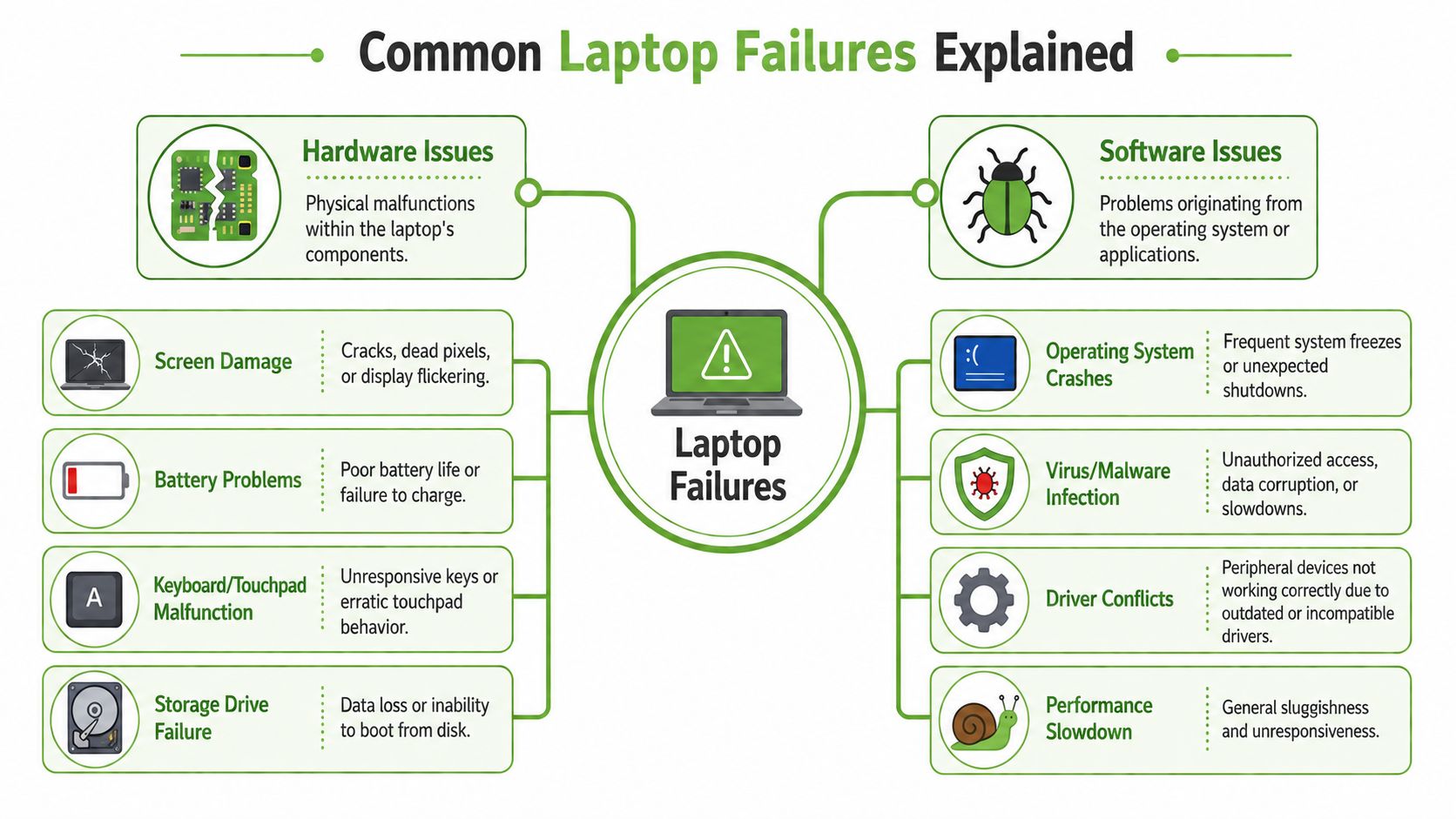
Most laptop faults fall into two buckets. Hardware issues affect the physical parts. Software issues affect the instructions, settings, and system behaviour. A simple way to think about it is this: hardware is the body, software is the brain.
Hardware problems are the physical failures
These are the faults you can often see, hear, or feel.
A screen problem may show up as cracks, flickering, dead pixels, lines across the display, or a backlight that cuts in and out. If the machine works on an external monitor, the issue is often isolated to the display assembly rather than the main board.
Battery problems usually build up slowly. The laptop drains too quickly, shuts down at random percentages, gets hot while charging, or only runs properly when plugged in. On some machines, a swollen battery can also affect the trackpad or casing alignment. If you're using an Apple laptop, this practical guide to MacBook battery replacement helps you understand the signs before you commit to service.
Other common hardware faults include:
- Keyboard or touchpad failure: Some keys stop responding, double-type, or trigger the wrong action.
- Storage drive failure: The laptop becomes hard to boot, files disappear, or the system keeps entering repair mode.
- Charging port damage: The cable feels loose, charging cuts on and off, or the connector overheats.
Software problems affect how the laptop behaves
Software faults are less visible but often easier to fix if diagnosed properly.
A slow laptop doesn't always need new hardware. It may be struggling with too many startup apps, a corrupted operating system, full storage, or background malware. Users often assume the machine is old when the actual problem is system clutter or failed updates.
Watch for these patterns:
- Operating system crashes: Freezing, restart loops, or error screens after login.
- Driver conflicts: Wi-Fi, Bluetooth, audio, or USB devices stop working after an update.
- Malware infection: Pop-ups, browser redirects, unauthorised logins, or unusual slowdowns.
- Corrupted system files: The laptop boots, but key functions stop working properly.
A technician can help faster when you describe symptoms, not conclusions. Say “the fan runs but the screen stays black” instead of “the motherboard is dead”.
That one habit makes a big difference. It keeps the diagnosis grounded in what the machine is doing, and it lowers the risk of paying for the wrong repair.
Choosing Your Service Provider in Singapore
The repair itself matters. The service route matters just as much.
Many people compare only price, then regret it when turnaround drags on, the diagnosis keeps changing, or nobody gives a straight answer about parts, data handling, and warranty coverage. That problem is especially clear in Singapore. A 2025 market analysis noted that local laptop owners rarely get transparent, region-specific comparisons for repair versus replacement on mid-tier models, leaving professionals and everyday users without clear cost breakdowns for common devices such as Dell Inspiron or Lenovo ThinkPad. You can see that gap in the Singapore laptop repair market analysis.
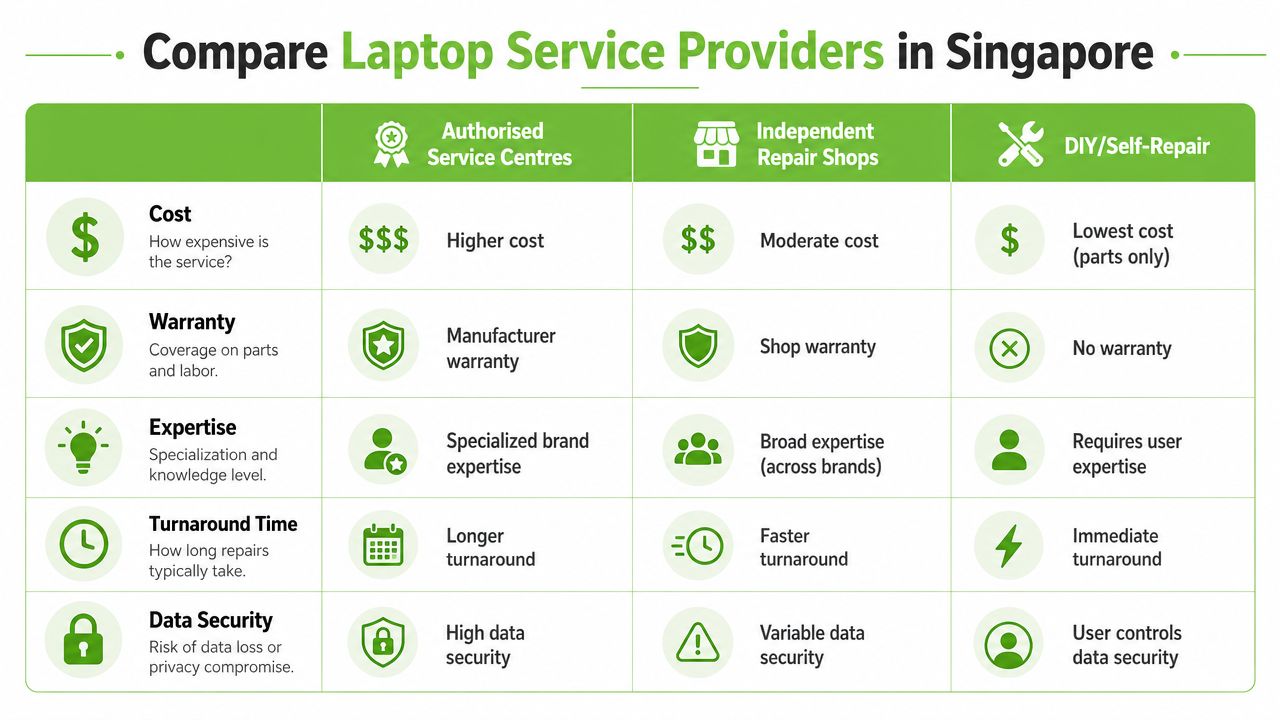
Here's the comparison most buyers need.
The three routes most people consider
| Service route | Typical fit | Strength | Main trade-off |
|---|---|---|---|
| Authorised service centre | In-warranty devices, newer premium models | Brand-specific procedures and manufacturer alignment | Often costs more and may take longer |
| Independent repair shop | Older devices, common repairs, faster turnaround | Flexible and often more affordable | Quality and data handling vary a lot |
| DIY or self-repair | Experienced users handling simple part swaps | Full control and lowest direct cost | High risk if you misdiagnose the fault |
The embedded overview below is useful if you want a quick visual primer before deciding.
What matters more than the headline price
A cheap quote can still be expensive if it ignores the issue.
Ask how the provider handles these areas:
- Diagnosis quality: Do they test before quoting, or do they jump straight to a part replacement?
- Parts clarity: Will they explain whether the part is original, compatible, refurbished, or pulled from donor stock?
- Data handling: Who accesses your device, and what procedures are used if storage inspection is needed?
- Post-repair support: Is there a service warranty, and what exactly does it cover?
- Escalation path: If repair isn't worth it, can they help with migration, trade-in, or a replacement path?
For consumers and SMEs, a lifecycle partner often makes more sense than a pure repair counter. That's where myhalo fits. It isn't just a place to swap a screen or battery. It also supports reuse through Certified ReLoved and Certified Surplus devices, offers RescueAdvise and mylo AI Assistant for guidance, and uses processes tied to ISO 9001 Certified and ISO 27001 Certified standards. Those things matter because laptop service shouldn't end at “fixed or not fixed”. It should help you decide what to do next.
Questions you should ask before you commit
Use these before handing over any machine:
- “What exactly are you testing first?” Good providers can explain the diagnostic path in plain English.
- “What happens if the first suspected part isn't the actual problem?” You want a process, not guesswork.
- “How do you protect my data?” This matters more than cosmetic polish.
- “Can you advise whether repair still makes sense versus replacement?” A useful shop won't force one answer.
- “Can I check warranty status first?” If you're on an HP device, this guide to an HP warranty check in Singapore can help you do that before paying for outside service.
Practical rule: If a provider can't explain the diagnosis, parts source, and warranty terms clearly, don't leave your laptop there.
A Smart Framework for Repair Replace or Refurbish
You don't need a complicated formula. You need a clear decision framework that matches the laptop's remaining value.

The repair and refurbishment space is not shrinking. It's growing because people are trying to extract more useful life from devices instead of replacing them too early. The global Computer Repair and Refurbishment Service market is projected to reach $150 billion by 2025 with a 12% CAGR, and 72% of users delay laptop repairs due to cost concerns, according to this computer repair and refurbishment market report. That tells you two things. Demand is real, and many people wait too long because they think the only alternative to repair is a costly new purchase.
Repair makes sense when the rest of the machine is still useful
A repair is usually the right call when the problem is isolated.
Examples include a cracked display on an otherwise stable laptop, a tired battery in a machine that still handles your daily apps well, or a faulty keyboard on a business model with solid performance. In these cases, spending on repair can buy you another meaningful stretch of use without forcing a full migration.
Repair is also sensible when:
- Your workflow is light: Email, browser tabs, Zoom, Microsoft Office, POS software.
- The issue is clearly localised: Battery, screen, fan, charging port, keyboard.
- You need continuity: Replacing the whole machine creates extra setup work you'd rather avoid.
Replacement should include refurbished options
Too many people think “replace” means “buy brand new”. That's lazy thinking, and it usually wastes money.
A professionally refurbished device can be the smarter move if your current machine has multiple faults, poor battery health, limited upgrade path, or no longer meets your workload. In such cases, Certified ReLoved and Certified Surplus devices deserve serious consideration. They help you avoid the full price of a sealed new unit while still getting a tested machine with transparent grading and battery health disclosure.
If your current laptop still has residual value, don't let it sit in a drawer. Turn it into part of the upgrade budget through a service that lets you sell a used laptop in Singapore rather than abandoning the asset entirely.
Think in lifecycle value not just immediate cost
A smart decision answers four questions:
- Can this machine still do the job after repair?
- Will another fault likely follow soon after?
- How much time will migration or reconfiguration take if I replace it?
- Can I recover value from the current device through trade-in, reuse, or parts recovery?
Singapore also has a strong practical reason to keep devices in circulation longer. The country generates about 120,000 tonnes of electronic waste annually, with laptops and personal computers forming a meaningful part of that stream, based on this local overview of e-waste in Singapore. That is why a lifecycle approach from myhalo matters. Through repair support, upgrade guidance, Certified ReLoved and Certified Surplus options, trade-in pathways, and responsible recycling, myhalo helps users turn e-waste awareness into a practical, cost-conscious device strategy. If you want to explore the brand's sustainability approach in more detail, see myhalo's zero e-waste page.
If a repair restores reliable daily use, it's often the highest-value option. If it only delays the next failure, move to a refurbished replacement instead.
Your Pre-Service Checklist to Protect Data and Time
A bad repair experience often starts before the laptop reaches the counter. People forget to back up files, leave accounts signed in, can't explain the fault clearly, and then panic when the technician asks basic questions.
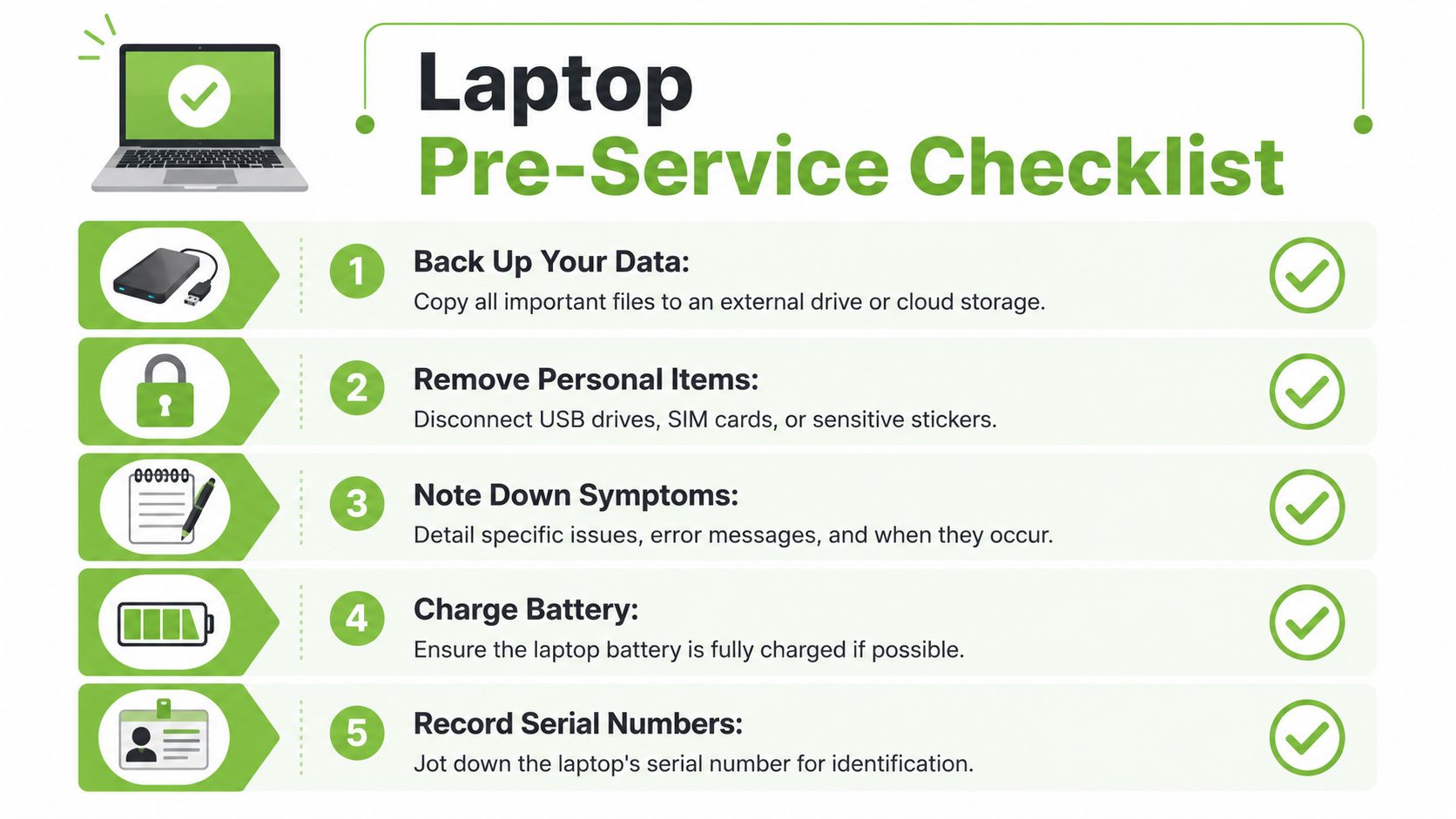
Use this checklist before any laptop service appointment.
Do these before you hand over the laptop
- Back up what matters first: Copy work documents, photos, accounting files, browser exports, and messaging archives to cloud storage or an external drive. If you already deleted something important on a Mac before servicing, this guide on how to recover Mac deleted files is worth checking before more changes are made to the drive.
- Remove what doesn't need to travel: Take out USB receivers, SD cards, dongles, privacy shutters, and any labels carrying passwords or internal asset info.
- Log out where possible: Email, cloud storage, password managers, and browser profiles should be signed out if the issue allows it.
- Charge the battery if the machine still powers on: That helps the technician reproduce intermittent faults without waiting on power recovery.
- Record identifying details: Write down the serial number, model name, charger type, and any visible physical marks.
Photos help. Take clear shots of the screen, casing, ports, and any dents before drop-off.
What to tell the technician
The best fault description is simple and specific.
Don't say, “It's spoiled.” Say what changed, when it started, and whether the issue is constant or intermittent. Useful examples include “the screen flickers after ten minutes on battery” or “the laptop only charges if the cable is held at an angle”.
A good handover note should include:
- Symptoms: What you see, hear, or smell.
- Trigger conditions: During charging, on battery, after sleep, after an update, when opening certain apps.
- Urgency: Deadline tomorrow, business-use device, exam laptop, family photos not yet backed up.
- Past history: Previous spill, old battery warning, earlier screen replacement, recent drop.
If data privacy matters, say so directly at intake. Ask whether storage access is necessary for diagnosis and whether there's a documented process for handling customer devices. That's where structured controls matter. Providers that work with ISO 27001 Certified practices are easier to trust because they treat information handling as a process, not an afterthought.
Frequently Asked Questions About Laptop Service
Will third-party service void my warranty
It depends on the device brand, the repair type, and your current warranty status.
If the machine is still covered, check that first before approving outside work. An authorised route may make more sense for newer devices, especially if the likely fault is covered. If the laptop is already out of warranty, the question changes from “Will this void anything?” to “Will this repair create enough value to justify the spend?”
How long will a repair take
That depends on diagnosis, parts availability, and whether the fault is straightforward or layered.
A battery or screen job is usually simpler than intermittent shutdowns, liquid exposure, or board-level problems. The right expectation isn't a generic promise. It's a provider who tells you what they're testing, what they're waiting on, and what would change the timeline.
Should I worry about my files and accounts
Yes. Always assume you need to protect your data before service.
Even honest repair work can involve reinstallation, storage testing, or account logout events. Back up first, remove sensitive accessories, and ask how the provider handles device access. If a shop treats data security casually, walk away.
What if the laptop isn't worth repairing
That outcome isn't failure. It's a decision point.
If the machine is uneconomical to fix, your next best move is usually one of three paths: trade it in if there's residual value, move to a refurbished replacement, or recycle it responsibly if recovery isn't practical. A proper lifecycle approach keeps the asset moving instead of leaving it in a drawer with old files and a dead battery.
Why is phone support still important
Because urgent hardware problems are rarely convenient to explain over forms and chat threads.
In Singapore, 80% of customers prefer phone support for urgent hardware issues, but only 9% of local laptop repair businesses prioritise long-term phone availability, according to this ServiceNow press release on Singapore customer support preferences. That gap matters when you need quick advice on accidental damage, data migration risk, or whether the machine should even be powered on.
If the issue is urgent, choose a provider you can actually reach by phone. Speed starts with access to a real person.
If you want a practical next step, start with myhalo as a technology lifecycle partner rather than treating service as a one-off repair errand. You can assess whether your current laptop should be repaired, traded in, replaced with a Certified ReLoved or Certified Surplus device, or moved into responsible recycling, all with a focus on extending useful life, protecting data, and making a more cost-effective decision.