





Laptop Screen Repair Cost in Singapore
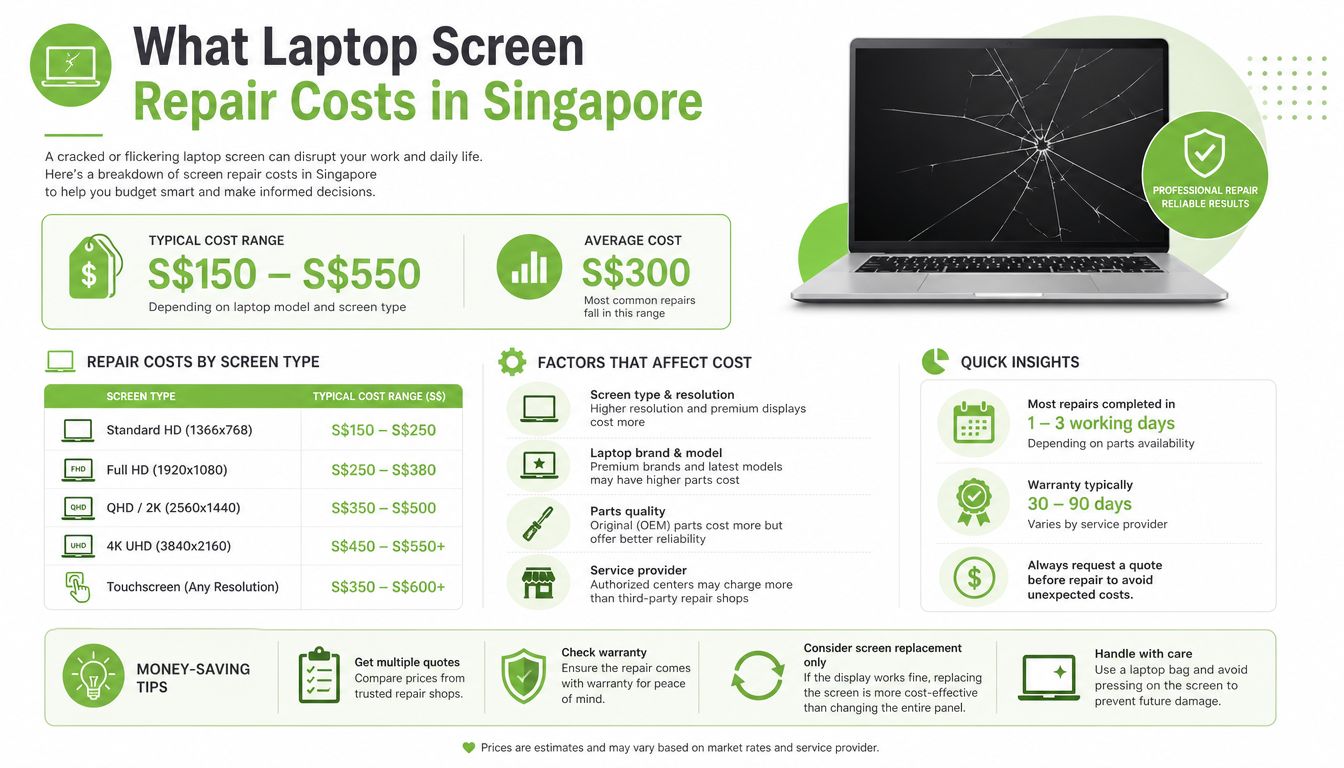
Professional laptop screen repairs in Singapore commonly cost around S$186 to S$390, with non-touch LCDs generally at the lower end and touch or premium screens nearer the upper end. DIY replacement panels can cost less, but the decision depends on the laptop's age, screen technology, labour, warranty and remaining value.
You're carrying a laptop through an MRT commute when the lid catches against a bag strap. The hinge twists, the display develops a black patch, and suddenly a device that still boots is difficult to use. Before you approve the first repair quote, treat the laptop screen repair cost as part of the device's total cost of ownership, not the price of a replacement panel.
Table of Contents
- What Laptop Screen Repair Costs in Singapore
- Understanding Different Laptop Screen Types
- Factors That Change the Final Repair Price
- Repair, DIY or Replace the Laptop
- DIY Screen Replacement Risks and Checks
- Warranties, Protection Plans and Turnaround Time
- Practical Singapore Scenarios for Device Owners
- Making a Smarter Screen Repair Decision
What Laptop Screen Repair Costs in Singapore
Professional screen repair pricing in Singapore commonly falls between S$186 and S$390, depending on the model and screen assembly. One local listing gives non-touch LCD replacements at S$158 to S$386 and touch-screen replacements at S$286 to S$390, while another Singapore repair guide places professional repairs at around S$300. See the Singapore laptop repair pricing reference for the published range and screen-type differences.
Non-touch LCDs usually sit nearer the affordable end because their construction is simpler. A touchscreen adds a digitiser, the layer that detects finger input, while premium OLED and mini-LED assemblies use more specialised components. Ultra-thin aluminium-unibody laptops and limited-edition models can exceed the upper range because the display, hinges, bezel and top case may be tightly integrated.
Read the quote beyond the headline price
An advertised screen price may cover only the part. The final invoice can also include diagnosis, labour, GST, adhesive work, bezel replacement, data backup or disposal of damaged components. Public Singapore repair listings show a broad spread, with LCD replacement starting around S$60 at one provider, while ASUS-specific replacements start from S$186 before GST in another listing. The Finchum Fixes IT laptop repair costs guide is useful background when comparing repair components and labour.
Ask for two or three written, itemised quotations. Each should identify the exact laptop model, screen specification, whether the panel is original or aftermarket, labour charges, warranty coverage, expected completion date and any fees payable if you decline the repair.
Practical rule: A low advertised price is only useful when two quotations cover the same panel quality, workmanship and after-repair support.
A neighbourhood repair shop may offer a competitive quote, an authorised centre may provide manufacturer-aligned parts, and a refurbished-device specialist may help you compare repair with a graded replacement. Choose based on the full value, not the first number you see.
Understanding Different Laptop Screen Types
A laptop display isn't just a sheet of glass. It's a complete assembly that can include the LCD or OLED matrix, backlight layers, digitiser, bezel, hinges and display cable. Damage to one part can affect the whole assembly, which explains why a laptop with a cracked outer surface may still require a complete screen replacement.
The main panel technologies
LCD remains the common, cost-conscious choice. An LCD uses a backlight behind the image-forming layer. IPS LCD panels generally provide wider viewing angles and more consistent colour than older TN panels, making IPS a sensible option for office work, study and shared viewing. TN panels can be cheaper, but they're less attractive if colour consistency matters.
Touchscreen laptops add a digitiser, which senses touch input. In many models, the digitiser is bonded to the display, so a damaged glass layer can't be lifted away without risking the panel underneath. That layered construction increases both parts and labour complexity.
OLED panels produce light at the pixel level, giving strong contrast and deep blacks. They're common in premium laptops and can cost more to replace. Mini-LED is a premium LCD approach that uses many small backlight zones for stronger contrast and brightness control. It isn't the same as OLED, but its specialised assembly can also raise the repair bill.
| Screen Type | Key Characteristics | Typical User | Cost Impact |
|---|---|---|---|
| Standard LCD | Practical backlit display, commonly non-touch | General office, study and home use | Lower to mid-range |
| IPS LCD | Wider viewing angles and more consistent colour | Students, office users and creators | Mid-range |
| TN LCD | Older panel design with narrower viewing angles | Basic use where price matters | Often lower |
| Touchscreen | Display combined with a touch-sensing digitiser | Tablet-style and interactive use | Higher |
| OLED | Deep blacks and strong contrast | Premium users and visual media work | Higher |
| Mini-LED | Premium LCD with advanced backlighting | High-end creative and performance laptops | Higher |
Resolution and refresh rate also affect compatibility. A Full HD replacement isn't automatically suitable for a laptop designed for 4K or a higher-resolution panel, while a 60Hz display may not match a model built for 90Hz or 120Hz operation. Confirm the panel model, connector, mounting points and power requirements before ordering. Paying for a premium feature your laptop's graphics hardware or hinge assembly can't support is poor value.
Factors That Change the Final Repair Price
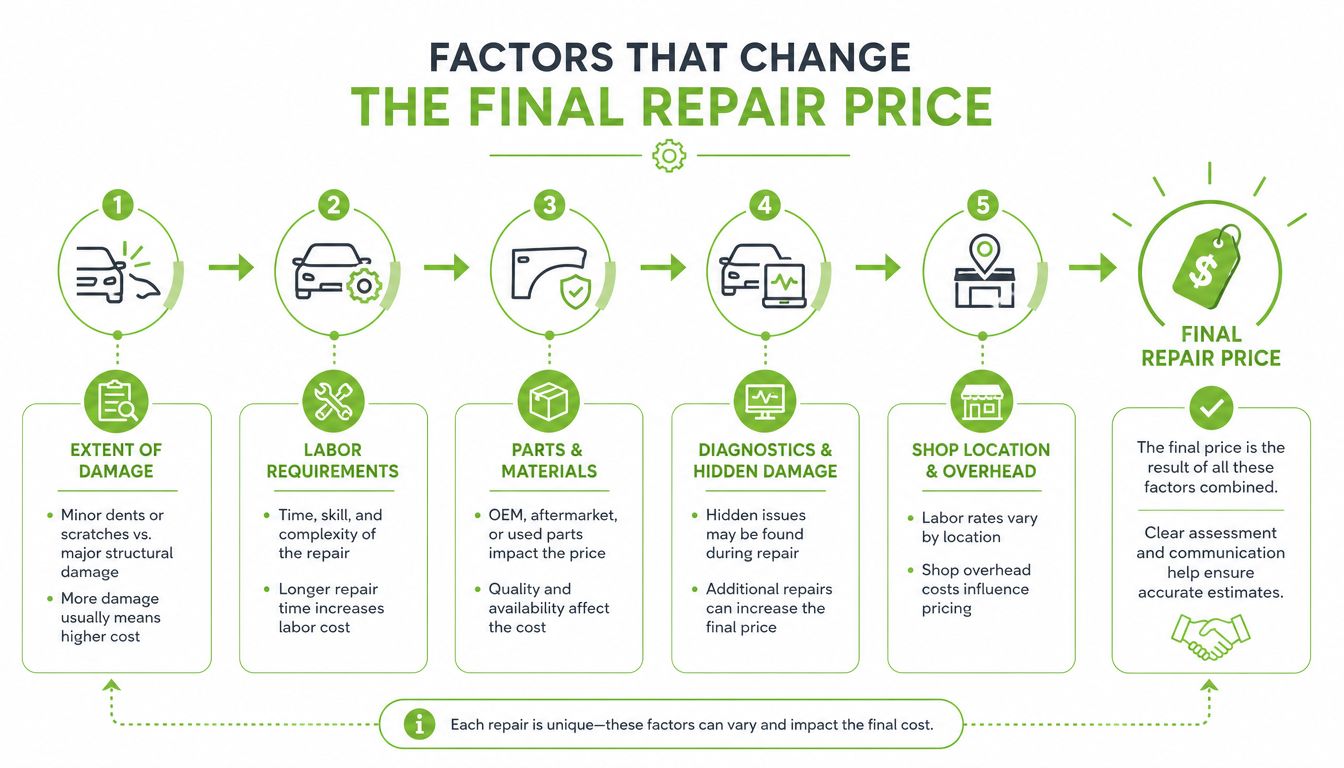
The panel usually drives the largest part of the bill, but it isn't the only cost. Two laptops with similar-looking cracks can require very different work because their screens attach to the chassis in different ways.
What an itemised quotation should show
Parts: Original equipment manufacturer panels usually cost more than aftermarket equivalents. They tend to provide a closer match for colour, brightness, resolution and connector placement. A compatible aftermarket panel may be reasonable for a basic work laptop, but the quotation should state what you're receiving.
Labour: Technicians may need to remove a bezel, separate adhesive, work around delicate hinges, route a display cable and reseal the assembly. Touch models can require additional testing and recalibration so that taps register correctly across the screen.
Diagnostics: Some repairers waive the diagnostic fee if you proceed. Others retain it even when you reject the quotation. Ask this before handing over the device, particularly if the visible crack may also have damaged the hinge, cable or motherboard.
Hidden work can change the economics
A damaged bezel may no longer hold the panel securely. A stretched cable can cause flickering after the new display is installed. Adhesive resealing matters on bonded touchscreen and OLED assemblies, while broken glass may require responsible handling and disposal. A business may also need a data backup or device migration before repair, especially if the laptop contains client files.
Newer, slimmer and brand-specific designs often leave less room for error. Specialised tools and trained technicians can increase labour time, but they also reduce the chance of secondary damage. For an SME, avoiding another failure after reassembly can matter more than saving a small amount on the initial quote.
Request a line-by-line breakdown covering:
- Panel specification: Brand, model, resolution, refresh rate and touch capability.
- Workmanship: Bezel removal, cable inspection, adhesive work and testing.
- Additional charges: Diagnosis, GST, backup, delivery and disposal.
- Aftercare: Repair warranty, exclusions and what happens if the replacement develops a fault.
A vague “screen replacement package” makes comparisons difficult. An itemised quotation lets you compare like for like and identify whether a cheap price excludes work another provider has included.
Repair, DIY or Replace the Laptop
The cheapest upfront option isn't always the lowest-cost decision. Compare the likely repair bill with the laptop's remaining usefulness, data continuity, downtime, resale value and the risk of damaging another component.
Professional repair is the sensible default when the laptop still performs well and the damage is isolated. Singapore benchmarks place professional screen work across a broad range, from roughly S$186 to S$390 depending on the model and panel. A repair can preserve your applications, files, settings and familiar workflow without forcing a rushed replacement.
DIY has a lower entry price, but the panel is only one part of the risk. Singapore guidance describes DIY replacement panels at around S$50 to S$100, while another repair benchmark places typical laptop screen repairs at approximately S$50 to S$200. Compare the exact part and compatibility before assuming a kit is suitable.
| Option | Typical Cost (SGD) | Risk Level | Best Fit |
|---|---|---|---|
| Professional repair | S$186 to S$390 | Moderate, managed by technician | A newer or reliable laptop with isolated screen damage |
| DIY replacement | S$50 to S$100 for some panels | High | An owner with prior disassembly experience and a compatible part |
| Replace the device | Model-dependent | Low repair risk, higher switching cost | An ageing laptop with several faults or poor remaining value |
The replacement option may make sense when the repair approaches the value of a comparable refurbished laptop. A Singapore repair guide notes that replacement panels can be sourced for DIY work at around S$50 to S$100, while professional repairs are often around S$300, so the difference between self-repair and professional service can be substantial. These figures come from HP's Singapore guidance on laptop screen repair.
A practical decision rule
Repair a laptop that is under three years old, works reliably and has no battery, keyboard, hinge or motherboard symptoms. Replace it when the repair exceeds 50 per cent of a comparable refurbished unit, using the device's age and condition as part of the comparison. DIY only if you've opened similar laptops before and accept that the process may void existing warranty support.
For a household, the cost of lost schoolwork or work hours can outweigh a modest repair saving. For an SME, several days of downtime across a team can make a fast, documented repair more valuable than an untested bargain panel.
DIY Screen Replacement Risks and Checks
A cheaper aftermarket panel doesn't automatically save money. DIY tutorials often focus on removing the old display and fitting the new one, but the difficult part is protecting the components around it.
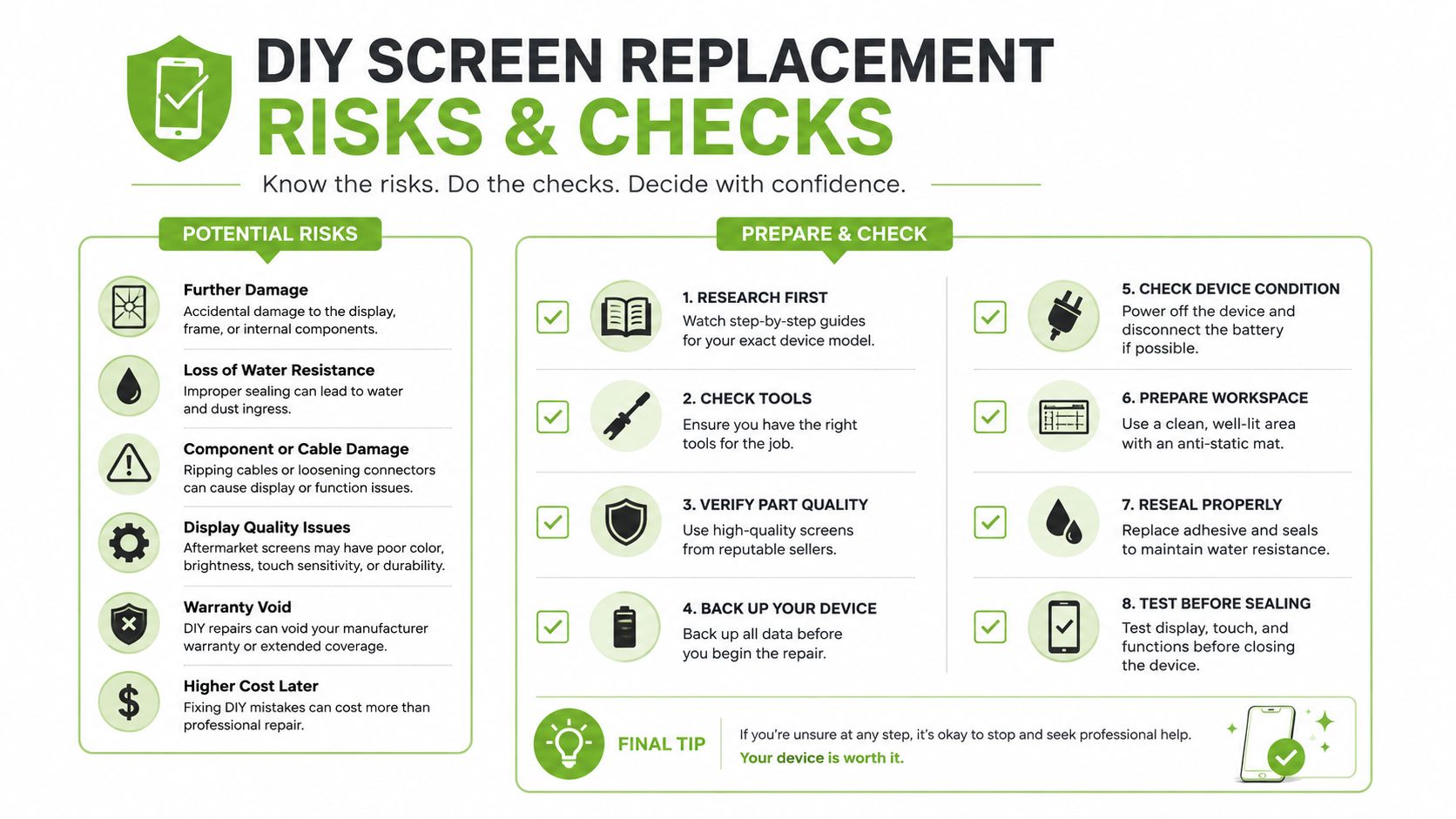
The display cable and LVDS connector are fragile. A careless pull can damage the cable or connector and leave the replacement screen flickering or blank. Bezel clips can snap when force is applied in the wrong place, and static discharge can harm sensitive graphics or board components even when the laptop appears switched off.
Touch and OLED assemblies create another problem. Their bonded layers may require careful adhesive removal and resealing. A replacement can also look noticeably different from the original because colour calibration, brightness and viewing characteristics don't match.
Complete these checks before ordering
- Confirm the exact panel: Match the panel model, resolution, connector and mounting points, not just the laptop family name.
- Check the included hardware: Verify whether the panel comes with controller boards, brackets, cable compatibility and mounting materials.
- Prepare the workspace: Use a clean, well-lit, anti-static surface and organise screws by location.
- Plan for failure: Decide whether you can pay for a professional redo if the bezel, cable or replacement panel is damaged.
A S$120 panel becoming a S$450 lesson is entirely plausible once a cracked bezel and damaged cable are added to the job. That example isn't a market statistic, it's a reminder that the initial part price doesn't represent the complete risk.
If you're also comparing repair approaches for other devices, the myhalo guide to phone screen repairs provides useful context on why display assemblies and damage types matter.
The following video can help you understand the physical steps involved, but a tutorial can't confirm your laptop's exact panel compatibility or protect you from model-specific risks.
Warranties, Protection Plans and Turnaround Time
Warranty status changes the repair decision before you compare prices. Standard manufacturer warranty normally covers technical hardware faults during the warranty period under normal use. It generally doesn't cover a cracked screen caused by impact, pressure or an accident.
ASUS Singapore states that customer-induced damage is charged for both parts and labour, so a cracked display is generally an out-of-warranty repair rather than a free warranty fix. The ASUS Singapore warranty guidance explains the distinction clearly.
Compare coverage, not just service fees
Accidental-damage protection is different from a standard warranty. Manufacturer programmes may include a service fee and depot turnaround of five to ten business days, while third-party repair warranties may cover only the replacement part or workmanship. Read exclusions for cosmetic damage, liquid exposure, hinge damage and repeat failure.
Turnaround depends heavily on stock and screen technology. A common non-touch LCD may be completed the same day when the part is available. Touch assemblies can take two to four days, while premium OLED or mini-LED replacements may require one to two weeks. These are practical service windows, not guarantees, so ask the repairer to confirm availability before you leave the device.
| Service Type | Coverage Scope | Repair Warranty | Typical Turnaround |
|---|---|---|---|
| Standard manufacturer warranty | Technical faults under normal use | Manufacturer terms | Service-centre dependent |
| Accidental-damage programme | Covered impact or accidental damage | Programme terms, often with a service fee | Five to ten business days for depot service |
| Third-party repair | Agreed part and workmanship | Provider's written terms | Same day to one to two weeks, depending on stock |
| Device protection plan | Accidental damage, liquid protection or extended cover, depending on plan | Plan terms and exclusions | Provider and part dependent |
| Refurbishment or replacement pathway | Reuse, graded replacement or trade-in route | Product warranty and grading terms | Depends on stock and fulfilment |
Structured lifecycle services can also change the calculation. myhalo offers device grading, transparent warranty terms, protection options and refurbishment pathways, allowing an owner to compare an out-of-warranty repair with reuse or replacement while keeping the existing device in service where practical. Look at the HP warranty check guide for Singapore before paying for work on a device that may still have applicable manufacturer support.
Practical Singapore Scenarios for Device Owners
A repair decision looks different for a student, a household and a small business. The same damaged panel can represent a manageable maintenance cost for one owner and an operational problem for another.
A NUS undergraduate with a mid-range Lenovo IdeaPad may find that a hinge-related LCD failure is worth repairing if the laptop still handles lectures, documents and video calls reliably. A same-week professional repair in the S$186 to S$390 range can preserve the student's data and avoid setting up a replacement during term. If the hinge or motherboard is also failing, replacement becomes more sensible. A device that no longer makes economic sense should go through Singapore's regulated e-waste channels rather than being left in general rubbish, as NEA's e-waste guidance explains.
For a family in Tampines using an older MacBook Air mainly for Zoom classes, the decision should include battery health, software support and the condition of the keyboard and hinges. A graded replacement or refurbishment route may provide more dependable value than fitting an expensive panel to a device with several ageing components. Families can also compare trade-in value through the myhalo laptop trade-in guide.
A five-person Bukit Merah design studio with cracked Dell XPS and ASUS ZenBook displays should request a batch quotation, confirm whether both parts are in stock and price the cost of employee downtime. Repairing both devices during an organised service window may extend the fleet's useful life, while a protection plan can make future accidental damage easier to budget for.
| User Profile | Device | Recommended Action | Estimated Cost (S$) |
|---|---|---|---|
| NUS undergraduate | Mid-range Lenovo IdeaPad | Repair if the laptop remains reliable and the hinge can be stabilised | 186 to 390 |
| Tampines family | Older MacBook Air | Compare graded replacement, repair and trade-in value | Model-dependent |
| Bukit Merah design studio | Dell XPS and ASUS ZenBook units | Request batch repair pricing, assess downtime and consider protection | Model-dependent |
These are decision scenarios, not fixed quotations. Exact pricing depends on the panel, model and work required.
Making a Smarter Screen Repair Decision
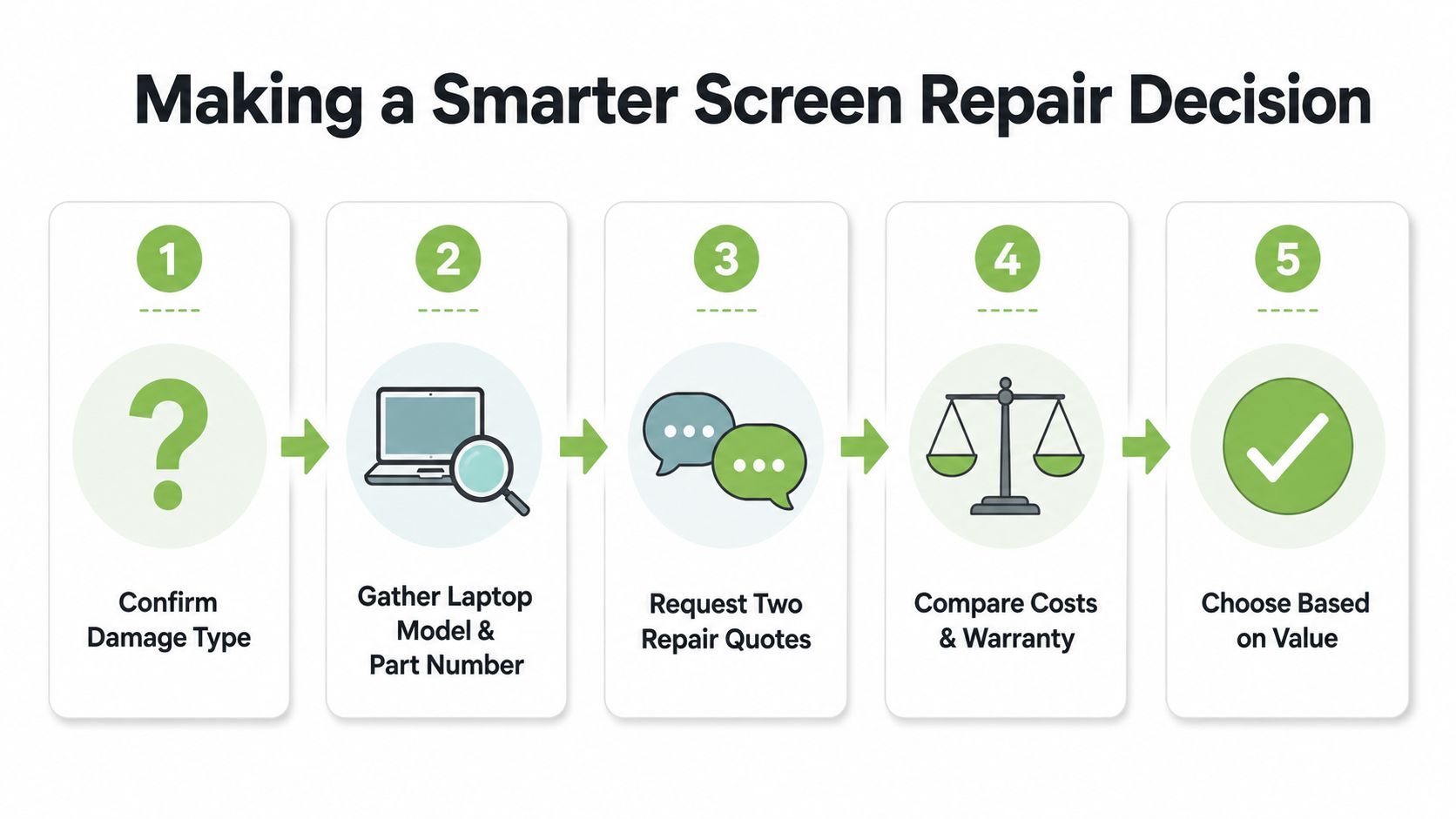
Start by identifying the damage. Is the image cracked, flickering, dim, black in one area or completely absent? Connect an external monitor if possible. If the external display works, the fault is more likely to involve the laptop display assembly, cable or hinge rather than the entire computer.
Next, record the exact model number and panel information. Take clear photos of the damage, hinge and bezel, then ask for two itemised quotations that separate parts, labour, diagnosis and warranty. Don't compare a basic aftermarket LCD against an original touchscreen assembly as though they're equivalent.
Use this checklist before approving the job:
- Confirm the damage type: Separate panel damage from hinge, cable or motherboard symptoms.
- Gather the laptop model and part number: Match resolution, connector, refresh rate and touch capability.
- Request two repair quotes: Ask each provider to list all charges and expected turnaround.
- Compare cost and warranty: Check panel quality, workmanship cover, exclusions and return procedures.
- Choose based on value: Include remaining lifespan, downtime, data continuity, trade-in value and responsible recycling.
myhalo's lifecycle approach includes Certified ReLoved devices, Certified Surplus products, RescueAdvise, the mylo AI Assistant, transparent device grading and battery health disclosure. Its quality process includes 30-point checks and operates under ISO 9001 and ISO 27001 certifications. Use those details as comparison points when evaluating a repair, refurbished replacement or recycling route, rather than treating the lowest screen price as the complete answer.
The right decision extends reliable device life while protecting your budget. Get the workmanship, part specification and warranty in writing, then choose repair, reuse or recycling based on the laptop's total value.
If your laptop screen is damaged, visit myhalo to compare repair support, graded Certified ReLoved and Certified Surplus devices, trade-in options and responsible lifecycle choices. Share the exact model and damage details so you can make a cost-aware decision instead of committing to an incomplete advertised price.