





IMEI Number Verification: How to Check Any Device Safely
You're about to buy a used phone in Singapore. The screen looks clean, the seller says the battery is “still good”, and the price feels fair enough to move fast. That's exactly when IMEI number verification matters most, because the device can look perfect and still carry a hidden problem that only shows up when you check the identity behind it.
A lot of buyers stop at the surface. They test the camera, inspect the casing, maybe open Settings once, then assume the deal is safe. In practice, the IMEI is the piece that tells you whether the handset can be traced through ownership, theft-report, and blocking workflows, and in Singapore that matters because the official process for a lost or stolen phone asks for the police report, the purchase invoice, and the 15-digit IMEI before the IMEI-block request goes through. Official guidance also lets you retrieve the IMEI with *#06# or send KYM <15 digit IMEI number> to 14422 in the verification service (official IMEI blocking guidance).
Table of Contents
- Why IMEI Number Verification Matters Before You Buy
- How to Find and Cross-Reference Your Device IMEI
- Understanding the Difference Between Valid and Verified
- Running Complete Verification Checks on Any Device
- Red Flags and Common Scams to Watch For
- Buying Used Devices with Confidence Through Certified Verification
Why IMEI Number Verification Matters Before You Buy
A buyer meets a private seller at a coffee shop in Bugis, checks the casing, sees a bright display, and hears the familiar line, “It's all clean.” The phone may still be a trap. A blacklisted IMEI, a hidden carrier lock, or a cloned identifier can turn a bargain into a device that won't behave the way the seller promised.
The IMEI is the device's identity layer
An IMEI is a 15-digit identifier, built as 14 digits plus a check digit, and it exists so devices can be recognised consistently across carrier and verification systems (IMEI format overview). That is why the number matters in Singapore's anti-theft and blocking workflows, not just in a spec sheet. When ownership is disputed, the number links the handset to the evidence trail the user must show, including the police report and invoice (official IMEI blocking guidance).
Practical rule: if a seller gets defensive about the IMEI before you've even agreed on the sale, treat that as a warning sign, not a personality quirk.
IMEI verification does one job well, it tells you whether the identifier is structurally sound and, in broader checks, whether the device appears safe to activate. What it cannot do on its own is prove the phone is physically genuine, carrier-free, or free from hidden status problems. That is why a valid phone listing can still hide a device that is stolen, swapped, or blocked.
For second-hand buyers, that distinction is the difference between a quick purchase and an expensive mistake. It's especially relevant when shopping from marketplace listings, private sellers, or informal refurbishers, because the seller's words are not a substitute for a documented check. If you want a useful buying checklist alongside this topic, myhalo has a practical guide on things to look out for before buying a refurbished phone.
How to Find and Cross-Reference Your Device IMEI
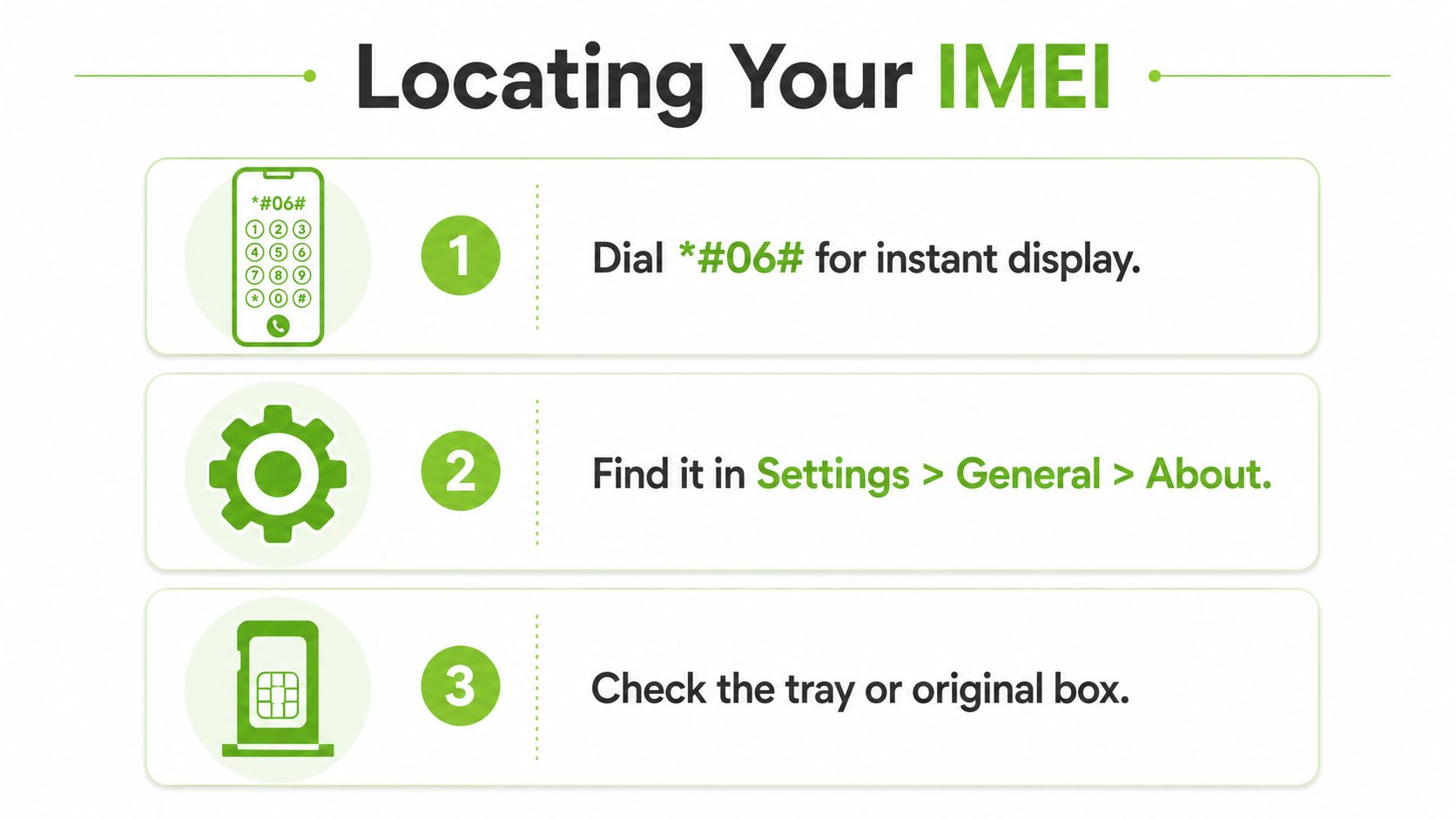
Start with the fastest method. On almost any phone, open the dialler and enter *#06#. The IMEI appears on screen immediately, and official guidance in Singapore points to that same lookup path as part of the verification service (official IMEI blocking guidance).
Pull the number from at least two places
Finding the IMEI once is not enough. Use the dialler, then compare it with the device settings, the SIM tray, and the original box label if you still have it. On iPhone, the path is usually Settings > General > About. On Android, it is often under Settings > About phone or Status, depending on the brand and software version.
The reason for cross-referencing is simple. If the number in Settings matches the box but not the SIM tray, something changed. That could be a replaced tray, a refurbishment that swapped components, or a clone attempt. A matching set of identifiers does not guarantee the phone is clean, but mismatches are hard to ignore.
- Dialler check: enter *#06# first because it's quick and avoids buried menus.
- Settings check: compare the displayed IMEI against the dialler result, not against memory.
- SIM tray or body engraving: use this as a physical reference, especially on second-hand devices.
- Original box label: useful when the seller still has it, but only if it matches the handset itself.
Dual-SIM devices need extra care. Some phones have two IMEI numbers, and verification sources note that IMEI 1 is usually the primary number used for blacklist or lock-status checks (dual IMEI guidance). If a buyer runs the wrong identifier, the result can look reassuring while the actual line the network cares about tells a different story.
A clean cross-check is not about being paranoid. It's about catching the small mismatches that sellers who rush the sale hope you won't notice.
For practical buying workflows, a reliable seller should let you confirm the number on the device itself before money changes hands. If they only send screenshots, you're not verifying the phone, you're verifying a file.
Understanding the Difference Between Valid and Verified
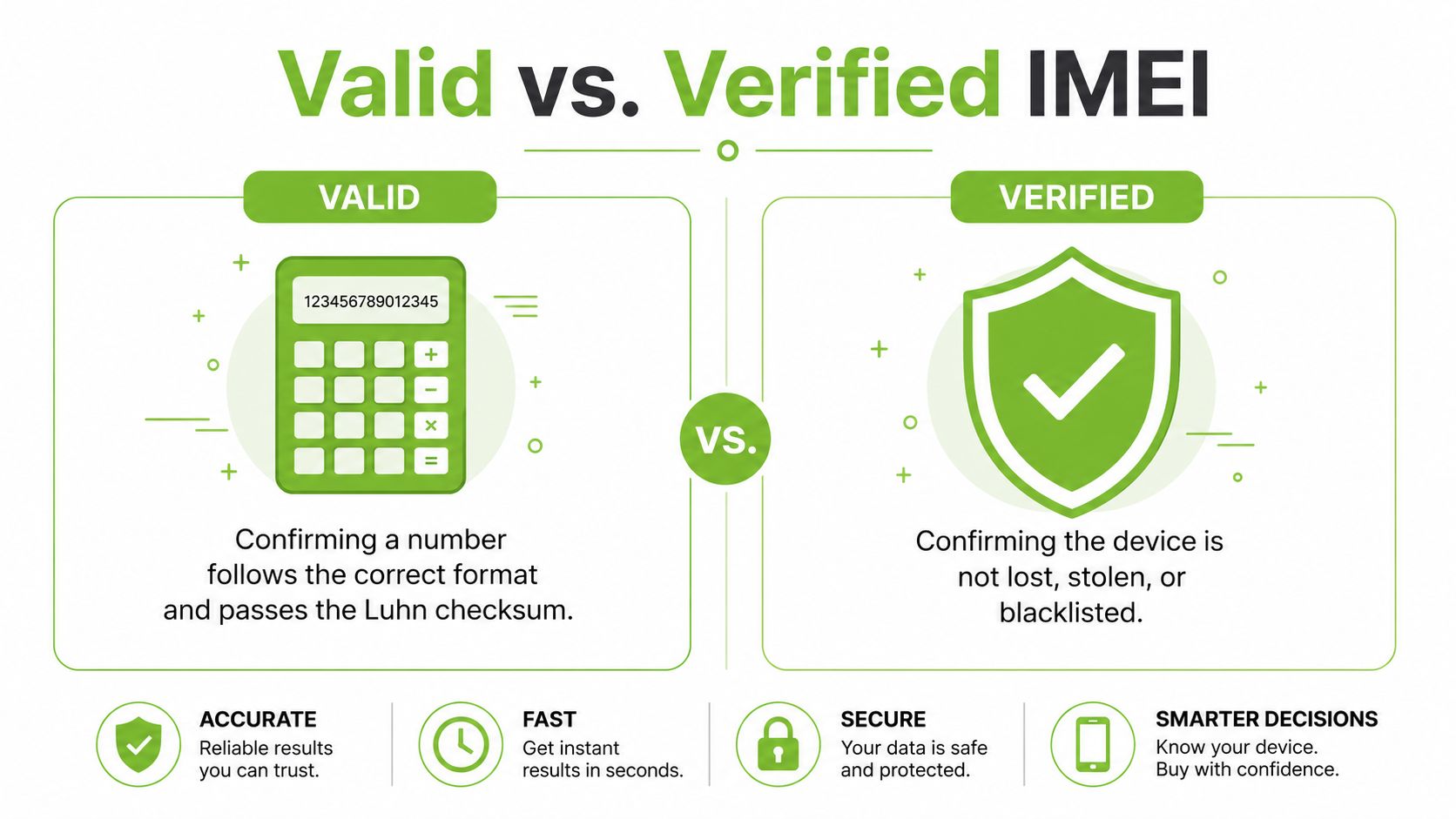
A buyer can run an online checker, see a pass result, and still end up with a risky phone. The Luhn mod-10 checksum only confirms that the digits follow the expected mathematical pattern. It does not tell you whether the handset is lost, stolen, blacklisted, or tied to a problem account (checksum method).
Valid format is not the same as safe status
A clearer way to frame this distinction is that valid means the number passes the structural test. Verified means the device also clears the practical status checks that matter before a purchase. A phone can pass the checksum and still be one you should leave behind.
That gap matters because basic validation cannot tell you whether the handset has been reported, blocked, or otherwise flagged. It also cannot tell you whether a seller copied the IMEI from another unit. The safer workflow starts by normalising the input, stripping spaces, hyphens, and dots, then checking that the number is really 15 digits before you run any checksum test (validation workflow notes).
Practical rule: treat checksum validation like spelling, not truth. It confirms the number is written correctly, not that the device is clean.
The confusion around IMEI and IMEISV causes avoidable mistakes too. Some tools note that 16-digit IMEISV values should not be judged with the same IMEI checksum rule, so copying the wrong string into a checker can give nonsense results. That is one reason I tell buyers to verify the number directly from the handset, then match the exact identifier the tool expects.
A similar split shows up in other identity checks. HarvestMyData's email validation tips make the same point, format validation alone is not enough if you still need to know whether the address is usable in practice. IMEI checks work the same way, and the practical lesson is to confirm the device itself before you trust any result. For warranty and ownership follow-up, a Singapore HP warranty check guide can also help you line up the handset record with what the seller claims.
Running Complete Verification Checks on Any Device
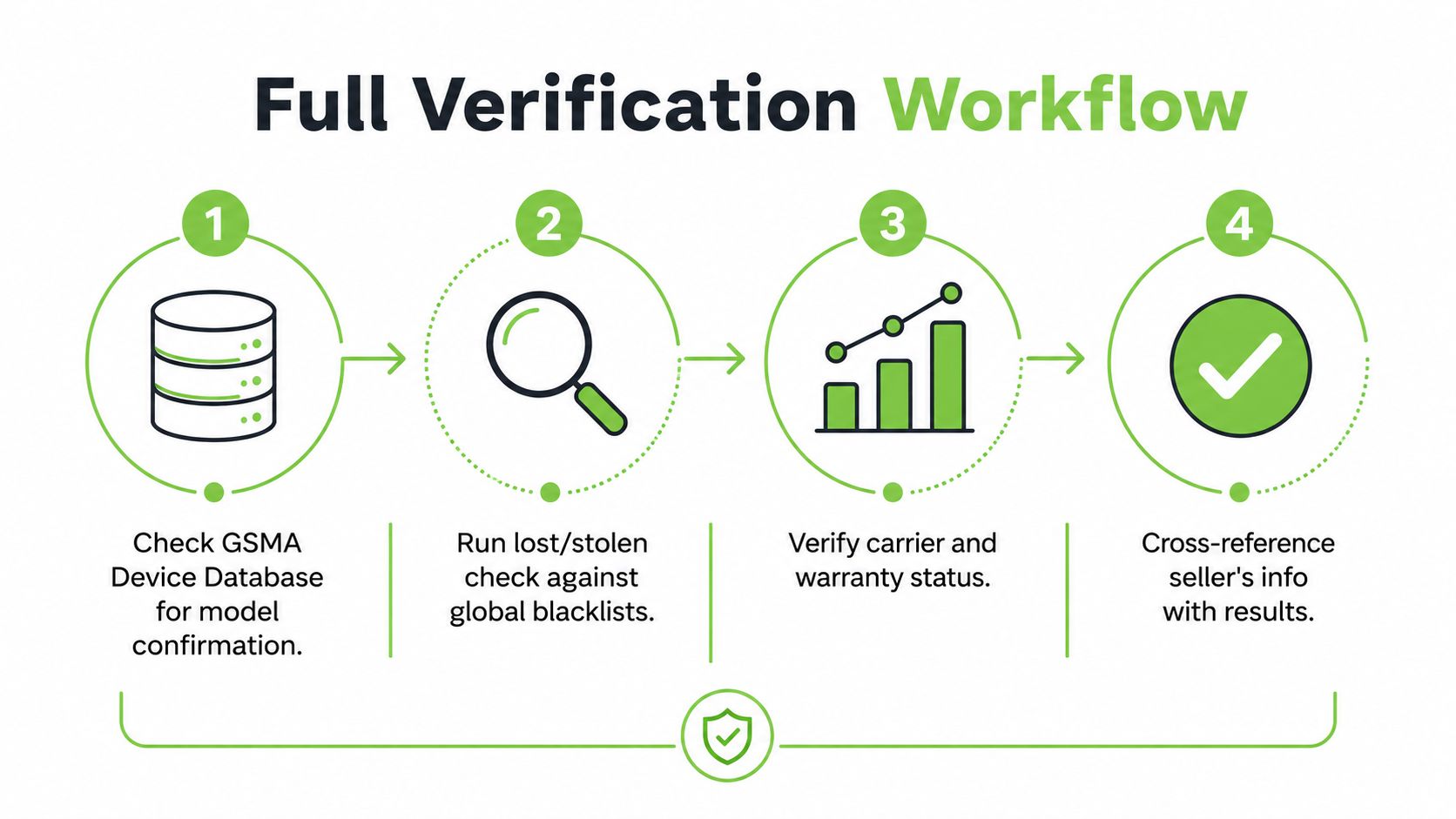
A proper check does not stop at one result screen. Start by confirming the device model and manufacturer through a device database, then move to carrier lock status, stolen-device lists, and warranty status. Each result answers a different question, and together they tell you whether the phone is worth buying.
Build the check in layers
Use the IMEI to confirm the device identity first, then look for network and ownership problems. In Singapore, the most practical route is to combine the phone's own identifier with the available status checks and the seller's documents. If the seller can't produce the purchase invoice or hesitates when you ask for the IMEI, that's already useful information.
A good workflow looks like this:
- Confirm the device identity. Make sure the model details line up with what the seller claims.
- Check for blacklist or stolen status. If a device appears on a stolen registry or blocked list, stop there.
- Review carrier and warranty status. A device may be genuine but still have restrictions, coverage gaps, or a hidden history.
- Match the paperwork to the handset. The invoice, device model, and IMEI should tell the same story.
For Singapore-specific situations, the official path still matters. Users are told to report a theft, keep the police report, and submit the purchase invoice before asking for an IMEI block, which means the document trail is part of the system, not an optional extra (official IMEI blocking guidance). If the seller refuses to show the original invoice, you're taking on more risk than the price suggests.
If the status check and the seller story don't agree, trust the status check.
Warranty matters too, because a phone can be clean on the network side and still be a poor ownership decision if support coverage is unclear. myhalo has a focused guide on HP warranty check in Singapore that reflects the same principle, verify the actual status before you rely on verbal claims. The same mindset applies to phones, especially when you're deciding whether a device is a sensible buy for work or resale.
For teams and buyers who want a broader acquisition workflow, AutoProv's smarter acquisitions with AutoProv resource is a useful comparison point because it frames device checks as a due-diligence step, not a sales step. That's the right mindset for any second-hand purchase.
Red Flags and Common Scams to Watch For
The easiest scam to miss is the polite one. A seller sends a screenshot of an IMEI check, says the phone is “fully fine”, and asks you to pay before meeting. That screenshot proves almost nothing if you can't confirm the handset in your hand is the same device shown in the image.
Watch for mismatched identifiers
IMEI cloning is a real concern because a stolen handset can be made to display a clean device's identifier. That's why comparing the IMEI across the dialler, Settings, SIM tray, and device body matters. If one location is different, don't negotiate around it, just stop.
Common red flags show up in predictable ways:
- Screenshot-only proof: a screenshot can be edited, cropped, or copied from another phone.
- Box mismatch: if the box IMEI and device IMEI do not match, the seller needs a stronger explanation than “factory change”.
- Refusal to let you check on-site: a seller who won't let you dial *#06# in front of them is asking you to trust them more than the device.
- Rushed meeting behaviour: when the seller wants a fast handover, they're often counting on you skipping the hard checks.
For refurbished or resale devices in Singapore, a single software check falls short. A tampered phone can still look pristine on the outside, and a clean-looking screen won't tell you whether the internals were swapped. That's why multi-point verification is not a luxury, it's basic due diligence.
The right response is calm and specific. Ask, “Can I confirm the IMEI on the phone itself and compare it with the box?” If the seller says yes, you're already in better territory. If they dodge the request, you've learned enough to walk away without drama.
A clean seller usually welcomes a check. A risky seller negotiates against it.
The local market rewards speed, but your money is safer when you insist on verification first. That applies whether you're buying from an individual seller, a small refurbisher, or a listing that looks professionally written.
Buying Used Devices with Confidence Through Certified Verification
If you check phones yourself, you already understand the value of a repeatable process. The next step is deciding how much uncertainty you want to carry. A certified refurbishment workflow reduces the guesswork because it checks the device before it reaches you, instead of asking you to uncover problems after the fact.
Certified checks change the buying experience
myhalo positions its devices as part of a broader technology lifecycle, not just a resale shelf. Its Certified ReLoved and Certified Surplus devices go through 30-point quality checks under an ISO 9001 Certified process, with transparent device grading and battery health disclosure built into the buying decision. That matters because a buyer is not just paying for hardware, they're paying for clarity.
When a device is checked, graded, and documented, the purchase becomes easier to assess against your own risk tolerance. That is useful for consumers who want a dependable personal phone, and for SMEs that need predictable replacement cycles without wasting budget on avoidable returns. It also supports smarter reuse, which is good business sense because a longer-lived device is usually a better use of capital than a rushed replacement.
The practical choice is simple. If you want to inspect every detail yourself, use the IMEI workflow above and insist on cross-checking the handset in person. If you want a more controlled route, look for certified pre-owned options that have already gone through structured checks and clear grading.
For buyers comparing second-hand iPhones specifically, myhalo also has a helpful guide on buying a second-hand iPhone in Singapore, which fits the same decision pattern. The point is not to skip verification. The point is to place it where it belongs, either in your own hands or in a certified process you can trust.
If you want a safer way to buy your next phone, visit myhalo to compare Certified ReLoved and Certified Surplus devices with transparent grading and battery health disclosure. You can also use the same IMEI checks discussed here, then choose a device that fits your budget without guessing about its status.