





Your 2026 Hard Disk Portable Guide for Singaporean Users
Your laptop says storage is full. Your phone is offloading photos to the cloud. A work folder is too large to email, and someone at home still wants a copy of the family videos. That's the moment many people start searching for a hard disk portable option.
In Singapore, that need cuts across students, freelancers, growing SMEs, and families who don't want to lose important files. A portable drive is often the most practical middle ground. It gives you more space without replacing your laptop, and it can travel between home, office, school, and client meetings with very little effort.
The smarter question isn't just “Which drive is fastest?” It's “Which drive will serve me well over time?” That means thinking about capacity, durability, recovery options, and what happens when the device eventually reaches end of life.
Table of Contents
Why You Need a Portable Hard Disk in Singapore
A portable hard disk solves a very local, very common problem. People in Singapore often work across multiple places in one day. You might start in school, continue on the MRT, finish at a co-working space, then head home and still need your files. Cloud storage helps, but it depends on bandwidth, subscriptions, and account management. A physical drive gives you direct access when you need it.
For families, the use case is even simpler. Photos, scanned documents, school projects, tax files, and videos accumulate gradually until a laptop slows down or a phone refuses another upload. Instead of replacing a still-usable device too early, adding external storage can extend its useful life. That's often the more practical and lower-waste move.
Practical rule: If your device still works well but keeps running out of space, extra storage is usually a better first step than a full device upgrade.
The demand for storage in Singapore reflects that everyday reality. The local hard disk drive market is projected to grow at a 7.3% CAGR from 2025 to 2034, with a market size of USD 49,681.5 million in 2025 and a forecast of USD 92,555.42 million by 2034, according to Future Market Insights on Singapore's hard disk drive market. That doesn't just describe a technology category. It shows how strongly people and businesses still rely on practical storage tools.
A portable drive also helps you stretch the life of your main computer. If you're comparing whether to upgrade your laptop or manage storage more strategically first, this guide on affordable laptops in Singapore can help you think through the trade-off.
HDD vs SSD The First Big Decision
The first choice is between an HDD and an SSD. People often get stuck here because product listings throw around terms without explaining what they mean in daily use.
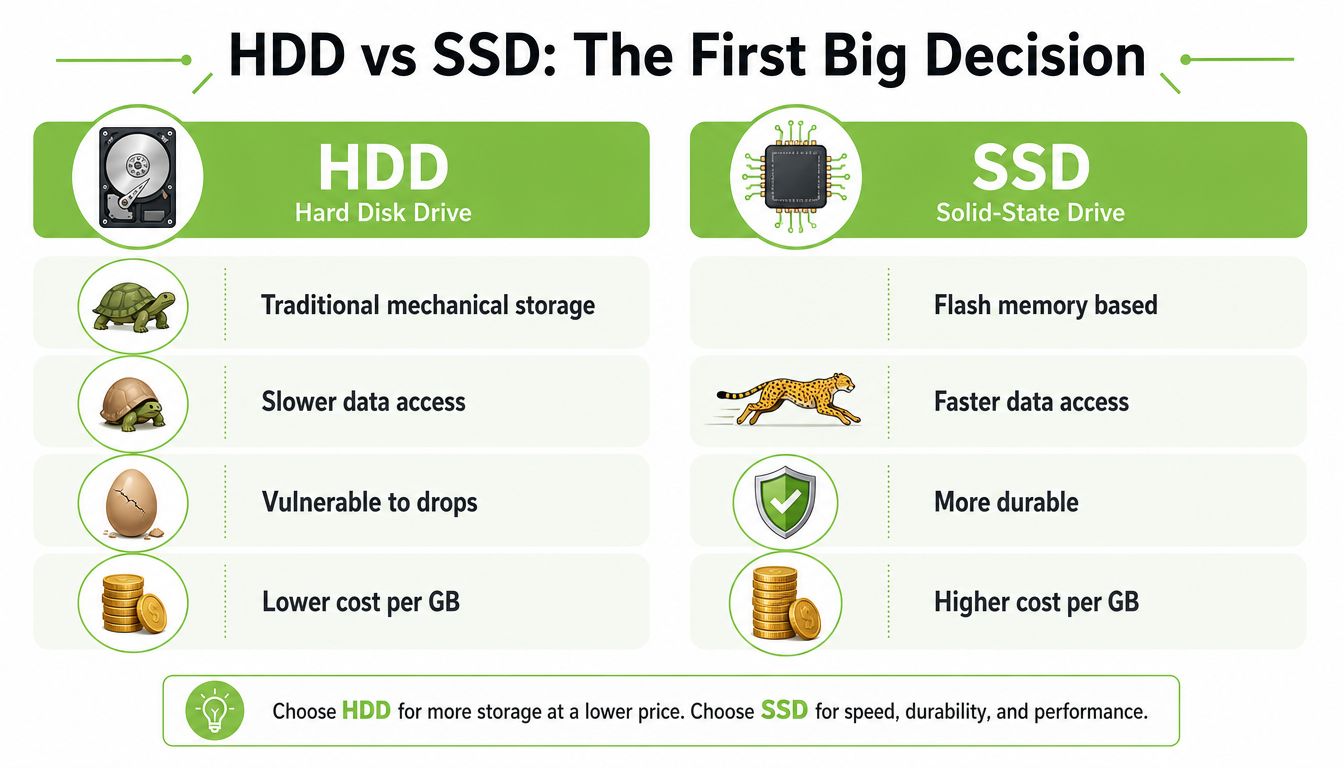
An HDD is mechanical storage. Inside, there are moving parts. A simple way to think about it is a library shelf with a moving arm that goes and finds the file. An SSD has no spinning disk. It behaves more like a set of instant-access digital drawers.
What changes in real use
The difference shows up in the jobs you do.
If you mainly need to store a lot of files cheaply, an HDD usually makes more sense. It's well suited for photo archives, document backups, old projects, and media libraries. If you need to move files fast and work directly off the drive, an SSD usually feels better. Video editors, designers, and anyone handling large active files often notice the improvement immediately.
Here's a simple comparison:
| Factor | HDD | SSD |
|---|---|---|
| Storage style | Mechanical | Flash memory |
| Best for | Bulk storage, backups | Speed, active work files |
| Drop resistance | More vulnerable | More resilient |
| Cost per GB | Usually lower | Usually higher |
That last row matters more than people think. Many buyers chase speed, then realise they didn't need it for their use case.
When an HDD is the better fit
Choose an HDD if your priority is space and value.
- Family backup use: You want one place for photos, videos, and document archives.
- Student storage: You need lecture recordings, assignment folders, and design files without paying a premium for speed.
- SME archive use: You want offline copies of records, exports, and media assets.
Portable HDDs remain a major part of the market. According to the verified market data included earlier, portable HDDs lead the global drive type market with a strong share, which matches what many users still value most: practical capacity and portability over headline performance.
A slower drive isn't a bad drive if the job is long-term storage.
When an SSD is worth the extra spend
Choose an SSD if delays cost you time.
Typical examples include editing video directly from the drive, moving large folders often, or carrying data between meetings where you don't want to wait for file copies to finish. If that sounds like your workflow, a faster external option such as this Transcend 1TB PCIe Gen3 x4 M.2 NVMe SSD shows the kind of product category to look at.
A sensible decision rule
If you're unsure, ask one question: Will this drive mostly store finished files, or will I work from it every day?
If it stores finished files, start with HDD. If it supports active work, shortlist SSD. That one distinction clears up most buying confusion.
Understanding Key Drive Specifications
Once you've picked HDD or SSD, the product page still throws a lot at you. Capacity, interface, ports, thickness, file system support. None of that is hard once you translate it into ordinary use.
Capacity is your digital garage
Capacity tells you how much digital stuff your drive can hold. Think of it as garage size. A small garage fits the essentials. A larger one lets you keep the extras without rearranging everything every week.
In Singapore, external HDDs commonly range from 500GB to 6TB, and mainstream portable external drives can go up to 6TB, based on the verified Lenovo and historical HDD market data. That means most users can choose according to actual habits rather than buying the highest number on the shelf.
A practical way to choose:
- Light use: Documents, spreadsheets, some photos.
- Mixed personal use: Phone backups, family media, school files.
- Heavy use: Video footage, design assets, large project folders, offline archives.
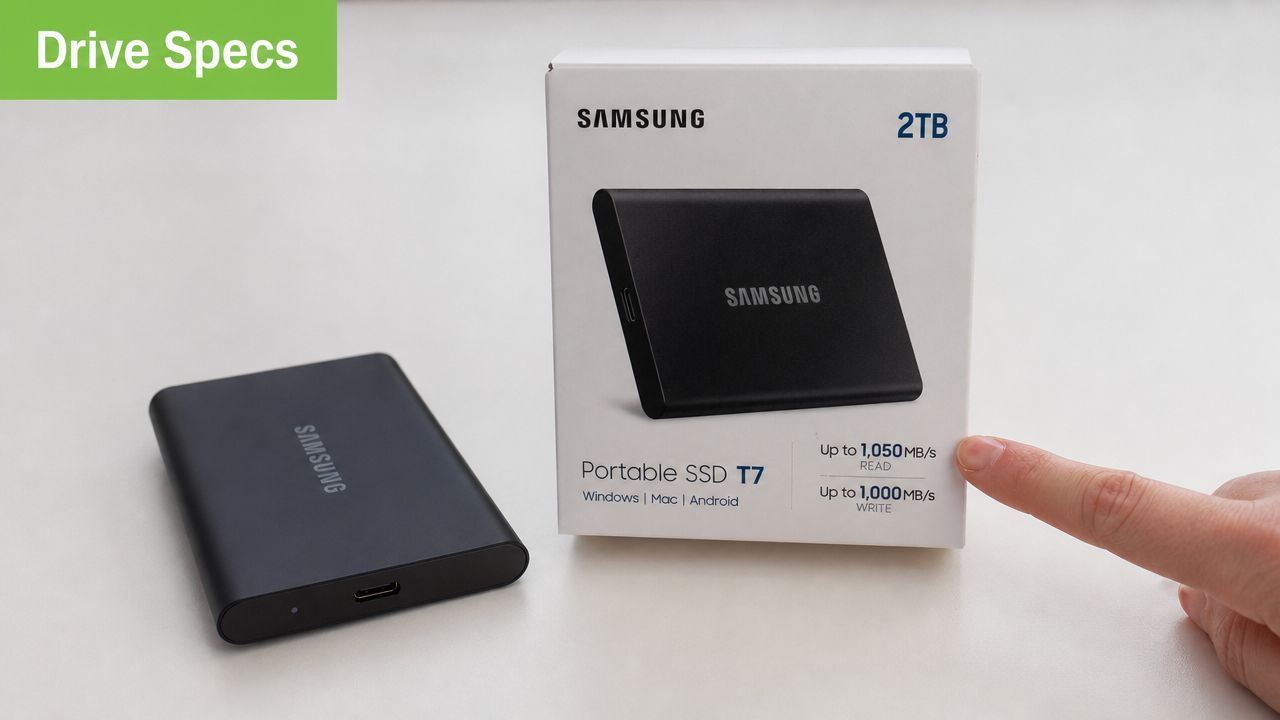
Portable drives also keep getting easier to carry. The Adata HV620S offers up to 4TB in a body that's 11.5mm thick, with a SATA III interface supporting up to 6Gbps, according to Adata's Singapore product listing for the HV620S. That's a good example of what “portable” now means in practice. You're no longer choosing between mobility and meaningful capacity.
If you're also trying to understand how removable storage differs across formats, this guide to memory cards and micro SD cards helps clarify when a card is enough and when a proper external drive is the better tool.
Speed matters differently for different jobs
Speed only matters when it affects your routine.
If you back up files overnight once a week, ultra-fast transfer rates won't change much. If you copy large project folders every day, they matter a lot. This is why many people overspend. They buy based on benchmark language instead of task fit.
A better way to think about speed is by activity:
- Backup and archive work: Moderate speed is usually fine.
- Frequent transfer work: Faster drives save time.
- Editing from the drive: Higher sustained speed matters more.
This video gives a helpful visual explanation of what different external storage specs mean in actual use.
Ports and compatibility decide daily convenience
A drive can be technically good and still annoy you every day if the connector doesn't suit your devices.
Check the port on your laptop first. USB-A is the traditional rectangular plug. USB-C is smaller and more common on newer laptops and tablets. If your devices use different ports, you may need an adapter or a cable with the right ends. That isn't a deal-breaker, but it's worth deciding before purchase.
The file system also matters more than many buyers expect. External HDDs commonly support FAT or NTFS formats for compatibility across Windows and Mac environments, based on the verified Lenovo glossary data. If you switch between office PCs and personal Macs, that small line on the product page matters.
Choose the drive that fits your devices and habits, not the one with the most impressive label.
Protecting Your Data with Encryption and Backups
Buying a drive without a protection plan for your files is only half a decision. Drives store things that matter. Family records, client work, scanned contracts, payroll exports, school submissions. If the drive is lost, stolen, or corrupted, the problem isn't the hardware. It's the missing data.
Encryption in plain language
Encryption means locking your files so other people can't open them without the proper password or key. If someone finds your portable drive in a taxi or takes it from a bag, encryption can stop casual access to the contents.
For personal users, encryption makes sense if the drive contains identification records, financial paperwork, or private photos. For SMEs, it's even more important when staff carry customer data, internal reports, or contract files outside the office.
You don't need to make this complicated. Start with these basics:
- Use a password-protected encrypted volume: Many operating systems already include tools for this.
- Separate work and personal folders: It reduces accidental sharing.
- Store the password safely: If you forget it, encryption can lock you out too.
A simple backup habit that reduces panic
A portable hard disk is useful, but one copy is still one point of failure. A straightforward rule many people use is the 3-2-1 backup approach. Keep multiple copies of important data, on more than one type of storage, with one copy kept elsewhere.
For a small business, that might mean:
- the working copy on a laptop,
- a copy on a portable drive,
- and another copy in a separate location or secure cloud account.
For households, it could be your phone, your external drive, and one additional backup for irreplaceable photos and documents.
If you handle records for work, storage discipline matters alongside legal retention. This guide on how long to keep business records UK is useful for understanding why file retention rules shape how you organise and protect archives, even if your operating context differs.
Backups are less about technology and more about routine. The people who avoid data loss usually follow a habit, not a gadget trend.
How to Choose a Drive the myhalo Way
A sensible storage decision isn't only about brand new versus old technology. It's also about whether the drive fits your workload, your budget, and your replacement cycle.
Think beyond sealed box buying
Many people still assume the safest choice is always a brand-new device. Sometimes that's right. Sometimes it isn't.
A portable drive can be a practical candidate for a more circular buying approach if the condition is assessed properly and the seller is transparent about grading and checks. That's where Certified ReLoved and Certified Surplus options become useful. They let buyers focus on function, expected condition, and long-term value rather than paying automatically for the newest packaging.
That matters because external portable hard drives typically last five years or more with regular use, and prices can start from around S$50 for budget models and go higher for professional-grade options, according to Lenovo's glossary on external hard drives. If a device category already has a meaningful working lifespan, buying more carefully can be smarter than buying more expensively.
What quality checks should tell you
For refurbished or surplus tech, the buying question should be simple: What was checked, and how clearly is the condition disclosed?
Look for these signals:
- Transparent grading: You should know whether the unit is closer to premium cosmetic condition or shows visible wear.
- Documented testing: A proper checklist is more useful than vague reassurance.
- Clear battery or health disclosure where relevant: Buyers need the facts, not marketing blur.
- After-sales support options: Help matters when data and compatibility are involved.
This is also where a lifecycle partner is more useful than a seller that only moves boxes. myhalo handles Certified ReLoved, Certified Surplus, 30-point quality checks, and works under ISO 9001 Certified and ISO 27001 Certified processes, with transparent grading and battery health disclosure across relevant device categories. That approach doesn't remove all risk from technology. It does give buyers a more structured basis for deciding.
A better buying lens
Use this shortlist before you decide:
| Question | Why it matters |
|---|---|
| Will I archive or actively work from this drive? | It separates HDD needs from SSD needs. |
| Do I need cosmetic perfection or reliable function? | It helps you avoid paying for appearance you don't need. |
| Is support available if something goes wrong? | Storage issues are stressful. Clear support reduces downtime. |
A thoughtful purchase is usually the one that keeps a device useful for longer, not the one that looks most impressive on day one.
Troubleshooting Common Portable Drive Problems
A portable drive problem usually starts with a small moment of panic. You plug it in. Nothing appears. The folder you need is suddenly out of reach.
The first response should be calm, not aggressive troubleshooting. One major gap in Singapore is the lack of accessible, budget-friendly recovery guidance for people who prefer a practical DIY-first approach, especially those using second-gen or refurbished devices, as noted by Data Savers Singapore's discussion of local recovery needs. That's why the first steps matter. You want to avoid making the situation worse.
Start with the simple checks
Begin with the commonly skipped things.
- Change the cable first. Cables fail more often than people think.
- Try another USB port. A healthy drive can still fail to mount through a problematic port.
- Use a second computer. This helps separate a drive problem from a computer setting issue.
If the drive still doesn't appear, check whether the system can see it even if File Explorer or Finder doesn't show it.
- On Windows: open Disk Management.
- On macOS: open Disk Utility.
If the drive appears there, the issue may be formatting, drive letter assignment, or mount status rather than total hardware failure.
If the drive is making unusual clicking sounds, stop using it. Continued power cycles can make recovery harder.
Know when to stop and protect the data
Some actions are safe. Some are risky.
Safe early steps include checking another cable, another port, another machine, and system utilities. Riskier steps include repeated reconnecting after odd noises, random formatting, or running repair tools without understanding whether the problem is logical or physical.
A practical response guide looks like this:
- Drive not detected, no sound issues: Continue with software checks carefully.
- Drive detected but folders won't open: Copy whatever accessible files you can first.
- Drive clicks, disconnects repeatedly, or gets very hot: Stop and avoid further stress.
- Business-critical files involved: Prioritise data preservation over experimentation.
For users who need a guided next step, RescueAdvise and the mylo AI Assistant can help frame the problem in plain language before you decide whether to proceed with local checks, professional recovery, or replacement. That kind of support is especially helpful when you're trying to balance cost, urgency, and the value of the missing data.
The Sustainable Lifecycle of Your Portable Drive
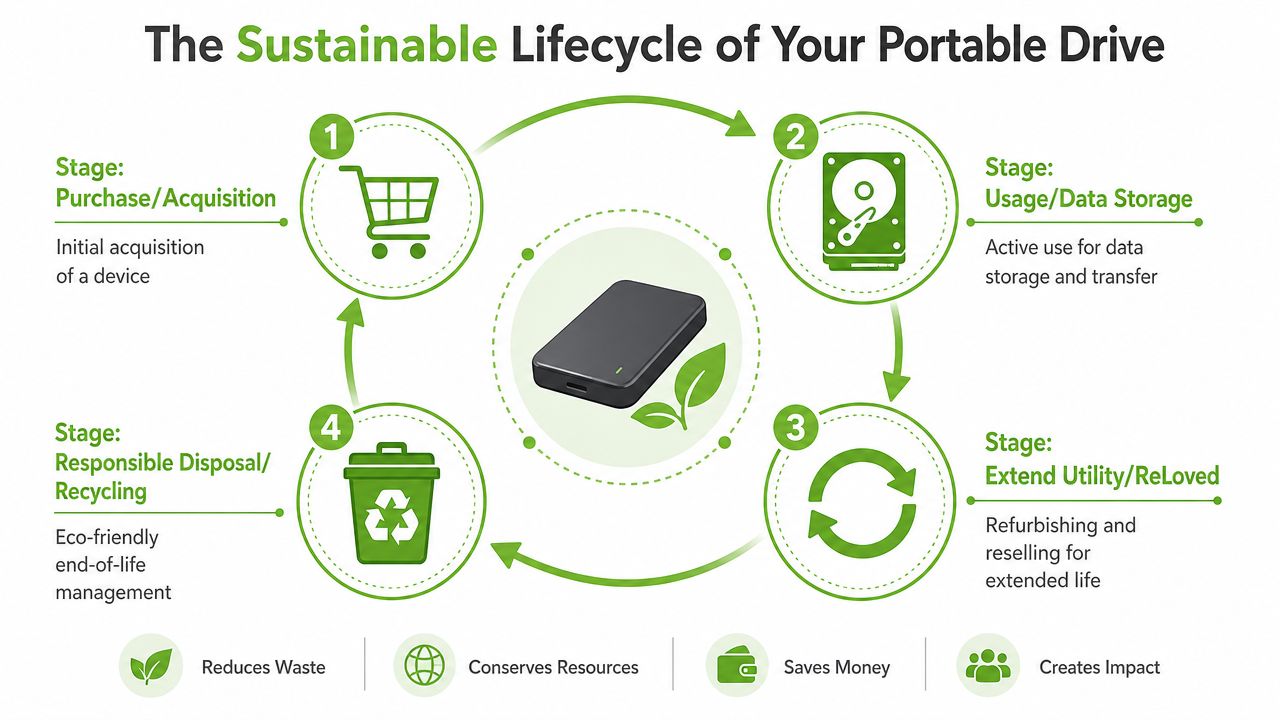
A portable drive has a lifecycle, not just a purchase date. It enters your setup, stores your work, supports upgrades, and eventually reaches a point where it should be repurposed, refurbished, or recycled.
That broader view matters in Singapore because electronic waste is a resource issue as much as a disposal issue. The country generates about 60,000 tonnes of e-waste annually, and only about 6 per cent is officially recycled, according to The Straits Times coverage of global and Singapore e-waste trends. For something as common as a portable drive, extending useful life before disposal isn't just environmentally responsible. It's also better value.
Use longer before you replace
The most sustainable drive is often the one you keep useful for longer.
That can mean:
- Reassigning roles: Move an older drive from active work to archive duty.
- Improving storage habits: Clean duplicates and separate live files from long-term records.
- Choosing repair or recovery before replacement: Especially when the issue is enclosure-related rather than full media failure.
For SMEs, this approach supports continuity. For households, it cuts unnecessary spending. For both, it reduces pressure to replace hardware too quickly.
Recycle properly when the drive is finished
Eventually, some drives won't be worth keeping in service. At that point, the right move is secure disposal and formal recycling.
Before recycling:
- Back up any remaining accessible data.
- Wipe the drive if it still functions.
- Remove labels if they expose personal information.
- Bring it to an approved collection route rather than binning it with general waste.
Singapore's e-waste collection network gives people a practical route for responsible disposal, and portable drives fall naturally into that wider ICT equipment stream. That turns end-of-life handling into a normal maintenance task rather than an afterthought.
Old storage still has value, either as secondary use, recovery candidate, trade-in material, or properly processed e-waste. Throwing it away should be the last option, not the default one.
A hard disk portable choice becomes much smarter when you look at the full cycle. Buy for the intended job. Use it carefully. Troubleshoot calmly. Extend life where possible. Recycle responsibly when the device is completely done.
If you're weighing storage options and want a practical path that balances cost, reliability, support, and lifecycle value, myhalo is one place to explore portable storage alongside Certified ReLoved and Certified Surplus tech, repair support, data migration help, and responsible next-step options when a device reaches the end of its useful run.