





Gaming Laptops Under 600: Practical Buying Guide
You've got a budget, you want to game, and you don't want to throw money at a machine that looks exciting on paper but struggles the moment you open Valorant, Genshin Impact, or even a few Chrome tabs. That's the starting point for gaming laptops under 600 in Singapore, because the question isn't just “what's cheap”, it's “what makes sense for how you play, study, and carry the laptop around”.
In Singapore, that question sits inside a real gaming economy. IMDA said Singapore's games sector contributed S$1.5 billion in value added in 2023, and its Subsidy for Mobile Gaming and eSports Development launched in 2024 reflects how gaming hardware demand is tied to a growing local ecosystem (IMDA context for Singapore's games sector). For a student, first-time buyer, or SME buyer who only needs a practical entry point, budget laptops are not a compromise that automatically means disappointment. They're often the sensible way into mainstream esports and casual gaming.
A useful way to think about it is this. Sub-S$600 machines usually aren't built for luxury, fast-changing flagship hardware. They're built for value, and that often means older or refurbished models, warranty-backed ownership, and a focus on playable frame rates instead of headline specs. If you want a broader view of affordable device buying in Singapore, myhalo also keeps a useful overview on affordable laptops in Singapore (https://shop.myhalo.com.sg/blogs/blog/affordable-laptops-singapore), which helps frame the trade-offs before you shortlist models.
If you're comparing a budget gaming machine with a general-purpose laptop, a normal review can help you notice what's missing as much as what's present. A detailed evaluation like the Dell Inspiron evaluation for buyers (https://monrocloud.com/laptop-reviews/laptop-review-dell-inspiron/) is a good example of how to read beyond the glossy product title and focus on the parts that matter.
Table of Contents
- Entering the Budget Gaming Laptop Market
- Realistic Performance You Can Expect
- Which Specifications Deserve Your Priority
- New Versus Professionally Refurbished Units
- Upgrades and Peripheral Recommendations
- Where to Buy and Protect Your Purchase
- Inspection Checklist and Final Takeaway
Entering the Budget Gaming Laptop Market
A lot of Singapore buyers begin with the same situation. You have saved around S$600 from part-time work, you want a laptop that can handle games after class, and every listing seems to call itself “gaming” even when the internals look modest. The first trap is simple, the label matters less than the parts inside the machine.
Local buying habits also shape what this budget means in practice. In the sub-S$1,000 tier, buyers usually care about usable performance, repair support, and long-term value, so gaming laptops under 600 can be a sensible entry point for students, first-time gamers, and SMEs that only need light play after work. Singapore's gaming scene also has a real social and competitive base, with events such as the Singapore Games Association's local community activities and tournament ecosystems showing that gaming is part of an active digital culture, not a passing hobby. That is why budget machines belong in the same conversation as broader ownership decisions, including the Dell Inspiron evaluation for buyers and other refurbished or warranty-backed choices that fit a careful budget.
What this budget really buys
At this price, you are usually buying access to mainstream esports and casual play. You are not buying a machine that should be expected to push every modern title at high settings.
That distinction matters because a budget laptop can still be the right tool. If your game library leans toward lighter multiplayer titles, older games, or esports releases, a sensible configuration gives you usable performance without paying for hardware you will not fully use.
Practical rule: if your favourite titles are esports and lighter multiplayer games, a well-chosen budget laptop can serve you far better than a flashy machine with poor cooling or weak graphics.
Why refurbished options matter here
Singapore buyers in this tier often look at refurbished or older-generation units because they stretch the budget without pretending to be current flagship hardware. That matters if you want warranty-backed ownership and a lower upfront cost. It also fits a lifecycle approach, where a laptop is bought, used carefully, maintained, then repaired, reused, or traded in instead of being discarded too early. For many buyers, that mindset lines up with the myhalo affordable laptops Singapore guide and the idea that a device can still have a useful second life when it is inspected and supported properly.
Realistic Performance You Can Expect
The biggest source of disappointment in this price range is expectation mismatch. A gaming laptop under 600 is not a shortcut to max settings in every modern title. It's a way to get solid, usable performance in a range that makes sense for budget gaming, especially if you know which GPU class to look for.
The useful performance band
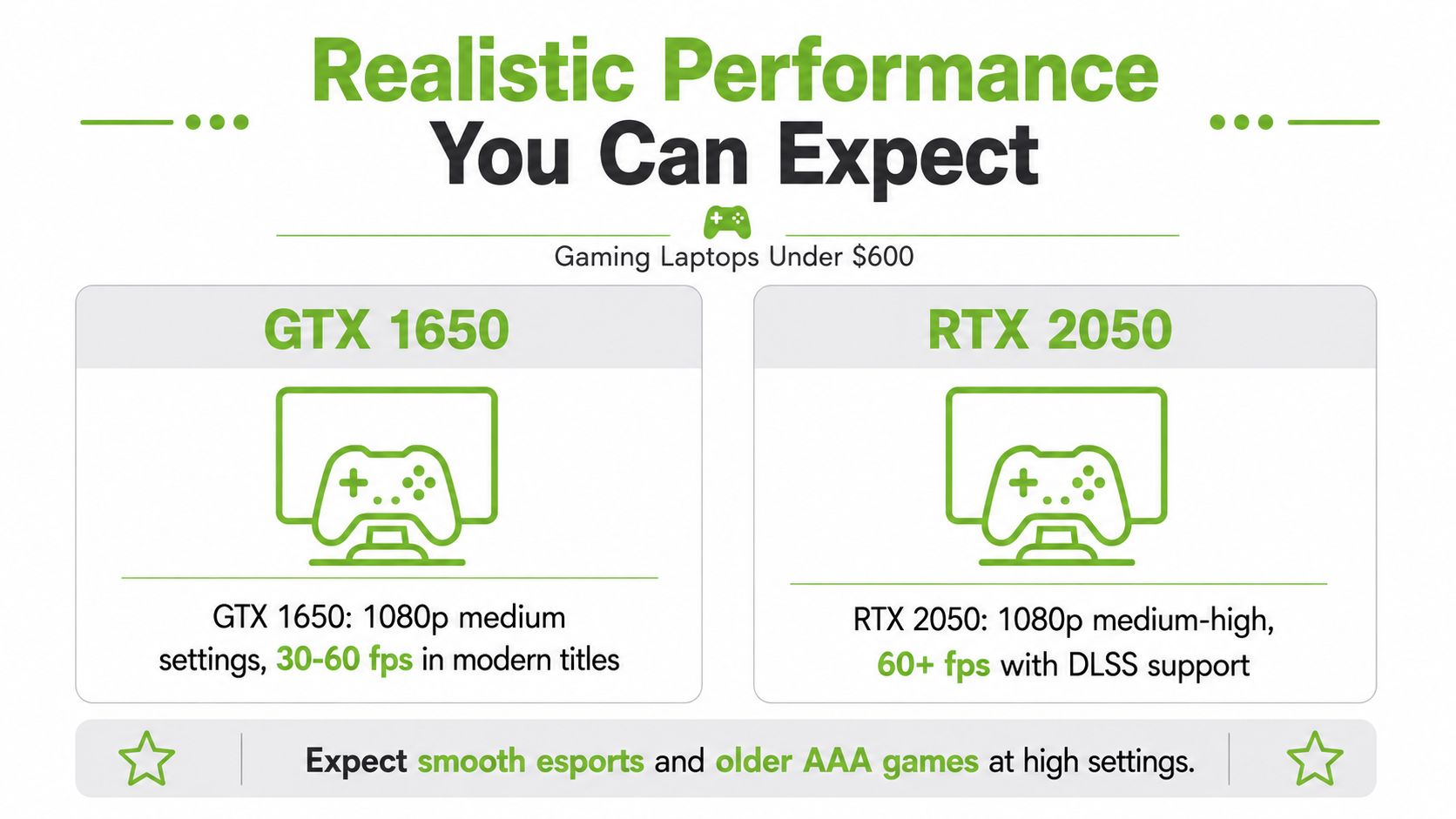
Budget guides consistently point to entry-level discrete GPUs such as GTX 1650 and RTX 2050 as the practical target in this bracket, with expected performance around 1080p at medium settings and roughly 45–60 FPS in many AAA titles, based on the verified guidance provided for this market. That's enough for a lot of everyday play, especially when your game library leans toward esports, older titles, or games that scale down cleanly (gaming-laptop guidance for sub-S$600 systems) (https://www.youtube.com/watch?v=WI9_5mCXbo8).
The useful comparison is not “can it run everything”. The question is “how well does it hold together at Full HD when the settings are adjusted sensibly”. An RTX 2050 can sit in the same general budget conversation as a GTX 1650, but the point is still the same, the GPU is doing the heavy lifting. If you only have integrated graphics, the ceiling drops fast.
Why higher-end budget gaming is a different price class
Current lower-end RTX 40-series budget gaming GPUs, like the GeForce RTX 4050 and 4060, are typically found in laptops priced around just under or just above US$1,000, not S$600. That matters because it explains why the sub-S$600 category usually means older silicon, refurbished stock, or less ambitious configurations (PCMag budget gaming laptop context) (https://www.pcmag.com/picks/the-best-cheap-gaming-laptops).
Buyer takeaway: if you want smooth esports and casual gaming, this tier can work. If you want modern AAA titles at high settings, the budget itself is the constraint, not your shopping skills.
Reading performance the right way
Think of the GPU like the engine in a small car. A better-looking dashboard doesn't make it faster on the road. The display refresh rate, battery size, and shell design may all matter, but they won't change the fact that the GPU decides how many frames your games can realistically push.
Which Specifications Deserve Your Priority
The fastest way to shop badly is to start with the screen size or the keyboard lights. Start with the graphics path instead. In this price band, the first question is simple, does the laptop have a discrete GPU or only integrated graphics? That single decision matters more than a lot of marketing copy.
Start with the graphics chip
Budget gaming guides consistently recommend discrete GPUs such as GeForce GTX 1650, RTX 2050, or RTX 3050 in entry configurations, paired with at least 8GB RAM and an NVMe SSD. The reason is straightforward. The GPU sets the frame-rate headroom, while the SSD cuts down on game-loading delays and texture-streaming stalls (budget gaming laptop spec guidance) (https://pcvenus.com/best-gaming-laptops-under-600/).
Practical rule: a 120Hz or 144Hz Full HD screen only helps after the GPU can keep up. A high-refresh panel can't create performance by itself.
Use the rest of the spec sheet as support
Once the GPU is decent, look at RAM, storage, and thermals. 8GB RAM is usually the floor, while 16GB is more comfortable for multitasking and helps keep background apps from stealing memory. An NVMe SSD is also important because it cuts the sluggishness you feel when a laptop is slow to boot or load a game.
Thermals matter too, even if they're easy to overlook. A laptop with a decent GPU can still feel slow if cooling is poor, because the system will reduce performance to keep temperatures safe. That's why thin branding, flashy keys, and a high refresh screen don't count for much if the machine can't breathe.
| Component | Minimum | Recommended |
|---|---|---|
| Graphics | Discrete GPU | GTX 1650, RTX 2050, or RTX 3050 |
| RAM | 8GB | 16GB |
| Storage | SSD | NVMe SSD |
| Display | Full HD | 120Hz or 144Hz Full HD after GPU check |
| Cooling | Basic usable cooling | Better thermal design that avoids throttling |
Put power limits in context
Budget guidance also highlights the value of higher-wattage parts, such as Ryzen 5 7535HS or Intel Core i5-12450H/13420H class chips, plus GPUs like RTX 3050 variants around 45W–65W TGP or RX 6550M around 80W TDP. The logic is simple, a GPU that can sustain boost clocks longer is usually more useful for gaming than a tiny CPU difference you'll never feel in play (power and wattage guidance for budget gaming laptops) (https://www.youtube.com/watch?v=eu4m2z_TpJM).
New Versus Professionally Refurbished Units
Many Singapore buyers hear “refurbished” and assume “risky”. That reaction makes sense if the seller is vague. It makes less sense when the device has a clear grading process, battery disclosure, and a defined warranty. A good refurbished path is not a second-rate shortcut, it's a controlled way to keep value high while spending less upfront.
The practical difference
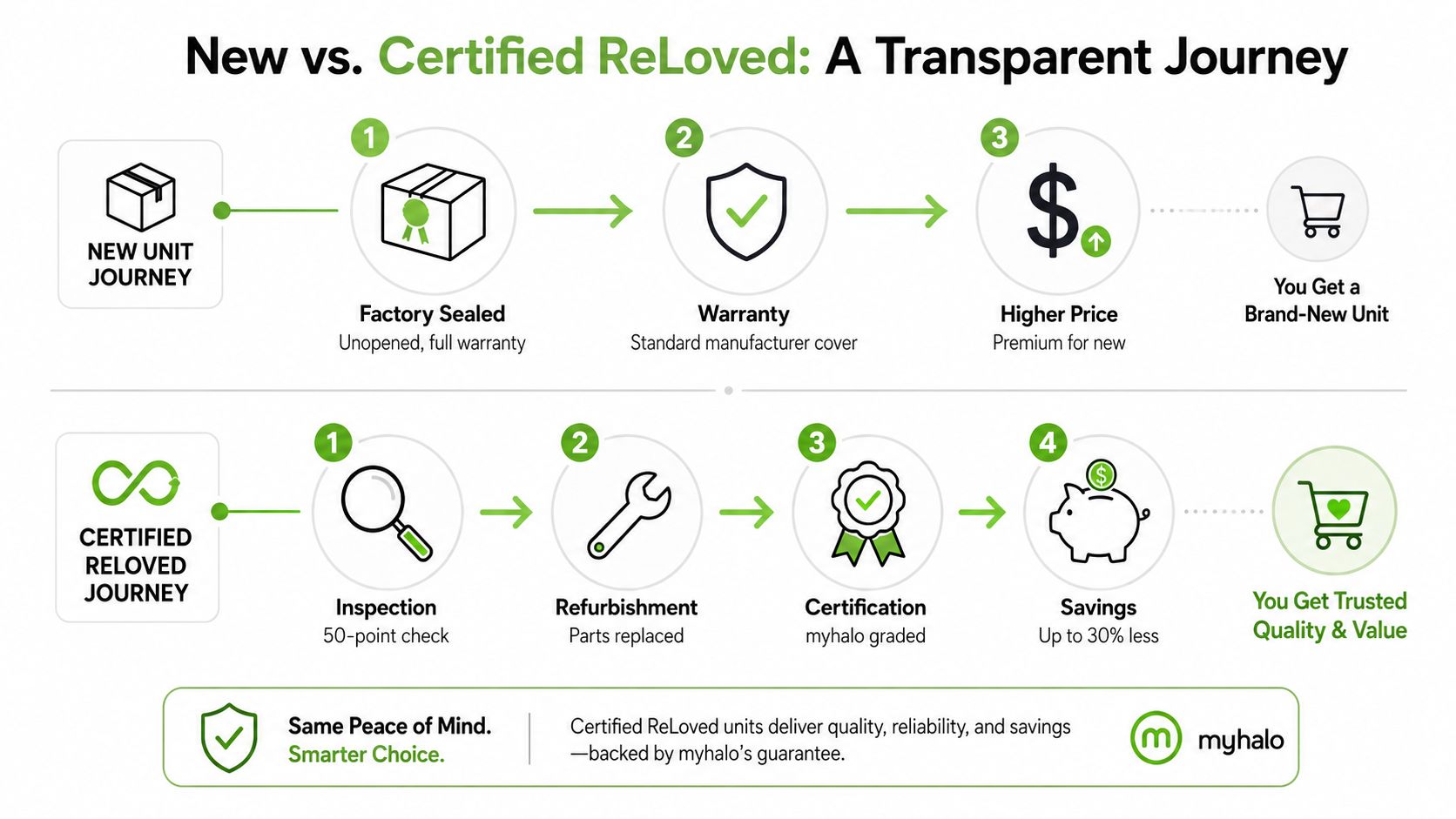
A brand-new sealed unit gives you the comfort of factory packaging and standard manufacturer coverage. A professionally refurbished device can give you a lower entry price, provided the inspection and grading process is transparent. For many buyers in this range, that's the better balance because the goal is not owning the newest laptop, it's owning one that does the job reliably.
myhalo's lifecycle model is built around that idea. It offers Certified ReLoved devices, Certified Surplus products, transparent device grading, and battery health disclosure, backed by 30-point quality checks under an ISO 9001 certified process. It also publishes Premium, Excellent, and Value grading so buyers can match condition to budget without guessing. For protection, the reconditioned path includes a 30-day warranty for ReLoved devices and a 6-month warranty for As-New units.
Why reuse can be a smart business choice
For students and SMEs, reuse is not just a sustainability talking point. It's a smarter way to manage lifecycle cost, protect cash flow, and stretch device budgets without lowering standards. Repair, reuse, and responsible recycling all help a device do more useful work over its life, which is exactly how a technology lifecycle partner should think.
If you want a deeper look at the refurbished side of the market, myhalo's own refurbished laptop computers (https://shop.myhalo.com.sg/blogs/blog/refurbished-laptop-computers) page is a practical place to understand how a guided refurbishment model differs from a blind second-hand purchase.
What to listen for in a refurbished pitch
A good seller should be able to explain inspection, battery condition, warranty coverage, and grading in plain language. If they can't, the discount probably isn't worth the uncertainty.
A refurbished laptop should feel like a managed asset, not a mystery box.
Upgrades and Peripheral Recommendations
A budget gaming laptop does not need to stay in its original starting condition. The right upgrades can make day-to-day use feel smoother, especially when a game sits beside a browser, Discord, or school work. Start with the parts that remove obvious bottlenecks, then add accessories that solve a real comfort or performance issue.
The most valuable upgrade is usually memory
If the laptop comes with 8GB RAM, moving to 16GB is usually the first upgrade worth considering. Extra memory gives Windows more space to keep background tasks from crowding out the game, which helps when you have browser tabs open, a launcher running, and chat apps in the background. It also supports steadier frame delivery, so the laptop feels less erratic during busy scenes.
This matters more after a RAM upgrade because the machine can hold more of what you are doing at once. A laptop that keeps its graphics chip running at a stronger, more sustained level will still feel better than one that spikes briefly and then drops off, especially if you are switching between a game and other apps. If the graphics hardware is already under thermal pressure, adding memory will not fix that by itself, but it can stop the system from stuttering because it is constantly shuffling data in and out of storage. That is the practical lesson here, spend on the bottleneck that affects the way you use the laptop every day.
Add only the peripherals that solve a real problem
A wired mouse is the cleaner choice if you care about stable input and do not want to deal with battery life or wireless interference. A cooling pad can give the laptop a little more breathing room during longer sessions, especially on a desk where airflow is limited. An external SSD makes sense if the internal drive is too small and you want a separate place for game installs, school files, or work documents.
A short priority list keeps the spending sensible:
- RAM first: move to 16GB if the machine supports it.
- Storage next: use an external SSD if game installs are squeezing the main drive.
- Mouse after that: choose one that fits your hand comfortably for longer sessions.
- Cooling pad last: helpful if the laptop runs hot on a desk, less useful if thermals are already acceptable.
For buyers who want to keep the machine useful for longer, the resale and trade-in side also matters. A laptop that is maintained properly and eventually passed on through a trade-in channel keeps more value in the lifecycle, which is why laptop trade-in options in Singapore (https://shop.myhalo.com.sg/blogs/blog/laptop-trade-in-singapore) can be worth checking before you replace a device outright.
If something goes wrong with the data side of ownership, there are also specialist recovery services such as laptop data recovery Houston (https://itcloudglobal.com/laptop-repair-houston-tx/), which shows how repair and recovery support can extend a device's useful life rather than forcing an early replacement.
Keep the setup practical
The aim is not to build a desk covered in accessories. It is to make a modest laptop behave better in normal use. For many Singapore buyers, especially students, the smartest move is often one upgrade that removes the main slowdown, plus one accessory that makes the laptop easier to live with.
Where to Buy and Protect Your Purchase
Where you buy a gaming laptop under 600 matters just as much as the spec sheet. At this budget, a purchase isn't only about the device, it's about the support behind it. That includes delivery, payment flexibility, protection, and what happens if the device needs repair or eventually gets traded in.
Why a lifecycle partner is useful
myhalo is built around that kind of ownership model. It offers new and professionally refurbished devices, 0% instalment plans, 24-hour delivery options, a price-drop refund guarantee, a 14-day exchange, and protection options like myhalo Protect and myhalo e-Xtender. It also supports repairs, data and device migration, trade-ins, and responsible recycling, which helps buyers extend a device's usable life instead of treating it as disposable tech.
That approach matters for resilience as much as it does for cost. If a laptop is protected, maintained, and eventually traded in, the owner gets more value out of the same budget over time. For students and SMEs, that makes planning easier.
Buying with risk in mind
If you're comparing options across stores, remember the price trade-off from earlier. Sub-S$600 usually means entry-level or older gaming hardware, while newer RTX 40-series budget gaming laptops tend to sit much higher. That's why warranty-backed refurbished devices can make sense. You're not paying for the newest silicon. You're paying for a clearer ownership experience.
If you've ever had a device fail and needed recovery help, a service resource like laptop data recovery Houston (https://itcloudglobal.com/laptop-repair-houston-tx/) shows how much value buyers place on post-sale support. The same principle applies in Singapore. Support matters because it reduces downtime and protects the money already spent.
Use the full purchase journey
The right channel should help you buy, protect, maintain, and later trade in the same device if needed. myhalo's laptop trade-in Singapore (https://shop.myhalo.com.sg/blogs/blog/laptop-trade-in-singapore) page fits that lifecycle idea well, because the value of a laptop doesn't end at checkout. It continues as long as the device is useful, repairable, and suitable for reuse.
Inspection Checklist and Final Takeaway
A good deal can still be a bad buy if you skip the inspection. Before you pay, you want to check the things that affect play, reliability, and resale value. That means reading the spec sheet properly, testing the device if you can, and confirming the support terms in writing.
What to verify before you commit
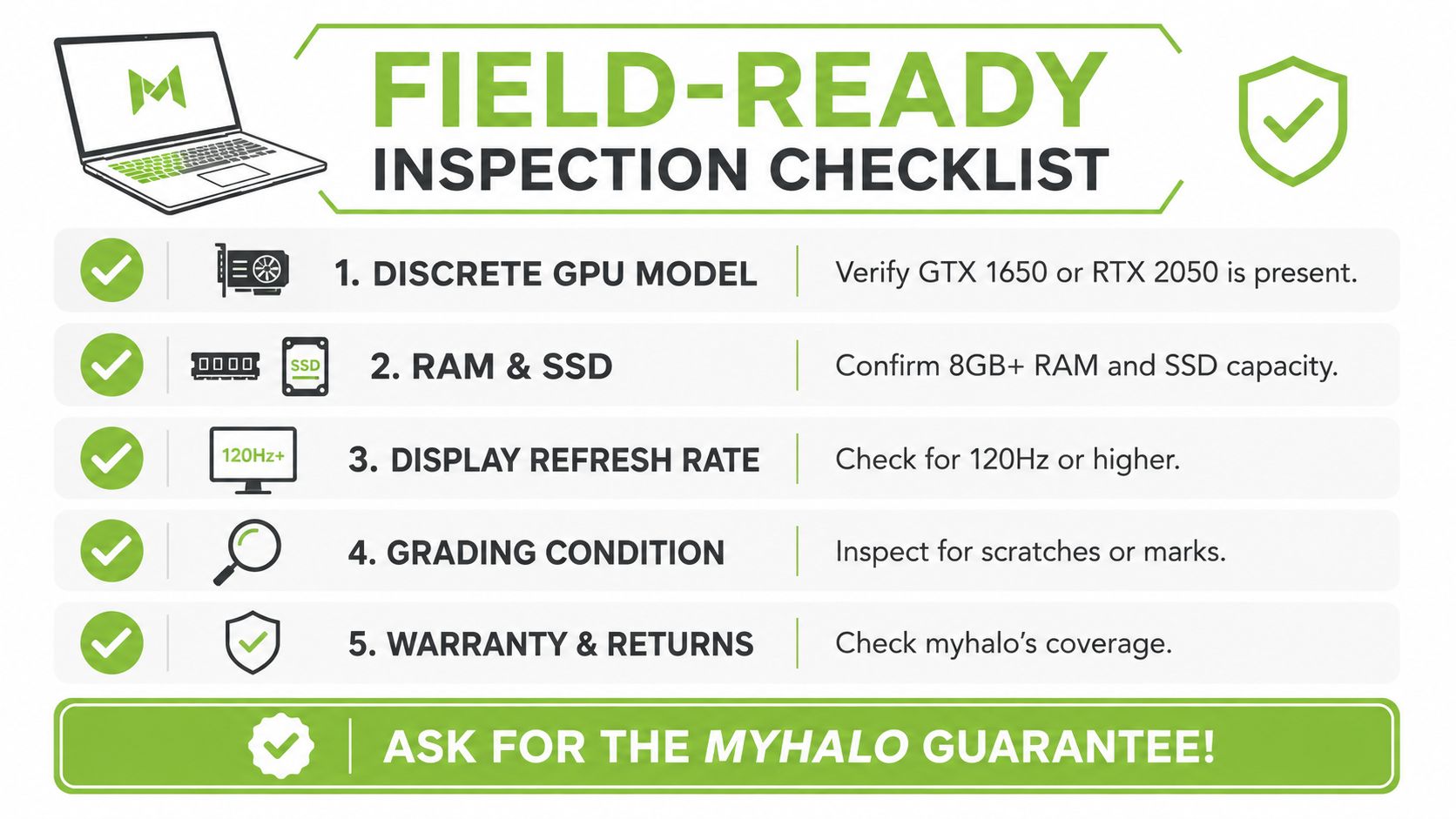
- Discrete GPU model. Make sure the listing clearly names a GPU like GTX 1650 or RTX 2050, not just “gaming graphics”.
- RAM and SSD. Confirm 8GB+ RAM and a real SSD, preferably NVMe, so the machine doesn't feel sluggish.
- Display refresh rate. Check whether the panel is 120Hz or higher, but only after the GPU is strong enough to use it well.
- Grading condition. Inspect for scratches, marks, battery disclosure, and any notes about wear if it's refurbished.
- Warranty and returns. Read the coverage terms carefully, especially if you're buying a ReLoved or As-New unit.
How to think like a careful buyer
The strongest buyers don't chase the prettiest headline. They check the GPU, then the RAM, then the storage, and only then do they think about screen refresh or cosmetic condition. That order protects you from paying for features that look impressive but don't change how the laptop performs in a game.
Ask for the grading report, the battery health information, and the warranty terms before you decide.
If you want a purchase that fits both your budget and your long-term use, choose a laptop that plays the right games well, not one that only looks powerful on paper. A smart gaming laptop under 600 is a real entry into Singapore's gaming economy, especially when it comes with clear support, repair options, and a lifecycle plan that keeps the device useful for longer.
If you're ready to buy with more confidence, visit myhalo (https://shop.myhalo.com.sg) to compare new and Certified ReLoved options, check warranty-backed gaming laptops, and choose a device that fits both your play style and your budget. You can also use myhalo's repair, trade-in, and protection services to keep the same laptop useful for longer instead of replacing it too soon.