





Fix iPhone Camera the Smart Way in Singapore
You're at a hawker centre, trying to photograph a receipt before the ink fades, and your iPhone Camera app opens to a black screen. You tap the shutter, but nothing happens. The flash icon is crossed out, and restarting the app doesn't change anything. Before you assume the phone needs replacing, separate a software glitch from a camera module that has failed.
This practical guide to fix iPhone camera problems follows the same order I'd use at a Singapore repair bench. You'll start with free checks, then isolate the faulty camera or mode, protect your data, and only pay for professional service when the evidence points to hardware. Apple's Singapore repair information lists rear camera damage as a paid service category, with a published S$385 benchmark for that repair pathway, so diagnosis matters before you commit money. Apple's Singapore iPhone repair page provides the official reference point.
Table of Contents
- When Your iPhone Camera Stops Cooperating
- Software Fixes to Try First
- Cleaning the Lens and Checking Accessories
- Diagnosing Whether It Is Hardware or Software
- Backing Up and Choosing a Repair Path
- Repair, Replace or Trade In in Singapore
- Keeping Your iPhone Camera Healthy Longer
When Your iPhone Camera Stops Cooperating
The most common complaints are familiar: a black screen when the Camera app launches, a shutter that stays stuck, blurry or out-of-focus photographs, a flash that won't fire, an app that crashes, or a front and rear camera that fail independently. Each symptom points to a different fault layer, so treating every problem as “the camera is spoilt” leads to unnecessary expense.
Recent iPhone generations also apply more camera processing than older models. That means a fault may appear as more than a blank viewfinder. Gridlines can disappear, Cinematic mode may refuse to engage, or the ultra-wide camera can behave as though it's stuck in a close-focus view without presenting the expected toggle. Those behaviours don't automatically prove a damaged module, but they do make a simple restart less conclusive.
Start with what the phone is telling you
Note exactly what fails before changing anything. Does the front camera work while the rear camera shows black? Does 1x work while 0.5x fails? Does the image look soft only under indoor lighting, or is every photograph blurred in daylight as well?
A frozen viewfinder that clears after closing the app often reflects a temporary process problem. A rear camera that remains black across restarts, while the front camera works normally, deserves a hardware-focused test. If you want another plain-language checklist before continuing, this guide on how to fix iPhone camera is useful for comparing basic symptoms and checks.
What this guide will help you avoid
The aim isn't to keep you troubleshooting forever. It's to use free checks first, identify whether an accessory is causing the problem, and stop before repeated DIY attempts damage the phone or reduce its resale appeal.
Apple's published out-of-warranty rear camera estimates in Singapore show a price ladder from SGD 189 to SGD 385, depending on the iPhone model, as listed on 30 July 2026. The Singapore camera repair price list shows examples including SGD 189 for entry models, SGD 255 for several standard models, SGD 299 for selected Pro variants, SGD 325 for certain Pro models, and SGD 385 for higher-priced Pro generations. That range is enough to make repair-versus-replacement a real decision, not a minor afterthought.
Software Fixes to Try First
Start with the simplest state reset, then move towards settings that affect permissions, camera behaviour and system services. This order matters because it changes one fault category at a time instead of wiping settings blindly.
Clear the current process
First, swipe up and force quit the Camera app. Open it again and test the same camera mode. If the app still freezes, perform a full restart rather than only locking the screen. A restart clears temporary process state and can restore a camera service that stopped responding.
Next, turn on Airplane Mode, wait briefly, then open the Camera app and take a photograph. This doesn't repair a camera module, but it helps isolate network-related behaviour around Live Photos, iCloud synchronisation and background services. Turn Airplane Mode off afterwards and test again.
Resetting network settings is a more disruptive step, so reserve it for cases where camera behaviour changes around connectivity. Go to Settings > General > Transfer or Reset iPhone > Reset > Reset Network Settings. Your saved Wi-Fi networks and related network settings will be removed, so you'll need to reconnect afterwards.
Diagnostic rule: Change one setting, test the same subject, and record the result. A camera that improves after a state reset has not yet proved that its hardware is healthy.
Review camera permissions and settings
If the problem appears inside WhatsApp, Instagram or another third-party app, check Settings > Privacy & Security > Camera. Confirm that the affected app has permission, then test Apple's Camera app separately. If Apple's app works but one third-party app crashes, the phone camera itself may be fine.
In Settings > Camera, review Macro Control and disable automatic macro switching if close-up scenes keep changing lens unexpectedly. Reset camera-related settings where available, then repeat the same 1x and ultra-wide tests. This rules out an unwanted mode or remembered setting rather than assuming the lens has failed.
Finish with iOS
Check Settings > General > Software Update and install the latest compatible iOS release. Apple has issued camera-related bug fixes through iOS updates, so an issue that began after an update may still be software-driven and corrected by a later release.
Don't move to a paid repair until you've completed the app reset, restart, connectivity check, permissions review, camera setting review and iOS update. If the same mode still fails afterwards, physical inspection becomes more sensible.
Cleaning the Lens and Checking Accessories
Singapore's humidity, crowded MRT journeys and frequent handling make lens contamination a routine cause of poor photographs. Pocket lint and skin oil collect on the raised camera bump, especially on Pro models with larger protruding camera assemblies. A dirty lens usually produces haze, glare or soft focus rather than a completely dead camera, but the distinction isn't always obvious on a small screen.
Use a controlled cleaning method
Switch the iPhone off if you're cleaning around a damaged lens cover. Use a clean microfibre cloth and wipe the outer glass with light, circular movements. If residue remains, apply a small amount of isopropyl alcohol to the cloth, not directly into the camera area, then wipe gently and allow the surface to dry.
Avoid shirt fabric and paper towels. They can leave fibres or fine scratches. Don't blast compressed air into the camera ring, because pressure can move debris further into gaps around the lens assembly. If the lens cover is cracked, cleaning won't restore optical clarity and liquid should be kept away from the opening.
For a suitable electronics-cleaning kit, you can view this 32-in-1 multifunctional cleaning kit. Use any tool carefully and keep fluids away from ports, seams and damaged glass.
Remove every accessory for one test
Magnetic MagSafe rings, metal cases, privacy screen protectors and clip-on lenses can interfere with the camera in different ways. A magnet or metal edge may sit close to the camera assembly, while a clip-on lens can introduce reflections, vignetting or incorrect focus. Accessories sold through marketplaces such as Shopee and Carousell vary widely in fit and optical quality, so don't assume a new accessory is harmless because it attaches neatly.
Remove the case, magnetic ring, lens protector and clip-on lens. Place a printed receipt under ordinary desk lighting, photograph it at 1x, then repeat at 0.5x and with the front camera. Compare the text edges and contrast. If the image sharpens after the accessories come off, the fix costs nothing and the phone doesn't need a camera replacement.
Diagnosing Whether It Is Hardware or Software
A camera fault becomes easier to price once you know which component or layer is failing. Start with physical clues, then compare modes under identical conditions. Changing the subject, lighting and distance between tests can make a healthy camera look faulty.
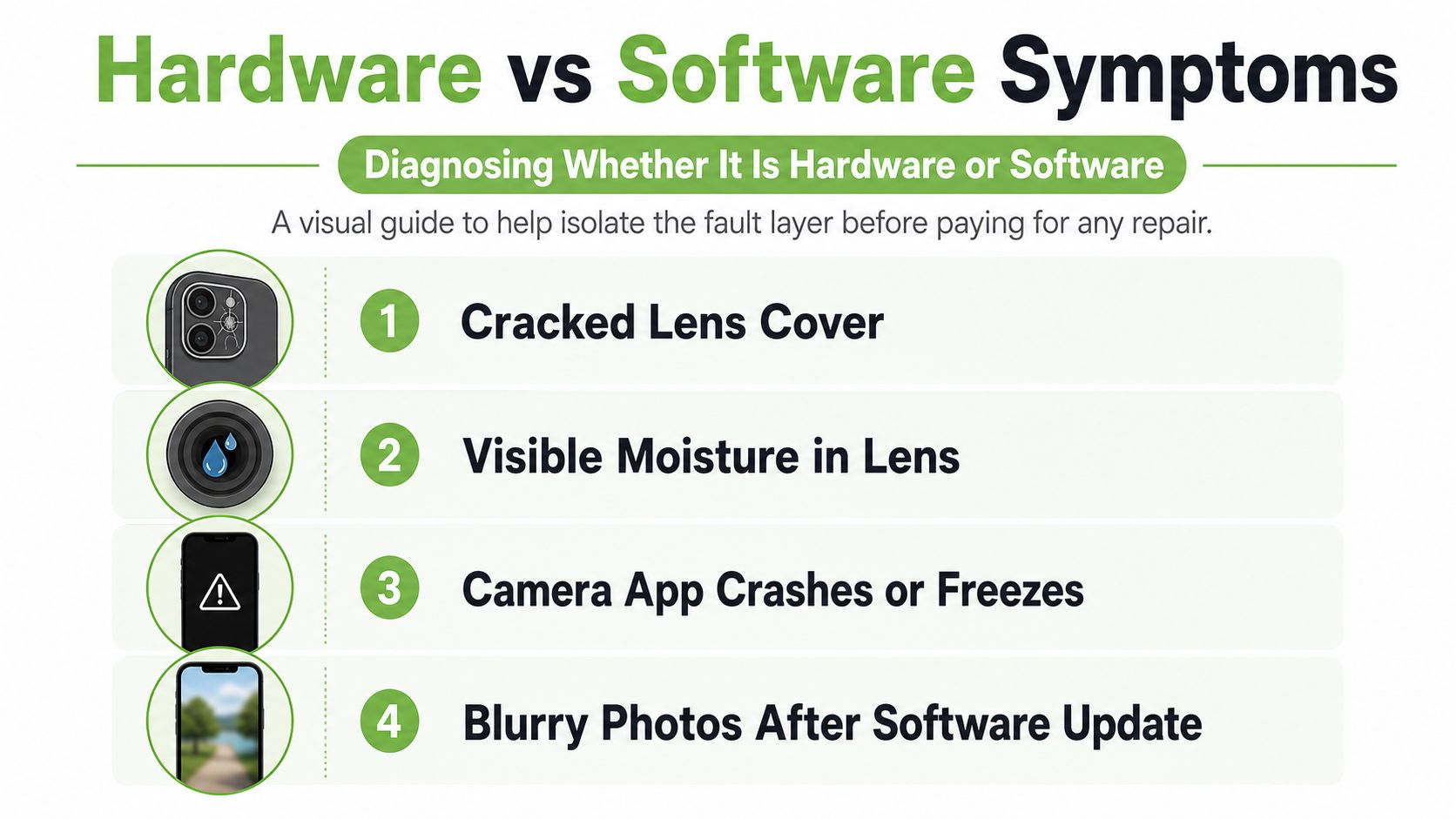
Hardware indicators
These symptoms deserve professional inspection:
- Cracked lens cover: Broken outer glass can scatter light and expose the camera area to contamination.
- Visible moisture: Condensation or droplets inside the lens indicate liquid ingress, not a normal software error.
- A shutter that never opens: If the same camera remains mechanically stuck after restarts, the module may be damaged.
- One camera mode stays black: A single failed lens, such as the ultra-wide, can leave other cameras working.
- Heat-related shutdown: If the camera works briefly and then closes with a temperature warning, stop repeated testing and let the device cool.
Software indicators
A frozen viewfinder that clears after force quitting, focus hunting across every mode, a black Camera app that began immediately after an iOS update, or a failure that started after installing a new app can still be software-related. These clues aren't proof, but they justify completing the software checks before opening the phone.
Run a controlled mode test. On the same device and subject, switch through 0.5x, 1x, 2x, front camera, Portrait, Video and Cinematic mode. Write down the exact failures. If one lens or one mode fails consistently while the others work, a camera module or its connection is more likely. If every mode fails, the fault could involve iOS, a flex cable or the logic board, and the phone needs deeper diagnosis.
Use DFU restore only as the final software checkpoint
A DFU restore is not the same as a normal restart. It reloads the device firmware and erases the iPhone, so create a verified backup before attempting it. On newer Face ID iPhones, connect the phone to a Mac or Windows computer, press and quickly release Volume Up, press and quickly release Volume Down, then press and hold the Side button until the screen goes black. Keep holding the Side button, then hold Volume Down alongside it for about five seconds. Release the Side button while continuing to hold Volume Down until Finder or iTunes detects an iPhone in recovery mode.
The exact timing can be difficult, and a failed attempt can just return the phone to normal mode. If the restore completes and the camera still fails before you reinstall your apps, software is no longer the leading explanation. At that point, a professional inspection is justified.
Backing Up and Choosing a Repair Path
Protect your data before anyone opens the phone. Start with an iCloud backup through Settings > [your name] > iCloud > iCloud Backup > Back Up Now. Singapore users on the free 5GB iCloud plan may need to move photographs to a computer or Google Photos, or select a paid iCloud tier, before the backup can finish. Apple's Singapore support guidance also directs customers to personal assistance through an Apple Store or Apple Authorised Service Provider and describes the use of genuine Apple parts within its certified repair ecosystem.
An encrypted computer backup is the stronger second layer. In Finder on a Mac, select the iPhone, choose Back up all of the data on your iPhone to this Mac, enable encryption, and set a password you can retrieve later. Windows users can use iTunes. Encryption helps preserve saved passwords, Health data and Apple Watch pairing information that may not survive an unencrypted backup.
Compare the available routes
Apple's official route offers standardised diagnostics and genuine parts. An Apple Store, including the Orchard location, or an Apple Authorised Service Provider, including providers serving areas such as Funan and Plaza Singapura, may suit a newer phone or a device with warranty support.
An independent Singapore specialist can make more sense for an older out-of-warranty iPhone, quicker local handling or a repair involving both the screen and camera. myhalo operates as a technology lifecycle partner, offering phone repair, data migration, trade-ins and device-lifecycle options alongside devices such as Certified ReLoved and Certified Surplus products.
DIY camera replacement is the least forgiving route. It requires suitable pentalobe and tri-point tools, a known-good replacement module and a pre-cut adhesive gasket. It also risks damaging the display, sealing, flex cables or Face ID-related components if you work without experience.
Apple's published Singapore figures vary by model. Its camera price list shows rear camera estimates from SGD 189 to SGD 385, while Apple's Singapore support page publishes S$385 for the rear camera damage category. Treat those figures as benchmarks, not a promise that every model or repair will receive the same charge.
| Repair Path | Typical Cost (SGD) | Turnaround | Best For |
|---|---|---|---|
| Apple Store or Apple Authorised Service Provider | Model-dependent, with Apple's published SG benchmarks from SGD 189 to SGD 385 | Varies by assessment and parts availability | Newer iPhones, warranty questions and genuine-part preference |
| Singapore independent specialist | Quote after inspection | Often arranged locally, depending on fault and parts | Older models, speed and combined repairs |
| DIY replacement | Parts and tools vary | Depends on skill and testing | Experienced users and devices already near the end of economic life |
For help locating an official option, this guide to Apple service centres in Singapore can help you compare locations. My practical rule is simple: warranty coverage with no accidental damage favours Apple, liquid damage with budget pressure may favour an independent specialist, and self-repair belongs only with experienced users who accept the risk.
Repair, Replace or Trade In in Singapore
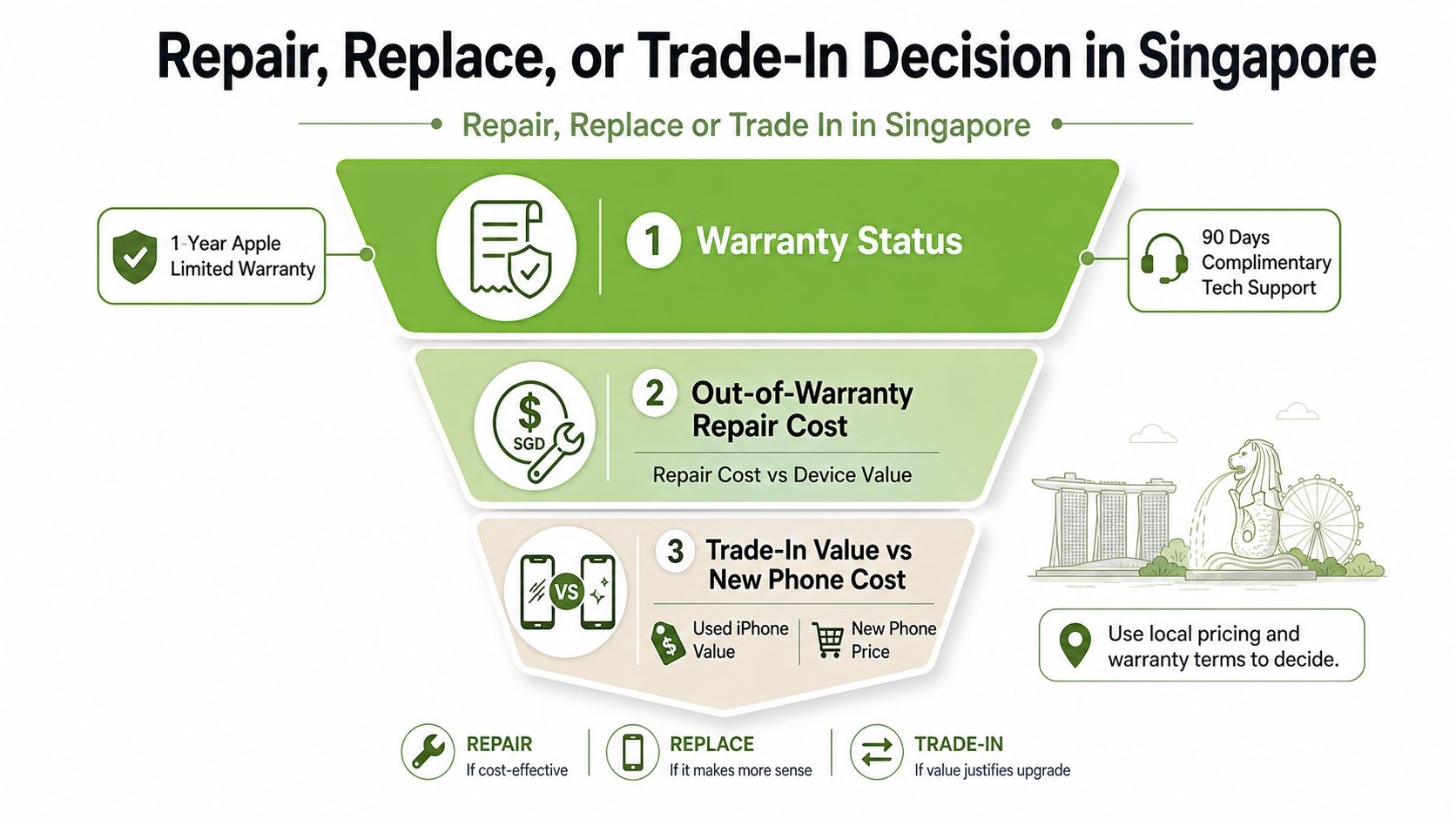
A camera fault isn't only a repair question. It affects warranty eligibility, resale value, data security and how long the device remains useful to you or your business.
Apple's limited warranty covers manufacturing issues, not accidental damage. Apple also provides complimentary technical support for a limited period, while AppleCare+ only helps if the plan remains active when the failure occurs. Check the coverage status before paying for a repair, and keep photographs of any visible damage for your records.
Singapore's consumer remedies may also matter. For covered defective goods, buyers can ask for repair, replacement, price reduction or refund within six months of sale or delivery, as explained in Singapore consumer protection guidance. That remedy doesn't mean every damaged camera qualifies, especially where impact or liquid damage caused the failure, but it gives consumers a reason to return to the seller rather than accepting an immediate paid repair.
Use a decision rather than a guess
Compare the repair quote with the phone's current trade-in value, not the price you originally paid. As a working rule, if the repair approaches half of the device's current trade-in value, replacement or trade-in often deserves serious consideration. The exact outcome depends on model, storage, battery condition, cosmetic state and whether other components are affected.
A faulty camera can reduce private-sale and refurbisher offers because the buyer carries testing and repair risk. Platforms and buyers may negotiate deductions for a known camera fault, and a flash problem can increase uncertainty. Don't treat an online asking price as a confirmed value, because a listed price isn't the same as a completed sale or an assessed trade-in offer.
A refurbished iPhone with a written warranty may be more practical than repairing an older flagship. Check the replacement device's Parts and Service History, genuine-camera status where supported, battery disclosure and grading. Apple documents Parts and Service History, which makes authenticity part of the purchase decision, not merely a technical detail after repair.
Be honest when selling
Disclose the black screen, failed lens, focus issue or flash problem in a Carousell, Shopee or direct-sale listing. A buyer who discovers an undisclosed fault may seek a refund or dispute the transaction, and inaccurate declarations can create avoidable account and device-management problems.
For a broader view of the process, read this guide to trading in an iPhone in Singapore. The right choice may be a repair, a replacement or continued use with a separate camera, but the decision should reflect the phone's remaining working life rather than the frustration of one failed component.
Keeping Your iPhone Camera Healthy Longer
Camera care works best as a small routine, not an emergency response. The habits below reduce contamination, accessory-related confusion and heat exposure while preserving the condition that buyers inspect later.
- Store it separately. Use a dedicated pocket or pouch instead of placing the iPhone with keys, receipts and loose lint. The camera bump catches debris easily, and a clean storage habit reduces how often particles reach the lens ring.
- Wipe the lens properly. Use a clean microfibre cloth regularly, rather than a shirt hem. Skin oil and condensation can soften text and create night-time flare even when the camera hardware is healthy.
- Avoid questionable lens accessories. Third-party adapters and poorly fitted tempered-glass protectors can shift focal distance, introduce reflections or cover part of the lens. Remove them before deciding that the phone needs repair.
- Keep iOS current. Camera behaviour depends on both hardware and system software. Installing compatible updates keeps the phone's camera software and firmware environment current, while also giving you a cleaner baseline for diagnosis.
- Limit heat and moisture exposure. Don't leave the iPhone on a car dashboard at Tuas or in direct sun during a beach day at East Coast Park. Avoid steam, splashes and damp pockets, especially when the lens cover or frame already has damage.
Long-term value: A working, clean camera supports everyday use, trade-in assessment and the option to pass the device to another user instead of replacing it prematurely.
When you eventually trade in or sell, camera condition sits alongside battery health, screen condition and transparent device grading. A service provider that performs documented checks can distinguish a cosmetic issue from a genuine module fault, which helps you make a more defensible lifecycle decision for personal devices or an SME fleet.
Your next action is simple: remove the case and lens accessories, clean the camera glass with microfibre, and test 0.5x, 1x, front camera, Video and Cinematic mode against the same receipt.
If your iPhone still fails after those checks, visit myhalo for a practical assessment covering camera repair, data migration, trade-in and reuse options. You can also compare Certified ReLoved or Certified Surplus devices when repair no longer makes financial sense, with transparent grading and battery health disclosure to support the next decision.