





Data Backup Service: What to Back Up and How Often
A Tiong Bahru SME owner opens the office laptop before payroll and finds the client database corrupted. A parent discovers that a hard disk containing years of family photos no longer mounts. In both cases, the immediate question isn't how much storage was purchased. It's whether a data backup service can restore a clean, usable copy when the original data is unavailable.
That distinction matters in Singapore, where backup expectations connect directly to business continuity, cyber incident response and data protection. This guide explains what to back up, how often to run backups, what RPO and RTO mean, how ransomware can defeat poorly designed copies, and how to assess a provider without getting lost in technical language.
Table of Contents
- Why Backups Matter More Than You Think
- How Data Backup Services Actually Work
- The Features That Make or Break a Backup
- Backup Architectures and Ransomware Readiness
- What Really Matters When Backups Fail
- How to Evaluate a Backup Service in Singapore
- Extending the Lifecycle Beyond the Backup
- Singapore FAQs on Backup Services
Why Backups Matter More Than You Think
A backup is a copy that exists for recovery. File syncing is different. A sync tool usually mirrors changes between locations, so an accidental deletion or an encrypted file may travel to the other location before anyone notices. A proper backup keeps recoverable versions, protects them from unauthorised changes and gives you a controlled way to restore files or systems.
For a household, the consequences may be personal rather than financial. A failed laptop can remove photos, school documents and tax records in one afternoon. For a small business, the exposed data may include invoices, payroll files, customer details, contracts, email and application databases. Rebuilding those records manually can consume far more time than creating them originally.
Four situations commonly make recovery necessary:
- Ransomware: Malicious software can encrypt live files and any connected backup it can reach.
- Hardware failure: A hard disk, laptop or server can stop working without warning.
- Human error: Someone can overwrite a quotation, delete a folder or misconfigure a shared drive.
- Data protection exposure: Backups may contain personal data, so retention and access need deliberate controls.
Singapore's official ICT security guidance expects organisations to back up important data and systems at least every day, with copies stored in a secure, separate location. The Singapore Government's backup and recovery guidance also describes automation, encryption, offsite storage and periodic restore testing as necessary controls.
The useful question isn't “Do we have a backup?” It's “Can we restore the right data, cleanly and within the time the business can tolerate?”
The rest of this guide builds that answer step by step, from backup methods and storage architecture to ransomware readiness, retention and provider evaluation.
How Data Backup Services Actually Work
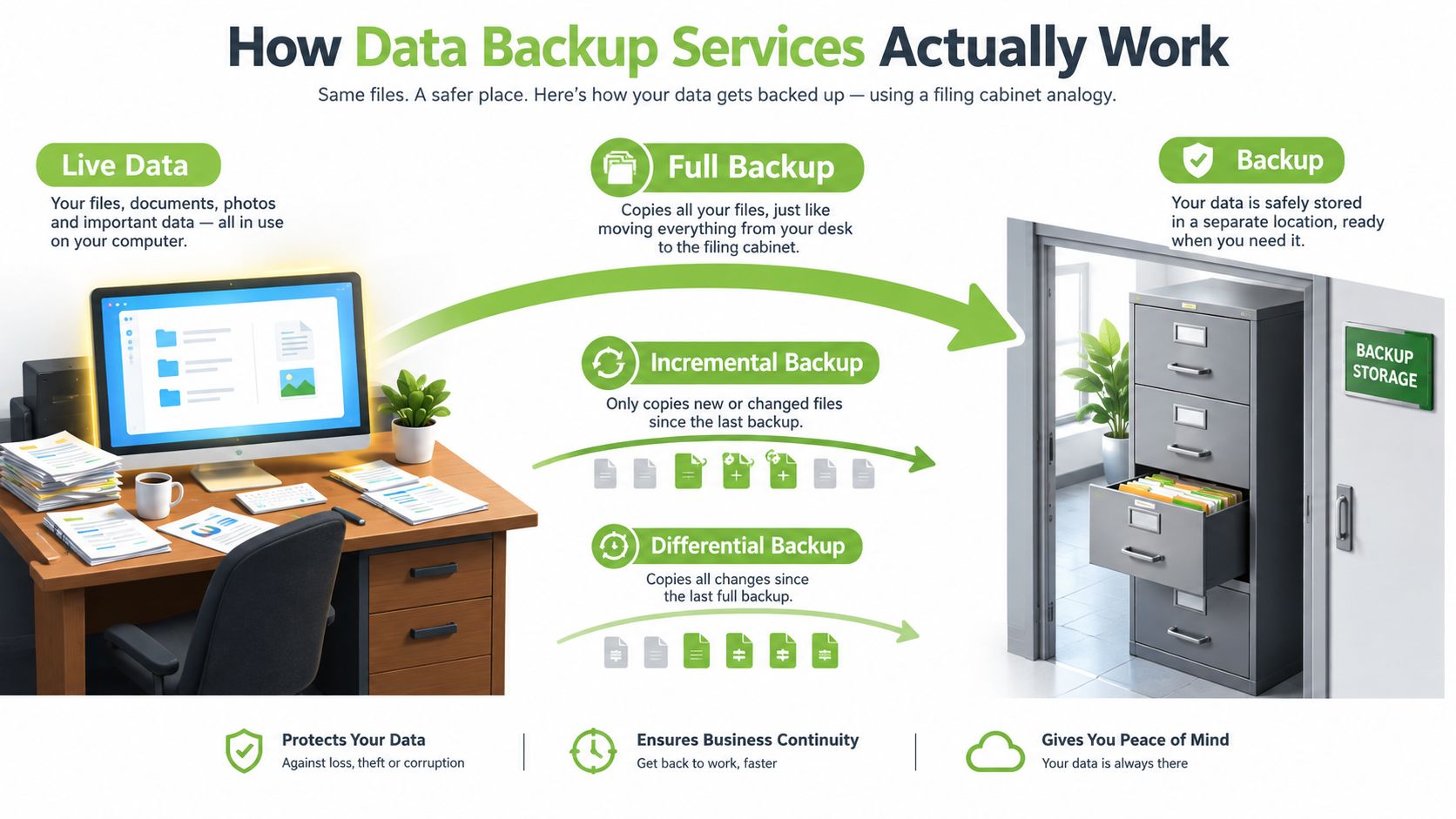
A working computer changes constantly, so a backup service must do more than make a one-time copy. It records selected data in a separate recovery location. If a file is deleted, a device fails, or ransomware encrypts the live copy, the service should provide a usable version from before the incident. A copy stored on the same machine, or reachable through the same compromised account, may not be available when recovery is needed.
The three common backup methods
A full backup copies everything selected for protection. If a design folder contains 200GB, the full job copies the complete folder. Restoring from it is straightforward, although each job uses more time, storage and network capacity.
An incremental backup copies files changed since the most recent backup, whether that previous job was full or incremental. A nightly run after office hours might capture only new invoices, edited designs or updated customer records. It saves capacity, but a restore may need the original full backup and a chain of incremental sets.
A differential backup copies all changes made since the last full backup. If the full backup runs on Sunday, Monday's differential contains Monday's changes, while Tuesday's contains Monday's and Tuesday's changes. The files grow as the week progresses, yet recovery may require fewer sets than an incremental sequence. The choice should therefore be judged by both backup efficiency and the likelihood of a clean restore after an incident.
The storage pattern behind resilient backups
The commonly used 3-2-1 rule keeps three copies of data, on two different types of media, with one copy offsite. Singapore-focused SME guidance recommends restoring a representative sample at least quarterly and performing a full server restore in a separate environment at least annually. The Singapore backup and test-restore guide explains the operational detail.
A stronger 3-2-1-1-0 approach adds one offline or immutable copy and zero unresolved verification errors. “Immutable” means the backup cannot be modified or deleted during its protection period. An isolated copy is separated from ordinary network access, reducing the chance that ransomware can alter every recovery point.
What exactly gets copied
A file-based backup protects selected documents and folders. An image-based backup captures a fuller device state, including its operating system, applications and configuration. A database-aware backup understands how software such as MYOB or a SQL-backed point-of-sale system writes data, helping create a consistent copy instead of capturing files mid-transaction.
Recovery needs determine the right coverage. A family may need one older photo, while a retailer may need both its transaction database and the system running the POS. Check that the service can restore at the required level, not merely confirm that files were copied. Teams using infrastructure as code can consult the GitOps recovery implementation checklist to connect backup tasks with repeatable recovery procedures.
The Features That Make or Break a Backup
Backup features become easier to judge when translated into business questions. RTO, or Recovery Time Objective, asks how quickly you must be operating again. A clinic may need a critical system restored within four hours, while a personal blog may tolerate a much longer interruption.
RPO, or Recovery Point Objective, asks how much recent work you can afford to lose. A business processing frequent transactions may need copies that are close together in time. A household storing occasional photos may accept a less frequent schedule. Singapore's PDPC guidance says backups should align with an organisation's RPO and RTO, which makes these settings part of planning rather than optional technical terminology. The PDPC data protection guidance also supports secure backup practices and careful retention of personal data.
Backup features and what they mean in practice
| Feature | What It Means | Why It Matters |
|---|---|---|
| RTO | The target time for restoring operations | It helps you choose between a quick local restore and a slower recovery over an internet connection |
| RPO | The acceptable gap between the latest backup and an incident | It determines how often backups should run |
| Retention | How long recovery points remain available | It balances recovery choices with storage cost and data minimisation |
| Versioning | Older copies remain available after files change | It provides an undo path after accidental deletion or ransomware encryption |
| Encryption | Data is protected while stored and while transmitted | It reduces exposure if a backup device, account or transfer is accessed improperly |
| Restore testing | A controlled check that data can actually be recovered | It exposes incomplete jobs, incompatible hardware and missing credentials before an emergency |
Retention deserves special care. Singapore's PDPA says organisations should stop retaining documents containing personal data, or remove the means of linking that data to individuals, once the original purpose is no longer being served and retention is no longer needed for legal or business reasons. Keeping every backup forever can therefore create a larger data exposure than necessary. Set retention around recovery needs, legal holds and genuine business necessity.
Encryption should also be treated as two separate protections. Encryption at rest protects stored copies, while TLS in transit protects data as it travels to or from the service. Ask whether the provider supports strong encryption, customer-managed keys where needed and clear information about where keys and data are held. If you need a simple physical transfer option for a local copy, an ORICO 2.5-inch SATA USB 3.0 HDD enclosure can be part of a broader backup arrangement, but the enclosure itself isn't a complete backup strategy.
Backup Architectures and Ransomware Readiness
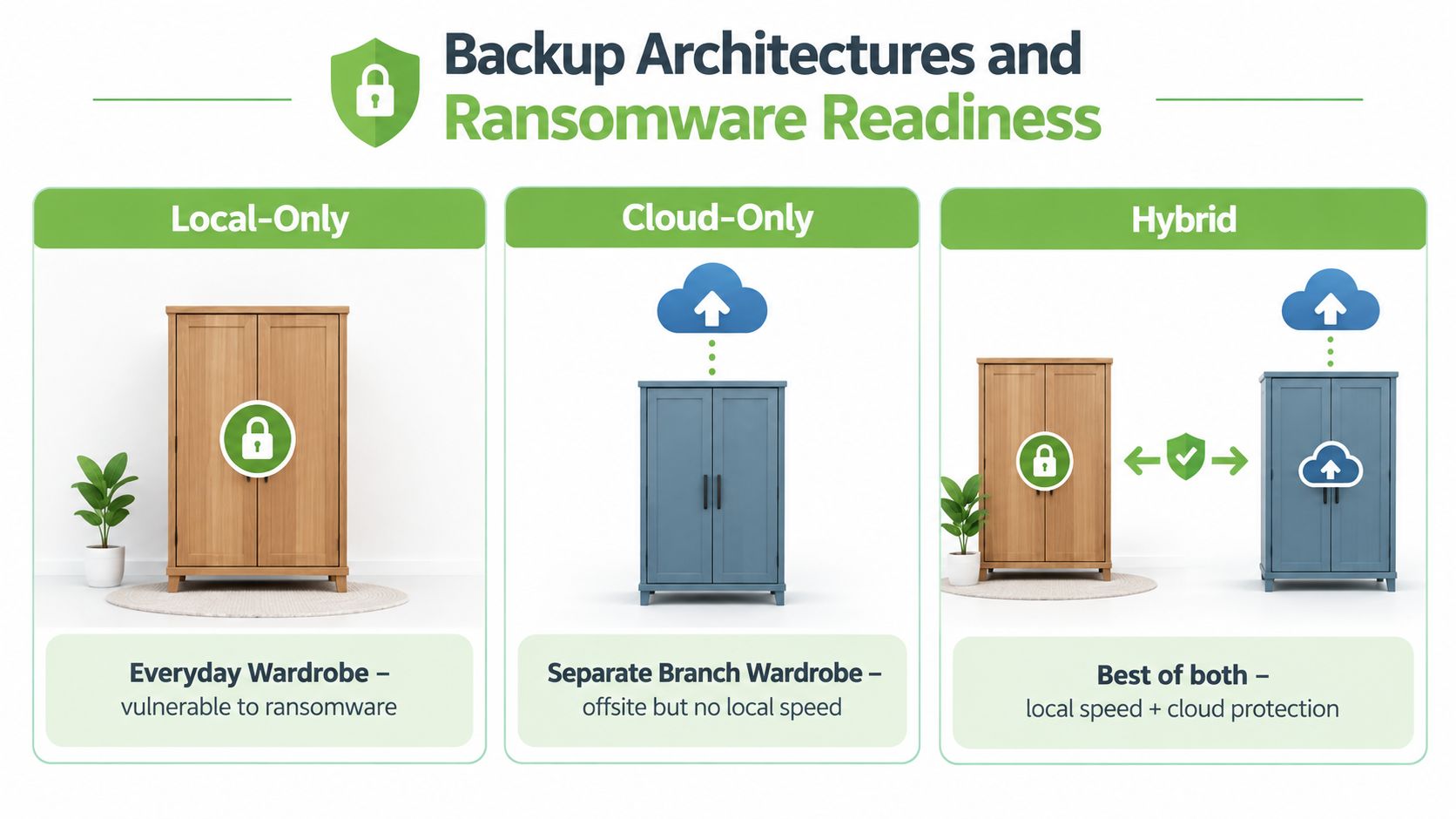
Local, cloud and hybrid architectures differ like wardrobes in different locations: one at home for quick access, one offsite for resilience, and a hybrid that keeps both. The right choice depends on whether your team can restore usable data after ransomware, not on where copies are stored.
Local-only, cloud-only and hybrid
Local-only backup is convenient and often fast. It can restore a failed laptop or a folder deleted by mistake. Its weakness is shared exposure. Ransomware may encrypt a connected drive, while a backup kept in the same office could be lost with production equipment.
Cloud-only backup places a copy offsite and reduces the need to maintain storage hardware yourself. Restoration depends on connectivity, provider capacity and the amount of data involved. Review identity controls, deletion policies, data residency and whether the provider can create an isolated recovery environment before relying on this design.
Hybrid backup combines local recovery speed with offsite resilience. A Singapore retailer might restore urgent files locally while keeping an immutable cloud copy for a wider incident. Set the architecture against the required RTO and RPO, because a fast copy is not useful if it cannot survive the attack or meet recovery needs.
Why ransomware changes the design
Ransomware can reach attached network drives, backup servers and administrator accounts. If production and backup systems share credentials, an attacker may encrypt or delete recovery points before restoration begins.
Immutable storage prevents protected recovery points from being changed during the retention period. An air-gapped copy stays separated from ordinary network access. An isolated recovery environment allows a team to restore and inspect systems without reconnecting compromised machines to live operations.
Ask a provider three practical questions:
- Where is the data physically stored, and which overseas subprocessors can access it?
- How long does a deleted recovery point remain available before it is permanently purged?
- Does the service support time-based immutability, rather than simple version history?
For wider planning questions, Ryware on recovery readiness can help teams assess recovery arrangements before an incident. Endpoint protection remains a separate control, so Trend Micro Internet Security may help protect devices, but it cannot replace backups that have been tested and can be restored.
What Really Matters When Backups Fail
Storage capacity is easy to compare. Recoverability is harder, and it's the more important measure.
A 2025 Singapore report found that only 46% of organisations used backups to restore data, down from 58% in 2024. The same report found that 53% of attacks in Singapore resulted in encryption, while 53% of affected companies fully recovered within a week. It also reported that organisations using backups generally recovered faster and were less dependent on ransom payments. These figures come from Singapore ransomware recovery coverage.
The result shouldn't be read as a reason to panic. It is a reason to test assumptions. A backup can exist and still fail because ransomware reached it, the recovery credentials were unavailable, the copy was incomplete, or nobody had tested whether the application would start after restoration.
Three signals of a usable backup
- It restores within the stated RTO: Test on hardware or an environment you control, not only through a provider's dashboard.
- It uses separate protection: Backup administration shouldn't depend entirely on the same identity and permissions used for production systems.
- It has recent restore evidence: A completed job confirms that copying occurred. A restore test confirms that the result is usable.
Singapore's Cybersecurity Code of Practice for critical information infrastructure requires backup copies to be kept on devices not connected to a computer or the internet, separate from corresponding systems, with periodic restoration testing. The Cybersecurity Code of Practice also links backup and restoration plans to business continuity, disaster recovery, RTO and RPO.
The decision between restoring and negotiating with an attacker is shaped by preparation. A tested, isolated copy gives the business a recovery route. An untested copy gives the business a hope.
How to Evaluate a Backup Service in Singapore
Shortlist providers by asking for evidence, not broad promises. A good service should explain what it protects, how restoration works, which controls are included and what happens when data must be recovered urgently.
| Pillar | What to Verify | Why It Matters in Singapore | Red Flag |
|---|---|---|---|
| Data protection | Encryption at rest and in transit, strong access controls, optional customer-managed keys | Backups may contain personal and commercially sensitive information | The provider describes storage but not access protection |
| Recovery | Published RTO and RPO, immutable tiers, isolated restore options and restore-test records | Singapore guidance connects backups with demonstrable recoverability | The provider only shows successful backup-job alerts |
| Compliance | PDPA retention controls, relevant sector obligations, CSA alignment where applicable and clear residency details | Retention and location affect privacy and operational risk | No clear deletion process or overseas subprocessor disclosure |
| Operations | Automated policies, SSO, audit logs, alerting and support coverage matching your business hours | Automation reduces missed jobs and logs support accountability | Staff must remember manual copies |
| Cost | Per-seat or per-GB pricing, restore and egress charges, minimum commitments | A low storage price may not represent the total recovery cost | Restore pricing is difficult to find |
Check protection before price
Ask whether the service can back up laptops, servers, cloud applications, databases and configuration data that your business uses. A product that protects only shared folders may leave the operating system or application state behind, forcing a slow rebuild.
Then ask how the provider separates backup administration from normal production access. Look for multi-factor authentication, role-based permissions, audit logs and immutable or read-only storage. Singapore-focused SME guidance recommends automation, offsite or cloud copies, strong access controls and immutability where possible, as described in this guide to backup solutions for Singapore SMEs.
Make testing part of the contract
Request a sample restore before committing. Restore a document, a folder and, where relevant, an application database or complete device image. Record how long each recovery takes, which credentials are needed and whether the restored data opens correctly.
For regulated or sensitive environments, obtain written answers about physical data location, overseas access, retention deletion and incident support. Where MAS Technology Risk Management expectations, CSA Cyber Essentials considerations or other sector requirements apply, ask the provider to map its controls to your own obligations instead of assuming that a general compliance statement is enough.
Finally, compare the full recovery cost. Per-gigabyte pricing can look attractive until restore fees, data transfer charges, support and minimum commitments appear. Predictable pricing is usually more useful than the cheapest storage line when the purchase is recovery capacity.
Extending the Lifecycle Beyond the Backup
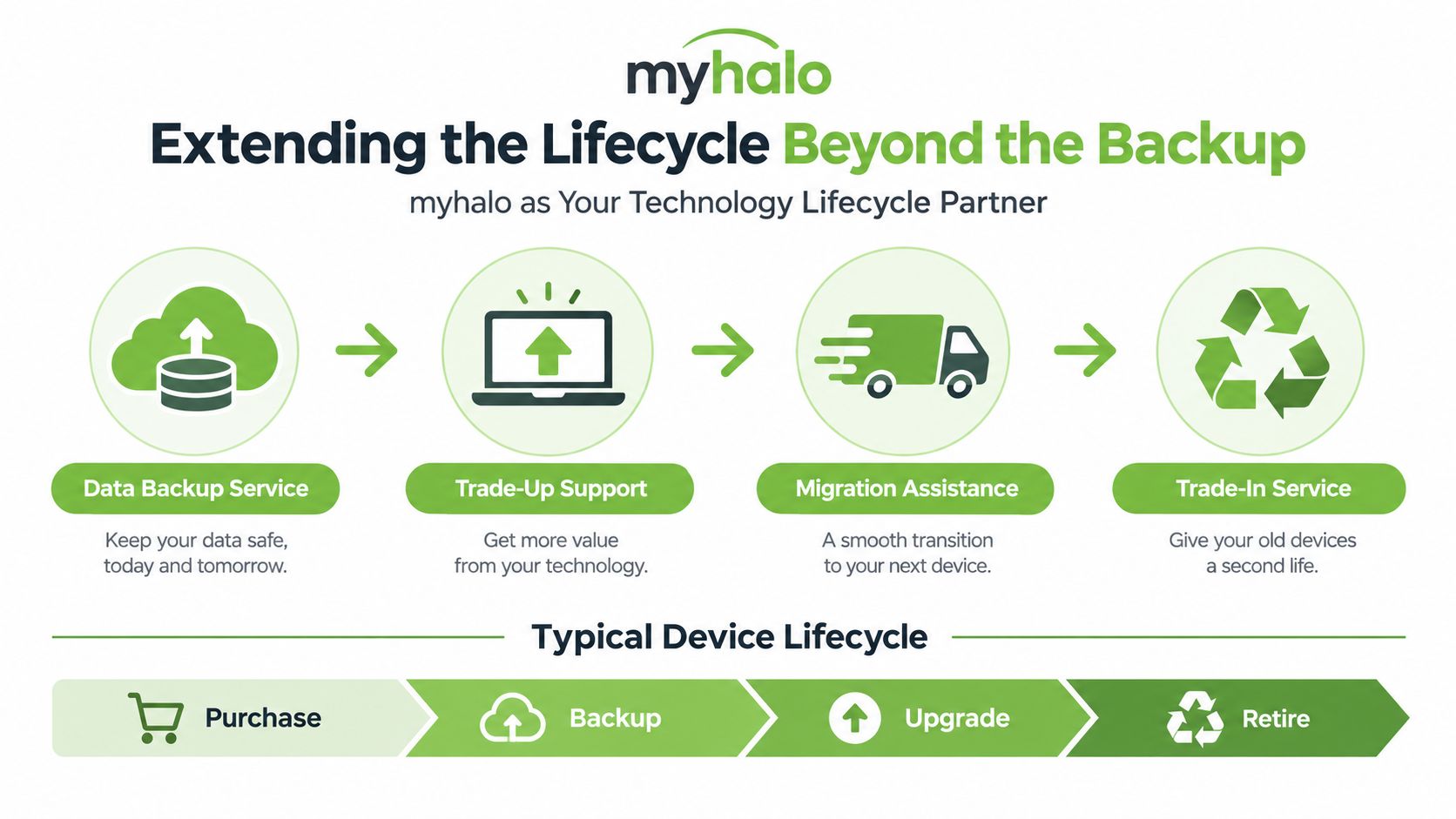
A backup becomes especially valuable when a device reaches the end of its working life. Before replacing a laptop, the business should back up and verify the user's data, identify what must move to the replacement, and confirm that no essential files remain only on the old machine.
A practical handover looks like this:
- Back up the source device: Copy documents, browser data, email, application files and other approved business information.
- Verify the copy: Open representative files and confirm that the recovery point is usable.
- Prepare the replacement: Restore the required information onto the new or refurbished device, then check applications and permissions.
- Wipe the old device: Remove data properly before the laptop enters another person's hands.
- Reuse or recycle responsibly: Route the device into a suitable trade-in, recommerce, repair or recycling process.
myhalo can operate as a technology lifecycle partner, not only a retailer. Its services include repair, migration support, trade-ins, Certified ReLoved devices, Certified Surplus products and responsible recycling. Device decisions can therefore support continuity and smarter resource use, while extending useful hardware life instead of treating every upgrade as a complete replacement.
The workflow also reduces the risk of orphaned data. A staff member who leaves with an old laptop, a replaced POS terminal sitting in storage or a household phone passed to a relative can all contain information that no longer has a clear owner. The memory card and micro SD card guide is a useful reminder that removable storage needs the same care as an internal drive.
myhalo's 30-point quality checks, transparent device grading and battery health disclosure can help buyers assess replacement hardware clearly. Its ISO 9001 Certified and ISO 27001 Certified processes are relevant to customers who want a more organised approach to quality and information security, but they don't replace a customer's own backup, retention and restore responsibilities. Tools such as RescueAdvise and mylo AI Assistant can also sit alongside practical device support, provided the business keeps ownership of its recovery decisions.
Singapore FAQs on Backup Services
Does the PDPA require backups?
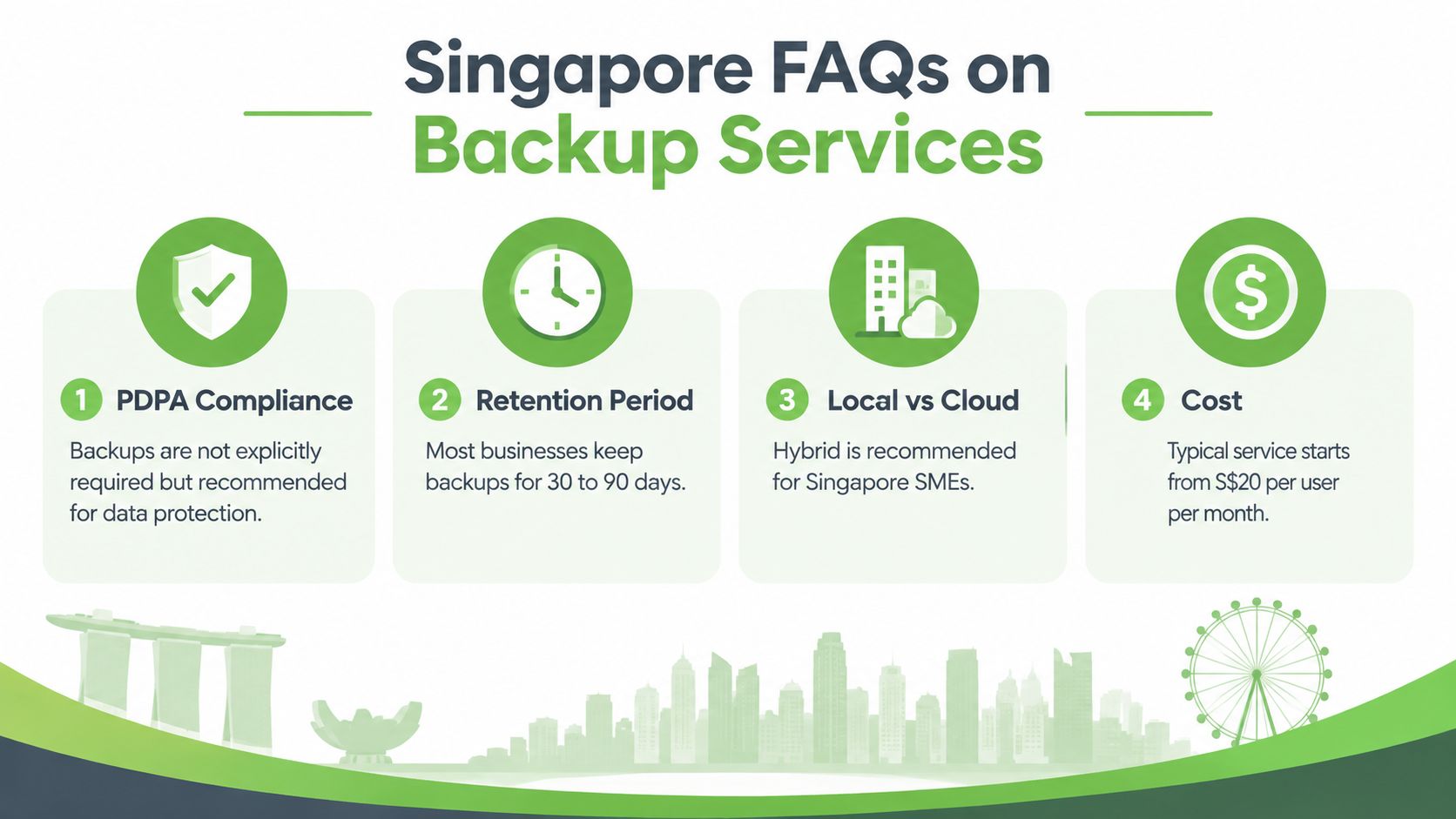
The PDPA does not turn every backup configuration into a universal checklist. However, organisations remain responsible for protecting personal data and should maintain secure, regular backups where recovery is necessary for operations. Backups should be protected from unauthorised access and included in the organisation's broader data protection design.
How long should a business retain backed-up personal data?
There isn't one universal period that suits every business. Set a retention schedule around the original purpose, legal and business necessity, legal holds and recovery requirements. The PDPC says organisations should stop retaining personal data when the original purpose is no longer being served and continued retention is no longer needed.
What should we do first during a ransomware attack?
Disconnect infected systems from networks to limit spread. Don't reconnect them just to check files, because ransomware may persist and re-encrypt restored data. Then contact your incident-response support and restore from a clean backup source onto a clean installation, following the Singapore Police Force ransomware advisory.
If a breach is likely to cause significant harm or affects 500 or more individuals, the Singapore Police Force advisory notes that notification to the PDPC may be required. Your response plan should identify who assesses and handles that notification.
Is a consumer cloud subscription enough for a business?
Not automatically. A business backup needs defined scope, automated scheduling, versioning, access controls, retention, offsite protection and tested restoration. A consumer sync folder may be useful for collaboration, but it shouldn't be treated as the only recovery copy unless it meets those requirements.
Choose a data backup service by testing recoverability, not by comparing storage alone. myhalo can support the wider technology lifecycle through device migration, repair, Certified ReLoved and Certified Surplus options, trade-ins and responsible recycling, so visit myhalo to explore device and lifecycle support for your home or Singapore business.