





Computer Repair Services Singapore How to Choose Wisely
Your laptop won't boot five minutes before an important presentation. Or perhaps your SME's shared desktop has started crashing, while a team member keeps asking whether the files are safe. A quick search for computer repair services in Singapore brings up authorised service centres, independent technicians, refurbishment options and recycling channels. The difficult part isn't finding a name. It's deciding what the device needs.
A good decision starts with diagnosis, not a sales pitch. You need to know whether the problem is a replaceable battery, a software fault, a failing storage drive, a board-level issue or a device that has reached the end of its practical life. You also need to consider your data, warranty position, repair quality and what happens if repair no longer makes financial sense.
That wider view matters in Singapore. The country generates about 60,000 tonnes of e-waste each year, equivalent to roughly 70 mobile phones per person, and more than 16,000 tonnes of regulated consumer e-waste had been collected by December 2023 under the Extended Producer Responsibility system introduced in 2021, according to Singapore's national e-waste guidance. Repair and refurbishment can keep a laptop useful for longer, while responsible recycling provides a safer exit when repair isn't sensible.
This guide treats repair as a technology lifecycle decision. You'll learn what services cover, how diagnostics work, how to assess price and turnaround, what questions to ask a provider, how to protect your data and when to move from repair to a Certified ReLoved replacement or recycling.
Table of Contents
- Introduction to Computer Repair Services in Singapore
- Understanding What Computer Repair Services Cover
- Common Computer Problems and How Diagnostics Work
- How Much Computer Repairs Cost and How Long They Take
- How to Choose a Trustworthy Repair Provider in Singapore
- Preparing Your Device and Knowing Your Rights Before Repair
- How myhalo Supports Repair Reuse and Responsible Care
Introduction to Computer Repair Services in Singapore
A computer problem can disrupt a normal day quickly. A student's laptop may freeze during coursework submission. A home user may notice a raised trackpad from a swollen battery. An SME desktop that powers off without warning can interrupt invoicing and access to customer records.
The symptom is only the starting clue. A slow laptop might need storage management or malware removal, yet a failing drive or overheating could cause the same behaviour. A black screen may come from the display, memory, charger, battery or motherboard. Replacing the first suspicious part can turn a manageable fault into unnecessary spending.
A sound repair decision answers three questions:
- Can the device become reliable again? The provider should identify the root cause, explain the proposed remedy and test the computer after service. Switching on once is not the same as dependable operation.
- Will repair preserve enough value? A newer laptop with a battery or keyboard fault may justify repair. An older device with several related failures may offer better value when replaced with a professionally checked refurbished unit, including a Certified ReLoved product where appropriate.
- What is the right next stage? Repair, reuse and trade-in can extend a device's useful life. When none makes sense, remove or protect the data and send the equipment through a proper recycling channel.
Singapore's public guidance encourages repairing electronic equipment where feasible and reusing or donating items that still work. The National Environment Agency's e-waste management page also records more than 800 islandwide e-waste collection points, giving households and businesses a route for responsible recovery. Collection access does not replace the need to decide whether repair, reuse or recycling is suitable.
Practical rule: Treat a repair quote like a treatment plan. Before approving it, confirm the fault, remedy, warranty and expected reliability after service.
A lifecycle view keeps the decision clear. Repair a device when the fault is contained and the result should remain dependable. Replace it with Certified ReLoved when repair costs or repeated failures outweigh its remaining value. Recycle it when secure reuse is no longer sensible. This helps households control costs and lets SMEs keep useful equipment in service without treating every failure as a reason for immediate replacement.
Understanding What Computer Repair Services Cover
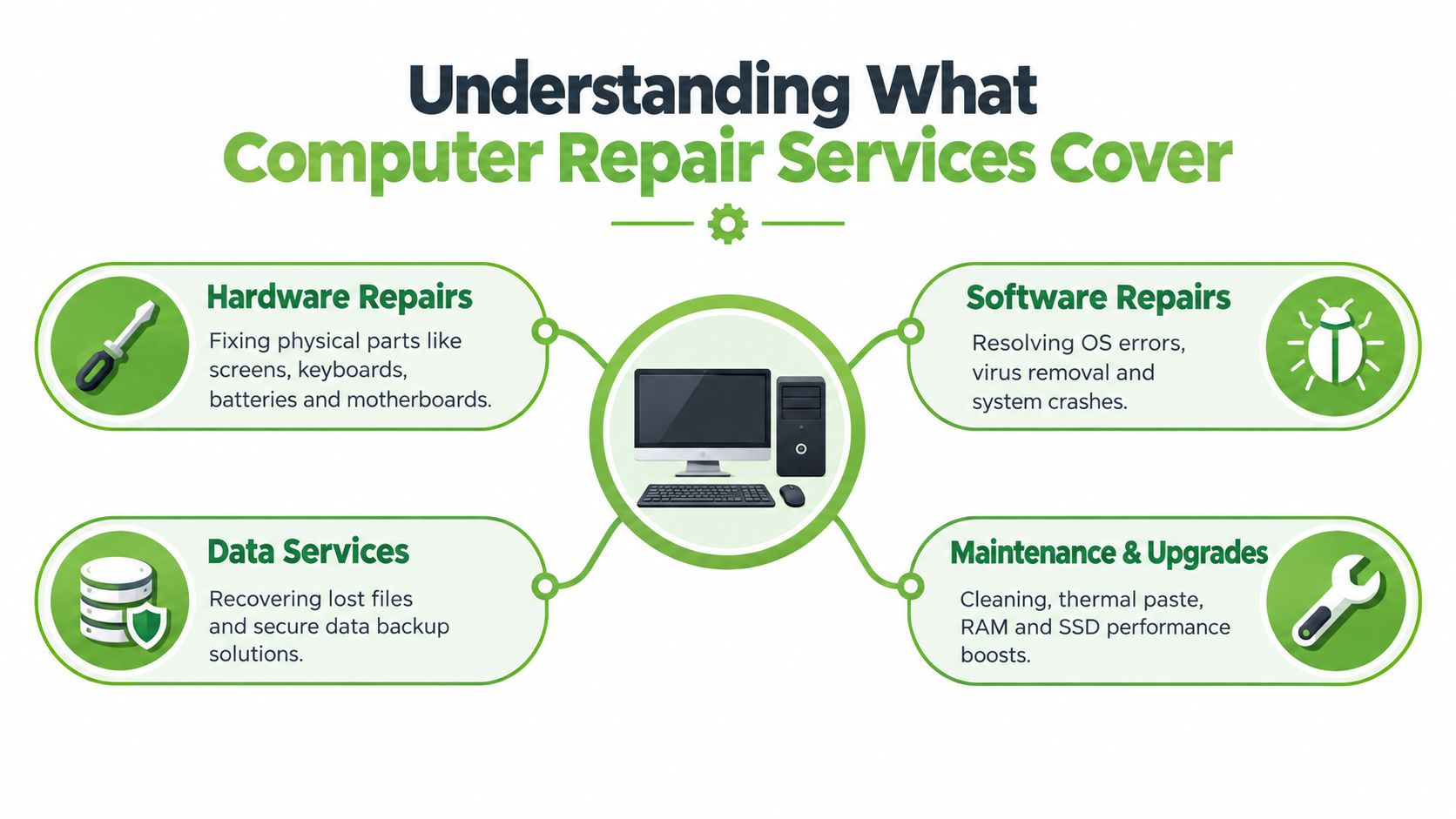
Computer repair is an umbrella term. The first job is usually diagnostics, similar to a medical examination. A technician gathers symptoms, checks the device's condition and runs tests before recommending treatment.
Hardware repairs
Hardware work addresses physical components. Common examples include:
- Screens and hinges: A cracked panel, flickering display or loose hinge may need part replacement or careful mechanical repair.
- Batteries and charging systems: Fast drain, unexpected shutdowns or a raised trackpad can indicate battery failure. A swollen battery shouldn't be pressed, punctured or repeatedly charged.
- Keyboards, trackpads and ports: These parts can fail through wear, liquid exposure or damaged connectors.
- Storage, memory and cooling: A solid-state drive upgrade can improve responsiveness when the existing drive is old or failing. Cleaning fans and replacing thermal material can help a system manage heat more effectively.
- Motherboards: Board-level work is more specialised because the fault may involve power circuits, connectors or tiny components rather than a simple plug-in replacement.
A repair shop should explain whether it's replacing a module or repairing a board. Those are different jobs with different risks, tools and testing requirements.
Software and data services
Software troubleshooting covers operating system errors, failed updates, driver conflicts, malware and repeated crashes. A technician may repair the installation, remove malicious software or reinstall the operating system. A reinstall can erase data, so it shouldn't begin until files and account access have been discussed.
Data recovery and migration require separate care. If a storage device is failing, continued use can make recovery harder. A provider may first create a safe copy, move files to a replacement drive or recover selected folders. Ask whether the work involves data copying, recovery from a damaged drive or secure erasure before reuse.
Maintenance and upgrades
Maintenance is preventative rather than reactive. Dust removal, cooling checks, storage upgrades and memory changes can improve day-to-day usability, but a technician should still confirm compatibility and inspect the device's wider condition. A faster drive won't solve a failing motherboard, and more memory won't repair a damaged charging circuit.
For an SME, the right service may also include device migration, user setup and secure disposal. That turns a single repair into a controlled lifecycle process, with less disruption and clearer ownership of data.
Common Computer Problems and How Diagnostics Work
Most computer faults become easier to manage once you describe the symptom precisely. “My laptop is spoilt” gives a technician little to work with. “It starts, shows the logo, then restarts whenever I open a large file” points towards a narrower set of possible causes.
Match the symptom to the risk
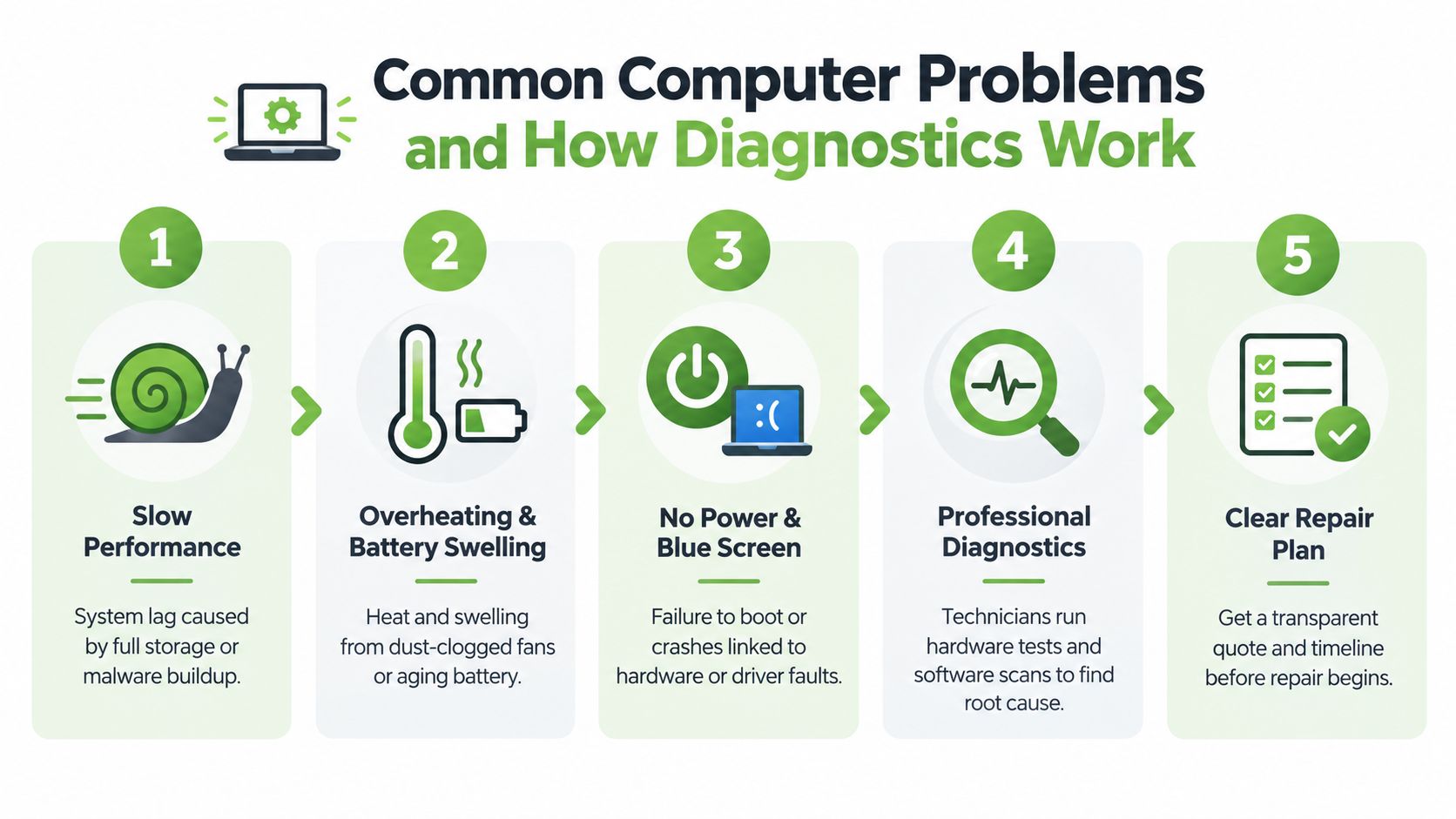
Slow performance can come from a crowded drive, unwanted software, failing storage, insufficient memory or heat-related throttling. Close unnecessary applications, restart the computer and check whether one programme is consuming unusual resources. Don't delete unfamiliar system files or install several “cleaner” tools at once.
Overheating and loud fans may indicate blocked airflow, dust, a cooling problem or heavy background activity. Save your work and stop using the device if the case becomes uncomfortably hot or the computer shuts down repeatedly. A raised trackpad or uneven click can signal a swollen battery, which needs prompt professional attention.
No power or a blue screen can involve the charger, power socket, battery, display, driver or motherboard. Test the charger and outlet only if the equipment looks safe. If the computer smells burnt, shows liquid damage or has a damaged cable, stop testing it.
Data loss needs a different response. If important files are missing from a failing drive, avoid repeated restarts and unnecessary downloads. New activity can overwrite recoverable information.
The diagnostic sequence
A careful technician normally works from the least invasive checks towards component isolation:
- Visual inspection: The technician records physical damage, liquid signs, battery swelling, port condition and loose parts.
- Power and software checks: The device is tested with suitable power equipment, startup tools and operating system diagnostics.
- Component isolation: Memory, storage, display, battery and board-level circuits are assessed separately where possible.
- Stress and stability testing: The repaired system is run under appropriate workloads to check temperature, crashes, charging and restart behaviour.
- Written repair plan: You receive the identified fault, proposed work, parts information, price and expected collection timing before approval.
This sequence protects you from paying for a guess. It also helps an SME decide whether to repair one machine, migrate its user to a spare, or replace the device without losing control of the data.
A short video can help you recognise the difference between a visible symptom and the underlying fault:
Seek professional help quickly after liquid contact, with a swollen battery, repeated shutdowns, suspected storage failure or any situation where valuable data is at risk. A simple restart is reasonable for a frozen application. Opening a thin laptop, drying a spill with heat or forcing a swollen battery into place isn't.
How Much Computer Repairs Cost and How Long They Take
A fair repair quote reflects more than the replacement part. Part availability, device design, labour complexity, testing, data handling and warranty risk all affect the final decision. A basic module swap is different from tracing a fault on a motherboard, and a repair involving liquid damage may require more inspection before anyone can promise an outcome.
OEM policies provide useful context without dictating what an independent provider must charge. ASUS Singapore's service warranty terms state that repaired or replaced components retain the remaining standard warranty, but for at least three months after service. Acer Singapore's warranty terms provide coverage for the balance of the original warranty or 30 days, whichever is longer. These are benchmarks for warranty thinking, not universal prices or guarantees.
| Service Item | Typical Benchmark | What Affects Price and Time |
|---|---|---|
| Software troubleshooting | Diagnosis, malware checks or operating system recovery | The depth of the software fault, data backup and whether reinstallation is needed |
| Battery replacement | Component replacement after safety and compatibility checks | Battery model, access difficulty, adhesive construction and post-repair charging tests |
| Screen or keyboard repair | Module replacement with functional testing | Panel or keyboard availability, device construction, hinge condition and display testing |
| Storage upgrade or migration | Drive replacement, operating system setup and data transfer | Drive compatibility, data volume, encryption and whether the original drive is failing |
| Motherboard repair | Component-level diagnosis or board replacement | Fault complexity, parts sourcing, microsoldering requirements and stability testing |
| Liquid damage treatment | Inspection, cleaning, corrosion assessment and recovery planning | The liquid involved, affected components, data priority and whether corrosion has spread |
Some jobs may be completed while you wait, especially when the correct part is available and the fault is isolated. Screen, keyboard and board work can take longer because the technician may need to source parts, dismantle the device carefully and complete extended testing. Ask for an expected range rather than assuming every “same-day” promise applies to your model.
OEM service policies also show why inspection and labour charges exist. HONOR Singapore's warranty policy lists a S$60 inspection fee for out-of-warranty devices, waived if repair proceeds, and labour fees of S$60 for non-foldable devices and S$85 for foldable phones and PCs or laptops. Lenovo Singapore's on-site service information describes next-business-day technician dispatch for typically covered warranty issues. The practical lesson is to compare what a quote includes, not just the headline figure.
For a related explanation of how service decisions work across another device category, see this guide to mobile phone repair in Singapore. The same principle applies to computers: approve work only after the provider identifies the fault and states the warranty clearly.
How to Choose a Trustworthy Repair Provider in Singapore
A trustworthy provider makes its process visible. You should know who is handling the device, what will be tested, which part will be used, how your data will be treated and what happens if the same fault returns.
Check process quality, not just branding
Ask whether the provider follows a documented quality process. ISO 9001 Certified workflows indicate that the organisation has a quality management framework. ISO 27001 Certified processes are relevant when technicians handle business files, customer information or devices containing confidential material. Certification doesn't prove that every repair will succeed, but it gives you a meaningful process question to ask.
A provider that performs 30-point quality checks should be able to explain what those checks cover. Look for practical evidence such as charging tests, display checks, keyboard and port testing, storage health, wireless connectivity, camera and audio checks, temperature behaviour and restart stability. The exact checklist may vary, but the provider should record the outcome rather than relying on a quick power-on test.
Use this checklist when comparing an authorised centre with an independent repairer:
- Ask about the diagnosis: Will the provider identify the root cause before recommending a part?
- Confirm the part type: Is the replacement original, manufacturer-approved, refurbished or compatible? Ask how the choice affects performance and warranty.
- Get the warranty in writing: Confirm the warranty period, covered part, labour coverage and exclusions. A three-month minimum on repaired parts is a useful comparison point because ASUS applies that floor to repaired or replaced components under its Singapore terms.
- Protect your data: Ask whether technicians need your password, whether data is copied, and whether the provider can offer secure sanitisation after service.
- Request condition records: For a device being traded in or refurbished, look for transparent device grading and battery health disclosure.
- Review the quote: The document should identify the fault, work proposed, parts, labour, taxes where applicable and collection conditions.
Spot weak service before handing over the device
Be cautious if a shop refuses to provide a written estimate, pushes replacement without diagnostics, gives no receipt or cannot explain what happens to your files. An unusually low quote may exclude labour, testing, data migration or warranty support.
Businesses should also ask about chain of custody. Record the device serial number, accessories and visible condition at drop-off. For teams with several computers, keep an asset register and note which user had the device, what files were stored locally and whether encryption or account removal is required.
For additional guidance on evaluating manufacturer support, compare the questions in this Samsung service centre guide for Singapore. The provider you choose should make the repair boundary clear. An authorised centre may be appropriate for a warranty claim or proprietary part, while an independent technician may be suitable for an out-of-warranty upgrade or board-level repair. The right choice depends on the device, fault, data and terms, not on a label alone.
Preparing Your Device and Knowing Your Rights Before Repair
Preparation reduces avoidable risk. Before handing over a working computer, copy important documents to a trusted external drive or cloud account, then confirm that the files open. For a device that won't boot, don't keep forcing it to start if the storage may be failing. Tell the provider which files are essential before any recovery or reinstallation work begins.
Use a handover checklist
- Back up first: Save documents, photos, browser data and business files before service where the device still works.
- Sign out carefully: Log out of cloud storage, email, password managers and device-tracking services where appropriate. Keep recovery details available if testing requires account access.
- Record the condition: Photograph scratches, dents, screen lines, ports and accessories. Note the exact symptom and when it started.
- Ask about privacy: Confirm whether technicians will access files, whether a temporary account can be used and how data is handled after diagnosis.
- Keep the paperwork: Retain the receipt, quote, serial number and written warranty. You'll need them if the fault returns or if the device is collected by someone else.
Don't share a primary password casually. If a password is required for testing, ask whether you can enter it yourself or create a temporary local account. SMEs should remove unnecessary customer data before service and confirm whether the provider can securely erase the drive if the computer is being retired.
Understand the local protection framework
Singapore's Lemon Law can help with defective goods within six months, but it isn't a general promise that an old computer will receive free maintenance indefinitely. The remedy depends on the circumstances and the nature of the defect, so keep your proof of purchase and communicate with the seller promptly. You can review the practical warranty context in this HP warranty check guide for Singapore.
Singapore's regulated e-waste system began on 1 July 2021 under the Extended Producer Responsibility model. Retailers with retail floor area of 300 m² or more must provide in-store collection for regulated ICT equipment, batteries and lamps, and free one-for-one take-back when delivering a new product, regardless of where the old item was originally purchased, according to the NEA e-waste management guidance.
The exit route matters as much as the repair. Use recognised ICT collection channels when a device can't be repaired, and ask how data will be sanitised before recycling. Singapore also tightened transboundary controls from 1 January 2025. Companies importing, exporting or transiting e-waste must follow the Prior Informed Consent procedure and obtain a Basel Permit from NEA before shipment, as explained in Singapore's transboundary e-waste consultation information.
How myhalo Supports Repair Reuse and Responsible Care
Repair works best when it forms part of a planned device lifecycle. A technology lifecycle partner helps you assess the existing computer, protect its data, extend its useful period and identify a responsible next step when continued repair no longer creates value.
myhalo provides repair, data and device migration, trade-in and lifecycle guidance through RescueAdvise and the mylo AI Assistant. For buyers who need a replacement rather than another repair, Certified ReLoved devices offer a reuse pathway, while Certified Surplus products provide another option for functional technology that can support household or SME needs. Responsible recycling remains appropriate when a device cannot be repaired, reused or recovered safely.
Quality controls matter because a refurbished or repaired computer must be more than cosmetically acceptable. myhalo uses 30-point quality checks under an ISO 9001 Certified process, with an ISO 27001 Certified approach relevant to information security. Transparent device grading and battery health disclosure help buyers understand condition before purchase, rather than discovering limitations after delivery.
Care programmes can also change the lifecycle calculation. myhalo e-Xtender supports proactive maintenance, while myhalo Protect covers accidental damage, liquid protection and extended warranty needs according to the applicable programme terms. These services can help households and SMEs plan device care instead of waiting for every failure to become an emergency expense.
The need for clear decisions is obvious. Households recycle only about 6 per cent of an estimated 30,000 tonnes of household electrical and electronic goods discarded each year, while 63.5 per cent of youth respondents reported hoarding old devices and only 10 per cent said they tried to recycle e-waste, according to survey coverage in The Straits Times. Repair, reuse, trade-in and secure recycling each have a place. The smart choice is the one that protects your data, preserves practical value and keeps the device in useful service for as long as its condition justifies.
If your laptop or desktop is failing, start with a proper assessment rather than guessing at parts or replacing the whole machine. Visit myhalo to explore repair support, RescueAdvise, Certified ReLoved and Certified Surplus options, then choose a path that fits your data, budget and device lifecycle.