





Cloud Storage Options: A Practical Guide for Singapore Users
You've probably had the same moment plenty of Singaporeans do. Your laptop is full, your phone has too many work photos, your tablet holds notes you can't lose, and you're still wondering what happens if one device fails at the wrong time. That's where cloud storage options stop being a tech buzzword and become a practical decision about access, backup, cost, and peace of mind.
For Singapore users, the decision is sharper than it looks. The country's digital push began with Smart Nation in 2014, and by 2018 Singapore had launched the Singapore Government Tech Stack to standardise cloud-native services across agencies, which helped normalise enterprise-grade cloud storage and data management in everyday business thinking. That local momentum sits inside a much bigger market too, with the global cloud storage market valued at USD 161.28 billion in 2025 and projected to reach USD 809.99 billion by 2034 in the cited forecast (Fortune Business Insights).
For a student, that might mean not losing coursework when a phone dies. For a small business owner, it might mean keeping client files accessible without buying more local hardware every time storage runs low. The key question isn't just which provider looks cheapest today, it's which setup keeps your files available, your costs predictable, and your devices useful for longer.
Table of Contents
- Why Cloud Storage Matters for Singapore Users
- Understanding the Three Core Cloud Storage Types
- Public, Private, and Hybrid Deployment Models Compared
- Cost of Cloud Storage in Singapore
- Security, Privacy, and Data Resilience for Singapore Users
- Your Cloud Storage Decision Checklist and Migration Steps
- Building a Resilient Technology Ecosystem
Why Cloud Storage Matters for Singapore Users
A common Singapore scene looks like this. A student drafts an assignment on a laptop at home, edits slides on a tablet in school, and takes reference photos on a phone in between. An SME owner does something similar, except the files are invoices, product photos, and client documents, and the worry isn't just convenience, it's whether a single device failure could halt work.
Cloud storage solves that problem by keeping files remotely in logical pools rather than only on one local device, with the provider managing the underlying servers and access over a network (cloud storage overview). That matters in Singapore because the market is small, connected, and fast-moving. Businesses usually need resilient data access more than they need to keep expanding local hardware, and cloud-based storage fits that reality well.
Why the local context changes the decision
Singapore's cloud and data-centre ecosystem also benefits from its role as a Southeast Asian hub for multinational cloud providers, which supports low-latency storage access for local users and nearby ASEAN markets. That doesn't mean every user should rush into the cloud blindly. It does mean the cloud is no longer a distant concept reserved for large enterprises, it's part of the everyday infrastructure stack for schools, startups, agencies, and growing businesses.
Practical rule: If a file would be painful to lose, hard to recreate, or needed on more than one device, it belongs in a storage strategy, not just on a device.
The other reason cloud storage matters is resilience. Local drives fail, laptops get stolen, and tablets get replaced. Cloud platforms help reduce that single-device dependency by making access possible across devices, which is why the cloud has become more than a backup tool, it's now part of how many people work and study.
Singapore users also tend to care about value. That makes the key question less about “cloud or no cloud” and more about what mix of cloud and local storage makes sense over time. For some people, a subscription is the cleanest answer. For others, a hybrid setup keeps daily files accessible while leaving large archives or less-used material on local storage. The right choice depends on how often you need the files, how sensitive they are, and how much you're willing to pay month after month.
Understanding the Three Core Cloud Storage Types
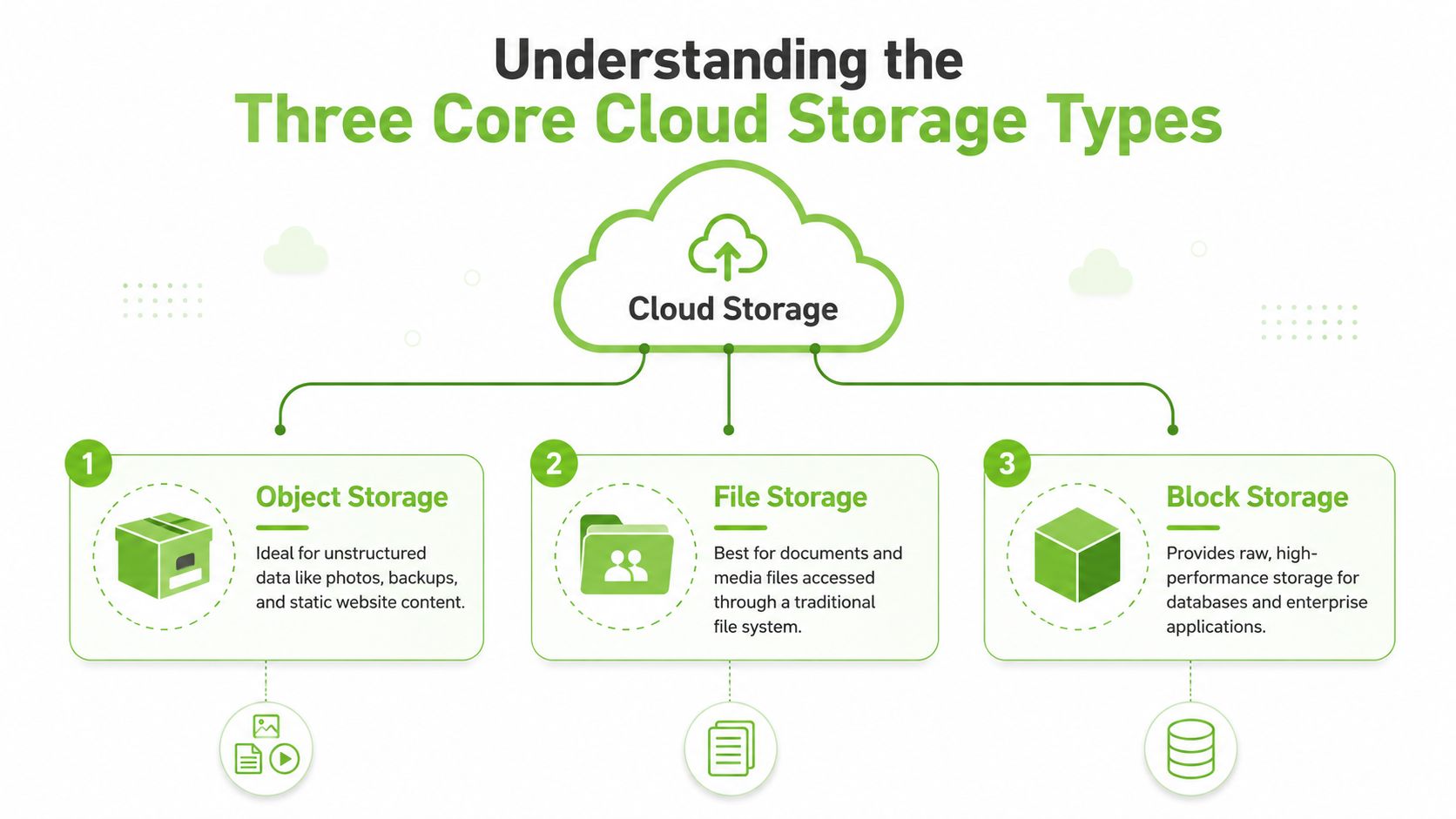
If cloud storage feels confusing, begin with the storage type, not the brand. The three common models are object, file, and block storage, and each one fits a different kind of work depending on what you store and how often you need to touch it. AWS explains the main cloud storage types clearly in its overview of AWS cloud storage types.
Object storage suits large, messy collections
Object storage works like a labelled warehouse. Each file is stored as an object with metadata, so it is a strong fit for unstructured data such as photos, backups, media archives, and static web content. If you are saving family photos, old project folders, or backup copies of documents you do not edit every day, object storage usually makes the most sense.
The main advantage is scale. It is built to organise many varied files without forcing everything into a traditional folder tree. That is why it often shows up in backup and archive workflows, where the files matter more than the folder structure around them.
File storage feels familiar
File storage works like a shared folder system. It is closest to what you may already know from a laptop or an office network drive, so the learning curve is lighter for teams that want a familiar way to open, save, and share files. If a group needs one place for document sets, media files, or a common workspace, file storage is usually easier to understand than object storage.
This is the version many non-technical users picture when they hear “cloud drive”. The appeal is familiarity, especially for documents, presentations, and media files that people access through a normal file system.
Block storage is for speed and direct access
Block storage is more like a high-speed workbench. It breaks data into fixed-size blocks and suits low-latency workloads that need direct volume access, such as databases or virtual machine disks. Engineers choose block storage when performance matters more than human-friendly folder browsing.
A simple rule helps here. Use object storage for backup and archive, file storage for shared documents, and block storage for databases or VM disks. That distinction is repeated in provider guidance from AWS, and it is one of the easiest ways to avoid paying for the wrong storage model.
For everyday devices that still play a role alongside cloud storage, a guide to a micro SD card can help you judge when local storage still belongs in the mix. If you are planning for a team budget, you can also find affordable cloud storage solutions and compare them against how often your files are used, how sensitive they are, and how much you are willing to keep paying over time.
Public, Private, and Hybrid Deployment Models Compared
Storage type is one decision. Deployment model is another. The three common models, public, private, and hybrid, describe where the storage lives, who manages it, and how much control you keep over access and governance.
| Cloud Deployment Models at a Glance | Best For | Cost Profile | Security Level | Singapore Use Case |
|---|---|---|---|---|
| Public cloud | Individuals, students, small teams | Usually subscription or pay-as-you-go | Shared infrastructure with controlled access | Personal backups, shared files, early-stage startups |
| Private cloud | Sensitive workloads, controlled environments | Usually higher due to dedicated setup | Stronger control over data and access | Client records, regulated business data, internal systems |
| Hybrid cloud | Users who need both convenience and control | Mixed cost profile, depends on split | Balance between flexibility and control | SMEs with public collaboration files and private sensitive archives |
A simple way to separate them is by control. Public cloud gives you convenience first, private cloud gives you control first, and hybrid cloud tries to split the difference without forcing every file into the same basket.
Public cloud is the easiest entry point
Public cloud storage runs on shared infrastructure, but only authorised users can access the stored data. It is the easiest option for individuals and smaller teams because it usually follows a subscription or pay-as-you-go model. For Singapore users who want quick setup, access across phones and laptops, and little operational fuss, this is often the first stop.
The trade-off is control. Public cloud is practical for general files, but it is usually a poor fit for information that needs tighter handling or stricter internal rules. That does not make it weak. It just means the model favours convenience over fine-grained control.
For a university project, a small project team, or a founder who needs files available anywhere, that trade-off can make sense. For records with data sovereignty concerns, or files tied to compliance and long-term retention, the question changes from “Can I store it here?” to “Should this be here at all?”
Private cloud gives you more control
Private cloud storage is a more controlled environment, often used by organisations that maintain their own servers or dedicated cloud arrangements. It suits businesses that handle sensitive client data, internal records, or systems with stronger governance requirements.
That extra control comes with overhead. Someone has to manage access, updates, backups, and the setup itself, whether that work stays in-house or is handed to a provider. For a Singapore SME, private cloud only makes sense if the business needs that level of control, not just because it sounds safer on paper.
A useful comparison is a locked storeroom versus a shared locker. The locked storeroom gives you more oversight, but you also take on the responsibility of organising, securing, and maintaining it.
Hybrid cloud is the practical middle ground
Hybrid cloud combines public and private approaches. A business can keep sensitive files in a controlled environment while using public cloud for less sensitive collaboration documents or media assets. That split is why hybrid setups are attractive to SMEs that want flexibility without giving up oversight.
Useful filter: If you can clearly separate “must protect tightly” from “needs easy access”, hybrid storage is often the most sensible design.
The key advantage is fit. A Singapore business may need staff to share working documents quickly, while keeping customer records or legal files in a more controlled system. Hybrid cloud lets those two needs live side by side instead of forcing one storage model to do everything.
It also helps with lifecycle planning. When phones, laptops, and office devices are replaced over time, hybrid storage can keep active work flowing through cloud access while older or less frequently used files remain in a quieter, cheaper, or more controlled layer. For teams trying to reduce waste and keep monthly bills in check, the Credit for Startups cloud savings guide is a useful place to compare storage habits against long-term spend.
Cost of Cloud Storage in Singapore
Many buyers focus on the monthly fee and stop there, but that can hide the bigger picture. For Singapore users, the better question is how total cost of ownership changes as files accumulate, teams grow, and older documents keep their value for years.
Short-term convenience versus long-term spend
Cloud subscriptions are easy to begin. You pay, you upload, and the service starts doing its job. That simplicity matters for students, freelancers, and teams that need access now without buying hardware upfront.
The choice does not end after the first payment. If your storage needs stay steady and you keep renewing the same plan, the long-run bill can look less attractive than a hybrid setup that keeps rarely used files in local storage and reserves the cloud for shared or high-priority material. That budget-friendly angle is why many buyers look beyond one monthly subscription and compare lifetime plans, local offloading, or a mix of providers, as discussed in this budget-friendly alternatives discussion.
Hidden costs matter more than people expect
One hidden cost is friction. If you need to pull large archives often, a cloud-only setup can become inconvenient, especially when bandwidth or access patterns do not suit repeated retrieval. Another is over-commitment. A user may end up paying for more space than needed because changing plans later feels like extra work.
Cost rule of thumb: If you keep paying for the same files but rarely open them, local storage plus cloud backup for the important set is often easier to justify.
There is also the question of what “cheap” really means in practice. A plan that looks affordable today may be the pricier choice once you factor in years of repeat payments, the effort of managing data, and the possibility of losing access if the subscription changes. For a closer look at spending habits and storage planning, the Credit for Startups cloud savings guide is worth reading alongside your own file list and budget. The better option is usually the one that matches how often you use your data, not the one with the loudest marketing.
Think in storage layers, not slogans
If you only need a few important files available everywhere, a smaller cloud plan can make sense. If your archive is large and stable, local hardware plus cloud backup may cost less over time. Singapore users should compare access value, retrieval inconvenience, and monthly spend predictability before committing to a subscription habit.
A hybrid approach also fits device turnover better. Phones, laptops, and office machines get replaced, but the storage plan should not force every file to move at the same pace. Newer working files can stay in the cloud for quick sharing, while older project folders, archived scans, and seldom-used records remain on a local device or NAS until they are needed again. If you are comparing the storage side with endpoint protection for a small setup, this Trend Micro Internet Security subscription for one device is one example of how security choices can sit alongside storage planning rather than replace it.
Security, Privacy, and Data Resilience for Singapore Users
Security starts with a basic question many buyers skip. Where is the data stored, and who can move it across borders? For Singapore users, that question matters because cloud convenience does not remove the need to think about data sovereignty, transfer rules, and what happens if access is interrupted.
Storage location is part of the risk picture
A cloud provider can store data in one place or distribute it across several locations. Providers often spread data across multiple virtual machines in data centres around the world to improve availability and redundancy, and Azure highlights built-in redundancy, flexible scaling, and easier collaboration as core cloud benefits (Azure cloud storage dictionary). That design helps with resilience, but it also means users should know whether sensitive files are stored in a region they're comfortable with.
For Singapore SMEs, this is especially relevant for client records and internal documents. If your business works with personal data, you should ask where files live, how copies are handled, and what the provider's cross-border handling looks like under local privacy obligations.
Privacy is stronger when you separate use cases
A cloud-only setup is convenient, but it can be too blunt for sensitive work. A cloud-plus-local strategy gives you more control. Keep active, shared files in the cloud, then maintain a local backup or offline copy for documents that would be painful to lose or difficult to audit.
That approach also fits better with responsible device management. If a laptop or tablet is nearing replacement, your first step should be to move and verify the data before any reset, repair, trade-in, or recycling. Good data hygiene extends the lifespan of the device because you can hand it over, repair it, or reuse it with less risk and less wasted hardware.
Best practice: Separate “always accessible” files from “must protect carefully” files, then back up both in different ways.
For users who want an extra layer of protection on connected devices, endpoint security still matters. A cloud account is only as safe as the devices and passwords that reach it, which is why tools like Trend Micro Internet Security for 1 device fit into the broader resilience picture rather than replacing it.
Resilience beats single-point dependency
A good backup plan is less about fear and more about continuity. If a device fails, your cloud copy should keep work moving. If a cloud account becomes temporarily inaccessible, your local copy should keep the most important files safe. This is the logic behind the commonly discussed 3-2-1 backup strategy, which means multiple copies, different media, and one offsite copy.
For Singapore users, that balance is the key takeaway. Cloud storage is not just a convenience layer. Used well, it becomes part of a wider protection plan that keeps client work, study materials, and device data from being trapped in one place.
Your Cloud Storage Decision Checklist and Migration Steps
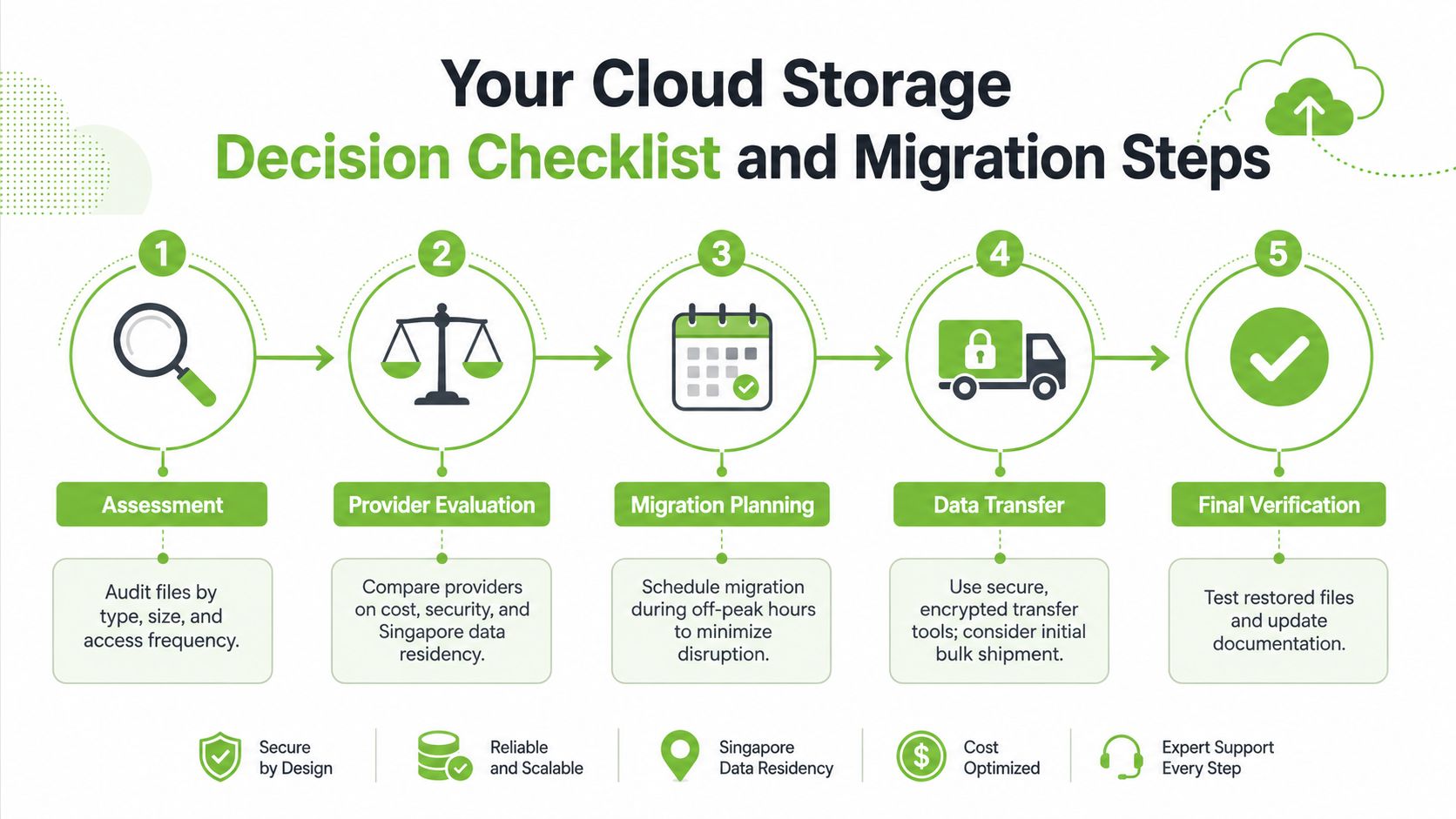
A useful cloud choice starts with your own files, not the provider's homepage. Before you move anything, sort your data by how often you use it, how sensitive it is, and whether it needs to be available on more than one device.
A simple decision checklist
- List your file types first. Separate documents, photos, backups, databases, and media. That tells you whether you need object, file, or block storage.
- Decide what must stay accessible. Active work files belong in cloud or hybrid storage. Archives can stay local unless you need regular remote access.
- Check data handling requirements. If the files contain client records or personal data, confirm where the provider stores them and how cross-border movement is handled.
- Compare costs over time. Look past the first month and ask whether you'll still be happy paying that subscription a year later.
- Plan for device change. If a laptop or phone may be repaired, traded in, or recycled, migrate and verify the files before the handover.
Safe migration is mostly about discipline
Start with a backup before you move anything. Then transfer the files in batches so you can verify that the most important folders opened correctly after migration. If the dataset is large, schedule the move when you can live with some downtime, preferably outside your busiest hours.
After the transfer, test the files. Open a sample document, check a few photos, and confirm that file names and folder structure survived the move. This is the boring part, but it prevents the worst kind of storage mistake, thinking the data is safe when it isn't.
For users who prefer to keep hardware in circulation longer rather than replace it early, support around migration, trade-ins, repairs, and Certified ReLoved or Certified Surplus devices can reduce waste while keeping costs under control. The point is not to buy more tech. It's to make the tech you already have work harder for longer.
Building a Resilient Technology Ecosystem
Cloud storage works best when it's part of a larger plan, not a stand-alone habit. The strongest setup usually combines device longevity, careful data backup, and the right mix of cloud and local storage so you're not paying for convenience you don't need.
That's where the broader lifecycle view matters. If you repair instead of replace, reuse where possible, and move data safely before every upgrade, you keep more value in circulation and reduce the chance that one failed device turns into lost work. A sensible storage strategy supports that mindset, because it makes every laptop, tablet, and phone easier to maintain, pass on, or recycle responsibly.
If you're reviewing your own setup, look at it as a system. The right storage plan, the right router, and the right device pathway should all support the same outcome, less downtime, less waste, and fewer surprise costs. For a practical home or office upgrade that fits that thinking, explore the nest wifi router with Google Assistant.
A CTA for myhalo. If you're ready to make your storage setup more reliable, compare cloud-only and hybrid options, then pair that decision with refurbished devices, repair support, and responsible recycling choices that help your tech last longer.