





Chromebook vs Laptop: The 2026 Singapore Buyer's Guide
You're probably looking at two tabs right now. One has a cheap new Windows laptop with a familiar spec sheet. The other has a Chromebook that seems too simple to be good, or maybe too limited to trust.
That's the exact point where most buyers in Singapore get stuck.
A traditional laptop feels safer because it's a familiar option. But budget buyers often end up with a machine that looks decent on paper and feels slow in daily use. A Chromebook can look weaker, yet run far better for the kind of work commonly performed: browser tabs, Google Docs, Microsoft 365 on the web, Zoom, email, streaming, and school portals.
For eco-aware shoppers, the choice gets more interesting. You're not only buying specs. You're choosing a workflow, a lifespan, and how much waste you're willing to create for tasks that may not need a heavy machine at all. That's where the Chromebook vs. laptop discussion starts.
Table of Contents
- The Modern Laptop Dilemma in Singapore
- The Core Difference Cloud versus Local
- A Practical Feature Breakdown
- The Real Cost Price Value and Sustainability
- Ideal Use Cases for Singaporeans
- Your Final Decision Checklist
- Frequently Asked Questions
The Modern Laptop Dilemma in Singapore
Buying a portable computer in Singapore isn't hard because there are too few choices. It's hard because there are too many familiar ones.
Windows machines dominate local buying habits. In Singapore, Windows laptops hold about 80.5% of operating system share, while Chrome OS holds 1.14% as of November 2023, which shows how strongly buyers still rely on traditional desktop software and conventional laptop setups, according to Singapore laptop operating system market data.
That market reality shapes expectations. Many shoppers assume the safe choice must also be the smart choice. It often isn't. If your daily routine happens in Chrome, Google Workspace, Microsoft 365 online, YouTube, web research, online learning portals, Slack, WhatsApp Web, and video calls, then a low-cost Windows laptop may give you the comfort of familiarity without the smoothness you expected.
Here's the practical tension:
| Factor | Chromebook | Traditional laptop |
|---|---|---|
| Best for | Web work, school portals, writing, meetings, streaming | Desktop software, gaming, creative tools, specialised business apps |
| Budget experience | Often smoother at the low end | Can feel slow if specs are weak |
| Storage style | Cloud-first | Local-first |
| Maintenance | Light | More hands-on |
| Sustainability fit | Strong if bought refurbished and used for the right tasks | Strong if you truly need its extra capability |
A good buying decision in the Chromebook vs. laptop debate isn't about chasing the longest feature list. It's about matching the device to the work.
Simple rule: Don't pay for local computing power you won't use, and don't buy a cloud-first machine if your core software lives on the desktop.
The Core Difference Cloud versus Local
The biggest difference isn't the keyboard, screen size, or logo on the lid. It's how the machine expects you to work.
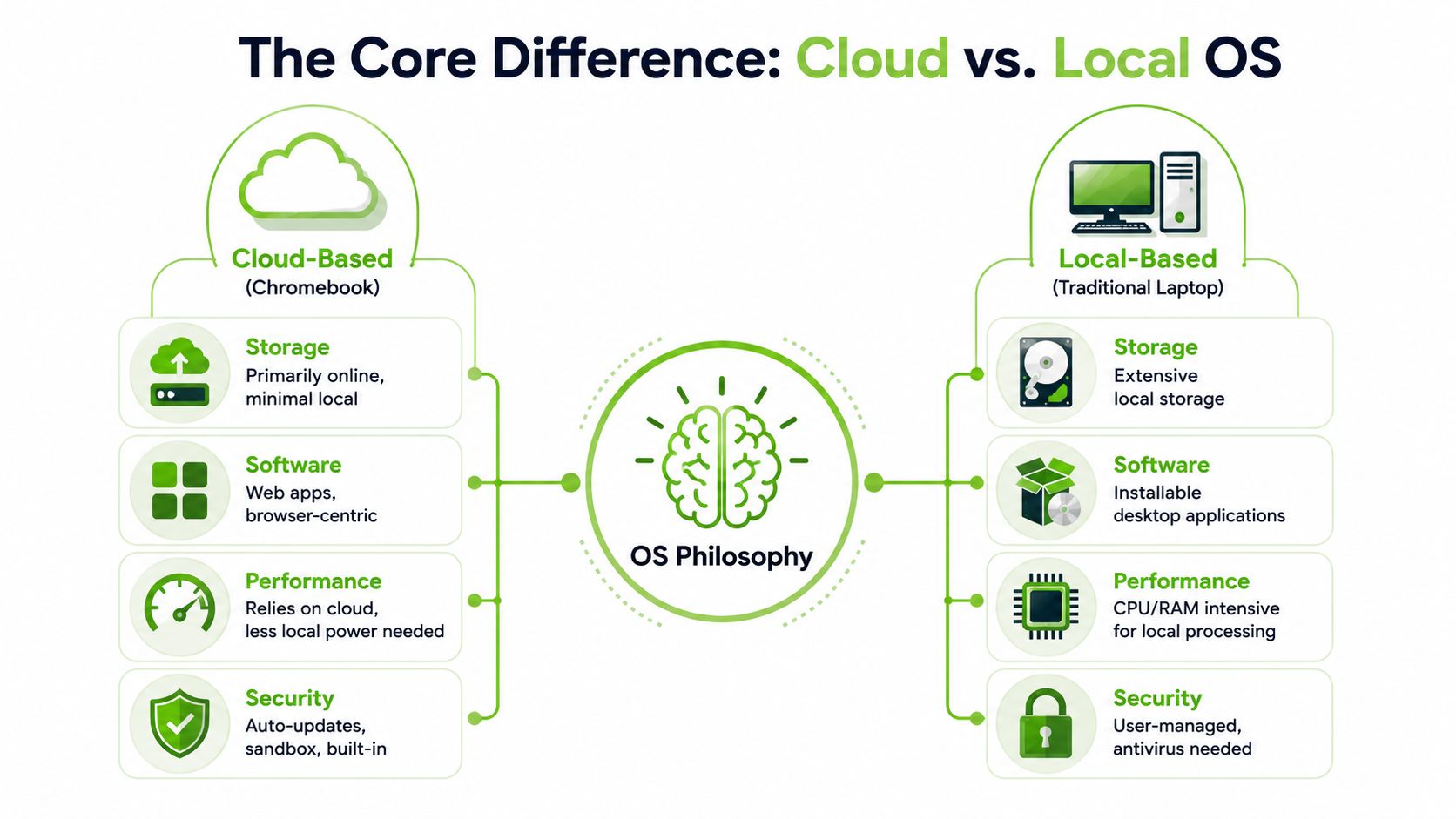
A Chromebook is built around a cloud-first model. A traditional Windows laptop or MacBook is built around a local-first model. Once you understand that, the rest of the comparison starts making sense.
An analogy to music helps illustrate this. Cloud-first is streaming. Your files, apps, and activity often live online, and the device acts as a fast, efficient access point. Local-first is owning a full offline library. The machine stores more, processes more on-device, and can run heavyweight installed programs without relying on the web in the same way.
What cloud-first means in daily use
On a Chromebook, the browser is central. That doesn't mean it only opens websites. It means many tasks happen through web apps, Android apps, and lightweight workflows designed around syncing, quick startup, and low hardware demand.
That's why a Chromebook often feels fast even when the hardware looks modest. It isn't trying to be an all-purpose desktop workstation. It's trying to do common tasks with less friction.
For parents setting up a student device, this also affects software choices. If schoolwork depends on Microsoft tools, it helps to understand what runs in a browser and what needs a desktop installation. A practical guide on how to install Office 365 for your child can help you map that out before you buy the device itself.
What local-first means in daily use
A traditional laptop is more like a self-contained workbench. You install desktop apps, keep larger files locally, and rely on the device's processor, memory, and storage to do more of the heavy lifting.
That flexibility matters if you use Adobe Creative Suite, advanced Excel workflows, coding environments with local dependencies, accounting software with Windows-only support, or games that need stronger graphics performance. A laptop gives you more room for those jobs, but it also asks more from the hardware.
Cloud-first machines reduce the need for expensive internals. Local-first machines justify stronger specs only when your work actually needs them.
Why this matters before you compare specs
Specs can mislead buyers because they look objective. But a processor or RAM number only tells part of the story. The operating system decides how efficiently that hardware gets used.
That's why two machines at a similar price can feel completely different. One is trying to run a broader, heavier desktop environment. The other is designed to stay lean and responsive for browser-led work.
If you remember one thing, make it this: a Chromebook is not a cheaper version of a normal laptop. It's a different tool with a different philosophy.
A Practical Feature Breakdown
Practical buying decisions happen at feature level. Not because every feature matters equally, but because one or two of them usually decide whether you'll love the machine or regret it.
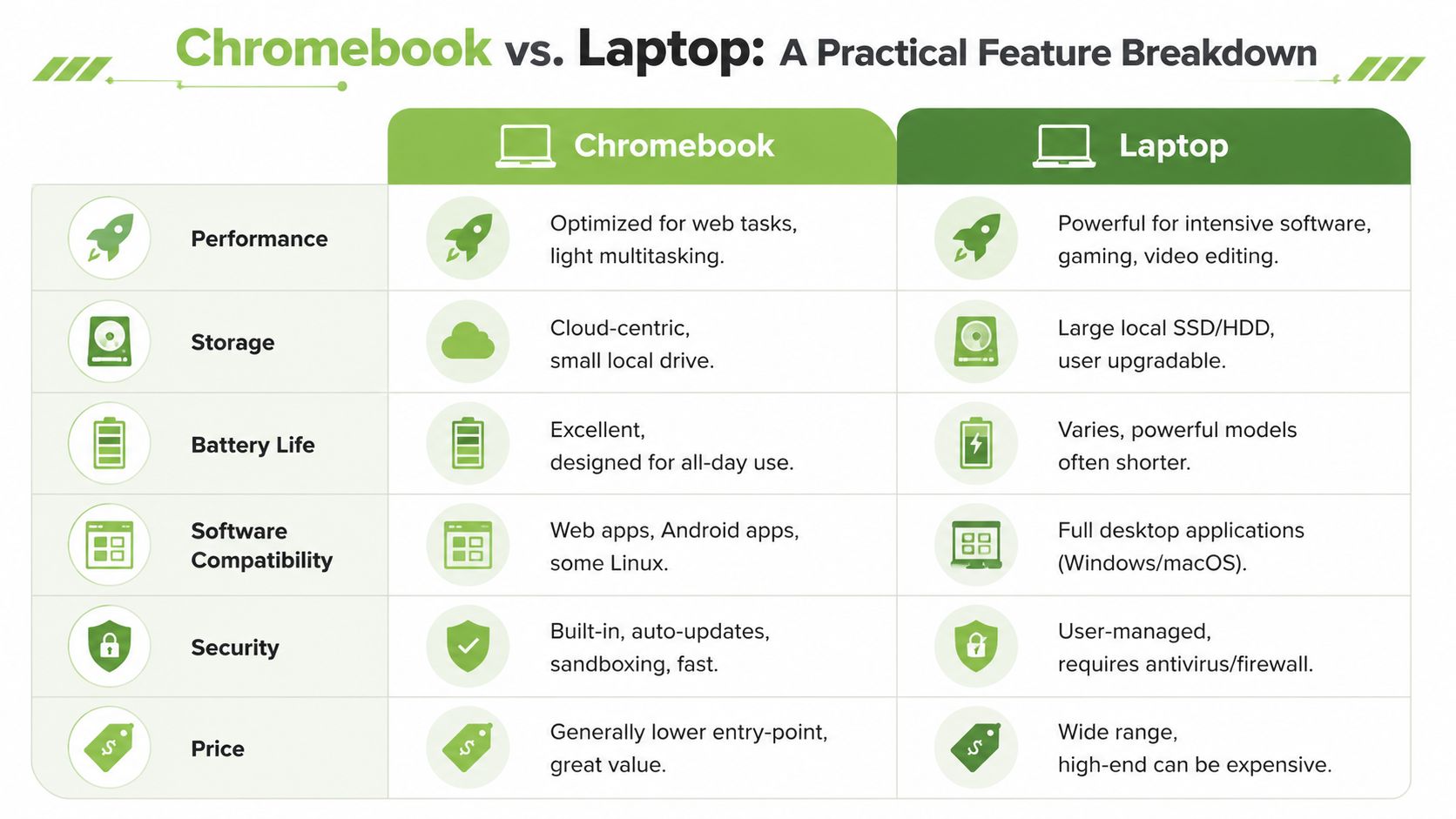
Start with the visual comparison below, then use the breakdown after it to test your own workflow against each device type.
Performance and speed
If your day is mostly browser tabs, video calls, email, documents, school portals, and streaming, a Chromebook often feels snappier than a weak Windows machine. ChromeOS is lighter, so less of the hardware budget gets wasted just keeping the system running.
Where laptops pull ahead is sustained heavy work. Large spreadsheets with advanced desktop features, raw photo processing, video editing, engineering tools, local virtual machines, and gaming all favour a traditional laptop.
Buying insight: For light workloads, real-world responsiveness matters more than headline specs.
The biggest mistake I see in the Chromebook vs. laptop decision is assuming “more complete” always means “better value”. If the machine spends most of its life in a browser, you can end up paying extra for capability you never touch.
A business buyer should also think about software environment early. If your team depends on conventional office setups and desktop workflows, a guide to choosing a reliable business laptop is more relevant than comparing entry-level consumer devices.
Here's a quick video if you want a general visual overview before going deeper:
Applications and software compatibility
This is the deal-breaker category for many buyers.
A Chromebook handles web apps well. Google Docs, Google Sheets, Gmail, Google Meet, Canva, Notion, Slack, Microsoft 365 online, YouTube, web research tools, and many school platforms work perfectly fine. Some models also support Android apps and Linux tools, which expands what you can do.
A Windows laptop or MacBook still wins if you need specific desktop software. That includes full Adobe Premiere workflows, complex Photoshop use, some accounting packages, many coding setups, CAD software, and most PC gaming libraries.
If you already know the exact app you must run, check that first. Don't start with processor comparisons.
For Office users, the distinction is straightforward. Browser-based Word and Excel are enough for many people. Power users who rely on advanced desktop features should stay with a traditional laptop.
Storage and how you actually work
This part is less about capacity and more about habits.
Chromebooks are designed around cloud storage. That's great if you keep files in Google Drive, OneDrive, Dropbox, or school platforms. It's less ideal if you carry around large local media libraries, project files, or software installers.
Traditional laptops suit people who want a fuller local file system. They're better for large photo folders, offline work archives, video assets, local backups, and software-heavy workflows.
A fast rule of thumb:
- Choose cloud-first storage if you mostly create documents, access shared folders, and move between devices.
- Choose local-first storage if your files are large, specialised, or often used without dependable internet.
- Choose a laptop with stronger local storage needs in mind if you don't want to think about syncing strategy at all.
Battery life and portability
Portable devices should feel mobile in real life, not just in product listings.
Chromebooks benefit from a lighter operating model. Chromebooks can deliver 10 to 12+ hours of battery life with modest hardware, while Windows laptops span a wider range from around 8 hours on standard models to over 32 hours on premium ones depending on specs and usage, based on this Chromebook and laptop battery comparison.
That range matters. A premium laptop can beat a Chromebook on endurance, but a budget Windows machine often won't. If you commute, move between classes, or work from cafés and co-working spaces, Chromebook portability is one of its strongest advantages.
Security and updates
Security isn't only about antivirus. It's also about how much maintenance the device expects from you.
Chromebooks usually suit buyers who want a simpler security model with automatic updates and less hands-on upkeep. Traditional laptops offer more flexibility, but they also demand more awareness from the user. That can be fine for experienced users. It can be annoying for someone who just wants a dependable daily machine.
For families, students, and casual users, lower maintenance often matters more than technical control.
The Real Cost Price Value and Sustainability
The smartest budget purchase is rarely the one with the lowest sticker price. It's the one that still feels usable after the excitement of checkout disappears.
That's where the Chromebook vs. laptop conversation gets uncomfortable for low-end Windows models. They often win on familiarity and lose on day-to-day experience.
Why low-budget Windows machines disappoint
There's a practical concept that explains this clearly: price-performance inversion.
At the budget end, the machine that looks “more capable” can perform worse in real life. Data shows ChromeOS runs more smoothly on low-spec hardware. In Singapore, a refurbished ReLoved Chromebook can deliver 3x faster app loading and 12-hour battery life compared with a similarly priced low-end Windows laptop, according to this analysis of Chromebook and Windows performance at low budgets.
That matters because budget buyers don't buy devices to benchmark them. They buy them to open assignments quickly, join calls without lag, and avoid waiting for basic apps.
The lower your budget, the more operating system efficiency matters.
Refurbished value is about lifespan, not just price
A refurbished device only makes sense if quality control is real. Otherwise, it's just a cheaper risk.
That's why I'd judge refurbished value on four things:
- Condition clarity: You should know whether the device is close to new or visibly used.
- Warranty support: Even a budget machine needs some protection after purchase.
- Testing standards: Proper checks matter more than polished marketing.
- Lifecycle fit: The device should match your workload, not just your wallet.
For buyers weighing options, a curated selection of refurbished laptop computers is often a better starting point than browsing random marketplace listings with unclear histories.
The sustainability side is just as practical. The global refurbished electronics market was valued at US$ 68.24 billion in 2026 and is projected to reach US$ 136.40 billion by 2033, growing at a CAGR of 10.4%, according to refurbished electronics market projections. That growth reflects something buyers already understand intuitively: extending device life is often the most sensible way to cut waste without giving up quality.
Singapore's device habits make that even more relevant. People here own plenty of tech, and not all of it stays in use. Choosing refurbished, repairing when practical, and trading in old hardware are better habits than letting usable electronics sit in drawers.
Sustainability includes data handling
Eco-friendly tech choices only work if people trust the handover process.
If you're trading in or disposing of an old laptop, responsible data wiping matters as much as recycling. An external example of enterprise-oriented disposal practice is Beyond Surplus data destruction, which highlights why secure end-of-life handling is a real part of sustainable tech, not a side issue.
A budget buyer should think in full lifecycle terms: buy the right device, keep it useful for longer, and retire it safely when it's finally done.
Ideal Use Cases for Singaporeans
The easiest way to choose is to stop thinking about categories and start thinking about your day. Different users need different things, meaning blanket advice fails.
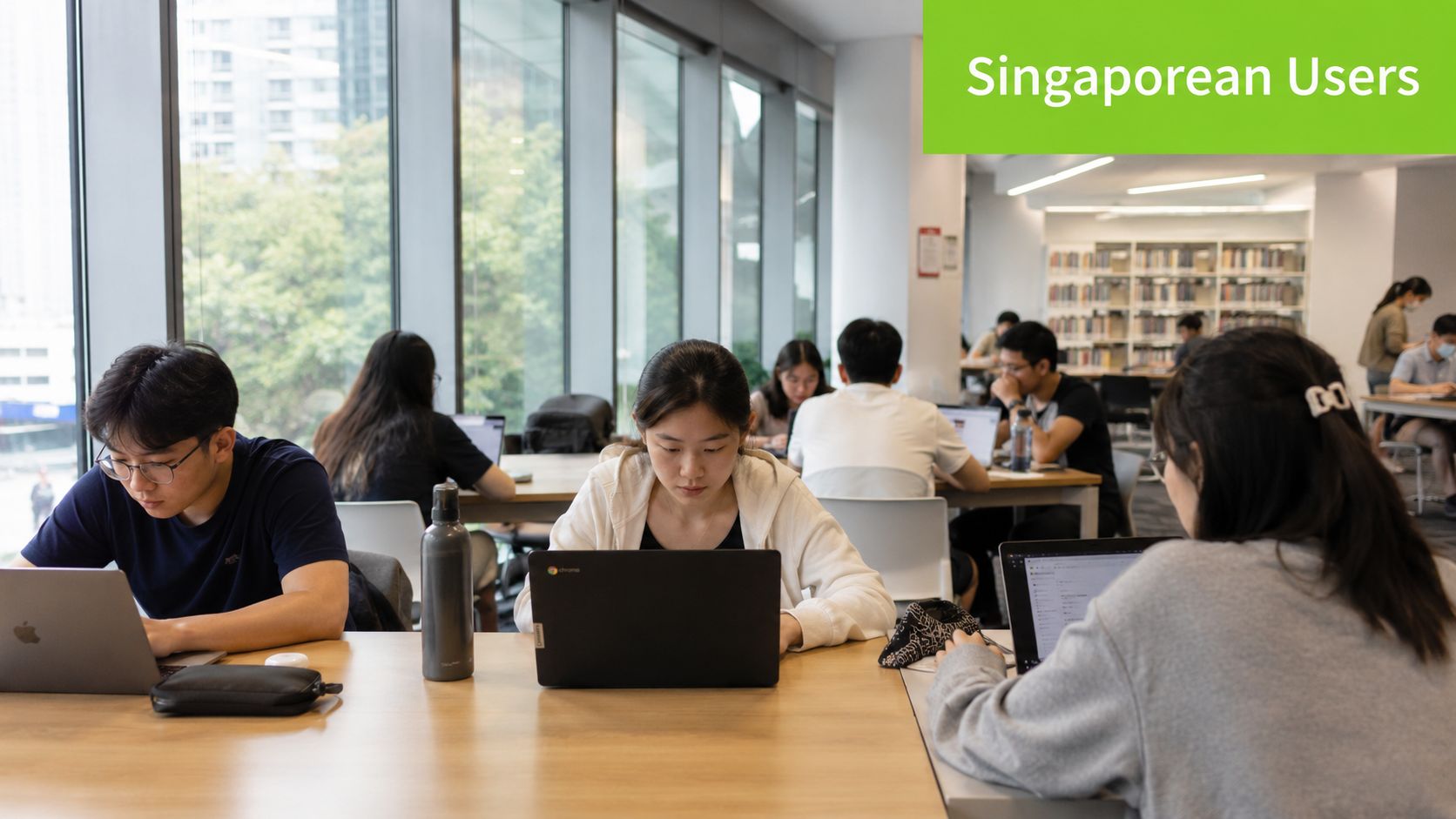
In Singapore's market, Chromebooks offer stronger performance-per-dollar for web tasks, with a $300 to $400 model outperforming a similarly priced Windows laptop. But Windows laptops remain essential for specialised software, gaming, and creative workflows, based on this market-oriented Chromebook versus Windows laptop comparison.
The university student
A university student usually needs portability, battery life, web research, note-taking, video calls, document editing, and enough reliability to survive a full day outside.
If that student mainly works in browsers, PDFs, Google Workspace, online lecture platforms, and Microsoft 365 online, a Chromebook makes a lot of sense. It's often the better fit for someone who values smoothness over desktop power.
If the course includes specialised apps, then the answer changes fast. Design, engineering, media, and data-heavy programmes usually need a proper laptop.
The SME owner or startup team
For admin staff, sales teams, customer support, and browser-based operations, Chromebooks can be a very clean fit. They're simple to manage and good for focused work.
For SMEs using Windows-only accounting software, industry tools, or heavier office workflows, traditional laptops are still the safer operational choice. The cost of software incompatibility is always higher than the money saved on hardware.
If you're outfitting a team on a budget, it helps to compare affordable laptops in Singapore against what your staff run all day.
The creative professional
This one is straightforward. If you edit video, produce graphics, work with large media files, or depend on Adobe desktop apps, buy a traditional laptop.
A Chromebook can still work as a secondary writing, communication, or admin machine. It shouldn't be your only device if your income depends on demanding creative software.
Buy for the bottleneck. For creatives, the bottleneck is usually software support and processing headroom, not browser speed.
The gamer
A Chromebook is not the right main machine for serious local gaming. If gaming performance matters, get a proper laptop with the right graphics capability and cooling design.
That doesn't mean every gamer needs the most expensive machine. It means gaming is one of those workloads where the laptop's extra power has a clear purpose.
The family device
Families often overbuy here. If the machine is for homework, browsing, YouTube, email, forms, streaming, and light household tasks, a Chromebook is often the cleaner answer.
It's easier for shared use, less demanding to maintain, and usually a more sensible fit for children or parents who just want something that works. A traditional laptop makes more sense only if the household already knows it needs desktop software.
Your Final Decision Checklist
Use these questions to make the choice quickly.
- Do you spend most of your time in a browser? If yes, a Chromebook is probably the better value.
- Do you need specific desktop software for work or school? If yes, choose a traditional laptop.
- Is your budget tight, but you still want the device to feel fast every day? A Chromebook usually makes more sense than a very low-spec Windows machine.
- Do you rely on large local files or offline-heavy workflows? A laptop is the safer fit.
- Do you want simpler maintenance and less fiddling with updates or security tools? A Chromebook is easier for most users.
- Are gaming, design, video editing, or advanced Excel work absolutely essential? Get a laptop.
- Is reducing e-waste part of the purchase decision? A refurbished device is worth serious consideration if it matches your actual needs.
If your answers lean toward web work, portability, and value, the Chromebook wins. If they lean toward specialised software and heavier computing, choose a laptop.
Frequently Asked Questions
Can a Chromebook replace a laptop for university work in Singapore?
Sometimes, yes. The key question isn't “student or not?” It's “what software does the course require?”
A common concern is off-campus studying with unreliable internet. Chromebooks don't offer native offline support for apps like Adobe Premiere, but Android apps and cloud-prefetching strategies can make them workable for many university students in Singapore, as explained in this student-focused Chromebook guide. For writing, reading, browser research, slides, forms, and meetings, they can work very well. For specialised desktop coursework, they can't replace a proper laptop.
Is a refurbished computer safe to buy?
Yes, if the seller treats refurbishment as a process rather than a resale shortcut. What matters is testing, grading transparency, warranty, and after-sales support.
You should also care about what happened before resale. myhalo's data erasure process is conducted in a locked restricted area accessible only to trained staff, with records stored and encrypted on their server for up to two years, according to this report on myhalo's data handling process.
Is a Chromebook only for kids or basic users?
No. It's for people whose work fits the platform. That includes plenty of students, mobile workers, admin teams, and anyone living in web apps.
The mistake is treating “simple” as “inferior”. For the right workload, simple is efficient.
Should I choose a Chromebook or laptop if I care about sustainability?
Choose the device that avoids overbuying. A lighter machine used well for years is more sustainable than a more powerful one bought out of habit and underused from day one. Refurbished options strengthen that decision even further.
If you're choosing between a Chromebook and a laptop and want a practical option that matches your budget, workload, and sustainability goals, browse the current range at myhalo. You'll find new and professionally refurbished devices, clear grading, warranty-backed options, and support for trade-ins, repairs, and device migration so your next tech purchase lasts longer and wastes less.