





Affordable Storage Solutions for Everyday Users
Your laptop says “Storage Almost Full” just before a deadline. A student is deleting lecture recordings to export a Final Cut project, a home-based baker is clearing photos from a point-of-sale tablet before the lunch rush, and an SME's NAS is filling up before month-end payroll. The immediate instinct is to buy the cheapest drive available.
That's often the wrong first move. Affordable storage solutions work best when you decide what deserves fast access, what can be archived, what needs a second copy, and whether the device holding your files still has useful life left. Singapore buyers also need to account for rental pressure, cloud fees, repair, reuse and e-waste, not just the sticker price of a terabyte.
Table of Contents
- When Storage Becomes the Real Bottleneck
- The Four Tiers of Affordable Storage
- Comparing SSDs, HDDs, microSD and NAS
- Cloud Storage Tiers and the Hidden Costs
- Matching Storage to Students, Gamers, SMEs and Eco-Conscious Buyers
- Buying, Migrating and Repairing Storage in Singapore
- Why the Cheapest Storage Is Not Always the Most Affordable
- Decision Checklist and Common Questions
When Storage Becomes the Real Bottleneck
The problem rarely announces itself as a technology strategy issue. It appears as a warning on a screen, a failed export or a folder that takes too long to open.
A NUS student might have a 256GB MacBook carrying lecture recordings, Final Cut libraries, design assets and Telegram backups. Deleting files creates space for today's assignment, but it also creates anxiety about what was removed and whether the next project will fit. An external drive solves the immediate capacity problem, yet a neglected drive that hasn't been touched in three years can become another forgotten risk.
A home-based baker faces a different version of the same constraint. Product photos, customer conversations, order exports and point-of-sale data compete for room on a tablet that needs to stay responsive during the busiest part of the day. A Jurong East SME owner may find that a NAS fills up before payroll processing, not because the business suddenly became large, but because invoices, CCTV clips, shared documents and old backups were never assigned different storage tiers.
Practical rule: Before buying capacity, identify whether the bottleneck is space, speed, access or backup.
Phones capped at 128GB and laptops without upgrade slots make careless storage decisions expensive. A drive can also be technically available but practically useless if it's slow, disconnected, unlabelled or missing from the backup routine. The choice is usually one of three things:
- Buy more storage: Add capacity when the existing device is healthy and the workload is predictable.
- Archive older data: Move completed projects, tax records and inactive media away from daily storage.
- Extend the device: Repair, replace a failing internal drive or reuse a sound laptop instead of replacing the whole machine.
Singapore's warehouse market illustrates why capacity and affordability are connected. By 4Q 2025, warehouse stock had reached 132.4 million square feet, with 95.3% in private warehouse space and 4.7% owned and operated by JTC. The market added 6.0 million square feet of net warehouse supply in 2025, while net demand reached 3.2 million square feet, and median warehouse rents were reported at S$2.33 per square foot per month. These figures describe physical logistics rather than digital storage, but the lesson carries across: supply, demand and utilisation shape what “affordable” means.
Your personal storage decision follows the same logic. Keep active files close, move cold data somewhere cheaper, maintain an off-site copy and avoid replacing a storage-bearing device before checking whether repair or reuse solves the actual problem.
The Four Tiers of Affordable Storage
Think of storage as a wardrobe. You don't keep school uniforms, winter coats and rarely worn formal clothes in the same drawer. Digital files also need different homes based on how often you use them and how painful it would be to lose them.
The dresser for daily files
Your internal SSD or HDD is the dresser. It holds the operating system, applications and files you open constantly. An internal SSD makes the most sense for booting a laptop, launching games and editing active video because it responds quickly without another cable or device.
The shoe rack for working overflow
An external SSD or HDD is the shoe rack. It stores projects, media libraries and working copies that don't need to occupy the internal drive. A Samsung T7 is a portable SSD example, while a larger external HDD suits files that are accessed less often. If you're building a value-focused computer, a resource such as this budget gaming PC configuration can help you think about storage alongside the rest of the system rather than treating it as an isolated purchase.
The suitcase for hand-carried files
A microSD card or USB drive is the suitcase. It's useful when you need to move files physically between devices, expand a compatible phone or store footage from a drone or Nintendo Switch. A SanDisk Extreme belongs in this category. Removable media is convenient, but it shouldn't be the only copy of important documents.
The off-site unit for irreplaceable data
A NAS or cloud account is the archive closet and off-site unit. A Synology DS224+ can give a household or small office a shared location, while Google One and iCloud+ are easier for users who want automatic syncing without maintaining hardware. Microsoft OneDrive may already be included with an eligible productivity plan.
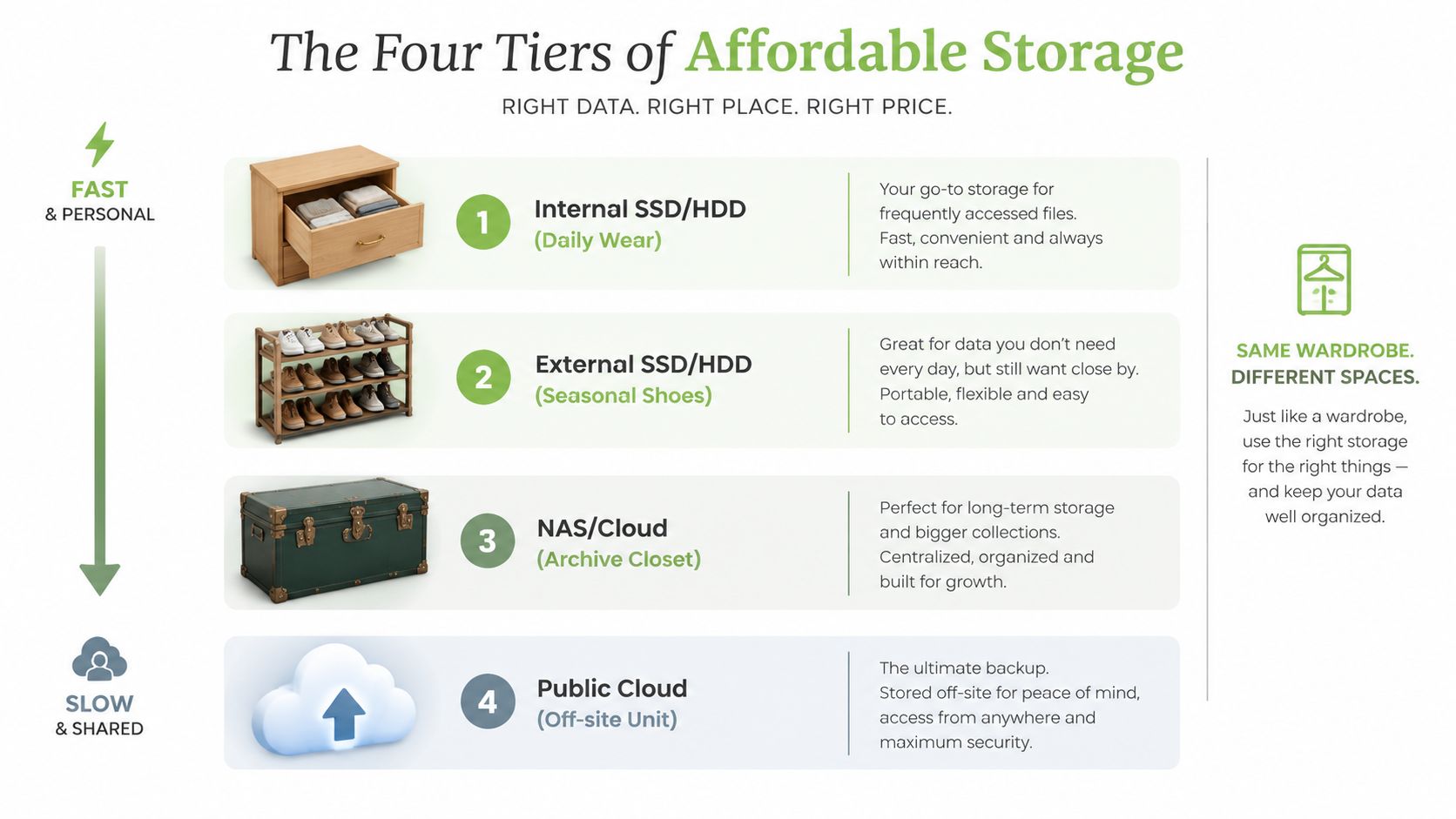
An affordable storage solution is normally a combination of tiers, not one magic product. Keep hot data on the internal SSD, working copies on an external SSD, archives on an HDD or NAS, and an off-site copy in the cloud.
Comparing SSDs, HDDs, microSD and NAS
Singapore buyers usually care about three things: price per gigabyte, real-world speed and how well the device will hold up over several years. The cheapest capacity isn't automatically the right capacity.
The retail spread is clear. Recent Singapore listings place 500GB SATA-class SSDs around S$78.90 to S$140.60, while 1TB NVMe or PCIe consumer SSDs range roughly from S$121.50 to S$265.35, with premium models going higher, as shown in Singapore SSD listings. NVMe provides lower latency and stronger parallel read and write performance, but SATA remains better value for ordinary office PCs, refurbished laptops and POS systems.
| Tier | Price/GB (SGD) | Typical Speed | Durability | Best For |
|---|---|---|---|---|
| SSD | S$0.10 to S$0.18 | Fast, low latency | No moving parts, but write wear matters | Boot drives, editing, active games |
| HDD | S$0.05 to S$0.08 | Slower, especially for small files | Mechanical parts can fail, particularly with constant operation | Cold archives and large media collections |
| microSD | S$0.12 to S$0.20 for 1TB cards | Varies widely by card and device | Compact but vulnerable to heat, wear and counterfeit capacity | Phones, drones and Nintendo Switch |
| 2-bay NAS | S$350 to S$600 before drives | Depends on disks and network | Redundancy is possible, but the unit needs maintenance | Shared household or office storage |
An SSD is the right choice for booting, editing and game load times. Cheap NAND can wear faster under sustained writes, so check the warranty and the manufacturer's endurance information before using a budget model for constant video capture or scratch work.
An HDD wins for cold storage, but an always-on mechanical drive needs ventilation and monitoring. A microSD card is practical for mobile devices, yet marketplace listings can include fake-capacity cards, so buy through an authorised channel and test the card before trusting it. For more detail on card formats and compatibility, use this microSD memory card guide.
A NAS is worth paying for when several people need the same files or when you want redundancy through mirrored drives. It still needs a backup, a stable network and UPS protection, because RAID can help with a failed disk but won't protect against accidental deletion, ransomware or electrical interruption.
Verdict: SSD for active work, HDD for cheap archive, microSD for portable device expansion, and NAS for organised shared storage.
Cloud Storage Tiers and the Hidden Costs
Cloud storage looks simple until you calculate what you do with the data. The headline rate may cover capacity, but not retrieval, transfer, administration or recovery.
The most familiar tier is the free account. Google One, iCloud+ and OneDrive can handle light personal syncing, but the allowance is shared across services in some ecosystems. Google storage, for example, can be consumed by Gmail, Photos and Drive together. Dormant-account rules and service changes also mean free storage shouldn't be treated as a permanent archive.
Consumer paid plans sit next. They suit phone backups, family photos and documents that need access across devices. The right plan depends less on the advertised capacity than on whether it includes the apps, sharing controls and recovery features you already use.
Prosumer and SME plans add team administration, business identities and collaboration features. Microsoft 365 Business, Google Workspace and Dropbox Standard can be sensible when the storage is part of a broader work system. Don't compare them with a bare storage bucket as if they provide the same service.
Object storage is the lowest-cost-looking option for infrequently accessed data. Singapore-focused pricing guidance places object storage at roughly S$0.02 to S$0.12 per GB per month, while Singapore-hosted backup storage is shown at around S$30.50 to S$38.50 per TB per month. Google's Cloud Storage pricing documentation explains that charges can extend beyond the stored amount.
| Tier | Example Provider | Headline Price (SGD) | Effective S$/GB | Watch Out For |
|---|---|---|---|---|
| Free | Google One, iCloud+, OneDrive | Free | Depends on included allowance | Shared quotas and dormancy rules |
| Consumer paid | Google One, iCloud+ | Varies by plan | Capacity alone is misleading | Sync limits and account dependency |
| Prosumer or SME | Microsoft 365 Business, Google Workspace, Dropbox Standard | Varies by plan | Includes collaboration features | Minimum terms and user administration |
| Object storage | Cloud object storage | Low headline rate | Can rise with usage | Egress, retrieval and API charges |
The hidden costs matter most when you restore frequently. Egress and retrieval fees can change the economics of AWS-style or Wasabi-style storage, while API request charges can matter for object storage with many small operations. A home fibre connection may download quickly but upload slowly, turning a large first backup into a long process.
Use free storage for convenience, consumer plans for personal syncing, business plans for collaboration, and object storage only when your access pattern is infrequent and you understand the recovery bill.
Matching Storage to Students, Gamers, SMEs and Eco-Conscious Buyers
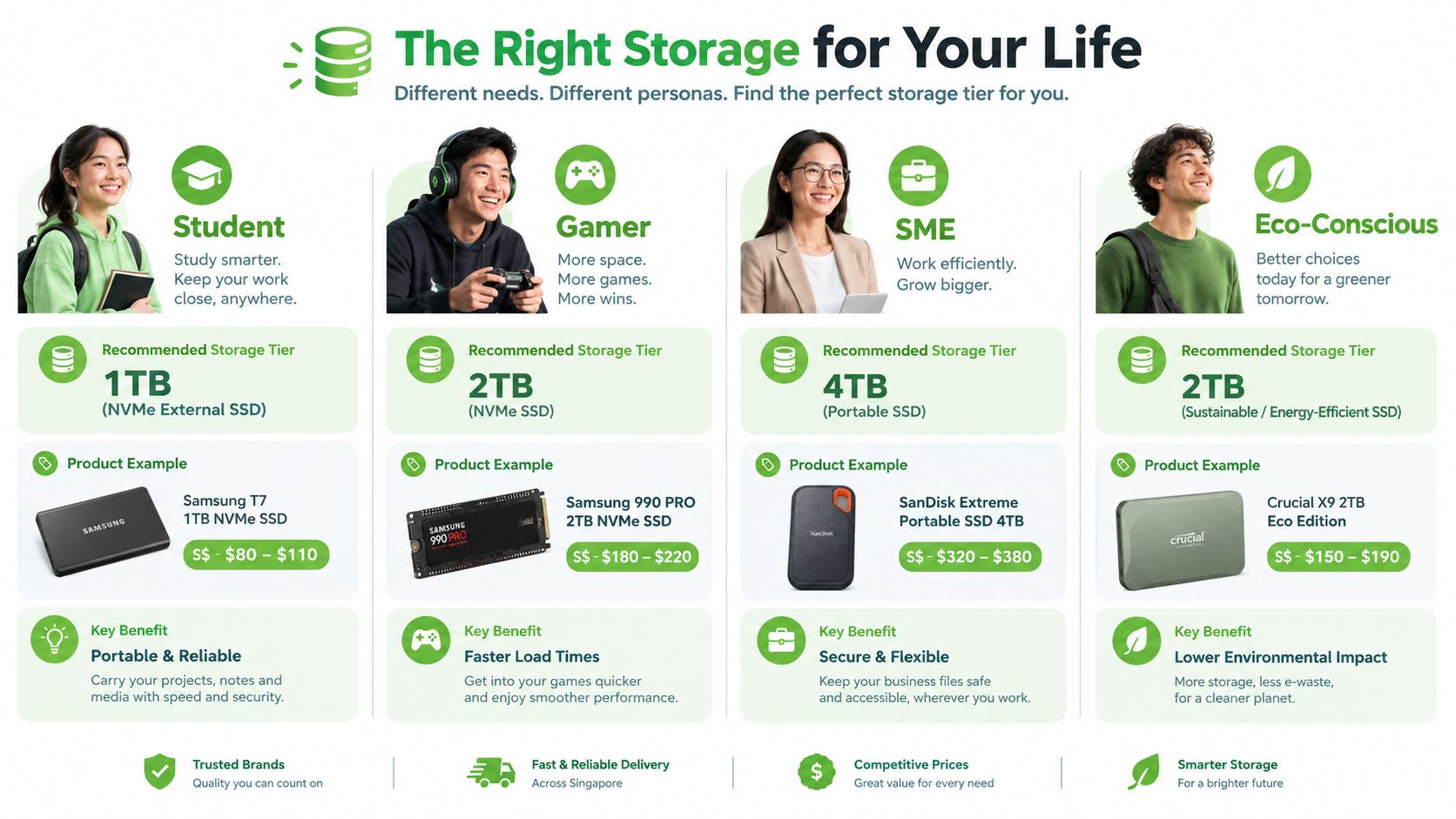
The best affordable storage solution depends on the person using it. A student moving video files has a different priority from a family storing photographs or a business protecting invoices.
Students
A practical student setup is a 1TB NVMe external SSD at about S$80 to S$110, paired with free cloud storage and any eligible university OneDrive or similar account. The SSD carries active Final Year Project datasets, creative applications and a portable Steam library, while cloud storage protects documents and coursework.
That arrangement can stay under S$120 based on the stated hardware range, but don't treat the number as a promise. Prices change by model, seller and promotion. Students should also ask whether their current laptop needs replacement at all. A reliable machine with a healthy battery and a sensible external drive may be more affordable than buying a new high-spec laptop, a trade-off discussed in this affordable laptops guide for Singapore.
Gamers
Gamers should keep the active library on a 2TB portable SSD at about S$150 to S$190, then place the backlog on a 4TB to 8TB HDD. Prioritise sustained write performance when moving large game files, not only the peak read speed printed on the box. A NAS is optional for a household or LAN party setup, but it adds cost and administration.
SMEs
A business with 5 to 25 staff may consider a 2-bay or 4-bay NAS at roughly S$500 to S$900, configured with RAID 1 for redundancy, plus OneDrive for Business or Wasabi for an off-site copy. RAID is not a complete backup. The business should still follow a 3-2-1 layout: three copies, on two types of media, with one copy stored away from the office.
Eco-conscious buyers
For an eco-conscious household, the strongest choice is often a refurbished enterprise SSD or a repaired laptop rather than a new device with unused capacity. Extending a device's useful life keeps the storage already inside it productive and reduces unnecessary replacement. The same principle applies to creators who can add external capacity instead of retiring a capable editing machine.
Buying, Migrating and Repairing Storage in Singapore
Buy based on support, authenticity and return options, not only the lowest listing. Challenger, Courts, Harvey Norman, Amazon.sg, Lazada, Shopee and Sim Lim Square all serve different needs. Sim Lim Square can be useful for niche NAS parts and enterprise pulls, but you need to verify the seller, condition and warranty carefully. Promotional periods around 11.11 and 12.12 can move prices sharply, so record the normal price before calling a discount a bargain.
Check the drive before installation
For an SSD, distinguish NVMe from SATA. NVMe uses a faster interface and suits heavier I/O, while SATA is adequate for many office and general-purpose systems. Check whether the drive has a DRAM cache, review its TBW rating, and compare the warranty term. A five-year warranty may be more useful than a three-year warranty, but only if the seller is locally authorised to handle RMA claims.
For a NAS, confirm drive compatibility, network speed, expansion options and UPS support. A two-bay enclosure without a sensible backup plan is just a more complicated single point of failure.
Migrate methodically
Use Acronis True Image or Macrium Reflect for cloning when the source and destination drives are compatible. A USB-NVMe enclosure makes the new drive easier to connect, especially for laptops with one internal slot.
For transfers above 500GB, verify the result with checksums rather than assuming the copy completed correctly. Keep the original drive untouched until the new system boots, applications open and important files have been checked.
Repair or erase before disposal
Certified local providers can assess HDD PCB failures, SSD controller failures and NAS RAID rebuilds. Logical recovery may start around S$120, while cleanroom work can reach S$800 or more, depending on the failure and the amount of work required. These are cost bands, not guaranteed quotes.
Before resale, use Blancco or a process aligned with NIST 800-88 purge guidance. myhalo can support certified erasure and trade-in, while its repair and migration services fit the wider lifecycle decision. If the laptop, desktop or NAS still works, extending the storage-bearing device is usually cheaper than replacing both the drive and its host.
Why the Cheapest Storage Is Not Always the Most Affordable
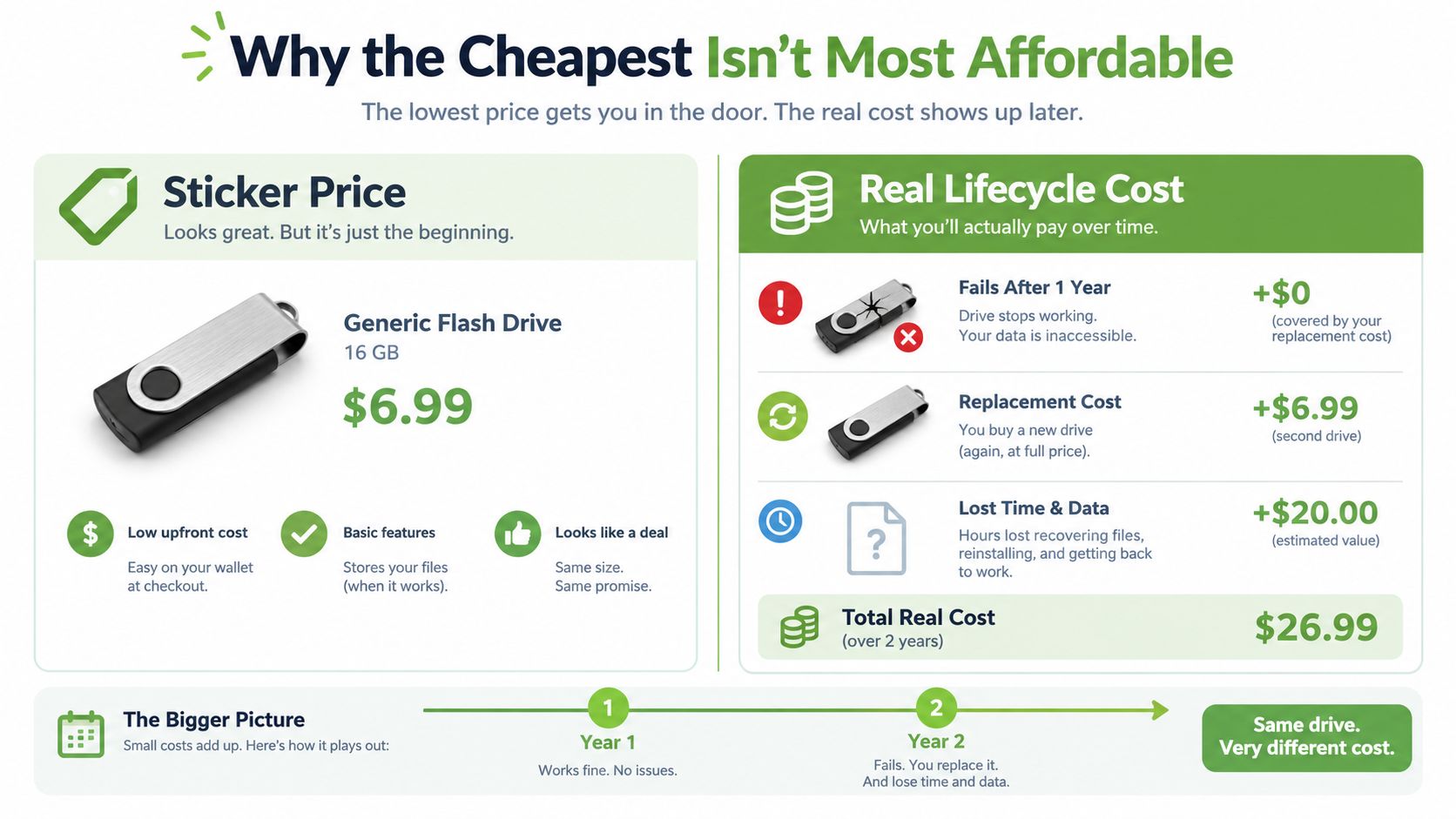
A flash drive with the lowest sticker price can be the most expensive option after failure. If it dies, you may pay for another drive, repeat the migration and lose working time. For a freelancer, that can mean recreating a client deliverable. For an SME, it can mean interrupting operations while someone searches for a missing file.
Price per gigabyte needs context. Add write endurance, warranty support, expected access pattern and the cost of one recovery incident to the calculation. A mid-tier external SSD used for active work can make more sense than repeatedly buying generic removable media. A maintained NAS can serve several devices, but only when the owner monitors it and keeps an independent backup.
Singapore's e-waste figures make the lifecycle argument difficult to ignore. The country generates more than 60,000 tonnes of e-waste each year, and around half is estimated to come from households, according to Channel NewsAsia's reporting on Singapore's e-waste recycling gap. Under the national e-waste recycling scheme, more than 34,000 tonnes had been collected over four years, with close to 10,000 tonnes collected in 2025, a 60% increase from the same period in the previous year, as reported by The Straits Times.
The national picture also shows why reuse deserves practical attention. Singapore generated about 7.02 million tonnes of solid waste in 2025, of which 3.66 million tonnes were recycled, raising the overall recycling rate from 50% in 2024 to 52% in 2025. The domestic recycling rate remained 11%, while the non-domestic rate rose from 65% to 67%, according to NEA's 2025 waste statistics.
Sustainability and affordability are the same conversation here. Repairing, reusing, migrating and trading in a storage-bearing device can make each terabyte serve more years. myhalo's Certified ReLoved and Certified Surplus options, RescueAdvise, transparent grading, battery health disclosure, 30-point quality checks, and ISO 9001 and ISO 27001 certifications are relevant when you're evaluating whether existing hardware should be extended rather than discarded.
Decision Checklist and Common Questions
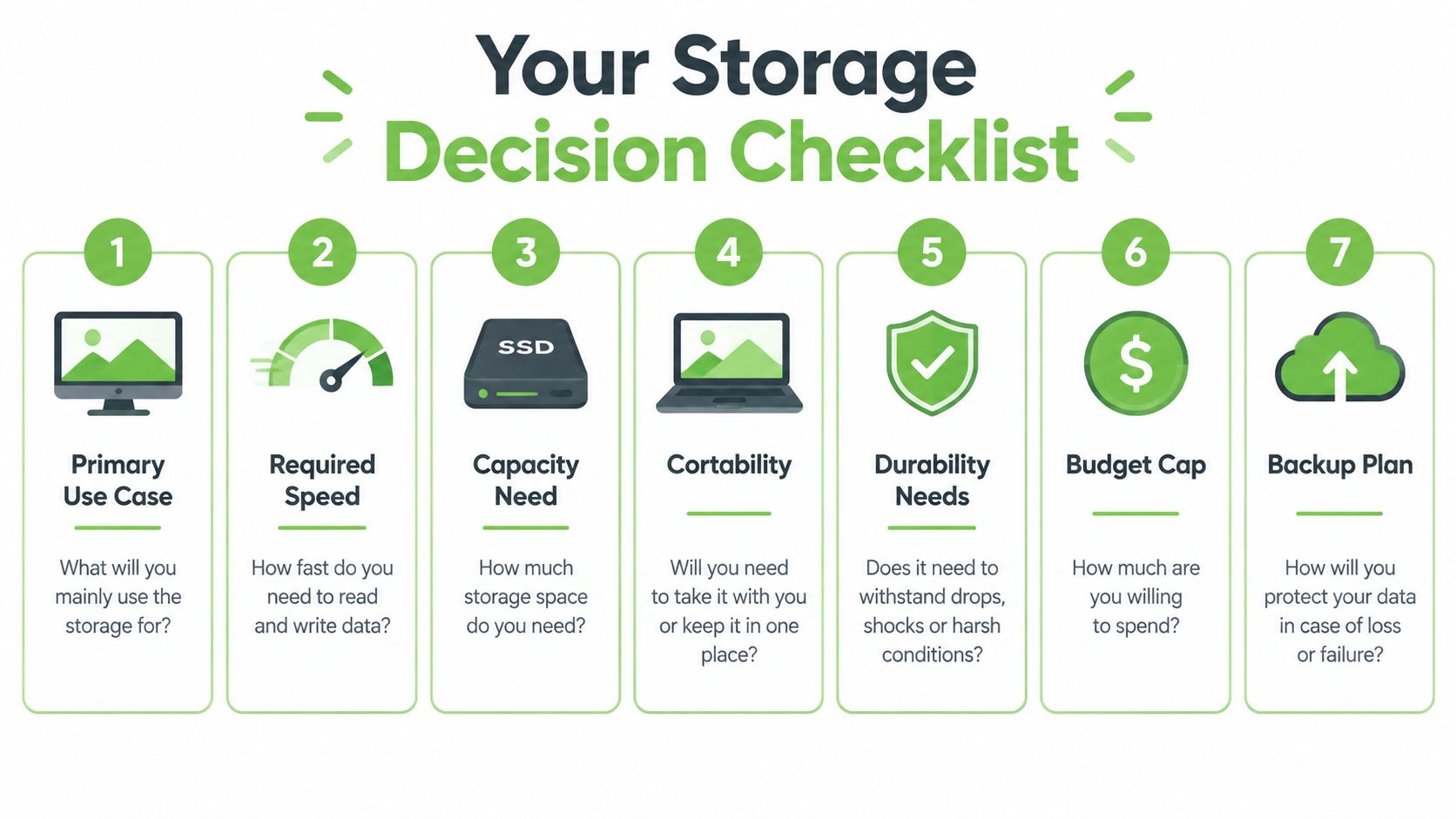
Run these seven filters before spending money:
- Primary use case: Are you editing, gaming, archiving, sharing or expanding a phone?
- Required speed: Does the workload need NVMe, or will SATA and HDD performance be enough?
- Capacity need: Separate active files from archives so you don't buy fast storage for data you rarely open.
- Portability: Choose microSD or USB storage only when physical movement is part of the workflow.
- Durability needs: Check warranty, write endurance, ventilation and whether the device stays on continuously.
- Budget cap: Include cables, enclosures, cloud fees, UPS protection and future replacement risk.
- Backup plan: Keep a second copy and test recovery, rather than assuming a mirrored drive is a backup.
Common questions
How often should backups be verified? Verify them on a schedule that matches how quickly your files change, and perform a real restore test rather than checking only that the drive appears connected.
Is a consumer NAS reliable for a home business? It can be, provided you use suitable drives, maintain it, protect it from power interruptions and keep an off-site copy. RAID improves availability after a disk failure, but it doesn't replace backup.
What should I do with a failing external drive before recycling? Stop writing to it, copy or recover important files first, and use certified data erasure where possible. Don't hand over a drive containing personal or business records without confirming how it will be wiped.
Do local SSDs need active cooling in an HDB room? Most ordinary consumer setups don't need a dedicated fan solely because they're in an HDB room. Keep airflow clear, monitor unusually high temperatures and use a heatsink where the drive manufacturer or workload calls for one.
Review recurring subscriptions while you review recurring storage costs. A practical cancel subscriptions guide can help free budget for storage that protects your files instead of paying for services you no longer use. For questions about device condition, migration and support, consult the myhalo FAQs.
myhalo helps Singapore users extend storage-bearing devices through repair, migration, certified data wiping, trade-in and responsibly assessed Certified ReLoved and Certified Surplus devices. Visit myhalo to review your current hardware and choose whether adding capacity, repairing the device or reusing a better-fit machine is the most affordable next step.