





Best Tablet Accessories: Your 2026 Singapore Guide
You've got the tablet. It's fast, bright, and light enough to bring anywhere in Singapore. Then questions start. Do you buy a folio case, a keyboard, a stylus, a stand, a hub, a charger, or just the cheapest bundle you can find online?
That's usually where people waste money.
A tablet on its own is only half a setup. Add the right accessories and it becomes a proper study machine for lecture notes, a second office for mobile work, or a portable canvas for sketching and edits. Add the wrong ones and you end up with a heavy case you hate using, a keyboard you never type on, or a charger that doesn't keep up.
The practical way to think about tablet accessories isn't as random add-ons. It's as a system. Protection, input, power, comfort, and portability all need to work together. That matters even more in Singapore, where tablets move between school, office, MRT, cafés, client meetings, and home desks in a single day.
This guide takes the no-nonsense route. It focuses on what improves daily use, how to avoid compatibility mistakes, which setups make sense for different users, and how to buy with longevity in mind.
Table of Contents
- Introduction Beyond the Tablet Itself
- Essential Tablet Accessory Categories Explained
- How to Choose Compatible and Quality Accessories
- Accessory Setups for Every User
- The Smart Way to Buy Sustainable and Refurbished Accessories
- Care and Maintenance to Extend Accessory Life
- Local Singapore Support and Services from myhalo
Introduction Beyond the Tablet Itself
A new tablet feels complete when you first unbox it. A few days later, you realise it isn't.
The screen is good for reading, but typing long notes on glass is tiring. Video calls work, but the camera angle is awkward without a stand. Carrying it around feels risky without proper protection. Charging becomes annoying once you add a keyboard, stylus, earphones, or external storage into the mix. The tablet hasn't changed. Your expectations have.
That's why experienced buyers don't shop for a tablet accessory in isolation. They build around how the device will be used. A student needs a setup that survives commuting, supports note-taking, and doesn't become uncomfortable after a long revision session. A professional needs quick desk conversion, reliable charging, and accessories that won't fail halfway through a client day. A creator needs precision, stability, and enough flexibility to switch between handheld and supported use.
Protective gear is only one part of value. If an accessory makes the tablet easier to use every day, it usually earns its place faster than a stylish extra.
In Singapore, that system mindset matters because tablets often do double duty. One device can be for lectures by day, streaming at night, and light work in between. The right accessory mix keeps that flexibility useful. The wrong mix turns a sleek tablet into a compromised laptop substitute that no one enjoys carrying.
Essential Tablet Accessory Categories Explained
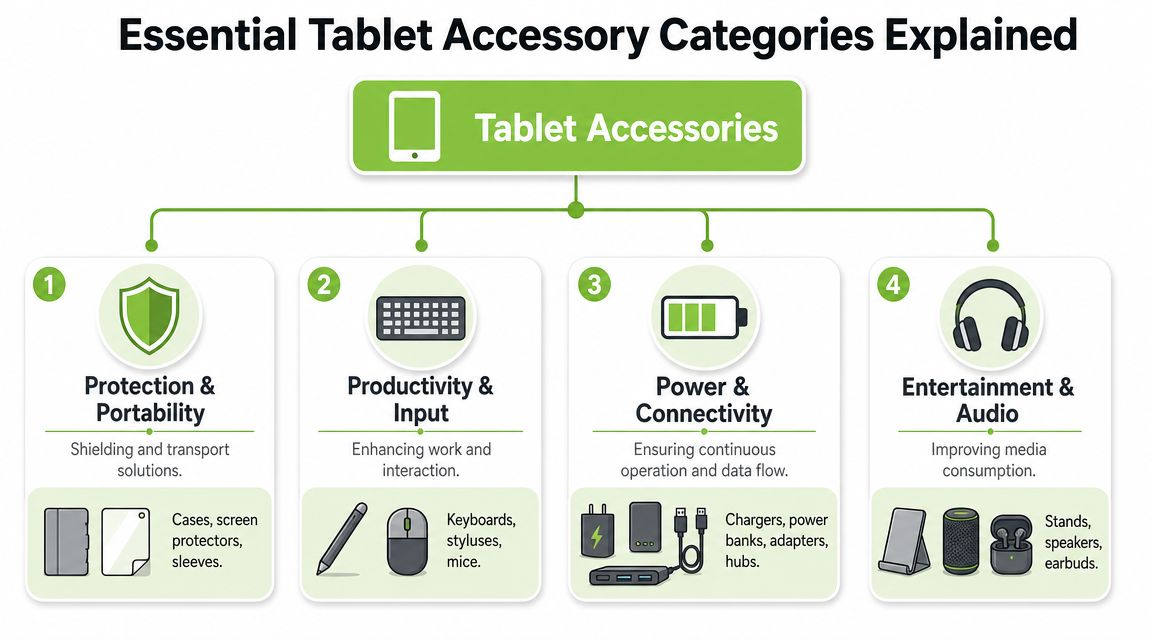
Tablet accessories aren't one category in practice. They solve different problems. If you group them by function, it becomes much easier to decide what you need and what you can skip.
The bigger market picture supports that shift. The global tablet market was valued at USD 114.66 billion in 2025 and is projected to reach USD 158.37 billion by 2030, while the tablet-accessories category was estimated at about USD 15 billion in 2025 and is forecast to reach USD 28 billion by 2033, with Asia-Pacific the largest tablet region in 2025. For Singapore buyers, that matters because accessories scale with tablet use in education, work, and existing device replacement cycles.
Protection and portability
This is the first layer. It's also where many people overspend on appearance and underspend on practicality.
A folio case is the common default. It covers the front and back, usually adds a viewing angle, and keeps the tablet slim. It suits users who mostly read, browse, and carry the device in a bag. The weakness is impact protection. Many folio cases look neat but offer limited edge cushioning.
A rugged case adds thicker corners, stronger grip, and better drop resistance. It makes sense for younger students, field staff, delivery workflows, and anyone who uses a tablet while standing or moving. The trade-off is bulk. If the case makes the tablet unpleasant to hold, it can reduce actual usage.
A screen protector is often more useful than people think. Scratches, micro-abrasions, and bag wear build up over time. For handwriting users, the screen feel also matters. Some prefer a smoother glide. Others want more resistance for note-taking.
A sleeve still matters even if you use a case. Cases protect the device. Sleeves protect the whole setup inside a backpack with chargers, keys, and cables.
If you're comparing designs for Apple tablets, this look at different iPad cover styles and trade-offs is useful because the right shape often matters more than the fanciest finish.
Productivity and input
A tablet either becomes useful for real work or stays a consumption device.
A keyboard case is the obvious productivity add-on. But not every keyboard case is good. Some are cramped, unstable on small café tables, or too heavy for regular carry. A detachable keyboard often works better for mixed use because you can remove weight when you're just reading.
A stylus isn't only for artists. Students use one for annotations and handwritten notes. Professionals use it for markups and signatures. The key issue is protocol support and palm rejection, not just whether the pen can write.
A mouse or trackpad can improve precision for spreadsheet work, document editing, and remote desktop use. This matters more than people expect if your tablet often sits on a desk stand. Once the screen is raised to a better height, touch becomes less convenient than pointer input.
Practical rule: If you type for long stretches, invest in the keyboard first. If you annotate and review documents, invest in the stylus first. Most people don't need both on day one.
Power and connectivity
This category gets ignored until something stops working smoothly.
A proper charger matters if your tablet supports fast charging and you want to use that speed. A cheap adapter may charge, but slowly, inconsistently, or with excess heat.
A power bank is useful for long campus days, travel, events, and field work. The wrong one adds unnecessary weight. The right one matches your charging habits and bag size.
A USB-C hub or adapter helps if you connect storage, displays, wired peripherals, or SD cards. But hubs are only useful when they fit your workflow. Many buyers get a large multi-port hub they barely use, when a compact adapter would have done the job with less clutter.
A charging cable isn't a throwaway purchase if you rely on the tablet daily. Cable quality affects durability, charging consistency, and convenience. A practical starting point is understanding what makes a fast charging cable suitable for modern devices, especially if you use one charger across multiple products.
Entertainment and specialised use
This final group is where comfort and experience improve, not just durability.
A stand is one of the most underrated tablet accessories. It improves viewing angle, makes video calls cleaner, and reduces the neck bend that comes with desk use. For many users, a stable stand plus a separate keyboard is a better setup than a heavy keyboard case.
Audio accessories matter if you stream, attend meetings, or game. Built-in speakers are fine until you're in a shared space or noisy commute. Earbuds or headphones usually add more daily value than decorative accessories.
Controllers and specialised grips make sense for cloud gaming or extended handheld use, but only if that's part of your actual routine.
How to Choose Compatible and Quality Accessories
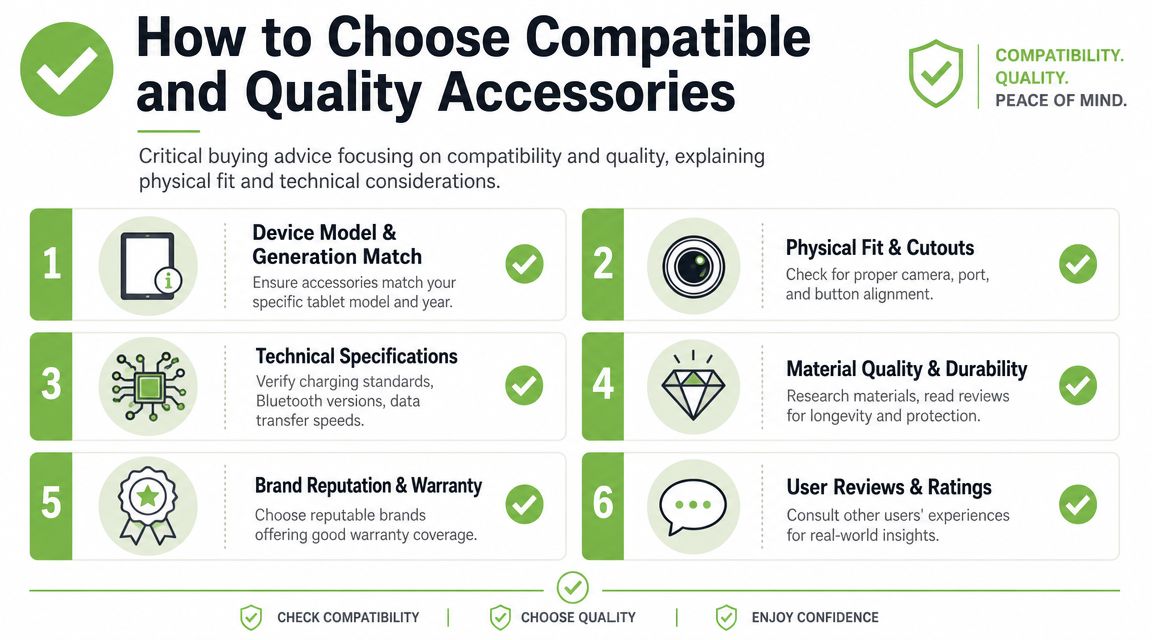
Most accessory mistakes happen before checkout. Buyers focus on appearance, price, or broad compatibility claims. They should focus on fit, standards, and build quality.
One point matters more than people expect. Lenovo's tablet accessory reference materials show that accessory choice sits inside the device specification stack, especially when organisations need exact compatibility for docks, keyboards, cases, and charging accessories. In Singapore, that's practical, not theoretical. A mismatch creates downtime, extra purchasing, and avoidable support work.
Compatibility is more than size
Start with the exact tablet model and generation. “Fits iPad” or “fits Galaxy Tab” means almost nothing on its own. Camera placement, speaker cut-outs, magnetic alignment, connector position, and pencil charging areas can differ even when devices look similar.
Technical compatibility comes next. A keyboard may physically pair but still offer poor layout support or unreliable switching. A stylus may write but lack the protocol features you want. A hub may connect but limit charging or peripheral behaviour.
The same goes for power. If you use one charger for your tablet, phone, and earbuds, the charger and cable combination needs to suit the device mix, not just the tablet itself.
A simple buying checklist
Use this checklist before you buy:
- Model check first. Confirm the exact device name and year before looking at any case, keyboard, or screen protector.
- Inspect physical fit. Camera openings, button covers, speaker holes, and charging points should line up cleanly.
- Check technical standards. For keyboards, pens, and hubs, read the supported connection method and limitations.
- Look at use position. A case that only works on a flat desk may be frustrating on your lap, on the train, or at a lecture hall table.
- Read the warranty terms. Short accessories lifespans usually show up first in hinges, coatings, cable strain relief, and battery accessories.
What quality looks like in practice
Good accessories feel boring in the best way. Buttons are easy to press. Cut-outs are precise. Hinges hold their angle. Materials don't peel after a short period. Magnets align consistently. Cables don't kink at the ends after routine use.
Cheap accessories usually fail in one of three ways:
| Accessory type | Common weak point | What to look for instead |
|---|---|---|
| Cases | Loose fit or weak stand angle | Firm shell, stable viewing support |
| Keyboards | Flex, poor key travel, unstable pairing | Solid base, dependable connection |
| Cables | Fraying or loose connectors | Reinforced ends, snug fit |
| Hubs | Overheating or inconsistent ports | Clear spec support and tidy build |
A low price is only good value if the accessory lasts and keeps the tablet pleasant to use. If it makes charging unreliable, typing awkward, or daily carry irritating, it isn't cheap. You just pay for the mistake later.
Accessory Setups for Every User
The most useful setups aren't built by category. They're built by routine. A student's needs differ from a designer's, even if both use the same tablet model.

For education and hybrid work in Singapore, one practical point gets missed. This perspective on tablet use accessories makes a useful argument that a premium case may be less valuable than a stable stand, good screen protection, and a keyboard, because breakage and discomfort often lead to underuse. That matches what works in real life.
The student setup
A student usually needs three things. Safe carry, efficient note-taking, and a way to work for longer sessions without awkward posture.
A sensible starter pack is:
- A slim protective case with front cover
- A screen protector if the tablet travels in a crowded bag
- A stylus or keyboard, depending on whether lessons involve more handwriting or typing
For polytechnic and university students, a stand plus keyboard often beats a bulky keyboard case. It's easier to set up on a desk and more comfortable for revision sessions. For younger users, a sturdier case usually matters more than elegance.
A better advanced setup adds:
- A foldable stand
- A compact Bluetooth keyboard
- A reliable charger and spare cable kept in the bag
That gives you flexibility. Handheld reading when moving. Proper desk posture when studying. Less chance of leaving a critical accessory behind.
The mobile professional setup
This user moves between locations, so friction matters. If setup takes too long, the tablet becomes a backup device instead of a primary work tool.
A practical starter pack looks like this:
- A professional folio or slim rugged case
- A stand that raises the screen to a better angle
- A keyboard
- A compact charger
The stand is the item many professionals skip. That's a mistake. Once the screen sits at a better height, email, calls, document review, and light admin work become less tiring.
For consultants, sales teams, and operations staff, an advanced setup often adds:
- A USB-C adapter or hub
- A mouse or trackpad
- A pouch for cable organisation
- A power bank for long days out
If your work overlaps with home setup planning and device placement, even a broader guide on smart home upgrades for Wisconsin homes can spark useful thinking about cable discipline, desk ergonomics, and how accessories should support the room around the device rather than just the device itself.
After the basics are in place, it helps to see how people configure portable workstations in practice.
The digital creator setup
Creators care less about generic protection and more about input quality, stability, and control.
A starter pack should centre on:
- A stylus with proper support for the device
- A screen surface that suits drawing or annotation
- A case or stand that supports multiple working angles
A floppy case ruins sketching. A poor writing surface makes precision work irritating. A bad stand creates wrist and neck strain.
An advanced setup usually includes:
- A sturdy desk stand
- A hub or adapter for storage transfer
- A compact external keyboard for shortcuts and file work
- A protective sleeve for moving the tablet with the pen and cable as one organised kit
A creator's accessory system should reduce interruptions. If you keep adjusting angle, reconnecting peripherals, or hunting for the pen, the setup is working against you.
The casual gamer and media setup
This group often doesn't need much, but comfort matters more than style.
A sensible starter pack is:
- A light case with grip
- A stand for tabletop viewing
- Good earbuds or headphones
- A charger that can keep up
For streaming, gaming, and casual browsing, weight matters. Oversized rugged cases can make long handheld sessions uncomfortable. If the tablet is mainly for bed, sofa, flights, or casual travel, keep the setup light.
An advanced setup might add a controller or a higher-quality stand, but only if it gets used often. Entertainment accessories are easy to overbuy because they look fun. Be honest about your habits.
The Smart Way to Buy Sustainable and Refurbished Accessories
Buying better doesn't always mean buying brand new. For many tablet accessories, the smarter move is choosing durable pieces, buying only what you'll use, and considering refurbished or responsibly sourced options where it makes sense.
Why sustainable buying makes sense
Singapore sits in a strong regional position for tablet accessory demand. A major market report notes that North America and Asia Pacific are the leading markets for tablet accessories. For local buyers, that means there's plenty of supply, but also plenty of unnecessary churn. Protective and productivity accessories have become everyday purchases, not rare extras.
That's exactly why careless buying creates waste fast. Cheap cases crack. Low-grade cables fray. Redundant accessories sit in drawers because they solved no real problem.
A better approach is simple:
- Buy for the workflow. Match the accessory to what you do each week, not what looks complete in a bundle.
- Prefer longevity over novelty. A well-made stand, keyboard, or charger usually outlasts impulse buys.
- Avoid overlap. If one accessory already covers the job, don't add a second version without a clear reason.
If you're trying to build better habits around reuse and product lifespan, interactive learning resources like the AI-powered second life challenge are a useful reminder that many tech items still have value after first ownership.
How to shop refurbished safely
Refurbished accessories can make sense, especially for chargers, adapters, some keyboards, and selected open-box items. The key is not to treat “refurbished” as a vague discount label.
Check for:
- Clear grading so you know the cosmetic condition
- Functional testing rather than seller promises
- A stated warranty
- Return or exchange terms
- Confirmation that wear parts are still in good condition
For buyers who want a local option, myhalo offers device and accessory-related products within a broader sustainable tech model, alongside guidance on reducing e-waste and supporting a zero e-waste world. That matters because sustainability isn't only about recycling the main device. It's also about avoiding disposable accessory buying in the first place.
Care and Maintenance to Extend Accessory Life
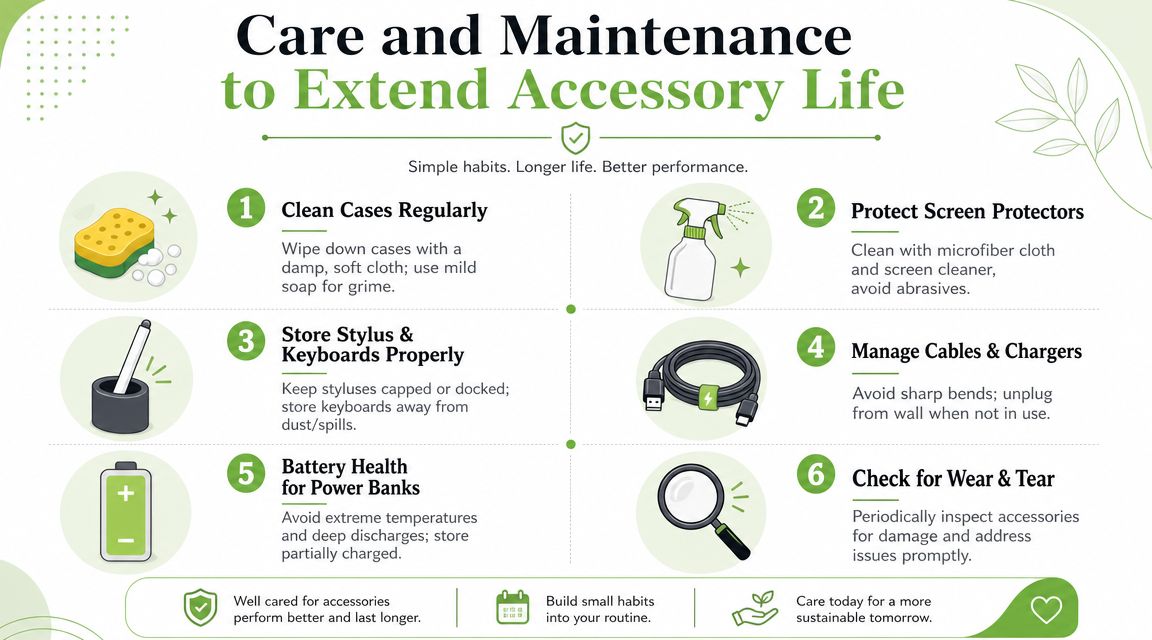
A lot of accessory failure isn't dramatic. It's slow wear from bad storage, rough cleaning, cable strain, trapped grit, and heat.
If you want tablet accessories to last, treat them like working tools, not packaging. That matters most for cases, keyboards, pens, chargers, and power banks because they're touched, moved, and packed constantly.
Cleaning without damaging anything
Cases collect skin oils, dust, and bag grime quickly in Singapore's humid environment. A soft cloth with light moisture is usually enough. Avoid harsh solvents, especially on coated materials, synthetic leather, and rubberised finishes.
Screen protectors should be cleaned gently. Grit is the main enemy. If you wipe dust around carelessly, you create fine scratches over time.
For keyboards, don't flood the surface with liquid. Use a dry or lightly damp cloth and keep crumbs, dust, and spills away from hinge areas and charging points.
Keep cleaning simple. Most accessory damage comes from over-aggressive cleaning, not under-cleaning.
Battery and storage habits that help
Bluetooth keyboards, active styluses, and power banks all age faster when stored badly. Heat is the obvious problem, but neglect is just as common.
A few habits go a long way:
- Store cables loosely instead of folding them tightly at the ends
- Keep battery accessories out of parked cars and hot window areas
- Don't leave styluses loose in bags where tips can get damaged
- Use a pouch so small accessories stay organised and protected
Simple do and do not rules
Here's the short version that saves the most trouble:
| Do | Do not |
|---|---|
| Wipe cases regularly to remove grit | Scrub with abrasive cloths |
| Dock or store the stylus properly | Throw it loose into a packed bag |
| Coil cables with gentle curves | Bend them sharply near the connector |
| Inspect stands and hinges from time to time | Ignore looseness until something snaps |
The goal isn't perfection. It's extending useful life. Better maintenance means fewer replacements, fewer compatibility headaches, and less waste.
Local Singapore Support and Services from myhalo
Buying tablet accessories is one decision. Keeping the whole setup useful over time is another.
That's where local support matters. In Singapore, users often want quick answers on fit, charging, replacement, repairs, and whether an older device is still worth keeping in service. That's especially true for households managing student devices, SMEs rolling out tablets across teams, and shops using tablets in customer-facing roles.
Where local support matters most
Enterprise and semi-rugged use is a good example. Oracle's MICROS Tablet 721P shoulder strap specification lists an adjustable range of 50 to 67 inches, and it's sold in packs of 4. That tells you two things. Ergonomics affect field productivity, and some accessories are meant to be standardised across multiple devices, not bought casually one by one.
That kind of detail matters when tablets are used for point-of-sale, stock checking, queue handling, or mobile service tasks. Buyers need support that goes beyond “compatible” and gets into carry method, charging routine, and replacement planning.
A more practical ownership model
myhalo fits into that local support layer across the wider device lifecycle. The business covers refurbished and new devices, accessories, repairs, trade-ins, data and device migration, plus care options such as myhalo e-Xtender and myhalo Protect. For someone trying to stretch the life of a tablet setup instead of replacing everything at once, that's useful.
The Bugis Junction store gives buyers a physical place to ask about fit and function, and the WhatsApp channel helps when you need a quick answer before making a trip. That's often better than guessing from generic listings.
Good tablet ownership isn't about collecting accessories. It's about choosing the right system, maintaining it properly, and knowing where to get practical support when something stops fitting your workflow.
If you're reviewing your tablet setup and want a more sustainable way to buy, maintain, repair, or upgrade it, myhalo is a practical local option in Singapore for devices, accessories, trade-ins, and after-sales support.