





Repair Apple Phone in Singapore: A Practical Guide
Screen damage is the most common iPhone repair problem in Singapore, and Apple's listed repair prices range from S$175 for battery service to S$699 for combined screen and back-glass damage. Your real options are to use Apple, an Apple Authorised Service Provider, or an independent repair workshop, then compare price, turnaround, parts, warranty, and data handling before choosing.
You're stepping off an MRT at Orchard, balancing your phone, travel card and kopi, when the iPhone slips onto the floor. The glass cracks across the display. At a hawker centre, the same accident might mean a missed Grab booking, a payment delay, or an SME owner suddenly unable to answer customers and staff.
The immediate questions are straightforward but important: Should I repair it? Where should I go? How do I avoid paying twice? Singapore gives you several practical routes, from Apple and Apple Authorised Service Providers to independent workshops around Funan, Orchard Road, Toa Payoh and Tampines. They don't offer identical prices, parts, turnaround times or warranty terms.
Table of Contents
- When Your iPhone Breaks in Singapore
- The Most Common iPhone Faults Explained
- Simple Diagnostic Steps Before You Hand Over Your Phone
- Official, Authorised and Third-Party Repair Compared
- Repair or Replace How to Decide
- Repair as Part of a Longer Device Lifecycle
- How myhalo Repair and Protection Plans Work
When Your iPhone Breaks in Singapore
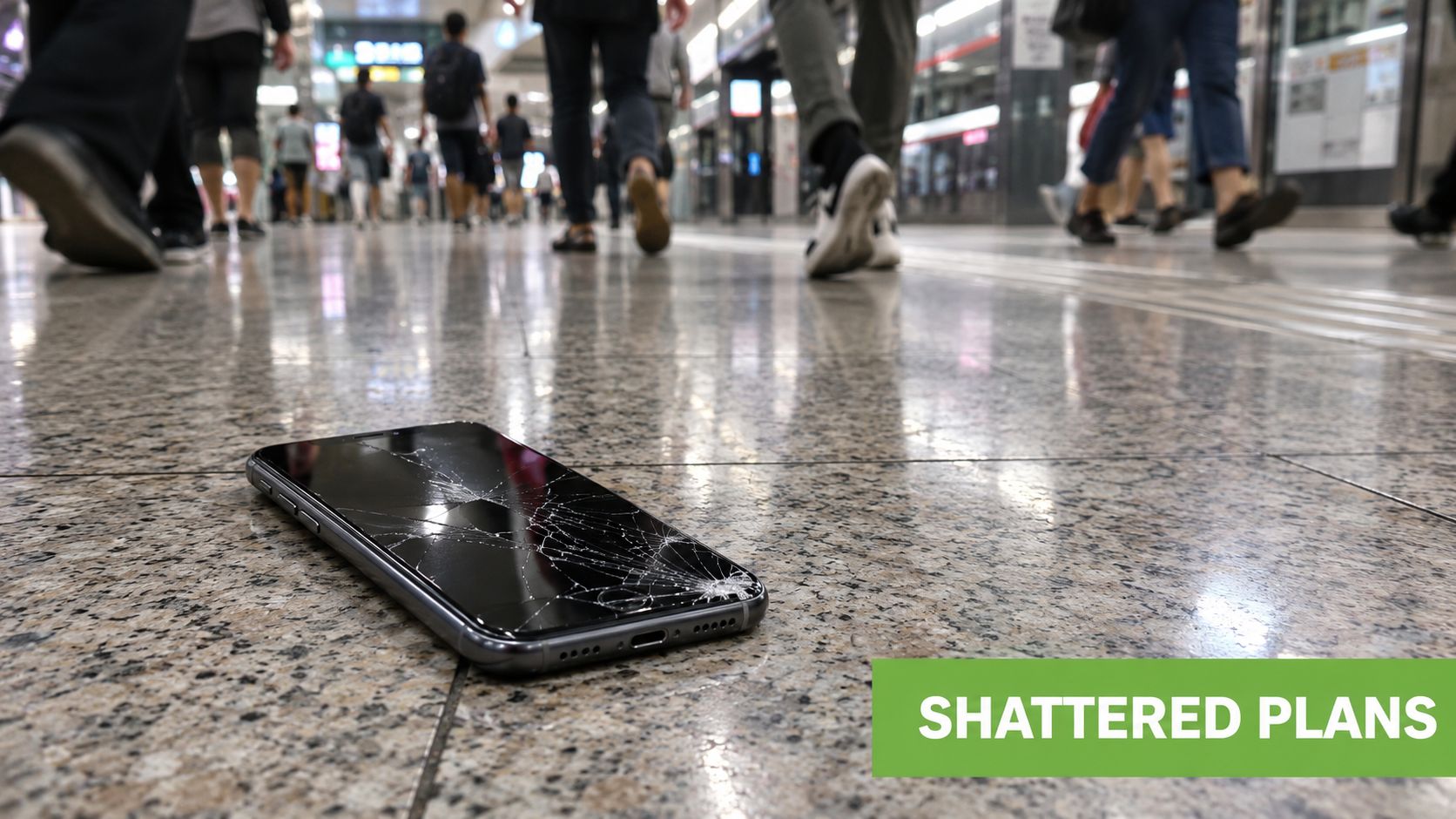
A cracked screen does not always mean the phone is beyond repair. If the image still looks clear and touch responds normally, the damage may be limited to the outer glass. If you see black patches, coloured lines, flickering, or dead areas, the display assembly is probably affected as well. A technician needs to tell those faults apart before giving a quote, because the fix is not the same.
That distinction matters in Singapore, where owners often compare repair cost, turnaround time, and the life left in the phone before deciding what to do next. Apple publishes a tiered repair ladder for Singapore, and the reference point helps you judge whether a repair makes sense for an older device or a phone that still has years of use left. See the comparison table in Section 4 for the full trade-offs, rather than treating a quick quote as the whole story.
Your first decision is not always the repair shop
Before you head to a counter, protect the phone and your data. Do not press hard on shattered glass, do not keep using a device that is heating or swelling, and do not assume water exposure is harmless just because the phone still powers on. A damaged phone can fail later when corrosion reaches a connector or a battery problem worsens.
For official service, Singapore customers can start with Apple Support, visit an Apple Store or an Apple Authorised Service Provider, or use a prepaid shipping label. Apple says there are more than 5,000 Apple Authorised Service Providers available through its service network, as described on AppleCare Singapore. Independent workshops may offer faster walk-in service or lower prices, but part quality, diagnostic depth and workmanship warranty can vary.
Speed matters for work and school
Apple's Singapore repair information says some authorised repairs can take about 5 to 7 business days. Check the current estimate before handing over the phone, especially if it holds business authentication codes, school messages, transport access or customer chats.
Singapore also has a wide repair network. One dataset counted 296 mobile phone repair shops, including 238 in the city area, while another counted 110 phone repair services, with 87 in Singapore city. The figures come from Singapore mobile phone repair shop data. The practical lesson is simple, access is concentrated in central and urban locations, but convenience should never replace a proper check of parts, warranty and repair terms.
Practical rule: A fast quote only helps when you also know which part will be used, what the warranty covers, and what happens if the first repair does not solve the fault.
The Most Common iPhone Faults Explained
A technician should start with symptoms, not guesses. Two iPhones that look alike on the outside can need very different repairs inside.
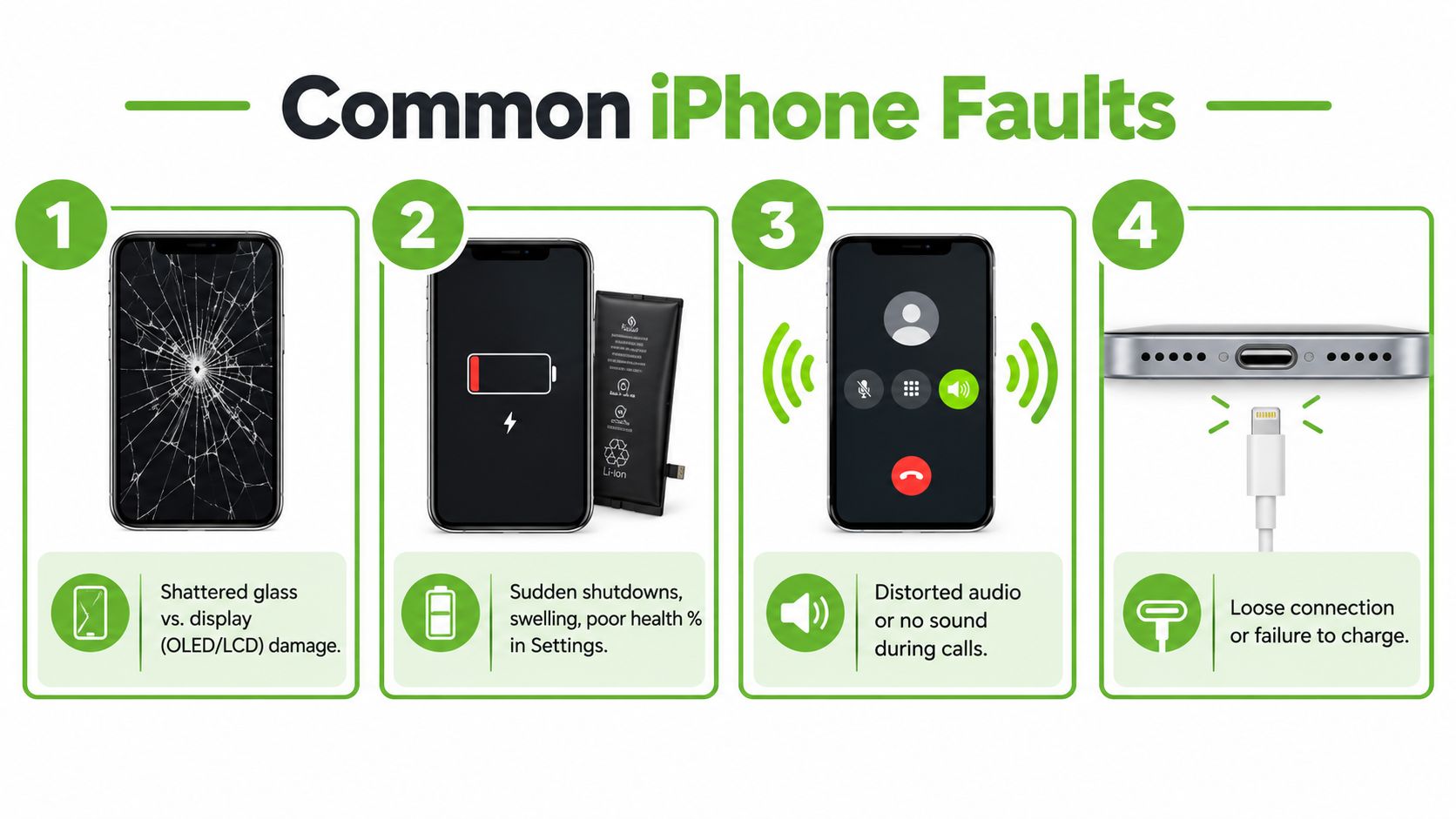
Screen and display damage
A cracked top layer may still leave the image and touch response working. A damaged OLED or LCD panel can show dark spots, lines, flickering, ghost touches, or one part of the screen becoming unresponsive. Check every corner before you describe the fault to a shop, because a screen that still looks usable can hide touch damage.
Screen faults make up 41% of phone repairs in one Singapore repair-industry report, according to the Singapore phone repair report. That does not mean every cracked screen needs the same treatment. A technician should inspect the display, touch layer, frame, Face ID-related parts, and any sign that the impact has affected the internal structure.
Battery problems
A worn battery usually shows up as shorter runtime, unexpected shutdowns, or a clear drop in performance during heavier tasks. In simple terms, the cell can no longer deliver power as steadily as it did when new. A swollen battery needs faster attention because it can press against the display and nearby components.
AppleCare+ in Singapore covers battery replacement at no extra charge once maximum capacity falls below 80%, according to Apple's Singapore iPhone repair support. The Battery Health screen also shows whether the phone can support normal peak performance. A warning does not automatically mean the phone is unsafe, but it is a useful service signal.
Charging and audio faults
Lint packed into the charging port can stop the cable from seating properly. A loose connection, charging that cuts in and out, or a cable that only works at one angle can point to contamination, port wear, or board damage. Do not insert metal tools into the port. A technician can inspect and clean it without bending the contacts.
Speaker and microphone faults often appear as muffled calls, distorted audio, or a Voice Memos recording that is faint or silent. Singapore's humid conditions do not by themselves prove water damage, but rain, splashes, and condensation can introduce moisture. Liquid can corrode a connector on the logic board, which is the phone's main circuit board, even after the exterior looks dry.
Camera damage
A cracked rear camera lens can create haze, bright reflections, or blurred images. If the camera shakes, refuses to focus, or shows a black screen, the camera module may also have taken impact damage. Keep dust and moisture away from the opening, and ask for a check of the camera, flash, and stabilisation before you approve any work.
For a focused explanation of the repair process, see this guide to iPhone screen repair.
Simple Diagnostic Steps Before You Hand Over Your Phone
Your iPhone may freeze before a client call, stop charging during a commute, or show a warning after a spill. A few safe checks can clarify what happened before you hand it to a technician. They cannot replace professional testing after liquid exposure or a hard impact, but they can separate an accessory or software issue from a hardware fault.
Start with information, not tools
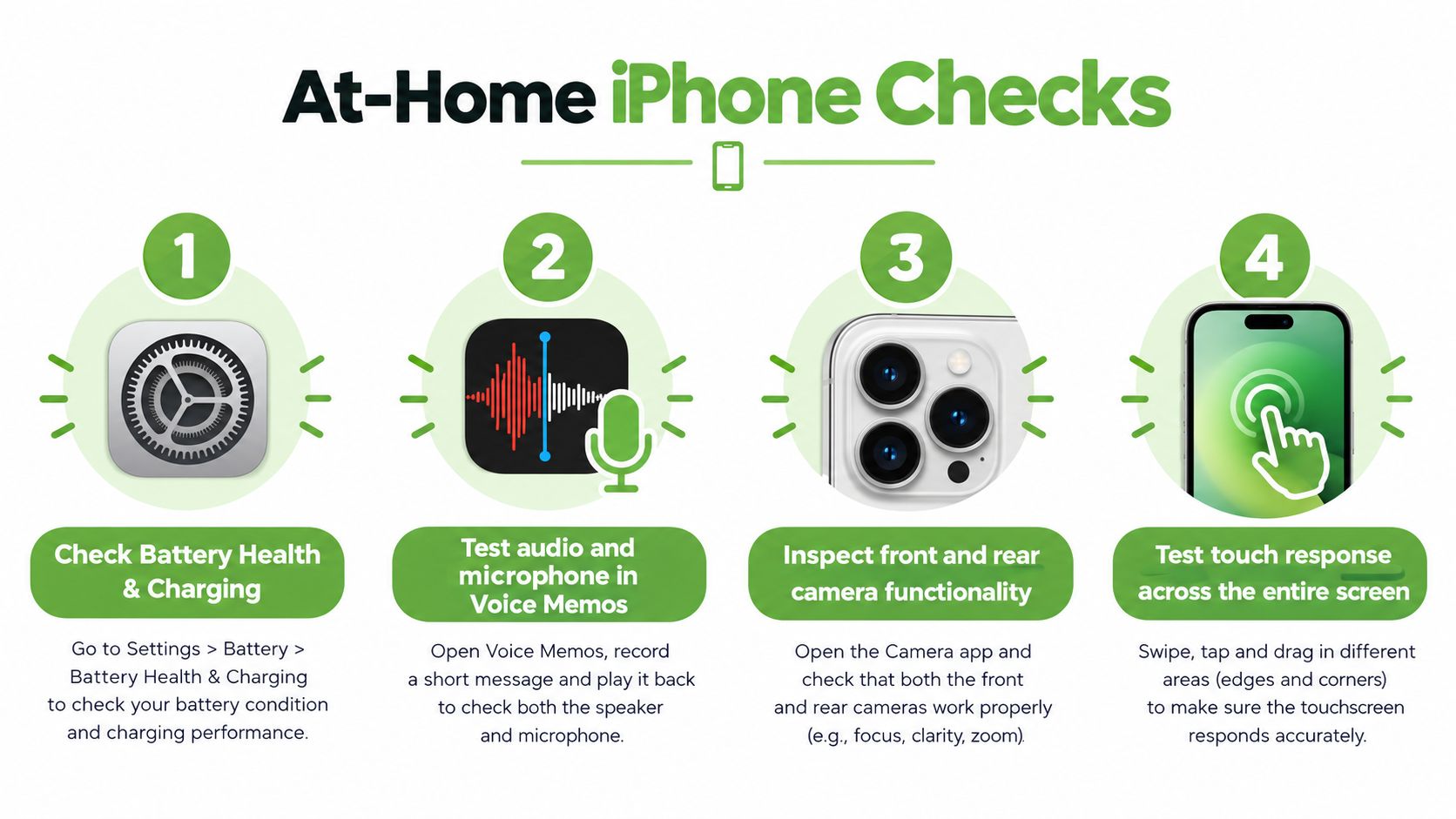
Open Settings, Battery, Battery Health & Charging. Record the maximum capacity and whether the phone says it supports normal peak performance. If the screen still works, take a screenshot. This gives a technician or protection-plan assessor a clear record of the condition before service.
Check Settings, General, Software Update next. An update cannot repair a cracked display or corroded charging port, but it may resolve freezing, unusual battery behaviour, or an app crash caused by software. Test the phone afterward only if it stays cool and stable.
If the phone is swollen, unusually hot, smoking, or physically distorted, skip restart attempts and seek service. For a normal, stable iPhone, press and quickly release volume up, press and quickly release volume down, then hold the side button until the Apple logo appears.
Test the functions that affect the quote
Open Notes and draw slow lines across the entire display. Cover the corners, keyboard area, and notification region. Gaps or sudden jumps indicate a touch problem, even when the picture looks clear.
Record a short Voice Memos clip and play it through the speaker. Test the earpiece during a call, then check the front and rear cameras, flash, Face ID where applicable, Wi-Fi, Bluetooth, and mobile data. A repair quote should account for every confirmed fault, not only the issue you noticed first.
Use a torch to look into the charging port. Do not insert a pin or pour cleaning liquid into the phone. Compacted lint, a worn port, and a board-level fault can produce similar charging symptoms, so a technician should identify the cause before parts are replaced.
Treat liquid exposure as urgent
After the iPhone gets wet, disconnect it from power, remove the case, wipe the exterior, and place it somewhere dry and ventilated. Avoid rice, hairdryers, and direct heat. Rice can leave particles behind, while heat can push moisture deeper or damage adhesives.
Back up the phone before service. Use iCloud or connect it to a trusted Mac, then confirm that photos, contacts, messages, and authentication methods are available elsewhere. Before recycling, back up data and perform a factory reset where possible, following the government guidance referenced in the lifecycle section below.
For battery-specific questions, read this iPhone battery replacement guide before speaking with a technician. It can help you ask about battery condition, replacement scope, data handling, and whether repair is more sensible than replacing the device.
Official, Authorised and Third-Party Repair Compared
A cracked screen does not automatically point to one repair route. In Singapore, the choice depends on the fault, the phone's condition, the required turnaround, and how much accountability you want after the device is opened. Apple and Apple Authorised Service Providers work within Apple's repair system. Independent workshops operate outside it, which may suit selected faults but calls for clearer questions about parts, testing, warranty, and data access.
Apple's official support flow lets customers start online, visit an Apple Store or AASP, or send the device with a prepaid shipping label. Owners can also use Apple's Singapore support portal or the Apple Support app to view current or recent repairs. That record can help individuals and SMEs keep track of several devices and service cases.
| Factor | Official Apple / AASP | Independent Third-Party |
|---|---|---|
| Parts and process | Apple-managed or authorised process, with service eligibility assessed through Apple's system | Parts and methods depend on the workshop. Ask about authenticity, quality, and testing |
| Price | Apple Singapore publishes repair pricing, including S$175 battery service, S$575 screen damage and S$699 combined screen and back-glass damage, as shown in this Apple repair pricing context | Quotes can be lower or higher depending on the model, component, and fault complexity |
| Turnaround | Some authorised repairs can take about 5 to 7 business days, according to Apple Singapore repair information | Walk-in or same-day service may be available, but timing depends on stock, queue, and diagnosis |
| Warranty | Coverage depends on Apple warranty, AppleCare+ and the repair terms | Workmanship warranty varies. Get its length and exclusions in writing |
| Previously opened device | Earlier repair can affect eligibility and the available service route | Independent technicians may assess devices opened elsewhere |
| Data handling | Follow Apple's preparation and service instructions, and back up before handover | Ask who can access the phone, whether a passcode is needed, and how data is protected |
Questions that reveal the key difference
Ask whether the quote includes diagnosis, labour, parts, and post-repair testing. Confirm whether the display is genuine, refurbished, or compatible. If the phone has Face ID, camera stabilisation, True Tone, or water-resistance concerns, ask what testing and limitations apply after opening it.
Express Replacement Service follows a separate process. Apple states that the original device must be returned within 10 working days after the replacement is sent. Apple removes the temporary hold only after receiving and inspecting the original device and confirming that the repair is covered by the applicable warranty, AppleCare+ or consumer law, as explained in the Express Replacement Service terms.
Insurance and protection plans may work with either repair route, although the claim administrator can require an approved channel. Check whether photographs, a diagnostic report, or a claim reference is needed before authorising work.
The wider choice is about the phone's lifecycle. A suitable repair can keep a device in service, while reuse and responsible recycling provide the next steps when repair no longer makes sense. myhalo's lifecycle-partner approach connects those decisions instead of treating a new-device replacement as the automatic answer.
Repair or Replace How to Decide
A cracked screen after a single drop calls for a different decision from a phone with liquid exposure, a weak battery and several failing functions. Start with three questions: can the device still support your work, is the fault limited, and will the repair leave enough useful life?
Filter one, support and condition
Check the iPhone's age, remaining iOS support and physical condition. A phone that still runs the apps you need may justify a battery or display repair. An older device with several unrelated faults carries greater uncertainty because one repair may reveal another problem.
Features can change the calculation. Face ID, 5G, camera performance, storage and battery endurance may matter more than the model name. For an SME, compatibility with business apps and mobile-device policies can make repair worthwhile. Replacing every handset also creates migration, setup and staff-training work.
Filter two, total cost and downtime
Use the complete quote, not the first price you notice. The Apple-published repair ladder described earlier gives a useful reference point, but your decision should compare the applicable repair, diagnostics, transport, accessories, data migration and any temporary phone. Check the written warranty and ask how post-repair testing is handled.
Downtime has a business cost. A phone used for sales, delivery coordination or two-factor authentication can disrupt work while it is unavailable. Ask when the device will be returned and whether the repair route provides a practical temporary arrangement.
A repair generally fits when the fault is isolated, the frame and logic board are sound, and the phone still meets your needs. Replacement becomes more reasonable when liquid damage affects the logic board, several major assemblies have failed, or the finished repair would leave you with an unreliable device and limited cover.
The decision is not only about today's bill. Consider the phone's support life, condition and role in your household or business. If repair is suitable, keeping the device in use avoids treating a new purchase as the automatic solution. myhalo's lifecycle-partner approach connects repair with reuse and responsible recycling when continued ownership no longer makes sense.
Decision test: Can you state the fault, total cost, expected downtime and written warranty in one sentence? If so, you have a clear basis for choosing repair or replacement.
Repair as Part of a Longer Device Lifecycle
A repaired iPhone can serve several owners and roles before it leaves service. For a household, that may mean restoring a suitable primary phone, passing it to a family member later, or selecting a professionally checked refurbished device for someone with lighter needs. For an SME, the same approach can include standardising models, tracking battery condition, planning repairs before busy periods and assigning working older phones to lower-demand tasks.
Value comes from continued use
Repair creates value only when the device remains dependable afterwards. A case and screen protector can reduce everyday damage. Keep the phone away from excess heat, and never charge it if the battery is visibly swollen.
Keep a simple service record. Log the repair date, part type, whether the component is genuine, refurbished or compatible, warranty length, exclusions, and the date for the next battery health check. This record works like a maintenance log for a vehicle. It helps the next owner or technician judge the phone from evidence instead of guesswork.
When repair no longer makes technical or economic sense, consider trade-in or responsible recycling. Singapore's NEA introduced a regulated e-waste management system in July 2021 to support proper collection, handling and recovery of valuable resources. Its guidance also encourages repairing electronic equipment where feasible. See NEA's e-waste management information.
Singapore generates about 60,000 tonnes of e-waste a year, equivalent to around 70 mobile phones per person, according to the government's Recycle.gov.sg e-waste guidance. Repair, reuse and secure recycling therefore support practical business and household goals as well as environmental responsibility. They keep useful equipment in circulation, reduce avoidable replacement spending and give myhalo's lifecycle-partner approach a clear purpose: maintain the phone first, reuse it where suitable, then recycle it responsibly when continued ownership no longer makes sense.
How myhalo Repair and Protection Plans Work
A damaged iPhone does not automatically need replacement. myhalo's lifecycle approach starts with keeping the device usable, then considers reuse and recovery when repair is no longer suitable. Its Rescue service supports diagnosis and hardware servicing. If repair is not the right option, Certified ReLoved and Certified Surplus devices provide alternatives within the same lifecycle approach.
The e-Xtender plan focuses on maintenance after Apple's standard one-year warranty ends. Before enrolling, confirm what repair coordination, battery service, coverage period and model-specific exclusions apply. The plan gives a working device a planned route when a fault appears, rather than leaving each repair as an unplanned expense.
Protect covers a different set of risks. Depending on the plan terms, it may address accidental damage, liquid-related incidents and extended warranty needs. A cracked screen or coffee spill can then follow a defined claim process, subject to coverage limits, exclusions and any applicable excess.
A typical claim route
The process usually begins with a fault report and diagnostic assessment. Depending on the device and customer, myhalo may coordinate walk-in repair, device collection or on-site support for Singapore-based SMEs. After servicing, ask for records of the work completed and the applicable warranty. Those details help you assess the phone's condition during its next repair or ownership decision.
myhalo coordinates with authorised service providers when the selected service requires that route. Before accepting a plan, check for pre-existing-fault exclusions, cosmetic-wear exclusions, claim limits, excess charges and rules about whether coverage follows the device or the individual user. Pricing varies by device tier, so the exact terms matter more than the plan name.
| Plan | Coverage Scope | Faults Covered | Singapore Claim Channels |
|---|---|---|---|
| myhalo e-Xtender | Post-warranty maintenance and repair coordination | Eligible service and battery-related needs, subject to plan terms | Walk-in coordination, device collection and applicable service support |
| myhalo Protect | Accidental damage, liquid protection and extended warranty | Covered incidents such as screen damage or liquid exposure, subject to exclusions and limits | Walk-in repair, device collection and on-site SME support where available |
At the end of the phone's useful life, choose between further repair, reuse, trade-in or responsible recycling. Consider the device condition, data backup, repair economics and whether another user could still benefit from it. This sequence keeps the decision practical: repair first, reuse where suitable, and recycle responsibly when continued ownership no longer makes sense.
If your iPhone has a cracked screen, weak battery, charging problem or liquid exposure, myhalo can help assess repair, protection, reuse and replacement options in Singapore. Bring the fault details, backup status and warranty information so you can decide based on the phone's full lifecycle.