





Refurbished vs New Laptop: Which Is Right for You in 2026
Are you really choosing between a refurbished vs new laptop, or are you choosing between retained performance and paying a premium for a fresh box? In Singapore, that distinction matters more than most buyers realise. A professionally restored business laptop can offer stronger construction, better ports, and more practical specifications than a low-cost new consumer model, while a new laptop still makes sense when you need the latest platform, a full manufacturer warranty, or a particular configuration.
The right comparison is total cost of ownership. Look beyond the purchase price to battery condition, SSD and RAM specifications, warranty support, repairability, resale prospects, security requirements, and how much useful work the device can deliver over the next 2 to 3 years. This guide gives a direct framework for making that decision without treating “new” as a synonym for “better” or “refurbished” as a synonym for “cheap”.
Table of Contents
- Why the Refurbished vs New Laptop Question Misses the Point
- Understanding Refurbished and New Laptop Categories
- Side-by-Side Comparison of Cost and Performance
- Sustainability and Business Resilience Benefits
- Which Laptop Type Fits Your Use Case
- What to Verify Before You Buy
- Making Your Decision and Next Steps
Why the Refurbished vs New Laptop Question Misses the Point
The conventional question assumes that age determines value. It doesn't. A laptop's usefulness depends more on its processor platform, memory, storage, display, battery condition, build quality, software compatibility, and support after purchase.
A new entry-level consumer laptop may have a current retail box but still use modest materials, limited ports, a small amount of RAM, or a slower storage configuration. A certified refurbished HP EliteBook or Lenovo ThinkPad may have started life as a business machine, with a sturdier chassis, a more comfortable keyboard, better serviceability, and security features designed for regular professional use. If both machines fall within the same budget, the refurbished business model can retain more practical performance for longer.
Practical rule: Compare the work the laptop can complete, not the date on its receipt.
Performance retention matters more than launch freshness
A laptop doesn't become unsuitable just because a newer generation exists. Office applications, web work, video calls, accounting platforms, coding environments, and general administration often depend on balanced specifications rather than the newest processor badge. A capable CPU paired with sufficient RAM and a responsive SSD can feel more useful than a newer but stripped-down configuration.
This is especially relevant as AI-ready specifications evolve. Some buyers may need a new machine because they require a specific neural processing capability, graphics platform, operating-system support level, or manufacturer configuration. Others are paying for future-facing features they won't use during the ownership period.
The better question is: how much usable performance are you buying per dollar, and how much of that performance will remain relevant?
Singapore's market supports a broader choice
Refurbished laptops have become an organised purchasing channel in Singapore, not merely an informal resale category. A market report estimated the Singapore refurbished laptop segment at US$43.25 million in 2024 and projected it to reach US$78.8 million by 2033, with a 6.87% CAGR for 2025 to 2033. The same report recorded individual consumers as 19.48% of demand in 2024, while refurbisher-owned stores represented 21.79% of distribution. These figures indicate a formal supply chain for professionally restored devices, not just one-off private listings. Singapore refurbished laptop market estimates
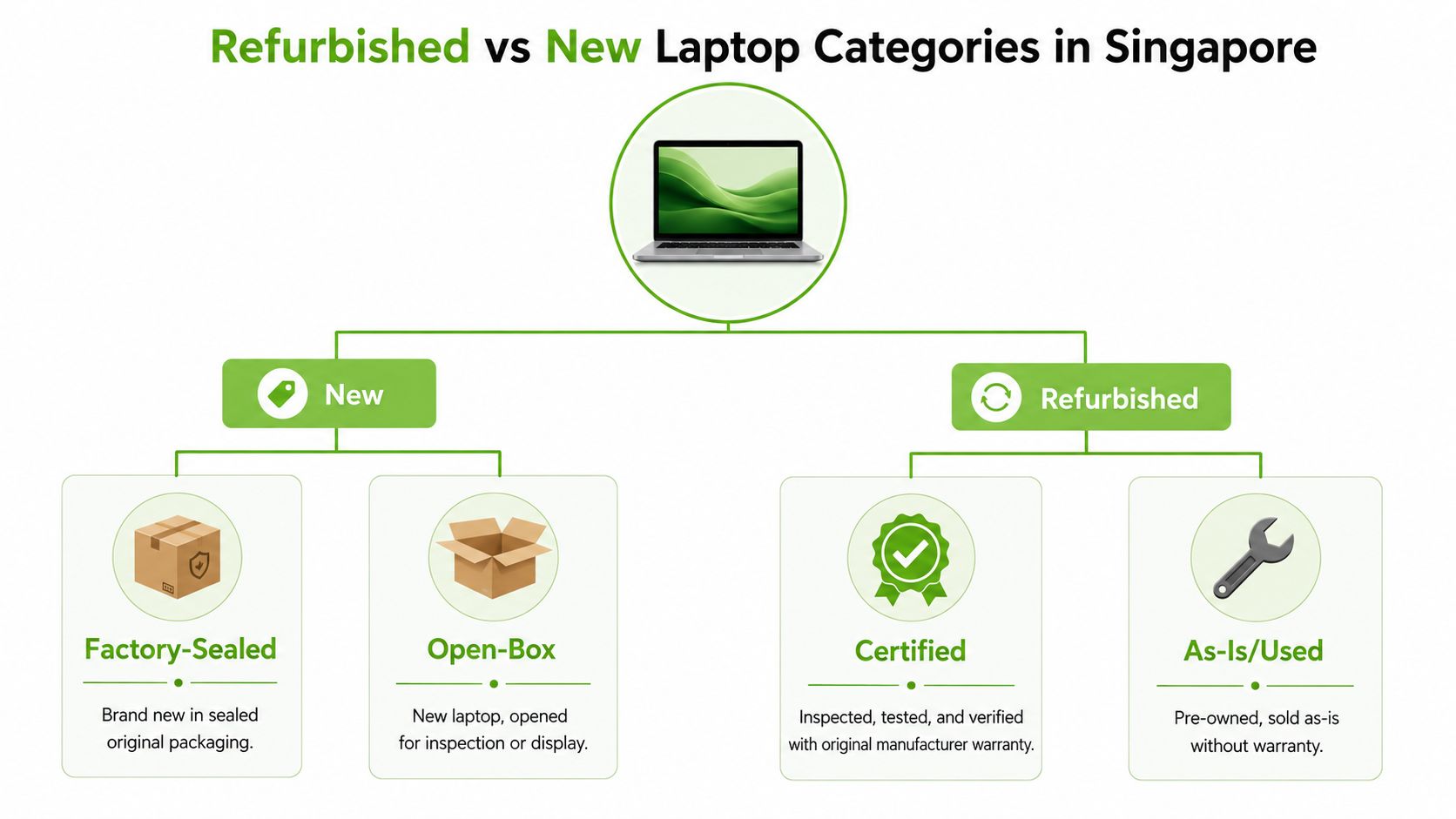
That maturity changes the buying decision. You can compare factory-sealed models, open-box stock, certified refurbished business laptops, and as-is devices according to risk, support, and specifications. The label matters less than the process behind it.
Understanding Refurbished and New Laptop Categories
“Refurbished” covers several very different conditions. A factory-sealed new laptop has never been used and normally comes with the manufacturer's standard warranty. An open-box unit may be unused or lightly handled, but its packaging has been opened and the warranty position needs confirmation.
A certified refurbished laptop is different from an unverified second-hand device. A professional refurbisher should inspect, test, clean, restore, grade, and document the machine before offering it for sale. An as-is laptop may work, but the seller may provide limited information about battery health, previous repairs, cosmetic wear, or future support.
Grading turns condition into something you can evaluate
myhalo's grading language illustrates how a structured category can make comparison clearer:
- As-New: A device intended to look and function like new, with a stronger warranty position than typical pre-owned stock.
- Premium: A Certified ReLoved device with minimal cosmetic signs and a focus on high overall condition.
- Excellent: A professionally restored unit with light signs of prior use.
- Value: A functional refurbished option where visible wear is accepted in exchange for a lower purchase price.
- ReEco: A fully functional device where cosmetic wear is part of the expected condition.
The grade shouldn't replace technical details. Ask for the exact processor, RAM, SSD capacity, display resolution, ports, operating system, battery-health disclosure, included charger, and warranty terms. A higher cosmetic grade doesn't automatically mean better performance, and a lower cosmetic grade doesn't necessarily make the laptop unsuitable for work.
Certification is the dividing line
A certified process should give you evidence that the device was examined rather than wiped and relisted. myhalo describes 30-point quality checks under an ISO 9001:2015-certified process, alongside transparent device grading and battery-health disclosure. ISO 9001 concerns quality-management processes, so it doesn't mean every individual component is new. It does mean buyers can look for a documented process instead of relying on a seller's vague assurance.
Data security also matters, particularly for business equipment. A buyer evaluating suppliers can compare computer options from Nutmeg Technologies as part of a wider procurement review, then ask every seller the same questions about testing, data wiping, warranty coverage, and support.
The safest category is not automatically “new”. It's the category where the seller clearly explains what was checked, what was replaced, what condition the battery is in, what the grade means, and what happens if the laptop develops a fault.
Side-by-Side Comparison of Cost and Performance
A fair comparison starts with equivalent specifications. Don't compare a certified business-class laptop with a new machine because both are labelled “laptop”. Compare processor capability, RAM, SSD speed and capacity, screen quality, keyboard, ports, webcam, wireless connectivity, battery condition, operating-system compatibility, and warranty.
The table below uses practical buying logic rather than invented price claims. The budget examples show what to investigate within each budget, not guaranteed market prices or fixed product bundles.
Refurbished vs New Laptop Comparison
| Factor | Certified Refurbished | New Laptop |
|---|---|---|
| Upfront price | Often gives access to a higher business-class tier within a fixed budget, but exact value depends on model, grade, configuration, and warranty | Usually carries the premium for unused stock and the newest retail configuration |
| Performance | May retain the original CPU and GPU platform, with performance determined by the installed RAM, SSD, cooling system, and condition | May offer a newer platform, but entry-level models can have modest RAM, storage, ports, or build quality |
| Expected lifespan | Depends on original model quality, component condition, maintenance, battery health, and parts availability | Depends on build quality and configuration, not merely the fact that it's new |
| Warranty | Varies by seller and grade. Check coverage, duration, exclusions, inspection requirements, and battery terms | Usually follows manufacturer terms, though coverage differs by model and region |
| Battery transparency | A credible seller should disclose health or provide a defined battery threshold | Battery starts unused, but long-term capacity still depends on usage and charging habits |
| Repairability | Business-class models may offer more practical access to serviceable components, but confirm the exact model | Thin consumer designs can be harder or more expensive to service, depending on construction |
| Resale and trade-in | Purchase value may be stronger when you avoid paying for unused retail packaging, but resale depends on demand and condition | New models can lose value once opened, so calculate future resale rather than assuming it |
| Best fit | SMEs, students, office users, and buyers prioritising specifications per dollar | Buyers needing the latest platform, a specific configuration, or full new-product coverage |
What different budgets should tell you
At S$800, compare a new entry-level laptop against a refurbished business model with a stronger keyboard, better connectivity, and more generous RAM or SSD configuration. The refurbished option may be the better work tool, while the new option may offer a newer processor generation or simpler purchasing experience.
At S$1,200, the comparison becomes more balanced. You may find a new mid-range laptop with current platform features, or a higher-tier refurbished business machine with better construction and a richer port selection. Choose based on the work you do and the warranty risk you're willing to accept.
At S$1,800, a new laptop may provide a current premium configuration, particularly for demanding creative work or specialised software. A refurbished workstation or business-class model may still offer attractive value, but you should scrutinise graphics capability, display quality, battery condition, and remaining platform support.
For a practical Singapore buying framework, use this guide to affordable laptops in Singapore to organise your comparison. The key point is simple: specifications and condition beat category labels.
Sustainability and Business Resilience Benefits
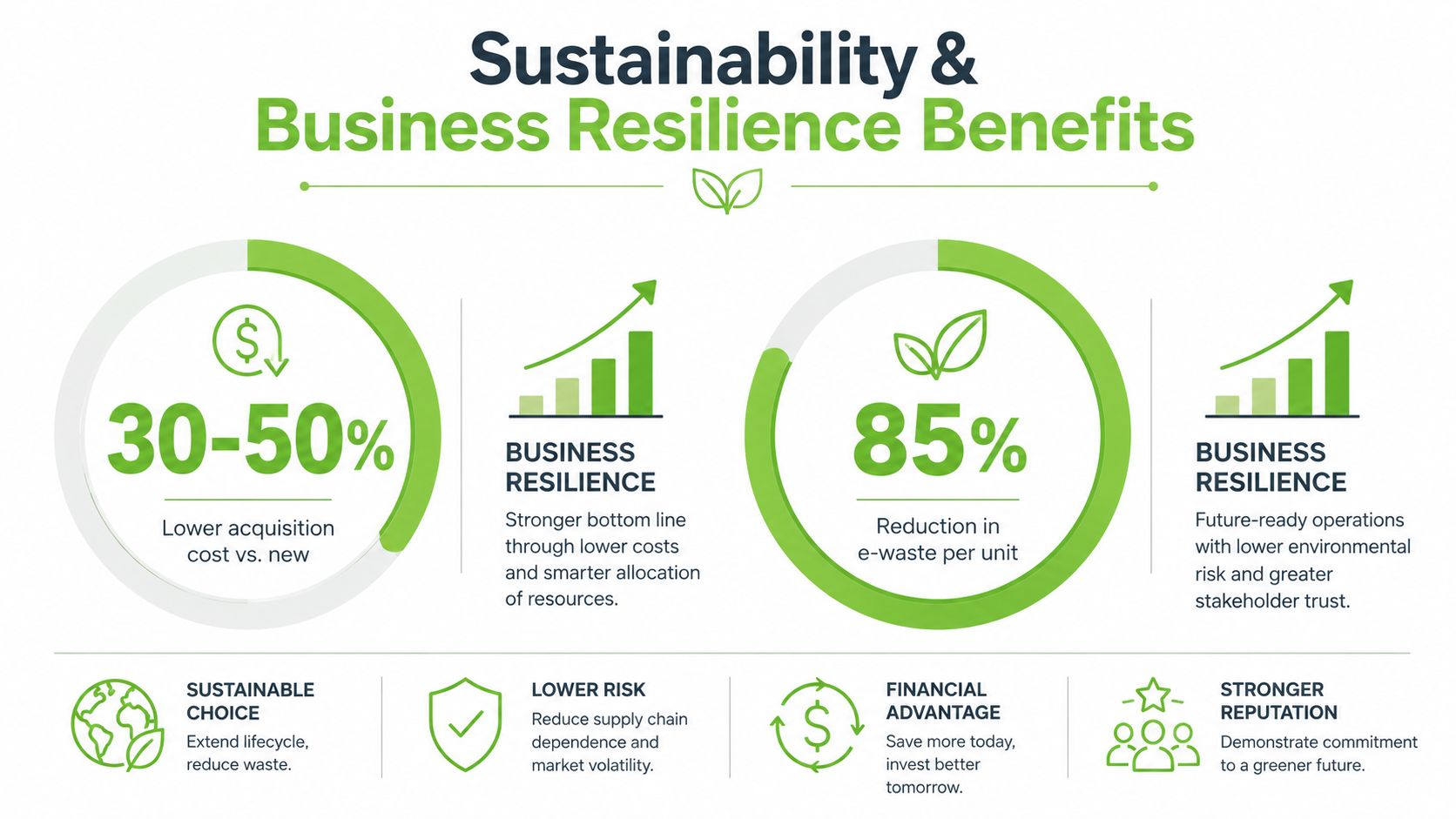
Refurbishment isn't only an environmental choice. It can protect a household budget, reduce replacement disruption, and help an SME deploy capable equipment without tying up as much capital in new hardware.
Singapore's e-waste history shows why reuse matters. A 2018 NEA study reported that Singapore generated more than 60,000 tonnes of e-waste a year, with about half estimated to come from households. Individuals discarded around 11kg annually, while only about 6% of domestic e-waste was recycled. The same findings suggest that usable laptops and IT devices were being lost before they could re-enter a reuse stream. Channel NewsAsia coverage of Singapore's e-waste findings
The recovery system has since expanded. Reported total e-waste collection rose from 3,500 tonnes in February 2022 to more than 22,300 tonnes by September 2024, reflecting stronger collection and recovery activity. For a business, that infrastructure supports a more disciplined asset lifecycle, purchase, deploy, maintain, redeploy, trade in, and recycle.
Carbon is a measurable procurement consideration
The environmental benefit isn't limited to keeping a laptop out of a bin. HP Singapore states that its Certified Refurbished EliteBook 840 G8 has an estimated up to 64% lower carbon footprint than an equivalent first-life device. HP-related carbon-footprint information
That figure applies to the specified certified refurbished model, not every refurbished laptop. It still demonstrates why procurement teams can assess lifecycle emissions alongside price, warranty, security, and expected service life.
Responsible retirement protects the business
Reuse only works when devices eventually leave the organisation safely. Licensed recyclers handling data-bearing devices must sanitise data and physically dismantle equipment. CNA reports that hard disk drives are degaussed and solid-state drives are shredded, turning data destruction into an operational step rather than a marketing promise. Singapore laptop data-sanitisation and dismantling practices
Singapore also has more than 1,000 e-waste collection points in malls, supermarkets, and community clubs. Most public bins have a 50cm by 25cm slot that accepts laptops and similar small devices, making responsible returns practical for households and SMEs. Singapore laptop recycling and collection guidance
Which Laptop Type Fits Your Use Case
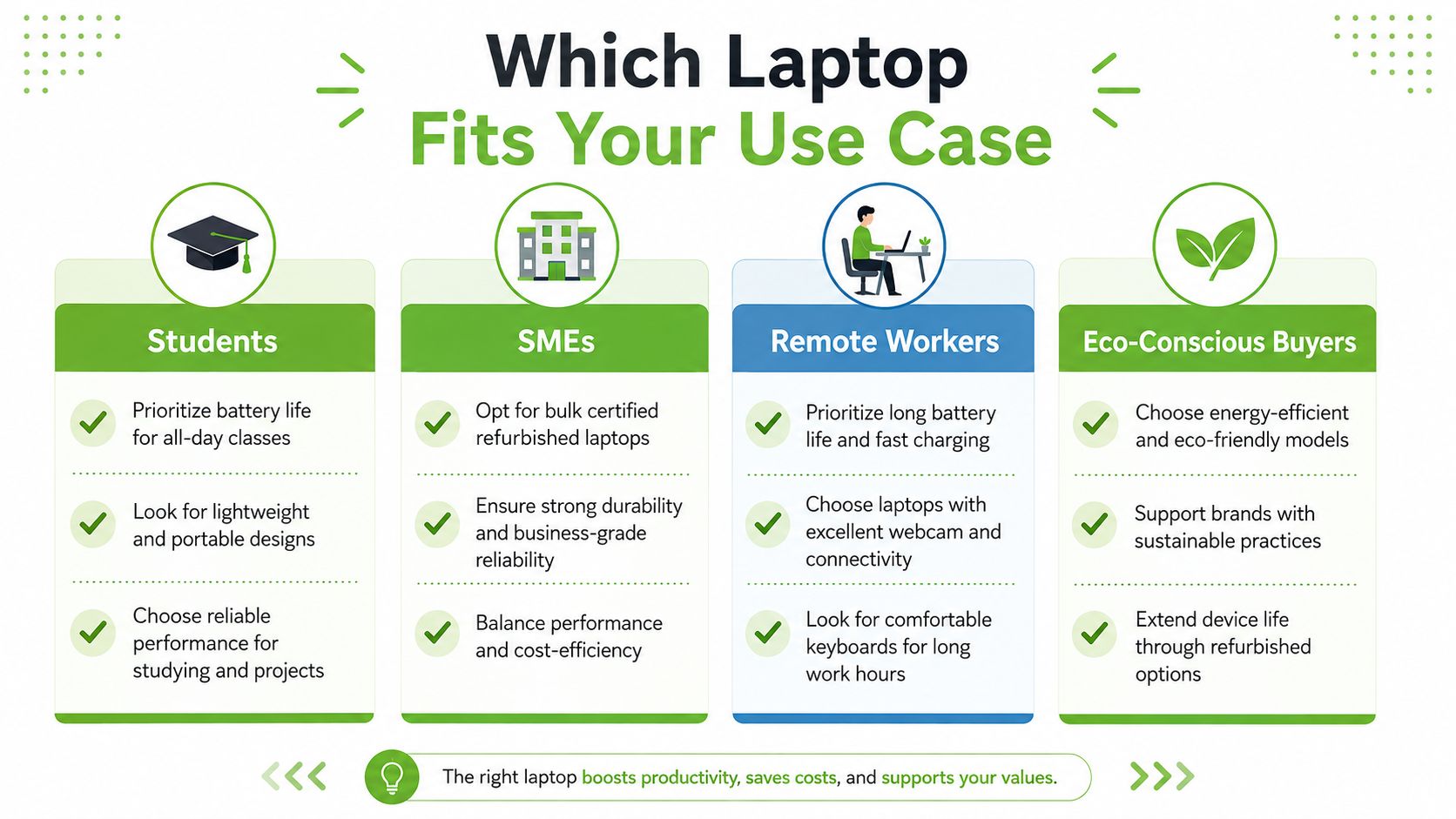
There isn't one correct answer for every buyer. The right choice depends on whether failure would be inconvenient or costly, whether your workload needs specialised hardware, and whether a seller can document the device's condition.
Students
Choose a certified refurbished laptop when your priorities are dependable study work, a comfortable keyboard, useful ports, and sensible spending. A refurbished business laptop can suit research, documents, presentations, online learning, and communication without forcing you into the weakest new configuration.
Check the battery-health disclosure carefully because students often carry their laptops between home, campus, libraries, and group projects. Also confirm the charger, webcam, wireless connectivity, and return process. Choose new if you need a particular current model, a manufacturer education bundle, or the reassurance of unused hardware.
SMEs and startups
Certified refurbished business laptops are usually the stronger starting point for equipping a team. Standardised models simplify deployment, accessories, troubleshooting, replacement, and staff onboarding. Business machines may also provide better keyboards, stronger hinges, more practical ports, and security features than low-end consumer alternatives.
Don't buy solely on unit price. Ask about asset tagging, device migration, warranty handling, data sanitisation, spare availability, and whether the supplier can support repeat purchases. A lifecycle partner should help you keep devices productive, repair them when appropriate, trade them in when their role changes, and recycle them securely at end of life.
For a wider business-laptop evaluation, see this guide to reliable business laptops.
Creative professionals
New is often the safer choice when your work depends on current graphics performance, colour accuracy, advanced video codecs, high-speed storage, or specialised AI and 3D workflows. Verify the GPU, display specifications, thermal design, ports, and software support rather than assuming a premium-looking chassis is sufficient.
Refurbished can still work for photography, design, audio, and editing when the device has the required specifications and a suitable condition report. A previous-generation business laptop may be excellent for administration but unsuitable for a creative workflow that depends on dedicated graphics or a wide-gamut display.
Everyday consumers and remote workers
For browsing, streaming, office documents, video calls, and household administration, certified refurbished often delivers the more rational value. Prioritise the SSD, RAM, webcam, microphone, display, wireless connection, and battery health. New makes sense when you want a compact design, a particular colour or configuration, or the latest platform with minimal research.
Eco-conscious buyers should also ask what happens to their old machine. A purchase decision is stronger when it includes repair, trade-in, data migration, reuse, and responsible recycling rather than treating disposal as an afterthought.
What to Verify Before You Buy
A low price doesn't compensate for missing information. Before you pay, insist on a clear specification sheet and written warranty terms.
Start with the condition report
Confirm the exact CPU, RAM, SSD, screen size and resolution, battery-health statement, operating system, charger, ports, and cosmetic grade. “Fully tested” is too vague on its own. Ask what testing covered and whether the seller replaced any components.
Battery policy deserves particular attention. One Singapore seller states that battery health issues are covered when the supplied battery falls below 80% capacity during the warranty period, with claims requiring proof of purchase and inspection. Treat that as a useful benchmark for the level of specificity buyers should expect, not as a universal Singapore standard. Example of a Singapore refurbished-electronics warranty policy
Read the warranty before comparing prices
Check the warranty duration, covered parts, battery exclusions, repair or replacement process, shipping responsibility, inspection requirements, and any conditions that could void coverage. A new laptop may have manufacturer support, while a refurbished laptop may have seller-backed support. Neither label tells you enough without the terms.
Singapore's CPFTA lemon law gives consumers a defined recourse for defective products. A consumer can make a claim for a defective product within 6 months of purchase, subject to the law's requirements and the facts of the case. Singapore lemon law guidance under the CPFTA
Look for process, not promises
A credible seller should explain quality controls, grading, data handling, exchanges, and post-sale support. myhalo provides a useful benchmark through 30-point quality checks, transparent grading, battery-health disclosure, and stated ISO 9001 and ISO 27001 certifications. Buyers can explore refurbished laptop computers and evaluation considerations while still comparing the same evidence across suppliers.
For SMEs, ISO 27001 is particularly relevant to information-security management, but certification doesn't remove the need to ask how a specific device was sanitised. Confirm the process, retain proof of purchase, and record serial numbers and condition at handover.
Making Your Decision and Next Steps
Use four filters. First, set the total budget, including accessories, software, protection, and likely service needs. Second, define the workload, from documents and video calls to engineering software, content creation, or AI-enabled applications. Third, decide how much warranty certainty you need. Finally, decide whether reuse, trade-in, repair, and secure recycling belong in the purchase plan.
A student with a fixed budget may choose a certified refurbished business laptop after checking battery health and exchange terms. An SME may standardise on refurbished business models and reserve new purchases for specialist users. A creative professional may buy new for a demanding workstation while choosing refurbished equipment for administration and travel.
In Singapore, myhalo operates as a technology lifecycle partner, offering factory-sealed new devices, Certified ReLoved devices, Certified Surplus products, repair and migration support, trade-ins, and lifecycle-care options. Buyers can also use RescueAdvise and the mylo AI Assistant to narrow choices based on workload, budget, and condition preferences, then inspect suitable devices at the Bugis Junction store or verify the details online.
Don't make the final choice from the “new” or “refurbished” label alone. Compare the specifications you need, the condition you can verify, the warranty you can use, and the support available after purchase.
Choose a laptop from myhalo by comparing certified condition, battery health, specifications, warranty terms, and lifecycle support rather than sticker price alone. Visit the Bugis Junction store or use mylo AI Assistant to find a new, Certified ReLoved, or Certified Surplus device that fits your work and budget.