





Buy MS Office Singapore: 2026 License Guide
You’ve got the laptop sorted. Maybe it’s a new machine for work, a refurbished MacBook for uni, or a budget Windows notebook for home use. Then the obvious question lands straight away. What’s the smartest way to get Microsoft Office in Singapore without overspending or buying the wrong licence?
That question comes up constantly because Office looks simple from the outside, but the buying options aren’t. Some licences are subscriptions. Some are one-time purchases. Some make sense for one person and are a poor fit for a family or a small business. It gets even more confusing when you’re pairing Office with a refurbished device and trying to keep total cost under control.
There’s also a strong local angle to this. Microsoft has had a significant operational presence in Singapore since 1990, and Singapore now hosts Microsoft datacentre services supporting platforms including Azure and Office 365, according to Microsoft’s Singapore community overview. So when people search for ms office singapore, they’re not looking for an abstract software guide. They want a practical buying decision for devices they use here.
Table of Contents
- Your Guide to Microsoft Office in Singapore
- Understanding Microsoft's Productivity Suites
- The Key Decision Microsoft 365 vs Office 2024
- Personal, Family, Student, or Business Plans
- Securing Your Legal Microsoft Office Licence
- Optimising Office for Your myhalo Device
- Frequently Asked Questions About MS Office in Singapore
Your Guide to Microsoft Office in Singapore
A common Singapore buying journey goes like this. You’ve just picked up a device, turned it on, connected to Wi-Fi, and realised the hardware was only half the decision. You still need Word, Excel, PowerPoint, Outlook, or some combination of them, and you want it to be legal, reliable, and worth the money.
That’s where many users get stuck. They see “Microsoft 365”, “Office 2024”, “Home”, “Business”, “Family”, and boxed software listings that look similar but behave very differently after purchase. One gives you ongoing service and cloud features. Another gives you a fixed version you own for that device. Neither is universally better.
In Singapore, that choice matters because buyers often care about total value, not just the lowest checkout price. Students want to keep costs predictable. Families want fewer login headaches. Small businesses want proper software without bloated recurring spend. Buyers of refurbished laptops usually care even more because they’re already making a deliberate value decision on hardware.
The best Office option isn’t the newest label on the box. It’s the one that matches how long you’ll keep the device, how many devices you use, and whether you actually need cloud collaboration.
If you’re still comparing options, it helps to look at a curated range of Microsoft products in Singapore so you can see how the licensing choices are presented in the local market.
Understanding Microsoft's Productivity Suites
The simplest way to understand ms office singapore options is to split them into two categories. Microsoft 365 is a service. Office 2024 is a product.
The serviced apartment versus owned apartment analogy
Microsoft 365 works like renting a serviced apartment. You pay on a recurring basis, the environment stays current, and key services are built in. You don’t need to think much about whether you’re using the latest version because that’s part of the deal.
Office 2024 works more like buying an apartment unit. You own that version, and the appeal is straightforward. You pay once and keep using it on the licensed device. But what you bought doesn’t keep evolving into a broader service package.
That difference matters more than the branding. People often compare them as if they’re two editions of the same thing. They’re not. One is ongoing access with cloud-centric convenience. The other is a one-time software purchase with a more fixed setup.
Why Office still matters in Singapore work
This isn’t niche software. Microsoft’s 2025 Work Trend Index shows that 81% of workers in Singapore are actively using Microsoft Office applications, as cited by ASK Training’s write-up on Office skills in the Singapore workplace.
That figure explains why the decision isn’t just about software features. It’s also about compatibility with how people study, apply for jobs, send files, prepare presentations, and manage business documents locally. If you’re buying a laptop for school, office admin, accounting support, sales work, or presentations, Office isn’t a luxury add-on. It’s often part of the basic setup.
What buyers usually get wrong
The first mistake is buying by name only. Someone sees “Office” and assumes every version includes the same rights and tools. It doesn’t.
The second mistake is overbuying. A user who only needs local Word and Excel on one computer may not benefit from a subscription. On the other hand, a person moving between laptop, tablet, and phone often ends up frustrated if they buy a static licence just to save money at the start.
A quick reality check helps:
- If you want flexibility across devices, Microsoft 365 usually feels easier day to day.
- If you want to minimise upfront hassle and recurring bills, Office 2024 can be the cleaner choice.
- If you share files constantly, subscription features tend to matter more.
- If you mostly work alone on one machine, a perpetual licence may be enough.
The Key Decision Microsoft 365 vs Office 2024
Most confusion disappears once you stop asking which option is “best” and start asking which trade-off you prefer.
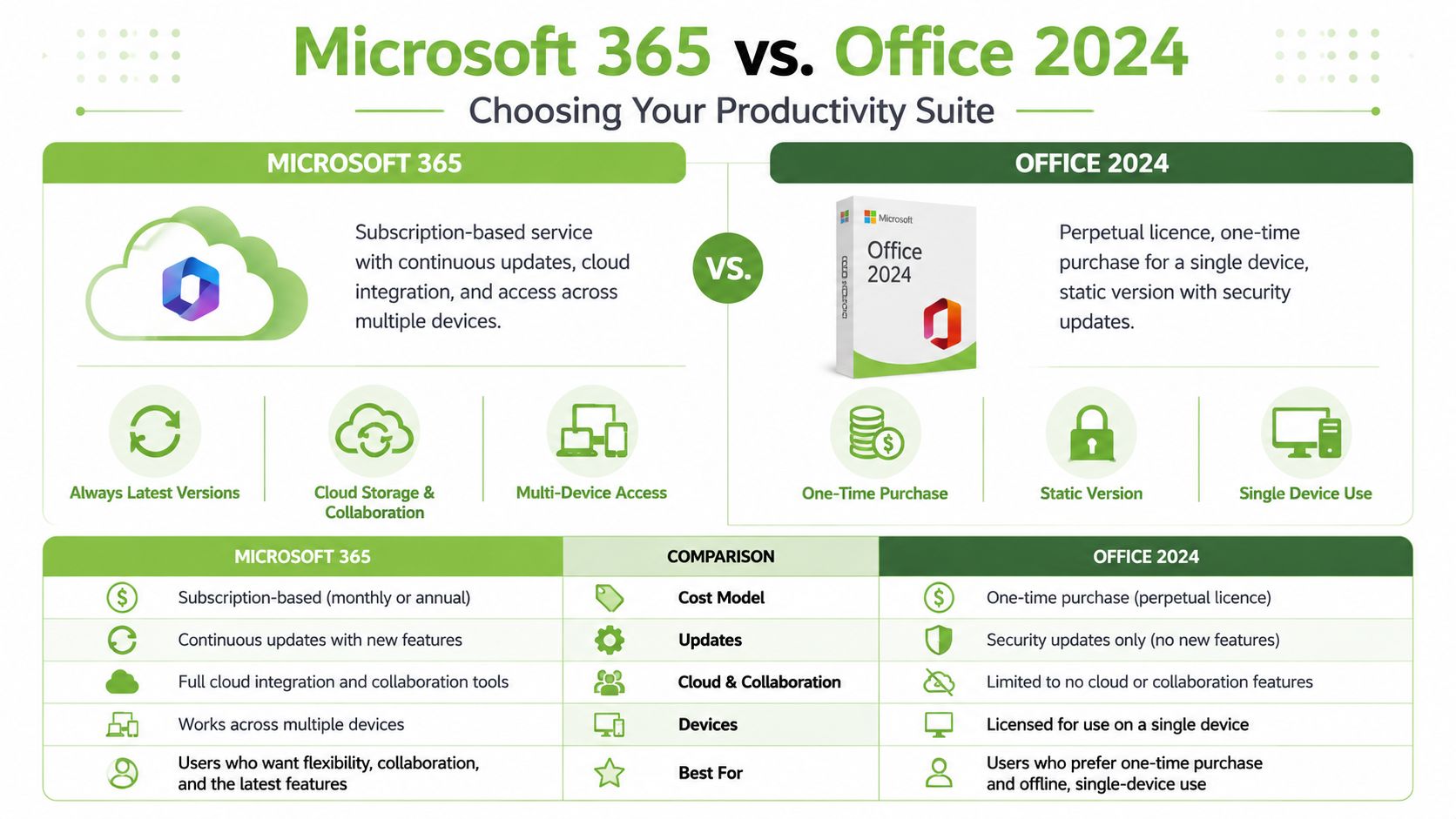
The pricing model is the clearest dividing line. According to SourceIT’s Office Home 2024 listing, Microsoft Office 2024 Home editions start at SGD 229 to SGD 379 as a one-time purchase, while Microsoft 365 follows a recurring subscription model. The same source notes that for some buyers, the one-time purchase can represent a 40 to 60% cost reduction versus annual subscriptions, but it doesn’t include the cloud collaboration features and 1TB storage that come with Microsoft 365.
How the two models behave in daily use
In practice, Microsoft 365 suits people who treat their documents as part of a connected workflow. They work across laptop and phone, store files in the cloud, and expect their setup to follow them. That convenience is the key value.
Office 2024 is stronger when your priority is control over spending. If you’re buying a machine for a specific purpose and plan to keep it in a fairly stable role, a one-time licence is often easier to justify. You pay, activate, and move on.
Practical rule: If you’re choosing software to match a fixed device, a perpetual licence is often cleaner. If you’re choosing software to match a person who uses several devices, subscription usually wins.
For buyers looking at bundle-style purchases, a Microsoft Office bundled option can also make the buying process simpler because hardware and software planning happen together.
A side by side comparison
| Feature | Microsoft 365 (Subscription) | Office 2024 (One-Time Purchase) |
|---|---|---|
| Cost model | Recurring subscription | One-time payment |
| Updates | Continuous updates as part of the service | Fixed version with no equivalent ongoing feature expansion |
| Cloud and collaboration | Includes cloud collaboration features and 1TB storage | Lacks the cloud collaboration features and 1TB storage included in Microsoft 365 |
| Devices | Better suited for people working across multiple devices | Best suited to a more stable, single-device setup |
| Best for | Users who value flexibility, syncing, and mobility | Users who want predictable upfront spending |
A lot of regret purchases happen because buyers focus only on the first invoice. That’s understandable, but incomplete. The smarter question is whether your software needs will stay steady. If they won’t, the “cheaper” option can become the more inconvenient one.
Personal, Family, Student, or Business Plans
A good Office choice starts with the person using it, not the product page.

Which plan fits which kind of user
A student usually cares about two things. Cost and survivability across device changes. If the laptop is mainly for assignments, spreadsheets, reports, and slides, a one-time Office purchase can work well. If that student also uses a phone and tablet to review files on the move, Microsoft 365 starts to make more sense.
A family tends to run into a different issue. Devices are mixed. Someone uses a Windows laptop, someone else uses an iPad, and there’s usually at least one phone involved in the workflow. In that setup, the cloud and account-based model often removes friction because files and apps aren’t tied so tightly to one machine.
A freelancer or sole proprietor usually sits in the middle. If the work is document-heavy but mostly solo, Office 2024 can be enough. If the business depends on file sharing, client revisions, and moving between devices during the day, Microsoft 365 usually feels more natural.
A small business owner should think less about brand labels and more about seat management, mobility, and future admin overhead. If your team is stable and each user works on one assigned machine, a perpetual licence can be appealing. If roles shift, devices are replaced, or hybrid work is normal, subscription tools tend to reduce friction.
Mixed device households and small teams
According to Acer Singapore’s Microsoft Office 2024 Home & Business product information, Office 2024 Home & Business supports Windows PCs and Macs, while Microsoft 365 Personal extends compatibility to iOS and Android devices. The same source highlights 1TB of OneDrive cloud storage, which is one of the biggest reasons people find Microsoft 365 easier to live with in mixed-device environments.
That matters in Singapore because many buyers don’t stay inside one ecosystem. A person may use a refurbished Windows laptop, an older iPad, and an Android phone. Another person may use a MacBook for work and a Windows desktop at home. Cross-platform consistency removes a lot of low-grade daily annoyance.
If you’re comparing options for work use, it can help to compare Microsoft 365 business plans as a framework for thinking about user roles, admin needs, and collaboration habits, even if your final purchase is made locally.
For households that want a shared subscription route, a Microsoft 365 Family 1 year physical box is one of the cleaner ways to buy without juggling multiple separate personal subscriptions.
If your users switch devices more often than they switch tasks, don’t choose Office based on the cheapest starting price alone.
Securing Your Legal Microsoft Office Licence
A legal licence matters for a simple reason. You want software that activates properly, stays valid, and doesn’t leave you guessing whether it will fail at the worst moment.
Where to buy safely
In Singapore, the safest buying paths are usually straightforward:
- Official Microsoft channels if you want a direct purchase and account-linked setup.
- Authorised retailers and partners if you prefer boxed products, local customer support, or hardware-software bundles.
- Device bundles from reputable sellers when you want one checkout and fewer compatibility questions.
- Business procurement channels if your company needs proper invoicing, deployment planning, or multiple licences.
For organisations trying to understand the broader logic behind commercial purchasing, Microsoft licensing solutions can be a useful background resource because it frames the different licensing approaches businesses typically evaluate.
Why cheap product keys are risky
A suspiciously cheap key isn’t a bargain if it stops working, activates incorrectly, or was never intended for resale in that form. That’s the core issue with grey-market listings. The upfront price looks attractive, but the risk sits entirely with the buyer.
The usual warning signs are easy to miss when you’re in a hurry:
- The price is implausibly low compared with mainstream retail listings.
- The seller offers only a bare code with no clear proof of licence origin.
- Support is vague or absent, especially once activation is done.
- The listing language is inconsistent, with unclear edition names or unclear usage rights.
Buy the licence, not just the activation. A code that works today but fails later isn’t good value.
For personal users, the safest approach is to buy from established sellers with transparent product descriptions. For SMEs, it’s even more important because a licence problem affects staff productivity, audits, and future device replacements.
Optimising Office for Your myhalo Device
Software choice changes when you’re pairing it with a new or refurbished machine. Hardware value and licence value should work together.
When a perpetual licence makes more sense
A refurbished laptop often appeals because it gives you a capable device without the premium price of a brand-new model. In that scenario, a one-time Office purchase can be a very logical companion. You keep the setup simple and avoid turning a budget-conscious hardware decision into a recurring software commitment.
This is especially sensible for users with a stable workflow:
- Students writing essays, building slides, and managing spreadsheets on one main laptop
- Home users who want familiar Office apps without ongoing billing
- Small admin teams using fixed desks and predictable document processes
There’s also a broader market gap here. As noted in EDB’s piece on Microsoft’s Singapore AI hub, Microsoft’s positioning in Singapore is strong at the strategic level, but there’s still minimal guidance for SMEs on affordable MS Office access alongside refurbished devices. That’s exactly why the refurbished-device-plus-perpetual-software route deserves more attention.
When a subscription is the better match
A subscription usually fits better when the device itself may change. If you trade in often, rotate between work and personal machines, or regularly work across phone, tablet, and laptop, Microsoft 365 gives you more flexibility. The software follows the account more naturally than a single fixed-device mindset.
That’s also the stronger fit for users who rely on cloud file access and cross-device continuity. A salesperson editing on a laptop and reviewing on a phone will usually appreciate that more than a lower one-off software bill.
Here’s the practical split I’d use:
- Choose Office 2024 if the device is your main workhorse and you want the leanest upfront path.
- Choose Microsoft 365 if your working style moves between devices or changes often.
- Choose based on workflow first, not on whether the machine is new or refurbished.
The most cost-effective setup isn’t always the cheapest licence. It’s the licence that keeps matching your device habits over time.
Frequently Asked Questions About MS Office in Singapore
Can I just use the free web version of Office
For light use, yes. If you only need simple edits, basic documents, and occasional access, the web apps may be enough. The limitation is convenience and depth. People who work heavily in Excel, prepare formal documents often, or want stronger offline use usually outgrow the free route quickly.
Can I transfer a one-time Office licence to a new computer
Sometimes, but you should always check the exact licence terms of the version you bought. This is a common pitfall for buyers. They assume “one-time purchase” means unlimited flexibility, when in practice the rights can be more limited than a subscription tied to your account usage.
What happens to my files if I cancel Microsoft 365
Your documents don’t automatically disappear just because you stop the subscription. The issue is access to subscription-linked features and storage terms. Before cancelling, download important files, organise local backups, and make sure you know what’s stored only in the cloud.
Is Office 2024 always the cheapest choice
Not always. It’s often the lower upfront spend for a single stable device, but “cheapest” depends on how you work. If you end up needing multi-device flexibility, cloud storage, or easier continuity, a subscription may be better value in real use.
What’s the safest way to buy ms office singapore
Buy through recognised channels with clear product naming, proper support, and legitimate licence information. If the listing is vague or the pricing looks unreal, step back and verify before paying.
If you’re choosing between a one-time Office licence and a Microsoft 365 subscription for a new or refurbished device, myhalo is a practical place to start. You can match the software to the way you use your laptop, tablet, or phone, instead of paying for features you won’t use or getting stuck with the wrong licence later.