





Singapore LCD Screen Repair Guide 2026
Your phone slips on the MRT platform, or the laptop lid closes on a charging cable, and the screen is gone in one moment. Calls may still come in. The device may still vibrate. But once the display shows black patches, coloured lines, or shattered glass, the key question is not only how to fix it. It is whether fixing it makes financial sense in Singapore.
That decision is where many screen repair articles fall short. They explain parts and tools, but they do not help you compare the numbers that matter: repair cost, remaining device value, refurbished replacement prices, and what you could still get by selling the device as-is. In practice, that is how owners decide. A two-year-old mid-range phone with a costly screen assembly may not be worth repairing. A newer flagship, business laptop, or tablet with strong resale value often is.
I usually advise people to start with one simple check. Compare the repair quote against the current resale value of the same model in working condition, then compare it again against a refurbished replacement. If the repair bill gets too close to those numbers, repair stops being the obvious choice. If the rest of the device is healthy and the screen is the only major fault, phone screen repair options in Singapore often make more sense than replacing the whole device.
There is also the practical side. Repair keeps your data, apps, accounts, and setup intact. Replacing the device costs more than the sticker price once you count migration time, accessory compatibility, and the risk of buying a used unit with hidden battery or board issues.
Extending the life of a phone, tablet, or laptop is also the cleaner option when the damage is limited to the display. But cost is often the primary concern, and that is reasonable. The better decision is the one that matches the age of the device, the severity of the damage, and what the repaired unit will still be worth after the job is done.
Table of Contents
- What's Wrong With My Screen? Diagnosing the Damage
- How Screen Repairs Differ for Phones, Tablets, and Laptops
- DIY Risks vs Professional Repair What to Consider
- A Look Inside a Professional LCD Screen Repair
- LCD Screen Repair Cost in Singapore Is It Worth It?
- Choosing a Trustworthy Repair Service in Singapore
- How to Prevent Future Screen Disasters
- Frequently Asked Questions About Screen Repair
What's Wrong With My Screen? Diagnosing the Damage
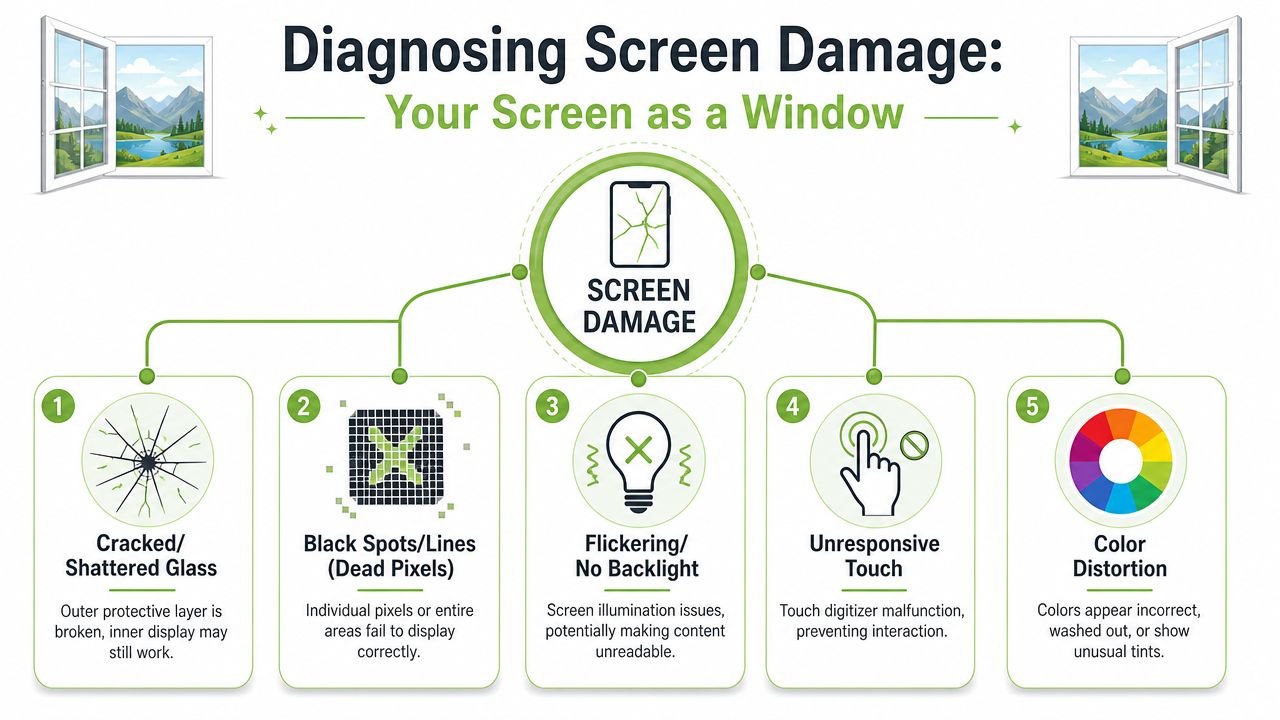
A modern screen is easier to understand if you treat it like a window with electronics layered underneath. The outer glass is what your hand touches. Under that sits the touch layer, often called the digitizer. Under both sits the LCD that creates the image.
That distinction matters because screen repair and screen replacement are not always the same job. Samsung Singapore makes that difference explicit in its support guidance: top-layer damage may be repairable, while panel or touch failure usually means replacement, as explained on Samsung Singapore's screen repair and replacement page.
Think of the screen as three parts
If the glass is cracked but the image underneath is sharp and touch works normally, the damage may be limited to the outer layer. That's the better scenario because the device is still functioning properly.
If the image has black patches, coloured lines, ink-like bleeding, flicker, or blank sections, the LCD itself is likely damaged. In that case, simple cosmetic repair won't solve it.
When touch stops responding but the picture still looks normal, the touch layer may be the failed part. That still usually leads to replacing the display assembly on many modern devices, because the layers are bonded closely together.
A quick self-check before you book repair
Use this checklist before you spend money:
- You still see everything clearly: Cracks on top, but no distortion. This is often the least severe kind of screen damage.
- The phone makes sound but the display is black: The device may still be alive, but the screen assembly or its lighting path may have failed.
- There are vertical lines or spreading black areas: The panel is usually physically damaged.
- Touch reacts in some places but not others: That points to touch-layer damage, connector issues, or pressure damage after a drop.
- The screen lifts from the frame: Stop pressing it. Frame distortion, adhesive failure, or battery swelling can complicate repair.
Practical rule: If the image is clean and touch works, you may be dealing with top-layer damage. If the image is missing, distorted, or touch behaves erratically, expect a fuller replacement path.
One caution. Symptoms can overlap. A hard drop can crack the glass, loosen an internal connector, and bend the frame at the same time. That's why a visual check is useful for triage, but it isn't a final diagnosis.
How Screen Repairs Differ for Phones, Tablets, and Laptops
Not all lcd screen repair jobs feel the same on the bench. The part may still be called a screen, but the way a technician approaches a phone, tablet, or laptop is very different.
Phones are compact and tightly integrated
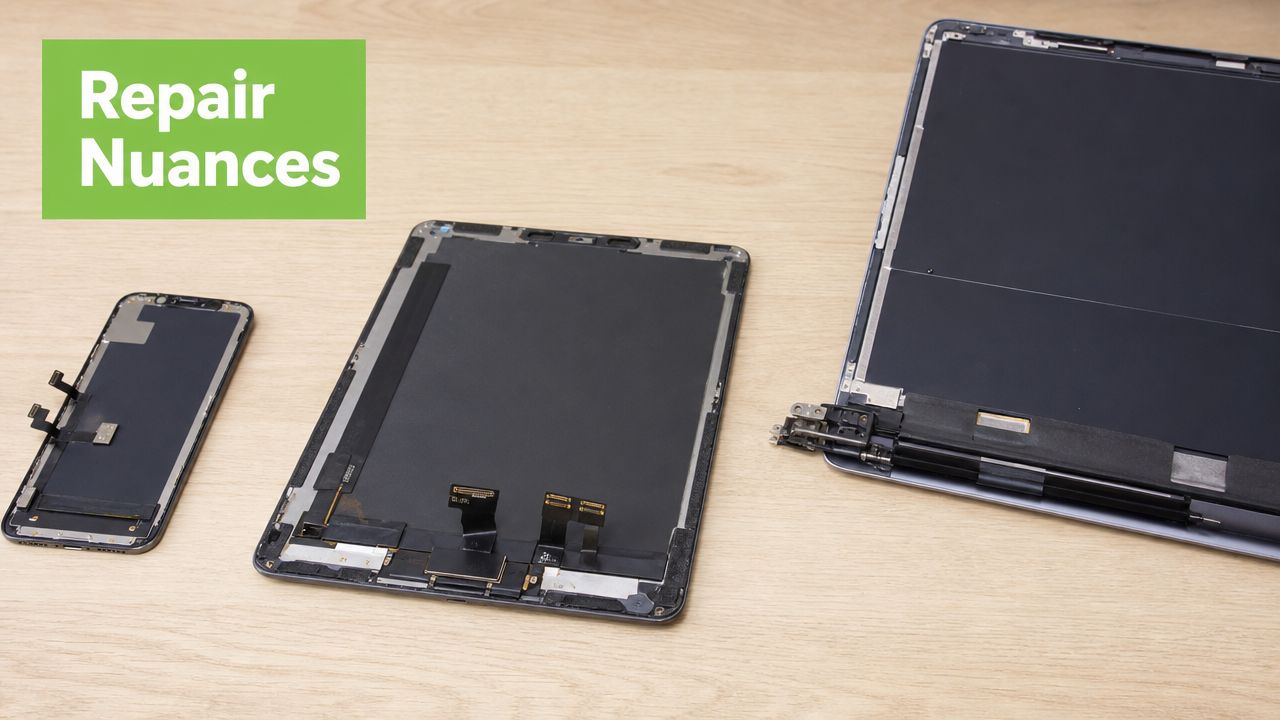
Smartphones are the most delicate to open cleanly because everything is dense. The screen, frame, adhesive, battery, and flex cables are packed tightly together. A phone repair often depends as much on controlled heat, careful lifting, and connector handling as it does on the replacement part itself.
That's why phone screen jobs can vary so much even between devices from the same brand. Some models open from the display side. Others open from the rear. Some have easier battery isolation. Others place sensitive cables exactly where a rushed pry tool can do damage. If you're comparing repair approaches, it helps to read a device-specific example such as this guide to phone screen repairs in Singapore.
Tablets and laptops fail in different ways
Tablets look simpler because they're bigger, but they often create their own problems. Large glass surfaces crack more dramatically, and the adhesive perimeter is broader. If the chassis twists after a fall, a new panel may not sit flush unless the frame is corrected first.
Laptops are different again. In many cases the display assembly is more modular than a phone's, but panel matching matters. Size, connector type, mounting points, bezels, and brand-specific assemblies all affect whether a repair is straightforward or annoying.
A quick side-by-side view helps:
| Device | Typical repair challenge | What usually drives complexity |
|---|---|---|
| Phone | Tight internal layout | Adhesive, fragile flex cables, compact assembly |
| Tablet | Wide fragile front surface | Frame shape, bonded layers, removal without further cracking |
| Laptop | Panel compatibility | Correct panel sourcing, hinge area handling, model-specific fit |
A laptop screen can be easier to replace than a phone screen mechanically, but getting the exact compatible panel can be the real challenge.
One thing they all share is this: the visible crack doesn't always tell the whole story. On tablets and laptops especially, a drop can also affect the housing, hinge tension, or internal connector seating. That's why estimates done purely from a photo are useful as a starting point, not a final verdict.
DIY Risks vs Professional Repair What to Consider
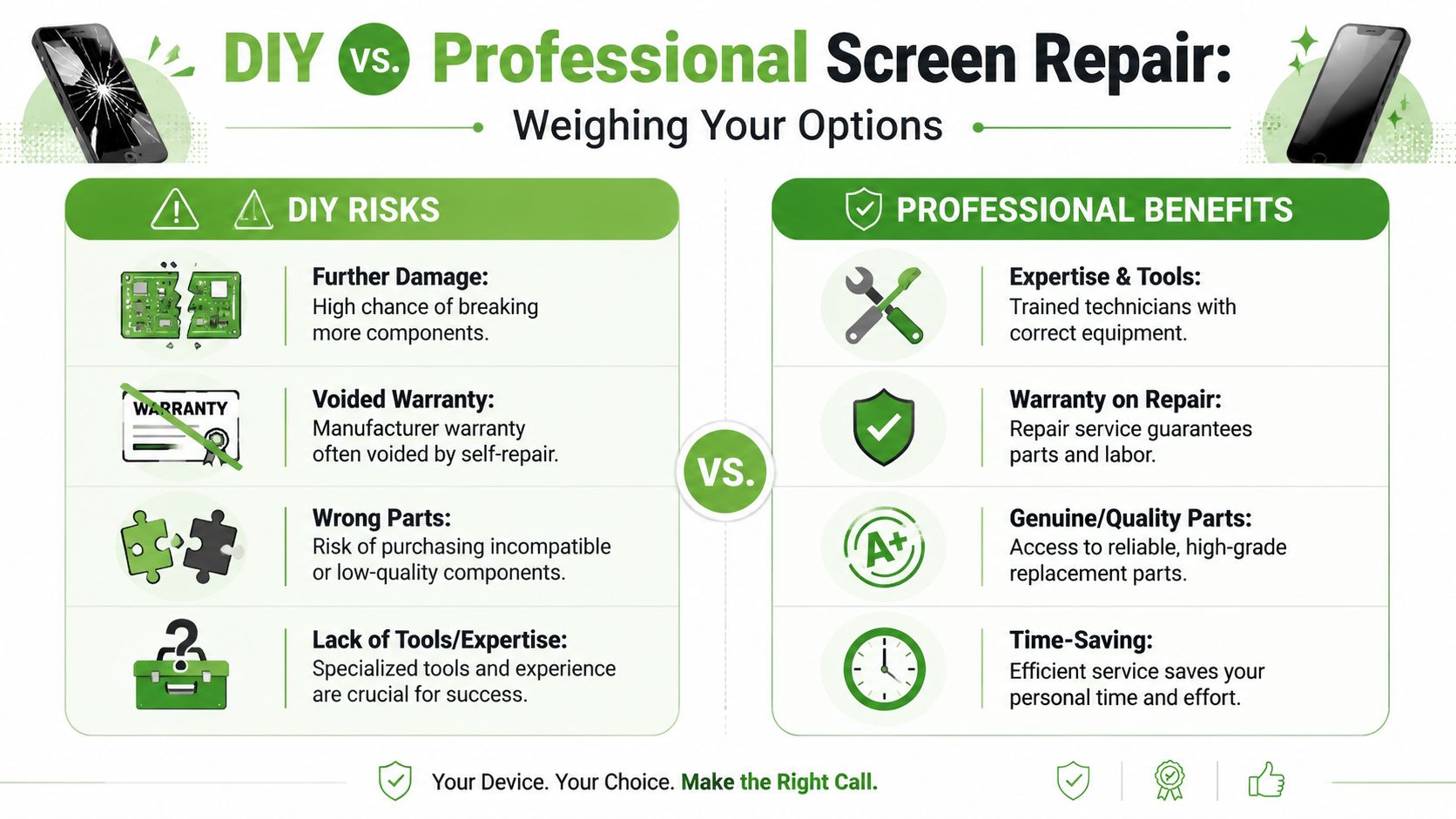
DIY screen repair is tempting for one reason. The replacement part often looks cheaper than a professional quote. But the quote includes more than the part. It includes diagnosis, safe disassembly, proper fitting, testing, and accountability if something else turns up along the way.
Why DIY looks cheaper than it really is
The first hidden cost is tooling. A proper job may need heat control, suction tools, plastic picks, precision drivers, tweezers, adhesive handling materials, and patience. A butter knife and a hair dryer are how people turn one broken screen into a broken screen plus damaged frame.
The second hidden cost is part quality. Online listings don't always make it clear whether you're buying a full assembly, a lower-grade compatible part, or something that fits physically but performs poorly. Poor colour, weak brightness, and unreliable touch are common complaints after low-grade swaps.
A third risk is warranty. Once a device has been opened badly, later repair gets harder. Torn adhesive strips, chewed screws, bent housings, and damaged connectors reduce the chances of a clean professional recovery. If you're weighing your options for an Apple device specifically, this overview of iPhone screen repair is useful for understanding why the process isn't just about swapping glass.
What a technician checks that most DIY guides skip
Technicians don't just install a new display and hope. They inspect the surrounding system. Guidance for repair work notes that technicians must check the backlight, flex cables, frame alignment, and contact quality before installation, as described on AG Displays' repair service page. That matters because many “screen problems” are partly connector, board, or fitment problems.
Consider what can go wrong after a rushed self-repair:
- A pinched flex cable: The new screen works for a moment, then touch fails.
- Uneven seating in the frame: Pressure points form, and the replacement cracks early.
- Dust trapped under the assembly: The repair functions, but the finish looks poor.
- Incorrect adhesive placement: The panel lifts later, especially in a warm bag or car.
If you've never opened a modern phone or tablet before, your first repair attempt shouldn't be on the device you rely on daily.
DIY can make sense for an old spare device where failure is acceptable. For a main phone, business laptop, or school tablet, professional work is usually the lower-risk choice.
A Look Inside a Professional LCD Screen Repair
Most customers only see the problem before repair and the device after repair. The middle part is where the value sits. A proper repair process is organised, not improvised.
From check-in to confirmed fault
The job starts with intake. The technician checks the visible damage, asks what happened, and confirms symptoms. Did the screen fail after a drop, after pressure in a bag, or after liquid exposure? That history matters because the same black screen can come from different causes.
Next comes diagnosis. The technician separates image problems from lighting problems and from touch problems. This is especially relevant in LCD work because the illumination chain can fail independently of the display signal. Technician guidance notes that some LCDs use CCFL backlights requiring 600–1200 V AC, while LED backlights are commonly tested at 24–36 V DC per strip, which is why a structured workflow isolates backlight issues before replacing other parts, as noted in this LCD troubleshooting guide for technicians.
Once the fault is clear, the repairer can give a firmer answer on scope. That's the point where a simple top-layer issue, a full module replacement, or a no-repair recommendation becomes clearer.
Installation and final testing
Disassembly comes next, and careful execution is paramount. Adhesive is softened in a controlled way, connectors are disconnected in the right order, and the damaged assembly is removed without stressing nearby parts.
Before the new screen goes in, the frame is cleaned and checked. A bent corner or leftover glass fragment can ruin a replacement quickly. The new assembly is then fitted, connected, and usually tested before full closure.
A competent final check covers more than “it turns on”:
- Display quality: brightness, colour consistency, unusual shadows
- Touch response: edge areas, typing, multi-touch gestures
- Physical fit: panel sits flush, no lift points, no creaking
- Basic functions nearby: front camera, earpiece, sensors, hinge or lid behaviour on laptops
Good repair work looks boring when it's finished. No gaps, no dust under the panel, no odd tint, no dead touch zones.
That's what you want. Not drama. Just a device that behaves normally again.
LCD Screen Repair Cost in Singapore Is It Worth It?
The question isn't “How much is screen repair?” The better question is “Does repairing this device still make sense compared with the alternatives?”
That distinction matters because Singapore buyers don't operate in a vacuum. A lot of people already compare repair against resale, trade-in, or buying another device from the secondary market. As noted in this discussion of the Singapore repair-versus-replacement decision, many repair guides explain the technical process but miss the economic threshold that shoppers care about.
The decision is repair value, not repair price alone
Here's the practical way to think about it.
Repair is usually worth it when the device still has meaningful usable life, everything else works properly, and the replacement restores normal function without introducing uncertainty. That often applies to newer phones, well-kept tablets, and laptops with good battery health and acceptable overall performance.
Repair becomes harder to justify when the screen damage is only one of several problems. If the battery is weak, the frame is bent, the hinges are failing, or the device was already due for replacement, a screen quote can feel less sensible.
Singapore's mobile dependence also reinforces why screen work remains a real service category. The Infocomm Media Development Authority reported 5.91 million mobile connections in 2024, which points to a very large installed base of active devices in daily use, as cited in this discussion of LCD replacement demand and process. Even if only a small share of those devices need display work each year, the need is still substantial.
Estimated LCD screen repair costs and timelines in Singapore
The exact figure depends on model, part grade, stock availability, and whether the quote covers only the display layer or a full assembly. Since no verified SGD figures are available here, the safest way to use a cost table is comparatively rather than numerically.
| Device Type | Estimated Cost (SGD) | Typical Turnaround Time |
|---|---|---|
| Smartphone | Varies by model, part quality, and whether repair or full replacement is needed | Often same day to a few days, depending on stock and complexity |
| Tablet | Usually higher than phones when bonded assemblies or larger panels are involved | Commonly longer than simple phone jobs |
| Laptop | Varies widely by panel type and model compatibility | Often depends on panel sourcing and installation complexity |
Use this decision filter before approving the job:
-
Check the refurbished alternative
If a comparable refurbished unit is available at a price you'd seriously consider, compare that against the repair quote. -
Estimate remaining life
A repaired device that you can comfortably use for much longer is easier to justify. -
Consider sale value if unrepaired
Some damaged devices still have trade or parts value. That changes the math. -
Factor in convenience
Moving data, logging back into apps, and reconfiguring a replacement device has a real cost in time and hassle.
In short, lcd screen repair is worth it when it restores a device you still want to keep. If the quote pushes you close to the value of a decent refurbished replacement, pause and compare before saying yes.
Choosing a Trustworthy Repair Service in Singapore
A repair shop sounds convincing until your phone comes back with poor brightness, weak touch response, or a new gap along the frame. In Singapore, the safer choice is usually the shop that explains the risks before taking your device in, not the one rushing to promise the cheapest same-day fix.
What to check before handing over your device
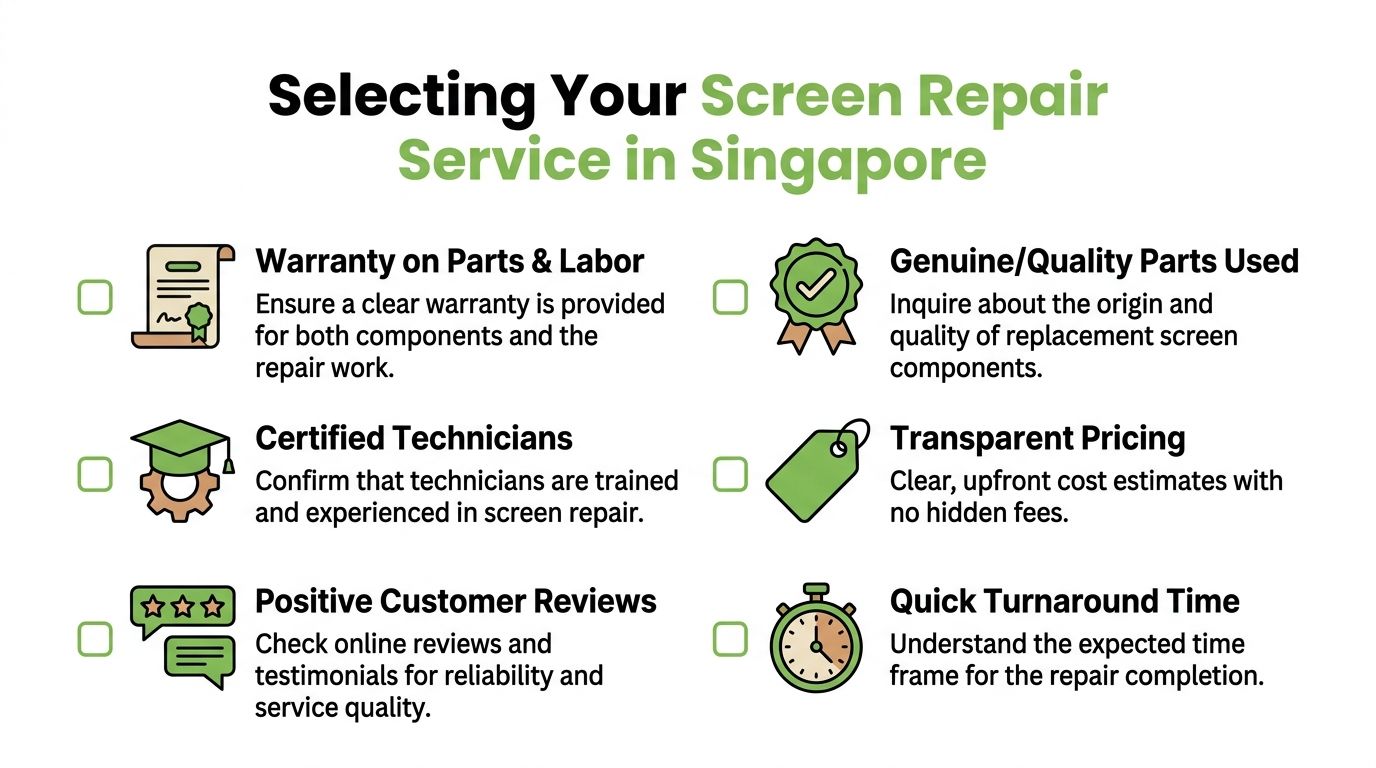
Start with the diagnosis process, not the headline price. A reliable repairer should be able to tell you what they expect to replace, what might change after opening the device, and whether the quote covers the full job or only the obvious damage. If the explanation stays vague, that is usually a warning sign.
Then check how they talk about parts. Screen quality varies a lot, especially for older phones and common models with many aftermarket options. Ask whether the replacement is original-grade, compatible-grade, or pulled from a donor device. Ask what trade-offs come with that choice. Lower-cost parts can make sense on an ageing device with low resale value, but they should not be presented as equal to a better panel.
Use a simple checklist:
- Written quote: It should spell out what is being replaced and what labour is included.
- Warranty terms: Check how long the warranty lasts and whether it covers both the part and workmanship.
- Part disclosure: You should know the screen grade before approving the job.
- Testing before collection: The shop should verify display output, touch, brightness, alignment, and front sensor function where relevant.
- Data and passcode handling: Ask whether device access is required and what the shop does to protect your privacy.
A repairer who cannot explain the likely failure point in plain language is taking your device on trust alone.
Reviews still help, but read them with a technician's mindset. Look for patterns around repeat repairs, dust under the screen, weak adhesive, missed deadlines, or disputes over warranty claims. One glowing review means little. Consistent detail across many reviews is more useful.
Choose a shop that can advise against the repair
This matters more than many customers realise. If a screen quote is already pushing close to the price of a decent refurbished replacement, the honest shop should say so. The same applies if the device has other expensive problems, such as a weak battery, bent frame, face ID issue, or liquid damage that could shorten the life of the repair.
That is why a provider with more than one path can be useful. For example, mobile phone repair services in Singapore from myhalo sit alongside refurbishment, trade-in, and replacement options. That setup makes the advice more practical. Repair if the numbers make sense. Replace if the device is nearing the point where another fault will cost you again in a few months.
The best repair service is usually the one willing to lose the repair sale because the economics do not work in your favour. In my experience, that is often the clearest sign the assessment is genuine.
How to Prevent Future Screen Disasters
Once you've paid for one screen repair, prevention starts looking very attractive. The good news is that avoiding the next crack usually comes down to a few boring habits that work.
Protection that actually helps
Use a tempered glass protector that fits properly and covers the active area well. Cheap protectors that lift at the edges or don't align with the screen shape often give a false sense of safety. They're worth replacing when chipped, because once damaged they stop distributing impact properly.
Pick a case with a raised lip around the display. That small edge matters when a phone lands face down on tile. For tablets, favour cases that protect corners and support the device without bending it.
For laptops, a screen protector matters less than safe transport. A rigid sleeve or padded compartment usually does more than any thin accessory stuck to the panel.
Habits that save screens
A few simple habits prevent a lot of repairs:
- Don't put tablets or laptops at the bottom of a packed bag. Pressure damage is common and often overlooked.
- Keep keys and loose metal objects away from phones. Scratches become crack points later.
- Don't slam a laptop lid shut with something on the keyboard. Even a small object can mark or crack the display.
- Replace swollen or damaged batteries promptly. Internal pressure can affect screen fit and safety.
- Avoid using a cracked screen for too long. Small cracks spread, moisture gets in, and the final repair often becomes more involved.
Good protection doesn't make a device indestructible. It buys you margin for everyday accidents.
Frequently Asked Questions About Screen Repair
Common concerns people ask before approving repair
Can a cracked screen be repaired if the display still works?
Yes, sometimes. If the image is clear and touch behaves normally, the damage may be limited to the upper layer. But many modern devices use tightly bonded assemblies, so the practical repair may still involve replacing the whole screen unit.
If the phone is black but still makes sounds, is it definitely a screen problem?
Not definitely. It can be the screen assembly, the backlight path, a connector issue, or something deeper. That's why diagnosis matters before ordering parts.
Will screen repair erase my data?
A normal screen repair usually doesn't require data erasure by itself. Still, if the device powers on and you can still access it, backing up first is the safest move.
Is water damage the same as screen damage?
No. Water can affect the screen, but it can also corrode connectors, short components, or create delayed faults that show up later. A device with liquid exposure needs broader inspection than a clean drop-damage case.
Are all replacement screens the same quality?
No. Brightness, colour accuracy, touch sensitivity, durability, and fit can all vary. If quality matters to you, ask exactly what grade of part is being installed.
How do I know if repair is no longer worth it?
If the quote is high, the device already has other issues, and a comparable refurbished replacement looks more attractive, that's the point to pause. Don't evaluate the screen in isolation.
Should I keep using a device with minor lines or flicker?
Only with caution. Intermittent screen faults can worsen quickly, and repeated pressure or movement can turn a partial failure into a full one.
Do tablets and laptops need the same kind of repair approval questions as phones?
Yes, but with different emphasis. For tablets, ask about frame condition and bonded display assemblies. For laptops, ask about exact panel compatibility and whether hinges or lid alignment are also being checked.
If you're deciding between repair, replacement, or trade-in, the useful next step is a proper diagnosis and a quote you can compare against your device's remaining value. myhalo offers repair support, refurbished alternatives, and trade-in options, which makes it easier to choose the route that fits your device and budget instead of forcing one outcome.