





Laptop Stand Singapore: Your 2026 Buying Guide
You clear a corner of the dining table, open your laptop, and tell yourself it will only be for a couple of calls. By midday, your neck is bent, your wrists are flat against the table edge, and the laptop is already warm from Singapore's heat. In many HDB flats and condos, that is not a temporary setup. It becomes the work desk.
A laptop stand helps, but only if it suits the way Singapore homes are used. Small desks, shared tables, shallow depth, and poor airflow all change what makes a stand practical. A model that looks fine in a product photo can eat up too much space, wobble on a narrow tabletop, or trap heat under the base during long work sessions.
That is why this guide focuses on trade-offs, not generic ergonomic advice. The right stand should raise the screen to a better height, leave enough room for your keyboard and mouse, and improve airflow instead of making your laptop run hotter.
The setup around the stand matters too. Desk size, chair height, cable routing, and storage affect whether the change feels useful day to day or just adds clutter. If you are reworking the whole workspace, Tanger's Furniture home office expertise is worth reading because furniture choices often decide whether a stand fits your routine. The device itself is part of the equation too, and this guide to refurbished laptop computers in Singapore can help if you are deciding whether to refresh your current machine or replace it.
Table of Contents
- Your Guide to Finding the Right Laptop Stand in Singapore
- Is a Laptop Stand Worth It for a Small Singapore Home
- Decoding the Main Types of Laptop Stands
- Key Features to Compare Before You Buy
- Where to Buy Your Laptop Stand in Singapore
- The Final Verdict on Your Ergonomic Upgrade
- Frequently Asked Questions for Singapore Shoppers
Your Guide to Finding the Right Laptop Stand in Singapore
You clear a corner of the desk in a 4-room flat, place your laptop, charger, mouse, notebook, and water bottle, then realise the stand you bought online takes up more space than the laptop itself. That is a key buying problem in Singapore. The right stand has to fit the room, the desk depth, and the way your laptop handles heat after a few hours of work.
A good stand solves two practical constraints at once. It raises the screen to a more usable height, and it does not turn a small desk into a cramped one. In our climate, it should also give the laptop room to breathe. That matters more than many buyers expect, especially for thin machines that already run warm. If you are using an older or budget-friendly machine, a stand can also help reduce heat buildup during longer sessions alongside a sensible refurbished laptop buying guide for Singapore users.
As noted earlier, fixed laptop stands remain a common pick here. That tracks with what I see in actual home setups. Many users want something stable, compact, and low-maintenance. Hinges and extra adjustment points can be useful, but they also add bulk, wobble, or wear over time.
Start with three questions.
- How fixed is your setup If the laptop stays on one desk every day, a rigid stand usually gives better stability and uses space more efficiently than a fold-flat travel model.
- Do you type on the laptop keyboard or on external peripherals This changes the shortlist immediately. A high stand works well with an external keyboard and mouse. Without them, the typing position often gets awkward fast.
- Does your laptop run hot under normal work Open-frame aluminium stands usually handle this better than wide solid platforms that block airflow underneath.
Desk size matters just as much as ergonomics. A stand that looks tidy in product photos can crowd a shallow desk once cables, a lamp, and a notepad are in place. This is where furniture proportions matter, and Tanger's Furniture home office expertise is useful for thinking about how the stand fits into the whole workstation, not just the laptop.
Choose for the setup you have, not the one shown in a staged product photo. That usually leads to a better result than chasing the longest feature list.
Is a Laptop Stand Worth It for a Small Singapore Home
If your desk is squeezed into a bedroom corner, built into a study nook, or shared with dining duties, the question is fair. Is a laptop stand worth the space?
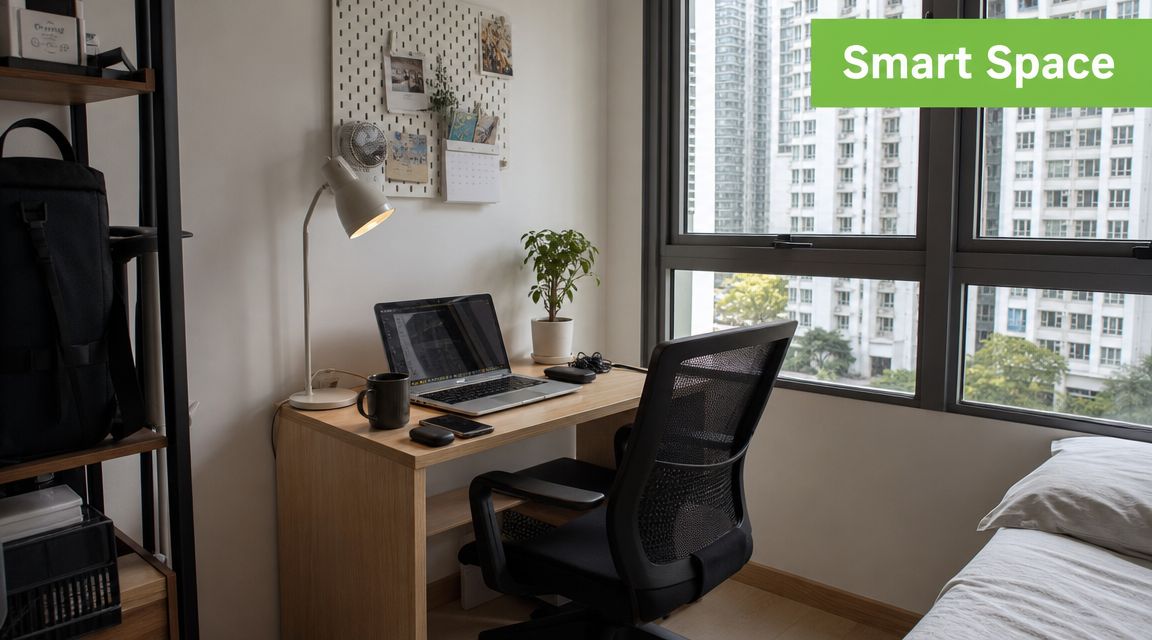
Usually, yes. But only if you treat it as part of a working setup, not a magic accessory.
Think of laptop posture like reading a book placed flat on a table while trying to keep your head upright. Your eyes want the page higher. Your hands want it lower. A laptop combines both into one object, so one part of your body always compromises. That's why people end up jutting the neck forward or bending the wrists back for long stretches.
Singapore-focused workstation guidance makes the point more realistically than most generic ergonomics articles. A good workstation depends on balancing limited desk space with a comfortable chair and proper lighting, which means the value of a stand is highly contextual, according to BenQ Singapore's laptop desk setup guidance.
When a stand earns its place
A laptop stand is worth it when it does one of these jobs well:
- Creates better screen height for long work sessions
- Frees desk surface underneath for a keyboard, notebook, or dock
- Improves airflow compared with resting the laptop flat or on fabric
- Makes a compact desk more organised instead of more crowded
When it doesn't
A stand isn't worth much if you still type on the raised laptop keyboard all day. That setup can reduce neck strain but increase wrist and shoulder tension. The compromise just moves.
If you're lifting the laptop significantly, pair it with a separate keyboard and mouse. Otherwise, the ergonomic gain is partial at best.
For small homes, the smart question isn't “Do stands help?” It's “Can my desk support the full setup?” If your tabletop is shallow, a low-profile fixed stand may work better than a dramatic height-adjustable one. If you pack everything away after work, a foldable aluminium model is easier to live with than a bulky riser.
Decoding the Main Types of Laptop Stands
The market looks crowded because very different products get sold under the same label. In real use, most stands fall into four groups. Once you know which group matches your routine, the buying process gets much simpler.
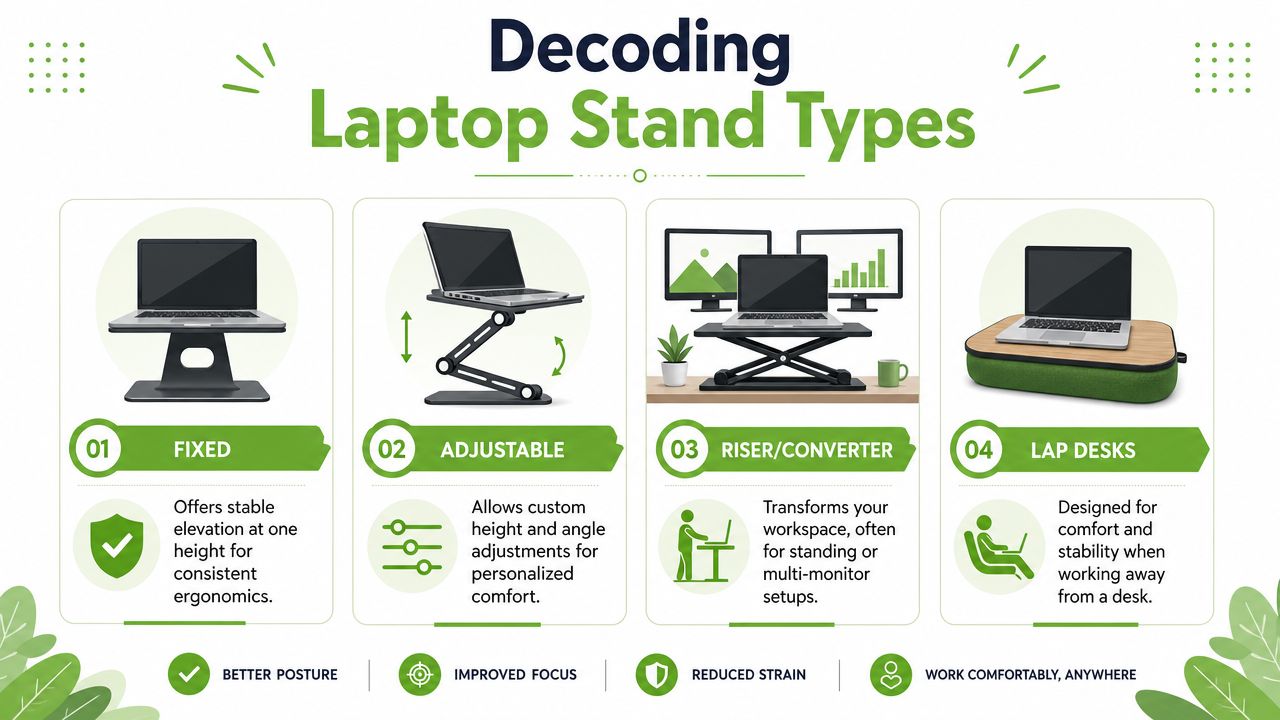
Fixed stands
These are the simplest. One shape, one working height, usually with no moving joints.
They suit people with a permanent desk and a clear idea of how high they want the laptop screen. A fixed stand is often the most stable option for everyday office work because there's less flex, less wobble, and fewer parts to wear out. That stability is why this category remains prominent in the local market.
The downside is obvious. If the height is wrong, there's no workaround except changing your chair, adding a seat cushion, or replacing the stand.
Adjustable stands
This category covers foldable aluminium designs, articulated stands, and travel-friendly models with multiple viewing angles. They suit hybrid workers who move between home, office, and shared spaces.
The biggest advantage is flexibility. You can fine-tune the angle for a coffee table, office desk, or hot-desk setup. The downside is that some compact models become less rigid when extended. If you type heavily on the laptop itself, that movement becomes irritating quickly.
A Singapore retailer also points buyers towards broader desk setups by offering products such as monitor desk mount arms for more flexible screen positioning, which can pair well with a laptop stand if you're building a dual-screen workstation.
To see how larger desktop risers compare with compact stands, it also helps to discover risers from Cubicle By Design because they solve a different problem. They change the whole desk surface rather than just supporting the laptop.
A quick visual walk-through can help if you're comparing shapes and use cases:
Riser and converter stands
These are larger platforms that raise the laptop and sometimes other accessories too. Some are designed for standing use. Others act as mini platforms for dual-screen arrangements.
They make sense if your laptop is one part of a broader workstation. They make less sense if your room already feels crowded. On a narrow desk, a converter can dominate the whole surface and leave little breathing room for writing space.
Lap desks
These aren't desk stands in the strict sense. They're padded or flat surfaces meant for sofa, bed, or casual seating use.
They can make short sessions more comfortable and more stable than balancing a laptop directly on your legs. But they're not the answer for full-day desk ergonomics. They're best treated as a temporary convenience product, not the foundation of a productive work setup.
Laptop stand types at a glance
| Stand Type | Best For | Pros | Cons |
|---|---|---|---|
| Fixed | Permanent desk setups | Stable, simple, usually sturdy | No height flexibility |
| Adjustable | Hybrid work and shared spaces | Flexible angle and height options, easier to store | Some models wobble more |
| Riser/Converter | Full workstation changes | Supports broader desk setups, can support standing workflow | Bulky for compact desks |
| Lap Desk | Sofa or occasional use | Comfortable away from a desk, easy to use casually | Not ideal for long desk work |
Buy for your dominant work habit, not your occasional one. A stand used five days a week at a desk should be chosen for that job first.
Key Features to Compare Before You Buy
Once you know the stand category, the key buying decision comes down to a few technical details. At this stage, many listings become misleading. Product photos can make almost any stand look clean and premium. Daily use exposes the shortcuts.
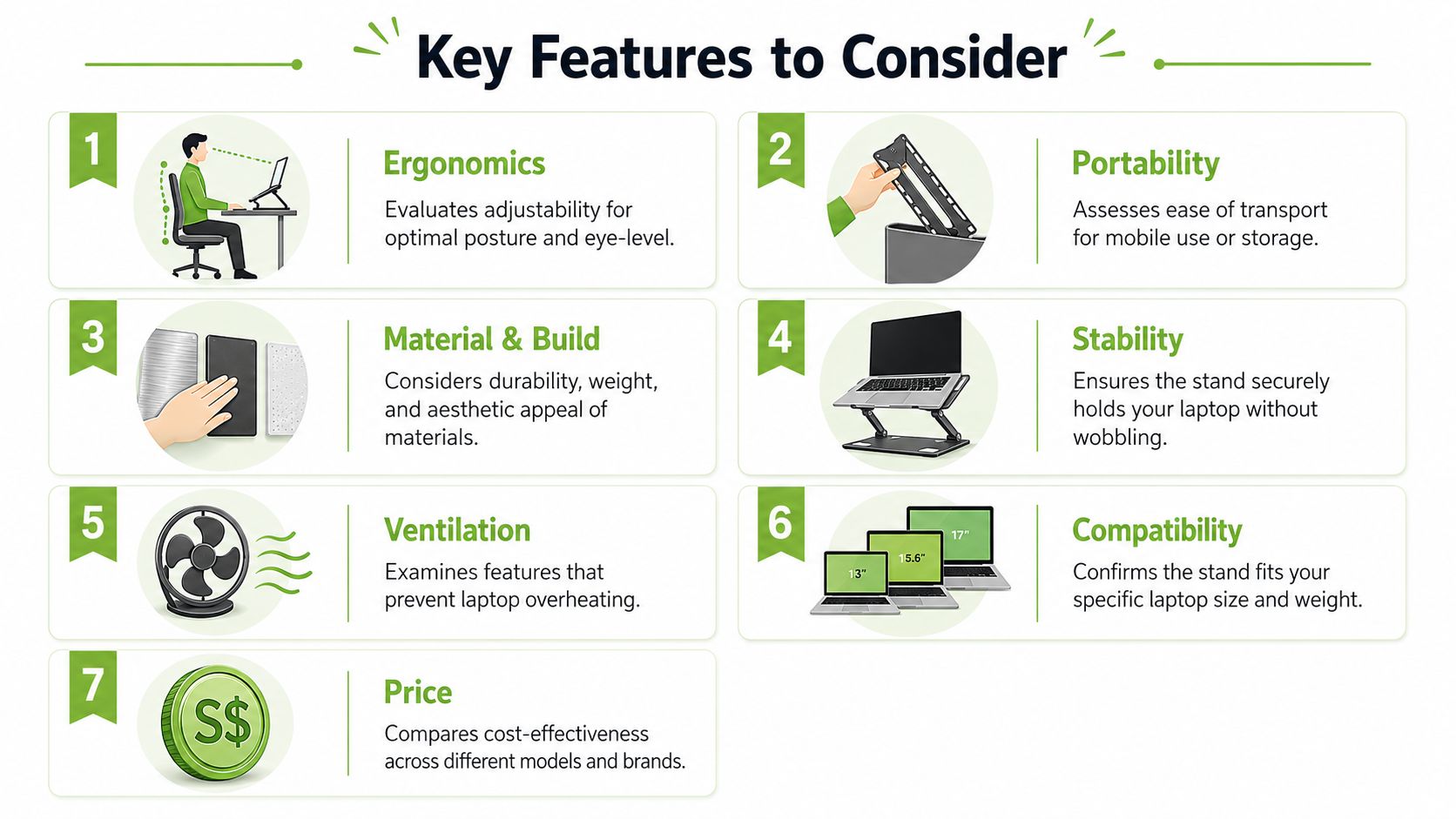
Adjustability that fits your body
Adjustability matters, but not all adjustment is equally useful. Some stands change height but not angle. Others give you several angle positions but very little elevation.
Local foldable stand listings show why this matters in practice. One model specifies 6 adjustable angles with an aluminum body and PC hinges, while another Singapore retailer lists an 8-step angle adjustment, according to Spigen Singapore's foldable laptop stand listing. Extra steps don't automatically make a stand better, but they do give finer control over eye-line and wrist position.
For buyers in Singapore, that's useful because many desks are multi-purpose. The same stand may need to work at a study desk in the morning and be packed away after dinner.
Material and load capacity
Material affects more than looks. It changes rigidity, weight, heat handling, and long-term wear.
Aluminium stands usually feel more planted and resist flex better than cheap plastic ones. Plastic can still be fine for lightweight use, but once the laptop gets heavier, the weaknesses show up as bounce, creaking, or hinge fatigue. This is especially noticeable with metal-bodied work laptops and larger creator notebooks.
One local benchmark worth keeping in mind is the StarTech desk riser sold in Singapore. It is rated to support up to 5 kg (11 lb) and is designed for 13-inch, 15.6-inch, and 17-inch laptops, based on StarTech Singapore's laptop stand specifications. You don't need that exact spec for every setup, but it illustrates an important point. Weight capacity isn't marketing fluff. It usually tracks with how confidently a stand handles heavier devices.
Buying check: If your laptop is large, metal-bodied, or paired with accessories that add strain, choose stability first and portability second.
Cooling and airflow in Singapore conditions
This is the feature people underestimate most. A stand can help cooling, but it can also make thermals worse if the design blocks vents or traps heat near the base.
That matters more in Singapore than in cooler climates. Long work sessions, warm rooms, and limited airflow can push thin laptops harder, especially when the machine is under load. Neutral guidance from HP and Lention emphasises ventilation, airflow, and avoiding stands that block cooling paths, as explained in HP's guidance on why to use a laptop stand.
The practical takeaway is simple:
- Open-frame designs usually help more than solid trays
- Raised rear edges can improve underside airflow
- Soft surfaces such as beds and cushions trap heat far more than proper stands
- Cut-outs alone aren't enough if the stand still covers major vents
If your laptop already runs hot, don't buy a stand purely on aesthetics. Buy one that creates space around the chassis.
Portability and desk tidiness
Portability sounds attractive until it starts undermining usability. Ultra-light travel stands are easy to carry, but some are too narrow or too flexible for confident daily use.
For office commuters, portability is still important. The right foldable model slips into a backpack and sets up quickly at a shared desk. For home users, storage matters more than carrying weight. A stand that folds away into a drawer may be more valuable than one that's technically lighter but awkward to pack.
Cable behaviour also matters. A tidy laptop stand setup usually leaves room for charging cables, a mouse receiver, and an external keyboard without awkward bends. If the stand forces the charging cable to press hard against the desk or rear edge, the setup becomes annoying fast.
Where to Buy Your Laptop Stand in Singapore
Where you buy matters almost as much as what you buy. Stands are one of those accessories that can look excellent online and feel disappointing in person.

Online marketplaces and brand stores
Online marketplaces give you the widest spread of options. That's useful if you already know the stand type, preferred material, and general dimensions you want.
The trade-off is inconsistency. Product photos often hide hinge quality, deck flex, and anti-slip pad placement. Reviews help, but they don't always tell you whether the stand suits your exact laptop and desk. Brand stores tend to provide clearer specs and better product pages, especially for load rating, compatibility, and adjustment style.
If you're browsing accessories together rather than one item at a time, it can also help to look through a broader collection of laptop and desk accessories in Singapore so you can assess whether the stand needs to work with a keyboard, mouse, hub, or external display.
Physical shops and testing before you buy
For stands, physical testing is valuable. You can feel wobble immediately. You can check whether the lip blocks your wrists. You can see if your laptop sits securely or if the base feels too light.
Testing in person is especially useful if:
- You use a heavier laptop and want confidence in the base
- You're sensitive to typing bounce on adjustable stands
- You're deciding between compact and full-size designs
- You want to compare materials rather than guess from photos
A physical store also lets you compare the stand against your actual workflow. Some buyers realise quickly that they don't need a high-rise model. Others discover that a low-profile stand plus external keyboard is the cleaner answer.
Delivery returns and warranty checks
Before you check out, look at the practical terms rather than the marketing copy.
Focus on these points:
-
Return window
A stand is highly personal. If the angle or footprint feels wrong, you want a realistic return route. -
Warranty coverage
Moving parts matter here. Hinges and joints are where lower-grade stands usually fail first. -
Delivery timing
If you need the stand for work this week, confirm dispatch expectations instead of assuming. -
Item condition
On marketplace listings, make sure the product is genuinely new and not clearance stock with missing pads or worn hinges.
One sensible route is to buy from sellers that already deal in practical desk setups and device accessories rather than random general-merchandise accounts. The product pages are usually more informative, and support tends to be clearer when something doesn't fit.
The Final Verdict on Your Ergonomic Upgrade
The right laptop stand in Singapore depends on three things. Your desk space, your laptop's size and heat profile, and how often you move between locations.
A compact foldable stand suits some people perfectly. Others need a rigid fixed stand because stability matters more than portability. If your laptop runs warm, airflow is essential. If your desk is shallow, footprint matters more than maximum height.
The mistake is buying by appearance alone. The better approach is to measure the desk, check how you work, and choose the stand that solves the primary bottleneck. For some people that's neck strain. For others it's clutter, wobble, or heat.
A stand won't transform a bad setup by itself. But the right one can make daily work noticeably more comfortable and more sustainable.
Frequently Asked Questions for Singapore Shoppers
Do I really need an external keyboard and mouse with a laptop stand
Not always, but very often. If the stand only lifts the laptop slightly, you may be able to use the built-in keyboard for shorter sessions. Once the screen is raised to a more comfortable viewing height, typing directly on the laptop usually puts your arms and wrists in an awkward position.
For regular work, a separate keyboard and mouse make the stand much more useful. They let the screen sit where your eyes want it while your hands stay where they should.
How do I choose a stand that won't damage my laptop
Start with fit and stability. The laptop should sit securely without rocking, and the front lip or support arms shouldn't press into fragile areas. Check that the stand doesn't block the vents, especially if your laptop draws air from the underside.
Avoid stands that feel underbuilt for your device. If the base shifts easily, the whole setup becomes less safe to use. Also check the rubber pads. Good grip prevents sliding and reduces metal-on-metal contact.
Where can I try laptop stands in person in Singapore
Tech retailers and accessory-focused shops are the best places to start because you can test hinge stiffness, typing stability, and overall footprint in real conditions. If you want a hands-on comparison before committing, myhalo's Bugis Junction store is one practical option because it carries laptops and accessories, so you can assess how a stand fits into a broader desk setup rather than judging it in isolation.
If you're ready to upgrade your setup, myhalo is a practical place to start for laptops, accessories, and support services that fit real everyday use in Singapore.