





Laptop Screen Repair Service Guide for Singapore
The screen goes black just before a presentation, a crack spreads across the display after a small drop, or vertical lines appear while you're trying to finish a report. In Singapore, that usually creates two immediate questions: can the laptop be repaired, and is repair still worth the cost?
A laptop screen repair service should answer both questions through proper diagnosis, compatible parts, clear pricing and sensible warranty terms. It should also account for your data, the laptop's remaining useful life and what happens if repair isn't economical. This matters for households and SMEs alike, because replacing a device too quickly ties up budget and creates avoidable e-waste.
myhalo approaches device support as a technology lifecycle decision. Repair may be the right answer, while Certified ReLoved, Certified Surplus, trade-in or responsible recycling may make more sense in other cases. The practical aim is simple: understand the fault, protect your information, compare the options and keep value in the device for as long as it remains useful.
Table of Contents
- Introduction to Laptop Screen Repair in Singapore
- How to Diagnose Your Laptop Screen Problem
- DIY Versus Professional Repair and When to Choose Each
- Understanding Costs Turnaround Time and Warranty Cover
- What to Back Up and Bring Before Your Repair Appointment
- Making the Smart Choice for Your Laptop Screen
Introduction to Laptop Screen Repair in Singapore
A cracked laptop display can look worse than the underlying problem. A student may see a spreading black patch and assume the entire laptop is finished. An SME owner may see a blank screen and worry that files, productivity and a replacement purchase are all waiting in the same queue. In both situations, the first step should be diagnosis, not disposal.
Singapore generates more than 60,000 tonnes of e-waste each year, and a 2018 National Environment Agency-linked study reported that only about 6% of household e-waste is recycled. The study also found that around one-quarter is discarded with general waste or left in common areas. These figures make repair and reuse practical resource decisions, not just environmental gestures. Channel NewsAsia's report on the NEA-linked study provides the Singapore context.
A screen replacement can keep a working processor, keyboard, battery and storage system in use. If the laptop still meets your needs, restoring the display may cost less than changing the whole device and may reduce disruption for a business team. If the machine is too old or has several serious faults, a technician should say so rather than recommend a repair that doesn't create sensible value.
This guide follows the decision in the order you'll experience it. You'll learn how to describe the fault, when professional work is safer than a DIY swap, why quotes and turnaround times vary, how to protect your data before handover and what to do when repair no longer makes financial sense.
How to Diagnose Your Laptop Screen Problem
Start by recording what you can see. A technician can work more efficiently when you describe the symptom precisely instead of saying only that the screen is “spoilt”.
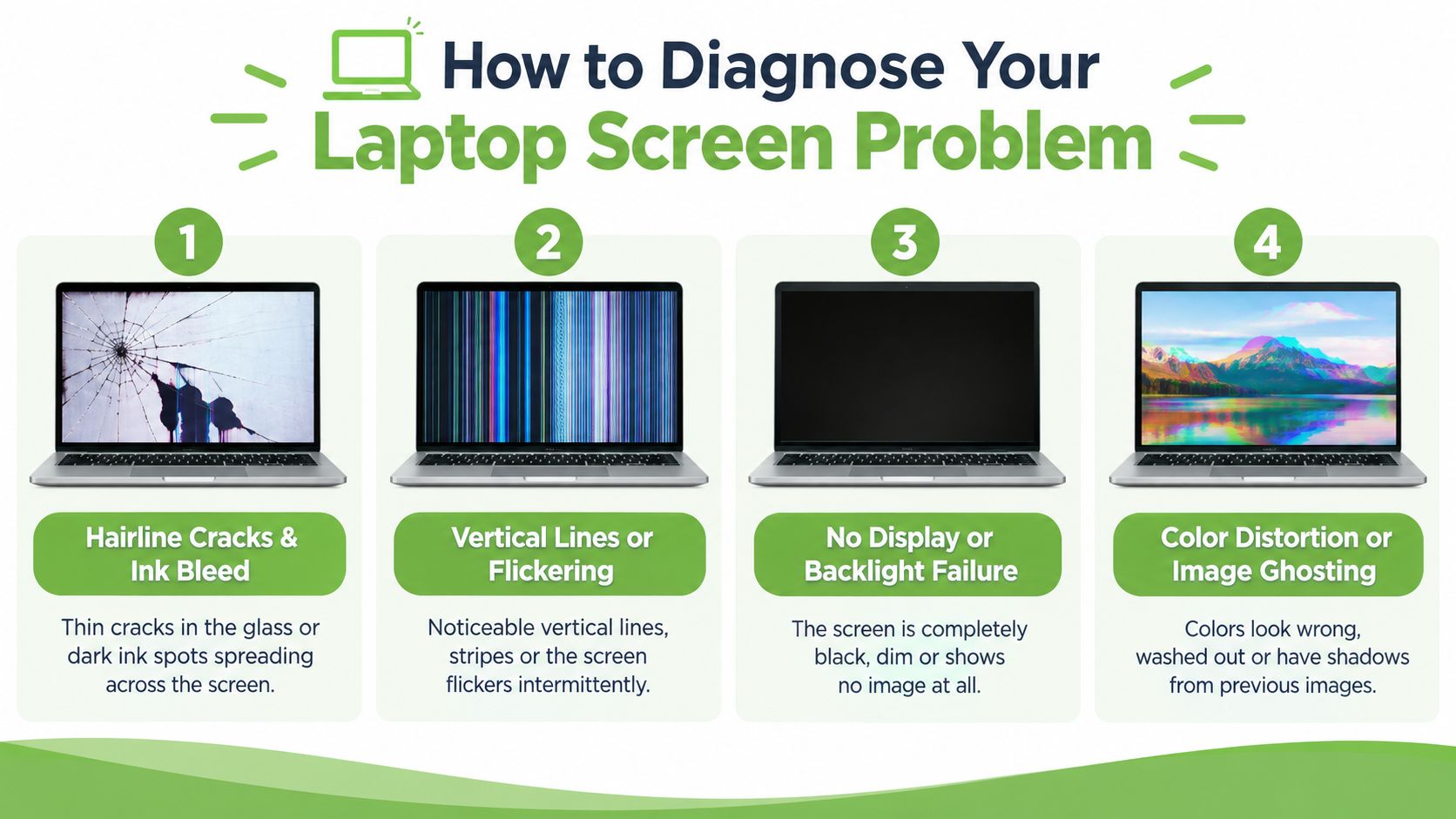
Read the visible symptom
- Hairline cracks and ink bleed: A fine crack may be accompanied by a spreading dark or coloured patch. This usually points to physical panel damage, even when the laptop still starts normally.
- Vertical lines or flickering: Lines that remain in the same position often indicate panel damage. Flickering that changes when you move the lid can also point to a display cable or hinge-area connection.
- No display or backlight failure: If the laptop powers on but the screen is very dark, shine a phone torch at an angle. A faint image can indicate a backlight problem, while a completely absent image may require broader testing.
- Colour distortion or image ghosting: Incorrect colours, duplicated images or unstable graphics can come from the panel, cable or graphics system. Don't assume the panel is automatically at fault.
Perform simple isolation checks
Connect the laptop to an external monitor or television using the appropriate video connection. If the external display works normally while the built-in panel remains faulty, the panel or its cable becomes more likely. If both displays show the same distortion or fail together, the technician may need to examine the graphics system, motherboard or software.
Move the lid slowly through its normal range without forcing it. If the image cuts in and out at a particular angle, stop opening and closing the machine repeatedly. That behaviour gives the repair centre useful information and may prevent further cable or hinge damage.
Before requesting a quote, note the brand, exact model, screen size, resolution and touch or non-touch configuration. A Dell Inspiron, Lenovo ThinkPad, ASUS ZenBook, HP Pavilion and MacBook can all require different panel assemblies, even when their screens appear similar. Refresh rate and connector details can matter too, particularly on newer or thin-bezel laptops.
Practical rule: Don't order a replacement panel from a photograph alone. Confirm the exact model and panel specification first.
DIY Versus Professional Repair and When to Choose Each
A DIY screen swap can look straightforward in a video. In practice, it may involve removing the bezel without cracking it, disconnecting a delicate display cable, transferring brackets or a camera assembly and fitting a panel that matches the original specification. Touchscreen and thin-bezel designs make the margin for error smaller.
Professional repair costs more than buying an unverified panel and attempting the work yourself, but the service includes diagnosis, part matching and testing. myhalo's repair approach can include model verification, installation, 30-point quality checks, transparent device grading and battery health disclosure. Its operational standards also include ISO 9001 Certified quality processes and ISO 27001 Certified information-security processes. These labels don't remove every risk, so ask what each certification covers within the service you're receiving.
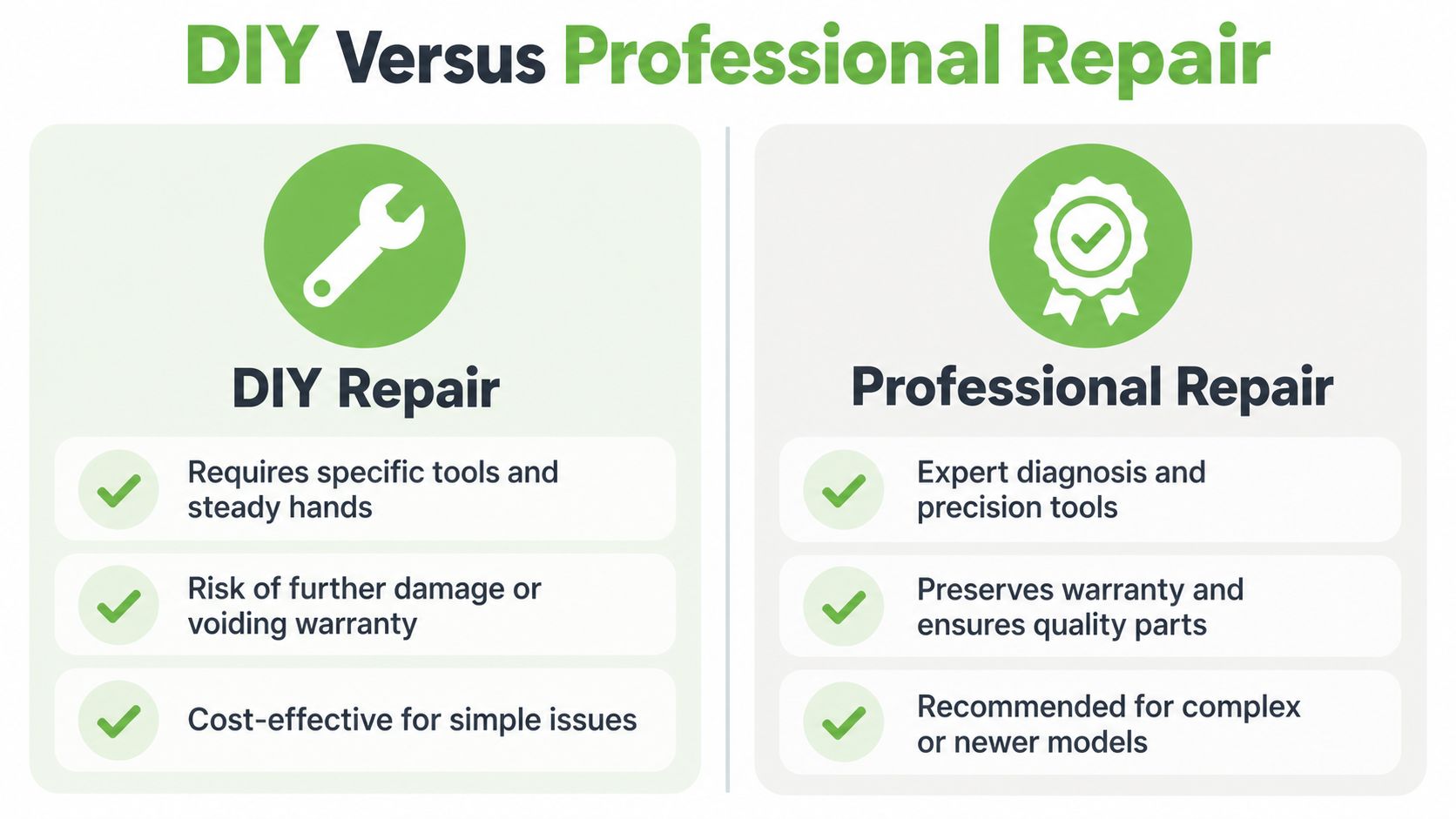
Compare the decision in practical terms
| Consideration | DIY repair | Professional repair |
|---|---|---|
| Skill and tools | Requires suitable prying tools, a steady hand and patience | Uses repair tools and an established installation process |
| Parts | You must identify and purchase the correct panel | The centre verifies compatibility before installation |
| Risk | A wrong part, damaged cable or cracked bezel can increase the final cost | Fault isolation and post-installation testing reduce avoidable errors |
| Warranty | Opening the laptop may affect existing coverage | Ask for written workmanship and replacement-part terms |
| Suitable situation | An older, low-value laptop when you accept the risk | A newer, valuable, business-critical or touchscreen laptop |
Part mismatch is one of the most common avoidable problems. A panel can have the right physical size but the wrong resolution, connector, refresh rate or touch arrangement. Hidden lid or hinge damage can also make a simple-looking screen replacement unsuitable until the surrounding structure is checked.
For a second opinion on repair decisions more generally, you can also read myhalo's guide to mobile phone repair in Singapore. The same principle applies to laptops: confirm the fault and the total repair path before judging the price.
myhalo's RescueAdvise and mylo AI Assistant can help frame the choice between repair, reuse and replacement. Treat that guidance as decision support, not a promise that every screen can be restored.
Understanding Costs Turnaround Time and Warranty Cover
Singapore pricing varies because a laptop screen isn't a universal part. A basic non-touch LCD and a bonded touchscreen assembly can look similar from the outside but differ substantially in sourcing and installation complexity. Screen size, resolution, refresh rate, bezel design and touch capability all affect compatibility and the quote.
Available Singapore benchmarks place non-touch LCD replacements around S$130 to S$386, while touchscreen panels sit roughly between S$220 and S$360. These are indicative ranges, not a guaranteed price for your model. Laptop Doctor's Singapore screen replacement information explains the specification and service factors behind such variation.
| Factor | What It Means | Impact on Quote or Time |
|---|---|---|
| Panel type | Non-touch and touchscreen assemblies use different parts and construction | Touch models generally cost more to source and fit |
| Size and resolution | The replacement must match the laptop's physical and display requirements | Higher or less common specifications can narrow parts availability |
| Refresh rate | The panel must support the laptop's intended display behaviour | Exact matching may require more careful procurement |
| Queue length | Technicians may have other confirmed jobs | Same-day work depends on appointment capacity |
| Parts availability | Stock may be available locally or require ordering | Special-order panels can extend the wait |
| Hidden damage | Lid, bezel, cable or hinge issues may appear during opening | The scope and price may change after diagnosis |
Some Singapore repair centres advertise a $0 diagnostic assessment, followed by a quotation after confirming the fault and compatible panel. Standard jobs are often positioned as same-day or 1 to 2 hours when stock is on hand, but actual timing depends on the queue and the part. Other providers specify 3 to 4 hours for LCD replacement, which shows why a fixed promise isn't sensible before model verification. Singapore repair guidance from EL Service Centre discusses these timing and warranty considerations.
Ask whether the quote includes diagnosis, labour, the complete panel assembly, testing, GST where applicable and any disposal of the old part. Confirm whether the repair covers dead pixels, flickering, colour issues and installation defects, and whether accidental damage is excluded.
Local repair warranties commonly range from 90 days to 1 year. One Singapore screen-repair FAQ gives a free 12-month warranty for the repaired screen from the return date, while excluding battery degradation from that scope. The screen-repair warranty FAQ shows why you should read coverage boundaries rather than rely on the word “warranty” alone. For broader manufacturer coverage checks, use myhalo's HP warranty check guide.
What to Back Up and Bring Before Your Repair Appointment
A technician may need to power on the laptop to test brightness, colour, touch response and external-display behaviour. That doesn't mean you should hand over unrestricted access to personal files. Recent Singapore coverage has highlighted cases where repair technicians looked through photo albums and folders or attempted to access personal accounts, so privacy belongs on your repair checklist, not as an afterthought. CNA Insider's coverage of repair-shop data privacy risks explains why this concern deserves attention.
Prepare the laptop
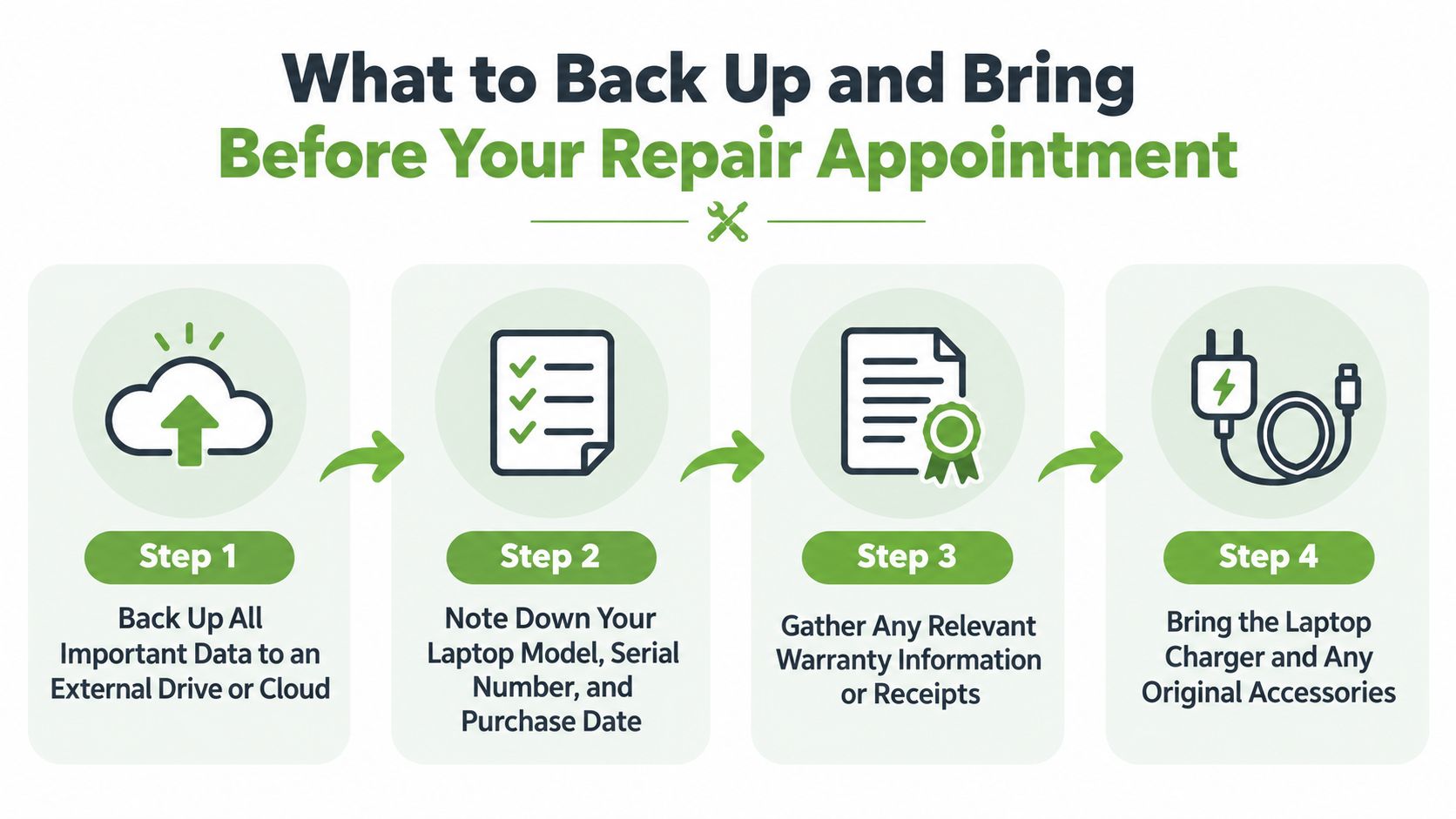
- Back up important files. Copy work documents, photographs, browser data and other essentials to an external drive or trusted cloud account. For a broader reference, review these data backup top actions from CloudOrbis Inc.
- Sign out where practical. Log out of personal accounts, disable unnecessary device tracking features and remove saved payment information if the repair process doesn't require it.
- Record identifying details. Note the model, serial number and existing cosmetic marks. Take photographs of the lid, corners and ports before handover.
- Bring only what's needed. Include the charger if testing requires it, and remove USB drives, memory cards, dongles and other accessories.
Don't share your main account password casually. If a test account is possible, use one with limited permissions. If the laptop can't be accessed without your account, agree in advance which tests will be performed and whether you'll return to complete them.
Understand the handover process
A diagnosis-first workflow should begin with a $0 diagnostic assessment, confirmation of the fault and a transparent quotation. After you approve the work, the centre should verify the model and panel specification, install the compatible display, test the result and explain the warranty at collection. Ask for the old panel back if you want to retain it, or ask how it will be handled.
If repair isn't economical, consider trade-in, a Certified ReLoved device, a Certified Surplus product or responsible recycling instead of leaving the laptop unused. Singapore's formal e-waste framework recognises laptops within the ICT equipment stream, and regulated collection and treatment obligations apply at a 10-tonne supply threshold for ICT equipment. Singapore's e-waste plan information provides that regulatory context.
For SMEs, this approach supports resilience. A repaired laptop can return to a staff member, while an uneconomical unit can be replaced through a planned reuse or trade-in route. That keeps procurement, data handling and resource use organised rather than turning one broken screen into an unplanned full-device purchase.
Making the Smart Choice for Your Laptop Screen
A sensible laptop screen decision follows a short sequence. First, describe the symptom and isolate the likely source. Next, compare DIY risk with professional diagnosis, especially if the laptop is new, valuable, touchscreen or needed for work. Then ask for a written quote that identifies the panel, expected timing, testing process and warranty exclusions.
Repair usually makes sense when the laptop still performs well and the display is the main problem. Replacement or reuse may be more practical when the machine has an ageing battery, damaged hinges, storage trouble or several faults. myhalo's Certified ReLoved and Certified Surplus options can support that second route, while 30-point quality checks, transparent grading and battery health disclosure help buyers understand what they're choosing.
The reuse case is strong in Singapore. A local reuse source reported that about 80% of laptops received were still in good working condition, while another 5% to 10% needed missing parts replaced for reuse, and the remaining 5% to 10% were too old to reuse and were sent for recycling. Eco-Business's report on reuse and refurbishment illustrates why a damaged screen doesn't automatically mean a dead laptop.
For ongoing ownership, ask whether programmes such as myhalo e-Xtender or myhalo Protect fit your usage pattern. If repair still isn't worthwhile, a structured laptop trade-in in Singapore can turn residual device value into part of the next purchase. The smart choice isn't always the cheapest immediate action. It's the option that preserves useful hardware, protects data and gives your household or business the clearest total value.
If your laptop has a cracked, flickering, lined or black screen, visit myhalo for practical repair guidance, model assessment and lifecycle options. You can also discuss Certified ReLoved, Certified Surplus, trade-in or responsible recycling when replacing the screen isn't the right decision.