





HP EliteBook 840: The Ultimate Singapore Buyer's Guide
You’re probably looking at the hp elitebook 840 for the same reason many buyers in Singapore do. You want one laptop that can survive lecture halls, hot commutes, café work sessions, client meetings, and a few years of actual use without feeling flimsy or overpriced.
That’s where the EliteBook 840 keeps showing up. It isn’t flashy. It isn’t the machine people buy just to admire the spec sheet. It’s the laptop people buy when they need something professional, durable, easy to live with, and sensible to maintain. Students like the solid build. SME owners like the clean business look and dependable day-to-day performance. Teams buying refurbished units like the fact that many generations still make practical sense today.
The harder part isn’t deciding whether the hp elitebook 840 is good. It usually is. The harder part is choosing the right generation, knowing when an i5 is enough, figuring out whether refurbished is the smarter move, and avoiding the common mistake of paying for features you won’t use.
Table of Contents
Introduction Why the EliteBook 840 is a Singapore Favourite
A familiar buying pattern goes like this. Someone starts by searching for a “business laptop”, gets overwhelmed by model numbers, then narrows the list to machines that don’t look cheap and don’t cost a fortune. The hp elitebook 840 usually stays on that shortlist because it gets the basics right.
It’s a practical middle ground. A 14-inch form factor is large enough for proper work and still manageable on the MRT or in a backpack. The chassis is built for business use rather than showroom appeal, so even older generations often age better than consumer laptops in the same price band.
That matters more than people think. A laptop for Singapore isn’t just sitting on a desk in air-conditioning all day. It gets moved between home, school, office, coworking spaces, and client sites. Hinges, keyboard feel, palm rest wear, heat handling, and port reliability all end up mattering more than one extra marketing feature.
Practical rule: If you need one machine for work, study, and travel, build quality and serviceability often matter more than chasing the newest processor.
Another reason the EliteBook 840 stays relevant is range. The older units can still make sense for basic office work and student use. The mid-generation models often offer the best refurbished value. The newer ones add stronger security, better conferencing, faster storage, and a more modern feel for heavier multitasking.
That spread is exactly why buyers need more than a generic review. The right answer for a poly student isn’t always the right answer for a founder buying three laptops for a sales team. A G7 and a G10 might both be “EliteBook 840”, but they don’t deliver the same ownership experience, upgrade path, or long-term cost.
Decoding the EliteBook 840 Generations From G1 to G10
A buyer in Singapore can search “hp elitebook 840” and find ten years of machines that look similar in photos but behave very differently in daily use. That is why generation matters more than the product name.
What the naming really tells you
“840” is the 14-inch business line. “G1” through “G10” marks the hardware generation, and that affects processor age, battery wear risk, repairability, port selection, webcam quality, and how long the laptop is likely to stay useful.
The line stretches back to the HP EliteBook 840 G1, part of HP’s business range built around Intel’s 4th Gen Core platform, as listed in HP’s EliteBook family history. Early units helped build the 840’s reputation because they offered business-grade construction and practical service access. That still matters in the refurbished market.
Age catches up, though. A G1 or G2 can still handle email, browser tabs, Word, and web portals, but buyers should treat them as low-cost tools, not long-term primary machines. Battery replacement, older wireless standards, and slower overall platform responsiveness start to affect the total cost of ownership.
The generations that matter most in practice
In real buying decisions, the 840 family splits into three useful bands.
The first band is G1 to G4. These suit very tight budgets, spare-desk use, simple admin work, or a secondary machine kept at home. They are cheapest to buy, but they also carry the highest age-related risk. A low upfront price can disappear quickly if you need a battery, keyboard, SSD swap, or charging-port repair within the first year.
The second band is G5 to G8. An ideal starting point for many refurbished buyers, these models are modern enough for Microsoft 365, Zoom, accounting platforms, CRM tabs, and normal multitasking, while still making sense on price. In Singapore, where buyers often want one laptop to cover office work, commuting, and home use, this range usually gives the strongest value.
The third band is G9 to G10. These are the newer-platform choices for buyers who plan to keep the machine longer, care about better conferencing hardware, or want a fresher warranty and chassis condition. They cost more. For some users, that extra runway is worth paying for. For others, it is money better spent on more RAM, a new battery, or a higher-grade refurbished unit from myhalo.
Buy the generation that fits your workload and replacement cycle. Do not pay a premium for years of headroom you will never use.
HP EliteBook 840 Generation Comparison G5 to G10
| Feature | EliteBook 840 G5 (2018) | EliteBook 840 G7 (2020) | EliteBook 840 G8 (2021) | EliteBook 840 G10 (2023) |
|---|---|---|---|---|
| Best fit | Cost-conscious business use | Refurbished value sweet spot | Premium refurbished or lower-cost newer feel | Buyers who want the newest platform |
| Processor era | 8th Gen Intel Core era | 10th Gen Intel Core era | 11th Gen Intel Core era | Newer Intel platform depending on config |
| Everyday feel | Fine for office basics if the unit is in good condition | Comfortable for sustained office multitasking | Noticeably more current for calls and heavier tab loads | Best choice for longest runway |
| RAM approach | Configuration varies by unit | Often easier to recommend if memory is already fitted well | Better suited to buyers who want a newer-spec setup | Check exact model before buying |
| Storage | SSD strongly preferred | NVMe-era responsiveness feels current for work tasks | Fast SSD performance is standard expectation | Modern storage depending on build |
| Security and business use | Business-class base feature set | Better fit for managed office fleets | Stronger fit for hybrid work and privacy-focused users | Newer enterprise feature set |
| Connectivity expectations | Older port mix is common | USB-C and modern wireless are more normal | Better aligned with newer docks and accessories | Current-generation connectivity |
| Refurbished appeal | Lowest-price entry point | Often the best balance of age, price, and usability | Higher-priced refurbished option with longer useful life ahead | Usually chosen by buyers who still want near-new positioning |
That table matters because “best” changes with budget. A G5 can be the right call for a student doing documents and browser work. A G7 often lands in the sweet spot for SMEs buying multiple units. A G8 or G10 makes more sense if the buyer wants to stretch replacement cycles and reduce the odds of another purchase too soon.
What changes across the generations
The biggest shift is not cosmetic. It is how modern the machine feels under a normal workday.
Older generations can still open Office apps and run web systems, but they are less forgiving once the workload grows. Newer generations recover better from heavy browser use, background sync, video calls, and external monitor setups. That difference shows up in time saved, fan noise, and battery frustration, not just benchmark charts.
Memory and storage configuration also matter more than many buyers expect. A well-configured G7 with enough RAM and an SSD is often a better buy than a stripped newer unit. Buyers comparing refurbished stock should check whether memory is upgradeable or already soldered on that specific model, and whether the current capacity is realistic for the next few years. For a basic refresher on what an upgrade involves, the Nerds 2 You Edmonton RAM guide gives a useful general overview.
The practical lesson is simple. Generation tells you the starting point. Condition, battery health, RAM, SSD size, and seller testing standards decide whether the laptop is a bargain or an expensive compromise.
Performance and Features Breakdown What Really Matters
A buyer in Singapore usually feels laptop performance in three places first. Browser-heavy work, video calls, and how the machine behaves at the end of a long day with background apps still running. That is a better buying filter than chasing processor labels alone.
CPU RAM and storage without the jargon
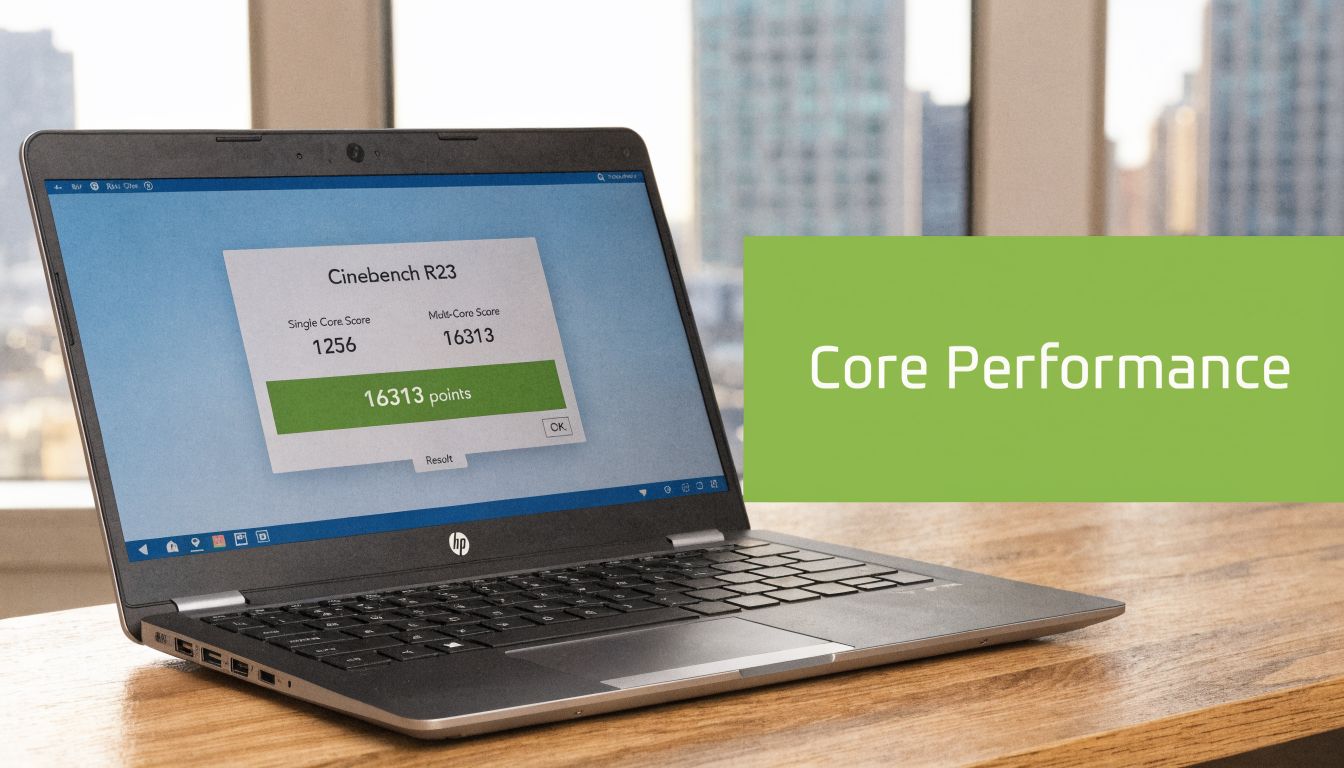
For office work, study, sales, and admin use, a Core i5 EliteBook 840 is usually enough. The better question is whether the unit has enough RAM, a healthy SSD, and a battery that still holds up through meetings and travel between home, office, and campus.
RAM affects day-to-day smoothness more than many buyers expect. A laptop with enough memory keeps more tabs, spreadsheets, messaging apps, and call software active without slowing to a crawl. Storage matters too. An SSD keeps boot times, file opening, and app launches quick enough that the laptop still feels responsive after the first few weeks of ownership.
That is why I rarely judge an EliteBook 840 by CPU alone. A well-tested refurbished unit with the right memory and storage can be the smarter purchase than a newer machine with a weaker configuration. For buyers comparing options, this matters just as much as generation. It is also part of what makes the 840 fit the profile of a reliable business laptop for long-term value.
Upgrade paths need checking before you buy, especially if you want to keep the device for several years. Some configurations are easier to expand than others. If you are deciding whether a memory upgrade is realistic, the Nerds 2 You Edmonton RAM guide is a useful general reference. It will not replace model-specific verification, but it helps you understand the work involved.
Durability ports and privacy features
The EliteBook 840 earns its reputation from ownership details, not spec-sheet drama.
Ports are a good example. USB-A still matters for thumb drives, mouse receivers, and older accessories. USB-C and Thunderbolt matter if you dock at a desk or connect modern monitors. HDMI can save you from carrying adapters into meeting rooms. In practice, the right port mix lowers accessory spend and daily friction, which is part of total cost of ownership that buyers often miss.
Build quality also deserves more attention than it gets. The EliteBook line is designed as a business machine first, so the chassis, keyboard, hinge, and palm rest usually hold up better than many consumer laptops after repeated commuting and desk-to-desk use. That does not make every used unit a safe buy. Refurbished condition still matters. A clean outer shell is nice, but keyboard wear, hinge tension, webcam function, speaker quality, and battery health tell you much more about how the laptop was treated.
Privacy features are easy to dismiss until you work outside a private office. Screen privacy options, webcam shutters on some configurations, fingerprint readers, and Windows Hello support can make a real difference for staff handling payroll files, customer data, tender documents, or internal reports on the move. For Singapore buyers who work in shared offices, cafes, schools, or client sites, those details have practical value.
A quick look at the machine in use helps if you’re comparing generations visually:
Who is the EliteBook 840 Best For Use Case Deep Dive
Some laptops are easy to recommend in the abstract and harder to recommend to a real person. The hp elitebook 840 is the opposite. It becomes clearer when you attach it to an actual use case.
For students who carry one laptop everywhere
Students usually care about three things first. It must fit easily in a bag, survive daily movement, and stay dependable when deadlines pile up. The EliteBook 840 fits that pattern well because it doesn’t feel oversized and the build is sturdier than many consumer laptops students compare against.
If the workload is lecture notes, research tabs, online submissions, video calls, and group project work, the machine makes sense. What students tend to appreciate most isn’t some benchmark result. It’s the simple fact that the laptop feels sturdy and professional rather than disposable.
For SME owners and startup teams
For small businesses, the EliteBook 840 often hits the right balance between image and practicality. It looks appropriate in front of clients, handles ordinary business software well, and supports the kind of multitasking that fills a normal workday.
A founder buying several units should care less about headline specs and more about deployment reality. Can the machines handle spreadsheets, browser dashboards, invoicing, stock tools, and video meetings without fuss? Will they still look acceptable after regular use? That’s where the hp elitebook 840 usually does its job well.
If you’re comparing options for a team fleet, this broader guide to a reliable business laptop is worth reading alongside model-specific research. It helps frame the buying decision around uptime, supportability, and actual office usage instead of marketing language.
For creators who need honesty not hype
For buyers seeking clarity, the EliteBook 840 is fine for content planning, light photo work, document layout, social media scheduling, and general admin around creative work. It is not the laptop I’d point someone towards for heavy 3D, serious colour-critical workflows, or GPU-driven production.
If your income depends on GPU-heavy work, don’t force a business ultrabook into a workstation role.
That doesn’t mean creators should dismiss it. Many freelancers spend more time in email, briefs, browser tabs, and calls than in rendering timelines. For that kind of mixed workflow, the EliteBook 840 can still be the better ownership choice. And if you’re setting up a practical work corner at home, a simple practical home office setup guide can be helpful for the desk, chair, and screen side of the equation.
New vs Refurbished A Smart Buyer's Checklist
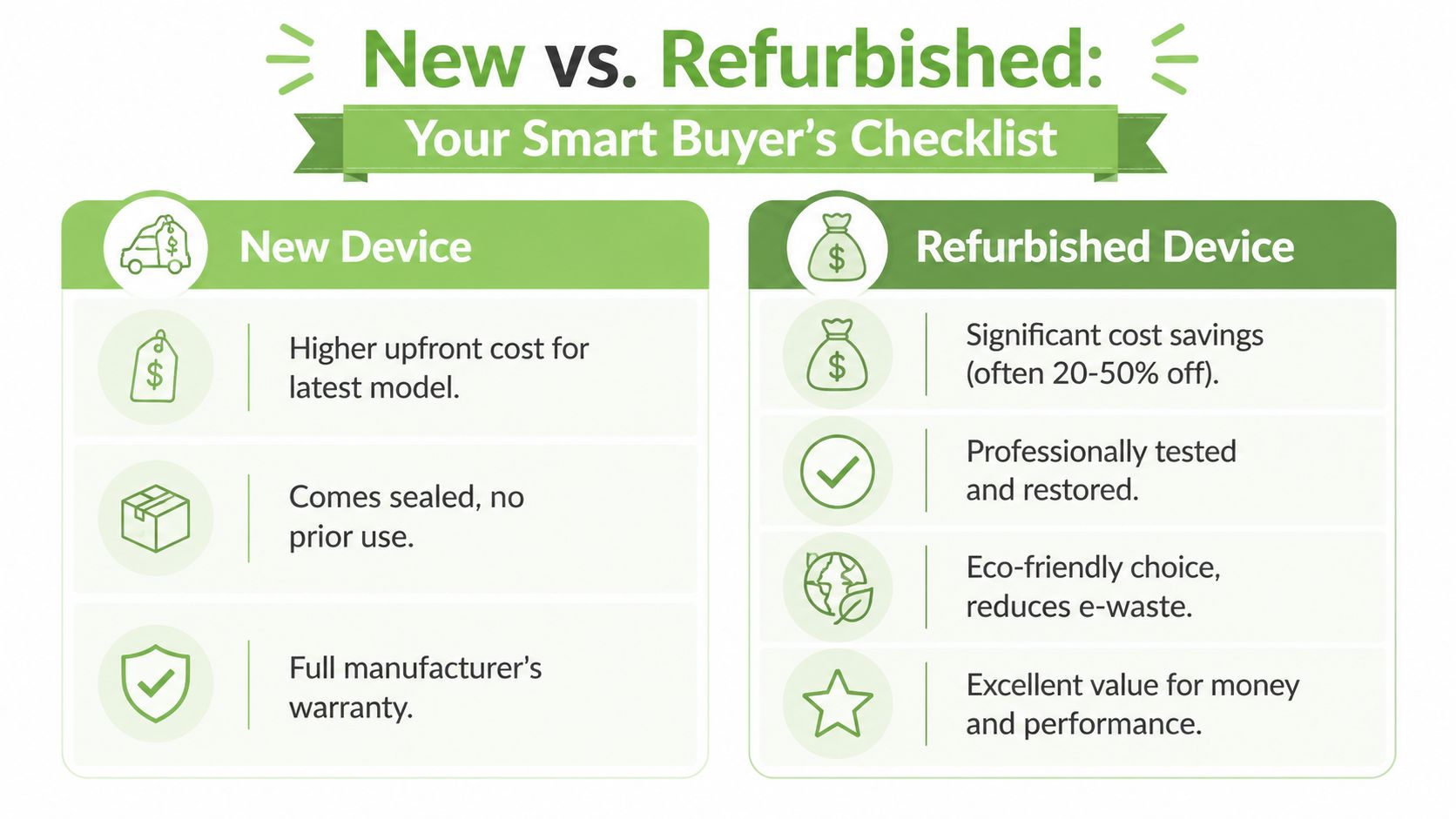
For many buyers in Singapore, the question isn’t whether the hp elitebook 840 is worth buying. It’s whether buying new makes sense when a well-selected refurbished unit can do the same job for far less money.
When refurbished makes more sense
Refurbished makes the strongest case when you care about total cost of ownership, not novelty. If the laptop is for office applications, schoolwork, cloud platforms, admin use, or fleet rollout for a growing team, a properly checked refurbished machine can be the more rational buy.
There’s also an environmental angle that isn’t abstract. Singapore generated nearly 390,000 tonnes of e-waste in 2022, and only 10% was properly recycled according to the e-waste context cited in this coverage on refurbished EliteBooks and circular use. The same source notes that customers can cut costs by 40-60% versus a new unit when choosing a refurbished HP EliteBook 840 that has passed 30 quality checks under an ISO 9001:2015-certified process.
That combination matters. A business doesn’t need to buy “cheap laptops”. It needs to buy laptops sensibly. A student doesn’t need the latest release if a refurbished mid-generation unit already meets the workload comfortably.
What to inspect before you buy
When I assess a refurbished business laptop, I don’t start with the processor sticker. I start with the wear points.
- Screen condition: Check for pressure marks, uneven brightness, dead pixels, and scratches that become obvious against white backgrounds.
- Keyboard and trackpad: Look for shiny keycaps, inconsistent key feel, double-typing, or a trackpad click that feels mushy.
- Ports: Test charging, USB ports, display output, and audio. Port damage is annoying because it often shows up only after you’ve started using the machine properly.
- Hinges and lid: Open and close the display a few times. You want resistance to feel smooth, not loose or crunchy.
- Thermals and fan behaviour: Let the machine run for a while. Excessive fan noise during basic tasks can hint at internal dust, dried thermal compound, or poor servicing.
- Webcam and mic: Business laptops often get bought for hybrid work. A bad webcam or weak mic becomes a daily irritation very quickly.
For buyers still comparing categories, this article on refurbished laptop computers is useful because it helps separate solid refurbished practice from vague second-hand listings.
How to think about grades and battery health
Refurbished buying gets easier once you stop treating all used laptops as the same thing. Grade matters because cosmetic expectations matter.
Some buyers want something that looks nearly new and don’t mind paying more. Others care only that the machine works properly and the screen, keyboard, and battery are in sensible condition. A transparent grading system helps because it lets you choose according to your budget and tolerance for visible wear.
Battery policy matters even more. For ReLoved EliteBook 840 units, battery health starts at 70%, and if the battery is below 70%, it gets changed. That’s the kind of threshold worth asking about whenever you compare sellers, because battery wear is one of the biggest differences between a laptop that feels dependable and one that keeps getting tethered to a charger.
Don’t ask only “Does it power on?” Ask “Will I still like using this after a month?”
What doesn’t work is buying on listing photos alone. Refurbished units should be assessed as tools, not as mystery boxes. If the seller can’t explain condition, checks, battery standard, and exchange terms clearly, keep looking.
Extending Your EliteBooks Life With Trade-In and Repair
A good laptop purchase isn’t just about the first day. With the hp elitebook 840, the smarter view is lifecycle. How long can you keep it productive, and what’s the cleanest path when you need to refresh it?
Maintenance beats emergency fixes
Business laptops usually fail in ordinary ways. Dust builds up. Thermals drift. Batteries wear down. Keyboards and ports take repeated use. Most of that isn’t dramatic, but it chips away at the experience.
A full e-Xtender check on an EliteBook 840 takes 2 hours, which makes routine maintenance realistic rather than something owners keep postponing. That kind of turnaround matters because people are far more likely to service a working laptop if the disruption is short.
Services in this category also make refurbished ownership more sensible. Instead of waiting for the machine to become frustrating, you refresh it before small issues become expensive ones.
Trade-in keeps the ownership cycle sensible
The other half of long-term ownership is exit value. If you know you’ll upgrade later, trade-in gives the device a cleaner next life than leaving it in a drawer or trying to offload it with incomplete information.
That matters for both individuals and SMEs. A student might trade up after graduation. A growing company may rotate older fleet devices into lighter roles or exchange them for newer units. A practical overview of laptop trade-in in Singapore is useful if you want to understand how that handoff works before your current machine loses too much relevance.
One option in this ecosystem is myhalo, which combines retail with repairs, trade-ins, maintenance, data migration, and protection plans. For buyers who want one place to handle both purchase and after-sales support, that setup can simplify ownership.
Frequently Asked Questions
Is the hp elitebook 840 good for gaming
The EliteBook 840 is a business laptop. That matters more than the processor name on the spec sheet.
For work, study, web apps, video calls, and light creative tasks, it holds up well. For modern AAA games, integrated graphics are the limiting factor. Older esports titles and lighter games may run acceptably at reduced settings, but anyone buying mainly for gaming should look at a machine with dedicated graphics and a chassis designed for sustained thermal load.
How does it handle Singapore heat and humidity
Singapore is hard on laptops. Air-conditioned offices help, but daily movement between cool indoor spaces, humid commutes, and warm rooms puts extra stress on cooling systems, fans, and batteries. HP also documents operating humidity limits and storage conditions for its business notebooks, which is a useful reminder that climate affects long-term reliability as much as raw specs do, as noted in HP's notebook maintenance and environmental guidance.
In practice, the EliteBook 840 handles local conditions well if it is kept clean and serviced on time. Dust-clogged vents, dried thermal paste, and swollen batteries cause more trouble than the badge on the lid. For a refurbished unit in Singapore, I would pay closer attention to fan condition and battery health than to chasing one newer generation on paper.
Can you upgrade RAM or SSD
It depends on the generation and the exact configuration.
SSD upgrades are usually the safer assumption and often the most noticeable one in day-to-day use. RAM is less consistent across the 840 line. Some older models are more flexible, while newer ones may use soldered memory or offer limited upgrade paths. Check the service manual or the seller's hardware breakdown before buying, especially if you plan to keep the laptop for several years.
What battery life should you expect from a refurbished unit
Battery life on a refurbished EliteBook 840 depends on three things. Battery health, screen brightness, and the kind of work you do.
A refurbished G5 or G6 used for browser tabs, Office, and Zoom will feel very different from a newer unit handling heavier multitasking all day on high brightness. That is why total cost of ownership matters. A cheaper refurbished set with a weak battery can stop being a bargain once you factor in an early replacement. A properly tested unit with a clear battery standard is usually the safer buy, even if the upfront price is a bit higher.
Is the EliteBook 840 a good buy for SMEs
For many SMEs in Singapore, yes.
The EliteBook 840 makes sense because it is easy to deploy, familiar to IT support, and built for standard business workloads instead of niche use cases. The primary buying decision is not whether the model is "good" in general. It is whether a specific generation matches your software, meeting habits, port needs, and replacement cycle. Many small teams get better value from a myhalo-certified refurbished G8 or G9 than from buying brand-new units with performance headroom they will never use.
Is refurbished safer than buying used from a random listing
A certified refurbished unit is usually the lower-risk option because the condition is documented.
Random marketplace listings can look cheaper, but buyers often discover the full cost later. Worn batteries, failing keyboards, loose hinges, SSD wear, or webcams that were never properly tested are common on ex-corporate laptops. A seller who can explain the grading standard, test process, warranty terms, and what was replaced gives you a much clearer picture of what you are paying for.
If you’re weighing up a new or refurbished hp elitebook 840, browse the current range and support options at myhalo. It’s a practical place to compare device grades, check available business laptop models, and plan the full ownership cycle from purchase to repair or trade-in.