





Fingerprint Sensor Guide for Smartphones and Laptops
You probably tap your phone without thinking about it, at the coffee shop, at the MRT gate, or when a banking app asks for a quick check. That tiny fingerprint sensor feels routine, but it decides whether your device trusts you in a split second. For Singapore buyers and SMEs, that matters because the same sensor can shape daily convenience, device security, and how long a phone or laptop stays useful.
Table of Contents
- The Fingerprint Sensor You Tap Every Day
- How Different Fingerprint Sensors Work
- Why Fingerprint Sensors Feel So Convenient and Where They Fall Short
- Fingerprint Sensor vs PIN, Password and Face Recognition
- Common Fingerprint Sensor Problems and How to Fix Them
- Buying Refurbished or Trade-In Devices With a Working Fingerprint Sensor
- Maintaining and Repairing Fingerprint Sensors Over the Device Lifespan
The Fingerprint Sensor You Tap Every Day
A good fingerprint sensor fades into the background of daily use. You wake your phone, approve a payment, or log into a laptop, and the device is already open by the time your thumb leaves the glass. That quick response is a big reason fingerprint authentication feels so natural, especially for people who move between work chats, banking apps, and e-wallets throughout the day.
Under the surface, the process is straightforward. The sensor reads the ridges and valleys on your finger, turns that pattern into a digital template, and compares a fresh scan with the template stored during enrolment. The device is not “seeing” your finger the way a camera sees a face, it is matching patterns it already recorded, as explained in fingerprint recognition overviews like allpcb's guide to fingerprint recognition principles and 1Kosmos' explanation of fingerprint biometrics.
Why that tiny tap matters
The practical appeal is easy to understand. You do not need to remember a long password, and you do not need to carry a card or key. Public references on fingerprint biometrics describe the same flow, a live scan, template creation, and matching, which is why the same idea works on phones, laptops, and some access systems Wikipedia's fingerprint history and technical overview.
There is also a device-lifecycle angle that many first-time buyers overlook. Fingerprint sensors moved from niche hardware to a common phone feature over time, with early milestones such as the Sagem MC 959 ID in 2000, Toshiba's G500 and G900 in 2007, and Apple's iPhone 5s in 2013 bringing Touch ID to the mass market. XDA's historical timeline notes that more than 70 modern smartphones had been released with fingerprint sensors since the iPhone 5s launch, which helps explain why refurbished and resale devices in Singapore now often include the feature across many Android and iPhone models mobile biometrics history.
Practical rule: treat the sensor as part of the device's security workflow, not as a convenience extra. If the scan is slow, inconsistent, or poorly enrolled, the whole login experience suffers.
How Different Fingerprint Sensors Work
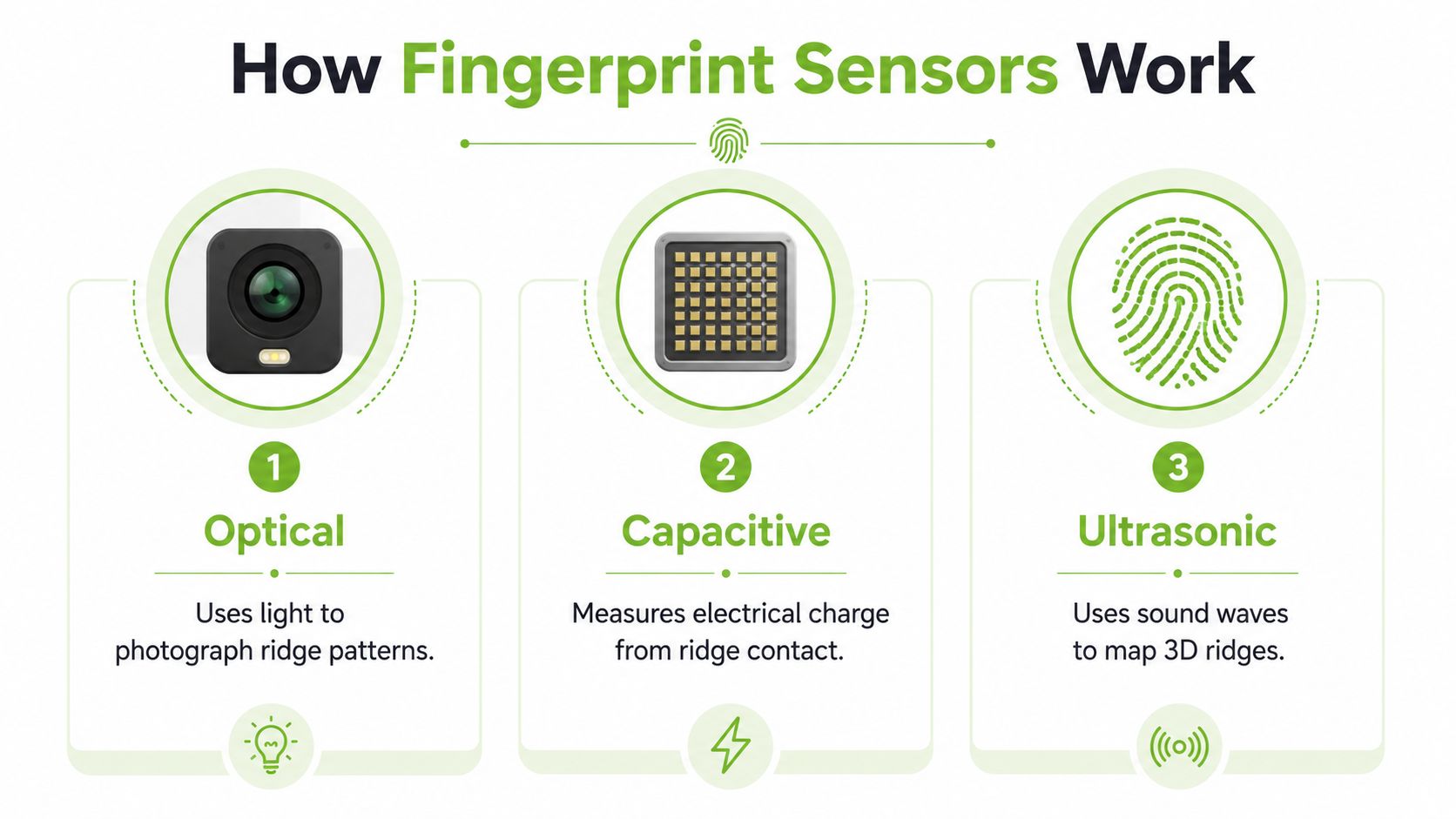
A fingerprint sensor works a little like a reader looking for ridges and valleys on your fingertip. Your finger provides the pattern, and the sensor captures enough detail to decide whether the print matches the one already stored on the device. The exact method matters when your hands are damp after a walk in Singapore's heat, when a screen protector sits between your finger and the phone, or when you are setting up a refurbished device that has already seen years of use.
Optical, capacitive and ultrasonic
Optical sensors work like tiny cameras. They use light to capture a visual image of the fingerprint through glass, which is why they are common in under-display designs. Capacitive sensors read changes in electrical charge across the finger surface, so they rely on solid contact and a fingertip that is not too dirty or wet. Ultrasonic sensors send sound waves into the finger and build a map from the returning signal, which lets them read more than just the visible surface pattern.
Placement still matters more than many buyers expect. The BM-Lite SafeTouch specification says the finger must fully cover the sensor and stay straight and parallel to it, with the lower part of the fingertip exposed as shown in the placement images. In everyday use, that means a tilted finger or partial contact can weaken the signal and make the device reject a perfectly good print.
Which type feels best in real use
A lot depends on how you use the device from day to day. The first time you authenticate in the morning is one moment, then there is the later authentication after the phone has been in a pocket, bag, or car for hours. Capacitive sensors often feel quick when the finger lands in the right spot. Optical sensors can be convenient when they sit under the display. Ultrasonic sensors are designed to capture more surface detail, which can help when the screen or fingertip is not ideal.
A refurbished phone buyer often notices this difference during re-enrollment, not during the first demo. A sensor that was acceptable for the previous owner may feel less forgiving after the device has picked up wear, grime, or a thicker protector. That is why a fresh setup should be treated like a proper fitting, not a quick tap through a menu.
The bigger point is that every type still depends on template matching. The sensor gathers a clean enough sample, the device stores a template, and later scans are compared against that reference. Better capture quality gives the matching system more useful detail, while poor contact leaves it with less to compare.
Consistency is what makes the process feel smooth. If the finger lands the same way each time, the result feels immediate. If the placement shifts from one attempt to the next, even a good sensor can seem unreliable.
The image and video above are enough to show the broad idea. Once you understand the three technologies, the practical question becomes which one fits the way you buy, use, re-enroll, and maintain a device over time.
Why Fingerprint Sensors Feel So Convenient and Where They Fall Short
A fingerprint sensor feels useful because it saves a small step every time you use the phone. You touch the sensor, the device responds, and you move on. That matters when you are paying at a store, checking a message at work, or opening an app while your other hand is busy.
The convenience is real
The other reason it feels so natural is that you do not have to remember anything. No long password, no card to pull out, no extra app to open first. The sensor compares the live scan with the stored template, so the interaction stays quick and familiar, which is why fingerprint systems are commonly used for device access and entry control fingerprint overview and history.
For first-time buyers, that repeatability is easy to appreciate. If the finger lands in roughly the same place, the phone responds in the same way, and the habit becomes almost automatic.
The limits show up in ordinary life
The trade-off is that a fingerprint is part of your body, not a secret you can replace. Singapore's Cyber Security Agency has warned that biometrics are convenient but not secret, and they cannot be changed if they are compromised. That is why the claim that a fingerprint method is automatically safer is too simple Singapore biometrics risk discussion. For anyone buying a refurbished phone, that distinction matters because convenience alone does not solve recovery if something goes wrong.
Wear and environment matter too. A sensor that felt fine on day one can become less forgiving after the screen protector changes, the sensor surface gets scratched, or the finger itself changes over time. A longitudinal study found that genuine match scores decrease as the gap between two fingerprints grows, and they also tend to decrease with age and poorer image quality fingerprint recognition over time study.
Dry fingertips, a clean sensor, and careful enrolment matter more than many first-time buyers expect.
Singapore's climate adds a practical twist. Humidity, dust, and greasy residue from hawker-centre snacks can interfere with contact quality, especially for capacitive sensors that rely on full fingertip contact SafeTouch placement guidance. Accessibility also matters, because some people cannot use fingerprint login reliably, so a backup method still needs to exist.
That is why the sensor works best as a convenience layer, not a complete answer. Over the life of a device, from the first setup to re-enrolment after repair, the fingerprint reader is easiest to trust when the fallback is ready and the sensor is kept clean.
Fingerprint Sensor vs PIN, Password and Face Recognition
Choosing an authentication method is less about picking one champion and more about matching the method to the situation. A fingerprint sensor is often the quickest choice for everyday access, yet speed alone does not tell you how well it will hold up if you repair the phone, buy it refurbished, or need to recover access after a problem.
A simple way to compare the options is to look at what each one gives you when things go right, and what it gives you when things go wrong.
| Method | Speed | Can be reset | Works with wet hands | Best used for |
|---|---|---|---|---|
| Fingerprint sensor | Very fast in daily use | No, the fingerprint itself can't be changed | Often less reliable | Phone access, quick app access |
| PIN | Fast | Yes | Yes | Backup login, device recovery |
| Password | Slower | Yes | Yes | Accounts that need stronger changeable credentials |
| Facial authentication | Fast and hands-free | Sometimes, depending on the system | Yes | Casual device access, hands-free use |
A PIN or password has one clear advantage, it can be changed. That makes it the better recovery method after a compromise, or after a device repair changes the way the sensor behaves. Biometrics are convenient, but if the template or the device trust chain runs into trouble, you cannot create a new finger.
Where facial authentication fits
Facial authentication works well when your hands are busy or wet. It can feel easier in daily use, but poor lighting, angle changes, or similar-looking family members can make it less dependable. Many people use fingerprint access as the primary method and keep a PIN as the backup, because the second method gives them a way back in if the first one is not cooperating.
For SMEs, the lesson stays practical. Use the biometric for convenience, then keep a recovery path that does not depend on one body part. That approach fits the way multi-layer security is usually set up in offices and consumer devices, especially when a phone may later be handed down, traded in, or checked during a repair through a mobile phone repair in Singapore service.
A sensible rule is to use biometrics for convenience, then keep a changeable secret, such as a PIN, for recovery and higher-risk actions.
The point is not to discourage fingerprint login. It is to keep expectations realistic. Once the sensor stops working as expected, the fallback method becomes the part that gets you back to your data, your apps, and your device after re-enrolment or maintenance over the device's lifespan.
Common Fingerprint Sensor Problems and How to Fix Them
A fingerprint sensor that suddenly stops recognising you is often reacting to something small. Start with the surface first, because dust, skin oil, moisture, and a poor touch pattern cause many of the failures people blame on hardware.
Start with the surface and your finger
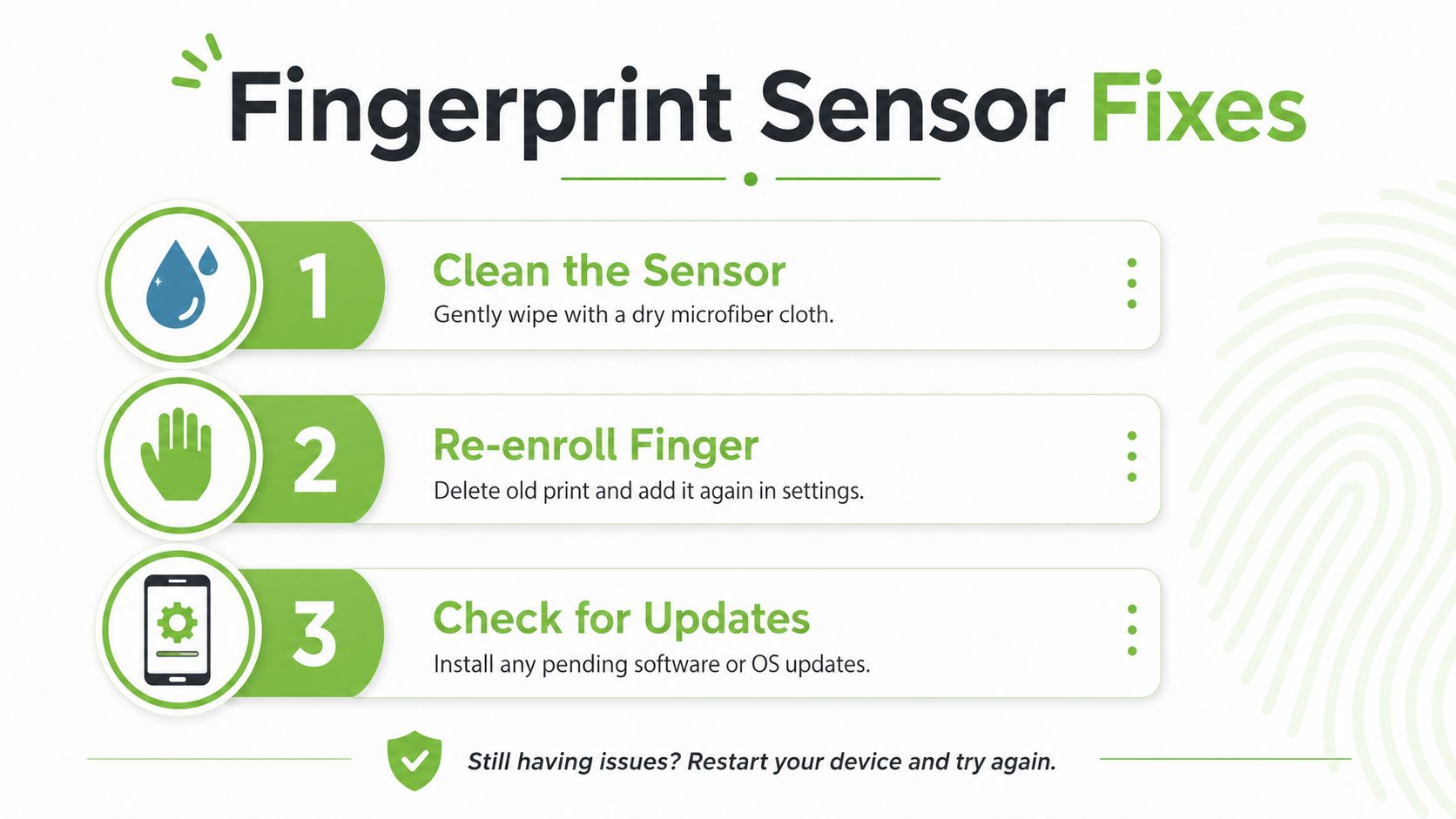
Wipe the sensor gently with a dry microfibre cloth. If the reader sits on the phone frame or back, clean both the sensor and the surrounding area so residue does not keep building up. If the fingerprint reader is under the screen, check whether a cracked protector, thick coating, or worn edge is blocking a clean touch.
Then remove the old print and enrol it again with careful placement. During enrolment, the system captures the fingerprint, pulls out the matching details, and stores a template, so a messy first scan can give you a weak reference later on. A fresh enrolment helps when your finger angle has changed, your skin condition has changed, or the device learned an awkward scan the first time.
Check software before assuming damage
Restart the device, then look for pending software or operating system updates. If the problem began after an update, a reboot often clears a temporary glitch. For laptop users, a useful step-by-step reference is complete Windows Hello setup Edmonton 2026, which shows how biometric login depends on both the sensor and the system settings around it.
If the sensor still fails, try a different finger. A thumb and an index finger do not wear the same way, so one may read better than the other. If several fingers fail in the same way, the issue is more likely tied to the device itself than to your fingertip.
Know when to stop troubleshooting
A cracked sensor window, water damage, or repeated rejection across several fingers usually points to repair. The same is true when the device shows hardware error messages instead of simple slow recognition. For broader repair context, a practical guide like myhalo's mobile phone repair overview can help you judge whether the fault sits in the sensor, the screen assembly, or the larger device.
The habit to keep is simple. Clean first, re-enrol second, update third, then move to repair if the same failure keeps coming back.
Buying Refurbished or Trade-In Devices With a Working Fingerprint Sensor
A used phone with a working fingerprint sensor can be a smart buy, but only if the sensor was tested properly. The first thing to check is simple: does the biometric layer still read a real finger reliably after the previous owner is gone?
What good refurbishment should include
A responsible refurbishment process should test the sensor, clear old templates, and enrol a fresh fingerprint during setup. That matters because the system stores templates, not a photo of the finger, so the previous owner's biometric data should be removed during reset and reconfiguration. A well-prepared refurbished device should also disclose any cosmetic damage near the sensor area, because cracks, scratches, or worn buttons can affect performance.
A buyer should try multiple fingers during inspection. A sensor that works only when pressed perfectly once is not the same as one that keeps working on the first tap of the day. Transparent grading matters because it tells you whether the issue is cosmetic, behavioural, or a sign of deeper wear.
If you are comparing second-hand phones in Singapore, a useful starting point is myhalo's refurbished phone buying guide. For buyers who also want a resale option with Apple models, UsedMobiles4U iPhones is another place where the fingerprint sensor should be treated as part of the device's condition, not an extra feature to check later.
Why re-enrolment is a security plus
Once the device is reset and re-enrolled, the old templates are gone from normal use. That is a good thing, not a drawback. It means the phone or laptop is starting fresh, which is exactly what you want when you are buying from a resale channel or taking a trade-in path.
The point is not the brand badge on the box, it is whether the device was checked with enough care to make the sensor dependable for the next owner.
A refurbished device is only as trustworthy as its setup, especially for biometrics.
A good inspection also looks for lag, false rejects, and any error message that hints at hardware trouble. If a device passes all of that, the fingerprint sensor becomes part of the value you keep, not a risk you inherit.
Maintaining and Repairing Fingerprint Sensors Over the Device Lifespan
A fingerprint sensor stays dependable longer when you handle it like the other small parts that do quiet but important work inside a device. Clean the sensor area, re-enrol your print when your finger condition changes, and keep the operating system updated so the biometric system stays aligned with the hardware. Those habits help the sensor recognise you the way it should, instead of leaving you to guess whether the problem is your finger, the software, or the sensor itself.
Small habits that prevent bigger problems
Daily use leaves traces. A quick wipe with a dry microfibre cloth helps remove skin oil, dust, and the light residue that can collect around a button or under-display area. If the phone or laptop starts rejecting your print more often than usual, re-enrol it before assuming the sensor has failed. Sometimes the issue is that your stored print no longer matches the way your finger looks and feels now.
Humidity, skin condition, and ordinary wear can all change how well a print matches over time. That is why a sensor that felt accurate when the device was new can become fussier after months of use, as noted earlier in the fingerprint matching study. Maintenance keeps the login process practical, especially for people using the same device every day in Singapore's warm, humid conditions.
Repair, reuse, or retire
A sensor that stops responding may need repair, especially if the rest of the device still has useful life left. If the problem sits deeper in the screen assembly or the board, the decision depends on whether the repair cost makes sense beside the value of keeping the device in service. For many owners, a targeted repair or a device migration is a better choice than replacing the whole machine.
myhalo's lifecycle approach fits that way of thinking. Repair, reuse, trade-in, Certified ReLoved, and Certified Surplus all follow the same idea, keep a device in circulation longer instead of discarding it too early. Services such as myhalo e‑Xtender and myhalo Protect support that approach too, because they help owners plan for maintenance, accidental damage, and longer-term use without waiting for a problem to grow.
For device owners who want to look at the screen and sensor together, myhalo's iPhone screen repair guide is a useful companion read. A fingerprint reader often sits close to the same parts that take the brunt of drops, pressure, and daily handling, so screen damage and sensor trouble can overlap.
A well-managed device does not need constant rescue work. It needs clean surfaces, sensible re-enrolment, timely repair, and a service partner that treats the whole device as something worth preserving.