





Biometric Security Explained: A Practical Guide for 2026
You know the moment. Your phone lights up, you glance at it, and you're in. No password to type, no PIN to remember, no extra step to slow you down. That simple, quick authentication is biometric security at work, and in Singapore it's become part of how many of us move through daily life, from phones and laptops to government services built on Singpass and MyInfo.
Biometric security sounds technical, but the idea is simple. It uses a part of who you are, such as a fingerprint, face, iris, or voice, to confirm identity instead of relying only on something you know, like a password. That shift matters because it changes security from memory-based to person-based, and with the right setup, it can make sign-in faster without making it careless.
For consumers and SMEs in Singapore, the useful question isn't whether biometrics are trendy. It's how they work, where they are strong, where they can fail, and what you should check before you trust them on a new or refurbished device. A good understanding helps you protect convenience, privacy, and business continuity at the same time.
Table of Contents
- What Biometric Security Really Means in Everyday Life
- The Main Types of Biometric Security and Where Each One Fits
- How a Biometric System Actually Works From Scan to Match
- Where Biometric Security Is Strong and Where It Breaks Down
- Privacy, PDPA and Singapore Rules You Should Know
- Enabling, Configuring and Disabling Biometrics on Your Devices
- What to Check Before Trusting Biometrics on a Refurbished or Second-Hand Device
- Your Biometric Security Checklist and Best Practices
What Biometric Security Really Means in Everyday Life
The easiest way to think about biometric security is the way you already use it. You tap your phone to pay, glance at a laptop to log in, or access a device with a finger that's already in your hand. The system is not asking you to remember anything, it is checking whether the body or voice in front of it matches the one it already knows.
A simple definition that actually helps
Biometric security means identity verification using a unique physical or behavioural trait. A fingerprint, a face, an iris pattern, or even a voice sample can serve that role. Instead of proving you know a secret, the system proves you are the same person who enrolled the trait earlier.
That is why biometrics feel so natural on modern devices. You do not have to pause and search your memory. You just present yourself, and the device decides whether to trust you.
Singapore has been building towards this model for a long time. The national identity card programme introduced fingerprint biometrics in 2001, and digital identity services later expanded through Singpass and MyInfo, which uses biometric verification on supported devices for secure access across government and private-sector services. That history matters because Singapore did not treat biometrics as a novelty. It treated them as a core part of trusted digital access at population scale, aligned with the country's broader digital trust and cybersecurity agenda. The practical effect is that biometric checks now sit in everyday workflows, not only at borders or in labs.
If you want a broader business view of how this fits into access control, the overview at biometric security solutions for businesses is useful context for companies planning sign-in and entry systems.
Practical rule: if a biometric system feels magical, it usually helps to ask one more question, what is it comparing, and where is that comparison stored?
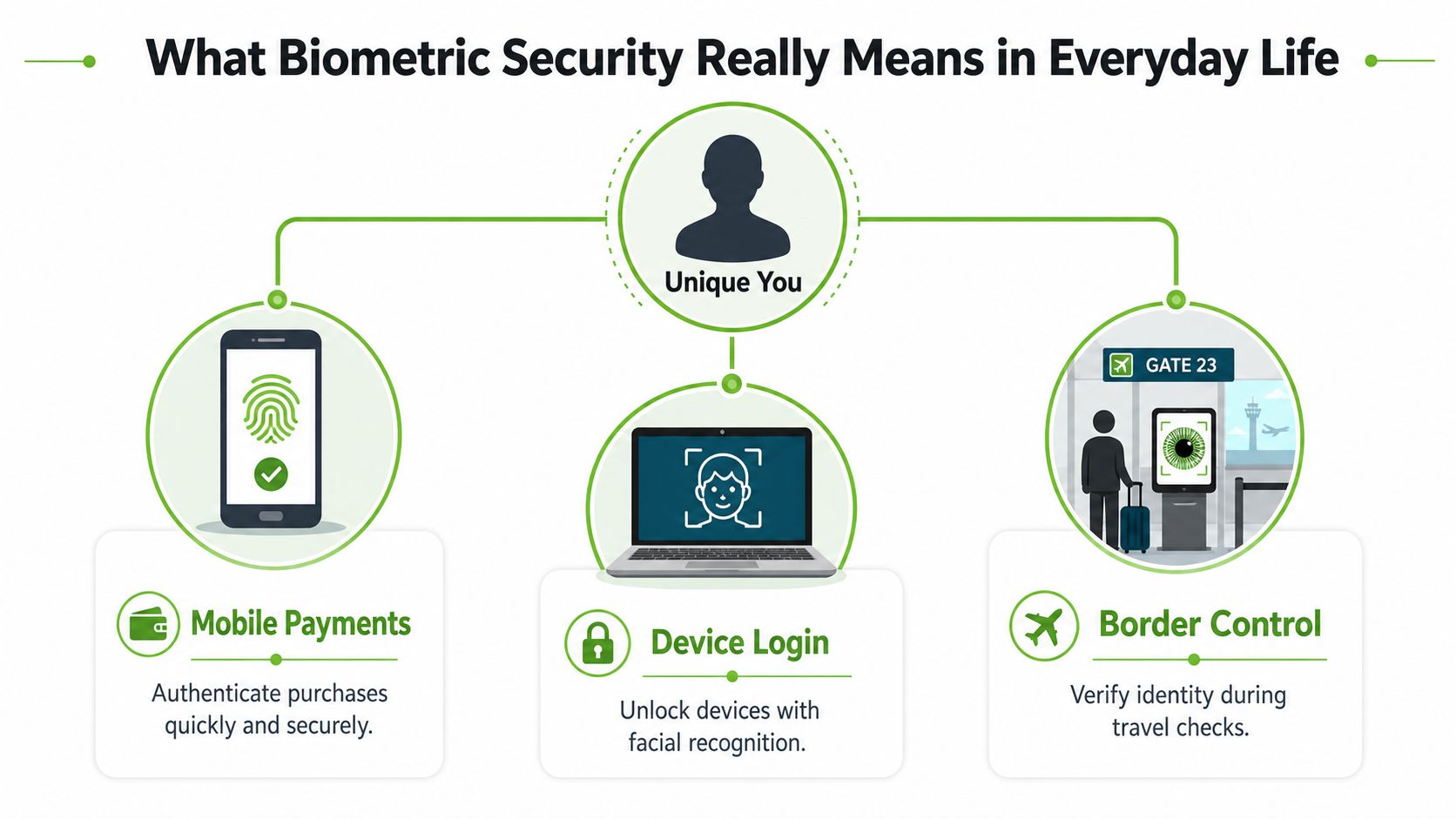
The main takeaway is reassuring. Biometric security is not a mystery box. It is a recognition method built around a trait you carry with you, which is why it can be fast, practical, and far less annoying than constant password entry when it is set up well.
The Main Types of Biometric Security and Where Each One Fits
Not every biometric method works the same way, and that is where many people get confused. A fingerprint reader, a face scan, an iris reader, and a voice system all aim to do the same thing, but each one suits different environments, devices, and risk levels. The best choice depends on how people use the device, how clean or noisy the setting is, and how much friction users can tolerate.
Fingerprint, face, iris and voice in plain language
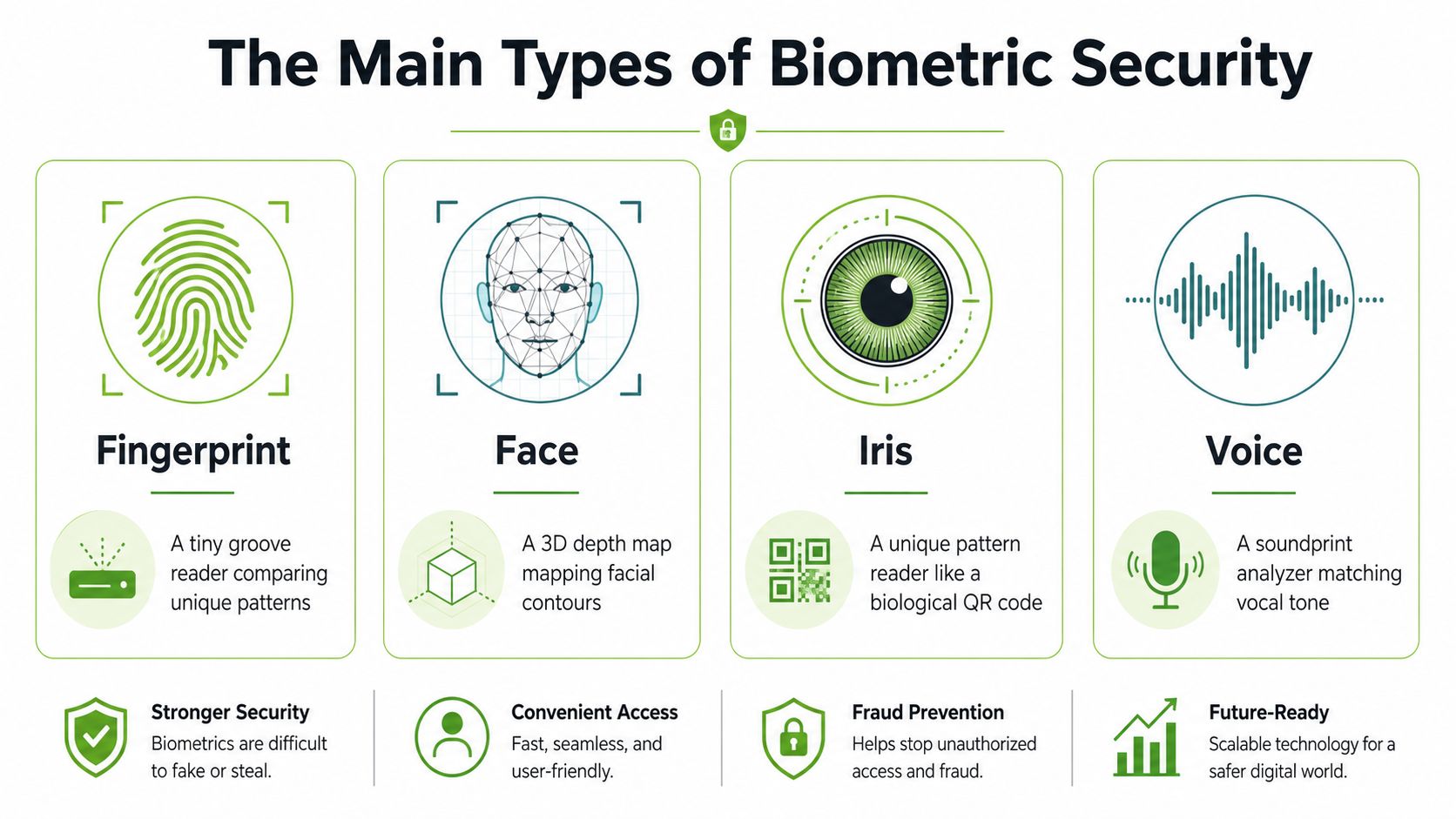
Fingerprint scanning is the most familiar. Think of it as a tiny groove reader, the sensor checks the ridges and patterns on your finger against the pattern it has saved. It fits well on phones and tablets because the sensor is easy to reach, the action is quick, and the user can repeat it without much thought.
Face recognition is different from a simple photo check. Better systems map the shape and depth of the face, so they are comparing geometry rather than just a flat image. That makes face recognition useful for hands-free sign-in on laptops and phones, especially when you are carrying bags, wearing gloves, or working at a desk.
Iris scanning reads the coloured ring around the eye, which has a highly distinctive pattern. A simple way to picture it is a biological QR code, one that is very hard to duplicate. That is why iris systems tend to show up in high-security environments rather than casual consumer devices.
Voice authentication listens to the way air, throat, and mouth shape sound. It works well in situations where speaking is easier than touching a sensor, such as some banking hotline flows or call-centre identity checks. It can be helpful, but it also has to deal with background noise, illness, and replay risks more carefully.
Matching the method to the setting
The right modality is usually the one that fits the environment without making users hate the process. A phone authentication should be quick and forgiving. A secure room entry point may need something stricter. A call-centre flow may need convenience that still resists impersonation.
No single biometric type wins everywhere. The better question is whether the method matches the device, the setting, and the level of risk you actually have.
For small businesses, that distinction matters. A customer-facing kiosk, a back-office laptop, and a secure archive room do not need the same setup. Choosing the wrong modality often creates more support issues than security gains.
How a Biometric System Actually Works From Scan to Match
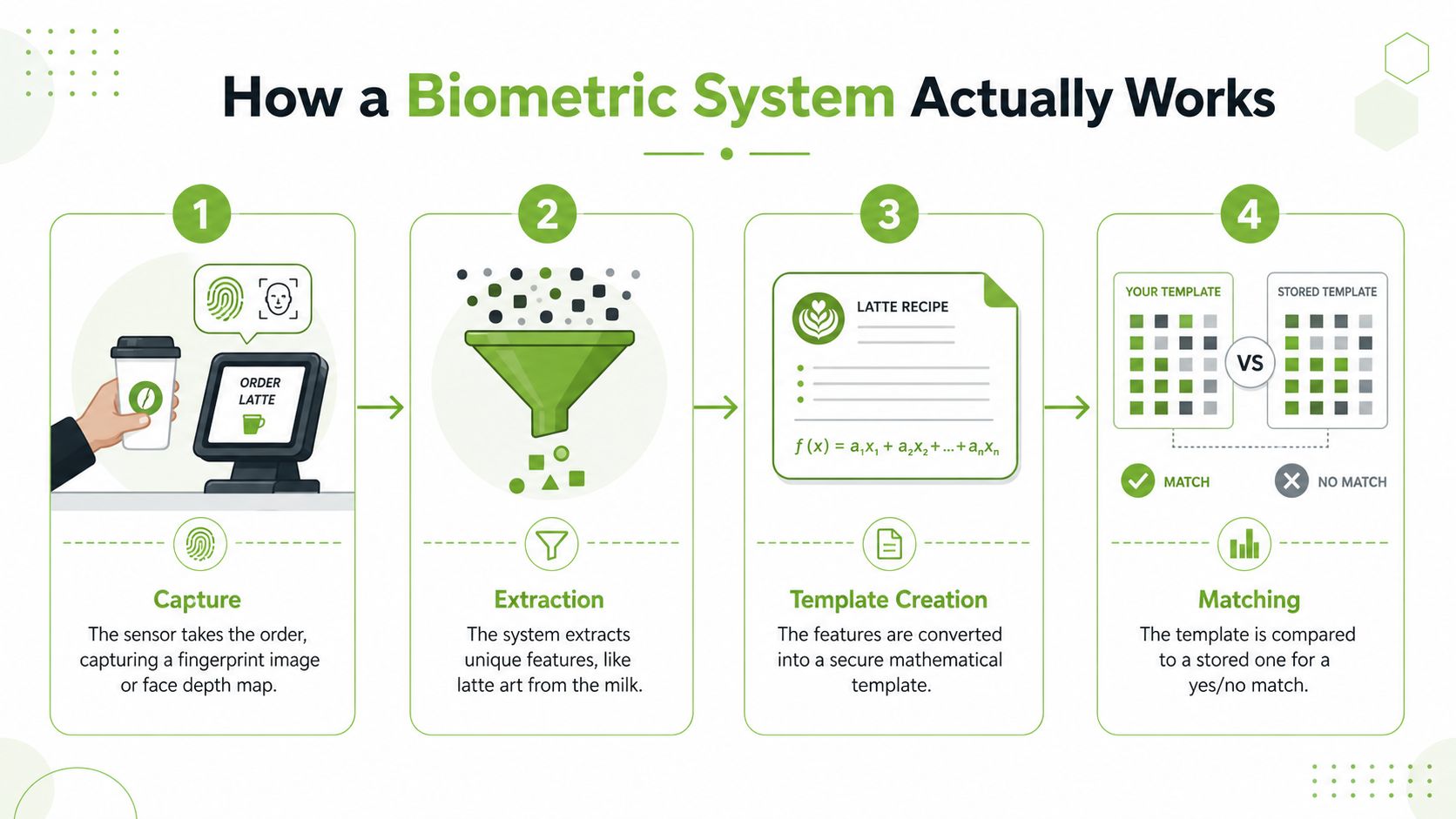
A biometric login looks instant, but inside the device it follows a careful sequence. The easiest analogy is ordering coffee. You give the order, the barista reads the request, the recipe is written down, and the finished drink is checked against what was asked for. If the result does not match the order closely enough, the system rejects it.
From capture to extraction
The first step is capture. The sensor takes in a fresh sample, such as a fingerprint image or a face depth map. This is the moment the device “sees” you.
Then comes extraction, where the system pulls out the distinctive features. For a fingerprint, that means ridge endings and pattern details. For a face, it means the spatial landmarks that define shape. The important point is that the device is no longer keeping a picture in the same way a camera roll would.
Why templates matter more than raw images
Extraction leads to template creation. A template is a mathematical representation of the biometric trait, not the trait itself. In simple terms, it is a one-way description that the system uses for comparison later. That is why good systems focus on storing templates securely, not on keeping raw images around.
Storage is the next step. The template sits in a protected area, often on the device itself, and strong systems keep it encrypted. Matching happens when you try to authenticate again. The new sample is turned into another template, and the device compares the two within a set threshold. If the similarity is high enough, it grants access.
The important takeaway is this. Biometric security is a template-matching system, not a giant fingerprint database sitting in plain sight. The security boundary should be the template store and the comparison pipeline, because that is where the critical decision happens.
Good systems also avoid sending raw biometric data to a server unless the user has clearly opted in. That keeps the most sensitive part of the process closer to the device, which is usually the safer place for everyday authentication.
Where Biometric Security Is Strong and Where It Breaks Down
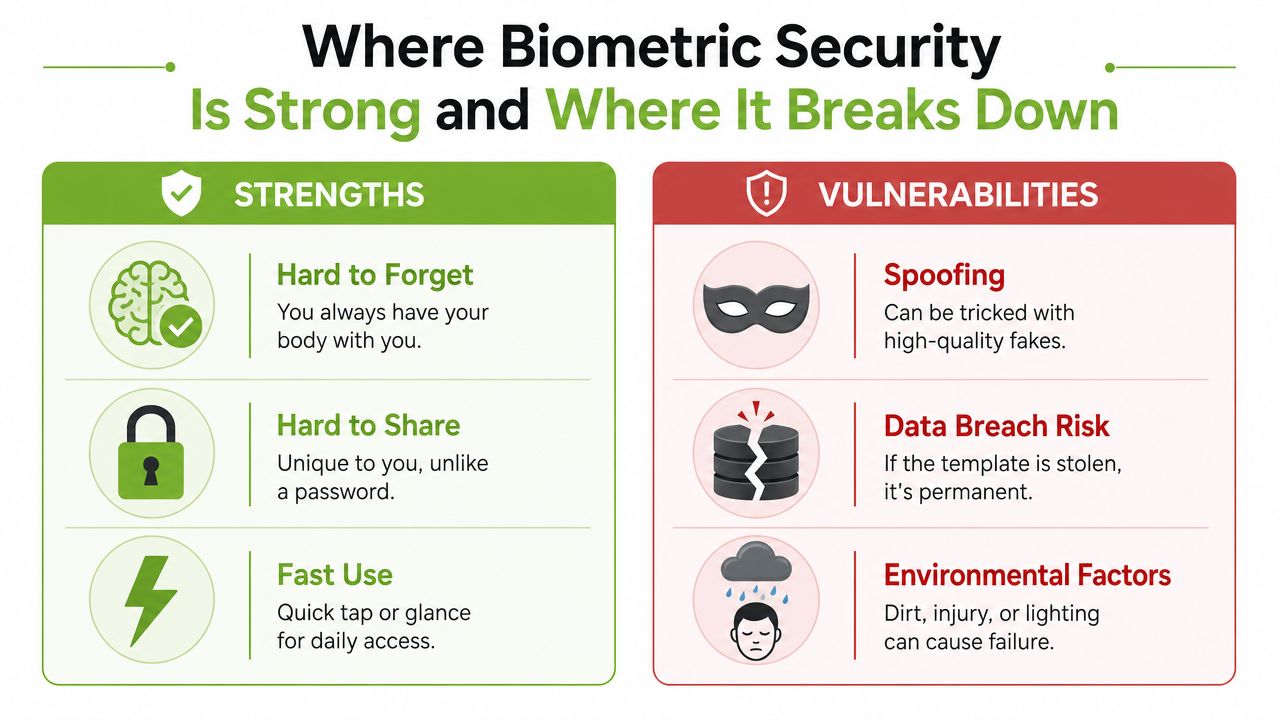
Biometrics have obvious strengths, and they are the reason people keep adopting them. They are hard to forget, because you carry the credential with you. They are hard to share, because your face or finger is tied to your own body. They are also fast, which makes them attractive for daily authentication and simple approval steps.
The strengths people feel immediately
Consumer preference helps explain the appeal. 81% of people globally say biometrics are more secure than traditional identity verification, and 72% prefer facial biometrics over passwords for secure online processes (Cloudwards biometric statistics). Those numbers do not prove every system is safe, but they do show why users often accept biometric flows more readily than repeated password checks.
That convenience matters in practice. A worker who signs in dozens of times a day is more likely to keep a biometric workflow if it is quick. A student trying to access a laptop in class will also care about speed. Security systems only work if people use them.
The trade-offs that deserve respect
The weak side is just as real. Some systems can be fooled by high-quality replicas. Faces can change with ageing, lighting, and coverings. Fingers can be wet, damaged, or hard to read. Voice can shift when someone is sick or standing in a noisy place.
A compromised biometric is also different from a compromised password. You can reset a password, but you cannot replace your fingerprint or face. That is why storage, encryption, and liveness checks matter so much. The issue is not only whether the sensor works. It is whether the system can tell a live person from an imitation and protect the stored template if something goes wrong.
Practical rule: if the biometric method is easy to use, ask what the fallback is when the sensor fails. A strong passcode still matters.
Multimodal systems, which combine two traits such as face plus voice, can raise the bar against spoofing. The trade-off is that they are more expensive and require more computing and storage, so they are not always the right answer for SMEs or consumer devices. The right question is not whether biometrics are perfect. It is whether the chosen setup is strong enough for the risk in front of you.
Privacy, PDPA and Singapore Rules You Should Know
Singapore's privacy rules change the way biometric security should be handled, especially once data is stored rather than just scanned. Under the Personal Data Protection Act, organisations need clear consent, purpose limitation, reasonable security, and deletion when data is no longer needed. That principle applies to biometric data just as much as to names, phone numbers, or addresses.
What PDPC guidance means in everyday terms
The PDPC's biometric guidance is especially practical. It recommends using biometric templates for recognition, not raw images, and it warns against letting decrypted templates linger in systems. It also recommends encrypting stored biometric samples and templates with application-specific keys, segregating biometric storage from other personal data, and using arbitrary unique identifiers instead of names to reduce re-identification risk (PDPC biometric guide).
That sounds technical, but the meaning is straightforward. If a phone or app stores only a template, the exposed data is less useful to an attacker than a raw image. If the biometric store is separated from the rest of the customer record, one breach does not automatically reveal everything. If names are replaced with unique IDs, it becomes harder to link the biometric to a person through simple database access.
Why this matters for Singapore users
Singapore's digital identity systems already assume a high level of trust. Singpass and MyInfo use biometric verification on supported devices for secure access to government and private-sector services, which is why a properly enrolled biometric can replace one-time passwords in many everyday transactions. The value here is not just convenience. It is a controlled way to balance easy access with stronger authentication.
For a consumer, this means turning on Face ID or fingerprint authentication is not only a convenience choice. It is also a privacy decision about where your biometric is stored, how it is used, and which platforms get to invoke it. If you want a plain-language overview of access-control use cases, the complete biometric access overview offers a useful external perspective.
The safest habit is to choose platforms that minimise biometric exposure, explain their processing clearly, and keep the fallback path under your control. Consent is only meaningful when the storage and access model are clear.
Enabling, Configuring and Disabling Biometrics on Your Devices
You do not need a long lecture to get started. You need the right menu path, a sensible backup, and a clear exit plan if a device goes missing. The details vary by platform, but the principle stays the same. Biometrics should sit behind a strong passcode, not replace it.
Setting them up the right way
On a modern Android phone, go to Settings → Security → Biometrics → Fingerprint. Re-enrol if your fingers are often wet, dusty, or calloused, because the sensor needs a clean, repeatable scan. Add a second finger as backup so you are not locked out if one hand is busy or injured.
On iPhone, open Settings → Face ID & Passcode. Enrol carefully and test it with the kinds of glasses, masks, or lighting you use every day. If the phone supports it, enable the attention requirement so the device checks that you are really looking at it before it verifies your identity.
On Windows Hello, go to Settings → Accounts → Sign-in options. Many laptops need an IR camera for face sign-in, so check the hardware first before assuming the feature is available. If the camera supports it, re-test after updates or after changing your workstation lighting.
On MacBook, open System Settings → Touch ID. Add more than one finger if you share workflow between left and right hand, and keep the passcode strong enough that it is a real fallback rather than a formality.
Turning biometrics off when things go wrong
If a device is lost, the goal is to lock access quickly, not to debate settings. Use Find My on Apple devices or Find My Device on Android and Windows where available, then sign out of all sessions remotely. That reduces the chance that a stolen device can keep using stored credentials while you sort out replacement hardware.
If you would not be comfortable handing the device to a stranger, you should be comfortable locking it remotely within minutes.
For one practical consumer workflow on older or pre-owned handsets, this second-hand iPhone buying guide is a useful reference point for what to think about before you trust a used device. The consistent rule is simple. Biometrics are strongest when a good passcode still stands behind them.
What to Check Before Trusting Biometrics on a Refurbished or Second-Hand Device
A refurbished phone can be a great buy, but biometrics make the purchase more delicate than many people realise. The previous owner's fingerprints, face enrolments, or account keys may still be present if the reset was not done properly. That can create confusion at best, and a privacy problem at worst.
The checklist that protects the new owner
Start with the basics. Confirm that the device has had a full factory reset, not just a sign-out. Then re-enrol your own biometric data from scratch, because that ensures the system is matching against your trait, not someone else's old record.
Next, test whether the old enrolments are really gone. Re-enrol your print or face, then remove it and add it again. If the device behaves oddly, or the account setup seems tied to the previous owner, stop and investigate before you load your personal data.
Update the operating system as soon as you can. That matters because biometric handling, secure enclave functions, and authentication flows often receive security fixes over time. Then change the account password so the iCloud, Google, or Microsoft account tied to the device is yours alone.
Why documented refurbishment matters
Refurbishment quality becomes more than a cosmetic issue. A well-processed device should reach you as a clean slate, not as someone else's digital carry-over. myhalo's Certified ReLoved devices are backed by a documented 30-point quality check under an ISO 9001:2015-certified process, with transparent grading and battery-health disclosure, plus an ISO 27001-certified information security posture. That combination matters because biometric trust starts with proper device handling, not just a polished screen.
For a second-hand buyer, the practical lesson is simple. Do not assume the reset was done right. Ask whether the device was checked for leftover enrolments, whether your own biometrics can be registered cleanly, and whether the account environment is fully yours. The refurbished phone buying checklist is a helpful reference if you want a broader pre-purchase lens.
Biometric security on a used device is only trustworthy when the previous identity has been properly removed. If that sounds fussy, it is because identity is fussy.
Your Biometric Security Checklist and Best Practices
A good biometric setup should feel calm, not complicated. Keep the strong fallback, enrol a backup trait, and make sure you can shut access down fast if the device changes hands or gets lost. That approach works for individuals, SMEs, and teams that need convenience without losing control.
A short checklist worth saving
- Keep a strong alphanumeric passcode. Biometrics should open the door, but the passcode should still guard the room.
- Add a second finger or alternative appearance. A backup enrolment helps when one finger is wet, or one lighting condition keeps failing.
- Turn on attention or liveness checks where available. These settings help the device confirm that a live person is present.
- Enable remote lock and wipe. Use Find My or Find My Device so you can react quickly if the device is lost.
- Review app permissions. Check which apps can invoke biometrics, especially banking, work, and password manager apps.
- Use biometrics as part of a wider approval flow for high-value actions. A biometric tap is useful, but it should not be the only thing protecting the most sensitive transactions.
- Re-verify biometrics when ownership changes. A device that moves from one person to another needs a fresh trust setup.
Practical rule: any device that has been repaired, reused, sold, or bought second-hand deserves a fresh biometric check before it becomes part of your daily workflow.
That point fits neatly with myhalo's wider lifecycle approach, where repair, reuse, Certified ReLoved, Certified Surplus, and responsible recycling are part of extending device life instead of replacing hardware too early. If you are planning to sell a device after upgrading, the used iPhone selling guide can help you think through the handover side of the process too.
Biometric security is one of the most user-friendly upgrades available today when set up thoughtfully. Singapore users already have the tools, platform support, and regulatory framework to use it well, so the true advantage comes from making careful choices on the devices you trust every day.
If you want a device that's been checked properly before it reaches you, visit myhalo for repaired, reused, Certified ReLoved, and Certified Surplus options that fit the way Singapore shoppers buy tech. You'll also find support for choosing, setting up, and extending the life of your devices with clearer grading and practical after-sales help.