





Best Laptop for Graphic Design: 2026 Buyer's Guide
Is the newest laptop necessary to do professional design work well, or do you just need the right mix of performance, display quality, and long-term value?
That gap in thinking trips up a lot of buyers. Spec sheets look impressive, but graphic design work doesn't happen on paper. It happens in Photoshop with layered files open, in Illustrator with multiple artboards, in Figma during live collaboration, and often with browser tabs, fonts, cloud storage, and messaging tools all running at the same time. The best laptop for graphic design isn't the one with the flashiest marketing. It's the one that stays responsive during your real workflow and still makes financial sense a year or two later.
In Singapore, that decision matters even more because creative professionals, students, freelancers, and SMEs often need one machine to handle coursework, client work, presentations, revisions, and content production without constant upgrades. The smarter lens is lifecycle value. That means judging a laptop by how well it performs today, how repairable and supportable it is, and whether buying new is actually the best use of your budget.
Table of Contents
- Finding Your Creative Powerhouse
- What Really Matters Under the Hood
- Your Workflow Determines Your Needs
- Smart Configurations for Every Budget
- New versus Certified ReLoved The Smart Value Decision
- Beyond the Purchase Warranty and Lifecycle Support
- Making Your Final Informed Decision
Finding Your Creative Powerhouse
Buying a laptop for design gets expensive fast when you chase specs without connecting them to the work you perform. A student building portfolios doesn't need the same machine as a freelancer editing product photos every day, and neither has the same needs as a creative who mixes branding, animation, and short-form video.
The useful question isn't “What's the most powerful laptop?” It's “What slows my work down today?” If your machine hangs when you switch between Photoshop and Illustrator, that points to memory and thermal limits. If exports crawl or motion previews stutter, that points elsewhere. If colours look different from screen to print or from your laptop to a client's monitor, the display becomes part of the problem.
A good buying decision starts with workflow, then budget, then lifespan. That's also why older business-class and creator-class machines can still be worth serious attention, especially if you care more about sustained performance than showroom appeal. Buyers comparing options often look at broad brand line-ups first, and a practical brand overview like this guide to Asus laptops in Singapore can help frame what different product families are built for.
Practical rule: Buy the laptop for the heaviest task you do every week, not the lightest task you do every day.
That mindset keeps you from overpaying for headline specs you'll never use, and it also stops you from buying too little machine and replacing it too soon. For designers, the laptop isn't just a gadget. It's part of your production capacity.
What Really Matters Under the Hood
A design laptop doesn't need every premium feature on the market. It needs the right internal balance. When one component is too weak, the whole experience feels slower than it should.
Start with the components that affect real work
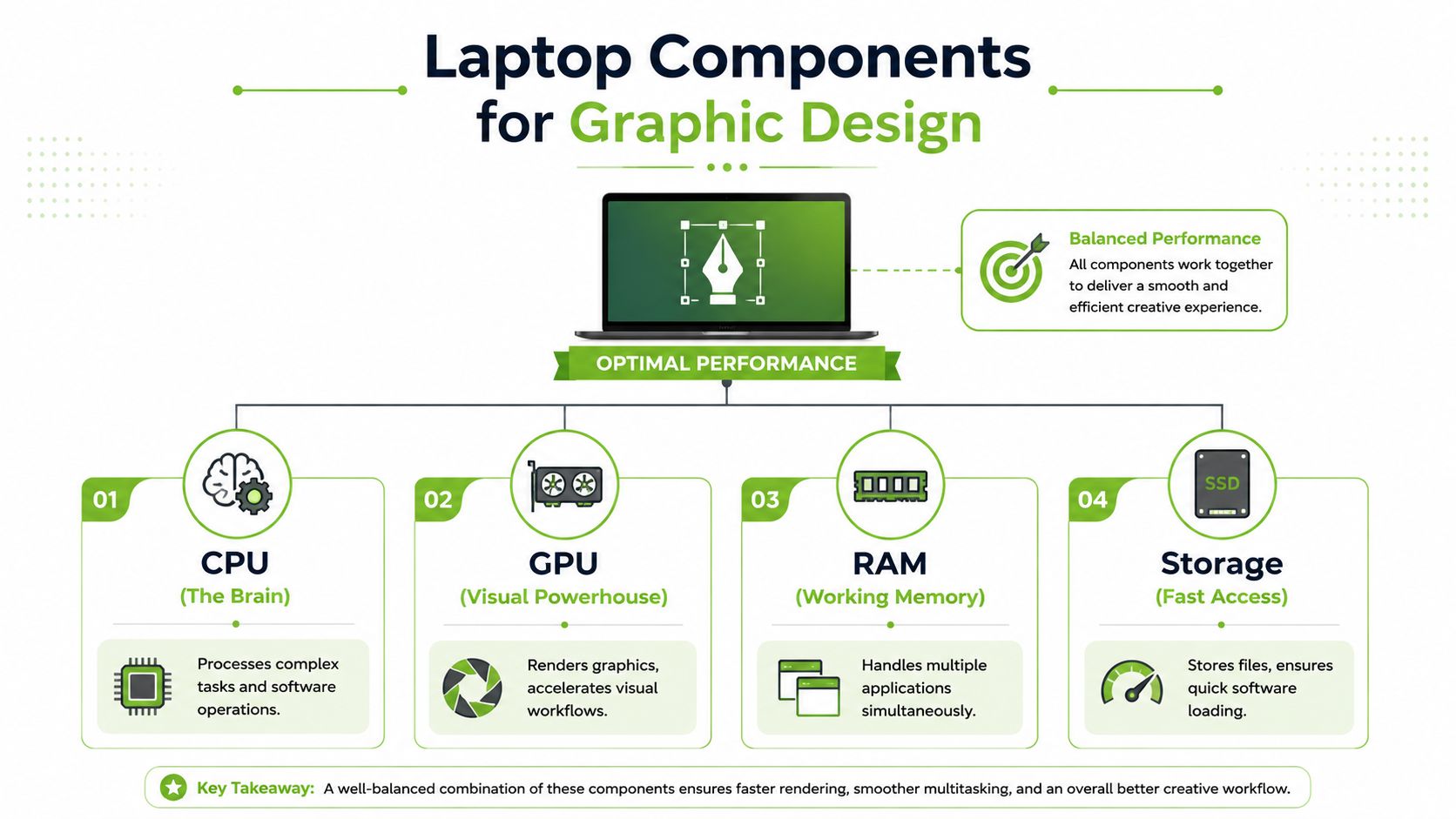
Think of the CPU as the project manager. It handles general computing tasks, tool responsiveness, file operations, and a lot of what makes software feel snappy. In Illustrator, InDesign, and Figma-style workflows, a strong CPU matters because you're constantly making small actions that need immediate response.
The GPU is the visual engine. It becomes more important when your work includes motion graphics, effects, 3D assets, video timelines, or GPU-accelerated features inside Adobe apps. For pure layout or vector work, it matters less than many buyers think. For After Effects or hybrid design-plus-video work, it matters much more.
RAM is your desk space. If the desk is too small, you keep shoving things off it to make room. In laptop terms, that means lag, swapping, and pauses when you move between apps. In Singapore, graphic design students and professionals must prioritise laptops with at least 16GB of RAM to ensure smooth operation of design tools like Adobe Creative Cloud, according to Lenovo's Singapore guide for graphic design students, which identifies 16GB as the minimum recommended threshold for handling layered files and multi-application coursework without performance lag in Lenovo's Singapore graphic design laptop guide.
Storage is simpler. Choose SSD storage, not old-style hard drives. Fast storage reduces app launch times, speeds up file opening, and makes scratch-disk activity less painful when you work with large PSDs or asset libraries.
A quick way to judge whether a spec sheet fits your work:
- CPU first for interface responsiveness: Photoshop, Illustrator, Figma, web design tools, and general multitasking all benefit from a capable processor.
- GPU where visuals are rendered heavily: Motion design, 3D mock-ups, animation, and video-heavy deliverables justify stronger graphics hardware.
- RAM for breathing room: Once multiple creative apps, cloud sync, fonts, browser tabs, and meeting tools are open, memory pressure shows up quickly.
- SSD for day-to-day smoothness: Large libraries, exports, and project switching feel cleaner on fast internal storage.
Buyers considering better value options should also understand how professionally restored machines are evaluated. This overview of refurbished laptop computers is useful because it shifts the conversation from “used or new” to “fit for purpose or not”.
Display quality changes the final result
Designers often obsess over processor names and forget the screen. That's a mistake. If the display is poor, you'll make poor visual decisions even on a fast machine.
For graphic design, the key issue is colour consistency. You want a panel that shows stable colour and contrast, with enough quality that your work doesn't look one way on your screen and another on a client's display or print proof. IPS panels remain a sensible baseline because viewing angles are usually more dependable than cheaper alternatives. Better creator displays can go further, but the practical question is simple: can you trust what you're seeing while you edit?
If your display isn't reliable, every design decision takes longer because you're second-guessing colour, contrast, and sharpness.
Screen size also affects comfort. A smaller laptop can still work well, but cramped interfaces slow down layout tasks, especially when toolbars, layers, and artboards compete for space. If you travel often, portability matters. If you mostly work at a desk, external monitor support becomes more important than shaving a bit of weight from the laptop itself.
Ports cooling and storage are practical not optional
Thin laptops look clean, but some give up too much in the process. Designers still need practical connectivity for external displays, storage drives, drawing tablets, SD-based workflows, and client presentations.
Check these before you buy:
- Practical Ports: USB-C is useful, but many designers still need USB-A, HDMI, or SD access without relying on dongles all day.
- Cooling that can sustain workload: A laptop that benchmarks well for a minute but heats up and slows down during exports isn't a strong design machine.
- Storage headroom: Design files grow quickly. So do font libraries, mock-ups, stock assets, and cached project files.
The best laptop for graphic design usually isn't defined by one hero component. It's defined by balance. A sensible CPU, enough RAM, dependable storage, and a trustworthy display will outperform a poorly balanced “premium” machine in real daily work.
Your Workflow Determines Your Needs
Two designers can spend the same amount and still get very different value because their software habits aren't the same. That's why generic advice often misses the mark.
The 2D designer and UI focused workflow
If most of your time goes into Illustrator, InDesign, Canva, Figma, branding work, slide decks, social assets, and web layouts, your priorities are straightforward. You want a responsive CPU, enough RAM for multitasking, and a display you can trust for colour and layout judgment. A dedicated GPU is helpful in some cases, but it isn't the first place to spend.
This group often benefits from lighter machines with strong everyday responsiveness. Portability matters because meetings, classes, and hot-desking are part of the routine. Battery life also matters more here than raw rendering power.
The photo and brand designer
Photo editors and brand designers usually push memory harder. Large layered compositions, RAW edits, multiple linked assets, and simultaneous Adobe workflows can overwhelm a lower-spec machine even if the work is technically “2D”.
According to HP's Singapore creator laptop guidance, 32GB of RAM is the “sweet spot” for designers handling digital art, photography, and moderate video editing, while 64GB is advised for professionals combining graphic design with heavy video editing in HP's Singapore creator laptop guide. That aligns with real-world behaviour. Once files become heavier and you keep several apps open at once, extra memory makes the machine feel calmer and more predictable.
More RAM doesn't make weak design choices better, but it does stop the laptop from interrupting good work.
The motion and hybrid creative
Motion graphics artists, content creators, and hybrid designers need a different balance. Once After Effects, Premiere Pro, 3D previews, or animation workflows enter the picture, GPU strength becomes much more relevant. These users should also think harder about sustained cooling, because prolonged exports and timeline work generate heat and expose weak chassis design quickly.
A simple way to map your own role:
- Branding and layout specialist: Prioritise display, CPU responsiveness, and enough RAM for layered files.
- Photo-heavy creative: Push RAM and display quality higher because image work expands fast.
- Motion designer or content hybrid: Budget for stronger graphics and cooling, not just a nicer screen.
- Freelancer who does a bit of everything: Aim for the middle ground. Balanced specs age better than overspending on one area and compromising another.
The best laptop for graphic design depends less on job title than on what you open every morning and what you export every evening. If your laptop is a client-work machine, buying for your heaviest recurring task is the safest way to avoid regret.
Smart Configurations for Every Budget
Model recommendations date quickly. Good configuration logic lasts much longer. If you know what target specs to shop for, you can compare new, surplus, and professionally refurbished options far more confidently.
A practical budget approach is to define a profile first, then find machines that meet it. That prevents a common mistake where buyers choose a price point before they've decided what the laptop needs to do.
Recommended Specs by Designer Profile
| Designer Profile | Primary Tasks | CPU Target | GPU Target | RAM (Sweet Spot) | Display |
|---|---|---|---|---|---|
| Student Starter | Canva, Illustrator basics, light Photoshop, slides, portfolio building | Current mainstream multi-core CPU | Integrated graphics is usually enough | 16GB if budget allows | IPS panel with reliable colour |
| Freelance Powerhouse | Branding, UI work, layered Photoshop files, client presentations, multitasking | Strong mid-to-upper tier CPU | Light dedicated GPU or strong integrated graphics depending on software | 32GB | IPS or better, colour-consistent panel |
| Prosumer Creator | Digital art, photography, moderate video editing, mixed Adobe workload | Upper-tier CPU with sustained performance | Dedicated GPU recommended | 32GB | High-quality display suited to visual work |
| Mobile Workstation | Heavy motion, 3D-adjacent work, demanding exports, hybrid design and video | High-performance creator or workstation CPU | Strong dedicated GPU | 64GB for heavy mixed workflows | Premium colour-accurate display |
That table gives you the buying shape. Now turn it into trade-offs.
For lean budgets, prioritise this order: RAM, display quality, SSD, CPU, GPU. That may surprise people, but many design workflows feel worse on a beautiful processor-heavy machine with too little memory than on a balanced machine with fewer headline specs. Buyers trying to stretch funds can compare profiles with options in this roundup of affordable laptops in Singapore, then narrow by display and memory before anything else.
For freelancers, the sweet spot is usually a machine that feels comfortable under client pressure. That means enough RAM to keep your active tools open, a display that doesn't undermine colour decisions, and a chassis that doesn't overheat during deadlines. You don't need a workstation if your work is mostly logos, layouts, and digital campaigns. You do need consistency.
For higher-end users, the trap is buying excess GPU power while ignoring practical usability. A large, heavy machine with strong graphics can still be the wrong buy if you spend most of your week in browser-based design tools and pitch decks. On the other hand, if you're moving between Photoshop, Premiere Pro, and effects-heavy deliverables, spending more on graphics and cooling is rational.
The best budget is the one that covers your actual workflow for the next few years without forcing an early replacement.
New versus Certified ReLoved The Smart Value Decision
The market often treats “new” as automatically better. For designers, that isn't always true.
Why newer is not always better value
A newer entry-level or mid-range laptop can lose to an older premium machine in the areas that matter most to designers: display quality, build quality, keyboard feel, thermal stability, and sustained performance. That's especially relevant if you're comparing a recent consumer laptop against a professionally refurbished creator or business-class device.
One of the most overlooked buying questions is whether a 2022 to 2023 refurbished laptop with 16GB RAM and an IPS display can still meet professional Adobe or Canva colour expectations for Singapore-based freelance work. That exact nuance is often missed in mainstream buying advice, even though the discussion around performance-per-dollar over spec-maxing has grown in importance, as noted in Dell's discussion on laptops for graphic design students.
That matters because many designers don't need the newest silicon. They need a laptop that still handles layered files cleanly, presents work professionally, and holds up under daily use without draining cash that could go into software, storage, marketing, or hiring.
What to inspect before buying refurbished
Professionally refurbished can be a very smart route, but only if the seller is disciplined. You want evidence of process, not vague reassurance.
Check for these points:
- Quality control: A proper inspection process matters more than a “good condition” label, and 30-point quality checks demonstrate real value.
- Transparency: Battery health disclosure and clear device grading help you judge likely lifespan instead of guessing.
- Supportability: Repairs, parts access, and post-purchase guidance matter more than a polished listing photo.
- Business-grade pedigree: Older premium laptops often age better than cheaper consumer models because they were built for heavier daily use.
For a closer look at what a lifecycle-led buying approach can look like in practice, this video is worth your time.
A strong refurbished option doesn't just save money upfront. It can improve resilience. If you buy a machine with proven design-friendly hardware, maintain it properly, and keep repair and support options open, you reduce wasteful replacement cycles and make better use of your budget. That's sustainability in a business sense. Less churn, more usable value.
Beyond the Purchase Warranty and Lifecycle Support
A laptop purchase isn't finished when you check out. For working designers, support after the sale can matter just as much as the original spec.
Support affects total cost of ownership
A machine that's slightly cheaper upfront can become more expensive if support is weak, repair is difficult, or downtime drags on. Creative work is deadline-driven. If your laptop fails during a campaign push, portfolio submission, or client revision cycle, the resulting cost isn't just the hardware problem. It's the interruption.
That's why warranty terms should be read together with the broader support ecosystem. Repair access, troubleshooting help, data migration, and accidental damage coverage all affect how long the laptop stays useful. Services such as RescueAdvise and practical protection options can make more difference over time than a flashy unboxing experience on day one.
A laptop with a support path is an asset. A laptop without one is a future interruption waiting to happen.
Lifecycle thinking is practical not idealistic
The strongest buying decisions account for reuse, repair, and eventual replacement before the device even arrives. That's where lifecycle partners stand apart from simple box movers.
A good technology partner helps you think through:
- How long the device should remain fit for work
- Whether upgrades or repairs are likely to be sensible later
- How to trade in, repurpose, or responsibly recycle the machine at the end of use
- Whether support standards are backed by real operational discipline, such as ISO 9001 Certified and ISO 27001 Certified processes
For SMEs and freelancers, that approach creates resilience. You make better use of capital, avoid unnecessary refresh cycles, and keep devices productive longer. Certified ReLoved and Certified Surplus programmes fit this model well because they turn device selection into a value decision, not just a buying event. Add transparent grading and battery health disclosure, and you can judge options on evidence rather than optimism.
Making Your Final Informed Decision
The best laptop for graphic design is the one that matches your actual workflow, not the one with the loudest product page. Start by listing the software you use most and the heaviest tasks you repeat every week. Then check whether the laptop gives you enough RAM, a dependable display, suitable graphics power, and practical connectivity for the way you work.
If your budget is tight, don't assume new is automatically smarter. A well-selected Certified ReLoved or Certified Surplus machine may deliver better real design value than a newer but weaker alternative. If your workload is growing, think beyond purchase price and judge the machine by lifecycle cost, repairability, and support.
That's the decision framework that usually holds up. Workflow first. Specs second. Value third.
When you buy with that order in mind, you're far more likely to end up with a laptop that supports your creativity, protects your budget, and stays useful long enough to justify the investment.
If you're comparing options and want help weighing new, Certified ReLoved, or Certified Surplus devices, myhalo is worth considering as a technology lifecycle partner. Beyond device selection, myhalo supports longer-term value through repair, reuse, responsible recycling, RescueAdvise, the mylo AI Assistant, transparent device grading, battery health disclosure, and 30-point quality checks under ISO 9001 Certified processes, with ISO 27001 Certified standards that matter to many business buyers in Singapore.