





Best Budget Gaming Desktop: Singapore 2026 Guide
You're probably looking at a few tabs right now. One seller is pushing flashy RGB. Another says a machine is “budget” but prices it like a premium desktop. A third looks cheap until you factor in shipping, warranty, and the possibility that one weak component will drag the whole system down.
That's the key challenge with buying the best budget gaming desktop in Singapore. Most advice online is built around US pricing, US stock, and generic recommendations that don't reflect what local buyers pay after GST, delivery, and support are factored in. A smart buy here isn't the cheapest tower on the page. It's the one that gives you the most usable gaming performance for your money, with the fewest unpleasant surprises after checkout.
Table of Contents
- What 'Budget Gaming PC' Means in Singapore for 2026
- Prioritising PC Components for Maximum Performance
- Recommended Gaming Desktop Specs by Singaporean Budget
- New vs Professionally Refurbished A Smart Comparison
- How to Future-Proof Your Gaming Desktop on a Budget
- Why Local Warranty and Support Matter in Singapore
- Frequently Asked Questions About Budget Gaming PCs
What 'Budget Gaming PC' Means in Singapore for 2026
You see a desktop listed at a tempting price, convert the specs into expected frame rates, then realise the actual question is simpler. Will it run the games you play well enough to feel good on your desk in Singapore, after delivery, setup, and warranty risk are factored in?
For 2026, a budget gaming PC in Singapore means a desktop that gives you dependable 1080p gaming without wasting money on parts or features that do little for actual play. The target is practical performance. Smooth esports matches, sensible settings in heavier games, fast boot times, and enough upgrade room that the machine still makes sense a year or two from now.
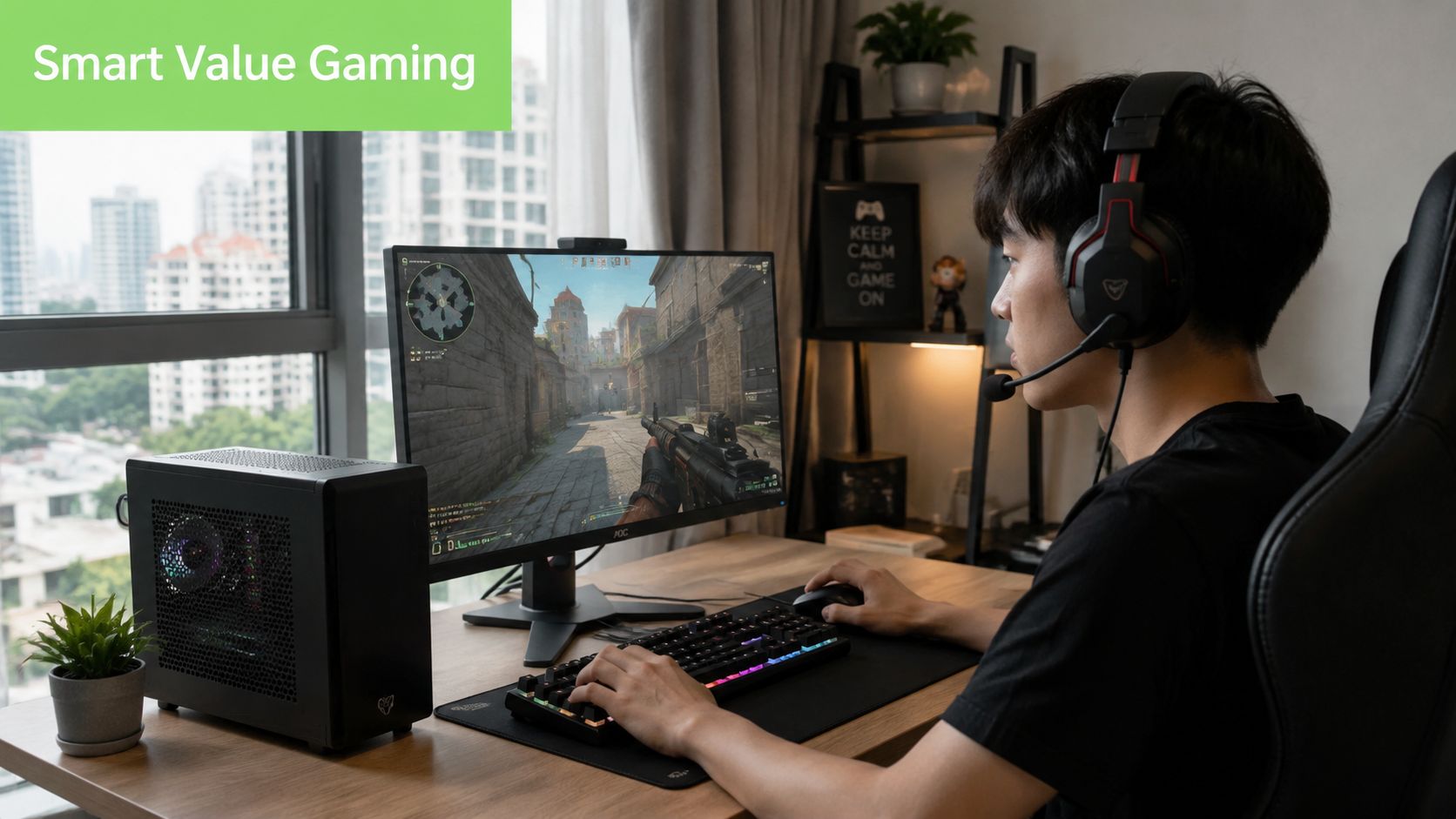
Budget is a performance target, not a bargain-bin label
Singapore buyers usually get the best value by judging a PC against the games they play and the monitor they already own. A 1080p 144Hz setup for Valorant, CS2, or Fortnite calls for a different balance than a system meant for Cyberpunk 2077, Black Myth: Wukong, or the next round of demanding AAA releases. The same sticker price can buy a smart configuration or a poor one.
That is why local context matters more than broad overseas advice. US or UK recommendations often look attractive until you account for SGD pricing, limited stock on certain GPUs, delivery lead times, and the hassle of sending a faulty unit back through a distributor chain. In Singapore, value is not only the listed price. It is the full cost of getting a working gaming desktop with support you can effectively use.
A useful global benchmark still helps frame expectations. Tom's Hardware's best gaming PC picks listed the CyberPowerPC Gamer Xtreme as its budget pick in 2026 at US$1,099.99, with strong 1080p performance as the selling point. That tells you what the category is really about. Reliable gaming output per dollar, not prestige parts or showroom specs.
What a sensible budget system looks like
A good budget gaming desktop in Singapore usually has a clear job. It plays today's popular games smoothly, loads Windows and games quickly, and avoids obvious weak points such as too little RAM, a tiny SSD, or a power supply that limits future upgrades. Storage speed also affects day-to-day use more than many first-time buyers expect, which is why it makes sense to check options for RAM and SSD upgrades for gaming desktops early instead of treating them as afterthoughts.
The wrong budget PC tends to fail in predictable ways. It spends too much on case styling, RGB, or a branded badge while the graphics card is underpowered. Or it looks cheap upfront, then gives away the savings through noisy cooling, single-channel memory, cramped storage, or weak after-sales support.
Use this filter before buying:
- Good value means stable 1080p performance in the games you care about.
- Good value means the parts list is balanced enough that one weak component does not hold the whole system back.
- Good value means the final SGD outlay still makes sense after delivery, warranty terms, and likely upgrades.
A budget gaming desktop should feel chosen, not merely discounted. For Singapore buyers, that often makes professionally refurbished systems worth serious attention alongside new prebuilts, especially when they come from a local retailer that has already tested the hardware and can support it properly.
Prioritising PC Components for Maximum Performance
When money is tight, component priority decides whether your desktop feels sharp or disappointing. I like to explain it like a football squad. The GPU scores the goals. The CPU controls the tempo and keeps the whole side organised. If either one is too weak for the other, the team falls apart.
Put most of the budget into the parts that affect frames
Intel's guidance is straightforward in its budget gaming PC buying advice. The CPU and GPU are the components that most directly determine in-game frame rate, and a budget system should prioritise out-of-box gaming performance over extras. Intel also notes that 16GB RAM is ideal, while 8GB can still work.
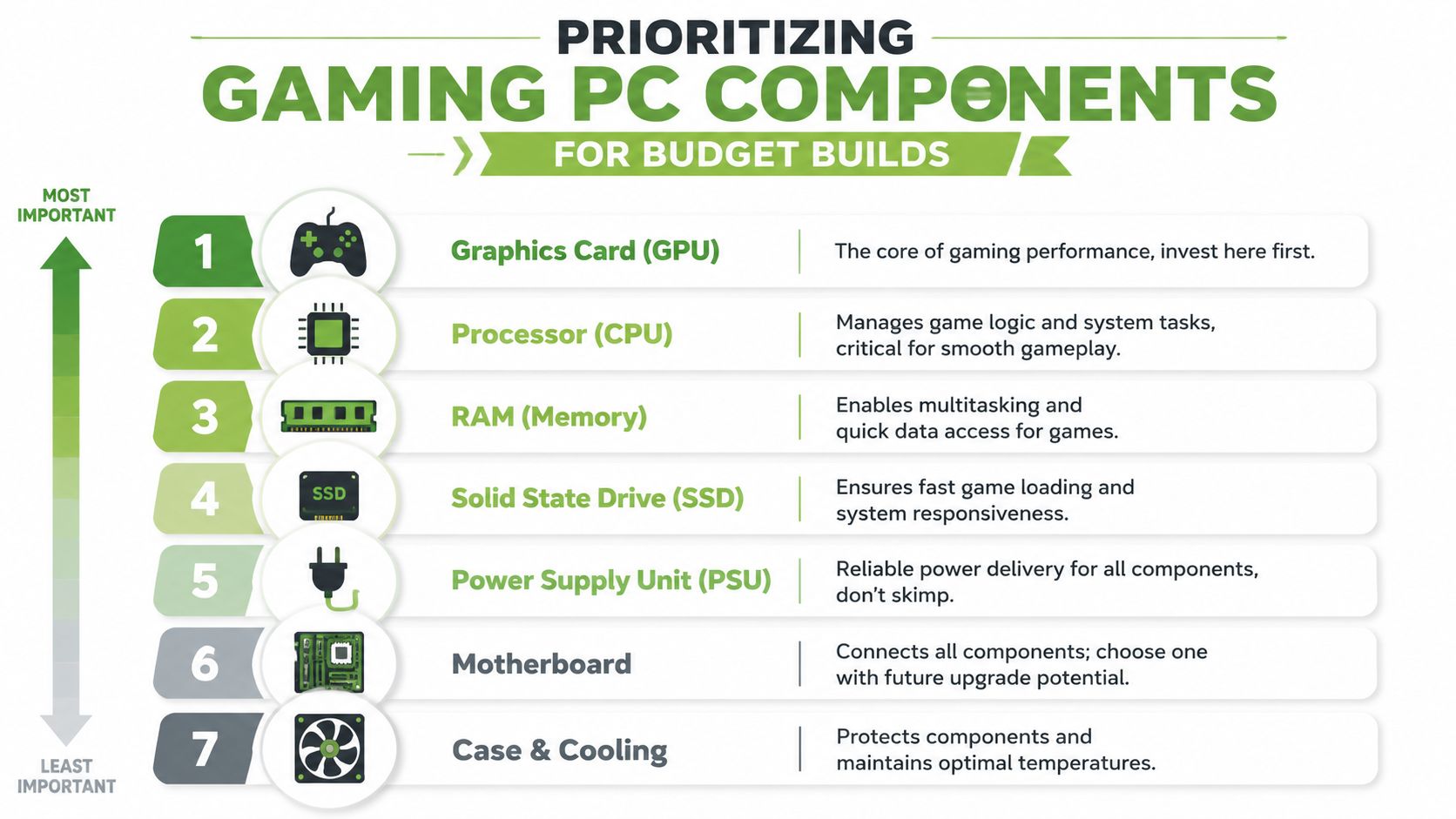
That lines up with how real budget builds behave. If the GPU is underpowered, games feel compromised immediately. If the CPU is too far behind the GPU, you get uneven performance and less headroom in newer titles. If RAM is too low, background tasks and texture loading become more annoying than they should be.
Here's the order I'd use for a value-focused gaming desktop:
- GPU first. The GPU dictates gaming performance.
- CPU second. Not the fanciest chip. Just one that keeps up properly.
- RAM next. Aim for 16GB if you can.
- SSD after that. Important for responsiveness and loading, but not the main frame rate driver.
- PSU and motherboard. These don't usually make the desktop faster, but they absolutely affect reliability and future upgrades.
- Case and RGB last. Nice to have, but avoid excessive budget allocation here.
A quick visual helps if you're comparing parts lists from different sellers.
Where to save and where not to save
You can save money in some places without hurting the gaming experience much. You can't do that everywhere.
- Save on storage size first if needed. A smaller SSD is easier to upgrade later than a weak GPU is.
- Be careful with RAM cuts. If the system starts at 8GB, make sure upgrading is easy. If you're comparing options, RAM and SSD upgrade choices matter more than decorative extras.
- Don't cheap out on the PSU. A poor power supply doesn't just limit upgrades. It can create instability you'll spend weeks trying to diagnose.
- Don't overbuy the CPU while underbuying graphics. That's one of the most common bad-value moves in budget desktops.
If two desktops cost about the same, pick the one with the stronger graphics card and a sensible CPU, not the one with prettier marketing.
The best budget gaming desktop is usually boring on paper in the right way. Balanced CPU. Capable GPU. Enough RAM. SSD storage. Reliable power. That combination wins far more often than a flashy machine with one obvious weak link.
Recommended Gaming Desktop Specs by Singaporean Budget
A useful Singapore buying guide needs to speak in budget bands, not just in parts theory. Prices move, retailer bundles change, and local promos can make one category suddenly more attractive than another. Still, the target profile stays consistent.
A practical baseline today is a 6-core/12-thread-class CPU, 16GB RAM, and a midrange GPU. Tom's Hardware's budget gaming build guide uses an Intel Core i5-14400F (6P+4E cores) in its 2026 sub-$800 build, while the guide also points to a budget prebuilt centred on a Ryzen 5 7600 + Radeon RX 7600 XT. That tells you where sensible value sits in current budget gaming. The system should be GPU-led, but not paired with a weak processor.
2026 Budget Gaming PC Tiers Singapore
| Budget Tier (SGD) | Ideal For | Example CPU | Example GPU | RAM | Storage |
|---|---|---|---|---|---|
| Entry-level | Esports, indie games, lighter 1080p gaming | Core i5-14400F class | Entry to lower-midrange dedicated GPU | 16GB preferred | SSD |
| Sweet spot | Most players who want balanced 1080p gaming | Ryzen 5 7600 class | RX 7600 XT class or similar midrange GPU | 16GB | SSD |
| Budget enthusiast | Buyers who want more settings headroom and a longer upgrade runway | Strong 6-core class or better | Stronger midrange GPU | 16GB or more | SSD with room for game library |
Entry tier for straightforward 1080p play
This is the tier for players who mostly stick to esports, live-service games, older AAA titles, and a few modern games with sensible settings. The key is not to drop into integrated graphics or extremely weak dedicated GPUs just to hit a lower price.
A machine at this level should still feel responsive in Windows, load games from an SSD, and avoid obvious stutter from low memory. If a seller tries to compensate for weak graphics by adding more RGB, more fans, or a giant drive, skip it.
Sweet spot tier for most buyers
For those aiming for the best budget gaming desktop, prioritizing value over just the absolute cheapest option is the optimal approach. This provides a machine that handles mainstream gaming more comfortably and usually ages better.
The sweet spot is where you stop fighting the hardware every time a game update lands.
For many Singapore buyers, this tier is the one to compare most carefully across new and professionally refurbished options. A well-configured refurbished desktop can sometimes move you into a stronger GPU class for the same spend, which matters more than cosmetic freshness.
Budget enthusiast tier for longer runway
This isn't “budget” in the strict cheapest sense. It's budget-minded buying for someone who wants fewer compromises and a better base for future upgrades.
Look for:
- A stronger midrange GPU
- A board with upgrade headroom
- A case with decent airflow
- A power supply that won't force replacement at the next graphics upgrade
This tier makes sense if you'd rather buy once and upgrade gradually instead of replacing the whole tower earlier than expected.
New vs Professionally Refurbished A Smart Comparison
Many buyers still frame this as “new versus used”. That's too simplistic. The smarter comparison is premium cost versus smart value.
A brand-new gaming desktop gives you untouched parts, current retail packaging, and the comfort of being the first owner. There's nothing wrong with that if the pricing is fair and the configuration is balanced.
When new makes sense
Buy new if one of these matters most to you:
- You want the latest platform and don't want to think about previous ownership.
- You care about full manufacturer coverage more than stretching your budget further.
- You're buying around a very specific new-generation component and won't consider adjacent alternatives.
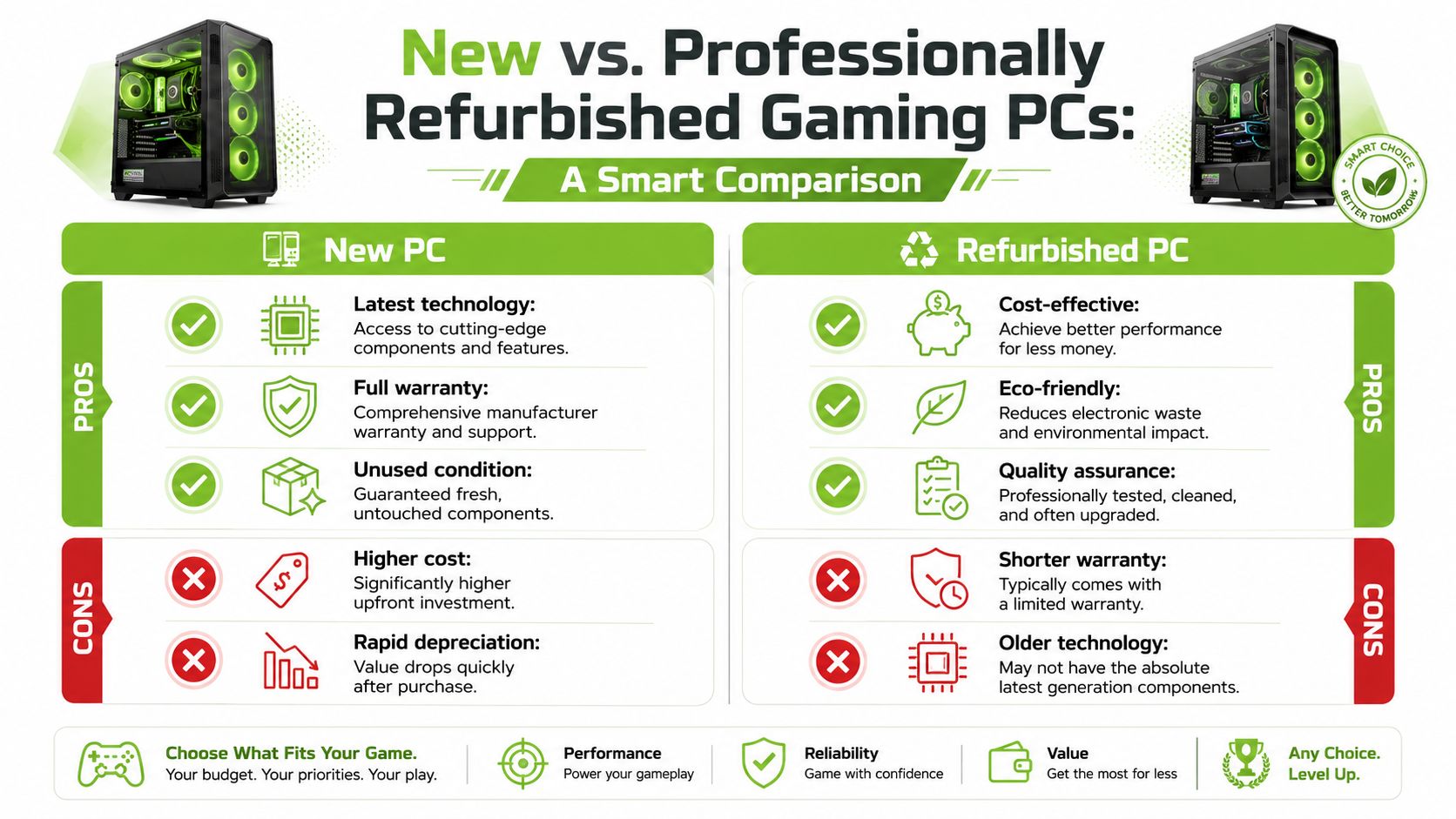
The downside is straightforward. You often pay more for freshness than for a meaningful jump in gaming experience. In the budget category, that can be a poor trade if the extra spend doesn't improve the GPU class or overall balance.
Why professionally refurbished can be the sharper buy
A professionally refurbished desktop is different from a random second-hand listing. That distinction matters. Peer-to-peer marketplaces can work for experienced hobbyists, but they're full of hidden variables: unknown thermal history, vague fault descriptions, missing accessories, poor assembly, and no practical fallback if the machine misbehaves.
A properly processed refurbished system is tested, cleaned, graded, and sold with clearer expectations. That's why it can be a strong route for gaming buyers who care about value more than box-fresh status. With a trusted local retailer, you can sometimes afford a higher-performing class of machine without paying the new-market premium.
One local example is myhalo's refurbished device approach, which includes transparent grading, warranty-backed stock, and quality-check processes rather than informal one-off resale. For a buyer trying to get into the best budget gaming desktop category without overspending, that kind of structure matters a lot more than glossy packaging.
A refurbished desktop is a compromise only when the refurbishment process is weak. When the process is solid, it's often just a better allocation of money.
The practical check is simple. Ask what was tested, what warranty applies, whether upgrades were done cleanly, and who handles support if something goes wrong. If those answers are clear, refurbished stops looking risky and starts looking sensible.
How to Future-Proof Your Gaming Desktop on a Budget
Future-proofing doesn't mean trying to buy a forever PC. That usually leads to overspending. A smarter approach is to buy a desktop that's easy to improve later without replacing half the machine.
Buy the upgrade path, not just the box
The first thing to look at is whether the system leaves room for practical upgrades. Some budget desktops look attractive until you open the side panel and realise the case is cramped, the motherboard is barebones, and the power supply leaves no room for a stronger graphics card later.
A good budget tower should give you:
- Spare RAM slots or an easy RAM path
- Space for additional storage
- A motherboard that isn't already at its limits
- A power supply with enough headroom for a future GPU move
- Decent airflow so upgrades don't become heat problems
These details don't make the machine benchmark higher on day one. They save money later.
Upgrades that age well
If you have to choose where to leave yourself flexibility, I'd focus on these in order:
-
Power supply headroom
This is one of the least exciting buys and one of the most useful. A slightly stronger, reliable PSU can save you from replacing it when you upgrade graphics. -
Case quality and airflow
A usable case with sensible ventilation is worth more than decorative panels. It makes maintenance easier and keeps future options open. -
Memory and storage expansion
Games get larger. Multitasking gets heavier. Even if you start modestly, you don't want your next upgrade to involve unnecessary workarounds. -
CPU platform sanity
Don't chase the fanciest platform. Just avoid buying into a dead end if another sensible option gives you better room to grow.
Buy the desktop you can live with now and improve without frustration later.
That mindset is what keeps a budget gaming PC from becoming false economy.
Why Local Warranty and Support Matter in Singapore
Friday night is a bad time to discover your new desktop has a dead RAM stick or a noisy GPU fan. If the seller is overseas, the cheap price stops looking cheap fast. You could be stuck with return shipping, long email threads, and weeks without a working PC.

In Singapore, local warranty has practical value because the whole process is easier to use. You can confirm who handles the repair, where the machine goes, and how long you may be without it. That matters more on a budget build, where one failed part can wipe out the savings that made the deal attractive in the first place.
I usually tell buyers to check support terms with the same care they give CPU and GPU specs. A physical collection point, local service access, clear exchange policy, and realistic response times are worth paying for. If the desktop is professionally refurbished, that point matters even more, because the quality of the seller's testing and after-sales process is part of the product, not an extra.
A simple habit helps. Verify coverage before paying, and read what the warranty covers. This guide to checking HP warranty support in Singapore shows the kind of checks that make sense before you commit to any desktop.
Local support also fits the way many Singapore buyers shop. Fast delivery, instalment plans, and the ability to speak to a seller during local business hours reduce hassle. If you are setting up a full gaming space, your PC is only one part of the experience. Your connection quality still shapes online play, and buyers comparing setup priorities may also want to read about high-speed internet for rural gamers, even if Singapore's connectivity situation is very different.
The short version is simple. A budget gaming desktop is only good value if you can get it fixed without losing time, money, and patience. In Singapore, local warranty and reachable support often make the smarter buy clearer than the sticker price does.
Frequently Asked Questions About Budget Gaming PCs
A lot of the last-minute hesitation around buying a gaming desktop comes from practical questions, not technical ones. These are the ones I hear most often.
Is a budget gaming desktop good enough for school or work too
Yes, usually. A balanced gaming desktop is often very capable for everyday productivity, online classes, documents, browser-heavy work, and media tasks. If it has a sensible CPU, enough RAM, and SSD storage, it'll feel more than adequate outside games.
The main exception is if you choose an ultra-cheap configuration that skimps on memory or storage. That hurts general use just as much as it hurts gaming.
Should beginners buy a prebuilt or build one themselves
If you already enjoy troubleshooting, comparing parts, and assembling hardware, building can be rewarding. If you just want to game without chasing compatibility issues, a well-configured prebuilt is usually the easier path.
For beginners in Singapore, the question isn't “which is more hardcore”. It's which option gives you the cleanest total value after local pricing, warranty, delivery, and upgrade path are all considered.
How long will a budget gaming PC last
That depends on your expectations. If you're happy targeting 1080p and adjusting settings sensibly over time, a balanced machine can remain useful for quite a while. If you expect every new release to run at very high settings indefinitely, no budget build will satisfy that for long.
The better approach is to buy a desktop with a clear GPU, RAM, and storage upgrade path so you can extend its life instead of replacing it too soon.
What matters more in Singapore, sticker price or total cost
Total cost matters more. That's especially true because many search results still define budget in USD and focus on global prebuilts rather than local affordability. As noted in Eneba's discussion of budget gaming PC buying, the more useful question in Singapore is often what still delivers stable 1080p gaming after GST, delivery, warranty, and upgrade headroom.
One more overlooked factor is connectivity. Even a good desktop feels bad if your connection is unstable, and players outside dense urban setups may need to think harder about that side of the experience. If that applies to you, this guide to high-speed internet for rural gamers is a useful companion read.
The best budget gaming desktop isn't the one with the loudest sales copy. It's the one that gets the basics right, respects your budget, and still feels like a smart purchase after the first week of ownership.
If you want a practical shortlist instead of sorting through endless listings, myhalo is one local place to compare new and professionally refurbished desktops, gaming-ready accessories, warranty-backed devices, and upgrade options in one catalogue.