





Best Budget Convertible Laptop: Smart Buyer's Guide 2026
You're staring at a shortlist on your phone, trying to decide whether to buy a cheap new convertible or hold out for something better. The problem isn't finding a laptop that flips into tablet mode, it's finding one that won't feel slow, flimsy, or outdated after a few semesters or a few client jobs. For Singapore buyers, the smarter move is to judge the best budget convertible laptop by lifespan, usability, and service support, not just the lowest price tag.
Table of Contents
- Why Convertibles Are the Smart Choice for Singapore Shoppers
- Comparing 360-Degree Hinges and Detachable Keyboards
- Key Specs That Actually Impact Budget Performance
- New vs Certified ReLoved Rethinking the Budget Category
- Recommended Configurations for Students Creators and SMEs
- Extending Device Lifespan Care and Maintenance Tips
- Making the Final Decision with Confidence
Why Convertibles Are the Smart Choice for Singapore Shoppers
A Singapore student on the MRT doesn't need a bulky setup. A laptop that opens flat for typing, folds back for reading, and works like a tablet for annotations is more useful than a traditional clamshell sitting in a backpack. That's why the category keeps showing up in budget recommendations, with current review roundups still putting Lenovo's Flex and IdeaPad convertible line at the affordable end of the market, including PCMag's pick of the Lenovo Chromebook Duet 5 as its best budget 2-in-1 and UltrabookReview naming the Lenovo Flex 5i Chromebook Plus the best budget convertible in 2026. For a buyer in Singapore, that consistency matters because it shows the category has settled around proven designs rather than gimmicks. See the market pattern in UltrabookReview's convertible roundup.

Value over volume
The best budget convertible is not the one with the flashiest shell. It's the one that can replace a laptop, a light reading tablet, and sometimes a note-taking pad without forcing you to buy three separate devices.
Practical rule: If one device can do your school, office, and media work acceptably well, that usually beats buying the cheapest laptop now and replacing it sooner.
That logic matters in Singapore, where tech prices aren't low and storage space isn't generous. A compact convertible fits better on HDB desks and in shared workspaces, and it's easier to carry between class, office, and café. A budget 2-in-1 also makes more sense when you think in terms of service life, not just day-one cost. That's the right mindset for students and SMEs alike.
The category has also matured. Review outlets now treat budget convertibles as a proper class of machine, not a compromise bin. That's important because buyers can now expect touch support, a stable hinge, and enough everyday performance to last through years of note-taking, admin work, and video calls. The question is no longer whether a convertible is practical. It is. The question is which one gives the most usable life for the money.
Comparing 360-Degree Hinges and Detachable Keyboards
A 2-in-1 only makes sense if the form factor matches how you work. Choose the wrong design, and you will feel it every day, especially on your lap, in a meeting, or during a cramped commute.
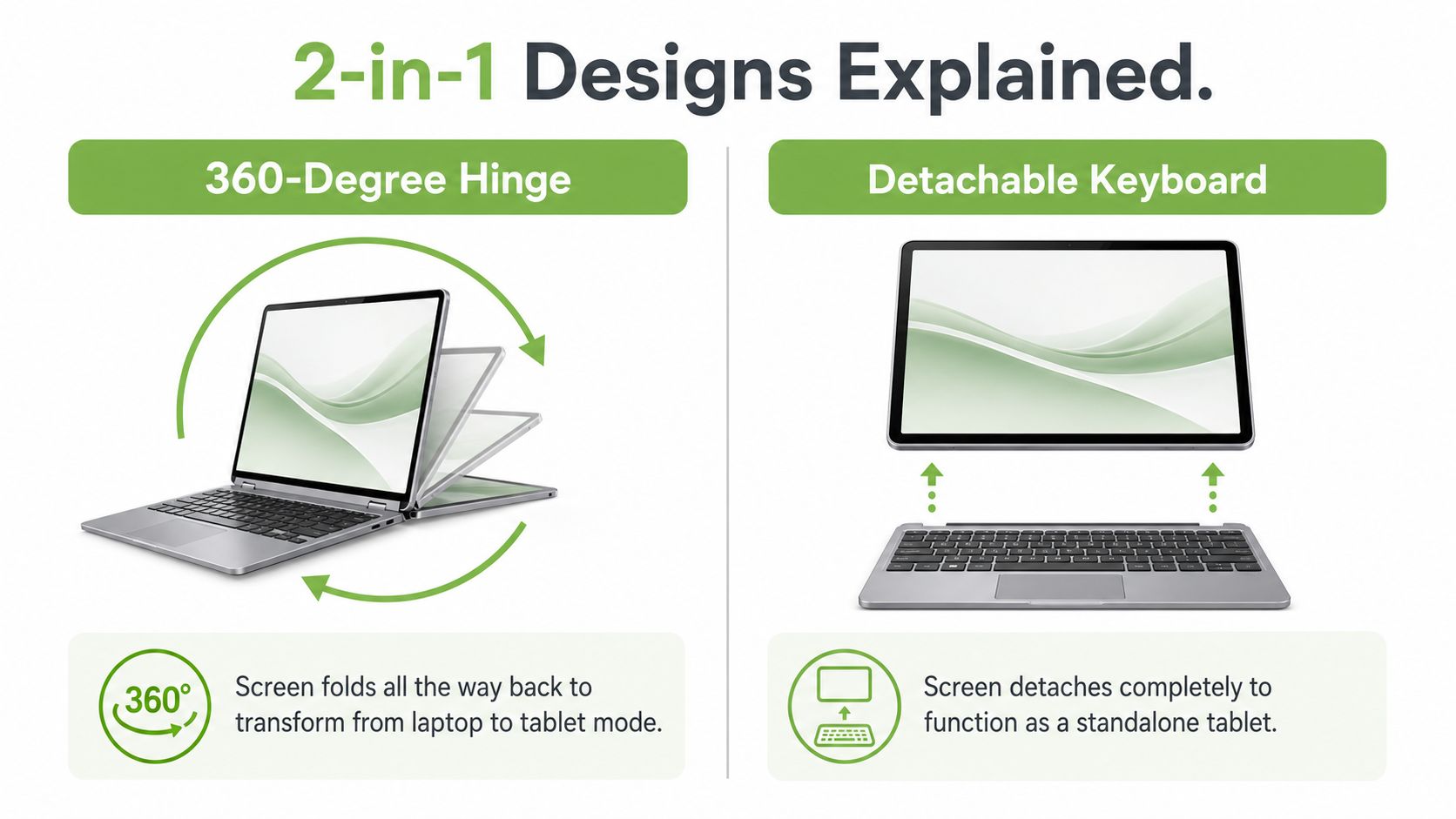
360-degree hinges versus detachable keyboards
A 360-degree hinge is the more practical convertible layout for most buyers. The screen folds all the way back, so you can use it as a laptop, prop it up in tent mode for viewing, or flip it into tablet mode. The big advantage is stability. The keyboard stays attached, and the whole device usually feels steadier on a desk and less awkward on your lap.
A detachable keyboard works differently. The screen separates from the keyboard completely, giving you a true standalone tablet whenever you want one. That suits people who spend a lot of time reading, sketching, or holding the screen while moving around. The trade-off is simple. You gain more freedom, but you also carry an extra part and have one more connection point to watch.
A sturdy hinge matters more than a clever shape. If a device feels loose in laptop mode, you will notice that problem long before any tablet trick starts to matter.
Which design suits real use
For students who type a lot, a 360-degree hinge is the better choice. It behaves more like a normal laptop, so the switch between writing assignments and joining online classes feels natural. For anyone who works tablet-first, a detachable system can make sense, but only if the screen will stay separate often enough to justify the extra complexity.
For lap use, the hinge design wins. For pure tablet use, the detachable design wins. For most Singapore buyers, the hinge design is the practical default because it gives flexibility without making the device feel fragile. That is why hinge durability affects long-term value so directly. If the hinge loosens, every mode gets worse.
If you are comparing models for school, office use, or light business work, affordable laptops in Singapore can include both new and certified pre-owned options. A high-spec refurbished convertible with a good hinge often gives better everyday value than a brand-new budget model with weak build quality.
Key Specs That Actually Impact Budget Performance
Budget convertibles win or fail on the parts buyers usually ignore. CPU branding gets the headline, but memory, storage, and screen quality decide whether the machine still feels responsive after months of school work, admin tasks, and video calls.
RAM and storage are the first filter
For a budget laptop, 8 GB of RAM is the floor. 16 GB is the better target if you want enough headroom for browser tabs, Office apps, cloud tools, and online classes at the same time. That matches Wired's advice that the straightforward answer for budget laptops is a minimum of 8 GB of RAM and CNET's view that 16 GB is the minimum for 2-in-1 use, with 8 GB as the absolute lowest. For Singapore students and SME owners who expect one machine to cover study, admin, and everyday entertainment, the extra memory pays off in less frustration and fewer slowdowns.
Storage matters just as much. An SSD makes the laptop feel much quicker than older, slower storage types. If one model gives you better RAM but weak storage, the daily experience can still feel sluggish.
The market reality is simple. A cheap new convertible with tight memory and slow storage often costs less up front, but it can age badly. A higher-spec refurbished unit can give you more useful life for the money, especially if you are comparing options through affordable laptops in Singapore and weighing the total ownership cost instead of the sticker price alone.
Displays should be practical, not luxury-led
For value, the sweet spot is usually a Full HD or 1920×1200 IPS touchscreen. PCMag's tested convertibles include 14-inch 1920×1200 IPS systems with 60 Hz panels, and that is a sensible benchmark for budget buyers. You do not need OLED to read documents, answer emails, or mark up PDFs. You need a screen that stays sharp enough for long sessions and clear enough for split-screen work.
A brighter, cleaner IPS panel also makes more sense for long-term use than chasing a flashy display that forces you to compromise elsewhere. If the screen upgrade pushes you down to weak RAM or small storage, skip it. The laptop should stay useful after the novelty wears off.
My take: choose the best screen your budget allows, but do not overpay for OLED if it means settling for 8 GB RAM or weak storage.
Budget Convertible Spec Benchmarks 2026
| Component | Student / Basic Use | SME / Creator Use |
|---|---|---|
| RAM | 8 GB minimum, 16 GB better for longevity | 16 GB preferred for smoother multitasking |
| Storage | SSD over slower storage | SSD with enough space for files and projects |
| Display | 1920×1200 IPS touchscreen | 1920×1200 IPS or better, depending on colour needs |
| Form factor | 360-degree hinge for laptop-first use | 360-degree hinge unless tablet-first workflows are essential |
| Battery priority | All-day practicality | Sustained use through meetings and travel |
The processor question is less complicated than many buyers assume. On a budget convertible, a slightly older but better-balanced chip often feels more usable than a brand-new low-end one, especially when the chassis is thin and cooling headroom is limited. That is why spec sheets need to be read as a system, not as separate parts. For a broader comparison of value-focused models, the laptop remarketing guide is useful background on how higher-grade returned devices can be kept in circulation with proper testing and resale.
New vs Certified ReLoved Rethinking the Budget Category
Most shoppers start with a bad assumption. They think “budget” means brand new and “refurbished” means compromised. In convertibles, that often leads to the wrong buy.
What new budget models usually trade away
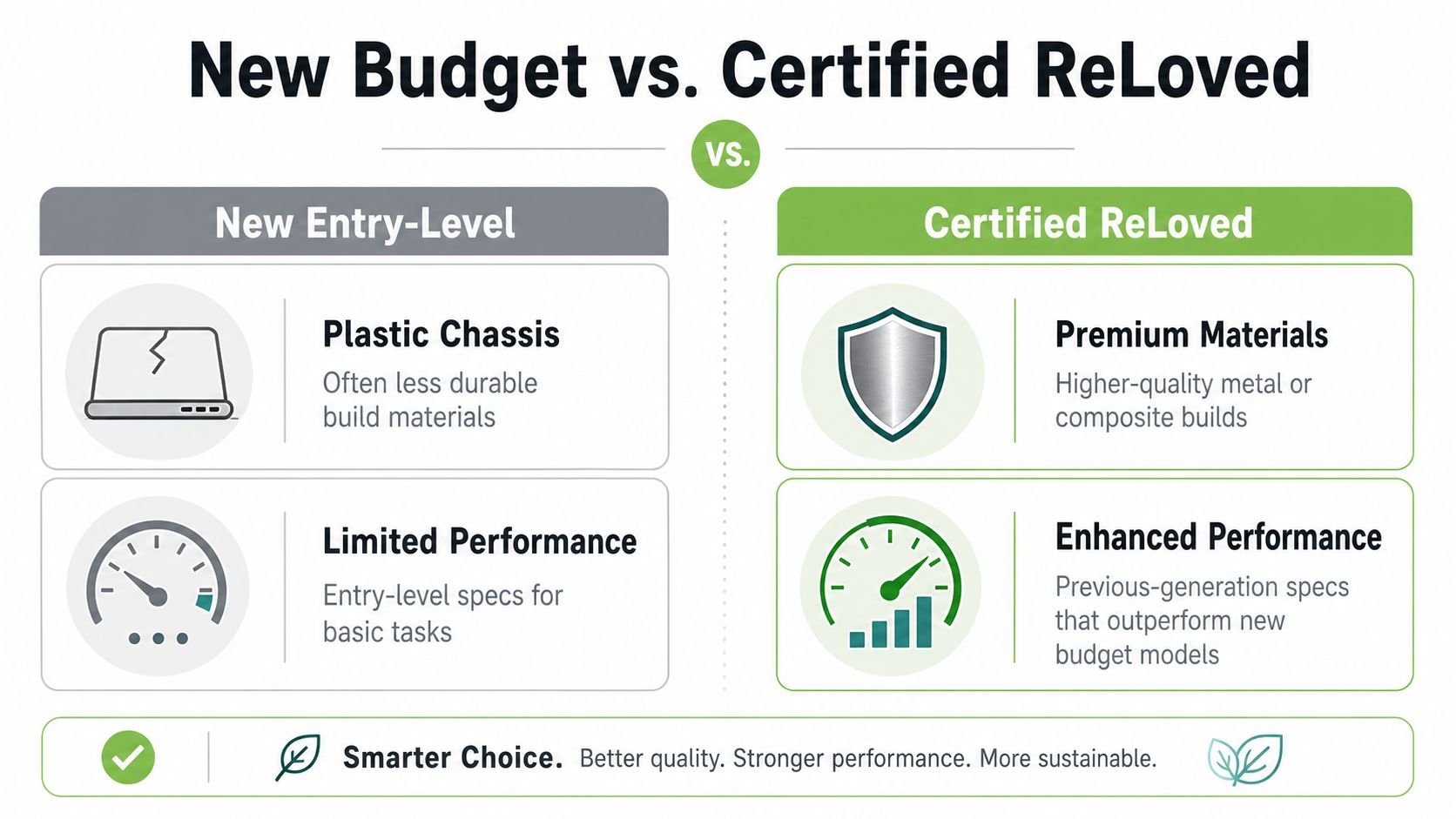
Entry-level new convertibles often cut corners on build materials, keyboard feel, and sustained performance. They can still be fine for basic school work or light admin, but you usually feel the compromises faster than you expect. A plastic chassis may survive daily use, but it won't usually feel as solid as a higher-grade business model, and it won't age as gracefully.
That's why a Certified ReLoved or Certified Surplus device can be a smarter buy. You're often moving into a better class of machine without paying for the original launch positioning. For Singapore buyers, that matters because the goal is not to own the newest thing. The goal is to own the right thing for as long as possible.
Why premium used devices can be better value
A refurbished business-class convertible often brings stronger hinges, better keyboards, and more refined materials than a new consumer-grade budget model. That's not a marketing talking point. It's the practical reason many buyers end up happier with a good used premium device than with a bargain new one.
myhalo's role here is as a technology lifecycle partner, not just a shop. It offers Certified ReLoved and Certified Surplus devices, plus 30-point quality checks, transparent device grading, and battery health disclosure, which lowers the uncertainty that usually makes people nervous about pre-owned tech. Those safeguards matter if the laptop is going into a school bag or a small business workflow. Quality control is what turns a used device into a sensible asset rather than a gamble.
For readers who want to understand the broader remanufacturing side of the market, this laptop remarketing guide gives useful background on how returned corporate devices can be brought back into circulation responsibly.
Reuse is a resilience strategy
Extending device life is not just about waste reduction. It's about protecting value. When a device gets repaired, reused, or resold through a proper lifecycle process, a buyer gets more utility from the same hardware, and a business avoids replacing working equipment too early.
If you want the mechanics behind that approach, myhalo's refurbished laptop guide is worth a look. It aligns with the basic principle here, which is simple. A good budget convertible is not always the cheapest new one. Sometimes it's the better-built machine that already proved itself and still has useful life left.
Recommended Configurations for Students Creators and SMEs
The right convertible depends on the job. A student, a freelance designer, and an SME owner all need different things, even if they're shopping in the same price band.
Students should prioritise portability and battery sanity
A student needs a machine that can move from class to library to home without becoming a burden. A 360-degree hinge, a sensible screen size, and 8 GB to 16 GB RAM are the right starting points. The point is to get a device that stays responsive while handling lectures, PDFs, Chrome tabs, and video calls.
Look for:
- Lightweight design, because commuting changes what feels acceptable very quickly.
- Touchscreen support, since handwritten notes and quick annotations are the point of buying a convertible.
- SSD storage, because slow storage makes a study session feel longer than it is.
A model in the Lenovo Flex series usually makes more sense here than chasing a flashy display. The workflow matters more than the spec headline.
Creators and freelancers need the screen to work
If you edit photos, sketch, or mark up layouts, the display matters more than the hinge trick. Notebookcheck's ranking data shows current 2-in-1 models can reach 99.9% DCI-P3 and 100% sRGB coverage on some configurations, which is a major step up for affordable convertibles. That doesn't mean every budget model is a creator machine. It means you should pay closer attention to colour than to marketing labels.
A creator-friendly shortlist should include:
- High-resolution IPS or OLED panel, depending on budget.
- Stylus support, if you plan to draw or annotate.
- Enough RAM for multitasking, because creative work rarely happens in one app.
The Samsung Galaxy Chromebook family is a useful reference point if screen quality is your main concern, but don't force a premium display into a budget that can't support it.
SMEs should buy for uptime and consistency
SME users need a machine that can survive meetings, spreadsheets, email, and travel without becoming a support headache. That means durability, keyboard comfort, and enough memory for real multitasking. It also means being realistic about security, serviceability, and how long the device will stay useful inside the company.
Practical rule: for an SME, a reliable used business convertible often beats a new consumer model if the used unit has better build quality and clearer device grading.
If your team moves around a lot, this find a travel-ready laptop guide can help frame portability expectations. For many businesses, the right answer is a machine that keeps working, not one that merely looks current.
Extending Device Lifespan Care and Maintenance Tips
A budget convertible only stays budget-friendly if you look after it. The hinge, the battery, and the vents all affect how long the device stays comfortable to use.
Treat the hinge and screen properly
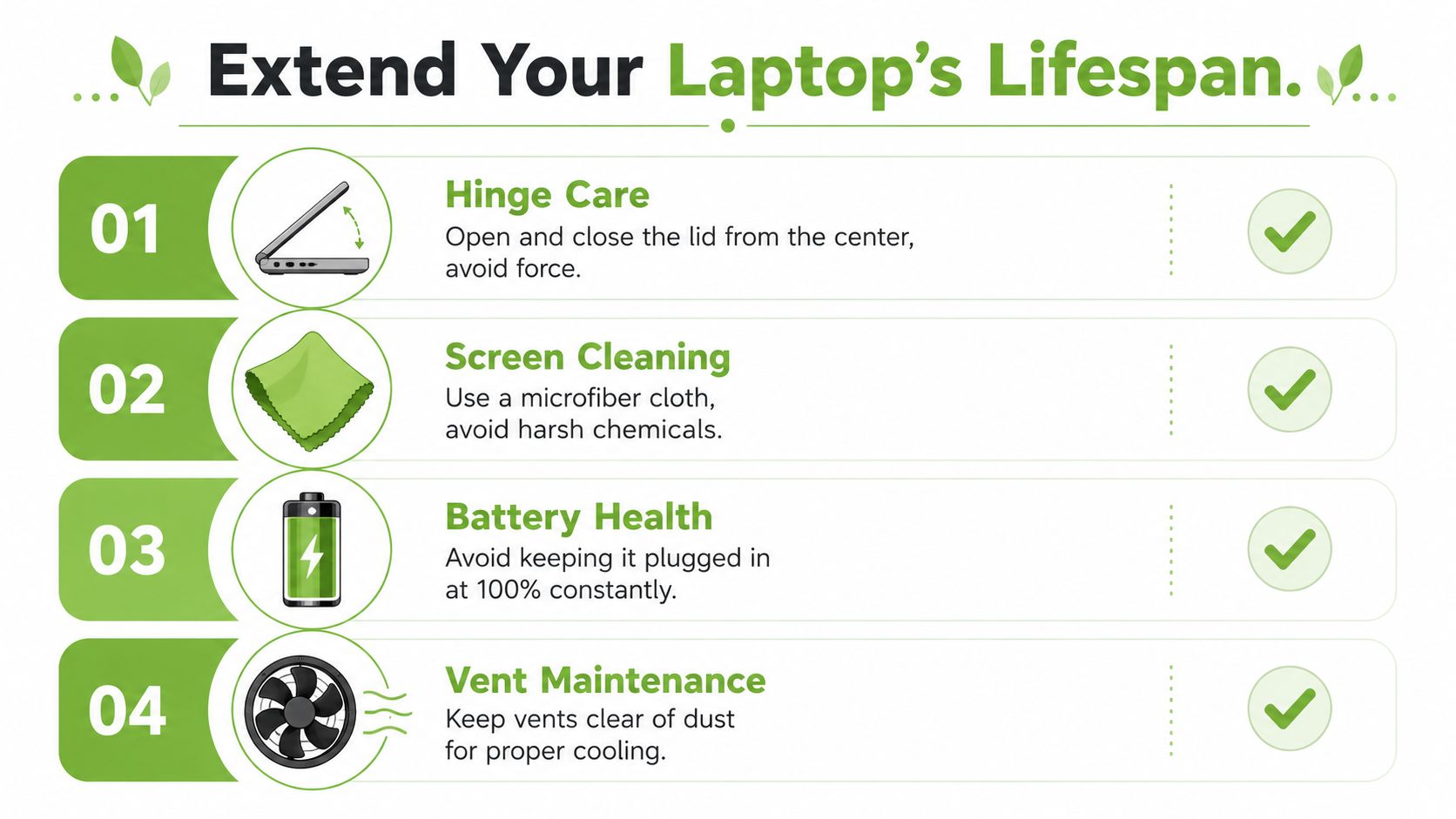
Open the lid from the centre, not from one corner. That reduces uneven stress on the hinge, which is especially important on a 2-in-1 that gets rotated often. Clean the screen with a microfibre cloth and skip harsh chemicals. Touch panels and folding lids are practical, but they need gentle handling.
Keep heat and charging habits under control
Don't leave the laptop baking on a soft surface that blocks airflow. Keep the vents clear, and avoid piling papers or fabric over the exhaust area. Battery care is equally simple. Don't make a habit of keeping it plugged in at full charge all the time if you can help it.
Use support programmes before problems grow
myhalo offers myhalo e-Xtender and myhalo Protect, which fit well for buyers who want to treat a laptop as a long-term asset. Those kinds of programmes matter because accidental damage, battery wear, and small faults are what usually cut a convertible's life short. If the goal is better value, a modest care plan can make more sense than replacing the whole device early.
Simple software habits help too. Keep updates current, clear out files you no longer need, and restart the device once in a while so background processes don't pile up. That's not glamorous advice, but it's how you protect the resale value and day-to-day reliability of the machine.
Making the Final Decision with Confidence
Pick the device that gives you the best total lifecycle value, not just the lowest entry price. For most Singapore buyers, that means prioritising 16 GB RAM when possible, a sensible IPS touchscreen, and a form factor that matches the way you work. If a Certified ReLoved or Certified Surplus convertible gives you better build quality and clearer grading, that's the better business decision too. For trade-in options and upgrade planning, myhalo's laptop trade-in guide is a useful next step.
If you want a practical recommendation, start with your use case, then choose the strongest device that still leaves room for repairs, reuse, and future resale. That's how you buy once, use longer, and keep your tech spending under control.
myhalo helps Singapore buyers choose smarter by combining device sales with repairs, trade-in support, and certified pre-owned options that extend useful life. If you're weighing a new budget convertible against a higher-value Certified ReLoved or Certified Surplus model, visit myhalo and compare your options with long-term use in mind.