





Apple MacBook Repair: Costs and Options
Your MacBook fails just before a client presentation, a student submission, or the day's first operations meeting. The screen stays black, the battery drains within minutes, or a liquid spill leaves you deciding whether to pay for a repair or replace the entire machine. In Singapore, apple macbook repair is no longer a simple fix-or-buy decision. It's a technology lifecycle choice involving diagnosis, downtime, data, warranty terms, residual value, and the possibility of moving to a certified refurbished device.
Singapore's repair ecosystem has become more established. CNA reported that the number of phone and computer repair companies grew from about 460 to about 1,020 over 14 years, more than doubling the local base that includes MacBook repair services (CNA coverage via The Smart Local's Sim Lim Square guide). That gives consumers and SMEs more pathways, but more choice also makes disciplined evaluation important.
Table of Contents
- Navigating Your Apple MacBook Repair Options
- Identifying Common MacBook Hardware Faults
- Comparing Authorised Service And Independent Repair Shops
- Evaluating Repair Viability Against Replacement
- The myhalo Approach To Device Lifecycle Management
- Connecting Device Longevity To Business Resilience
- Preparing Your MacBook For Service And Next Steps
Navigating Your Apple MacBook Repair Options
A student with a failing battery needs a different answer from an SME whose MacBook contains client files and supports daily sales operations. The student may prioritise same-day service and a manageable bill. The SME may prioritise data protection, a documented repair process, and a replacement device that keeps the employee productive while the original is assessed.
Treating both situations as “send it to a repair shop” misses the key decision. First identify the fault. Then establish whether the device is covered, whether the data is backed up, and whether the repair preserves enough value to justify the downtime. A working MacBook with a new battery may remain useful for years, while a liquid-damaged machine with several affected circuits may be a poor repair candidate.
Practical rule: Never approve a repair from a symptom alone. Approve it after the technician identifies the failed component, explains the repair method, and states what happens if the diagnosis changes.
Singapore's dense service corridors, including Sim Lim Square and other retail clusters, give owners access to independent technicians with different specialisations. Some focus on component replacement. Others handle board-level work, which means repairing microscopic connections on the logic board rather than replacing the whole board.
For readers comparing repair economics across markets, the guide to MacBook screen repair pricing UK offers useful context on how display work is assessed elsewhere. The Singapore decision still depends on your exact model, local parts availability, warranty terms, and the technician's diagnosis.
Apple's official route is also clear. Mac laptops can be taken to an Apple Store, a Genius Bar, or an Apple Authorised Service Provider, with Apple-certified repairs using genuine Apple parts available in Singapore (Apple's Mac repair support). Independent repair can be more flexible, but the responsibility for checking parts quality, warranty coverage, and data handling rests more heavily with the customer.
Identifying Common MacBook Hardware Faults
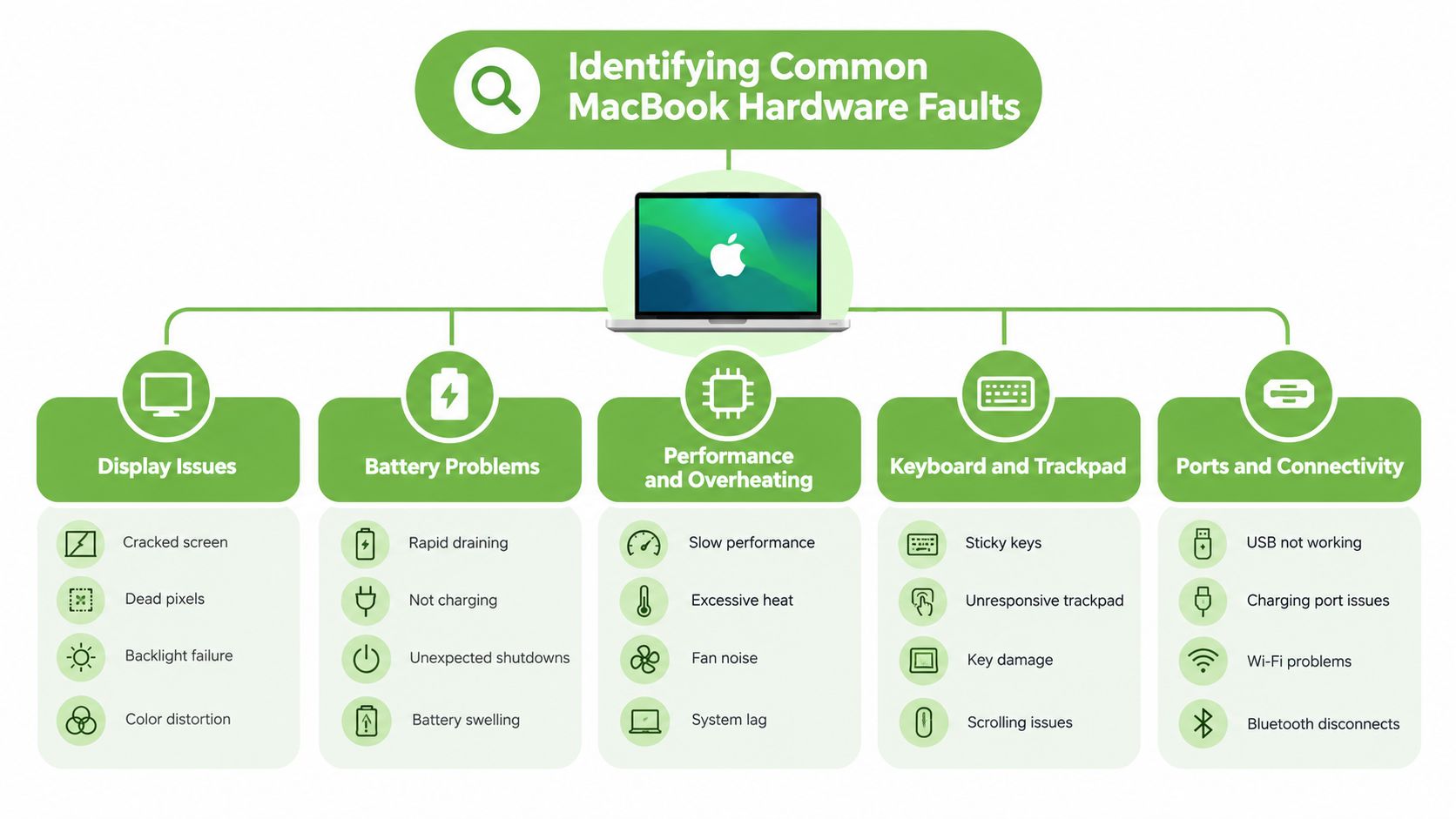
A MacBook that won't start doesn't automatically need a logic board replacement. The visible symptom often points to several possible causes, so the first useful step is to describe exactly what the machine does.
Battery symptoms and charging problems
A worn battery usually reveals itself through rapid discharge, unexpected shutdowns, or a MacBook that works normally only while connected to power. A swollen battery is more serious. It can push against the trackpad or bottom case and should not be pressed, punctured, or carried around casually.
Charging problems can also come from the charger, cable, debris in a port, or the charging circuitry on the board. A technician should test those possibilities before recommending a battery replacement. myhalo's guidance on MacBook battery replacement is useful for understanding why the model and battery condition affect the quote.
Display and keyboard failures
A cracked panel is straightforward to identify, but a dim screen, vertical lines, flickering, dead pixels, or display delamination can have different causes. Damage may affect the panel, the display cable, the hinge area, or the logic board. Ask whether the proposed repair replaces the complete display assembly or addresses a smaller fault.
Keyboard faults range from a single stuck key to liquid contamination beneath the key mechanism. Replacing one key may be appropriate in limited cases, while repeated or spill-related failures can require more extensive work. A technician should explain whether the keyboard is being repaired, replaced, or bundled with a larger top-case component.
Logic board and liquid damage
The logic board contains the main circuits that coordinate charging, startup, storage access, display output, and other functions. Liquid damage can create corrosion or short circuits that aren't visible from the outside. A MacBook may appear to recover after a spill and fail later, so continued use is a bad test of safety.
Board-level repair uses microscopes, specialised tools, and careful measurement to replace damaged components or restore broken connections. It can preserve a device that would otherwise require an expensive board replacement, but success depends on the affected circuit and the extent of corrosion. Do not switch the machine on repeatedly after a spill. Disconnect power and seek a diagnosis promptly.
Comparing Authorised Service And Independent Repair Shops
The authorised-versus-independent choice comes down to control, cost, and repair scope. Apple's route gives you a standardised channel and genuine Apple parts. An independent specialist may offer component-level work, board repair, and a faster local handover. Neither route is automatically correct for every MacBook.
Apple's Singapore repair terms also create important boundaries. Apple may refuse or exclude service for accidental damage, liquid spills, misuse, abuse, or unauthorised modification, and a device may be returned unserviced with a diagnostic fee under the applicable terms (Apple Singapore repair terms). Read those conditions before assuming that an official service visit will lead to a repair.
| Feature | Authorised Apple Service | Independent Repair Shop |
|---|---|---|
| Parts | Apple-certified repairs using genuine Apple parts | May use original, refurbished, or compatible parts. Ask for the exact part type |
| Diagnosis | Standardised official service pathway | Shop-specific testing and reporting |
| Liquid damage | May be excluded or refused under service terms | Some specialists assess and attempt board-level recovery |
| Board repair | May recommend a larger module or replacement pathway | May offer component-level microsoldering |
| Warranty impact | Suits devices with applicable Apple coverage | Unauthorised work may affect existing coverage |
| Turnaround | May involve in-store handling, shipment, or centralised status tracking | Often arranged directly with the shop and may be faster for stocked parts |
| Customer responsibility | Follow Apple's service and data requirements | Check the shop's warranty, parts source, privacy process, and liability terms |
The financial gap can be significant. Apple's Singapore terms say a failed inspection can trigger a S$129 diagnostic fee, while battery service for recent MacBook Air models is listed at S$269 to S$289 (Apple Singapore repair terms and pricing). Singapore independent repair listings commonly advertise battery replacements from about S$85 to S$190 or more, so compare the complete landed cost rather than the headline part price.
For screen work, ask whether the quote covers the display assembly, labour, calibration, data handling, and warranty. This MacBook screen repair guide can help you understand the practical questions to ask before approving display service.
Apple's official status process is managed through Apple repair support in Singapore, while local providers may advertise walk-in service, same-day battery replacement, and branches across Bugis, Bedok, Jurong, Woodlands, Tai Seng, and Ang Mo Kio. Speed matters, but it shouldn't outrank data security and a credible diagnosis.
Evaluating Repair Viability Against Replacement
A repair quote is only one part of the decision. The correct comparison is between the total repair cost, the MacBook's present value, the cost of an equivalent replacement, and the operational impact of downtime.
Use this decision sequence:
- Confirm the failure. Get a written diagnosis, not just a symptom description.
- Calculate the landed cost. Include diagnostics, parts, labour, shipping, accessories, data migration, and any temporary replacement device.
- Assess remaining usefulness. Consider processor capability, memory, storage, battery condition, software support, and physical condition.
- Compare replacement routes. Include a new device, a certified refurbished MacBook, a trade-in, or a temporary loaner.
- Make a lifecycle decision. Repair when the device remains suitable and the fault is contained. Replace or trade in when several risks are accumulating.
The commonly used 50% repair rule is a useful screening tool, not a law. If the repair approaches half of the MacBook's current value, pause and compare alternatives. A newer Apple Silicon model with a single failed battery may still deserve repair. An older machine with a logic board fault, worn battery, damaged display, and uncertain parts availability deserves a much stricter review.
Decision test: Ask, “Will this repair give the user a dependable working device, or only postpone a replacement decision?”
Downtime can outweigh a modest price difference. An employee who cannot access customer records or project files may cost the business more through lost productivity than through the repair itself. Backups, device migration, and a spare machine can therefore be part of the economic calculation.
A replacement doesn't have to mean buying brand new. Readers comparing affordable options can use this resource on budget friendly laptops for students to understand how refurbished devices fit into a broader value calculation. For an SME, that same principle applies to fleet planning. A certified replacement may restore productivity without committing to the highest possible purchase price.
The myhalo Approach To Device Lifecycle Management
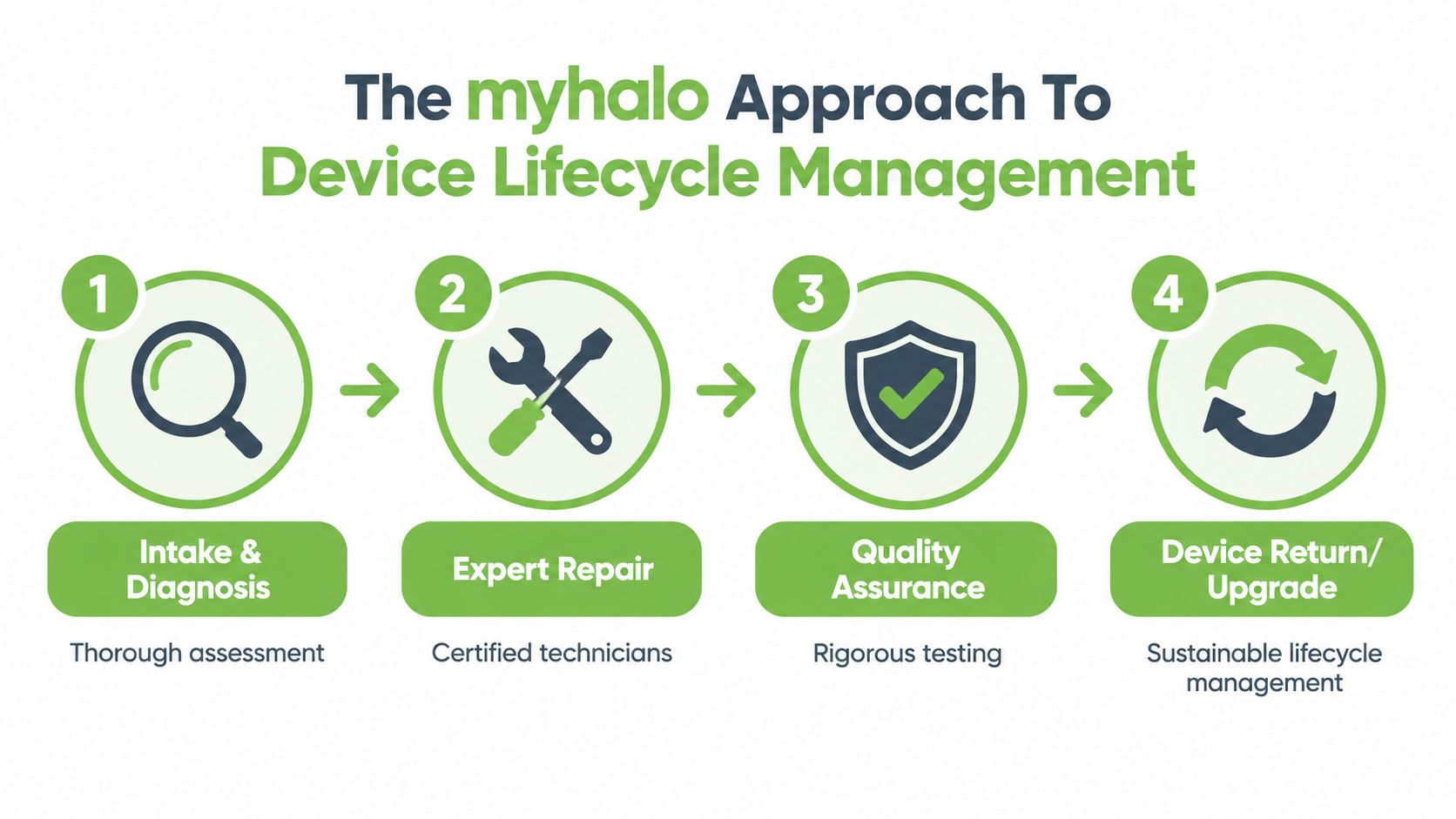
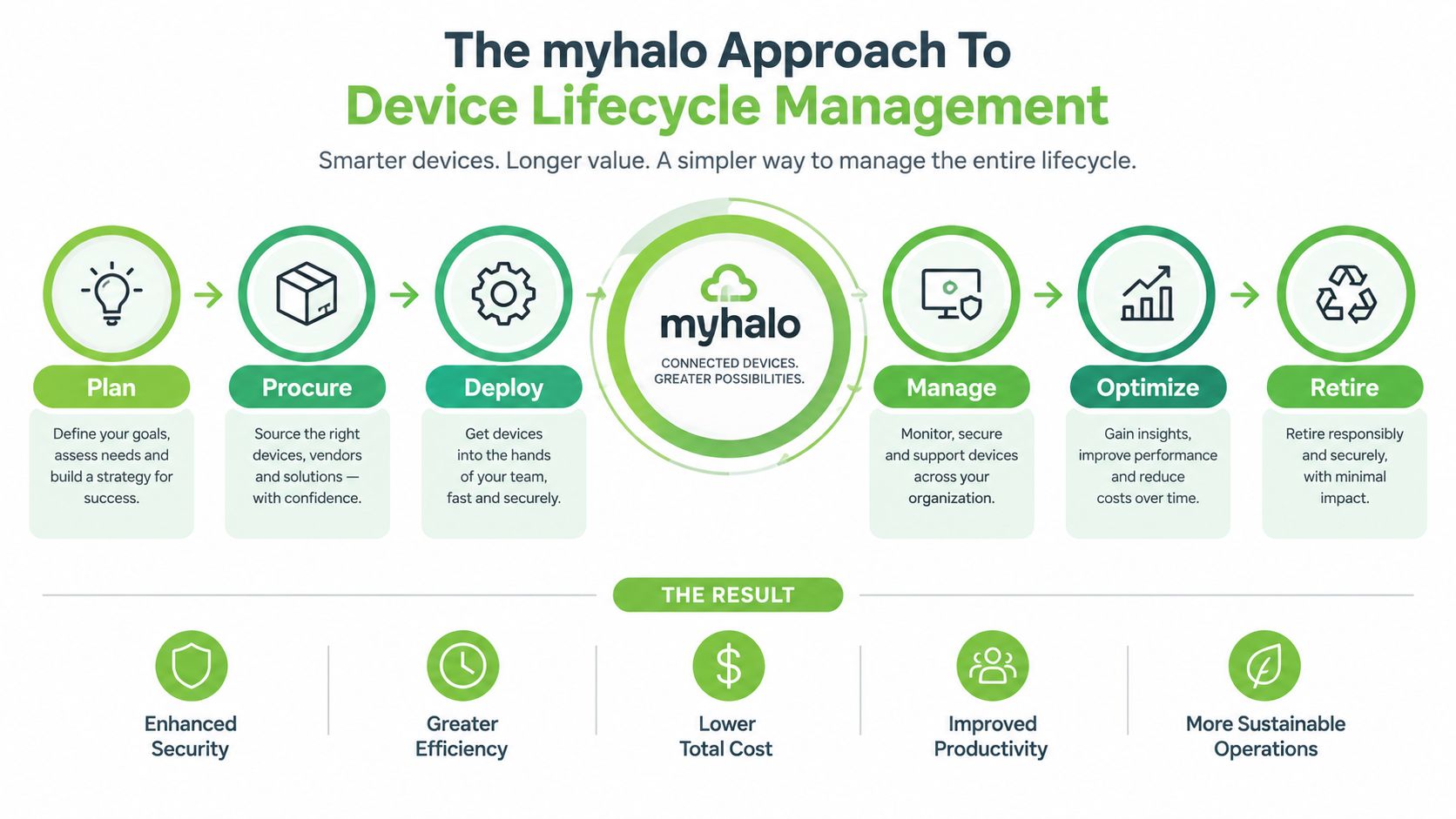
A repair shop solves a fault. A lifecycle partner helps you decide what should happen before, during, and after that fault. That distinction matters when a MacBook contains business data, when several employees need dependable devices, or when the repair quote competes with a refurbished replacement.
myhalo's lifecycle approach can include diagnosis, repair, data and device migration, trade-in, protection, reuse, and responsible recycling. Its RescueAdvise service and mylo AI Assistant support decision-making, while repair and migration services address the practical work around the device itself. The point isn't to force every MacBook into repair. The point is to keep useful technology in service when that makes financial and operational sense.
Repair with a clear quality baseline
When a repair is viable, insist on a documented intake and a meaningful post-repair test. Battery charging, display output, keyboard input, ports, camera, speakers, Wi-Fi, sleep and wake behaviour, and startup should be checked as relevant to the fault. A repair warranty should state what it covers and for how long.
myhalo's service model includes 30-point quality checks, transparent device grading, and battery health disclosure for relevant devices. The organisation is ISO 9001 Certified and ISO 27001 Certified, which are useful signals for customers assessing quality management and information security processes. They don't remove the need to ask questions, but they give SMEs a stronger basis for supplier evaluation.
Refurbishment as the third option
The choice isn't limited to repairing the existing MacBook or buying a factory-sealed replacement. Certified ReLoved devices can provide a professionally checked route into reuse, while Certified Surplus products offer another option for customers seeking value from devices that are not being sold as standard new stock.
Transparent grading matters because cosmetic condition and functional condition aren't the same thing. A business can accept visible marks on a secondary workstation if battery health, performance, warranty terms, and data handling meet its requirements. A customer-facing role may justify a cleaner grade. Make that choice deliberately rather than paying for appearance without improving operational fit.
Protection plans also change the calculation. AppleCare+ Singapore lists three-year Mac coverage at S$229 for MacBook Neo, S$309 for MacBook Air 13-inch, S$359 for MacBook Air 15-inch, S$429 for MacBook Pro 14-inch, and S$609 for MacBook Pro 16-inch (AppleCare+ Singapore). Apple says coverage can be obtained through a prepaid shipping label, an Apple Store, or one of more than 5,000 Apple Authorised Service Providers, so owners should compare the plan cost with their device value, risk profile, and likely usage.
Connecting Device Longevity To Business Resilience
A repaired or reused MacBook is not merely an environmental success. It can be a working capital decision. Keeping a suitable device productive delays an unnecessary purchase, while a structured replacement programme helps an SME avoid emergency spending when several machines fail close together.
Resilience comes from knowing what you own and what condition it is in. Maintain an asset register with the model, assigned user, battery condition, warranty status, repair history, and replacement priority. That information lets an operations manager decide whether a faulty device should go to repair, be reassigned after service, or be replaced with a certified refurbished unit.
Make service continuity part of the budget
A MacBook fleet needs a plan for interruptions. Keep current backups, define who approves repair spending, and identify a temporary device pathway. If a staff member's laptop fails during a busy period, the business can move the user to a prepared replacement instead of making a rushed purchase based only on availability.
The same logic supports reuse. A device that no longer suits a senior designer may still handle administration, point-of-sale work, customer service, or training. Reassignment creates value without requiring every role to receive the same specification. Certified grading and battery disclosure make that reassignment easier to manage because the next user receives a clearer description of the device.
For SMEs: Treat repair history as an asset-management record, not as an isolated service receipt.
Secure data migration is essential when devices change hands. Before a MacBook is reassigned, traded in, or recycled, confirm that the user has backed up required files, signed out of Apple services, and removed device locks. End-of-life equipment should go through a responsible recycling route after data has been handled properly, with reusable components and materials separated where possible.
Apple states that owners may obtain service and parts from Apple service providers for a minimum of five years from when Apple last distributed the product for sale (Apple's after-warranty service guidance). That minimum service window can inform retention policies, but it shouldn't be the only factor. A device may remain serviceable yet fail to meet the user's performance, security, or battery expectations.
Preparing Your MacBook For Service And Next Steps
Prepare the device before handing it over. Good preparation protects your data, speeds diagnosis, and prevents avoidable delays caused by Activation Lock or missing information.
Secure the data first
Use Time Machine or another trusted backup method to create a current copy of essential files. Open several important documents from the backup if possible. A backup that has never been tested isn't a reliable recovery plan.
For a practical walkthrough, use this guide to back up and restore a MacBook. If the MacBook is being traded in or recycled, sign out of iCloud, turn off Find My, and remove the device from your Apple Account. If the machine still works, erase it only after confirming that the backup and any required migration are complete.
Give the technician useful evidence
Write down what happened and when it started. Include whether the MacBook was dropped, exposed to liquid, connected to a different charger, updated recently, or intermittently failing. Record unusual sounds, heat, battery behaviour, screen artefacts, and whether external displays or peripherals work.
Bring the charger if the issue involves charging or power. Ask for four answers before authorising work:
- Fault: Which component failed, and what test confirmed it?
- Scope: Is this a component repair, board-level repair, or full assembly replacement?
- Cost: Does the quote include diagnosis, labour, parts, tax, and any return fee?
- Protection: What warranty applies, and what happens if the repair doesn't resolve the original symptom?
Apple's Singapore support pages confirm that Mac laptops can be repaired through an Apple Store, any Genius Bar, or an Apple Authorised Service Provider, using Apple-certified repairs and genuine Apple parts (Apple Mac laptop repair options). You can start through Apple Support, the Apple Support app, or by phone. Independent providers remain an option, especially for board-level diagnosis or component work, but ask how they protect customer data and document parts.
If the quote no longer makes sense, move to a replacement decision rather than authorising work by habit. Compare a Certified ReLoved or Certified Surplus device, a trade-in, and a protected new purchase. For an SME, include migration time and user setup in the project plan, then recycle or reassign the old MacBook responsibly.
myhalo can help assess MacBook repair, migration, trade-in, Certified ReLoved and Certified Surplus alternatives, with device grading and battery health disclosed for relevant products. Visit myhalo to compare the repair path with a practical replacement or reuse plan for your device.