





Affordable Gaming Desktop: Singapore Guide 2026
You're probably in the same spot a lot of first-time buyers in Singapore hit. You want to play after work or school, maybe jump into CS2, Valorant, or Cyberpunk 2077, but every search for a gaming PC seems to swing between overpriced RGB showpieces and suspiciously cheap listings with old parts and no safety net.
That's why an affordable gaming desktop needs a different mindset. The goal isn't to chase the cheapest box. It's to buy enough performance for the games you play, avoid the few mistakes that waste money, and use Singapore's strong market for both new and refurbished hardware to your advantage.
A lot of buyers still assume desktop gaming is only for people willing to spend big. That's outdated thinking. The market has moved. The global gaming PC market is valued at USD 47.9 billion in 2026 and projected to reach USD 89.6 billion by 2036, with desktops leading the category, according to Fact.MR's gaming PC market outlook. For local buyers, that matters because stronger desktop demand usually means more choices at the entry and mid-range end, not just premium rigs.
Table of Contents
- Your First Affordable Gaming Desktop Starts Here
- What Budget Gets You What Performance
- The Gamer's Hierarchy of PC Components
- New vs Refurbished The Smart Buyer's Dilemma
- Where to Buy and How to Protect Your PC in Singapore
- Your Gaming Journey Begins Now
Your First Affordable Gaming Desktop Starts Here
Buying your first gaming desktop can feel more complicated than it should. Sellers throw around CPU generations, GPU model numbers, SSD types, airflow claims, and “gaming” branding as if all of it matters equally. It doesn't.
What matters is whether the machine fits your budget, runs the games you care about smoothly, and leaves you room to upgrade later without rebuilding everything from scratch. In Singapore, that's a realistic goal because the market isn't limited to only brand-new premium systems. You've got pre-builts, custom local builds, certified refurbished options, and a very active second-hand scene.
The smartest buyers don't start with specs. They start with a short list of absolute requirements:
- Games first: Are you mainly playing esports titles, or do you want newer single-player games too?
- Resolution target: Most budget buyers should aim for 1080p and tune settings sensibly.
- Buying style: Do you want a plug-and-play desktop, or are you willing to mix used and new parts?
- Risk tolerance: Some people are comfortable hunting bargains. Others want warranty-backed peace of mind.
Practical rule: If you're on a tight budget, buy for today's games and tomorrow's upgrade path. Don't overspend chasing bragging rights.
A lot of confusion also comes from reading scattered forum advice that doesn't reflect local buying conditions. Singapore is different. Carousell deals move fast, pre-built pricing can be surprisingly competitive, and warranty terms matter more in a humid climate where heat and dust punish neglected systems.
If you tend to compare options obsessively before buying, it also helps to browse broad buyer resources outside the PC bubble. A page of frequently asked questions can be useful as a reminder of how to evaluate service quality, support clarity, and purchase confidence in any consumer tech category, not just gaming gear.
The good news is simple. You don't need a luxury build to get started. You need a sensible one.
What Budget Gets You What Performance
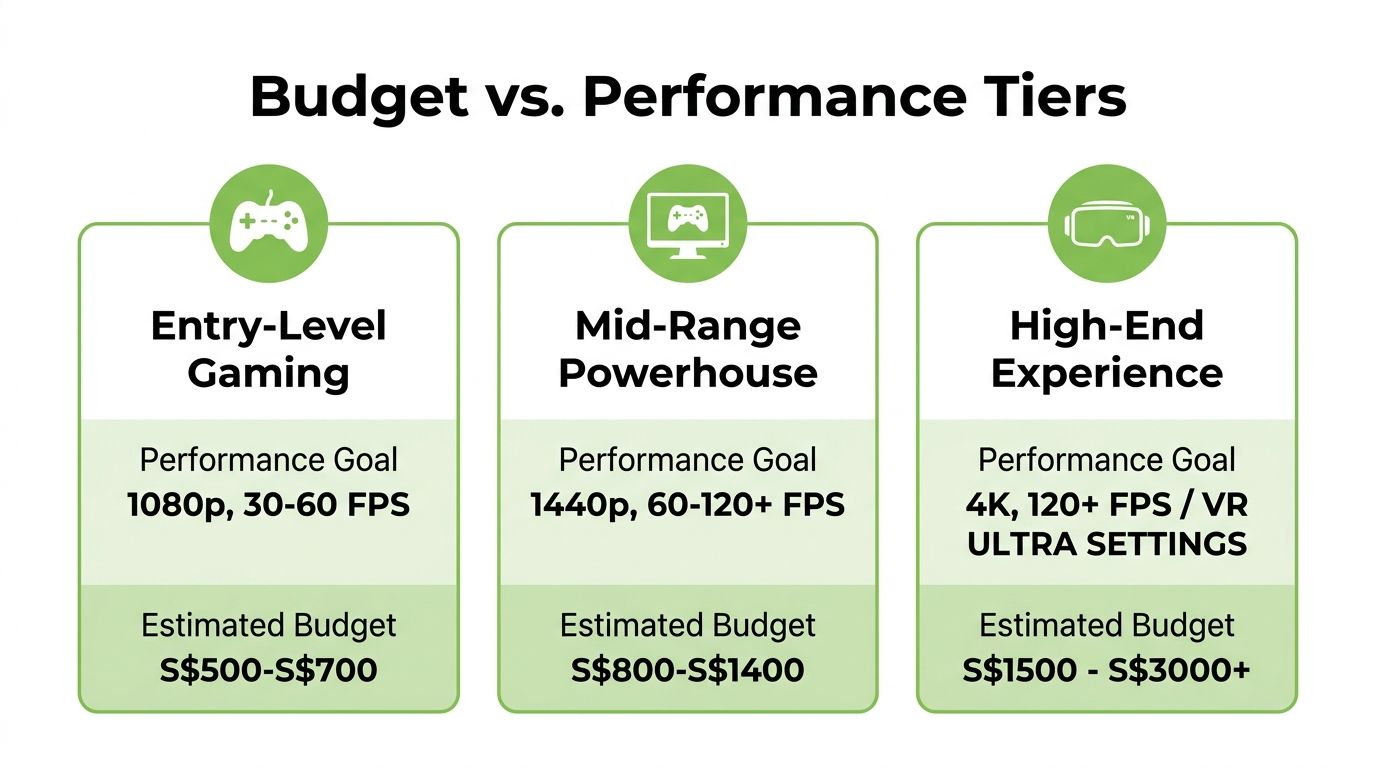
The biggest mistake beginners make is treating “budget” like a single category. It isn't. A cheap esports machine, a balanced 1080p all-rounder, and a more upgrade-friendly desktop all count as affordable, but they serve different kinds of players.
Think in use cases, not parts lists
If your main games are lighter competitive titles, you can be much more aggressive about saving money. You don't need a fancy case, massive storage, or a top-end processor. You need stable frame rates, an SSD, and parts that don't choke under load.
If you want a better all-round system, the local sweet spot sits higher. In Singapore, an entry-level budget gaming desktop at around $600 to $900 typically pairs an RTX 3060 with a Core i5 or Ryzen 5 and 16GB RAM, delivering 1080p gaming at high settings with over 90% success in running modern titles like CS2 and Cyberpunk 2077 at 60+ FPS, according to Kachiing's budget gaming desktop build guide for Singapore.
That's the bracket I usually point first-time buyers towards when they want a machine that feels straightforward, modern, and not immediately outdated.
Affordable Gaming PC Tiers in Singapore 2026
| Tier | Price Range (SGD) | Target Performance | Example Games |
|---|---|---|---|
| Ultra-Budget Build | Around the lowest end of the market, often achieved with mixed refurbished and second-hand parts | 1080p on sensible settings, strongest value for esports and older AAA titles | Valorant, CS2, indie games, older AAA releases |
| Sweet Spot Build | $600 to $900 | 1080p high settings, strong all-round gaming for modern titles | CS2, Cyberpunk 2077, multiplayer shooters, action games |
| Future-Proof Budget Build | Above the sweet spot, with more headroom for upgrades | Better long-term flexibility, stronger multitasking, more comfortable settings tuning | Newer AAA games, heavier open-world titles, mixed gaming and productivity use |
The table matters because it keeps expectations realistic. A buyer in the ultra-budget camp shouldn't expect the same experience as someone buying a newer RTX 3060 system with a current mid-range CPU. The machine can still be good. It just has a narrower job description.
A useful local benchmark on the pre-built side is Lazada Singapore, where the Armaggeddon Thunderbolt R5 5600GT is listed at $599.00 with 16GB RGB RAM and a 1TB SSD, making it one of the most affordable ready-to-use gaming desktop options available in the market, as shown in Lazada Singapore's budget gaming desktop listings.
Buy the tier that matches your actual habits. If you mostly queue ranked matches at 1080p, putting extra money into “just in case” hardware often gives you less value than a better monitor, headset, or future GPU fund.
A practical way to decide is this:
- Choose ultra-budget if you're comfortable with refurbished or mixed-source parts and you care most about getting in cheaply.
- Choose sweet spot if you want fewer compromises and a desktop that just feels balanced.
- Choose future-proof budget if you know you'll upgrade gradually and want a stronger platform from day one.
The Gamer's Hierarchy of PC Components
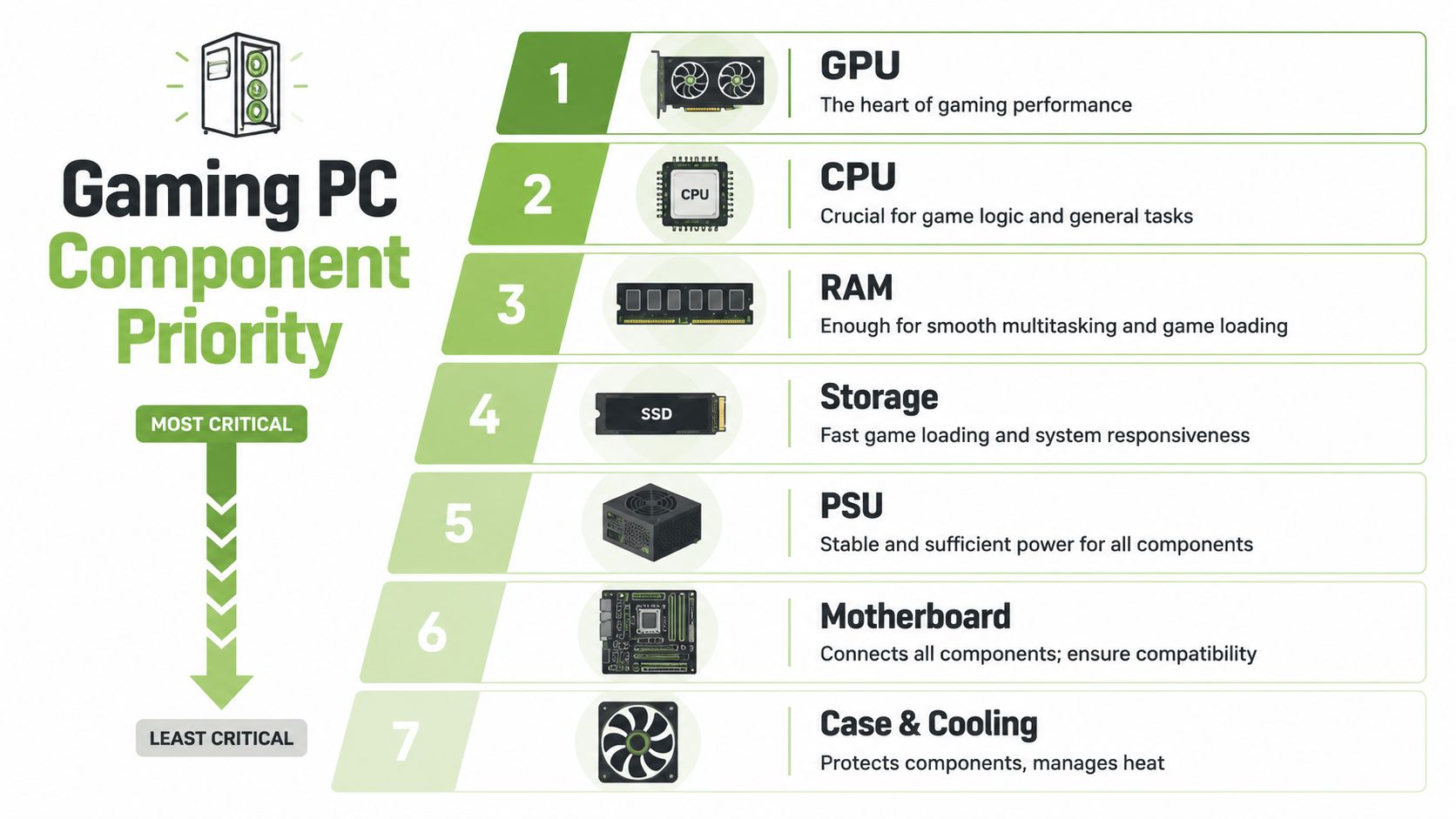
When money is limited, every component can't be top priority. Gaming desktops reward focus. If you spread the budget too evenly, you often end up with a machine that looks respectable on paper but feels oddly disappointing in games.
Put the money where games feel it
For gaming, the GPU is the first priority. That's the part that most directly changes visual quality, smoothness, and how far your system can stretch into newer titles. A lot of first-time buyers do the opposite. They get seduced by a newer CPU name, flashy RAM, or RGB-heavy case, then settle for a weaker graphics card. That's backwards.
The CPU comes second, but it still matters enough to ruin a good build if you cheap out too aggressively. One of the most common traps in budget gaming is pairing a solid GPU with a platform that's too old to keep up. A clear example is an RTX 3060 matched with an Intel 6th Gen i5-6600K, which creates a 30 to 40% frame-rate bottleneck in modern titles because of slower clock speeds and PCIe 3.0 limitations, as noted in the earlier market guidance.
That's why I always rank components like this:
- GPU
- CPU
- RAM
- Storage
- PSU
- Motherboard
- Case and cooling
This doesn't mean the bottom items don't matter. It means they matter differently. A case doesn't give you more FPS by itself, but a bad one can choke airflow and make every expensive part run worse.
A balanced gaming desktop isn't the same as an equal-spend desktop. Good builders spend unevenly on purpose.
The parts you can't afford to ignore
RAM is where a lot of buyers overcomplicate things. For a budget gaming rig, the primary target is stable capacity and decent compatibility. Don't spend your first dollar chasing exotic memory kits if your GPU is still underpowered. If you do want extra headroom for gaming plus multitasking, a kit like G.Skill Sniper X 32GB DDR4 3200MHz desktop memory makes sense only after the core CPU and GPU pairing is already right.
Storage changes how the whole machine feels. Boot times, game loading, patching, and everyday responsiveness all improve with solid-state storage. For a first gaming desktop, I'd treat SSD storage as mandatory. Capacity depends on your library, but the principle doesn't change.
Here's where buyers can save without harming actual gameplay:
- Motherboard: Buy for compatibility and basic reliability, not bragging rights.
- Case: Prioritise airflow and practical front panel access over tempered-glass drama.
- Cooler: Stock or modest aftermarket cooling is often enough for sensible budget CPUs.
Here's where I don't like gambling:
- PSU quality: A weak or questionable power supply can destabilise the whole system.
- Thermals: Small, badly ventilated cases create heat problems that show up later.
- Platform age: Very old platforms can look cheap up front and cost you more when upgrades get awkward.
A simple buying lens helps. Ask which parts directly affect frame rates, which parts affect system feel, and which parts protect your upgrade path. Spend in that order. That's how an affordable gaming desktop stops being “cheap” and starts being smart.
New vs Refurbished The Smart Buyer's Dilemma
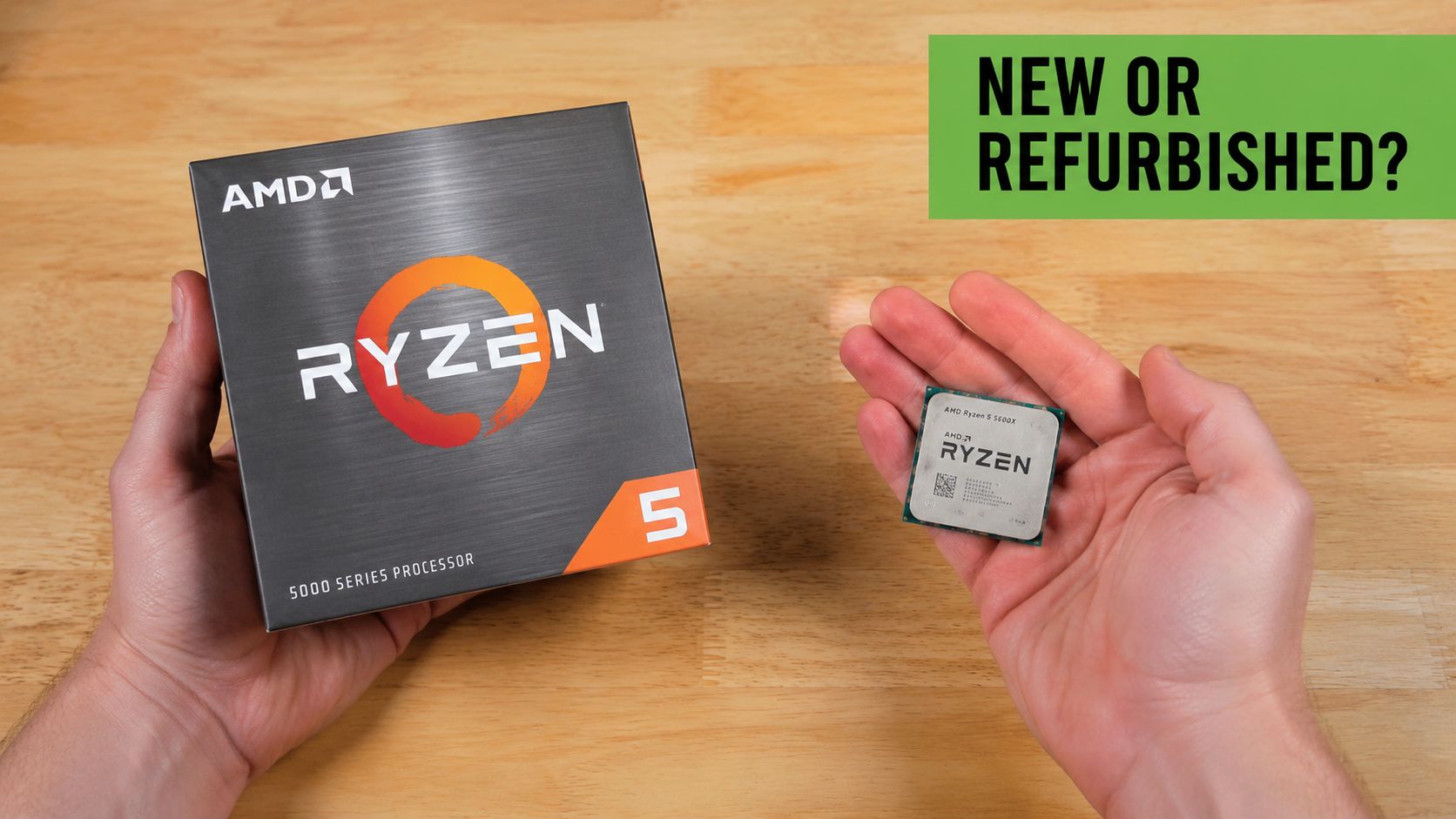
Many Singapore buyers save the most money. Not by chasing mystery deals, but by knowing when refurbished parts are a strong buy and when buying new is worth the extra cash.
Where refurbished makes real sense
A properly chosen refurbished build can exceed expectations. In Singapore, a functional budget gaming desktop can be assembled for $304.50 using second-hand and refurbished parts, starting with an Intel i5-6600K PC base for $100, then adding an RTX 2060 for $175 and a new 500GB SATA SSD for $29, as shown in this Singapore budget gaming desktop build example on YouTube.
That example is useful for one reason. It proves that low-budget desktop gaming isn't fantasy. It's possible if you're selective and realistic about the kind of performance tier you're building for.
Refurbished parts usually make the most sense in these categories:
- GPU: Good value if the seller tests thoroughly and offers some warranty support.
- CPU: Often one of the safer used buys because processors tend to age well if not abused.
- Case: Cosmetic wear matters least here.
- Older complete systems: Strong starting point if the platform isn't too outdated for your goals.
If you're new to the category, it's worth reading a grounded overview of refurbished laptop computers and what makes refurbished tech worth considering, because the same buying logic applies to desktops too. Condition grading, testing standards, and after-sales support matter more than the word “refurbished” itself.
Where buying new is often the calmer choice
New components still have a place, especially when failure would be expensive or annoying.
I'd usually lean new for:
- PSU: This is the component I'm least relaxed about buying from an unknown history.
- Primary SSD: Fresh storage reduces one more uncertainty in the build.
- Fans and thermal paste: Cheap enough to replace, worth doing properly.
- Certain motherboards: Depends on condition, socket age, and how well the seller documents it.
Refurbished is smart when the testing is strong and the seller is accountable. It's not smart when you're buying blind and hoping for the best.
The decision isn't “new versus refurbished”. It's risk without support versus value with support. If a certified refurbished part comes with transparent grading, inspection, and warranty coverage, that's a very different proposition from a random listing with blurry photos and a vague description.
Where to Buy and How to Protect Your PC in Singapore
Buying the desktop is only half the job. The other half is reducing the chances that a good deal turns into a headache three weeks later.
A useful starting point is to shop from retailers that clearly show warranty terms, exchange policies, and what condition standard applies to each device category. For example, when browsing gaming desktop options in Singapore, I'd look first for whether the listing and store policies explain what's covered after purchase, not just what RGB parts are inside.

What to check before you pay
A first-time buyer should inspect a seller almost like they inspect the hardware. In Singapore, convenience is important, but accountability is more important.
Use this checklist:
- Warranty clarity: If the store doesn't explain the coverage clearly, assume problems later will be harder to settle.
- Exchange policy: A straightforward return or exchange window reduces risk on first boot.
- Physical presence: A store you can visit matters when you want to inspect build quality or ask direct questions.
- Support channel: WhatsApp support, phone contact, or clear live response options make after-sales service easier.
- Trade-in options: Useful if you're replacing an old laptop or desktop and want to offset some cost.
One practical advantage in Singapore is that some retailers combine online convenience with a physical outlet, so you can check the product first and still buy efficiently. That matters more for budget desktops than many people realise because first-time buyers often need help confirming ports, upgrade paths, and condition.
If two systems are similarly priced, choose the one backed by clearer after-sales terms. Cheap becomes expensive very quickly when support disappears.
Aftercare matters more than most first-time buyers think
A gaming desktop isn't a one-time transaction. Dust builds up, storage fills, Windows installations get messy, and accidents happen. That's why support services can be just as relevant as the machine itself.
In Singapore, useful aftercare usually falls into four buckets:
- Trade-ins for turning old devices into credit.
- Maintenance programmes that help extend the device lifecycle.
- Protection plans for accidental damage and extended coverage.
- Instalment options that make a better-spec purchase manageable without jumping to an unsafe bargain.
Here's a quick look at why local aftercare has become part of the buying conversation:
For students and younger buyers, instalment plans can be especially helpful if they let you buy the right machine once instead of buying the wrong machine twice. Just be disciplined about it. Financing should support a sensible build, not justify overspending on looks.
Your Gaming Journey Begins Now
A good affordable gaming desktop isn't about winning the spec sheet. It's about making sure every dollar does a job. Put enough money into the graphics card, avoid old CPU pairings that hold the system back, insist on SSD storage, and don't get careless with the PSU or cooling.
That approach also fits Singapore especially well. You don't have to choose between expensive new systems and risky no-support bargains. There's a workable middle ground if you buy from sellers who document condition properly, explain warranties clearly, and treat refurbished hardware like a legitimate product category instead of a lucky dip.
There's also a lifestyle side to this that many buyers forget. A desktop setup feels more satisfying when the whole space supports how you play. If you're refreshing your room along with your rig, a visual guide to leveling up your space can help with the fun side of setup planning without pushing you into expensive furniture or décor mistakes.
A final checklist before you buy
Keep this short list beside you when you compare desktops:
- Set your real budget first: Don't let a flashy listing decide for you.
- Choose your main game type: Esports and newer AAA titles need different compromises.
- Prioritise GPU and CPU pairing: A bad match wastes performance.
- Stick with SSD storage: Daily usability depends on it.
- Check the seller, not just the specs: Warranty, exchange terms, and support matter.
- Use refurbished strategically: Great for value when the testing and grading are trustworthy.
- Leave room to upgrade: The best budget desktop is the one that doesn't corner you later.
Buy with a plan and you'll avoid most of the regrets that hit first-time PC owners. The machine doesn't have to be perfect. It just has to be well chosen.
If you want a practical place to start, browse myhalo for gaming desktops, refurbished tech, and support options that make budget buying in Singapore feel less risky and more organised.