





SD and Micro SD Card Reader: A 2026 Singapore Guide
You've probably run into this already. Your camera card is full, your drone footage needs to get onto a laptop before the next shoot, or your dashcam has captured something important and your phone can't read the card directly. The files are sitting there, but the transfer part turns into a small headache because the card fits one device and not the other.
That's why a good SD and micro SD card reader still matters. It's one of those accessories people ignore until they urgently need one, and then the difference between a cheap, slow reader and a reliable one becomes very obvious. In Singapore, where people often move files between phones, tablets, USB-C laptops, cameras, drones, and older USB-A devices, the right reader saves time and avoids a lot of frustration.
Table of Contents
- Why You Still Need a Card Reader in 2026
- What Is an SD and Micro SD Card Reader
- Choosing the Right Connector for Your Devices
- How Speed Classes Affect Your Transfer Times
- A Practical Buying Guide for Singapore Shoppers
- Common Issues and Simple Fixes
- Your Card Reader Questions Answered
Why You Still Need a Card Reader in 2026
A common situation looks like this. You finish a weekend trip, pull out your camera or drone, and realise your laptop doesn't have the right slot. Or your phone can technically receive files, but wireless transfer is slow, patchy, or awkward when you just want the footage copied over cleanly.
A dedicated reader solves that in a very direct way. You remove the card, plug the reader into the device you want to use, and transfer files without depending on cloud sync, cables for the original device, or battery life on the camera. For large video files, that simple workflow is often the least troublesome option.
Storage may have changed, but the card stayed relevant
The reason card readers are still around is simple. The SD card standard has been around for a long time and kept evolving with modern devices. The format launched in 1999 by SanDisk, Panasonic, and Toshiba. It later expanded through SDHC in 2005 with capacities up to 32 GB, SDXC in 2009 up to 2 TB, and SDUC in 2018 up to 128 TB. By 2025, the SD Association said global sales of SD and microSD cards had reached 12 billion units, which shows how widely the format is used across cameras, laptops, phones, and readers (SD card history and format development).
That long lifespan matters because many people in Singapore still use removable storage every day. Cameras, action cams, drones, handheld consoles, dashcams, and some Android devices all keep these cards relevant even when internal storage has grown.
Practical rule: If your files live on a removable card, a reader is usually the fastest path to getting them onto the device where you'll actually sort, edit, back up, or share them.
If you're also choosing storage for a new workflow, it helps to explore HauntGears microsd options so you can match the card itself to the reader and the device you're using.
Where readers help most
A card reader isn't only for photographers. It's useful for:
- Dashcam owners who want to archive clips without sitting in the car with an app open
- Students moving media files between tablets and laptops
- Creators editing photos or video on a USB-C laptop
- Travellers backing up camera files before clearing a card
- Drone users who need fast, direct access to footage
When people ask whether they still need one in 2026, the short answer is yes. Not all the time, but exactly when it counts.
What Is an SD and Micro SD Card Reader
Think of a card reader as a data translator. The memory card stores the files, but the computer, tablet, or phone needs a way to access them through a port it understands. The reader is the bridge between those two sides.
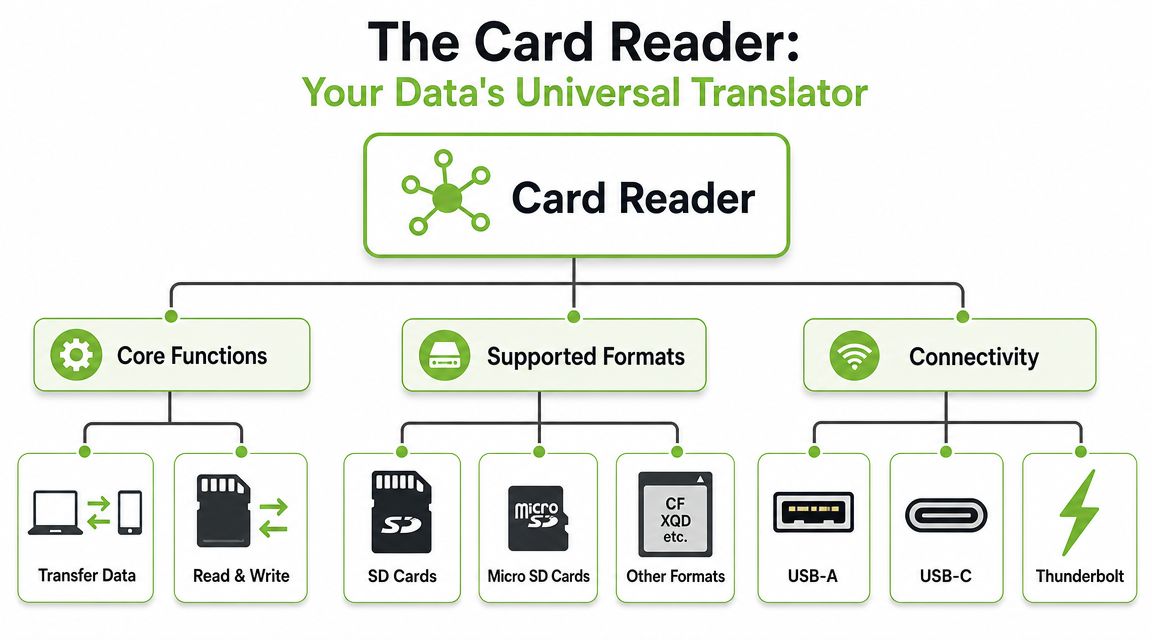
Without that bridge, the files stay stuck on the card unless your device has a built-in slot that supports the format properly. With a reader, the card appears more like external storage, so you can copy, sort, back up, or delete files from a much more comfortable device.
SD slot versus microSD slot
An SD card is the larger card you usually see in cameras and some laptops. A microSD card is the much smaller version used in phones, action cameras, drones, handheld devices, and dashcams.
MicroSD cards arrived in 2005 as a smaller form factor for mobile devices. Early cards started at 128 MB and reached 2 GB by 2006. Later formats expanded to microSDHC with capacities up to 32 GB and microSDXC up to 2 TB, while the card itself stayed tiny at 15 mm x 11 mm x 1 mm (microSD development history and size standards).
That tiny size is exactly why readers matter. The storage format can be powerful and widely compatible, but the physical card is too small for many devices to accept directly.
What a modern reader usually does
A useful reader today often includes more than one slot and more than one connector. The practical features to look for are:
- Dual slots so you can read both SD and microSD without needing an adapter
- Read and write support so you can transfer files both ways
- Modern connectors such as USB-C for newer laptops and tablets
- Simple plug-and-use operation for quick access during travel or field work
Some readers are tiny dongles. Others look more like mini hubs. Neither style is automatically better. The right one depends on your gear and where you use it.
A card reader isn't just an accessory. It's part of your workflow. If it's slow, unstable, or easy to lose, you'll feel that every time you import files.
If you want another practical example of how people use readers to access media in the field, Magic Eagle's guide to photo access is a useful reference.
What it does not do
A card reader doesn't make a slow card fast. It also doesn't override the limits of the device port you connect it to. It creates the path for transfer. How good that path is depends on the whole chain, which matters even more once you start dealing with large photo libraries or video files.
Choosing the Right Connector for Your Devices
The first buying mistake is choosing a reader that supports the card but doesn't conveniently fit the device you use. Before you look at speed ratings, check the connector.
Some customers focus on the card slot and forget the other end. That's the end you'll touch every day.
The three connector types most people ask about
USB-A is the older rectangular port still common on desktops, older laptops, monitors, and some hubs. It's familiar and widely supported, but it's less convenient if your main device is a newer USB-C laptop or tablet.
USB-C is now the easiest option for many people in Singapore. It's reversible, common on current laptops, tablets, Android phones, and accessories, and it fits modern mobile workflows better because you're less likely to need an extra adapter.
Lightning matters mainly if you're using older Apple mobile gear that still relies on that connector. If your main workflow now revolves around newer USB-C devices, a Lightning-specific reader can feel limiting very quickly.
Card Reader Connector Comparison
| Connector Type | Common On | Key Benefit |
|---|---|---|
| USB-A | Older laptops, desktops, some monitors and hubs | Broad compatibility with legacy devices |
| USB-C | Newer laptops, tablets, Android phones, modern hubs | Easier fit for current devices and portable workflows |
| Lightning | Older Apple mobile devices | Direct connection to compatible iPhones or iPads without another adapter |
How to choose without overthinking it
Start with the device where you most often import files.
If you edit on a newer laptop, pick USB-C first. If you mostly work at a desk with an older desktop or office machine, USB-A may still be fine. If you regularly switch between old and new hardware, a dual-connector reader or a travel hub can be the neatest answer.
For people who want one accessory to handle displays, networking, and USB expansion alongside storage transfers, a compact hub such as this Lenovo USB-C travel hub can make sense if your desk setup already depends on USB-C.
What usually works best in Singapore
A lot of local setups are mixed. Someone may have a USB-C phone, a tablet, a work laptop with only USB-C, and an older family desktop with USB-A. In that situation, a single-purpose reader with only one connector can become annoying faster than expected.
A few practical checks help:
- Look at your everyday device first. Buy for the laptop or tablet you use most, not the oldest device in the house.
- Count adapters you already need. If the reader requires another dongle just to plug in, the setup becomes easy to forget or misplace.
- Think about where you transfer files. At a desk, a larger hub is fine. On the MRT or in a café, a compact reader with a direct USB-C plug is usually easier.
The best connector is the one that lets you plug in immediately, without hunting for another accessory.
How Speed Classes Affect Your Transfer Times
When people say a card reader is “slow”, the reader may not be the only problem. Transfer performance works like a chain. The card, the reader, and the device port all matter. The slowest part sets the pace.
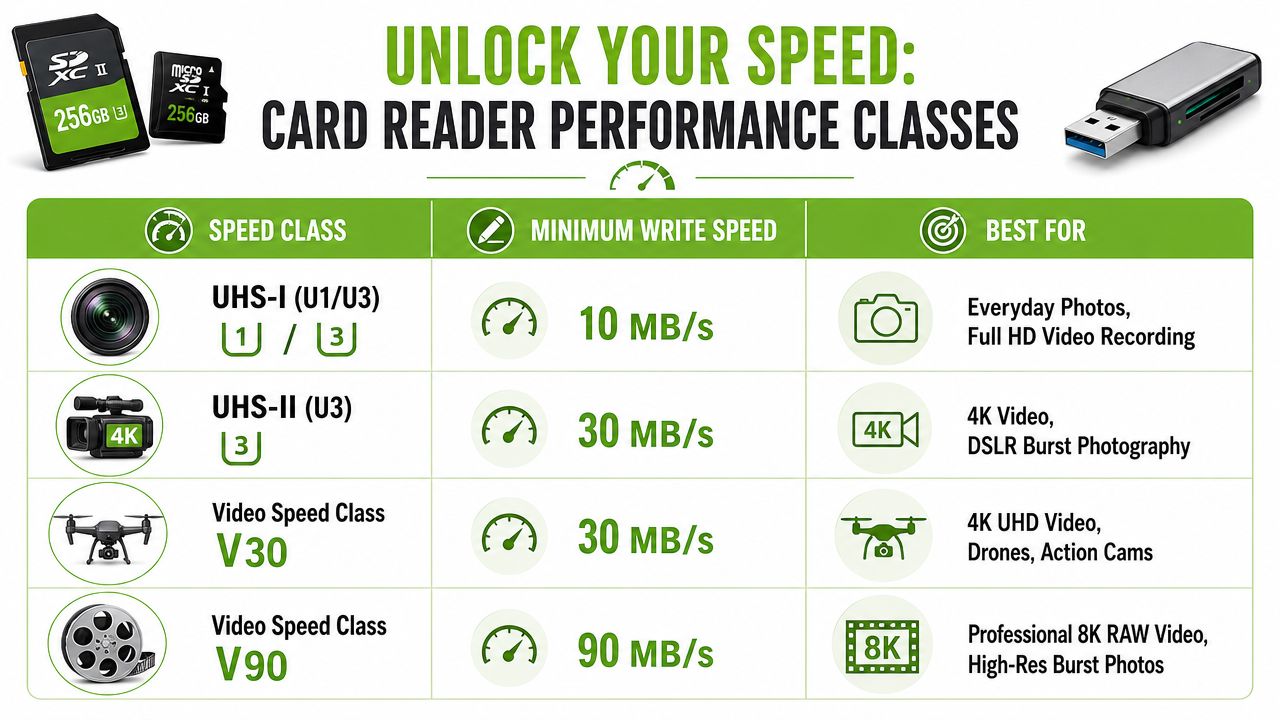
That's why a premium card plugged into a weak reader often feels disappointing. On paper the card may support much more, but your actual workflow only sees what the whole chain can sustain.
What the speed labels actually mean
Some of the key speed classes are based on minimum sustained write performance. Class 10 means 10 MB/s. UHS Speed Class U3 means 30 MB/s. Video Speed Class V30 also means 30 MB/s. Higher tiers such as V60 and V90 are intended for UHS-II or faster cards and readers (SD performance standards and compatibility notes).
Those labels matter most when you record or move demanding media. General documents and casual photo copies don't stress the system much. High-bitrate video, burst shooting, and heavy offloads do.
What that means in everyday use
A few practical examples make this clearer:
- Basic school or office files don't need an advanced reader. A simple reader is often enough.
- Holiday photos from a compact camera are usually fine on a modest setup unless you're importing very large batches often.
- Dashcam footage can be more annoying than expected because you may need repeated transfers and quick archiving.
- 4K video and burst photography are where weak readers become obvious very quickly.
Key takeaway: Buying a fast card but pairing it with a basic reader is like opening a wide expressway and then forcing all traffic into one narrow lane.
UHS-I versus UHS-II in practical terms
Understanding reader capabilities can be a sticking point for many shoppers. A UHS-I reader can handle ordinary transfers well, and for many people that's enough. But once your work includes heavier creator tasks, it may become the bottleneck. Guidance specific to Singapore use cases points out that UHS-I can meet general file transfer needs, but it may not sustain the write rates needed for more demanding capture and ingest work.
There's also a compatibility layer people overlook. The SD Association notes that UHS-II and SD Express cards require 3.3 V and 1.8 V signalling, and that voltage support in the reader matters for full-speed operation in compatible setups, as described in the same performance standards reference above.
A simple matching method
Use this quick check before buying:
- Check the card label. If it carries higher-end speed markings, don't assume any reader will realize that benefit.
- Check the reader specification. It should support the class and bus standard you want to use.
- Check the device port. A good reader plugged into an unsuitable port can still feel underwhelming.
If you want a broader refresher on matching cards to use cases before picking a reader, myhalo's guide to memory card micro SD card choices gives useful context.
When faster hardware is worth paying for
Spend more on the reader if you regularly do any of these:
- Edit content on the go and need files imported quickly between shoots
- Archive dashcam footage often and don't want transfers dragging out
- Work with drones or action cams that generate heavier video files
- Shoot RAW bursts or high-resolution media and move large batches routinely
If you only occasionally copy a few files, speed matters less than build quality and connector fit. If you import media every week, speed turns from a nice extra into a quality-of-life feature.
A Practical Buying Guide for Singapore Shoppers
The best reader isn't the one with the longest feature list. It's the one that fits how you move files. In Singapore, that often means juggling a laptop with USB-C, a phone, maybe a tablet, and storage coming from a camera, dashcam, or drone.
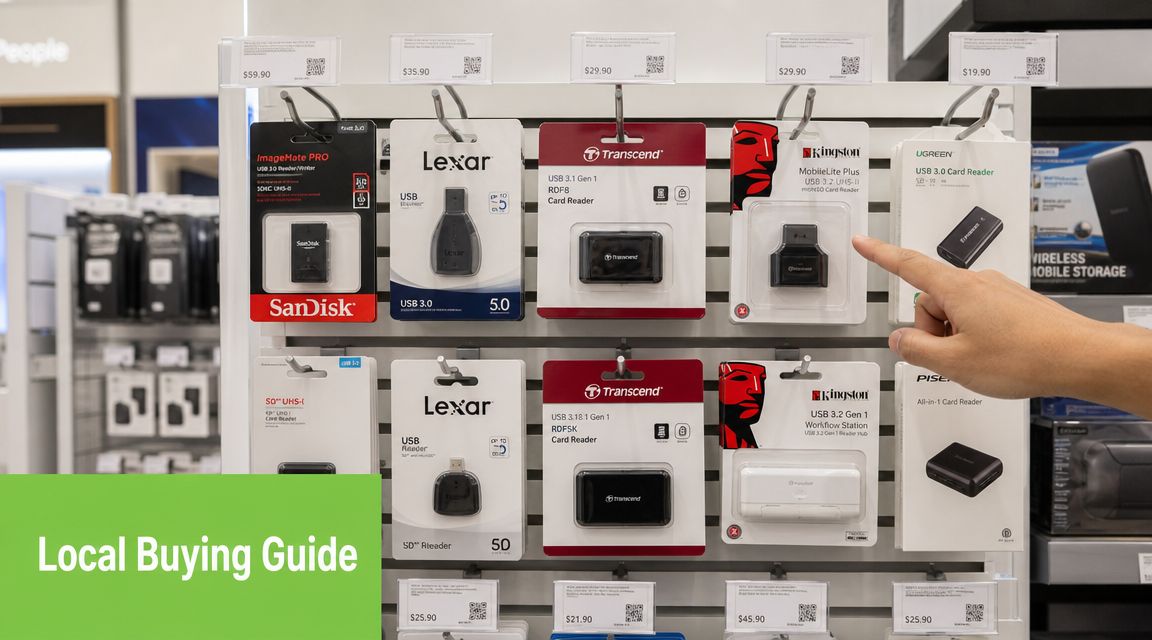
A lot of generic buying advice overlooks the core issue. People don't just want “compatible”. They want a reader that feels fast enough for their own routine. Practical guidance for Singapore users notes that buyers asking whether a reader is fast enough for 4K/6K video offload, backup, or mobile workflows often aren't well served by generic advice, and it also highlights that built-in laptop readers are often slower in creator and on-the-go setups (consumer guidance on card reader bottlenecks).
Start with your main workflow
Ask one question first. What are you transferring most often?
If it's mostly documents, occasional photos, or admin backups, you don't need to chase every advanced spec. A reliable compact reader is enough. If it's camera media, drone clips, or recurring dashcam footage, you'll feel the difference between a basic reader and one designed for heavier use.
Different workflows point to different priorities:
- For casual use. Prioritise connector fit, compact size, and solid card detection.
- For creator work. Prioritise stable performance, better bus support, and a housing that can handle repeated use.
- For travel or field use. Prioritise portability, dual slots, and fewer loose adapters.
Then check the devices you already own
A good purchase should reduce friction, not add one more workaround.
If your laptop and tablet are both USB-C, don't buy a USB-A reader unless you already carry a hub every day. If your household mixes older and newer machines, a dual-connector model can be more sustainable because you won't replace it the moment one device changes.
Built-in slots can be convenient, but they aren't always the most dependable choice for repeated transfers or mixed-device use.
Portability versus desk use
A tiny dongle-style reader is easy to carry, but it can also be easier to misplace. A hub-style reader takes more room, yet it may work better if your setup already includes external drives, displays, and wired connections.
Think about where the reader lives most of the time:
- Bag every day. Small, direct-plug, sturdy casing.
- Desk setup. Larger body is fine if it improves cable strain relief and ease of access.
- Shared family use. Choose something simple enough that anyone can use without guessing which side faces up.
Don't ignore the card itself
Sometimes the reader isn't the weak point. The card is.
If you're replacing both, it makes sense to match them sensibly. A card such as this Strontium Nitro A1 64GB microSDXC card is one example of the sort of spec level people often look at for more demanding mobile or media use, but it still needs a suitable reader and host device to feel right in practice.
The sustainable choice is usually the smarter one too
Cheap readers often fail in boring ways. Loose connectors, flaky card detection, intermittent disconnects, or casing that cracks after being tossed into a bag. They create waste because they're bought as throwaway accessories.
A better approach is to buy a reader you can keep using across devices and over time. That may mean choosing a well-built new accessory or considering professionally checked refurbished gear where that makes sense. In a shop context, that's where myhalo can be one practical option among others, especially for buyers who already want to extend the life of their broader device setup instead of replacing everything at once.
The smartest purchase usually comes from answering four questions clearly:
- What files do I move most often?
- Which device do I plug into most often?
- Do I need this at a desk or on the move?
- Am I buying a durable tool or a disposable stopgap?
If you answer those truthfully, the shortlist gets much smaller.
Common Issues and Simple Fixes
Even a good reader can misbehave if the card, port, or file system causes trouble. Start with the simple checks first. Most problems are more ordinary than they look.
The card isn't recognised
Remove the card and reinsert it carefully. Make sure it's facing the correct way and fully seated. Then try a different port on the same device.
If the problem continues, test one variable at a time:
- Try another card to see whether the reader detects anything at all
- Try the same card on another device if available
- Check for dirt or debris on the card contacts or inside the slot
- Restart the device if the reader mounted incorrectly the first time
If one card works and another doesn't, the card is the more likely issue. If no card works, suspect the reader or the port.
Transfers are much slower than expected
This often comes down to a mismatch somewhere in the chain. A slow port, a basic reader, or a card that isn't suited to the workload can all drag performance down.
Try these steps in order:
- Use the fastest suitable port on your device
- Avoid stacking too many adapters or hubs
- Test with another reader if you have one
- Move a different type of file to see whether the slowdown is consistent
The reader gets warm
Mild warmth during heavy transfers can be normal, especially with compact metal or tightly packed readers. But if the reader becomes unusually hot or starts disconnecting, stop the transfer and test again later.
Safely eject the card before unplugging the reader. That small habit helps prevent corrupted files and messy re-copy jobs.
Good habits that prevent problems
A few habits make a real difference:
- Insert gently. Don't force the card into the wrong slot.
- Eject properly. Let the device finish writing before removal.
- Store it in a pouch. Loose readers collect dust and take connector damage.
- Avoid tension on the connector. A reader hanging awkwardly from a side port is easier to damage.
Your Card Reader Questions Answered
Is an external reader better than a built-in laptop slot
Often, yes. Guidance aimed at creators suggests external readers are often more reliable and less prone to mounting issues than built-in slots, especially for people moving files across phones, tablets, laptops, and cameras in Singapore (creator-focused discussion on external versus built-in readers).
That doesn't mean built-in slots are useless. It means they're not always the most dependable choice when file transfer is part of regular work.
Should I buy a reader with a cable or a tiny dongle body
If you travel often, a tiny reader is easy to carry but easier to lose. A reader with a short built-in cable usually puts less strain on the device port and can feel tidier when working at a desk or on a plane tray table.
Choose based on where it lives. Pocket use and bag use aren't the same thing.
Can one reader handle both SD and microSD
Yes, if it has both slots. That's often the most practical format for people who use a camera and a dashcam, or a drone and a laptop. It cuts down on adapters and makes the reader more useful over time.
Is it safe to buy a refurbished card reader
It can be, if the seller has properly checked it and clearly explains condition and support. With simple accessories, what matters most is connector health, stable detection, and whether the slot still grips the card properly.
A professionally inspected accessory is very different from an unknown used item tossed into a listing with no testing.
Why does my fast card still feel slow
Because the card is only one part of the chain. The reader and the device port still have to keep up. If either side is weaker, your real-world transfer speed drops to match that weaker link.
Do I need a premium reader for ordinary use
Not always. If your use is light, buy for reliability and connector fit first. If your workflow includes repeated media imports, bigger video files, or regular cross-device transfers, stepping up to a better reader usually makes more sense.
If you're comparing card readers, storage cards, or a broader device setup, myhalo is a practical place to browse options that fit both budget and sustainability goals. A sensible reader paired with the right card and the right device saves time, reduces hassle, and helps you keep your tech in use longer instead of replacing it unnecessarily.