





How to Reduce Electronic Waste in Singapore
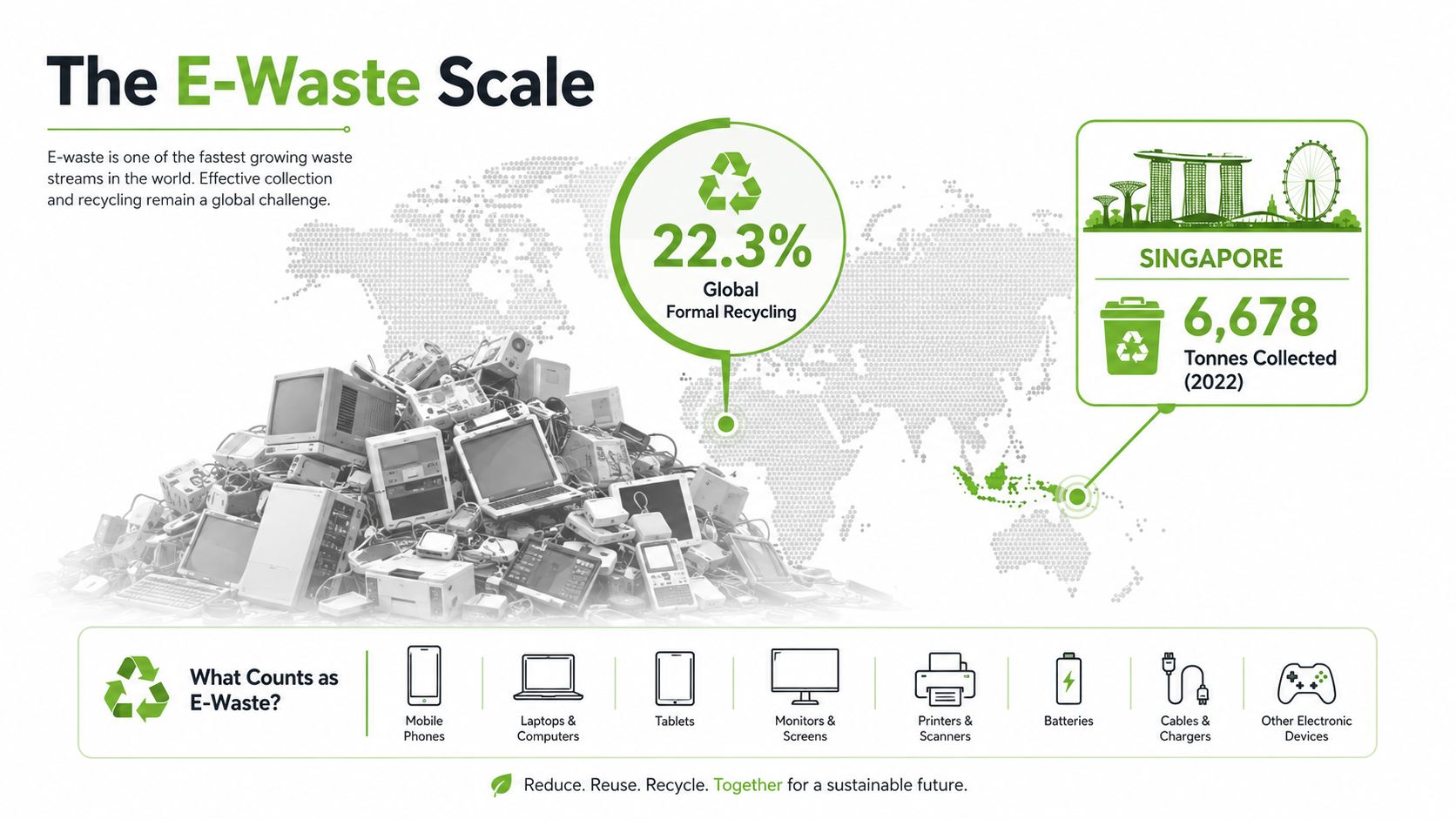
62 billion kg of e-waste was generated globally in 2022, and only 22.3% was formally collected and recycled, according to the Global E-waste Monitor 2024. Singapore is not immune to that pattern. The country collected 6,678 tonnes of regulated e-waste in 2022, up from 3,161 tonnes in 2021, but the better answer is still not to recycle faster, it's to stop creating waste too early.
That's the practical mindset shift. If a phone, laptop, tablet, or accessory can be repaired, refurbished, traded in, or redeployed, it should stay in circulation. Disposal is the last move, not the first instinct, and Singapore's EPR system gives you the infrastructure to act on that logic.
Table of Contents
- Why Singapore Needs a Lifecycle-First Approach to E-Waste
- Buying Smart to Prevent E-Waste at Source
- Extending Device Lifespan Through Repair and Care
- Trade-In, Resale and Reuse Before Recycling
- Responsible Disposal Through Singapore's Collection Network
- Your Reduce-E-Waste Action Plan
Why Singapore Needs a Lifecycle-First Approach to E-Waste
A device that stays in service is better than one that reaches the bin early. Singapore's regulated e-waste stream is already large, and the pressure point is not collection alone, it is how fast phones, laptops, and peripherals are pushed out of use before they are actually spent. The cleanest unit of e-waste is the one that never gets created, because each extra month of use delays replacement, reduces waste, and protects residual value.
Why recycling alone doesn't close the gap
Recycling has a place, but it belongs at the end of the chain. Once a device is beyond repair, much of its value is already gone, and the environmental cost has largely been baked in. A lifecycle-first approach starts with buying better, then using longer, then recovering value, and only after that recycling responsibly. Singapore's policy direction backs that order, because the national Extended Producer Responsibility framework shifts regulated producers toward collection and treatment, with public collection access spread across the island, as described by NEA's overview of Singapore's e-waste management system.
Practical rule: if a device can still do real work, keep it in service. Recycling is for end-of-life hardware, not for usable tech that is merely old or unfashionable.
That logic also lines up with broader circular-manufacturing thinking. If you want a useful outside reference on how resource efficiency shapes the full product lifecycle, the sustainability insights from American Additive Manufacturing are a solid companion read.
What the policy setup means for you
Singapore's EPR system turns e-waste handling into a structured process instead of a last-minute clear-out. It helps, but it does not excuse poor device habits. The smarter move is simple, keep a phone or laptop productive for as long as possible, then send it into formal collection only when repair is no longer worth doing. That is the right model for households, students, and SMEs, because it protects budget and cuts replacement churn at the same time.
For buyers who want a second-hand route, a practical guide to checking a refurbished phone before you buy is worth reading before money changes hands. And if you are comparing lifecycle options beyond pure disposal, that same discipline applies whether the device ends up in Certified ReLoved, Certified Surplus, a rescue flow, or a trade-in programme.
Buying Smart to Prevent E-Waste at Source
The buying decision determines most of the waste you'll create later. If you choose a fragile device with poor service support, sealed components, and no clear second-life path, you're locking yourself into earlier replacement. If you buy with lifecycle in mind, you make every later step easier, from repair to trade-in to resale.
Choose devices that are built to be worked on
Start with serviceability. A phone with a replaceable battery, a laptop with accessible storage, or a device family with decent parts availability gives you options when something wears out. Software support matters too, because a machine that still receives updates is safer to keep in use, especially for students and SMEs handling logins, files, and payments.
Use this lens for every purchase:
- Check repairability: Look for devices that can be opened and serviced without turning every minor fault into a full replacement.
- Prefer long support cycles: A device that still gets operating system and security updates stays useful for longer.
- Buy for the actual workload: Don't overbuy power you won't use, because underused hardware still becomes waste eventually.
- Use a trade-in at the same time: If an outgoing device still has value, fold it into the purchase rather than letting it sit in a drawer.
My rule of thumb: if the device can't be sensibly repaired, I treat it as a short-term buy, not a long-term asset.
How to judge refurbished and surplus options
Certified ReLoved and Certified Surplus units make sense for a lot of buyers. A professionally refurbished unit isn't just “used”, it has been checked against a process, graded clearly, and sold with a warranty that reduces the risk of buyer regret. myhalo's published approach includes 30 quality checks, ISO 9001 Certified processes, and transparent grading such as As-New, Premium, Excellent, and Value. That's the kind of evidence you want, because it tells you what shape the device is in before money changes hands.
| Device Grades at a Glance | Condition | Warranty |
|---|---|---|
| As-New | Like new | 6-month warranty |
| Premium | Refurbished to a high standard | 30-day warranty |
| Excellent | Good cosmetic and working condition | 30-day warranty |
| Value | Fully functional with visible wear | 30-day warranty |
If you want a practical checklist before buying a refurbished phone, this guide is worth a look: things to look out for before buying a refurbished phone.
The point isn't to buy second-hand for the sake of it. The point is to buy a device that still has useful life in it, with enough transparency to make the decision feel controlled instead of risky.
Extending Device Lifespan Through Repair and Care
A lot of people replace hardware when they really need a service visit. That's expensive, and it creates needless waste. In my bench work, I've seen a battery swap, a fan clean-out, or an SSD upgrade turn a “dead” device into something that still has years left in it.
The small fixes that change the timeline
A four-year-old phone with weak battery life is not finished just because it no longer lasts a full day. If the screen is intact and the mainboard is healthy, a battery replacement usually makes more sense than buying a new handset. The same goes for a three-year-old laptop that's slowing down because the storage is failing, a replacement SSD can restore responsiveness without touching the rest of the machine.
Routine care helps too:
- Keep software current: Updates fix bugs and reduce security risk.
- Manage battery health: Avoid heat, and stop treating overnight charging as harmless.
- Clear storage regularly: A full drive makes devices sluggish long before they are worn out.
- Clean vents and ports: Dust builds heat and causes charging or cooling issues.
A repair event like this can defer replacement by two to three years, which is why the value is so much bigger than the cost of the part. For a household, that means fewer purchases. For an SME, it means less downtime and fewer rushed procurement decisions.
Where care programmes fit
Protection plans are useful when they support proper maintenance instead of replacing common sense. myhalo's e-Xtender programme is positioned for proactive maintenance, while myhalo Protect covers accidental damage, liquid spills, and extended warranty support. Those kinds of programmes are relevant because many devices die from avoidable accidents or neglected wear, not from dramatic hardware failure.
If you need a concrete example, take an office laptop with a failing battery and a noisy fan. The machine still boots, the keyboard still works, and the storage is fine. Replace the worn parts, clear the vents, and the device is usable again, rather than being written off for a cosmetic issue or one failing component. For a repair-specific reference, see iPhone screen repair, because the same basic logic applies across most consumer devices.
myhalo's support model includes repair and device migration alongside its retail offer, and that's the right direction for lifecycle work. The useful question is never “Should I buy again?”, it's “What's the least wasteful way to keep this machine useful?”
Trade-In, Resale and Reuse Before Recycling
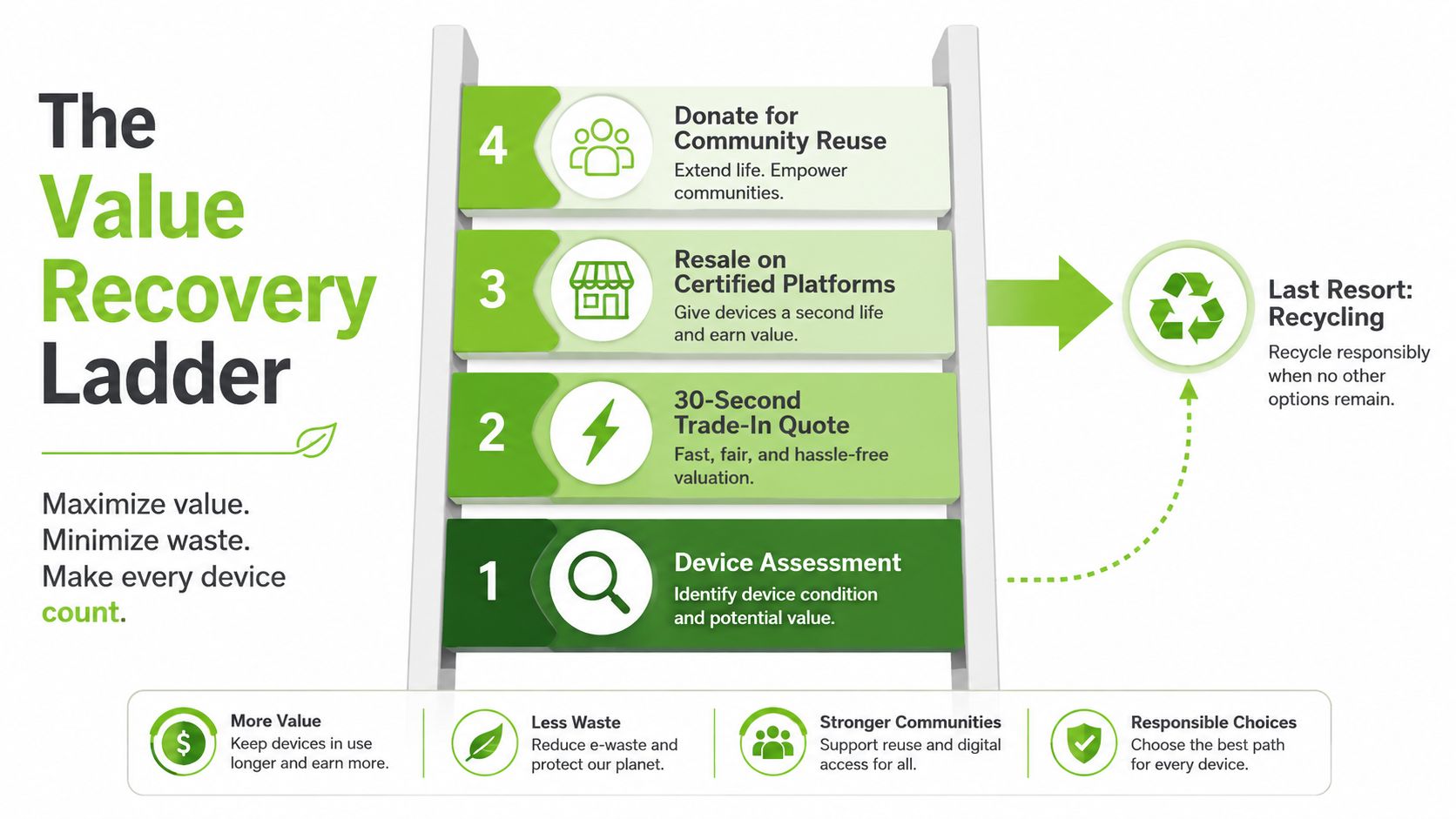
If a device still powers on and can be cleaned up safely, recycling is premature. A functional laptop, tablet, or phone still has value, even if it's no longer ideal for the original owner. The smartest path is to recover that value before the device becomes scrap.
Remove the friction that keeps devices in drawers
People don't usually keep old devices because they love clutter. They keep them because selling feels slow, uncertain, or risky. That's why instant-quote trade-in matters, especially when pricing is quick, payment is simple, and pickup is available for common categories like phones and tablets. Less friction means more devices re-enter circulation instead of sitting in a cupboard for years.
Here's the clean workflow I recommend:
- Back up your data to cloud or external storage.
- Sign out of accounts and remove device locks.
- Factory reset the device.
- Check whether repair or resale is the better route based on condition.
- Trade in, resell, or donate if the device still has useful life.
Security first: if a device holds personal data, don't let fear push you into dumping it. Use formal collection or resale channels that include proper wiping.
Why grading and wiping matter
The biggest barrier I hear from users is not price, it's trust. People want to know their files are gone, and they want the device they're buying or selling to be accurately described. That's why transparent cosmetic grading and battery health disclosure matter so much. They reduce uncertainty for the buyer and stop sellers from hiding faults that make the device less useful than advertised.
For readers who want a broader resale perspective, upgrade to a new laptop is an example of how resale guidance can be framed around recovery rather than disposal.
A working device can also go to donation or community reuse if the owner doesn't need cash back. The main thing is to avoid the lazy default, which is to let value rot in storage until the battery swells or the device fails completely.
Responsible Disposal Through Singapore's Collection Network
A device should only go into disposal after the reuse path is closed. Broken motherboards, irreparable screens, and unsafe batteries do not belong in general waste, because they need proper handling and, in some cases, specialised transport. Singapore's collection network is the right place for the last stage of device life.
Use the EPR-backed channels, not informal dumping
Singapore's collection system gives residents and businesses proper disposal routes, with collection points across the island and large retail distribution outlets that accept one-for-one old-for-new returns under the take-back system. That is the route to use for consumer electronics with no usable second life left. It is more reliable than handing devices to informal collectors, because regulated channels are set up to manage material recovery and hazardous components in a controlled way.
For a local overview of how these channels fit into the wider system, see MyHalo's guide to a zero e-waste world. It is a useful reference if you want the broad picture without the sales fluff.
If you are handling batteries, old displays, or data-bearing machines, the difference matters. E-waste can contain materials that should not be exposed through rough handling, and data-bearing devices need proper wiping before they leave your control. Recycling only starts after those basics are handled. Too many people skip that part because they assume disposal alone is enough.
What SMEs should do differently
Bulk disposal is a process, not a bin drop. SMEs should request scheduled collection or one-for-one take-back rather than dumping equipment into general waste. That keeps the workflow cleaner and lowers regulatory and reputational risk. If you are managing a fleet of laptops, monitors, or peripherals, document what leaves the office and where it goes. Keep the paper trail tight.
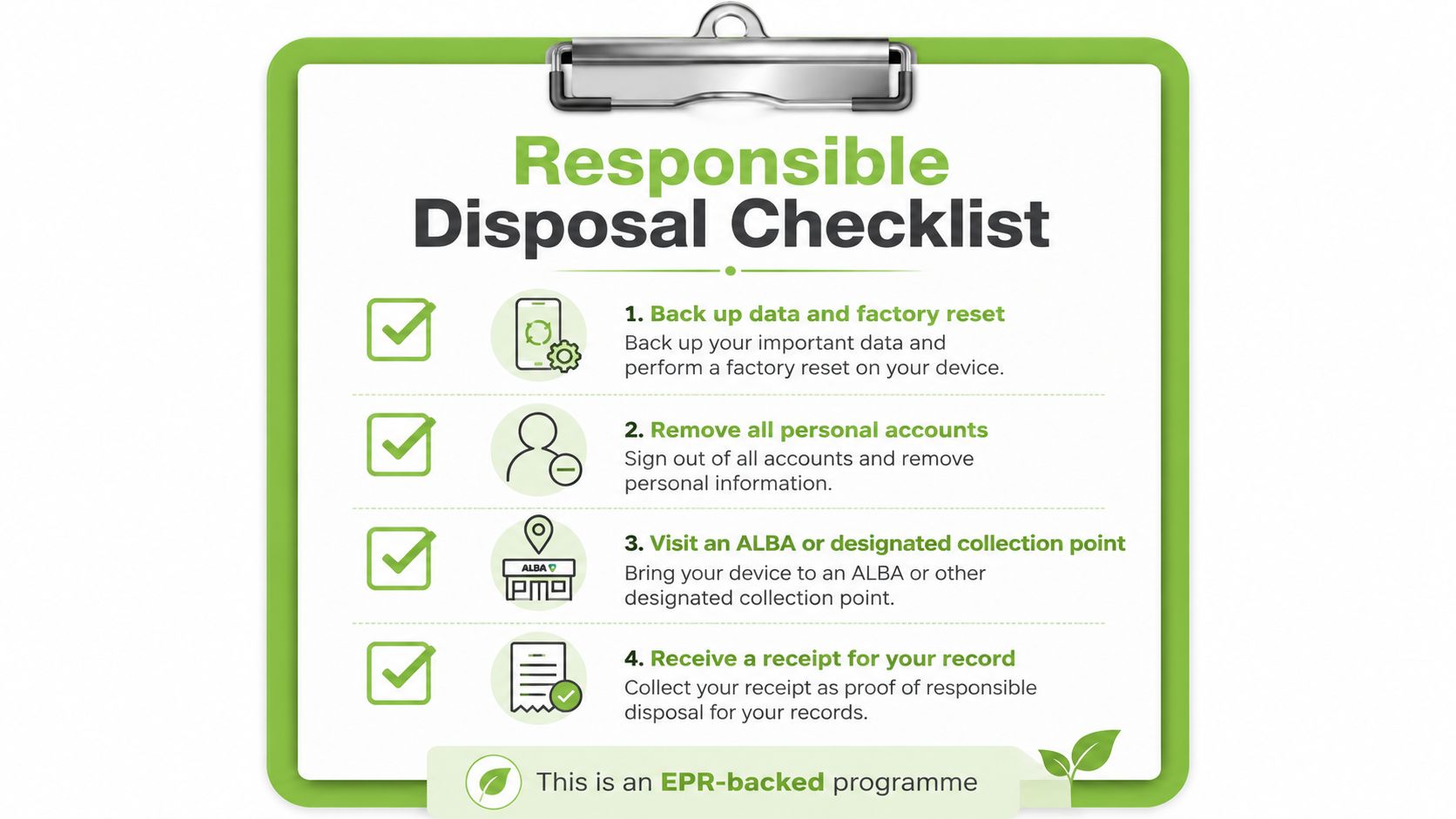
Bring the device to a formal channel only after the data is gone and the reuse path is closed.
That discipline protects people, protects records, and keeps recoverable material in the right stream.
Your Reduce-E-Waste Action Plan
If you want to reduce electronic waste properly, use a four-tier rule and don't skip steps. Buy smart, use longer, recover value, dispose responsibly. That order matters because the biggest gains happen before recycling is even on the table.
A simple checklist you can use this week
- Assess before buying: Check whether the device is repairable, supported, and suited to the task.
- Choose ReLoved or Surplus where it fits: Use certified refurbished stock when it meets the workload.
- Enrol in a care plan: Use maintenance and accidental-damage cover to keep good hardware alive longer.
- Trade in at the next upgrade: Don't let a functioning device sit unused in storage.
- Route only true end-of-life units to licensed channels: Recycle only when repair, resale, and reuse are no longer sensible.
Students and SMEs need different tactics, but the same logic applies. Students usually get the most value from a Certified ReLoved laptop with a warranty and a sensible price point. SMEs do better with fleet-level refurbishment, structured trade-in, and bulk collection so devices don't scatter across desks, drawers, and storerooms.
Where lifecycle discipline matters most
AI-optimised workstations and gaming hardware make this even more important, because upgrade cycles can get short very quickly. If you keep replacing high-spec machines every time a new model lands, you'll burn budget without getting full value from the hardware you already own. That's why a technology lifecycle partner is more useful than a transactional retailer. The job is to extend life through repair, reuse, Certified ReLoved devices, Certified Surplus products, and responsible recycling.
For Singapore buyers who want one place to start, myhalo covers that lifecycle in practical terms. It handles the path from purchase to repair to trade-in to recycling, which is exactly how a sensible device strategy should work.
If you want to keep your next device in use longer, cut waste at the source, and recover value instead of writing hardware off too early, visit myhalo and check the devices, trade-in options, and repair support that fit your situation. For households, students, and SMEs in Singapore, that's the cleaner way to manage tech without paying twice for the same lifecycle.