





New MacBook Battery: A 2026 Guide for Singapore Buyers
You're in the store, laptop open, battery dropping faster than you expected. A MacBook that used to survive a day of lectures, client calls, or café work now needs a charger by mid-afternoon, and the sales pitch in your head starts screaming “new MacBook battery”. Don't rush that decision. In Singapore, the smarter question is not just how to replace a battery, it's whether the battery is the problem, how much life the unit still has left, and whether your money should go into repair, optimisation, or a different MacBook altogether.
Table of Contents
- Why a New MacBook Battery Is a Buying Decision, Not Just a Repair
- Understanding MacBook Battery Specs in Plain English
- How to Check Battery Health and Cycle Count on Your Mac
- Signs Your MacBook Battery Actually Needs Replacement
- DIY Replacement Versus Professional Service in Singapore
- How Much Does a New MacBook Battery Cost in Singapore
- Aftercare Habits That Extend Any MacBook Battery
- When It Is Not the Battery at All
Why a New MacBook Battery Is a Buying Decision, Not Just a Repair
A student in NUS, a founder hopping between meetings in Raffles Place, or a creator editing in a café all hit the same wall eventually. The MacBook starts dying early, and the knee-jerk reaction is to buy a new MacBook battery or book a repair. That's too narrow. The decision is whether the battery is worn enough to justify the spend, whether the device still has useful life left, and whether a different unit gives better value.
Think in terms of remaining value
Apple's own guidance makes battery condition and cycle count the key signals, not marketing language on a box. Modern MacBook models are designed for 1,000 battery charge cycles before the battery is considered at end-of-service for normal use, while Apple also says a battery designed for that cycle life should retain up to 80% of its original capacity at the end of that period. Apple battery service and recycling and Apple Mac battery condition guidance
Practical rule: if the battery health is still comfortably above Apple's service threshold and the MacBook's other parts are fine, you should usually optimise first, not replace on impulse.
That logic matters in Singapore because buyers here often compare factory-sealed, refurbished, and older personal devices side by side. A machine with a tired battery but low cycle count may still be a sensible keeper. A machine already near the design-life threshold is a different story.
Why provenance changes the answer
A “new” MacBook isn't automatically a healthy one. Sealed storage, warehouse time, demo use, and import delays all shape what battery health looks like on day one. Apple's support pages focus on whether the battery shows a service condition, not on promising that every unit will read a perfect maximum capacity figure. Apple Mac battery condition guidance
That's why this guide treats the battery as part of a buying decision, not an isolated repair. Students need all-day runtime. SMEs need predictable work devices. Creators need stability when they're away from power sockets. The right choice comes from matching battery condition, cycle count, and how long you want to keep the MacBook.
Understanding MacBook Battery Specs in Plain English
Battery specs sound technical, but they're simple once you strip away the jargon. Watt-hours are the size of the fuel tank. Charge cycles are how many full tank equivalents the battery has used. Apple's published 1,000-cycle design life is the point where the battery is expected to have reached end-of-service for normal use. Apple battery service and recycling
Capacity tells you the runway
For buyers, capacity matters more than case size alone. Apple's Singapore MacBook Pro specs list the 14-inch MacBook Pro with a 72.4-watt-hour lithium-polymer battery, rated for up to 16 hours of wireless web or up to 24 hours of video streaming, and fast-charge capable with a 96W or higher USB-C power source. Apple MacBook Pro specs Independent comparisons show that 16-inch MacBook Pro models sit near 99.6 to 100Wh, while many MacBook Air models sit around 52.6 to 66.5Wh. Macworld battery capacity comparison
| Typical MacBook Battery Capacity by Model Family | Typical capacity (Wh) | Apple rated wireless web (hrs) |
|---|---|---|
| 14-inch MacBook Pro | 72.4 | Up to 16 |
| 16-inch MacBook Pro | About 99.6 to 100 | Not listed in the verified data |
| MacBook Air | About 52.6 to 66.5 | Not listed in the verified data |
Why Singapore heat changes the calculation
Singapore's warm, humid climate makes battery ageing less forgiving. Heat accelerates capacity loss, especially if you keep the machine plugged in for long stretches on a hot desk or in a bag after use. Capacity is not the only thing that matters, but heat exposure and charge cycles are usually what wear a battery down faster than the calendar does. Macworld battery capacity comparison
My advice: stop asking “Is this battery new?” and start asking “How big is the battery, how many cycles has it done, and how much healthy life is left?”
That's the vocabulary you need when comparing spec sheets, reseller listings, and refurbished units. A larger battery can give you more runtime, but a battery's real condition depends on use, heat, and cycle count. If a seller talks about “new in box” but avoids battery condition disclosure, treat that as a gap, not a reassurance.
How to Check Battery Health and Cycle Count on Your Mac
Open System Settings, then click Battery. On many modern Macs, you'll see the battery condition summary there, and Apple's guidance says the battery status helps you decide whether service is needed. If you want the cycle count, go to System Information or System Report, then Power, where the cycle count appears alongside other battery details. Apple Mac battery condition guidance Apple also explains that checking battery health on Mac laptops shows the battery's condition status and helps identify whether it needs service. Apple support
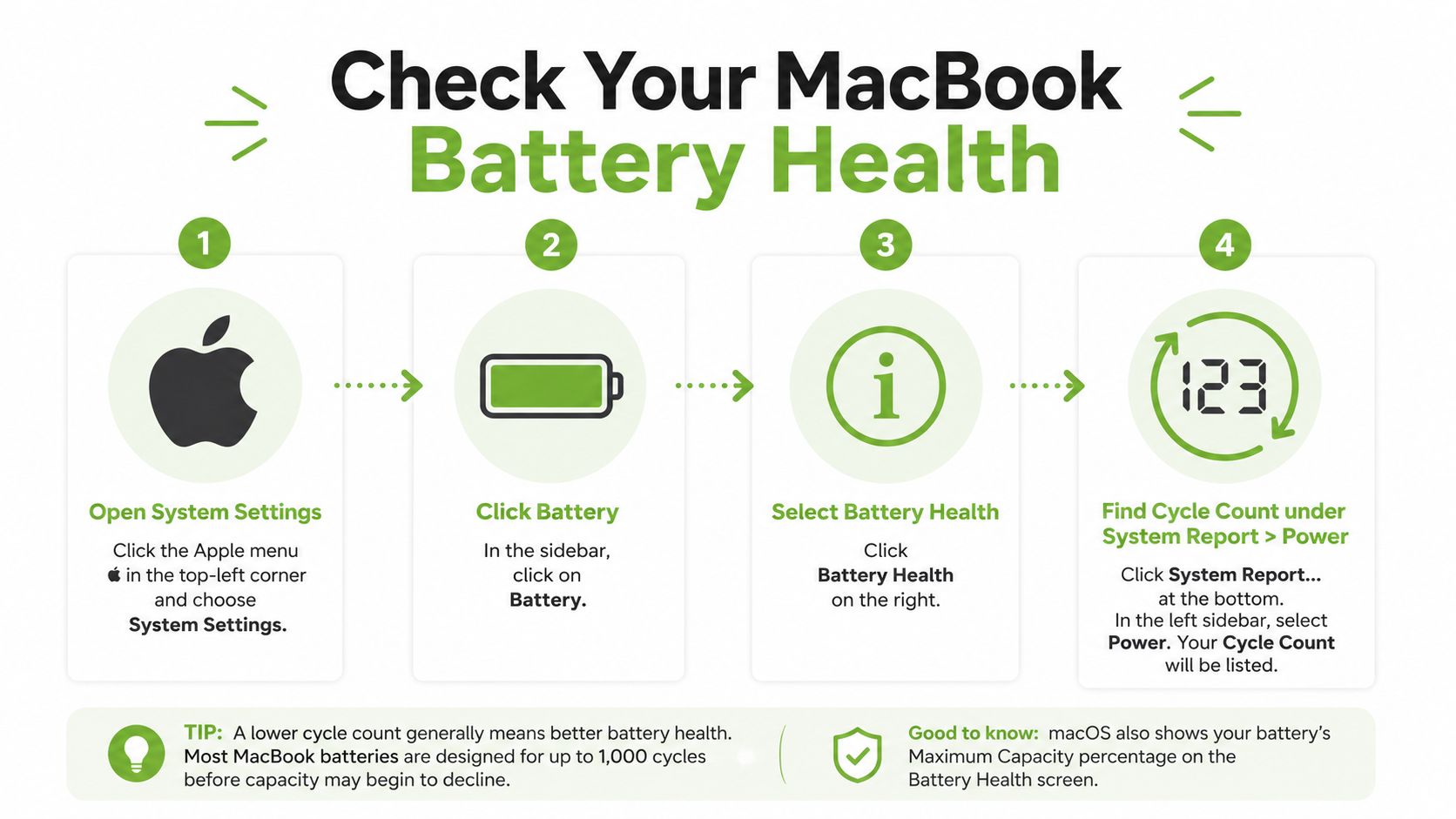
Read the label, not just the percentage
Apple's condition labels matter more than the number alone. Normal means the battery is still within expected behaviour. Replace Soon and Replace Now mean degradation is becoming obvious. Service Recommended is the clearest sign that battery health has dropped enough that replacement should be considered. Apple Mac battery condition guidance
A healthy MacBook battery typically retains about 80% or more of its original capacity for normal use, and a brand-new battery starts at or near 100% health. A battery around 1 year old is often in the 92% to 97% range, while a battery around 4 to 5 years old may fall to roughly 80% to 87%, depending on how it's used. Apple Mac battery condition guidance
A simple worked example
If a three-year-old MacBook shows 87% health and 412 cycles, that does not scream emergency. It says the battery has aged, but it's still below the published design-life threshold and above the common 80% benchmark. You'd check whether the user's workload is outgrowing the battery or whether settings and software are the issue first.
For a quick, location-independent working setup, some people even compare battery behaviour while travelling or working remotely. If you're planning long work stints outside the office, a guide like Discover Madeira Remote Coliving can be useful for understanding how laptop battery planning changes when you're away from fixed desks and power access.
Useful distinction: macOS gives you the first answer. A technician gives you the second. If the numbers are borderline, a deeper health check is worth paying for before you replace hardware blindly.
Signs Your MacBook Battery Actually Needs Replacement
A battery doesn't need replacing just because it feels older. It needs replacing when the symptoms line up with the data. The biggest mistake Singapore buyers make is treating every battery complaint like a hardware failure. That's how you waste money on a machine that only needed a settings fix or a workload clean-up.
The warning signs that matter
Sudden shutdowns at higher charge percentages are a real red flag. So is a swollen chassis, a trackpad that starts lifting, or a MacBook that runs noticeably hotter than usual. If the battery percentage drops fast under light use, or the machine restarts unexpectedly after updates, you're past normal ageing and into replacement territory.
For SMEs, a swollen battery is not a cosmetic issue. It's a safety issue, a downtime issue, and a data risk at the same time. One bad battery in a point-of-sale or field device can disrupt the whole workflow.
Don't ignore condition and behaviour together
macOS condition labels and real-world symptoms don't always match perfectly. A machine can show a less alarming status but still behave badly under load. A battery can also be near the end of service even if the Mac still turns on. That's why you should never look at one signal in isolation.
If you're comparing symptoms against a broader repair case, the same logic applies across Apple devices. A related breakdown of battery replacement thinking for another device is covered in myhalo's iPad battery replacement guide, and the same principle holds here. Battery health only matters when it's connected to actual behaviour.
If the MacBook is swelling, heating unusually, or shutting down unpredictably, stop debating and get it checked.
The decision is straightforward. Replace when symptoms line up with battery health, cycle count, and usage impact. Don't replace just because the laptop feels slower than it used to be. That's often a workload problem, not a battery problem.
DIY Replacement Versus Professional Service in Singapore
DIY battery replacement looks cheaper on paper until you face the actual job. You have to open a tightly packed laptop, deal with adhesive, handle fragile components, and avoid damaging the logic board if your tool slips. If the Mac is still under any form of Apple coverage, you also take on warranty risk that is easy to avoid.
The actual trade-off
A DIY kit lowers upfront spending, but it asks for the right tools and steady hands. You are dealing with pentalobe screws, battery adhesive, and careful reassembly. A professional service uses controlled handling, matched parts, and calibrated installation. That is the difference between saving money and risking a machine you still rely on.
DIY replacement suits people who are technically confident and ready to accept failure. Professional service suits everyone else. In Singapore, where many MacBooks still have enough value to justify proper care, the safer move is usually to pay for competent work instead of chasing the cheapest parts.
A decision rule that actually helps
Use this sequence. If the MacBook is young, valuable, and otherwise healthy, professional service makes sense. If the unit is old, heavily used, and the battery fault sits alongside other problems, replacement is poor value. In that case, trade-in or a different device is usually the smarter call.
For a reader who wants a proper repair path, a Singapore Apple service centre guide can help you compare official support against workshop options, including what to check before you hand over the machine: Apple service centre options in Singapore.
myhalo fits into that lifecycle view as a technology partner that handles repair, reuse, and device movement rather than treating every Mac as disposable. It also offers pathways around trade-in and refurbished device replacement, which is often the cleaner answer when a battery repair no longer makes financial sense.
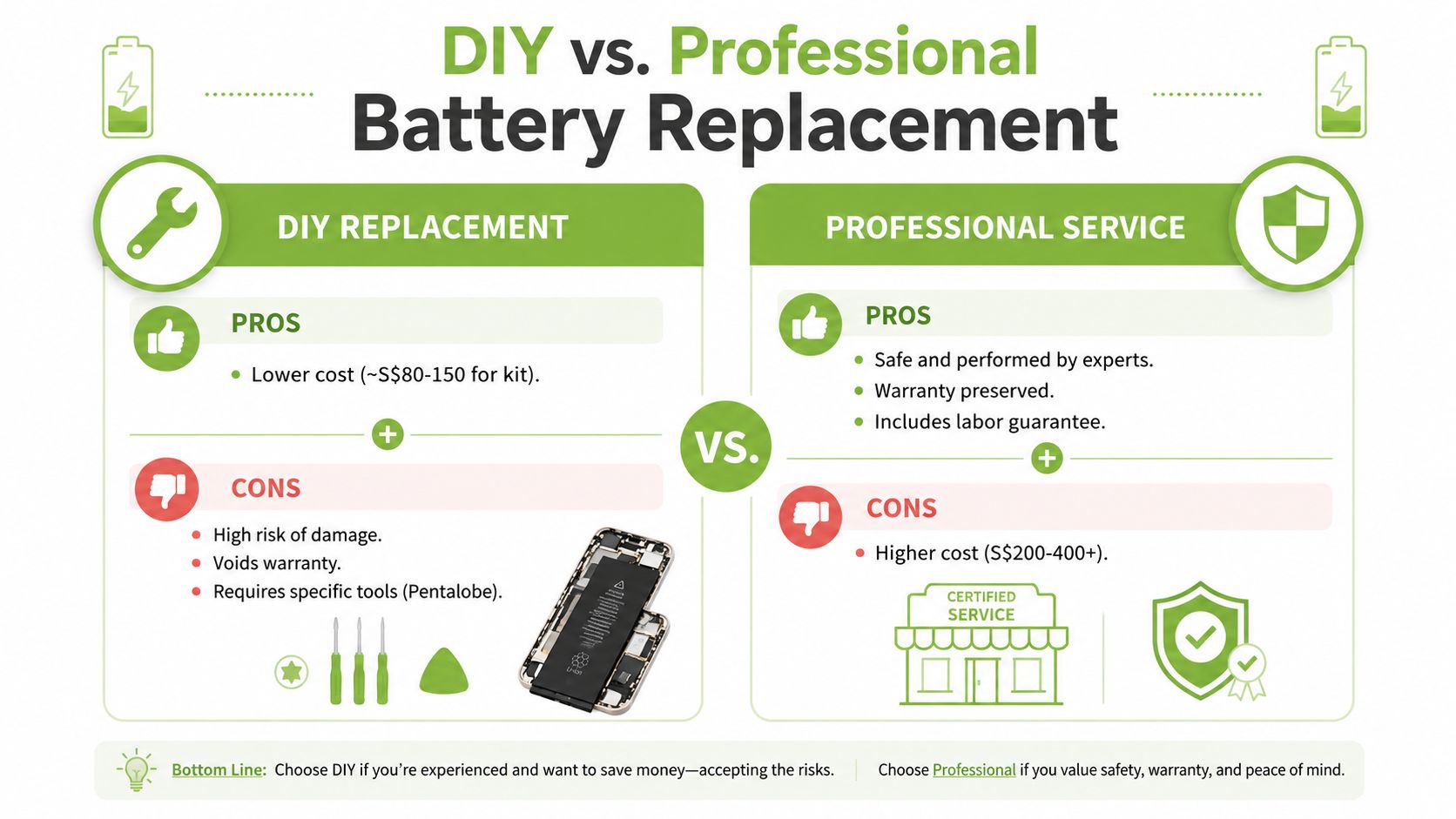
For a Singapore reader, the honest answer is simple. If you are not comfortable opening a MacBook, pay a professional. The extra cost is basically insurance against a bricked logic board.
How Much Does a New MacBook Battery Cost in Singapore
Battery replacement pricing in Singapore varies because you're not just buying a part. You're buying labour, calibration, support, and sometimes warranty. A cheap kit gives you the battery itself. A higher-end service gives you peace of mind and less chance of ending up with a second repair bill.
Three cost bands, three different outcomes
A DIY kit is the lowest-cost route, but it carries the most risk. A third-party workshop usually sits in the middle, where you pay for installation and experience without paying authorised-service rates. Apple-authorised service is typically the most expensive path, but it gives you the strongest support chain and genuine parts.
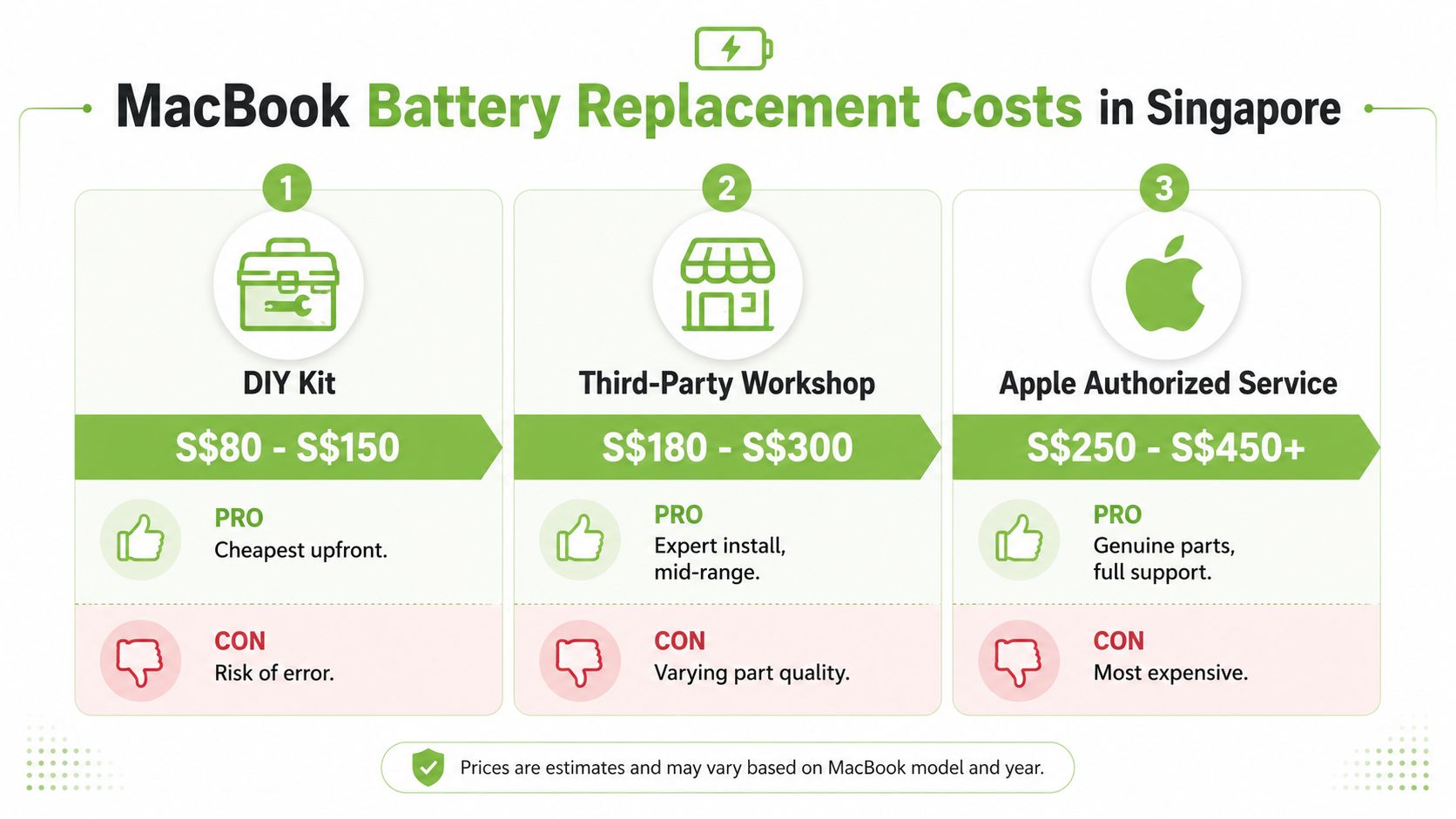
| Cost band | Typical price band | What you're really paying for |
|---|---|---|
| DIY kit | S$80 to S$150 | Cheapest upfront, highest error risk |
| Third-party workshop | S$180 to S$300 | Expert install, mid-range support |
| Apple authorised service | S$250 to S$450+ | Genuine parts, fuller support |
Repair only makes sense if the rest of the Mac still has life
Total cost of ownership matters. Replacing a battery in an older MacBook only makes sense if the rest of the device still has at least two to three years of useful life. If the machine is already past its battery design life and the chassis, keyboard, or storage are also wearing out, you're better off trading it in and moving to a healthier unit.
That's also where transparent device grading becomes useful. myhalo's battery health disclosure and graded device options make it easier to compare a repair against a replacement, instead of guessing from photos and vague seller descriptions. A well-disclosed refurbished MacBook can be the more economical choice when the current machine is already on the wrong side of the cycle-count curve.
For readers who are used to comparing repair economics across devices, the same value logic appears in myhalo's battery replacement cost discussion for iPhone. The numbers differ, but the decision model is the same, spend only when the device still has a worthwhile future.
Aftercare Habits That Extend Any MacBook Battery
Apple's battery-health management exists for a reason. It lowers the time the battery spends at full charge to slow chemical ageing. If macOS sometimes pauses charging before 100%, that's not a defect. It's the system trying to keep the battery usable for longer. Apple battery-health management
Daily habits that actually help
Don't leave the MacBook parked at 100% in a hot room for long periods. Keep macOS current, because power-management fixes often come through system updates. Avoid draining the battery to empty unless you need to. Partial top-ups are usually kinder than constant deep cycles.
Check Activity Monitor if battery life suddenly looks bad. A browser tab, background sync job, or post-update indexing run can drain power far faster than the battery itself is ageing. That's why a healthy Mac can still look like a tired one if the workload is messy.
Practical rule: if the machine spends less time hot and less time fully charged in Singapore conditions, the battery usually ages more slowly.
The longer view matters here. Apple's published 1,000-cycle design life is easier to reach when the battery is managed well, not abused daily. That's where repair, reuse, and better charging behaviour create real value. myhalo's e-Xtender and Protect programmes fit this kind of ownership, because they're about stretching the working life of the device, not just selling another unit.
What smart users do
- Use Optimised Battery Charging: Let macOS slow the ageing process instead of forcing a full charge all the time.
- Avoid extreme temperatures: Heat is one of the fastest ways to shorten usable battery life.
- Keep it plugged in for heavy work: Long exports or long meetings are easier on the battery when the load is stable.
- Update macOS regularly: Power-management improvements often arrive in system updates.
- Watch for false alarms: A bad app can look like battery wear if you don't check usage first.
These habits don't make a battery immortal. They do make the difference between replacing hardware early and getting fuller value from the Mac you already own.
When It Is Not the Battery at All
A lot of battery complaints are really workload complaints. Chrome can be heavier than Safari for some users. Login items can wake up in the background. Spotlight indexing after an update can keep the Mac busy. If you pay for a battery replacement before checking those basics, you're solving the wrong problem.
A quick fifteen-minute triage
Start with battery health and cycle count. Then open Activity Monitor and look at energy impact. Run Apple Diagnostics. If the machine still acts strangely, reset SMC or NVRAM where appropriate for your model. That sequence catches most of the common non-battery causes without wasting time.
If the MacBook passes those checks, then the battery might still be the issue. If the Mac fails them, a replacement battery won't fix the root cause. That's the point too many repair conversations miss.
A fast decision checklist
- Battery health is good and cycles are moderate: optimise settings first.
- Battery health is near the service threshold and symptoms are real: replace the battery.
- Battery is swollen or the chassis is lifting: stop using it and service it now.
- Device is old, tired, and no longer worth the repair: trade it in and move to a better unit.
That's the cleaner way to think about a new MacBook battery in Singapore. Don't buy repair work just because the laptop feels old. Buy the fix only when the battery data, the symptoms, and the remaining value all point in the same direction. If you want a device with disclosed battery health, repair support, or a replacement path that doesn't waste money, visit myhalo and compare the options before you spend.