





iPad Battery Health Check: Complete Guide
An iPad that once lasted through a full day can start dying during a client presentation, dropping from a comfortable charge level to empty with little warning. Some owners respond by replacing the device immediately. That can be wasteful and expensive, because the fault might be a worn battery, a damaged charging port, a software process, or a logic-board problem.
A proper iPad battery health check gives you measurable evidence before you spend money. In Singapore, the most useful decision points are the battery's maximum capacity, cycle count, symptoms, AppleCare+ eligibility, and the local service cost. The aim isn't to chase a perfect reading. It's to decide whether your iPad should keep working, receive a battery service, be reused by someone else, or be responsibly recycled.
Table of Contents
- Checking iPad Battery Health in Settings
- Understanding Cycle Count and Maximum Capacity
- Alternative Diagnostics for Older iPad Models
- Recognising Symptoms of a Failing Battery
- When to Repair or Replace Your iPad Battery
- Battery Care Habits That Extend Device Lifespan
Checking iPad Battery Health in Settings
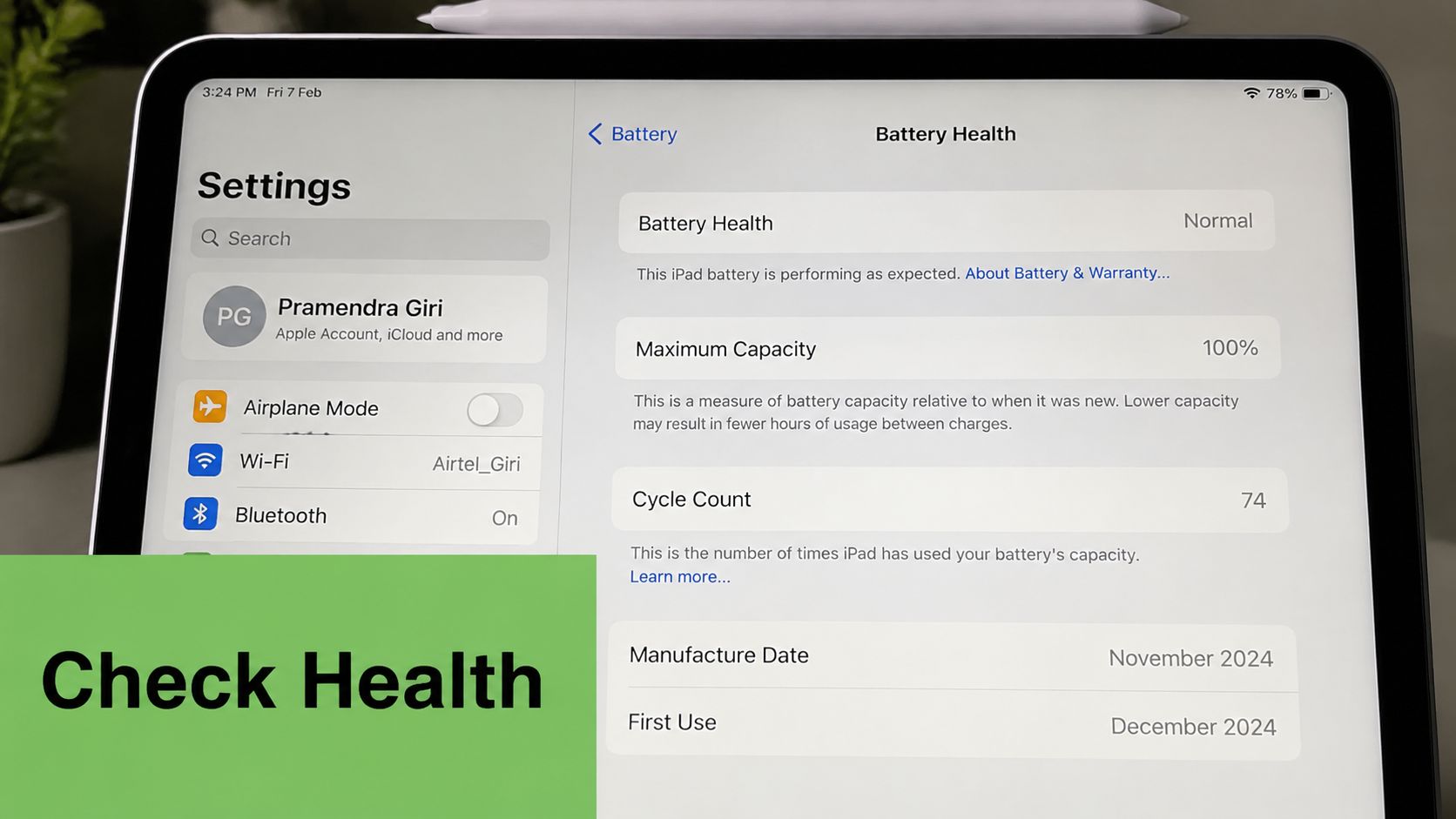
Start with the information iPadOS provides directly. On supported iPad models, open Settings > Battery > Battery Health. Apple's Singapore guidance says this screen can show battery capacity, battery health, cycle count, manufacture date, and first-use date, turning a battery health check into a diagnostic rather than a guess. See Apple's Singapore iPad battery guidance for the supported-model limitation and menu path.
The panel is available on newer supported hardware, including iPad Pro models with M1, M2, or M4, iPad Air with M2, iPad mini with A17 Pro, and iPad with A16 when running compatible iPadOS. Older iPads may not display it, even if their batteries are perfectly usable. A missing panel indicates a model or software limitation, not proof that the battery is healthy or damaged.
Reading the built-in result
Maximum Capacity compares the battery's present capacity with its original design capacity. A lower reading means the battery stores less energy than it did when new, so the same workload will generally require more frequent charging.
Cycle Count records battery usage over complete equivalent cycles. It isn't just the number of times you've plugged in the charger, because several partial discharges can add up to one complete cycle.
The status wording also matters. Normal generally means the system hasn't identified service-level deterioration through its available checks. A service recommendation means the battery deserves professional assessment, not that every power problem automatically comes from the cell.
Counter advice: Use the Settings reading as your first checkpoint, then compare it with real symptoms. A percentage alone can't identify a damaged port, faulty power circuitry, or a software drain.
If the Battery Health panel isn't present, update iPadOS where the model supports the update and check again. If it still doesn't appear, use the alternative diagnostic routes described below instead of assuming the battery is fine.
Understanding Cycle Count and Maximum Capacity
Battery metrics become useful only when you connect them to how the iPad behaves. A cycle represents the equivalent of using the battery's full capacity, although that usage can happen through partial discharges. For example, using part of the charge, topping up, then repeating the process contributes towards a complete cycle rather than creating a new cycle every time you connect a cable.
Apple says iPad batteries are designed to retain up to 80% of their original capacity at 1,000 complete charge cycles. That benchmark provides context, but it isn't a guaranteed failure date. A lightly used iPad may remain convenient beyond that point, while heat, heavy workloads, storage conditions, or a faulty cell can create symptoms earlier. The benchmark is documented in Apple's battery service and recycling guidance.
What the readings mean in practice
Maximum Capacity is the clearest consumer-facing metric. If an iPad reports 87%, the battery's effective ceiling is approximately 87% of its original design capacity. The iPad can still work normally, but its runtime will be shorter than it was when new.
Cycle Count adds usage history. A high count doesn't automatically demand replacement, while a low count doesn't rule out damage. Manufacture date and first-use date help explain why two apparently similar iPads can show different readings, especially when one device spent longer in storage or experienced different charging conditions.
The table below is a practical triage framework, not a promise that every iPad will fall into the stated capacity range. Apple's firm operational benchmark is the 80% service threshold, not a fixed capacity prediction for every cycle band.
| Cycle Count Range | Expected Max Capacity | Battery Status | Recommended Action |
|---|---|---|---|
| 0–500 | Usually comfortably above the service threshold | Keep using if symptoms are normal | Monitor runtime and charging behaviour |
| 500–800 | May show noticeable wear depending on usage | Monitor closely | Check capacity alongside shutdowns, heat, and drain |
| 800–1000 | May be approaching the long-term benchmark | Assess workload and service coverage | Plan for service if capacity or symptoms deteriorate |
| 1000+ | Greater chance of reduced runtime | Service assessment may be sensible | Compare repair cost with remaining device value |
Apple's Singapore repair policy uses less than 80% of original capacity as the AppleCare+ battery replacement benchmark when Apple's testing confirms it. Under qualifying coverage, replacement is provided at no extra charge. Without coverage, normal battery wear generally isn't treated as a warranty defect, so the reading becomes a planning tool rather than an automatic entitlement.
Alternative Diagnostics for Older iPad Models
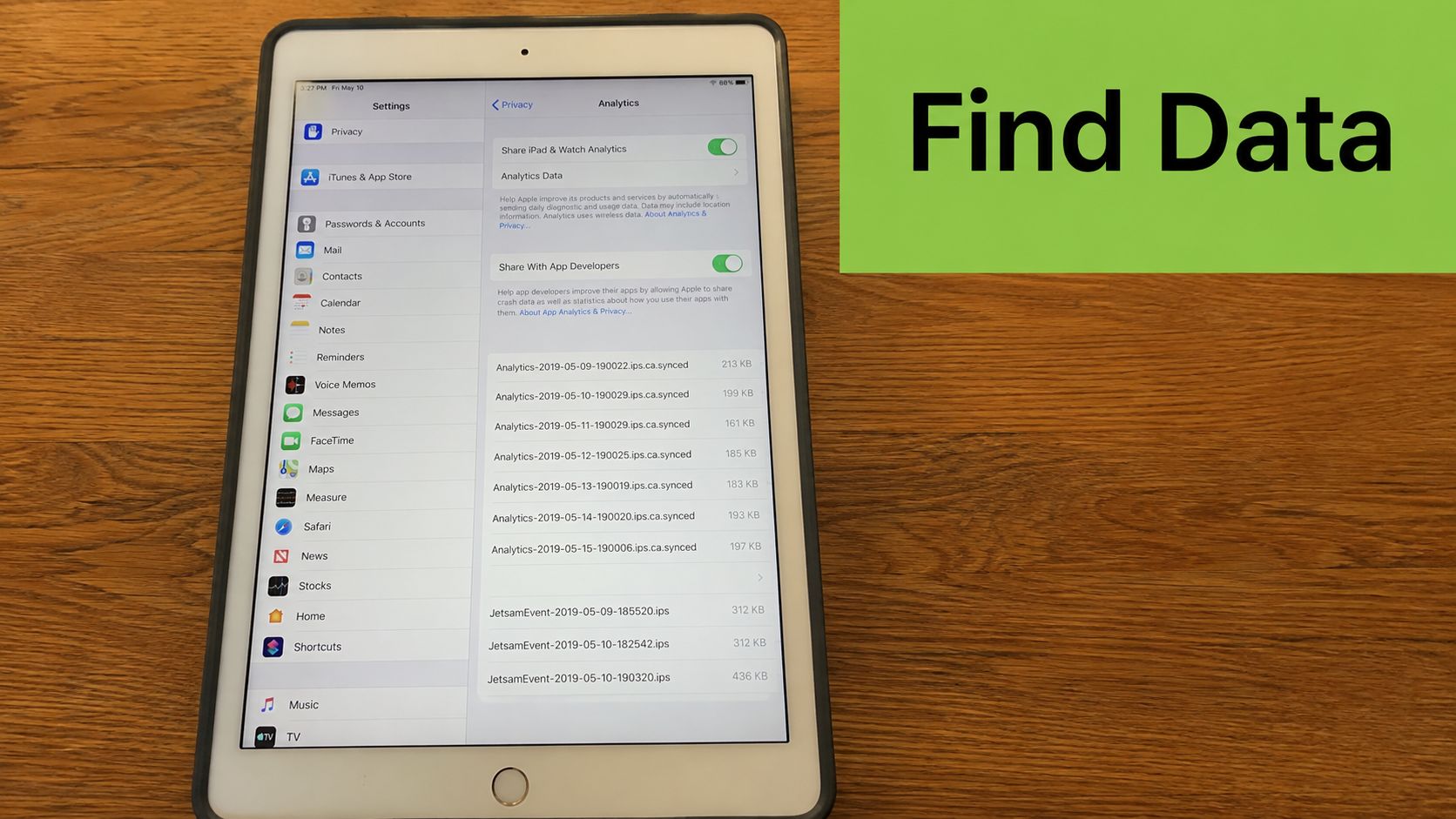
Older iPads can still be assessed when Settings doesn't show a Battery Health panel. The most practical starting point is Analytics Data, although the raw files are less friendly than Apple's dedicated screen.
Open Settings > Privacy & Security > Analytics & Improvements > Analytics Data. If analytics sharing hasn't been enabled, Apple's Singapore instructions explain that you may need to enable Share iPad Analytics and wait for a current analytics file. Search entries beginning with Analytics or log-aggregated, then inspect the text for the field cycleCount. The surrounding battery fields can provide useful supporting information, but raw logs require careful reading and can vary by model and software version. Apple's iPad battery-health support instructions describe the analytics route.
A Mac provides a more readable option. After connecting the iPad by USB and pairing it, tools such as coconutBattery can display cycle count, design capacity, current capacity, and manufacture information. iMazing offers a battery panel within its device summary, with current charge, design maximum charge, effective maximum charge, and cycle information. These tools are useful for screening because they read battery-management data from the connected device, but a software readout still isn't a substitute for a physical inspection when the iPad is swollen, unusually hot, or intermittently charging.
Windows users have fewer convenient options. 3uTools can expose basic battery information, but it may not provide the same depth or clarity as a direct Apple diagnostic or a Mac-based utility. Treat third-party readings as evidence to support a decision, not as an official service verdict.
Practical rule: If the result will determine whether you spend money, escalate to Apple Diagnostics through the Apple Support app or a qualified service centre. A technician can separate battery degradation from faults in the port, charging circuit, display assembly, or main board.
For Singapore owners comparing repair routes, myhalo's mobile repair guidance is relevant as an example of a lifecycle approach that begins with assessment rather than immediate replacement. The same principle applies to an iPad: confirm the fault, record the condition, then choose the least wasteful viable option.
Recognising Symptoms of a Failing Battery
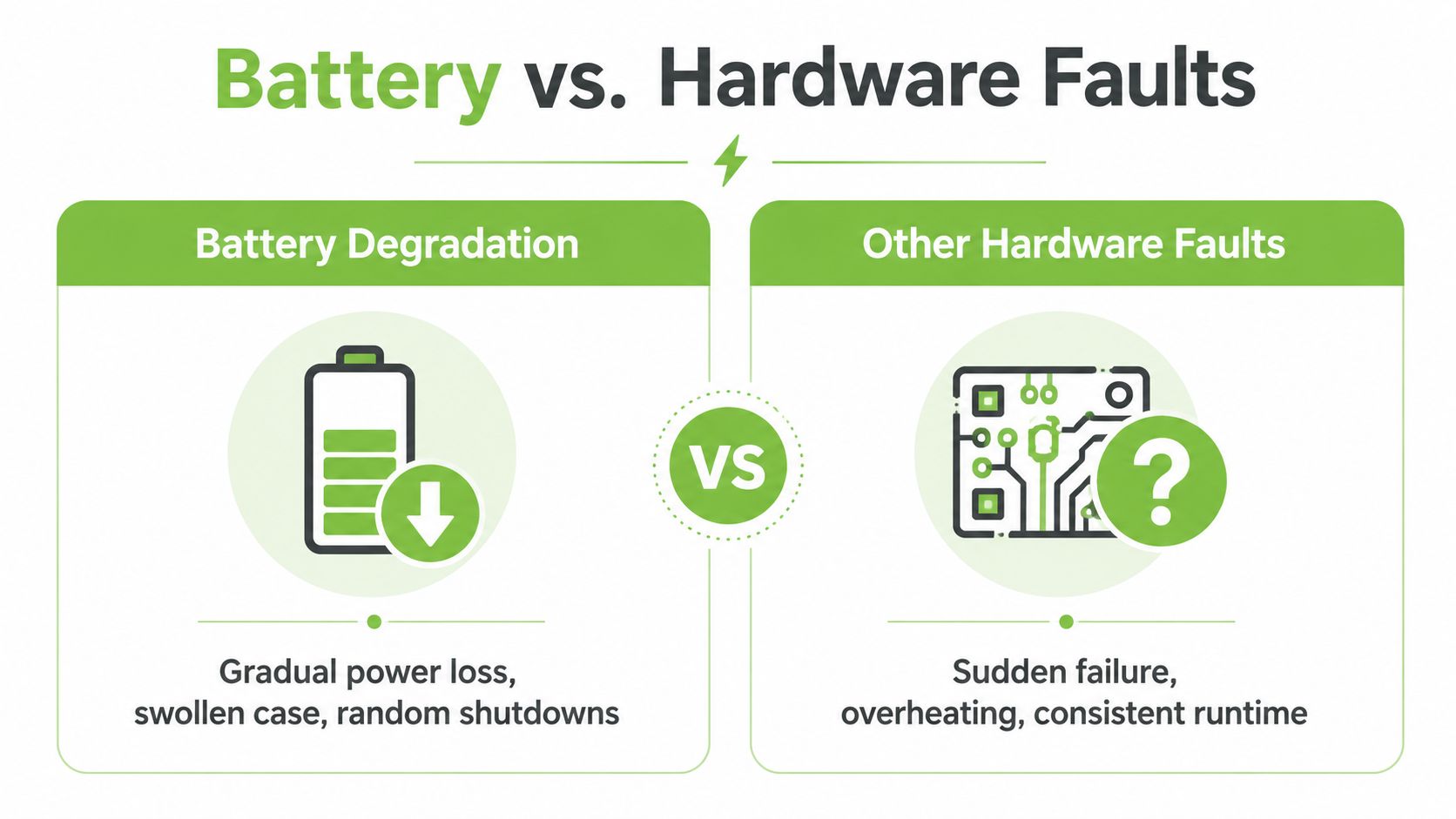
A worn battery usually creates a pattern rather than one isolated symptom. Runtime becomes shorter, the iPad needs charging more often, and the device may shut down unexpectedly under load. Sudden shutdowns while the iPad still displays charge, rapid drain during light work, or a noticeable loss of standby time all justify a closer battery check.
Physical changes are more urgent. A lifting display, a separating enclosure, or a visible bulge can indicate a swollen cell. Stop charging and stop using the iPad if you notice swelling or a chemical odour. Don't press the screen flat, puncture the case, or attempt a DIY battery removal. Apple's Singapore guidance recommends that iPad batteries be serviced or recycled by Apple or an Apple Authorised Service Provider.
Separate battery wear from similar faults
Intermittent charging, a cable that works only when angled, or a connector that feels loose points more strongly towards the charging port, cable, or adapter. Boot loops, failure to power on even while connected, or repeated crashes can involve the logic board or power-management circuitry instead of the battery.
Software can also imitate battery failure. Background activity, location services, synchronisation, and a recently installed app may drain power without any physical battery defect. Review Battery usage by app, restart the iPad, update iPadOS, and test with a known-good cable and adapter before approving a repair.
Use this isolation sequence at the counter:
- Force-restart the iPad and observe whether the problem returns.
- Swap the cable and adapter, checking whether charging becomes stable.
- Inspect the port for debris without inserting metal tools.
- Compare light and heavy workloads, because a battery may collapse under demand while appearing normal at idle.
- Check for heat, swelling, or odour, and stop immediately if any safety sign appears.
Singapore's warm, humid conditions make heat management especially important, but climate alone doesn't prove a battery fault. A technician should combine the symptom pattern, software readings, charging test, and physical inspection before recommending replacement.
When to Repair or Replace Your iPad Battery
The correct decision depends on battery condition, coverage, device performance, and future workload. A battery replacement makes sense when the iPad still meets your needs, the display and enclosure are sound, and the device has no serious software or board fault. Replacing the whole iPad makes more sense when the battery is only one of several ageing components or the device no longer supports the work you need.
Apple's Singapore service documentation lists iPad battery service at S$225. Apple also states that batteries worn through normal use generally aren't covered by its standard warranty. If AppleCare+ applies and Apple tests the battery at less than 80% of original capacity, the replacement is covered at no extra charge under the stated policy. Check the current terms and eligibility before booking through Apple's Singapore iPad repair service.
A practical decision matrix
| Scenario | Estimated Cost (SGD) | Recommended Action |
|---|---|---|
| Battery reading remains above the service threshold and runtime is acceptable | S$0 | Keep using the iPad and monitor behaviour |
| AppleCare+ applies and Apple confirms capacity below 80% | No extra charge under qualifying coverage | Book covered battery service |
| Out-of-warranty Apple battery service | S$225 | Compare the fee with device age, condition, and workload |
| Battery symptoms are accompanied by swelling or screen lifting | Assessment required | Stop using the iPad and arrange professional handling |
| Battery reading is inconclusive and charging is intermittent | Assessment required | Test the cable, adapter, port, and charging circuit before replacing the battery |
The table deliberately avoids treating every worn battery as a simple swap. A replacement won't solve a damaged port or power-management fault, and a low-cost repair isn't good value if the screen, storage, performance, or software support already limits the iPad's usefulness.
For organisations, repair can also protect operational continuity. A functioning iPad may remain suitable for point-of-sale work, meetings, inventory checks, education, or field forms even after its battery needs service. Extending that device's working life preserves the value of existing accessories, user familiarity, and deployed workflows.
A professional service provider can assess swelling, enclosure separation, charging behaviour, and battery condition before recommending a path. myhalo's iPad battery replacement service information can help Singapore users understand the assessment-led approach, while its broader lifecycle options include repair, trade-in, Certified ReLoved devices, Certified Surplus products, and responsible recycling. For SMEs, that approach supports smarter resource utilisation rather than forcing a full fleet replacement whenever one component wears out.
Battery Care Habits That Extend Device Lifespan
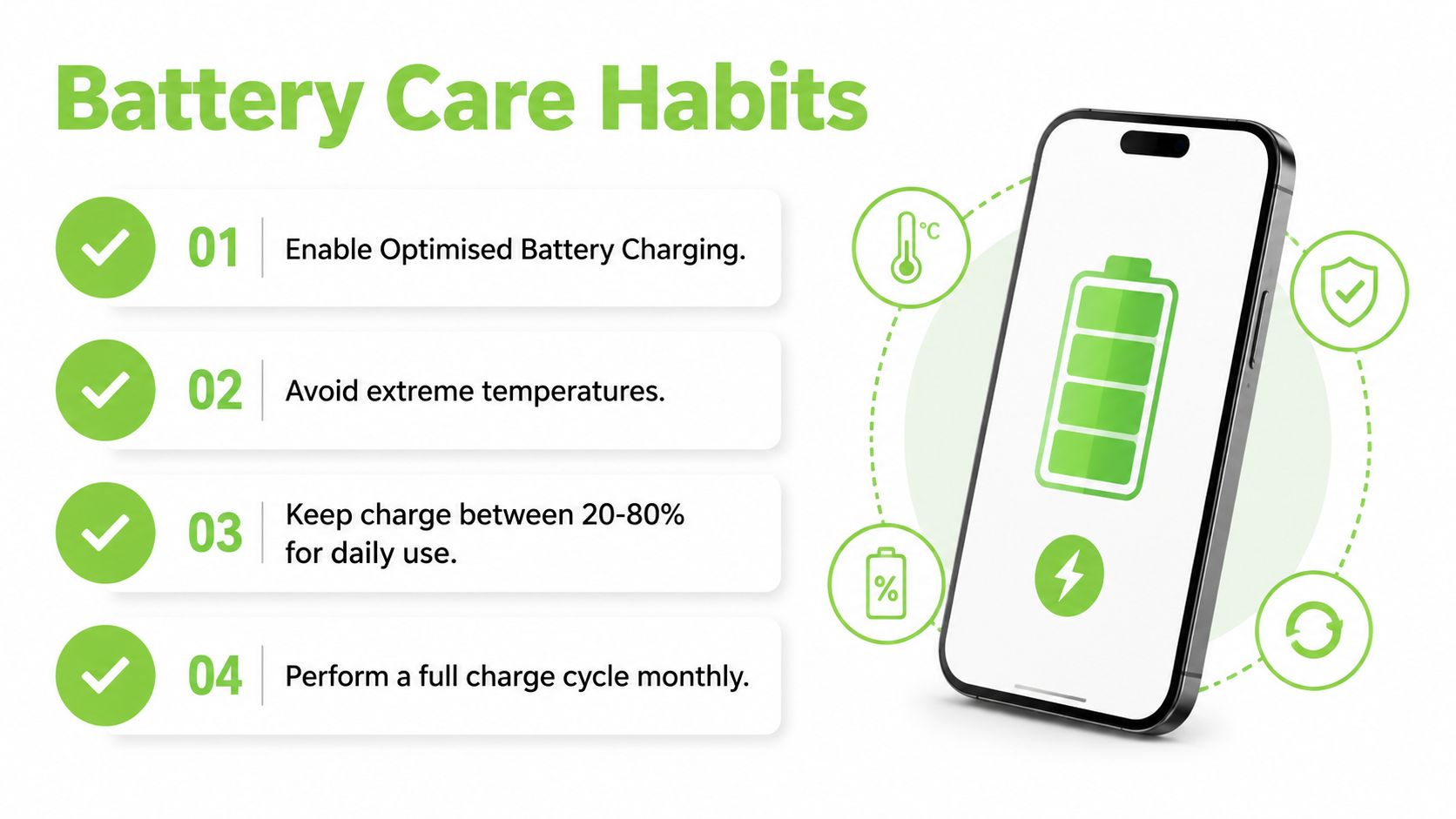
A new battery still needs sensible operating conditions. Apple provides a charge-management feature on supported iPads that lets users set an 80% charge limit. When enabled, the iPad stops charging at 80% to reduce battery wear, and users can temporarily choose Allow Until Tomorrow or reset the limit to 100%. The setting is available under Settings > Battery > Battery Health. Apple documents the feature in its iPad charge-limit guide.
Use the settings that match the workload
For a desk-bound iPad, the 80% limit is a sensible default if you rarely need maximum runtime. For travel or a long presentation day, temporarily allow a full charge, then return to the limit afterwards. This is more practical than treating every charge as a test of battery discipline.
Keep the device away from excessive heat, especially in direct sun, enclosed vehicles, or poorly ventilated display installations. Use a reliable, Apple-compatible cable and power adapter, and replace damaged accessories rather than continuing to rely on a loose or frayed connection. myhalo's charging-cable guidance can help when you're choosing a replacement cable for everyday use.
For daily work, partial charging is convenient. Keeping the iPad from repeatedly running completely flat can reduce unnecessary stress, but you shouldn't turn the device into a constant source of anxiety. Battery chemistry responds to overall usage, temperature, and charging conditions, not one missed percentage target.
A simple maintenance routine
- Review battery information: Check health data periodically and record unusual changes in runtime or charging.
- Control heat: Remove thick coverings during demanding tasks if they trap heat, and avoid leaving the iPad in hot locations.
- Reduce background load: Review apps using significant power, limit unnecessary location access, and keep storage reasonably organised.
- Update responsibly: Install compatible iPadOS updates and restart after major updates if battery behaviour changes unexpectedly.
Always-on displays and kiosks deserve a separate setup. If the iPad supports the charge-limit feature, enable it rather than leaving the device at full charge continuously. Guided Access can restrict the device to its intended application, while a sensible installation keeps ventilation clear and makes inspection easier.
myhalo approaches this kind of decision as a technology lifecycle partner, with services and product routes that include repair, reuse, Certified ReLoved devices, Certified Surplus products, transparent device grading, battery health disclosure, 30-point quality checks, and processes aligned with ISO 9001 and ISO 27001 certification. If your iPad is no longer economical to repair, arrange a condition assessment and choose between continued use, trade-in, reuse, or responsible recycling instead of leaving it unused in a drawer.
If your iPad is draining quickly, shutting down unexpectedly, or showing a capacity below the AppleCare+ service benchmark, visit myhalo for an assessment-led repair or replacement decision. The team can help with iPad battery service, reuse and trade-in options, and professionally checked Certified ReLoved or Certified Surplus devices when replacement is the more practical choice.