





2026: Handheld Pc, Gaming, Rog Ally, Legion Go, Msi Claw, Z Extreme, Z2a
You're probably looking at a handheld PC the same way most Singapore buyers do. It isn't an impulse purchase. It's a serious gaming buy that has to justify itself on the MRT, at home on the sofa, and six months later when battery wear, software quirks, and resale value start to matter.
That's where the usual global reviews fall short. They'll tell you which device gets more frames, but they often skip the part local buyers feel. Which one is comfortable on a daily commute, which one needs charging too often, which one is easier to live with in Windows, and whether buying new even makes sense if a professionally refurbished unit gives you nearly the same gaming experience with less financial regret.
The shortlist is familiar: ASUS ROG Ally, Lenovo Legion Go, and MSI Claw. Around them, buyers are also hearing more about Z Extreme and Z2A class chips, which makes the decision even noisier. The right answer isn't just the fastest machine. It's the one that fits how, where, and how often you play.
Table of Contents
- Choosing Your Next Gaming Obsession
- The Handheld PC Titans at a Glance
- Under the Hood APUs and Performance Potential
- Real-World Gaming Thermals and Battery Life
- Controls Display and Ergonomics
- The Singapore Ownership Guide New vs Refurbished
- Final Verdict Which Handheld PC Is Right For You
Choosing Your Next Gaming Obsession
A lot of buyers start in the same place. They want desktop-style PC gaming without being tied to a desk, but they're not sure whether a handheld is a smart upgrade or just an expensive toy that ends up in a drawer after the novelty fades.
That hesitation is fair. A handheld PC has to do more than run games. In Singapore, it has to survive short commutes, irregular charging opportunities, warm weather, small bags, and the reality that many players already own a decent laptop, desktop, or console. If a handheld overlaps too much with what you already have, it's hard to justify.
The appeal is still real. Asia Pacific represented 46.7% of the global PC gaming market in 2024, and that market is projected to grow from US$96.69 billion in 2026 to US$185.95 billion by 2034 at an 8.52% CAGR, according to Fortune Business Insights on the PC gaming market. That matters because devices like the ROG Ally, Legion Go, and MSI Claw aren't creating a gaming habit from scratch. They're extending one that already exists at scale.
The question buyers should ask first
Don't begin with specs. Begin with use case.
- Daily commute use: You need a device that wakes quickly, feels comfortable in tight spaces, and doesn't punish you with terrible battery life.
- Home-first portable use: Bigger screens and stronger docked flexibility matter more than size.
- Value-first buying: You need to compare the handheld not just against other handhelds, but against a refurbished laptop plus controller, or against upgrading what you already own.
Practical rule: If you already game mostly at a desk, a handheld only makes sense when it gives you access to gaming sessions you currently miss, not when it duplicates sessions you already have.
The decision isn't “which handheld is best”. It's whether your lifestyle suits a handheld PC at all, and then which compromise is least painful.
The Handheld PC Titans at a Glance
Three devices dominate most buyer conversations. The ROG Ally is the clean all-rounder. The Legion Go is the bigger, more flexible machine. The MSI Claw is the alternative for buyers curious about Intel's approach and a different chassis feel.
Here's the quick visual overview first.
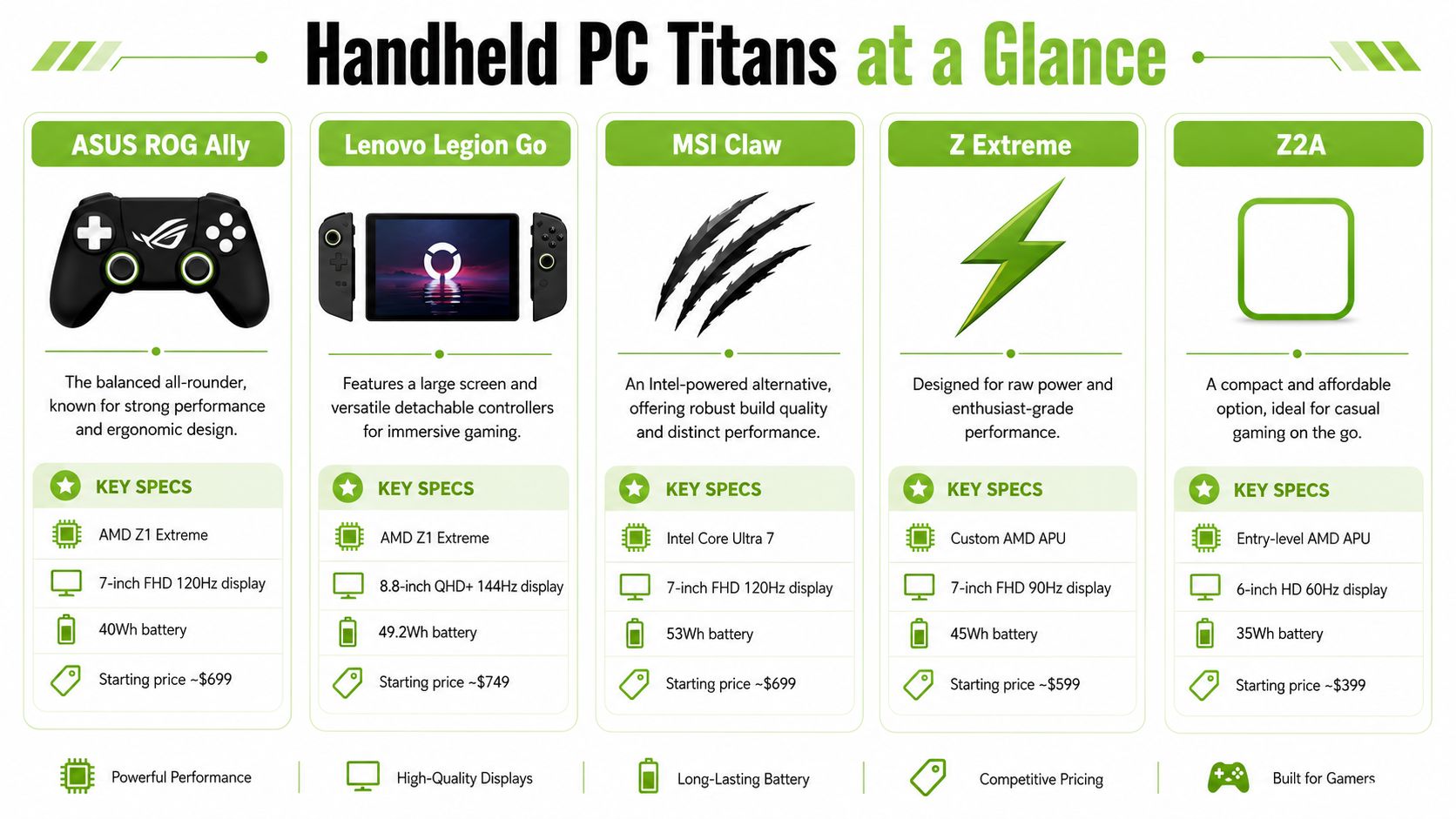
Handheld PC Spec Showdown 2026
| Specification | ASUS ROG Ally (Z1 Extreme) | Lenovo Legion Go | MSI Claw (Core Ultra) |
|---|---|---|---|
| Processor class | AMD Z1 Extreme | AMD Z1 Extreme | Intel Core Ultra |
| Operating style | Windows handheld | Windows handheld | Windows handheld |
| Core identity | Balanced all-rounder | Large-screen flexible option | Intel-powered alternative |
| Best fit | Mixed home and mobile gaming | Players who want screen size and versatility | Buyers who prefer Intel ecosystem and a different feel |
| Main trade-off | Smaller battery on earlier models | Larger body in bag and hand | Software and tuning can matter more |
For shoppers who still want a broader market comparison before narrowing down, this Steam Deck vs ROG Ally guide from Budget Loadout is useful because it frames where Windows handhelds differ from the Steam Deck approach. If you're leaning Lenovo, myhalo also has a focused Lenovo Legion Go buyer guide that's helpful for understanding how that device fits into a wider PC setup.
What each one feels like in actual use
ROG Ally suits buyers who want the least dramatic adjustment from a traditional controller-first setup. It feels like a handheld built around balance. Not the biggest screen, not the strangest form factor, and usually the easiest one to recommend to someone buying their first Windows gaming handheld.
Legion Go is for the buyer who keeps asking for more screen, more flexibility, and more ways to use the same machine. The detachable controller concept gives it a very different personality. It feels less like a fixed appliance and more like a portable gaming kit.
MSI Claw is the one people often consider after they've already looked at the AMD options and want to know whether Intel gives them something meaningfully different. Sometimes that answer is yes, especially if you prefer its build or want to avoid buying the same thing everyone else is buying. But it usually needs more careful expectation-setting.
Bigger doesn't automatically mean better on a handheld. A larger screen helps at home. It can become a burden when you're standing on the MRT with a backpack, a charger, and nowhere to rest your elbows.
Under the Hood APUs and Performance Potential
The chip discussion gets messy because buyers are hearing several names at once: Z1 Extreme, Z Extreme, Z2A, and newer Z2 Extreme class conversations. Most shoppers don't need to memorise architecture details. They need to know what affects the buying decision over the next few years.
The big picture is simple. A handheld chip has to do more than post a benchmark. It has to manage heat, battery drain, driver maturity, and game compatibility inside a small body. That's why two devices with similar paper specs can still feel different in practice.
The wider category is also moving fast. The global mobile and handheld gaming market is projected to rise from US$15.0 billion in 2026 to US$34.7 billion by 2033 at a 12.7% CAGR, while smartphones still account for about 72% of the market, according to Persistence Market Research on mobile and handheld gaming. That's the key pressure point for handheld PCs. They can't merely be portable. They have to deliver a clearly more PC-like experience than a phone.
Why chip names matter less than people think
For most buyers, AMD Z1 Extreme is still the known quantity. It's familiar in the category, widely discussed, and easier to understand because so many comparisons already use it as a baseline. If you want less uncertainty, buying around a proven chip family is usually the safer route.
Intel Core Ultra in the MSI Claw is more of a personality choice than a guaranteed win. Some buyers like the idea of an Intel-based handheld, but a key question isn't who made the chip. It's whether the device gives you stable, predictable gaming on the titles you play.
Here's how I'd frame it in shop-floor terms:
- Choose proven platform confidence if you don't enjoy tweaking. AMD-based handhelds are easier to understand because the market has already tested them heavily.
- Choose Intel curiosity carefully if you like experimenting and don't mind a bit more variation in how games and software behave.
- Choose for your library, not forum arguments. Launchers, anti-cheat behaviour, older games, and emulation habits all matter as much as the processor badge.
Z Extreme versus Z2A thinking
Marketing can mislead buyers. A newer chip label, for instance, sounds like an automatic upgrade. It isn't. What matters is whether that newer class gives you better efficiency, better sustained gaming, or a better software stack around it.
If you're comparing a current Z1 Extreme handheld with waiting for Z2A or Z2 Extreme devices, ask these questions instead:
- Do you need a handheld now? If your gaming gap is current, waiting for the next cycle can easily turn into endless waiting.
- Are you buying for AAA titles or mixed use? Buyers who mostly play indie games, older titles, JRPGs, and emulation don't always need the newest silicon.
- Will the rest of the device improve too? Better battery, more RAM, and extra ports can matter more than a modest chip refresh.
A good example of sensible improvement is when a refresh fixes ownership pain points rather than just adding a new name on the box. That's the kind of upgrade worth paying attention to.
The strongest handheld purchase is rarely the one with the newest chip. It's the one where the processor, cooling, battery, and software feel properly matched.
Real-World Gaming Thermals and Battery Life
Handheld buyers often obsess over peak performance and then regret the device because of heat, fan noise, or battery drain. That's backwards. On a handheld PC, sustained comfort matters more than a short benchmark win.
This matters even more in Singapore. You're often using these devices in warm indoor environments, in transit, or in places where charging isn't convenient. A handheld that feels fine for twenty minutes but becomes noisy, hot, and power-hungry after that won't fit real life.
To ground the comparison, here's the assigned performance visual.
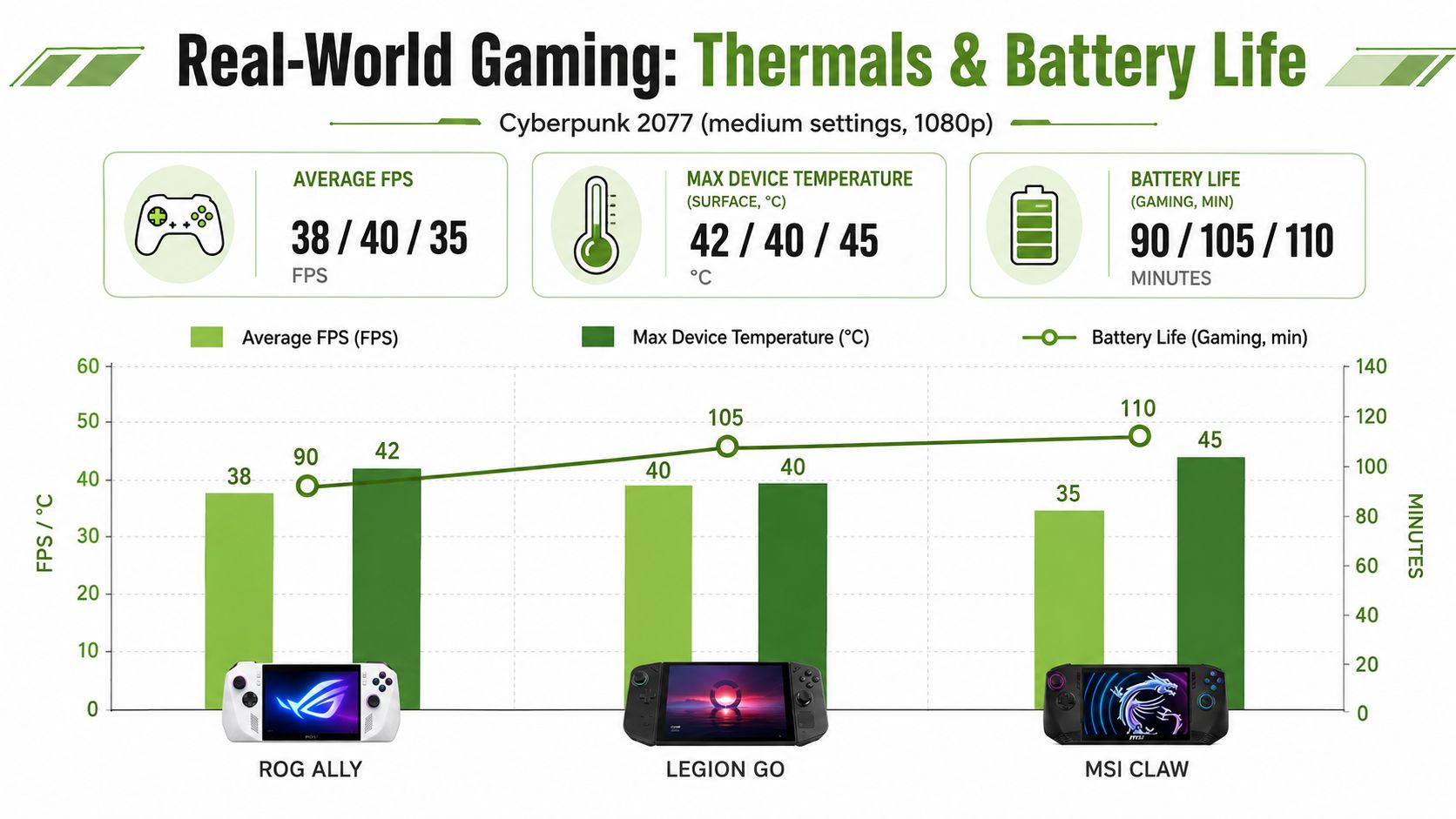
Heat changes how long you want to play
A larger handheld often manages surface comfort better because there's more room to spread heat and move air. That doesn't make it more portable. It just means your hands may tolerate longer sessions more easily.
The ROG Ally usually feels like the device with the least learning curve. You pick it up, game, and don't think too hard about it. The Legion Go tends to feel roomier, but that same size makes it less casual for quick pull-out-and-play moments. The MSI Claw can appeal on build feel, though buyers should still pay attention to how fan behaviour and long-session comfort affect daily use.
A practical buying mistake is testing a handheld only in a cool shop, for a short demo, while plugged in. That tells you almost nothing about what happens on a sofa, on battery, in a sleeve, after forty minutes of actual gaming.
Battery life is where the hype usually breaks
Battery life is the first thing buyers underestimate and the first thing they complain about later. Many first-generation handheld PCs feel powerful when plugged in and compromised the moment you try to use them untethered at higher power levels.
That's why the ROG Ally X is such an important signal for the category. It increases battery capacity from 40Wh to 80Wh, adds a second USB-C port, and adds 8GB more RAM. HotHardware notes that this allows up to about three hours in Turbo mode, which makes it materially better suited to longer mobile gaming sessions than first-generation 30–40Wh handhelds, as reported in HotHardware's handheld buying guide.
That kind of improvement matters more than flashy launch slides. Doubling the battery changes behaviour. It can mean the difference between carrying a charger everywhere and leaving it behind for shorter outings. If you often play away from a wall socket, battery upgrades are not a minor spec.
For local buyers who rely on external charging, it also helps to think about your wider carrying setup. A handheld with short battery life often turns into a handheld plus cable plus power bank plus pouch. That adds cost and friction. If you're planning that route, this myhalo guide on choosing a suitable power bank in Singapore is relevant because wattage support and portability matter more than raw battery pack size alone.
- For commuting: Lower-power modes matter more than maximum FPS.
- For home couch play: Weight and charging convenience matter almost as much as endurance.
- For long sessions away from power: Battery-first hardware is usually worth paying more for.
Buy the handheld for the power mode you'll actually use, not the headline mode you test once.
Controls Display and Ergonomics
A handheld can be technically strong and still be the wrong buy if it feels awkward in your hands. Specs alone cannot compensate. Comfort is physical, immediate, and very hard to fix later.
The ROG Ally usually wins people over with simplicity. Its shape feels coherent. Buttons, sticks, and grip all point toward one use case: hold it like a gaming device and get on with it. If you want the least fuss, this matters more than buyers admit.
The Legion Go goes the opposite direction. It gives you a larger visual canvas and detachable controllers, which sounds brilliant on paper and often is at home. But it also changes how you carry it, how you balance it in hand, and how long you'll tolerate using it in more cramped situations.
Screen and software affect comfort together
Display size isn't just about immersion. It affects posture, eye comfort, and how often you need to lean in to read small interface text in PC games that were never designed for handheld screens.
The software layer matters too. On identical hardware, SteamOS has shown notable gains over Windows 11 in handheld testing. Cyberpunk 2077 ran at nearly 60 FPS on SteamOS versus 46 FPS on Windows 11, The Witcher 3 and Doom Eternal improved by 12–13%, and battery life in Dead Cells exceeded six hours on SteamOS versus under three hours on Windows 11, according to this report on SteamOS outperforming Windows 11 in handheld gaming.
That isn't just a benchmark story. It affects ergonomics because poor software wastes your attention. If Windows feels clumsy on a touchscreen, you end up fighting menus, launchers, and background behaviour instead of playing. A more console-like interface reduces friction, which makes the device feel better to use even before you talk about frame rates.
Which shape suits which player
Choose the ROG Ally if your priority is a more integrated feel. It generally suits players who want handheld gaming to remain handheld, not become a mini project.
Choose the Legion Go if you care about a bigger display and value flexibility more than compactness. It's easier to appreciate when you play seated, rested, and with time.
Choose the MSI Claw if its grip, trigger feel, and chassis appeal to you enough to justify stepping outside the most common recommendation path. That can be valid. Just make sure you're buying the whole user experience, not just the chipset idea.
A device that's slightly slower but noticeably more comfortable often gets used more. In the long run, that's the better gaming machine.
The Singapore Ownership Guide New vs Refurbished
This is the part most handheld coverage skips, and it's the part that matters most once the excitement wears off. In Singapore, ownership cost is never just the upfront price. It's warranty support, repair options, accessory spending, battery wear, and how much value the device still holds when you want to move on.
That gap matters because the category is still early. Coverage cited in recent reporting puts worldwide handheld shipments at about 6 million units from 2022 to 2025, with another 1.9 million projected in 2026, while Asia Pacific is described as the fastest-growing region for gaming handhelds in this analysis of handheld PC gaming's early market and ownership questions. For SG buyers, that means you're shopping in a market with rising demand but still uneven long-term value signals.
Sticker price is only the start
A new handheld PC feels clean and simple at checkout. But total cost of ownership grows fast once you add:
- Accessories you'll probably need: Charger, protective case, screen protector, possibly a dock, maybe a controller.
- Battery decline over time: Handhelds live on charge cycles. Heavy use shows up here sooner than on a mostly plugged-in desktop.
- Repair risk: A handheld is more likely than a console to be carried around, dropped, or stressed in transit.
- Resale pressure: New refreshes can make older units feel outdated faster than buyers expect.
That's why a professionally refurbished route can make more sense than many first-time buyers assume.

When refurbished makes more sense
For value-focused shoppers, the smarter comparison often isn't new ROG Ally versus new Legion Go. It's new handheld versus professionally refurbished alternative, or even handheld versus refurbished laptop and controller, depending on how portable you really need the setup to be.
One practical option in Singapore is myhalo's professionally refurbished device range and buying guidance. myhalo offers transparent grading across As-New, ReLoved, and ReEco categories, along with warranty options, repair services, trade-ins, and aftercare programmes. For a buyer who cares about value retention and support, that structure can be more relevant than chasing the newest launch cycle.
A refurbished handheld or adjacent gaming setup makes sense when:
- You want lower financial risk. If you're still unsure whether handheld gaming will stick, paying less reduces regret.
- You care about local support. Warranty and repair access in Singapore often matter more than launch-day bragging rights.
- You upgrade often. Lower entry cost can soften depreciation when you switch devices later.
A brand-new unit still makes sense if you know exactly what you want, plan to use it heavily, and specifically need the latest battery or port improvements. But for plenty of local buyers, refurbished isn't the compromise. It's the more rational purchase.
Final Verdict Which Handheld PC Is Right For You
The best handheld PC isn't universal. It depends on where you play, how long you play, and how much friction you're willing to tolerate.
Start with the decision guide below, then sanity-check it against your actual habits.
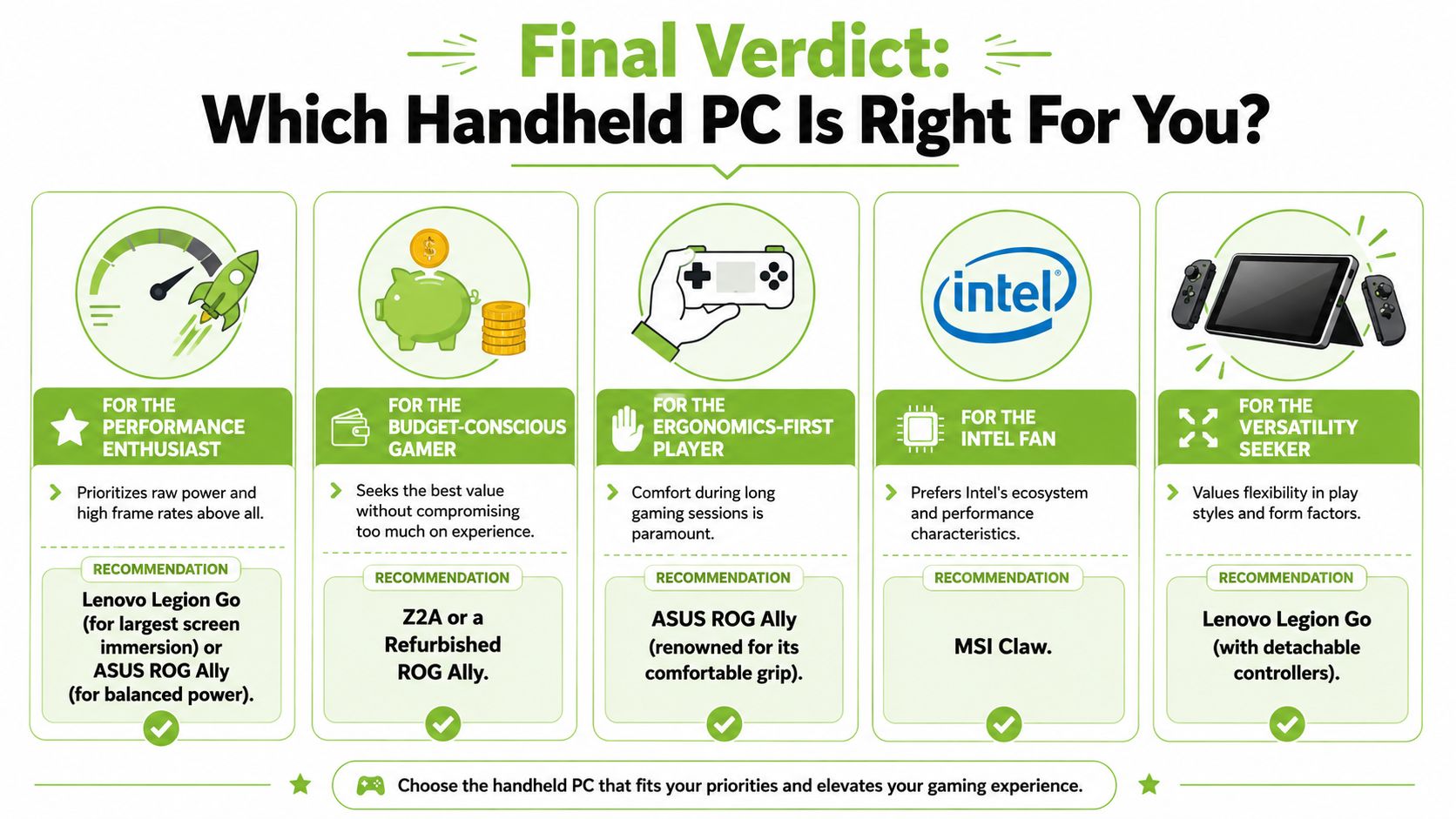
Buyer profiles that actually help
The Daily Commuter
Pick the ROG Ally if you want the easiest device to live with. It's the one that most often feels proportionate to real handheld use. Not too big, not too fussy, and easier to recommend if your gaming happens in shorter bursts.
The Performance Chaser
Pick the Legion Go if a larger display matters to you almost as much as raw performance. It suits buyers who mostly play seated and want the handheld to feel closer to a compact PC setup than a pure grab-and-go device.
The Intel-Curious Buyer
Pick the MSI Claw only if you've already accepted that you're choosing a different route, not the default safe choice. That doesn't make it wrong. It just means you should care about how it feels and behaves, not only what badge it carries.
Here's the embedded video if you want a visual companion while deciding:
The Value-Focused Gamer
Most Singapore buyers should exercise caution here. If you're comparing handheld pc, gaming, ROG Ally, Legion Go, MSI Claw, Z Extreme, and Z2A options, don't stop at launch specs. Compare ownership cost, likely battery ageing, repair access, and how much use you'll really get outside home. For many buyers, a refurbished path or a less aggressive purchase is the better move.
The Buyer Who Wants Fewer Regrets
Choose the device that fits your lowest-friction play pattern. If you mostly game on the sofa, buy for comfort. If you commute, buy for portability and battery realism. If you're unsure whether you'll stick with handheld gaming, don't overspend just to own the newest chip name.
The category is exciting, but the practical answer is still the same. Buy the handheld you'll carry, charge, and keep using after the first month.
If you're weighing a handheld PC against a more value-conscious setup, myhalo is one local option worth checking for new and professionally refurbished devices, along with repair, trade-in, and aftercare support that can matter more than headline specs once you've owned the device for a while.