





Challenger Junction 8 Complete Local Guide
You're probably reading this before heading to Bishan, standing in front of an ageing phone, a laptop that needs replacing, or a charger cable that has failed at the wrong time. In these moments, many seek Challenger Junction 8. They want a quick answer on where it is, when to go, and whether the trip will solve the problem.
A useful visit starts before you leave home. If you know the exact unit, the busiest hours, and what kind of questions to ask at the counter, you're much more likely to leave with the right device, accessory, or service outcome. If you're also comparing new tech with refurbished options, a bit of planning can save money and reduce waste without sacrificing reliability.
Table of Contents
- Discover Challenger Junction 8
- Visit Logistics to Junction 8
- Services Available at Challenger Junction 8
- Product Categories and Promotions at Junction 8
- Tips for Visiting Challenger Junction 8
- Comparing Refurbished Options with myhalo
- Frequently Asked Questions about Challenger Junction 8
Discover Challenger Junction 8
If you're trying to locate Challenger Junction 8 quickly, the key detail is the unit number. Challenger's mobile retail store at Junction 8 is at 9 Bishan Place, #04-03A, Singapore 579837, and it operates daily from 11 AM to 9:30 PM, according to this Junction 8 location listing.
Junction 8 is a busy heartland mall. Without knowledge of the specific floor and unit, visitors may easily spend extra time circling around escalators or walking past the wrong electronics stores.
Spotting the store faster
For a first-time visitor, the most practical approach is simple:
- Save the full address in your maps app before leaving home.
- Look for Level 4 signage once you enter the mall.
- Match the unit number #04-03A, not just the brand logo.
If you like previewing layouts before a visit, tools used for AI-powered 360 tour creation are worth knowing about because they show how indoor spaces can be mapped in a more intuitive way than flat directories. That idea helps when you're navigating multi-level malls like Junction 8.
Practical rule: When a store sits inside a popular mall, the unit number is often more useful than the postcode.
What to keep handy before you go
Keep these details in your notes app or messages:
- Address: 9 Bishan Place, #04-03A, Singapore 579837
- Opening hours: Daily, 11 AM to 9:30 PM
- Purpose of visit: New phone, accessory, service query, warranty question, or trade-in enquiry
If your trip is time-sensitive, call the mall or store directory channels first to confirm the latest operating status. Store listings are helpful, but a quick confirmation can prevent a wasted journey during public holiday periods or temporary layout changes.
Visit Logistics to Junction 8
Bishan is one of the easier town centres to get around in Singapore, which is why Challenger Junction 8 works well for residents, students, and office workers passing through the area. The mall connects closely with public transport, and that's the main reason many people prefer it over a more distant electronics run.
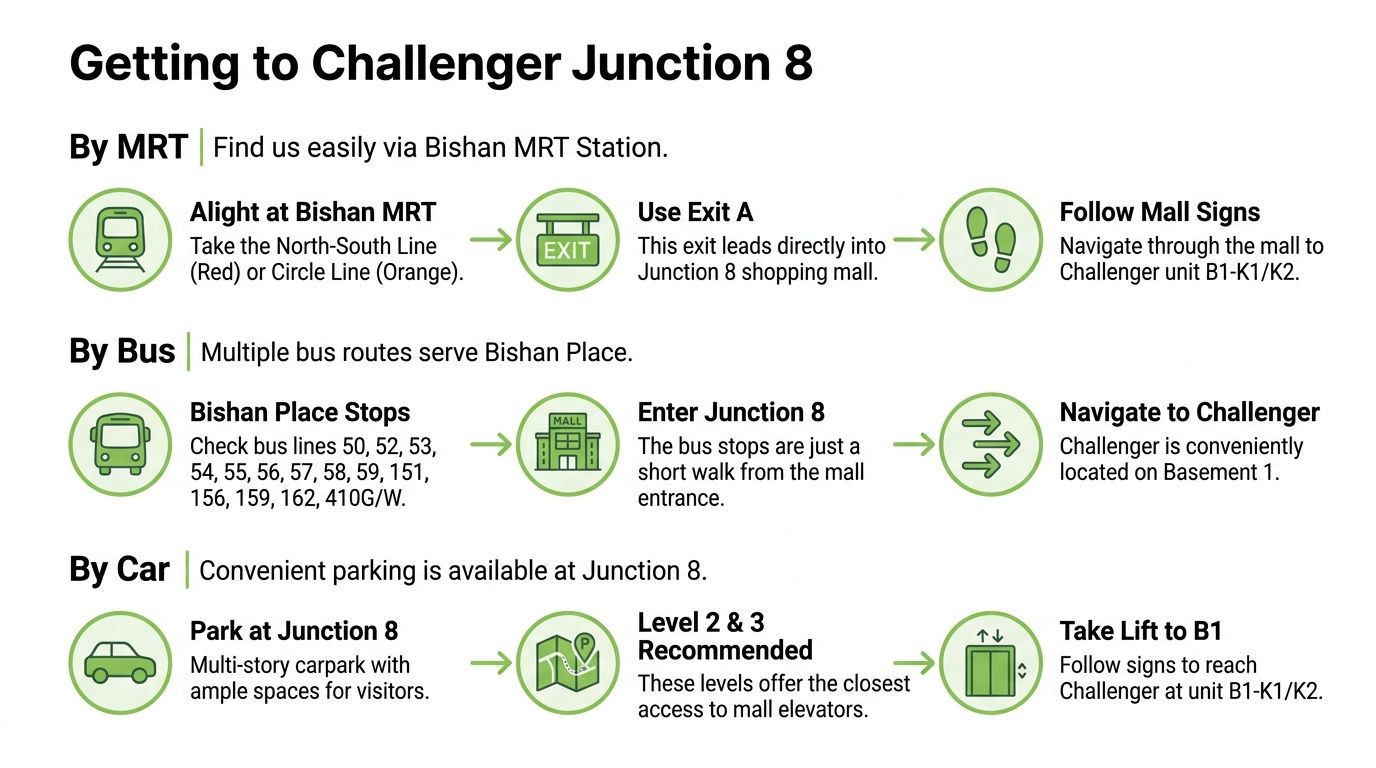
By MRT
If you're taking the train, Bishan MRT Station is the obvious choice. The station is an interchange, so it's convenient whether you're coming from the North-South Line or the Circle Line.
A straightforward routine works best:
- Alight at Bishan MRT: This is the closest rail access point to the mall.
- Use the mall-linked exit: Follow Junction 8 signs rather than relying only on retail directories.
- Head upward early if needed: Once inside, move towards the correct level instead of browsing from floor to floor.
The infographic above mentions Basement 1 units, but the location detail cited earlier identifies Challenger's mobile outlet at #04-03A. When you arrive, trust the current in-mall signage and unit listing rather than older visual references.
By bus or car
If you're coming by bus, Bishan Place is served by multiple routes in the town centre. The practical tip isn't memorising every service. It's checking which stop drops you closest to the mall entrance you want, then walking in with the unit number already saved.
Drivers should expect the usual mall traffic pattern. It's generally easier to park, enter the mall, then orient yourself indoors using directional boards. If you're carrying a laptop for assessment or collecting multiple accessories, driving can be more comfortable than changing trains or buses with bags in hand.
Weekend traffic inside heartland malls tends to build from midday onward. For mobile retail specifically, weekend transactions in places like Junction 8 peak between 12:00 and 20:00, so an earlier arrival usually means a calmer queue and more attentive staff time.
A simple timing strategy
Try one of these visit windows depending on your goal:
| Visit goal | Better timing | Why it helps |
|---|---|---|
| Quick accessory purchase | Late morning | Shorter lines, faster checkout |
| Phone comparison | Early afternoon on a weekday | More room to browse and ask questions |
| Warranty or service query | Before peak shopping hours | Staff can explain next steps more clearly |
If you only have time on weekends, arrive before lunch where possible. That gives you a better chance of handling your purchase or enquiry before the mall gets crowded.
Services Available at Challenger Junction 8
Visitors to Challenger Junction 8 rarely come just to “look around”. They're usually there with a task. Replace a phone, compare a tablet, ask about a faulty item, or sort out a warranty matter. That's why it helps to think of the store as a practical stop for electronics buying and after-sales questions rather than just a display floor.
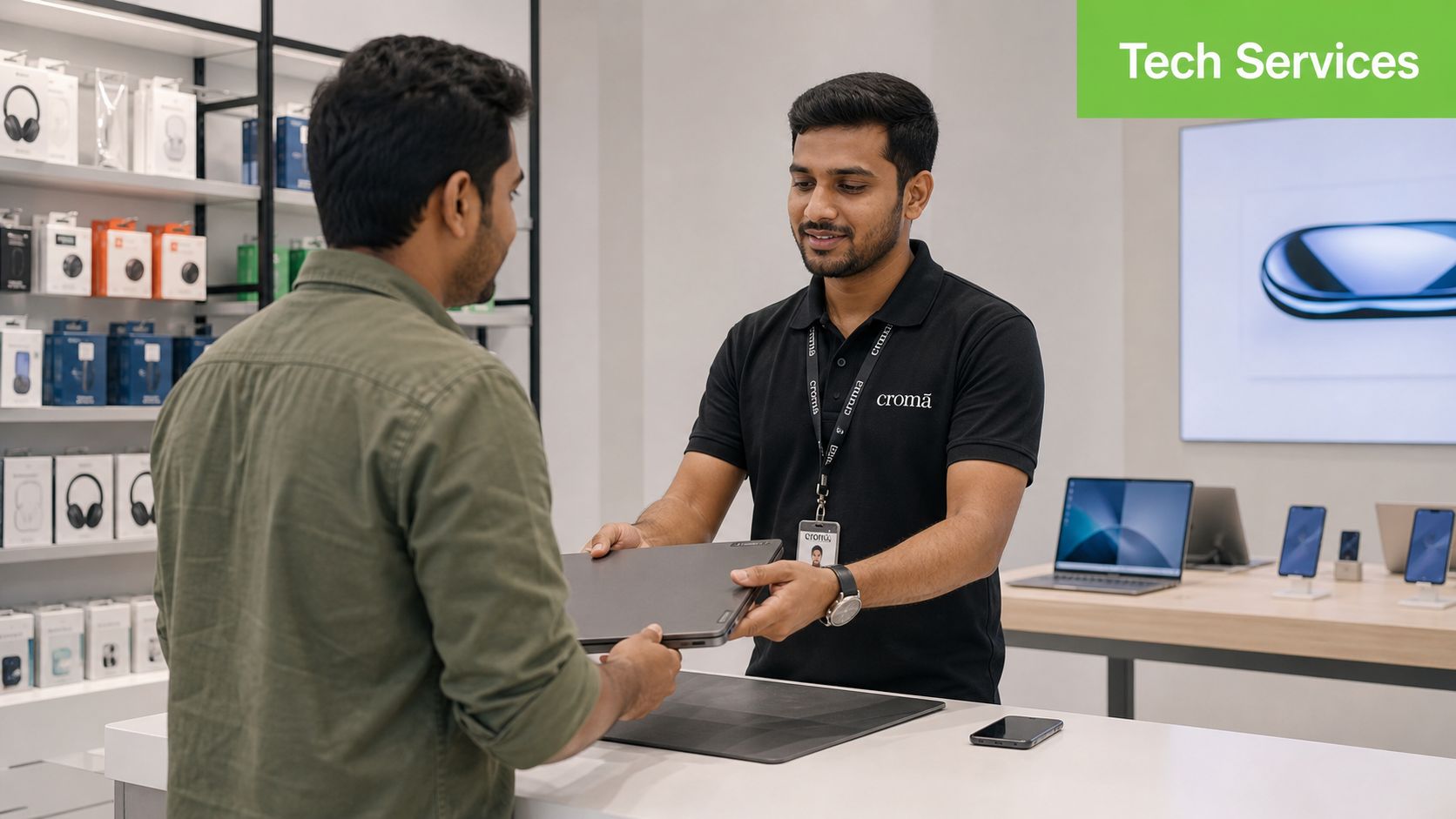
What shoppers usually come here for
The outlet focuses on mobile devices, so you're most likely to find support around phones, related accessories, and device-buying questions. More broadly, Challenger's business remains heavily concentrated in electronics, which account for 95% of total sales in 2025 according to this retailer profile. That lines up with what most customers expect on the ground. Phones, wearables, chargers, cables, adapters, and other everyday tech needs.
For in-store visits, these are the most practical service paths:
- New device purchase: Useful if you want to compare a few models in person before deciding.
- Accessory matching: Bring your existing device if you need help checking fit, port type, or compatibility.
- Warranty enquiry: Have your receipt, member details, or order information ready.
- Product troubleshooting: Staff can often advise whether your issue looks like a settings problem, accessory fault, or a repair case.
How to approach repair-related questions
Not every retail counter performs the same level of repair work on site. Some issues can be assessed immediately, while others may need referral, vendor servicing, or a later collection arrangement. That's why your first question shouldn't be “Can you fix this now?” Ask instead, “Is this handled in-store, by a service partner, or by brand support?”
For example:
- A cracked phone screen may need inspection before anyone can say whether it's a same-day repair elsewhere or a brand-service case.
- A battery that drains too fast may require testing to rule out settings, battery wear, or charging accessory problems.
- A laptop that won't power on may need deeper diagnosis than a retail counter can complete on the spot.
If you want a clearer sense of what professional phone servicing usually involves in Singapore, this guide to mobile phone repair in Singapore is useful for understanding common repair pathways, turnaround considerations, and what to ask before handing over a device.
Bring the device, charging cable, proof of purchase, and a short note describing the fault. Staff can help faster when the issue is described clearly.
What makes the visit smoother
Before you queue, prepare three things:
- Your exact device model
- The main problem in one sentence
- Any urgency, such as travel, work use, or school deadlines
That small bit of preparation often makes the conversation more productive. It also helps staff tell you whether buying a replacement, claiming warranty support, or seeking specialist repair is the better next step.
Product Categories and Promotions at Junction 8
A visit to Challenger Junction 8 usually centres on practical electronics rather than niche hobby gear. If you're shopping in Bishan, think everyday consumer tech. Phones, tablets, laptops, wearables, audio gear, chargers, cases, and replacement accessories are the categories that make the most sense to check first.
Challenger also has a sizeable footprint across Singapore. One listing notes a network of 24+ participating outlets as of 2024, placing Junction 8 among key non-flagship stores in a broader nationwide setup, as shown in this Singapore outlet overview. For shoppers, that usually means the store fits into a larger inventory and service ecosystem rather than operating as an isolated neighbourhood shop.
What to focus on by shopping need
Different buyers should scan the store differently.
| Buyer type | Category to check first | What to compare |
|---|---|---|
| Student | Tablets, entry laptops, charging accessories | Portability, warranty, keyboard support |
| Working adult | Smartphones, power banks, earbuds | Daily reliability, charging speed, compatibility |
| Parent | Basic phones, tablets, protective cases | Ease of use, screen size, durability |
| SME buyer | Laptops, peripherals, adapters | Stock consistency, warranty path, accessory bundling |
If you're buying a wearable or replacing a strap, it's also smart to check sizing before purchase. For readers comparing alternatives beyond what a mall store may stock, these premium replacement silicone straps are a useful example of the sort of specialised accessory range that can help when standard in-store choices feel limited.
Promotions are often category-driven
Promotions at tech retailers often rotate by product family rather than applying across the whole store. That means your best move is to ask targeted questions.
Instead of saying, “Any promo today?”, ask:
- Is there a bundle with this phone and charger?
- Are there member offers on wearables or tablets?
- Is this model being cleared for a newer version?
Here's a practical way to think about it.
| Category | Offer | Validity |
|---|---|---|
| Smartphones | Look out for bundle-based offers with cases, chargers, or audio accessories | Varies by in-store campaign |
| Laptops and tablets | Seasonal education or productivity promotions may appear during common upgrade periods | Varies by launch and stock |
| Accessories | Multi-buy deals are often easier to find than headline discounts | Varies by brand and shelf promotion |
If refurbished shopping is part of your decision, it's worth browsing a specialist range like ReLoved devices separately before you visit. That gives you a clearer benchmark for comparing condition, warranty style, and value, even if you still prefer to buy in person at the mall.
Tips for Visiting Challenger Junction 8
The best store visit is usually the shortest one that still answers your question properly. Most delays happen because shoppers arrive without model details, don't know the exact accessory they need, or show up during the busiest hours.
A little preparation fixes most of that.
Small habits that save time
- Check your device model first: “iPhone”, “Samsung”, or “iPad” isn't enough when you need a case, screen protector, or charger with the correct fit.
- Photograph the problem: If your screen flickers or your hinge is loose only at certain angles, a photo or short video helps staff understand the issue.
- Bring old accessories: A worn-out cable, charger head, or watch strap makes replacement matching much easier.
- Keep proof of purchase ready: Warranty conversations move faster when the receipt or membership record is easy to pull up.
When to go and who to approach
If your visit is mainly for browsing, almost any time works. If you need advice, avoid the busiest weekend stretch. Earlier in the day is usually more manageable because staff aren't balancing as many simultaneous checkout and service questions.
A practical in-store approach looks like this:
- State your goal clearly when you first speak to staff.
- Ask whether you need sales help or service help.
- Confirm stock before deciding if you're comparing colours, storage options, or accessory variants.
If your purchase depends on one specific item, call ahead first. A short confirmation can save a full round trip.
Questions worth asking at the counter
Some questions produce better answers than others. These tend to work well:
- For phones: Is this local set, and what does the warranty process look like?
- For accessories: Does this support my exact model and charging standard?
- For problem devices: Is this likely a repair issue, a warranty issue, or a replacement decision?
If you're visiting with an older device and thinking about upgrade value, ask for the practical difference between repairing what you have, buying new, or moving to a refurbished unit elsewhere. That comparison often leads to a better decision than focusing only on headline price.
Comparing Refurbished Options with myhalo
For many shoppers, a key question isn't only where Challenger Junction 8 is. It's whether buying new from a mall store is the smartest move, or whether a professionally refurbished device offers better value for the way they use tech.
That's where comparison becomes useful. Not all refurbished pathways are built the same, and the missing details usually matter most. Battery health disclosure, grading clarity, data wiping, and how devices are assessed before resale.
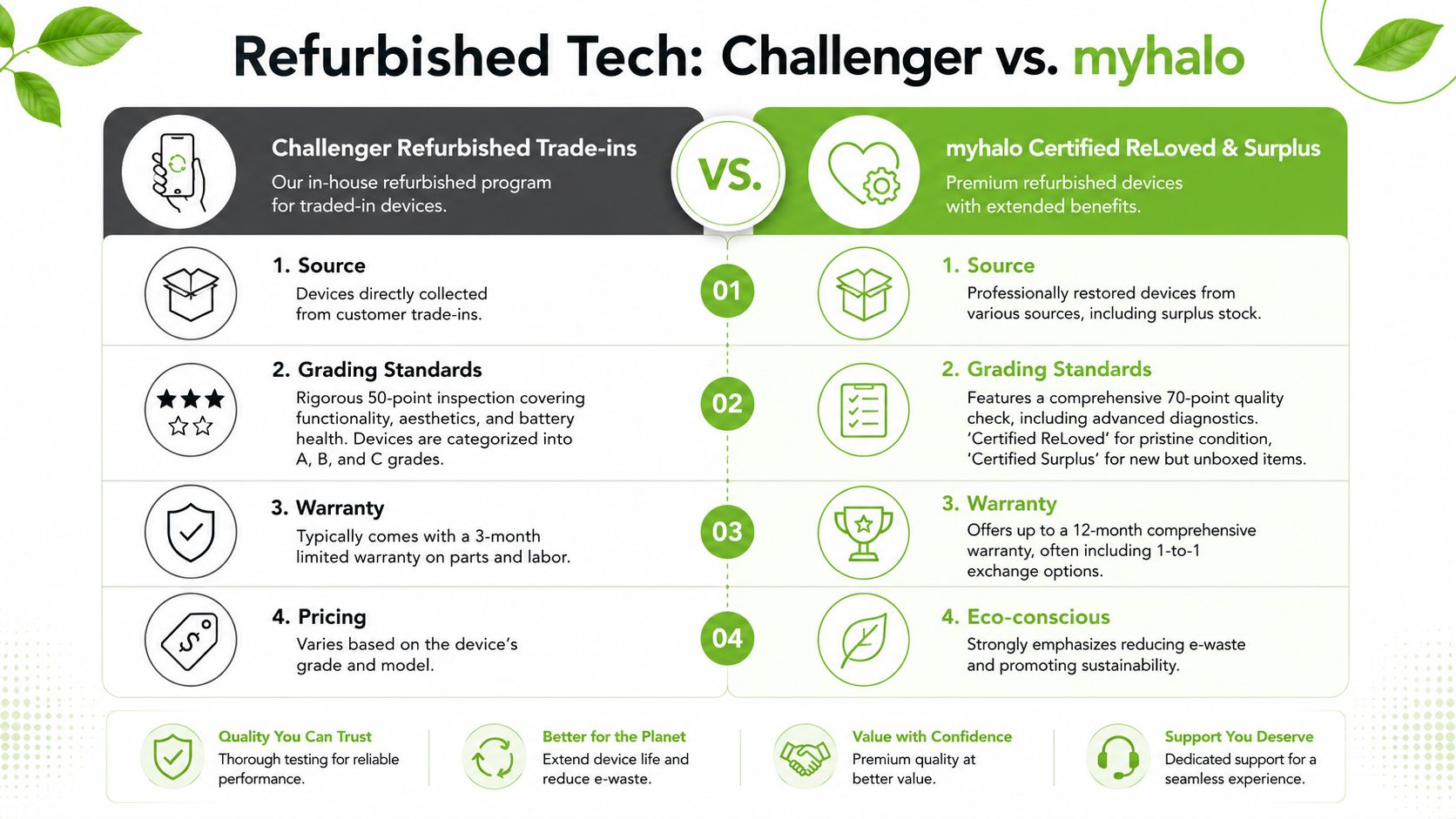
What to compare beyond price
If you're choosing between a retailer's trade-in based refurbished device and a specialist refurbishment programme, focus on these criteria:
| Comparison point | Why it matters |
|---|---|
| Grading clarity | You want to know if marks are cosmetic only or tied to heavier prior use |
| Battery disclosure | Battery condition affects daily experience more than minor scratches |
| Testing process | A documented check process reduces guesswork |
| Warranty terms | Clear after-sales support lowers replacement risk |
| Data handling | Secure wiping matters for both sellers and buyers |
One concrete benchmark is that myhalo's 30-point diagnostic check ensures data wiping, functional verification and battery health disclosure for every device in its Certified ReLoved programme, as detailed on its trade-in process page. That kind of transparency helps buyers understand what “refurbished” means in practice.
Why lifecycle thinking matters
A good refurbished programme doesn't only create a lower entry price. It can also improve business resilience and cost control. For an SME equipping staff, buying devices with clear grading and known support pathways can stretch budget further while keeping equipment dependable. For households, it can mean extending useful device life instead of replacing everything with brand-new stock.
myhalo presents its role more broadly than a simple retail channel. Its Certified ReLoved and Certified Surplus ranges sit alongside repair, reuse, responsible recycling, RescueAdvise, and tools such as mylo AI Assistant. That lifecycle approach matters because a customer's best decision isn't always “buy new now”. Sometimes it's repair. Sometimes it's reuse. Sometimes it's a carefully graded refurbished replacement that matches actual daily needs.
If you're evaluating a refurbished phone, this checklist of things to look out for before buying a refurbished phone is worth reading before you commit.
A refurbished device is only a smart buy when the seller explains condition, testing, and support in plain language.
A practical way to decide
Choose a mall retail purchase if you want immediate in-person browsing, brand familiarity, and straightforward access during a normal shopping trip.
Choose a refurbishment specialist when you care more about lifecycle value, transparent grading, battery information, and comparing reuse options with repair or trade-in routes. That's often the better fit for budget-minded buyers and SMEs trying to balance cost, uptime, and responsible asset use.
Frequently Asked Questions about Challenger Junction 8
Can I walk in without an appointment?
For normal retail purchases, yes, that's usually the default. For repair-related or warranty-related matters, it's smarter to call ahead and confirm whether the issue is assessed in-store or redirected to a service partner.
Is Challenger Junction 8 good for last-minute accessory shopping?
Yes. It's a convenient stop for urgent electronics needs such as cables, chargers, adapters, cases, and common mobile accessories. Bring your device if compatibility is important.
Should I visit on weekends?
You can, but expect more crowding during the main shopping window. If you want more time with staff, earlier visits are usually easier than peak periods.
What should I bring for a service or warranty question?
Bring the device, receipt if available, any relevant charger or accessory, and a short explanation of the issue. That helps staff narrow down whether you need troubleshooting, warranty support, or external repair.
If you're weighing a new purchase against repair, trade-in, or a professionally refurbished replacement, myhalo is worth exploring as a technology lifecycle partner. Its approach goes beyond retail by supporting repair, reuse, Certified ReLoved devices, Certified Surplus products, and responsible recycling, which can help consumers and SMEs make more cost-aware and practical tech decisions.