





Best Budget Desktop Computer in Singapore: 2026 Guide
You're probably here because a laptop feels too cramped, too fragile, or too expensive for what you need. Maybe your child needs a study machine that won't lag during online lessons. Maybe you're setting up a home office corner and want something stable, repairable, and easy to upgrade. Or maybe your current desktop still turns on, but every click feels like a test of patience.
That's where many people in Singapore get stuck. The first price tag looks simple, but the actual decision isn't just about buying the cheapest box with a power button. The smarter question is this: which desktop will give you the most useful years for the money you spend?
A good budget desktop computer should feel fast enough for daily work, be sensible to maintain, and leave room for future needs. In Singapore, that also means thinking about electricity use, repairability, warranty support, and whether a professionally refurbished machine might be the more practical buy.
Table of Contents
- Finding Your Ideal Budget Desktop in Singapore
- Decoding Your Needs Before You Shop
- Key Desktop Specs Explained for 2026
- How Much to Budget and the True Cost of Ownership
- New vs Certified ReLoved The Smartest Choice
- Your Singapore Desktop Buying Checklist
- Beyond the Purchase Extending Your Desktop's Lifespan
Finding Your Ideal Budget Desktop in Singapore
You spot a desktop listed at a tempting price, bring it home, and feel pleased for about two weeks. Then the fan gets noisy, startup slows down, storage fills up, and a simple repair quote wipes out the “savings.” That is why the best budget desktop computer is rarely the one with the lowest shelf price.
A smarter way to shop in Singapore is to look at the full cost of owning the machine across a few years. The purchase price matters, but so do electricity use, upgrade options, repair costs, warranty coverage, and how long the desktop stays useful before you need to replace it. A desktop is closer to a fridge than a phone in this sense. You want steady service for years, not a flashy first impression.
For many buyers here, the sweet spot is still a simple desktop built for everyday work such as web browsing, documents, video calls, schoolwork, and light creative tasks. That also explains why entry-level processors and practical memory configurations remain common in budget listings in Singapore, as noted earlier. Buyers are usually trying to get reliable day-to-day performance without paying for power they will never use.
A better way to judge value
A good shortlist should answer a money question, not just a spec question.
Ask:
- Will it stay fast enough for your real routine next year, not only this month?
- Can you add RAM or storage later instead of replacing the whole machine?
- Are parts standard and easy to service in Singapore?
- Does the warranty reduce your risk if something fails early?
- Can the desktop be resold, refurbished, or responsibly recycled at the end of its life?
That last point gets ignored too often. A machine with replaceable parts usually costs less over time because you can fix one weak component instead of throwing away the whole system. Sustainability and savings often point in the same direction.
Physical setup matters too. If your desktop will share space with study materials, work documents, or gaming gear, planning the desk around the PC can save frustration later. Buyers comparing compact towers and monitor placement sometimes also browse best gamer desk setups to see how a small space can stay practical.
Why longevity matters more than headline specs
A budget desktop should feel boring in a good way. It should start quickly, stay quiet enough, and keep doing its job without constant troubleshooting. Raw specs on a product page do not always tell you that.
Longevity usually comes from unglamorous things. An SSD instead of an old hard drive. A power supply that is not at its limit all the time. Enough RAM for several apps at once. A case you can open for cleaning or upgrades. These details affect your total cost of ownership because they shape how soon you pay again, whether through repairs, lost time, or a full replacement.
Refurbished and certified pre-owned desktops deserve a fair look for the same reason. If a system has been properly tested, cleaned, and backed by a warranty, it can lower your upfront cost without forcing you into the shortest lifespan. That is not just an environmental choice. It is often a sensible financial one.
The goal is simple. Buy a desktop that fits your routine, ages slowly, and gives you more useful years per dollar spent.
Decoding Your Needs Before You Shop
The easiest way to waste money on a desktop is to shop by specs before you understand your routine. A student, a home-office user, and a light gamer may all type “budget PC” into a search bar, but they're solving very different problems.

The student who needs a steady workhorse
A polytechnic or university student usually doesn't need a powerful gaming tower. What they need is consistency. The desktop should open research tabs quickly, handle documents without freezing, and stay responsive during online classes or project submissions.
A common mistake is buying the cheapest old machine available and assuming “for school use” means any PC will do. It won't. Even basic academic work becomes frustrating when startup times are slow or the system stutters with multiple apps open.
For students, a sensible desktop feels boring in the best way. It turns on fast, stores notes and files on an SSD, and doesn't demand constant troubleshooting. If the study area also doubles as a gaming corner, desk layout matters too. Good cable management and monitor placement can make a compact setup much easier to live with, which is why some buyers also browse best gamer desk setups for practical space ideas.
The home office user who needs reliability
Now think about someone working from home. They might be switching between spreadsheets, browser tabs, video calls, PDF documents, and messaging apps all day. Their frustration point usually isn't graphics. It's multitasking.
This user benefits from a machine that stays stable under a medium workload and supports a clean desk setup with enough ports for a monitor, keyboard, mouse, and maybe a webcam or printer. For SMEs, that same logic applies at a larger scale. A fleet of desktops that are easy to maintain and replace parts in is often more valuable than flashy hardware that's harder to support.
A desktop that saves five minutes of waiting every day feels more valuable than one with a faster benchmark you never notice in normal use.
The casual gamer or creative hobbyist
This group sits in the middle. They may edit photos, work on simple design projects, or play lighter games after work. They don't always need a premium gaming rig, but they do need more breathing room than a basic study machine.
The key here is honesty. If you mainly play older or less demanding titles and do occasional creative work, you may be fine with a modest system plus a future upgrade path. If you expect smooth modern gaming at higher settings, that's a different budget category altogether.
A lot of confusion comes from mixing these three profiles together. Once you know which one sounds most like you, the shopping process gets simpler. You stop paying for what you won't use.
Key Desktop Specs Explained for 2026
You are looking at two desktops with similar prices. One feels quick for years. The other feels tired after a few months because it skimps on the parts that affect everyday use. That is why specs matter. They are not just technical labels. They are clues to how long the machine will stay useful, how much you may need to spend later, and whether the “cheap” option is good value.
Start with three parts first: CPU, RAM, and storage. If those are sensible, you can judge the rest with much more confidence.
The three parts that matter most
The CPU is the processor. It handles the steady flow of small jobs your desktop does all day, from opening apps to switching between browser tabs. For basic schoolwork, admin tasks, web use, and home office work, an entry-level modern processor such as an Intel Core i3 or a similar AMD chip is usually a practical starting point. Going too low here can shorten the useful life of the machine, which matters for total cost of ownership. Replacing a sluggish desktop early is more expensive than buying a slightly better base system once.
The RAM is your short-term workspace. A larger desk lets you keep more papers open without stacking everything on top of each other. Computers work in a similar way. If you often use a browser, spreadsheet, messaging app, and video call software together, more RAM helps the system stay responsive. For many budget buyers, 8GB is a reasonable floor in 2026. If you keep many tabs open or plan to use the desktop for several years, extra RAM can be one of the smartest upgrades because it often extends useful life at a lower cost than replacing the whole machine.
The storage drive affects how fast the desktop starts, loads programs, and opens files. An SSD gives a much better day-to-day experience than an older hard drive, and it usually uses less power and creates less waiting. That matters both for comfort and for long-term running costs. If you are still comparing drive types, this guide on Choosing between SSD and HDD explains the difference clearly.
Storage size needs a bit of honesty. A smaller SSD may work for documents, school files, and light office use, but photo libraries, games, and large project files fill up fast. A desktop that looks cheap because it includes very little storage can become costly once you need an upgrade or external drive.
When integrated graphics are enough
A lot of buyers get stuck here.
Integrated graphics are built into the processor. For web browsing, documents, streaming, online classes, and normal office work, they are usually enough. They also use less power than a separate graphics card, which can help keep electricity use and heat lower over the life of the desktop.
A dedicated graphics card makes sense for modern gaming, 3D work, video editing with heavier effects, or other visually demanding tasks. It adds cost up front, and it can add cost later through higher power use and more heat inside the system. If your workload does not need that extra graphics muscle, paying for it is a bit like buying a delivery van for a weekly grocery run.
That is why budget desktops should be judged by fit, not by the longest spec list.
2026 Desktop Spec Recommendations by Use Case
| Component | Student / Basic Use | Home Office / SME | Light Gaming / Creative |
|---|---|---|---|
| Processor | Intel Core i3 or equivalent | Intel Core i3 or equivalent with stronger multitasking focus | Mid-range processor with room for GPU support |
| RAM | 8GB minimum | 8GB minimum, more if you keep many apps open | More than basic use if you edit media or game regularly |
| Storage | SSD, preferably enough for coursework and files | SSD with space for documents, apps, and backups | SSD with extra room for games or project files |
| Graphics | Integrated graphics | Integrated graphics usually sufficient | Dedicated graphics if gaming or visual work is a priority |
| Upgrade priority | Storage first | RAM or storage, depending on workload | GPU, RAM, and storage flexibility matter most |
Use this table like a filtering tool. If a listing gives you a weak processor, too little RAM, or only an old hard drive, you can skip it quickly and save yourself from a false bargain.
A final point many sellers gloss over is upgrade path. A desktop with accessible RAM slots, standard storage connections, and a case that is easy to open often costs less over its full life. You can refresh one part instead of replacing the whole machine. That is one reason refurbished and business-grade desktops often make financial sense. They were built to be maintained, not thrown away. If you are weighing affordability month by month, guides on desktop payment plans and installment options in Singapore can also help you compare the cost of buying now versus upgrading later.
How Much to Budget and the True Cost of Ownership
The shelf price is only the beginning. Many buyers think they've found a bargain, then discover that the “cheap” desktop runs hot, uses more electricity than expected, or becomes expensive the moment a part fails.
What the shelf price tells you
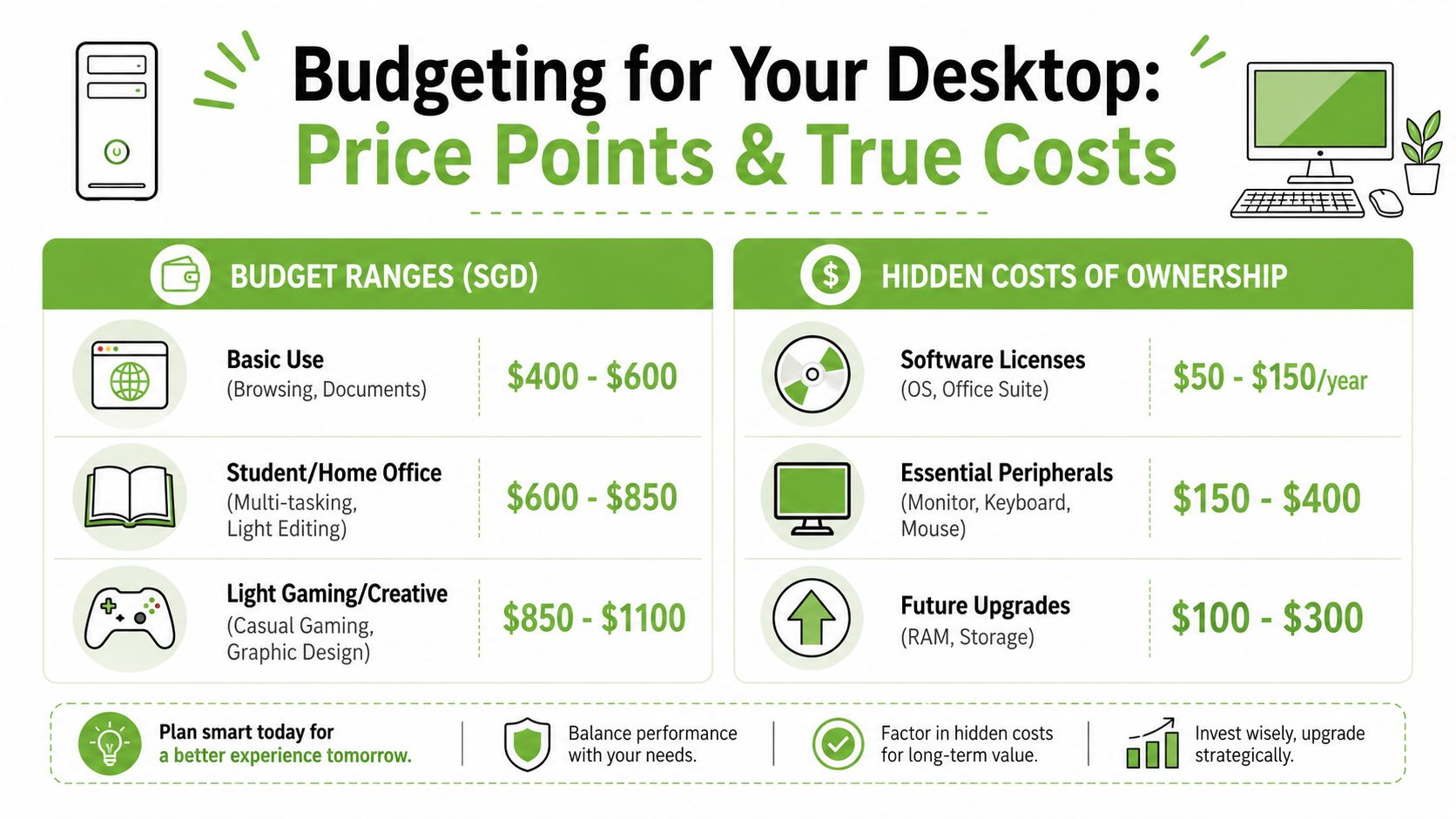
In Singapore, a new budget desktop computer typically costs SGD 450 to SGD 700. That's a useful starting point for basic buyers, especially if your tasks are productivity-focused and don't require a dedicated graphics card.
But that price range can create a false sense of certainty. Two desktops with similar upfront pricing may cost very different amounts to live with over time.
What the shelf price hides
Electricity is one of the easiest costs to ignore. In Singapore, electricity rates are S$0.30 to S$0.35 per kWh, and a 300W desktop running 4 hours daily can add about S$45 per month in energy costs. That's a major part of total cost of ownership, especially for older, less efficient systems. It's one reason I'd be careful about buying solely on low entry price.
Repair risk matters too. A desktop with no proper checks, poor warranty support, or unclear part history can become expensive fast if the graphics card or storage fails. Payment method also affects the total buying experience for some households, especially when you're balancing cash flow with other home expenses. If instalment options are relevant, it helps to understand how plans work before you commit, such as this overview of the COURTS instalment plan in Singapore.
Buying advice: A desktop isn't cheap if its monthly running cost and repair risk cancel out the savings from the sticker price.
Look at ownership in layers:
- Power use: Older high-draw systems can cost more to run than buyers expect.
- Repair exposure: No warranty or poor inspection history shifts more risk to you.
- Upgrade path: A desktop that accepts more RAM or a larger SSD can delay a full replacement.
- Included items: Monitor, keyboard, mouse, and software can change the actual budget.
The best budget desktop computer isn't always the one with the lowest sale price. It's the one that stays economical after month one.
New vs Certified ReLoved The Smartest Choice
You spot two desktops at a similar screen size and with similar basic specs. One is brand-new. The other is certified refurbished and costs noticeably less. The first feels safer at a glance, but the smarter buy often depends on what happens after checkout, not just on day one.
A used desktop is not always the same thing
A random second-hand listing and a professionally refurbished desktop belong in different categories.
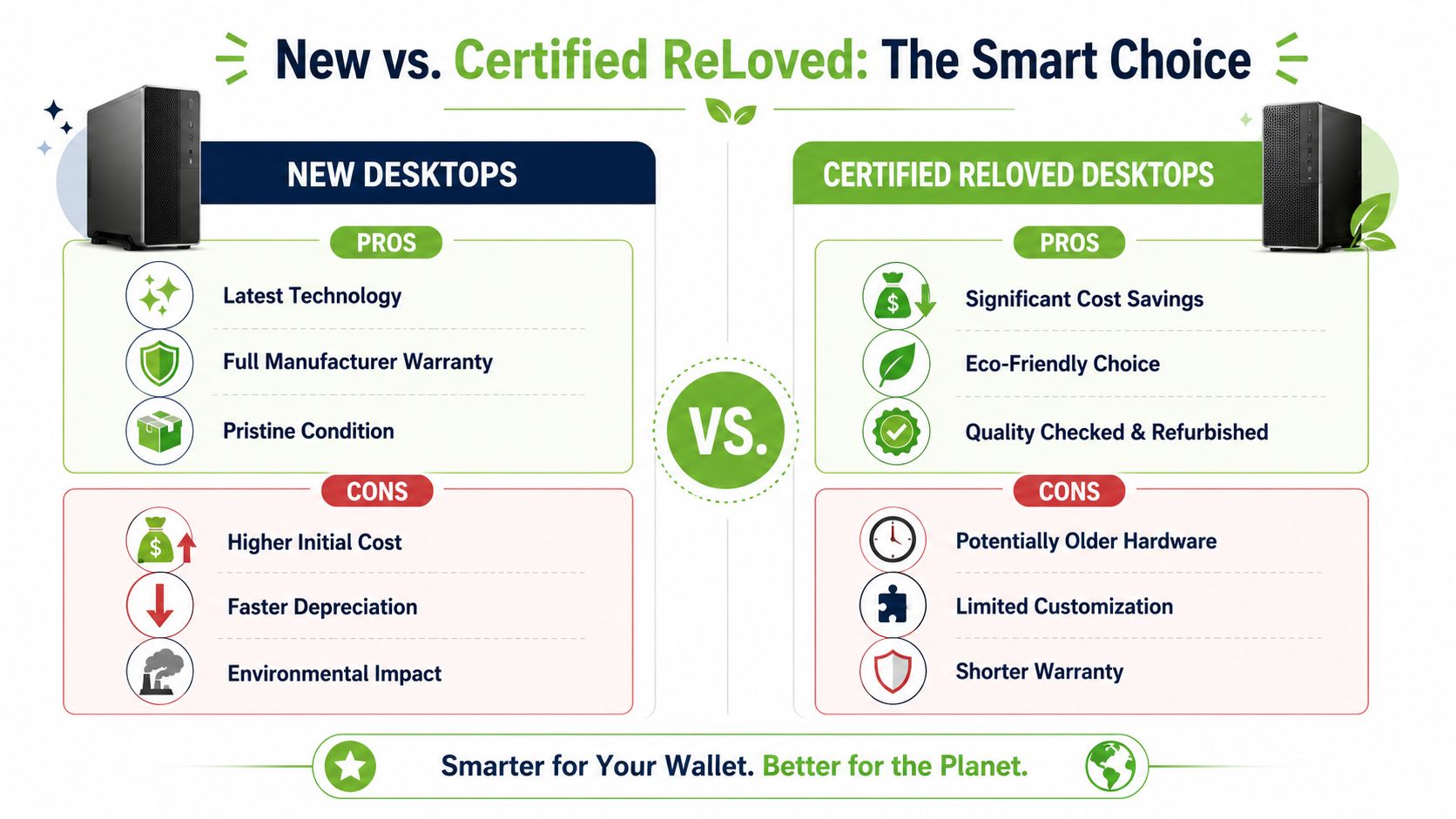
A casual resale unit may come with little more than a seller's promise. You may not know how heavily it was used, whether parts were replaced properly, or what support you will get if the SSD fails next week. A certified refurbished unit should be checked against a defined process, graded clearly, and sold with stated warranty or exchange terms. That lowers risk in a very practical way.
The easiest way to understand the difference is to treat it like buying a used car. One option is an as-is sale from a stranger. The other is a dealer-inspected car with service records and a short warranty. Both are pre-owned, but they do not carry the same ownership risk.
Why certified refurbished can be the better value buy
For many homes, students, and small businesses in Singapore, a certified refurbished desktop offers more than an initial lower price. It can be the lower-cost option across a longer stretch of use.
That matters because desktops often retire before their useful life is over. Business-class machines are a good example. They are usually built for daily office workloads, easier servicing, and part replacement. If a refurbisher has already tested the storage, memory, ports, and thermal behaviour, you may be buying a machine that has already cleared the early checks many budget buyers forget to ask about.
Total cost of ownership becomes more useful than the sticker price itself. A new entry-level desktop may cost more upfront and still be the right pick if you need the latest platform, longer manufacturer support, or a specific workload. But if your job is web browsing, school assignments, office apps, video calls, and light creative work, a certified refurbished desktop can leave room in the budget for a better monitor, more RAM, or a larger SSD. Those upgrades often affect day-to-day comfort more than buying “new” for its own sake.
There is also a lifecycle angle that saves money. Reusing a well-built machine delays replacement, reduces demand for new hardware, and makes better use of parts that are still fully serviceable. In plain terms, stretching a desktop's useful life is not only good for waste reduction. It is often the more financially disciplined move.
One example is certified refurbished desktop options that are sold with a documented inspection process rather than as one-off resale units. The practical value is in the details. Clear grading, defined quality checks, warranty terms, and disclosure about condition help you compare risk properly. That structure matters more than marketing words.
A good rule is simple. Buy new when you need the newest platform or a feature older systems cannot provide. Buy certified refurbished when your goal is dependable performance, a lower full-lifecycle cost, and a desktop you can keep useful for years instead of replacing too soon.
The smartest budget desktop is often the one that gives you the longest useful life per dollar, with the least surprise cost along the way.
Your Singapore Desktop Buying Checklist
A desktop can look good in a listing and still be a poor buy. Before you pay, slow down and check the practical details that affect ownership after the unboxing.

Checks before you pay
Start with your own use case. If you don't define that first, every listing starts to look tempting.
- Match the machine to your routine: Schoolwork, office multitasking, and light gaming need different levels of performance.
- Set a full budget, not just a desktop budget: Include monitor, keyboard, mouse, software, and delivery if needed.
- Read the spec sheet for the essentials: CPU, RAM, SSD, and graphics should match your real workload.
- Ask whether upgrades are possible: Extra RAM or storage can extend value later.
Checks after you choose a seller
Buyer protection becomes more important than glossy marketing photos.
- Warranty clarity matters: Check what's covered, how long it lasts, and what happens if the machine arrives with a fault. If you're comparing business-class units such as HP desktops, it also helps to understand support history and serial-based verification through resources like this guide to an HP warranty check in Singapore.
- Review return or exchange terms: A short exchange period can still be useful if it's clearly stated and easy to use.
- Confirm support channels: WhatsApp, phone, or store support can make post-purchase issues much easier to solve.
- Check delivery and collection options: Fast delivery is helpful, but clear communication is more important.
You should also decide whether to buy online or visit a physical shop. Online buying is convenient and often easier for comparing listings. In-store buying helps if you want to inspect ports, case condition, noise level, or form factor in person.
A careful checklist won't make the decision exciting. That's the point. Good desktop buying is usually less about impulse and more about avoiding preventable regret.
Beyond the Purchase Extending Your Desktop's Lifespan
A desktop becomes a better investment when you stop thinking of it as a one-time purchase. Most machines slow down in ways that can often be improved without replacing the whole system.
Small upgrades can delay a full replacement
Storage and memory upgrades are usually the first places to look. If your desktop takes too long to load apps or struggles with many open tasks, a bigger SSD or additional RAM can make it feel much more usable.
For buyers with gaming or graphics needs, component-level upgrades can change the value equation dramatically. A verified example is this: upgrading a legacy desktop with a used RTX 2060 for around $175 can improve gaming frame rates by 4 to 6 times and reduce total system cost by over 60% compared to a new entry-level build in Singapore, based on the example discussed in this GPU upgrade reference video.
Think in lifecycle terms
That kind of upgrade story matters because it shows what smart reuse can do. Instead of replacing an entire desktop, you may only need to improve the part that limits performance most.
The same lifecycle thinking applies when a device reaches the end of its useful role for you. Trade-ins, reuse, repair, and proper recycling all help extract value from hardware more responsibly. That's good environmental practice, but it's also good purchasing discipline. You spend less when you replace less often.
A desktop lasts longer when you clean it, update it, and improve it in small steps. Buyers who approach technology that way usually get better value over time than buyers who chase the newest hardware every cycle.
If you want a practical place to compare new and refurbished options, repair pathways, and device lifecycle support in Singapore, myhalo is one option to explore. It brings together Certified ReLoved and Certified Surplus devices, repair and migration support, trade-ins, and responsible recycling, which can help you stretch the value of a desktop far beyond the day you buy it.