





Battery Health Check: Maximize Your Device's Life
Your phone says 35%, so you leave the house. Half an hour later, it shuts down while you're paying for lunch. Or your laptop still shows charge left, but the moment you open a few tabs and a video call, it dies.
That's usually the moment people start asking about a battery health check.
The good news is that battery health isn't mysterious. You can check it on most devices in a few minutes. Once you know what you're looking at, you can make a calmer decision. Sometimes the fix is simple. Sometimes the battery is still fine and the issue is elsewhere. Sometimes replacing the battery gives the device a useful second life and saves you from replacing the whole machine too early.
Table of Contents
- Why a Battery Health Check Matters More Than You Think
- How to Perform a Battery Health Check on Your Devices
- Understanding What Your Battery Report Really Means
- Tips to Improve Your Battery's Lifespan Today
- Repair Refurbish or Replace A Smart Decision Guide
- Your Partner in a Smarter Device Lifecycle
Why a Battery Health Check Matters More Than You Think
Battery failure is rarely sudden. It usually shows up as a pattern first. Your phone needs a top-up before dinner. Your tablet feels warm during simple tasks. Your laptop says 40%, then drops much faster than you expect once you leave the charger.
That pattern matters because a weak battery can make an otherwise good device feel older than it really is.
At our myhalo service centre, we often see customers assume they need a full replacement, only to find that the main problem is battery wear. A battery works like a fuel tank and a power pipe at the same time. It stores energy, but it also has to deliver that energy steadily. When it starts wearing out, the device may feel inconsistent, not because every part is failing, but because the power supply is no longer stable. Dell describes common warning signs such as shorter battery life, sudden shutdowns, and abrupt drops in charge level in Dell's battery health guidance.
The hidden cost of not checking
Skipping a battery health check can lead to the wrong decision.
You might replace a device that still does what you need with a simple battery repair. Or you might keep struggling with poor battery performance until it disrupts work, school, travel, or a customer call. In Singapore, where many people rely on their phones and laptops throughout long days outside the home, that loss of reliability has a real cost in time and convenience.
Battery condition also affects resale value. If you plan to trade in, resell, or pass a device to a family member, its battery health changes how useful and attractive it looks to the next owner. A MacBook with solid performance but weak battery endurance will usually be judged differently from one that still holds charge well. If you want a model-specific example, this MacBook battery replacement guide in Singapore shows why battery condition often shapes the repair-versus-replace decision.
A battery check also gives you a baseline. Once you know the condition, you can compare future changes instead of guessing. For readers who want a broader reference on measuring battery condition, this practical guide for battery capacity explains the idea in a simple, useful way.
Practical rule: Check battery health before you decide the whole device is “old”.
It's also a lifecycle decision
A battery health check is not just a technical step. It helps you choose the next step wisely.
If the battery is still in good shape, you may only need to adjust settings, charging habits, or software. If the battery is worn but the device still meets your needs, repair can extend its life at a much lower cost than buying new. If the device no longer fits your work, study, or family use, a refurbished replacement may be the more sensible option. And if the device has reached the end of its practical life, responsible recycling keeps useful materials in circulation instead of adding to waste.
That is the bigger picture. A quick battery check can save money, protect resale value, and help you keep technology in use longer before replacing it. In a market like Singapore, where devices are expensive and sustainability matters more each year, that is a smart habit, not just a troubleshooting step.
How to Perform a Battery Health Check on Your Devices
A battery check is a bit like checking tyre wear before a long drive. You are not trying to become a technician overnight. You are looking for a few reliable signs that tell you whether the device is still healthy, needs attention soon, or is already costing you convenience, productivity, and resale value.
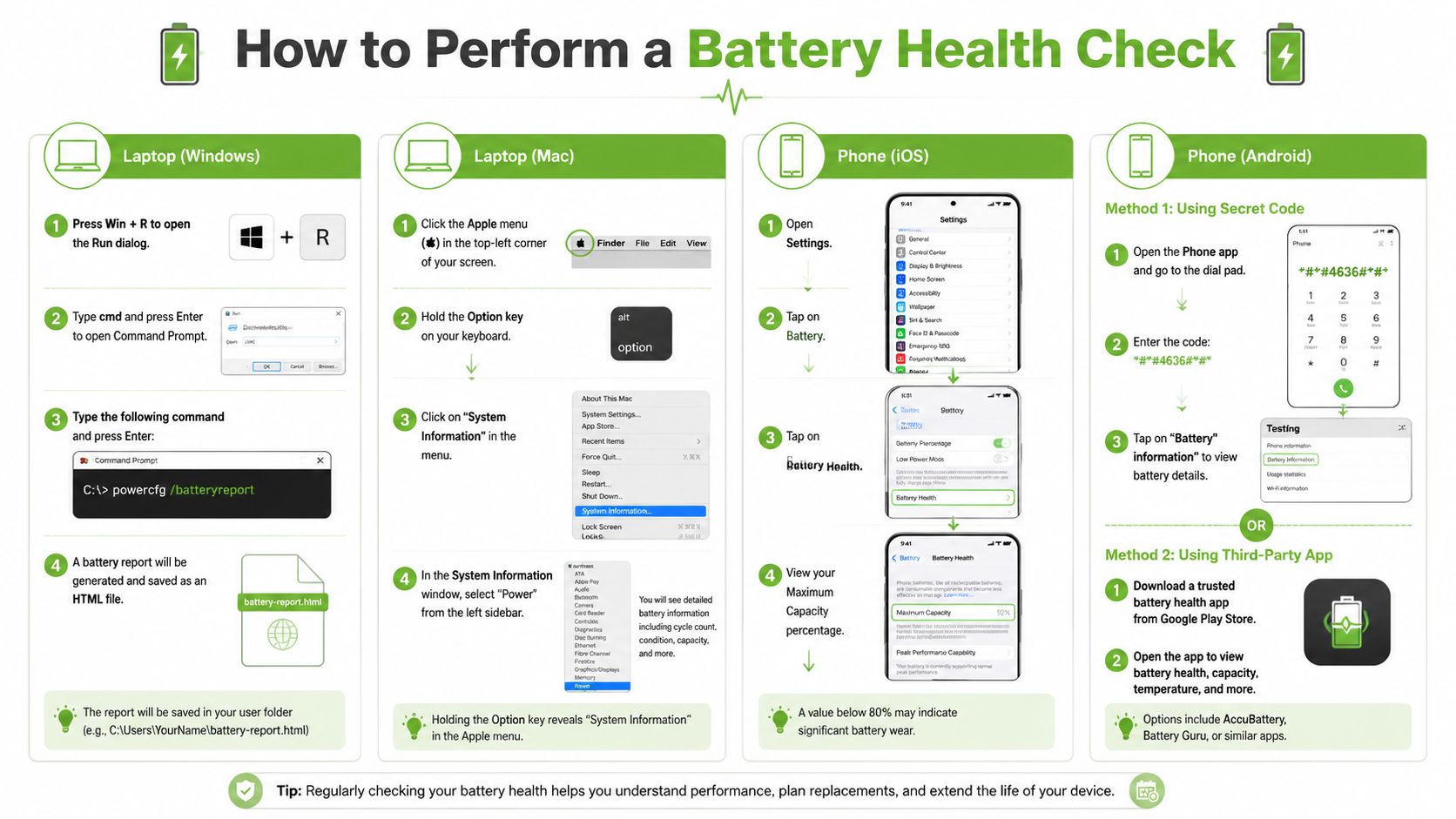
Start with the device you depend on most. For many people in Singapore, that is the phone used for work messages, payments, ride booking, and school or family coordination. Then check your laptop, especially if battery life affects commuting, classes, or hot-desking.
Check an iPhone
On an iPhone, go to Settings > Battery > Battery Health & Charging. The two items to notice are Maximum Capacity and any message about Peak Performance Capability.
Maximum Capacity shows how much charge the battery can still hold compared with when it was new. If that number has dropped a lot, the phone may still work, but it will usually need charging more often and may feel less stable during heavier tasks such as video calls, gaming, navigation, or camera use.
Also look at behaviour, not just the percentage. A phone that gets hot quickly, drops from 30% to 10% faster than expected, or shuts down during demanding use may have a battery issue even if the number does not look alarming at first glance.
Check an Android phone
Android phones are less consistent because each brand builds its own menus and diagnostic tools. On some Samsung models, the Samsung Members app gives a simple battery status check. Other brands may place battery details inside device care settings, support apps, or hidden service menus.
If you cannot find a formal health percentage, use a practical test instead. Charge the phone fully, use it as you normally would for part of the day, and watch for uneven drops, overheating, or sudden shutdowns. Those are often more useful than chasing a number that your phone may not display clearly.
If you want extra reading on how capacity testing works in a broader battery context, this practical guide for battery capacity gives a useful plain-language overview.
After the phone checks, this walkthrough may help if your concern is on the laptop side as well:
Check a MacBook
On a MacBook, click the Apple menu, then open System Settings > Battery for the basic view. For more detail, open System Information and review the battery information under power. That report can show condition wording and cycle-related details that help explain why a Mac no longer lasts through a workday.
The wording can sound technical, but the question is simple. Is macOS describing the battery as normal, or is it recommending service? If you want a local reference for the signs Mac users commonly compare before deciding on service, this MacBook battery replacement guide for Singapore users is a useful next read.
Check a Windows laptop
Windows gives you a helpful built-in report. Open Command Prompt and run the battery report command shown in the infographic. Windows then saves a report you can open in a browser.
The most useful comparison is usually design capacity versus full charge capacity. The first number is what the battery was built to hold. The second is what it can hold now. If the gap is wide, the battery has aged. If the laptop also drains quickly off the charger or turns off unexpectedly, that is a stronger sign that battery wear is affecting daily use.
Some laptop brands also include diagnostics in BIOS or preboot tools. Those checks can help separate battery wear from software or charging issues, which matters before you spend money on the wrong fix.
What about wearables
Smartwatches and earbuds often give you less detail. Many do not show a formal battery health percentage at all.
In that case, judge the battery by routine use:
- Shorter usage time: It no longer lasts through your normal day or commute
- Charging inconsistency: The percentage jumps, stalls, or fills unusually slowly
- Heat or random restarts: The device becomes unreliable during basic tasks
That kind of check still has value. If the battery is the only weak point, repair or refurbishment may extend the device's useful life and protect some resale value. If the product is already outdated in several ways, replacement may be the more sensible choice.
Understanding What Your Battery Report Really Means
A battery report is less like a school grade and more like a health screening. It does not answer only one question. It helps you judge how well the battery stores energy, how steadily it delivers power, and whether the device is still worth keeping in service.
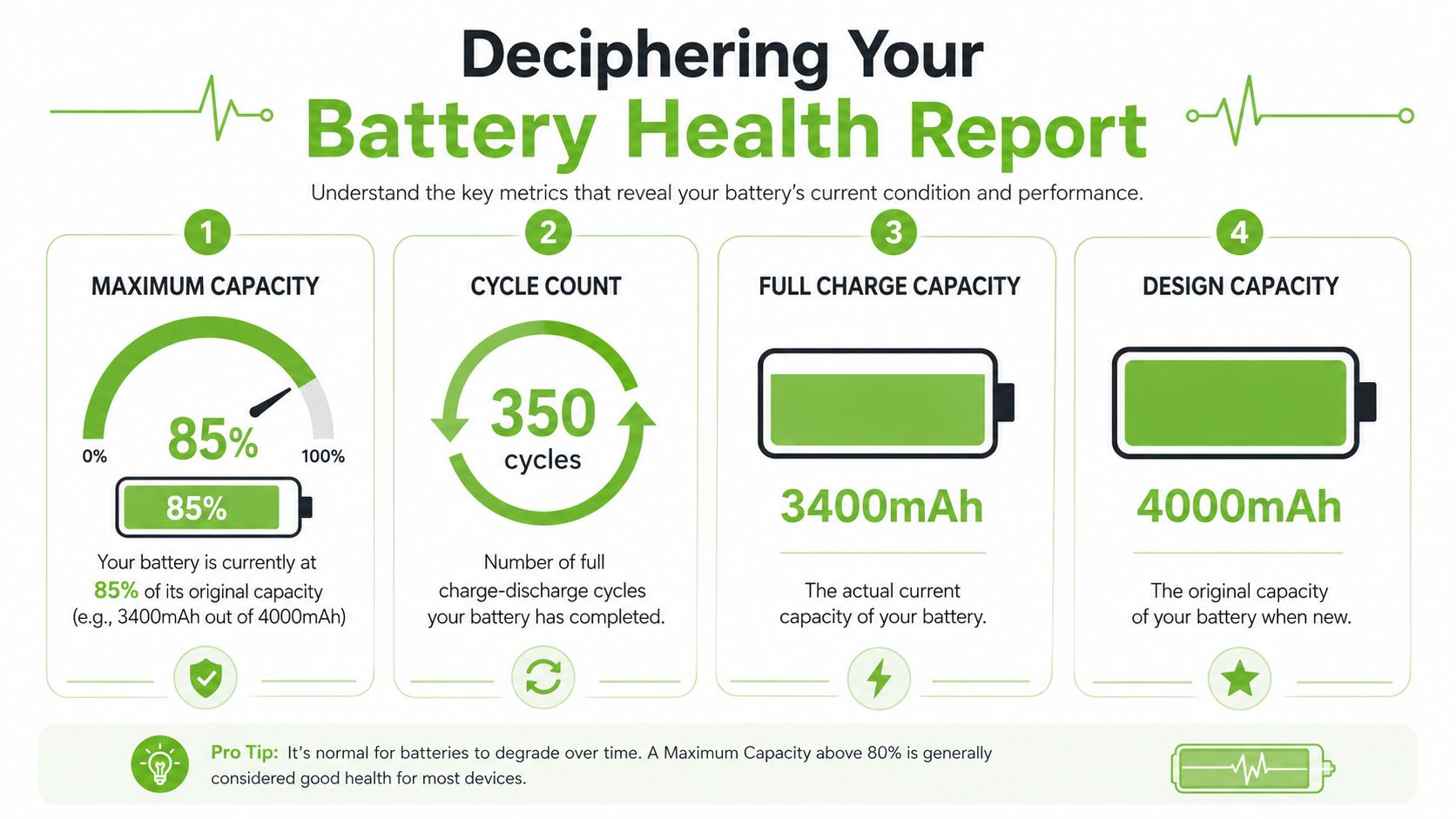
Maximum Capacity in plain English
Maximum Capacity is the battery's current storage ability compared with when it was new.
A simple way to read it is this. If your phone once had a full-size fuel tank, battery wear has made that tank smaller over time. The device may still run normally for light tasks, but it has less reserve for long workdays, video calls, gaming, navigation, or a humid Singapore commute with brightness turned up.
A modest drop does not always mean action is needed. What matters is the combination of the number and your daily experience. If the percentage is lower and the phone now needs a top-up before dinner, the report is matching real life.
For iPhone users, Apple commonly treats lower battery health as a sign that runtime and peak performance may be reduced. At myhalo's service centre, we usually explain it to customers this way: the battery may still power on the device, but it has less breathing room.
Cycle Count and what it adds
Cycle count shows how much charging work the battery has already done over its life.
One cycle does not always mean one plug-in. If you use half the battery today and half tomorrow, that adds up to roughly one full cycle. This is why a device that is topped up often can still age gradually. The battery is being used in small pieces, not avoided.
Cycle count is best read as context, not as a verdict. A higher count often fits an older, well-used device. A lower count with poor battery behaviour can point to heat exposure, charging issues, or simple battery wear. That is also why a clean-looking second-hand device can still have weak battery value underneath the casing.
Read the numbers together
Customers often get stuck on one figure. That is understandable, but battery reports work better as a group.
| What you see | What it usually suggests | What to do next |
|---|---|---|
| Good health reading, but battery life feels poor | Power-hungry apps, display settings, background activity, or charger issues may be affecting usage | Review app usage and check whether your cable and charger are suitable. A fast charging cable guide for choosing the right setup can help |
| Lower health reading plus sudden shutdowns or lag under load | The battery may be struggling to deliver stable power, not just store charge | Book a proper assessment before the problem affects work, school, or travel |
| No clear battery percentage available, but usage has become unreliable | The device may hide battery details, especially on wearables or older products | Judge it by runtime, charging behaviour, heat, and restart issues |
One more point causes confusion. Battery percentage on screen is not the same as battery condition. A phone can show charge remaining and still have an aged battery that drops quickly under stress. That is why two devices at 40% can behave very differently.
This matters beyond convenience. In Singapore, where many people repair, resell, hand down, or trade in devices, battery health affects the next smart decision. A battery replacement may cost far less than replacing the whole device. A well-documented battery condition can also support resale value, especially for pre-owned phones and laptops.
The same logic applies outside phones and laptops. Riders who care about extending electric bike battery life already know that battery condition shapes cost, reliability, and how long a product stays useful. Consumer electronics follow the same pattern. Check the battery, read the symptoms beside the numbers, then choose the option that gives the device more useful life with less waste.
Tips to Improve Your Battery's Lifespan Today
Battery care doesn't need to be complicated. A few habits make a practical difference, especially if you use the same device for work, study, travel, and entertainment every day.
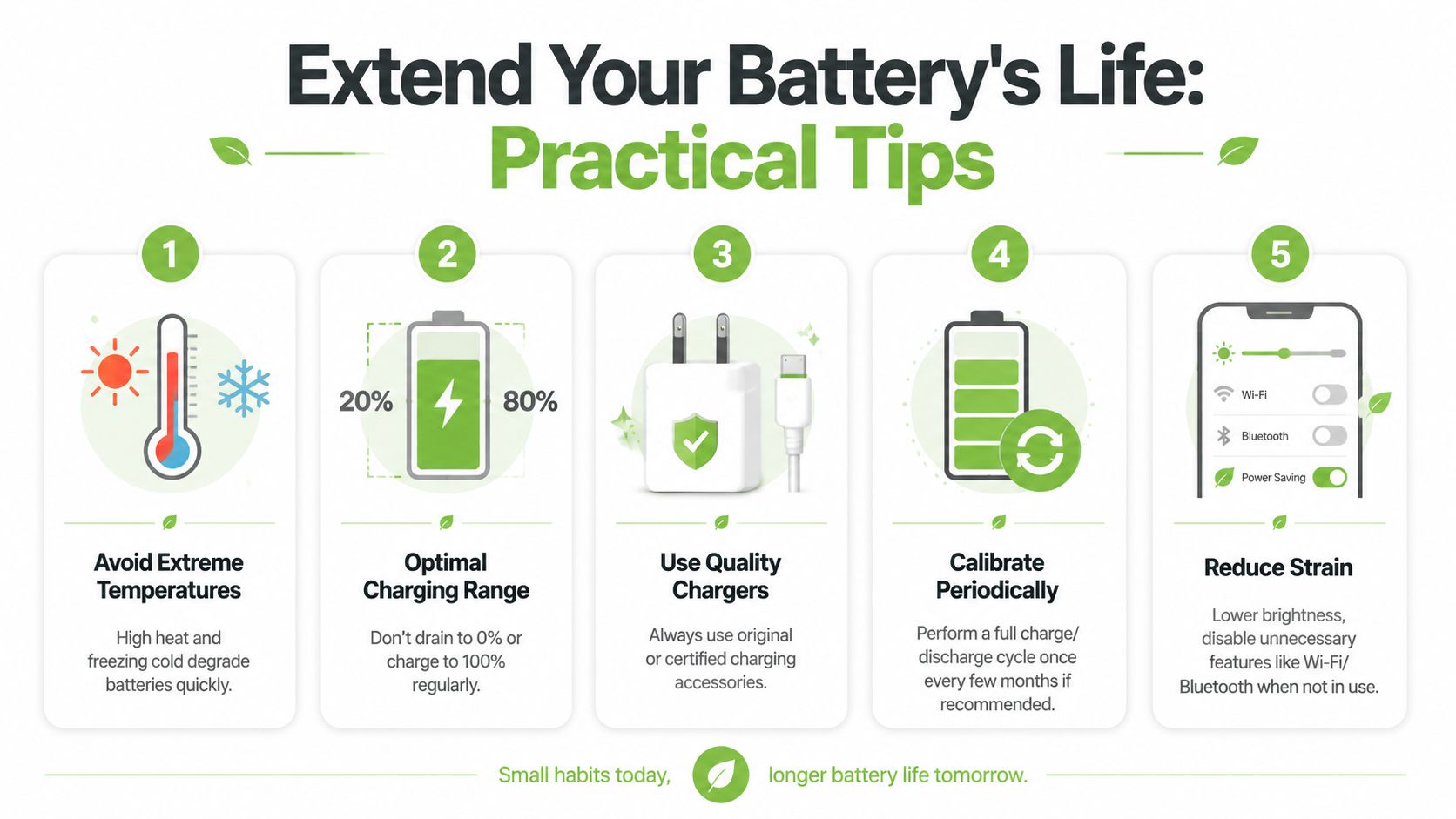
Daily habits that reduce battery stress
Start with the basics:
- Avoid unnecessary heat: Don't leave your phone in a parked car, on a sunny windowsill, or under a pillow while charging.
- Use sensible charging habits: Frequent top-ups are usually easier on the battery than constantly running it flat.
- Reduce power strain: Lower brightness, close apps you don't need, and use power-saving modes when appropriate.
- Use suitable accessories: Cables and chargers should match the device properly. If you need a replacement, a reliable fast charging cable guide can help you choose more carefully.
- Keep software updated: Updates often improve power management, even when they don't say so in plain terms.
These are small actions, but they support longer useful life and lower running cost over time.
Why Singapore conditions matter
Battery advice often sounds generic because it ignores climate. That's not very helpful in Singapore.
Most battery health check content doesn't account for local heat and humidity, even though guidance on battery care does acknowledge that extreme heat should be avoided. The available local context highlights Singapore's average 31°C temperature and 84% humidity while noting that region-specific consumer electronics data is still limited in this area, as discussed in this battery climate article.
What does that mean in daily use? It means storage and charging habits matter more than many people realise.
Keep devices cool, dry, and ventilated when charging. In Singapore, that's not fussy advice. It's routine battery care.
If you're interested in how the same principles apply beyond phones and laptops, this article on extending electric bike battery life is a useful comparison. Different devices use different battery systems, but heat, charging stress, and storage habits still shape lifespan.
A final point many people overlook is simple cleanliness. Humidity can contribute to corrosion around terminals or contact points in some battery systems, and that can look like battery failure when the issue is poor connection. If charging becomes inconsistent, don't assume the battery itself is the only cause.
Repair Refurbish or Replace A Smart Decision Guide
You check your battery health, see a lower number than expected, and the next question arrives fast. Should you fix this device, pass it on through refurbishment, or stop spending money on it?
A good decision starts with one simple idea. Battery health is only one part of the story, much like checking tyre wear before deciding whether to service a car or replace it. You also need to look at performance, repair cost, software support, and how the device fits your daily routine in Singapore.
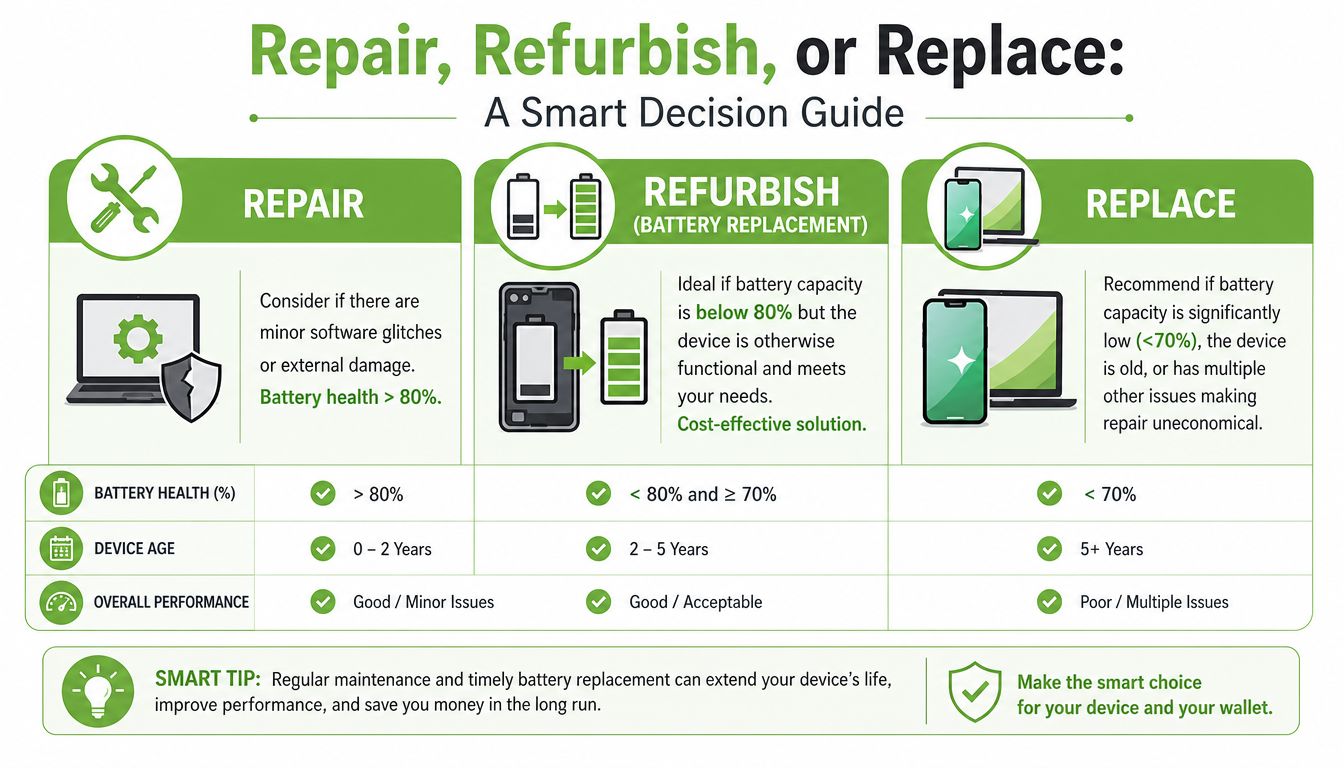
When repair makes sense
Repair is usually the best-value option when the device still works well and the battery is the main problem.
A familiar case is a phone that still opens your banking apps quickly, takes acceptable photos, and receives software updates, but runs flat by late afternoon. In that situation, replacing the battery can bring back a full day of usable life without the expense and setup time of changing devices.
This matters for more than convenience. A battery replacement can help you keep a device in service longer, avoid unnecessary e-waste, and preserve resale value by preventing the rest of the hardware from being retired too early.
For anyone comparing costs before deciding, this battery replacement cost for iPhone guide gives a practical starting point.
For businesses, the logic is similar. If a fleet phone or tablet still handles calls, messaging, stock checks, or field reports reliably, a battery repair can be the more sensible budget decision.
When refurbishment is the practical middle path
Refurbishment works well when your current device is no longer worth repairing, but buying brand new also feels unnecessary.
This option suits people who want a device that has been checked, tested, and priced more carefully than a new model. It also makes sense for parents buying for students, SMEs equipping staff, or users who want dependable value without paying for features they will not use.
Battery results matter here, but they should be read in context. A lower battery health figure does not automatically make a device a poor buy. What matters is whether the battery condition is clearly disclosed and whether the price reflects it. Clear battery information helps you judge expected runtime, likely maintenance needs, and eventual resale value.
In Singapore, that kind of transparency is especially useful because shoppers often compare repair, second-hand, and new-device pricing side by side. Refurbishment can sit in the sweet spot between those choices.
When replacement is the smarter call
Replacement makes sense when the battery issue is only one of several signs that the device is reaching the end of its practical life.
Look at the whole picture:
- Battery weakness plus other hardware faults: charging problems, screen damage, random shutdowns, or overheating
- Performance that no longer matches your needs: the device struggles with work apps, school tasks, video calls, or current operating system demands
- Repair costs that start to pile up: one targeted repair is manageable, but several separate fixes can exceed the value of keeping the device
Here is a useful rule of thumb. If a battery replacement would solve your main frustration, repair is usually worth serious consideration. If the battery is only one item on a growing fault list, replacement may be the cleaner decision.
Even then, the old device may still hold value. It might be suitable for trade-in, parts recovery, refurbishment, hand-me-down use within a family or business, or responsible recycling. That is the sustainable path. Use the device for as long as it remains practical, recover value where you can, and replace only when the numbers and the practical experience both point in the same direction.
Your Partner in a Smarter Device Lifecycle
A battery health check is a small task, but it leads to bigger choices. Keep, repair, refurbish, redeploy, or recycle. When those decisions are made well, you get more value from technology and fewer rushed purchases.
That's where a lifecycle approach helps. Instead of treating every battery issue as the start of a shopping journey, it treats the device as an asset that can be maintained, assessed, reused, or retired responsibly.
A clearer way to buy and maintain devices
For pre-owned devices, clarity matters more than marketing labels. myhalo's transparent grading process for Certified ReLoved devices in Singapore requires disclosure of the Actual Battery Health before purchase, including the exact maximum capacity percentage and cycle count, rather than relying only on generic condition descriptions, as shown in myhalo's device grading disclosure.
That kind of visibility helps buyers compare options properly. It also supports better decisions for SMEs equipping teams, parents buying for students, and individual users who want reliable value instead of vague reassurance.
In a broader lifecycle model, the same logic applies after purchase too. A device may need repair. It may be suitable for reuse within a business. It may fit a different budget category as a Certified Surplus unit. If not, responsible recycling closes the loop more sensibly than leaving old hardware in a drawer.
Why lifecycle thinking matters for households and SMEs
Good battery decisions create business resilience as much as they create convenience. A repaired laptop may postpone a larger capital purchase. A refurbished replacement can equip a new staff member without stretching budget. A transparent pre-owned purchase reduces uncertainty and helps you plan.
That's also why process matters. Services such as RescueAdvise and the mylo AI Assistant fit into this practical side of ownership by helping people understand what they have, what condition it's in, and what action is worth taking next. Combined with ISO 9001 Certified and ISO 27001 Certified operating disciplines, plus structured checks such as 30-point quality checks, that lifecycle approach becomes more organised and easier to trust.
You don't need to guess your next step from a battery percentage alone. You just need the right context, a clear diagnosis, and a sensible path forward.
If your device battery isn't lasting the way it should, explore myhalo for repair support, Certified ReLoved and Certified Surplus options, or a clearer view of battery health before you buy. The goal isn't solely to replace devices faster. It's to keep useful technology working longer, with better value and fewer surprises.