





Wireless Charging Pad Singapore Guide: What to Know in 2026
You've placed your phone on a charging pad beside your laptop, but it's still losing battery. The pad says 15W, your phone supports wireless charging, and the cable works perfectly. The missing piece is usually not the headline number. It's the combination of Qi compatibility, coil alignment, case design, heat, power supply and future usefulness.
For Singapore buyers, that last point matters more in 2026. IMDA reported 11,013,400 wireless broadband subscriptions and a 186.1% wireless broadband population penetration rate for July to December 2024. The figures include connections across 3G, 3.5G/HSDPA, 4G/LTE, WiMAX or equivalent platforms, as well as Wireless@SG active users, so they reflect a highly connected, multi-device market rather than a simple count of residents with one phone. IMDA-related Singapore wireless market data provides useful context for why wireless accessories fit local routines.
A good wireless charging pad should make daily charging easier without becoming another short-lived gadget. This guide focuses on what the technology does, how the Qi family has changed, what wattage means in practice, and how to choose a pad that remains useful when your next phone arrives.
Table of Contents
- What a Wireless Charging Pad Actually Does
- How Qi and Qi2 Wireless Charging Work
- Wattage, Speed and Real-World Charging Performance
- Pad Types and Form Factors Worth Knowing
- Buying Checklist for Singapore Shoppers
- Placement, Case Compatibility and Everyday Habits
- Sustainability, Recycling and the myhalo Lifecycle Angle
- Common Questions About Wireless Charging Pads
What a Wireless Charging Pad Actually Does
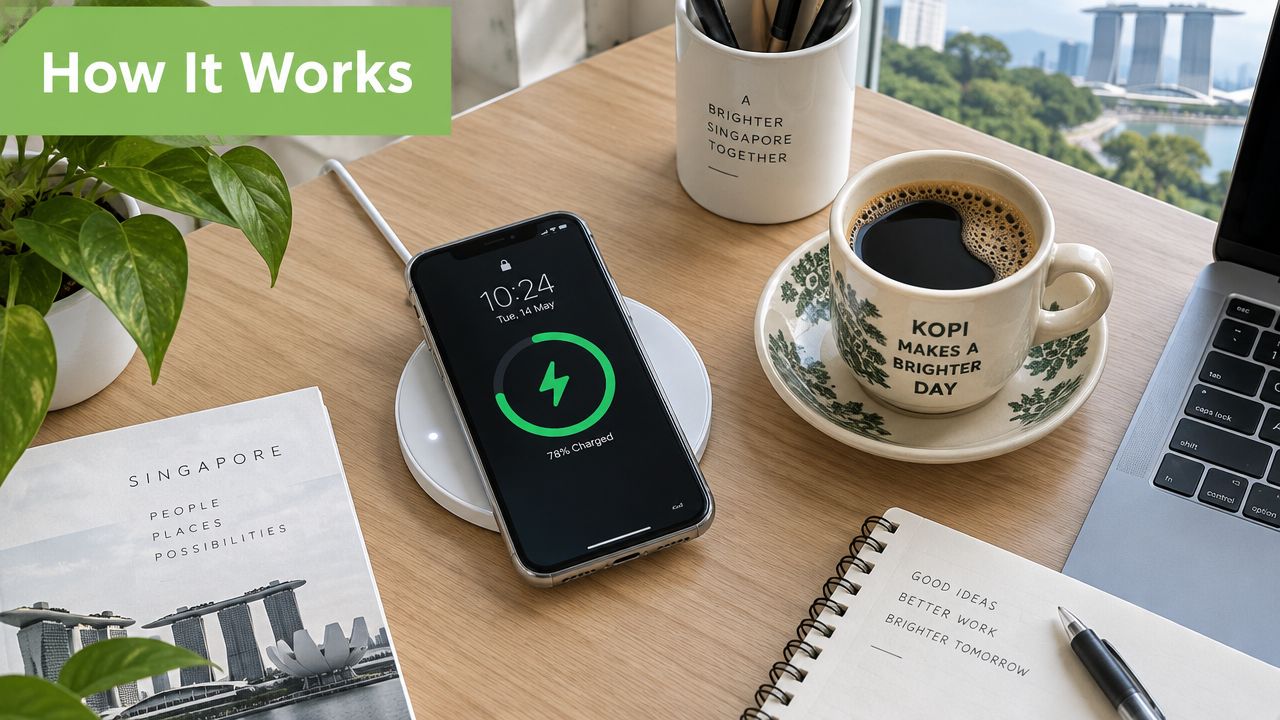
At a home office desk, the setup is familiar. Your phone rests on a slim pad beside a kopi cup, a notebook and the laptop you use for work. Instead of reaching for a cable every time the battery drops, you place the phone on the marked charging area and leave it there while reading messages or joining a call.
Physically, a wireless charging pad is a flat accessory with an induction coil inside. The coil connects to a power source through the pad's cable and power adapter. Your phone contains a matching receiving coil, usually positioned near the back of the device. When the two coils sit close together, the pad transfers energy across the small gap.
Nothing plugs into the phone. A Lightning or USB-C cable sends electrical power through a physical connector, while the pad creates a low-power electromagnetic field. The phone's receiving coil converts that transferred energy back into electricity, which its charging system manages before sending it to the battery.
Why placement still matters
Wireless charging isn't magic, and it doesn't remove every point of friction. The phone has to sit over the coil, the case must allow sufficient energy transfer, and the pad needs a suitable power input. If you place the phone off-centre, the pad may charge slowly, stop intermittently or fail to begin charging.
That's why a wireless pad works best as an always-ready desk or bedside companion. It suits short top-ups throughout the day, overnight charging and shared spaces where several people use compatible phones. It may be less suitable if you need the fastest possible emergency charge while continuing to use the device heavily.
Practical rule: Treat the pad as a convenient charging surface, not as a cable with the same performance in a different shape.
The useful question isn't whether a phone can charge wirelessly. Ask whether the pad fits your routine, whether its standard will remain relevant, and whether you'll still use it after upgrading your phone.
How Qi and Qi2 Wireless Charging Work
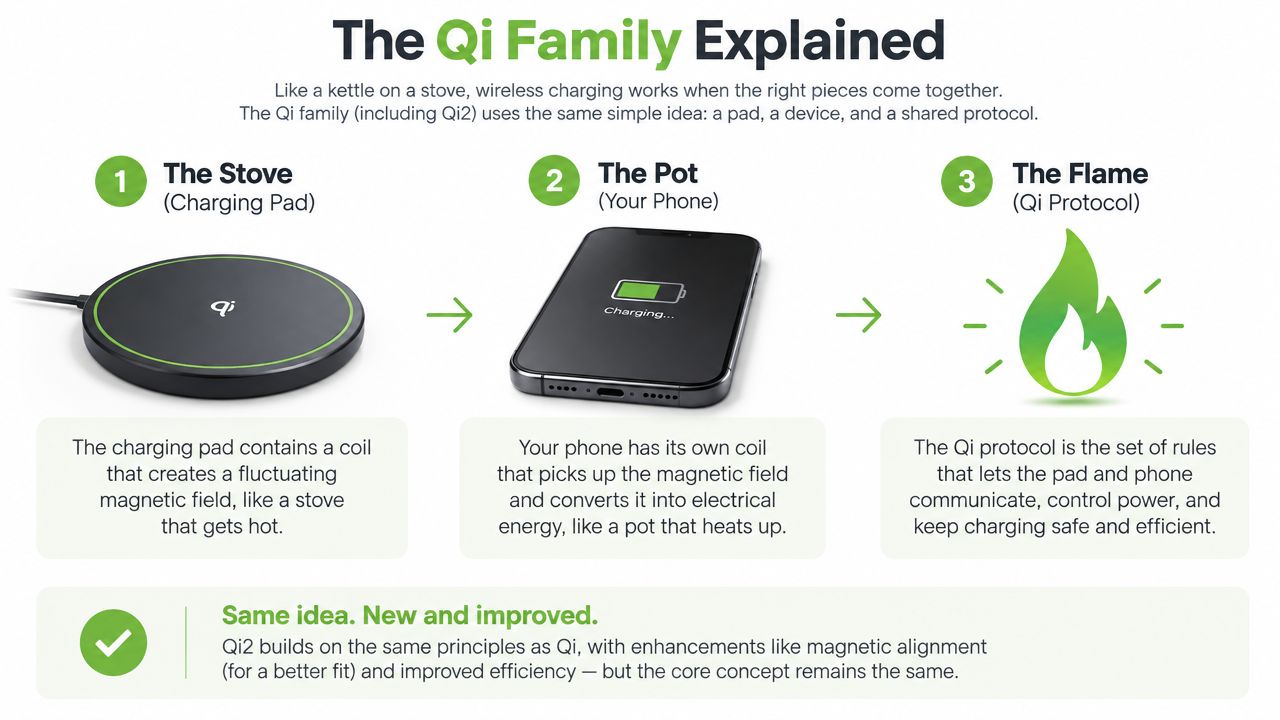
A phone placed on a wireless charging pad is like a pot set on a hob. The pad is the hob, the phone is the pot, and Qi is the agreed design that lets both sides work together. The comparison also explains why position matters. A pot sitting away from the flame will not heat properly, just as a misaligned phone may charge slowly or not start charging.
The Qi family in simple steps
- The pad supplies the energy. Its internal coil creates an electromagnetic field.
- The phone receives the energy. A coil inside the phone captures that field and converts it into electrical power.
- Qi controls the conversation. The phone and pad communicate to decide how much power is safe and suitable. The pad does not force its maximum advertised output into every phone.
The Qi explanation from ASUS Singapore describes Qi as a universal wireless charging standard. Singapore retail listings commonly show 7.5W for iPhone-class Qi charging, 10W for some Samsung and other Qi devices, 15W for Qi2-certified devices, and up to 25W for Qi2.2 or Qi2 25W when the phone supports that level.
Why Qi2 adds magnets
Qi2 keeps the original Qi approach but adds a magnetic alignment ring, based on the alignment experience associated with MagSafe. The magnets help the phone settle over the transmitter coil, so placing it on a flat pad involves less guesswork. More accurate alignment can also make charging more consistent when you set the phone down quickly.
Qi2 does not make every phone charge at the same rate. A new Qi2 pad can work with an older compatible Qi phone, but that phone will use the lower rate it was designed to negotiate. The complete setup matters, including the phone, pad, charger and power adapter.
That system view is useful when choosing a pad for the next two years. Singapore's SS 722-2 standard covers low-power charging and wireless power transfer systems, with the formal standards framework taking effect from 1 April 2026. Its supporting documentation describes the pad-and-receiver arrangement and the role of alignment in reliable energy transfer. Enterprise Singapore's wireless power and EV charging factsheet places wireless power within a more structured national standards environment.
Wattage, Speed and Real-World Charging Performance
A phone placed on a pad before a meeting may gain enough charge for the afternoon, while the same pad may feel slow when the battery is nearly empty. Wattage describes the pad's possible power output, not a guaranteed charging rate. The phone decides what it can accept, while alignment, temperature, battery level, case thickness and the connected power adapter affect the result.
A legacy 7.5W pad generally suits overnight charging or keeping a phone topped up at a desk. A 15W Qi2 pad is more practical for a noticeable top-up during a meeting or lunch break. A 25W Qi2.2 or Qi2 25W pad has a clear benefit only when the phone, pad, charger and adapter all support that level. Otherwise, the extra number remains unused.
| Pad Wattage | Battery Gained in 30 Minutes | Best Use Case |
|---|---|---|
| 7.5W | Qualitatively, a slower top-up suited to maintenance charging | Bedside charging and light desk use |
| 15W | Qualitatively, a brisker top-up for a short break | Workstations and daily daytime charging |
| 25W | Qualitatively, the fastest option in this comparison when the full system supports it | Newer supported phones and buyers planning ahead |
A higher tier can feel close to twice as fast as a legacy 7.5W pad, but only across a compatible setup. Check the phone's supported wireless charging rate, the pad's Qi or Qi2 specification, and whether its power adapter can supply the required input. This system check matters more than choosing the largest wattage printed on the box.
Why headline wattage falls short
Heat can make the phone reduce power. Singapore's warm conditions may make this more noticeable if the pad sits inside an enclosed shelf, under direct afternoon sun or on a surface with little airflow. A thick case, particularly one above roughly 3 mm to 5 mm, can also increase the distance between the transmitter and receiver coils.
The internal coil matters too. A Singapore-based Qi transmitter coil listing gives an example of 5.8 μH inductance, a 70 mm diameter, a 220 minimum quality factor and operation up to 15W. These specifications illustrate why coil design affects efficiency, but a component listing does not guarantee the performance of a finished pad.
For a phone that must charge quickly, stay in use during charging or remain reliably positioned, wired charging is still the more predictable choice. myhalo's guide to fast charging cables provides a useful comparison. For a pad expected to remain useful over the next two years, Qi2 readiness and full-system compatibility usually matter more than buying the highest unsupported wattage.
Pad Types and Form Factors Worth Knowing
The shape of a wireless charging pad changes how you use it every day. A flat pad is compact and easy to pack, while a stand keeps the screen visible during calls. A multi-device station can clear cable clutter from a bedside table, but it takes more space and usually makes less sense for travel.
| Form Factor | Typical Devices | Best For | Trade-off |
|---|---|---|---|
| Flat single-coil pad | One compatible phone | Simple bedside or desk charging | You can't view the screen easily while it charges |
| Angled stand | One phone, sometimes earbuds | Video calls, notifications and desk visibility | The viewing angle may matter more than maximum charging speed |
| 2-in-1 unit | Phone and wireless earbuds | A compact personal desk setup | Less useful if you don't own both device types |
| 3-in-1 station | Phone, earbuds and smartwatch | Organised bedside charging | Larger footprint and lower portability |
| Multi-device mat | Several compatible devices | Shared desks or households with multiple devices | More surface area, and alignment can still vary across devices |
Match the form to the routine
A flat single-coil pad suits a student who wants a small accessory beside a study desk or a traveller who doesn't want to carry a stand. It also works well on a narrow HDB bedside table, where a larger station could compete with books, a lamp or a fan.
An angled stand is better for an office workstation. You can see incoming notifications without picking up the phone, although viewing convenience can encourage more screen checking. If you often use wireless earbuds, a 2-in-1 unit keeps the phone and case together without requiring a second charging cable.
Multi-device convenience has a cost
A 3-in-1 station is a sensible choice for someone using a phone, earbuds and smartwatch every night. It creates one charging destination and can make morning packing easier because the devices stay in a predictable place. The trade-off is size. A station that works well beside a bed may feel awkward in a laptop bag.
A pad should reduce decisions in your routine. If its shape makes you reposition devices repeatedly, its extra features may not be worth the desk space.
For an SME, the same principle applies at a hot-desk or shared workstation. A simple pad may be easier to standardise across desks, while a multi-device station may be more suitable for a small executive desk or reception area where cable management matters.
Buying Checklist for Singapore Shoppers
A reliable purchase starts with the phone you own, not the pad's packaging. Use the following decisions to filter out attractive specifications that won't improve your actual routine.
Confirm the standard first
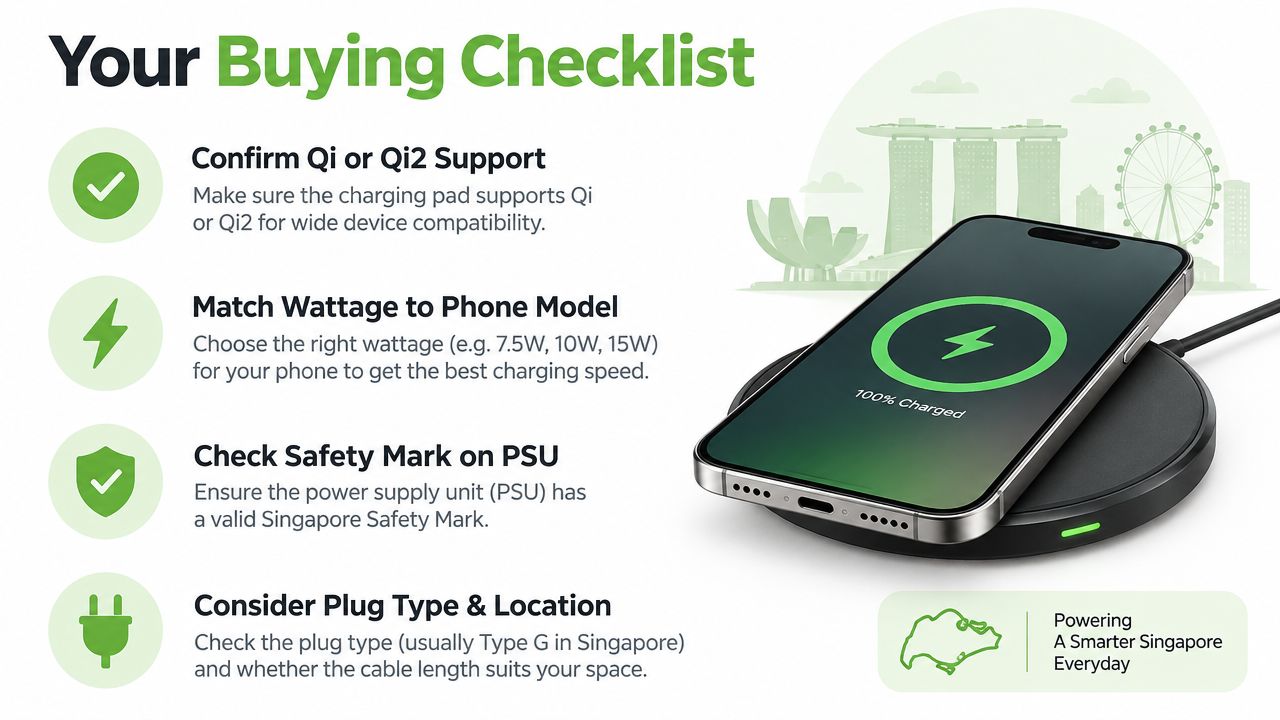
Check whether your phone supports Qi or Qi2, and identify the charging tier it can accept. A Qi2 pad may be a sensible longer-term choice if you expect to upgrade within the next phone cycle, but an older phone won't automatically gain Qi2 speed because it sits on a newer pad.
Retail listings on Sim Lim Square, Challenger, Lazada and Shopee can make this step confusing because sellers don't always present the phone, pad and adapter requirements together. Look for the supported standard, maximum output, required power adapter and case guidance in the same product description.
Match wattage to your usage
Choose 7.5W or 10W if your priority is overnight charging, occasional top-ups or a lower-cost accessory for an older compatible phone. Consider 15W Qi2 if you regularly need a faster daytime top-up. A 25W Qi2.2 or Qi2 25W model is a forward-looking choice only when your phone supports it or you have a clear upgrade plan.
Don't buy a higher number just to future-proof blindly. A pad remains useful for longer when its standard, coil alignment and build quality match the devices you're likely to use, not when the box carries the largest figure.
Check the power supply and safety details
The pad's output isn't the same as the wall adapter's capability. Confirm what adapter the product requires and check that the power supply carries the Singapore Safety Mark where applicable. A pad sold without a suitable adapter can cost more after purchase, even when its listed price looks attractive.
Read the case and warranty terms
Look for the maximum case thickness, whether magnetic rings are supported and whether metal plates are excluded. Then compare warranty length, exchange terms and seller support rather than comparing price alone. A cheaper pad that becomes unreliable after a short period may deliver poorer value than a supported product designed for repeated daily use.
For related charging decisions, myhalo's Singapore power bank guide offers another way to think about capacity, compatibility and portability. Apply the same lifecycle test here: will this pad remain useful when your current phone is replaced?
Placement, Case Compatibility and Everyday Habits
A wireless charging pad on an HDB study desk often has one job. The phone arrives for the night, you place it near the centre and leave it charging while you sleep. Problems begin when the pad is pushed behind books, covered by loose objects or placed in a warm corner with limited airflow.
At a bedside table next to a fan, the pad usually has better ventilation. At an office hot-desk, it may be moved between workstations and used with different cases. These environments create different failure points, even when the same phone and pad are involved.
Keep the charging path clear
A thick case can reduce the energy that reaches the phone. Metal-lined cases and metal plates may block or disrupt the magnetic field, while pop sockets and raised grips can prevent the back of the phone from sitting close enough to the pad. If charging becomes intermittent, remove the case and test the phone directly on the pad before assuming the accessory has failed.
Keys, coins, cards and other objects can also cause trouble. Modern pads use foreign object detection to sense unsuitable metallic items and stop or limit charging. That protection matters on a crowded desk, where an EZ-Link card or a set of keys can easily slip beneath a phone.
Give heat somewhere to go
A pad doesn't need to be cold to work, but excessive heat can lead the phone to reduce charging power. Keep it away from direct afternoon sun, enclosed shelves and soft surfaces that cover ventilation areas. Centre the phone carefully, remove accessories that interfere with contact and avoid placing papers or fabric over the pad.
One practical starting point is the HUAWEI CP60 15W Wireless Charger, but the same placement checks apply to any brand. Test the setup with your actual case and power adapter, not only with the bare phone on an empty desk.
If a pad works reliably only when the phone is placed with perfect precision, the problem is often alignment or case interference rather than the phone battery.
Sustainability, Recycling and the myhalo Lifecycle Angle
A wireless charging pad contains more than a convenient surface. Inside are a copper induction coil, a plastic or composite housing, control electronics and small printed circuit boards. When the pad becomes obsolete or fails, those materials need a route that keeps them out of general waste.
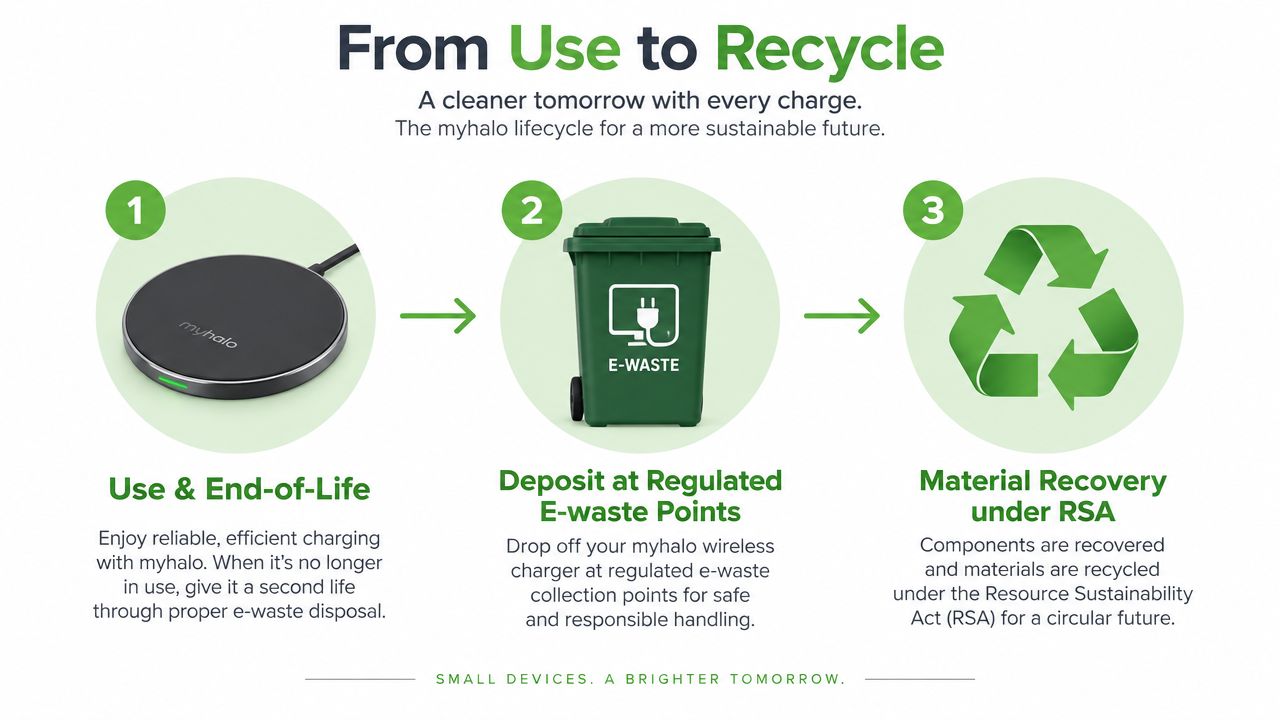
Singapore's national e-waste system has operated under the Resource Sustainability Act since 1 July 2021. The Extended Producer Responsibility model makes producers responsible for collection and treatment of regulated products at end of life, and ICT equipment and accessories form part of the regulated collection ecosystem. NEA's e-waste EPR guidance-system-for-e-waste-management-system) explains the local framework.
Choose the most useful end-of-life route
A working older Qi pad may still serve a family member, community group or secondary workstation. Reuse keeps the coil, housing and circuit board in service, which can create more value than replacing a functional accessory just because a newer standard exists.
If your pad no longer fits your devices but still works, a trade-in or upgrade route can also make sense. A lifecycle partner such as myhalo can connect trade-in valuation, device support and reuse-minded purchasing, so the decision isn't limited to keeping obsolete hardware in a drawer.
A dead or unsafe pad should go to a designated e-waste channel. NEA's guidance lists ICT items accepted through 3-in-1 bins, including mobile phones, laptops, tablets, modems, routers, set-top boxes, desktop monitors and power banks. The bin opening accepts devices that fit through 500 mm x 250 mm, although a wireless charging pad isn't specifically listed, so confirm acceptance with the collection operator before depositing it. NEA's e-waste recycling guidance provides the relevant local benchmark.
Think beyond the next purchase
For businesses importing, exporting or handling electronic waste, compliance also extends across borders. NEA's technical guidelines state that from 1 January 2025, covered WEEE under Basel Convention entries Y49 or A1181 is subject to transboundary movement control, with licensing, TradeNet declaration and prior informed consent requirements applying in relevant cases. NEA's technical guidelines for WEEE and used equipment-and-used-electrical-and-electronic-equipment-(ueee).pdf) sets out those requirements.
The sensible buying question is therefore not “what's the fastest pad today?” It's “can this accessory serve several phone cycles, be repaired or reused where practical, and enter the correct recycling route when it reaches the end?” That approach supports cost control, business resilience and smarter use of materials.
Common Questions About Wireless Charging Pads
Does foreign object detection really matter?
Yes. Foreign object detection, or FOD, helps the pad identify metallic items such as coins, keys or cards between the phone and charging surface. It can stop or limit charging when an object could interfere with energy transfer or become hot. This is particularly useful on a crowded HDB desk, but you should still keep loose metal objects away from the pad.
Product pages don't always provide enough detail to identify which myhalo-listed pads reliably stop charging when metal is detected, so check the individual specification and ask myhalo before buying if FOD is a deciding requirement.
How thick can my phone case be?
A practical working range is roughly 3 mm to 5 mm, but the exact limit depends on the pad, phone and case materials. Metal plates, magnetic accessories and raised grips can interfere even when the case itself is thin. If charging is unstable, test a thinner non-metal case or remove the accessory temporarily.
Will an older Qi pad work with a newer phone?
Often, yes, provided the phone supports the relevant Qi charging mode. The phone and pad will negotiate a compatible lower rate. Qi2 becomes more compelling when you want easier magnetic alignment, more consistent placement or access to newer supported charging tiers. First-generation hardware isn't automatically useless, but it may no longer suit your speed or multi-device requirements.
What should I do with a dead pad?
Don't place it in general rubbish without checking the correct route. Contact a designated NEA collection point or operator to confirm whether the pad is accepted, and consider a trade-in path when upgrading through a lifecycle-focused retailer. For businesses, review the applicable e-waste handling obligations before moving equipment across borders.
myhalo supports longer technology lifecycles through repairs, trade-ins, Certified ReLoved devices, Certified Surplus products and responsible recycling guidance, alongside transparent grading, battery health disclosure and quality checks. Visit myhalo to compare a wireless charging pad with your current devices, plan a Qi2-ready upgrade or get help choosing an accessory that should remain useful for years.