





Decoding RAM Prices: Smart Upgrades for Singapore in 2026
You check the price of a simple RAM upgrade, expecting a manageable add-on. Then you see the listing and wonder if you've opened the wrong tab.
That reaction is normal in Singapore right now. People come in wanting to speed up a laptop for school, add memory to a business desktop, or stretch the life of a gaming rig, and the first obstacle isn't installation. It's ram prices that no longer look remotely sensible.
What makes this more frustrating is that most advice online is written for US buyers chasing new DIY parts. That misses how a lot of Singapore buyers shop. We upgrade older laptops. We compare complete refurbished systems against parts. We care whether a purchase is still worth it after import-heavy pricing, not whether a benchmark chart looks nice.
The practical approach is simple. Buy only the RAM you need, avoid paying DDR5 premiums where they don't help, and look at the refurbished market before you commit to an expensive new build.
Sticker Shock Acknowledged What Happened to RAM Prices
A common scenario goes like this. A student wants to move from 8GB to 16GB because Chrome, Teams, and a few assignment tabs are dragging the laptop down. An SME owner wants to refresh a few office machines instead of replacing them. A gamer wants 32GB because modern titles, Discord, and background apps keep chewing through memory.
Then they check prices and pause the whole plan.
The shock isn't imagined. Buyers in Singapore have seen RAM move from a routine upgrade into a meaningful expense. What used to feel like a straightforward quality-of-life purchase now forces harder questions. Upgrade the current machine. Buy a used device with more memory already inside. Delay the purchase and hope prices calm down. Or spend more than planned and absorb it.
That confusion matters because RAM isn't glamorous. People don't want to become hardware experts just to stop their laptop from freezing during a Zoom call. They want a clear answer on whether a memory upgrade still makes financial sense.
Practical rule: If a RAM upgrade starts costing enough to make you question the entire device, stop comparing parts alone and compare the full-system cost.
That's the decision most buyers miss. In a normal market, buying RAM separately is often the obvious move. In this market, the cheaper answer can be a different device category altogether, especially if you're looking at refurbished laptops and desktops with usable memory already fitted.
A lot of people don't need the newest memory standard. They need enough memory, decent reliability, and a price that doesn't feel absurd. That's where sensible buying beats spec chasing.
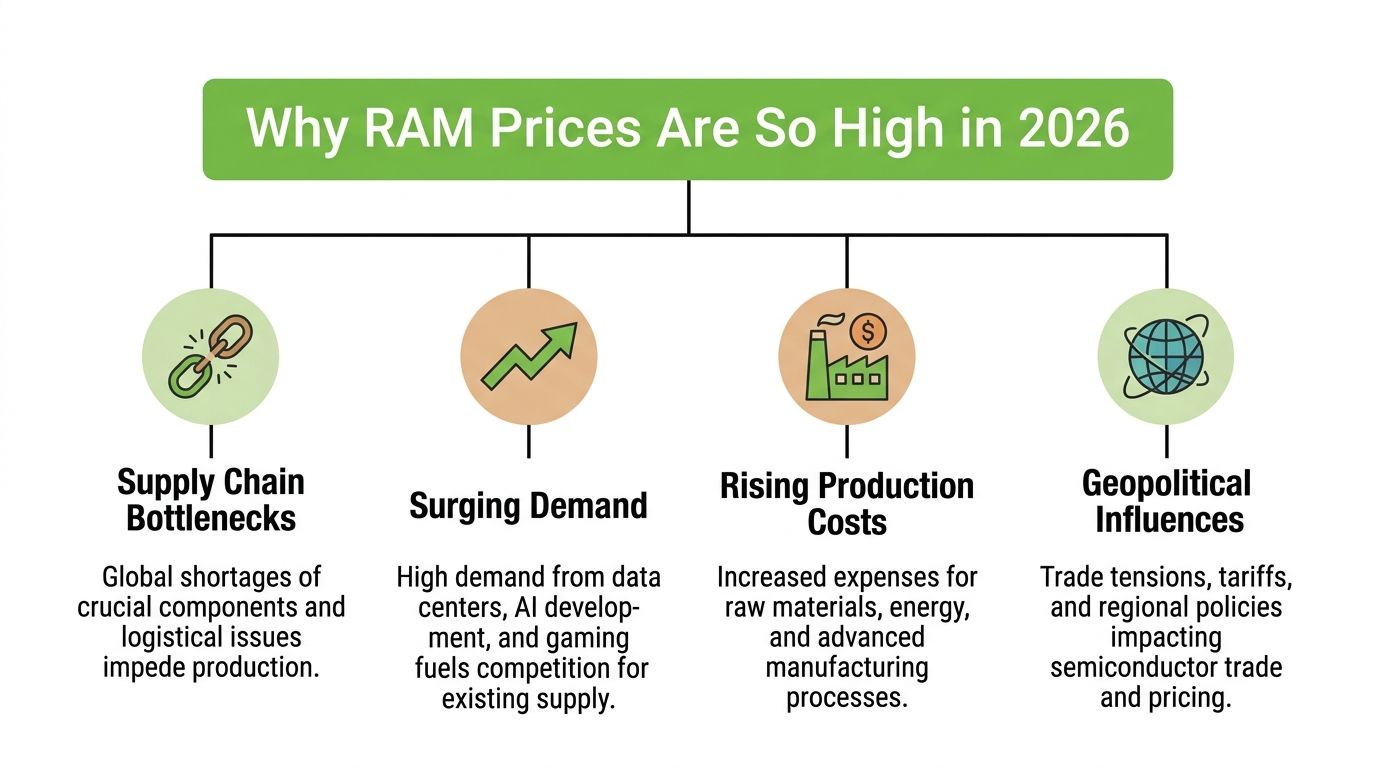
Why RAM Prices Are So High in 2026
Singapore buyers are seeing the result of a global supply squeeze, but it hits harder here because most consumer hardware is imported. When memory prices climb internationally, local retail pricing follows quickly.
In Q1 2026, RAM prices in Singapore surged by 80% to 90% compared with Q4 2025, driven by AI data centre demand and DDR5 shortages, according to Counterpoint Research's market note on memory prices. The same report notes that a 32GB DDR5 kit that cost S$130 to S$260 in late 2025 now retails for S$450+, while equivalent DDR4 kits rose from S$80 to S$120 to S$200 to S$240 by January 2026.
AI is taking priority over consumer memory
The biggest driver is simple. Manufacturers can earn more by allocating production to memory used in AI servers and data centres than to ordinary consumer modules.
That doesn't mean consumers have stopped buying RAM. It means consumer buyers are competing for a smaller slice of available supply. When that happens, prices rise quickly and stay uncomfortable longer than expected.
DDR5 changed the market at the wrong time
The second issue is the transition between DDR4 and DDR5. Newer platforms increasingly want DDR5, while many existing systems still rely on DDR4. That leaves both standards under pressure for different reasons.
For DDR5, demand is high and supply is tight. For DDR4, older systems still need it, but the industry isn't treating it as the long-term priority. That is why older memory hasn't become the cheap fallback many people expected.
AI demand doesn't just make top-end server memory expensive. It tightens the whole memory market and pushes ordinary buyers into worse choices.
Why this feels especially painful in Singapore
In Singapore, this shows up fast in retail channels because local pricing is sensitive to regional supply, distributor stock, and incoming shipments. If you shop around enough, you'll notice a pattern. Listings can look inconsistent from week to week, and the best-value stock tends not to stay available for long.
For non-technical buyers, the takeaway is clear:
- Don't assume older RAM is automatically cheap. DDR4 can still be expensive.
- Don't assume new-gen is always worth it. DDR5 performance gains are real, but the premium is often brutal.
- Don't compare RAM in isolation. In this market, full device value matters more than ever.
Decoding RAM Specs What You Actually Need to Know
If you've looked at RAM listings and seen a wall of letters and numbers, ignore the marketing first. Most buyers only need to understand four things: capacity, generation, speed, and fit.
Capacity matters first
Capacity is the number to care about first. Think of it as the size of your work table. A bigger table lets you keep more things open without everything piling on top of each other.
If your laptop slows down with a browser, Office apps, WhatsApp, and video calls running together, that usually points to insufficient capacity, not some exotic speed problem. For many everyday users, moving from a low-memory setup to a more comfortable one changes the experience more than buying faster RAM with fancy branding.
DDR4 and DDR5 are different generations
DDR4 and DDR5 are not interchangeable. They're different standards, and your motherboard or laptop decides what you can use.
Think of them like two road systems built for different vehicles. DDR5 can move more data and support newer platforms better, but if your machine was built for DDR4, buying DDR5 won't help because it won't fit or work.
Before you buy, check:
- Device compatibility: Your laptop or desktop must support the RAM generation you're buying.
- Form factor: Laptops usually use SO-DIMM. Desktops often use DIMM.
- Maximum supported memory: Some machines won't recognise higher-capacity modules properly.
If you're shopping for laptop memory, a practical example is this Crucial 16GB DDR4 3200MHz SO-DIMM laptop memory module, which shows the kind of specification format you should learn to read: capacity, DDR generation, speed, and laptop form factor.
Speed and latency matter, but not equally for everyone
RAM speed is usually shown as MHz or MT/s. Higher numbers generally mean more bandwidth. Latency, often shown as CL, reflects response delay. The easiest way to think about it is this: speed is how much can move through the road, latency is how quickly the first car responds.
For most non-technical users, capacity still wins. If you're choosing between too little RAM that is very fast, or enough RAM that is reasonably fast, enough RAM usually gives the better real-world result.
Buy for your bottleneck, not the marketing sheet. Office users usually need more headroom. Power users may benefit from more speed.
What actually helps in day-to-day use
A quick checklist works better than memorising specs:
- Slow when multitasking: prioritise more capacity.
- Older machine with upgrade slot: match the generation and form factor first.
- Gaming or creative workload: then look at memory speed and platform support.
- Very cheap marketplace listing: verify whether it's used, mismatched, or pulled from another system.
The most expensive RAM isn't automatically the right RAM. The right module is the one your system supports and your workload can use.
The Real Cost DDR4 vs DDR5 in Singapore Today
The toughest buying decision in this market isn't whether RAM is expensive. It is whether DDR5 is expensive enough to skip.
For a lot of Singapore buyers, the answer is yes.
In Singapore's market, DDR5 can deliver 50% faster multitasking in demanding apps, but it costs about S$16.50 per GB. By comparison, DDR4-3600 32GB at S$200 to S$240 works out to about S$7 per GB and delivers 85% of the performance for 45% less cost, based on the pricing and performance comparison in this 2026 RAM forecast analysis.
The value question matters more than the speed question
That gap changes the buying logic.
If you're editing heavier projects, using demanding creative apps, or building on a platform that already requires DDR5, paying the premium can be justified. But if your actual workload is spreadsheets, browser tabs, accounting software, point-of-sale systems, study tools, and light creative work, DDR4 still delivers strong value.
Here is the practical comparison.
| Factor | DDR4 | DDR5 |
|---|---|---|
| Platform fit | Better for older and budget systems | Required for newer platforms |
| Cost efficiency | Stronger value for most buyers | Weaker value when bought purely for future-proofing |
| Performance gain | More than enough for general use and many business tasks | Better for heavier multitasking and demanding apps |
| Upgrade logic | Good when extending device life | Better when the full system is already DDR5-based |
| Buyer risk | Lower spend if the device is older | Higher spend and easier to overbuy |
Compatibility can ruin a good deal
A cheap listing is not a bargain if it doesn't work with your machine. DDR4 and DDR5 are not mix-and-match parts, and laptop memory differs from desktop memory.
If you're comparing DDR5 laptop upgrades, a listing like this Samsung 16GB DDR5 4800MHz PC5-38400 SO-DIMM laptop RAM shows what to verify before purchase: generation, speed, and laptop-specific form factor.
If your system already uses DDR4 and still meets your needs, forcing a jump to DDR5 often means replacing more than just RAM. That's where costs spiral.
The cheapest high-performance upgrade is often the one that keeps the rest of your hardware in service.
Smart Ways to Beat High RAM Prices in Singapore
The wrong move in this market is buying RAM the same way you did when memory was cheap. The smarter move is to widen the comparison.
If a new RAM kit looks overpriced, don't ask only, "Where can I find it cheaper?" Ask three better questions. Can the current device still justify the spend? Would a refurbished machine with the right RAM already installed cost less overall? Would a trade-in reduce the cash outlay enough to make the decision easier?
The refurbished market has become a useful buffer. Refurbished laptops with 16GB RAM in Singapore have held steady at S$500 to S$800, undercutting new builds by up to 50%, according to the pricing comparison cited in this analysis of the AI-driven memory crunch.
Compare the whole machine, not just the module
Many buyers save money through this.
A standalone RAM purchase can still make sense if your device is in good condition, has easy access to memory slots, and won't need other upgrades soon. But if the battery is worn, storage is tiny, thermals are poor, and the CPU is already dated, sinking more money into RAM alone often becomes false economy.
Use this filter:
- Upgrade the current device if the machine is otherwise healthy and the memory bottleneck is obvious.
- Switch to a refurbished system if the RAM price pushes total upgrade cost too close to replacement territory.
- Trade in old hardware if it can offset part of the move to a better-fitted device.
For businesses, standardisation beats chasing specs
SMEs usually don't need the fastest RAM. They need predictable machines that stay stable across email, browsers, accounting apps, and shared office tools.
A practical fleet strategy is to standardise on a sensible memory target, then keep that fleet maintained instead of mixing random consumer upgrades. If your team runs Linux on some back-office or development systems, it's worth learning how to master the Linux free command so you can see actual memory usage before buying more hardware than the workload needs.
After you've checked usage, browse a focused RAM and memory collection for laptop and desktop upgrades only if the existing systems still deserve investment. Otherwise, a refurbished business machine with adequate memory already installed is often the cleaner answer.
A short video can help if you're still weighing upgrade versus replacement:
Where services matter more than raw parts pricing
This is the one place where retailer support changes the outcome. A parts-only purchase assumes you already know compatibility, installation risk, and whether the rest of the machine is worth saving.
For buyers who want a practical route, myhalo sells RAM, refurbished laptops and desktops, and also handles trade-ins, repairs, data migration, and ongoing care options such as e-Xtender and Protect. In this market, that combination matters because the cheapest-looking part isn't always the cheapest completed outcome.
RAM Recommendations for Students Gamers and SMEs
Different buyers should make different compromises. That matters even more when memory makers imposed 30% higher contract prices in Q4 2025, leading to retail hikes of 100% to 150%, and analysts cited in this RAM pricing trend report described a projected 3 to 4 year supercycle.
Students and budget users
If your workload is school portals, web research, Office apps, video calls, and streaming, prioritise usable capacity over premium specs. A stable DDR4 upgrade on a compatible laptop can still be sensible. If the module price starts feeling disproportionate to the age of the machine, look at a refurbished laptop with enough memory already fitted rather than forcing a costly parts upgrade.
The target here is simple. Buy enough RAM to stop daily slowdowns. Don't pay for bragging rights.
Gamers and creators
This group has the strongest case for DDR5, but only when the platform and workload justify it. If you're already on a newer system and your games or creative apps can use the extra bandwidth, DDR5 makes more sense. If you're on an older DDR4 system that still performs well, the wiser move is often to hold the platform longer and avoid paying a steep premium for memory plus a wider rebuild.
Spend on DDR5 when it unlocks the system you actually want to use. Don't spend on it just because it's newer.
A refurbished gaming or creator machine can also make more sense than buying RAM separately if it bundles the CPU, GPU, and memory level you were heading toward anyway.
SMEs and startups
Business buyers should think in terms of lifecycle, not component hype. Standardise hardware where possible, avoid overbuying memory for light office work, and replace only the machines that are becoming support headaches.
A practical SME plan usually looks like this:
- Office users: favour reliable DDR4-based business systems where appropriate.
- Power users: reserve higher-memory or newer-platform machines for staff who need them.
- Procurement timing: avoid panic buying at obvious market peaks when a refurbished replacement can bridge the gap.
- Support planning: keep maintenance and trade-in options in view so devices stay productive longer.
If your budget is tight, the best RAM recommendation may not be a RAM purchase at all.
Your Smartest Move in a Volatile Market
High ram prices don't mean you're stuck. They mean the lazy buying habits no longer work.
The smart move is to separate need from noise. Check whether your slowdown is really a memory problem. Buy for compatibility before branding. Treat DDR5 as a targeted upgrade, not an automatic one. And when parts pricing stops making sense, compare against a complete refurbished system instead of forcing the wrong upgrade.
That mindset usually saves money and reduces waste at the same time. A longer device lifespan is not a compromise if the machine still does the job reliably. It's disciplined buying.
If you're also planning wider hardware purchases, broad trend pieces can still be useful for timing and expectations. One example is this overview of Exciting Tech Products To Look Out For In 2025, which helps frame where newer hardware categories are heading without assuming every buyer needs to jump immediately.
The key point is simple. In a messy market, the buyer who wins is the one who stays boring, checks fit, and refuses to overpay for memory they won't fully use.
If you're weighing a RAM upgrade against a refurbished replacement, browse myhalo for current RAM listings, refurbished laptops and desktops, and trade-in options so you can compare the full cost of ownership before spending more than you need.