





Best Power Bank for Laptop: 2026 Buyer's Guide
Your laptop battery always seems to drop at the wrong time. You're halfway through a report in a Bugis café, your charger is in your bag, and every wall socket is already taken. For students, founders, remote staff, and frequent travellers in Singapore, that's no longer an occasional annoyance. It's a workflow problem.
A good power bank for a laptop fixes that problem only if you choose the right one. Many buyers look at a big capacity number and assume it will work with any notebook. That's where people get caught out. Laptop charging depends on three things working together: capacity, power output, and compatibility with your laptop's charging port and standard.
That need is becoming more mainstream. The Singapore power bank market, including devices capable of charging laptops, was valued at USD 14.96 million in 2023 and is projected to reach USD 17.05 million by 2030 according to Singapore power bank market research. If you often work outside the office, it also helps to discover laptop friendly spots with Madeira Remote so you can pair better locations with the right backup power strategy.
Table of Contents
- Why You Need a Power Bank for Your Laptop in Singapore
- Decoding Power Bank Specifications
- Calculating Your Laptop's Power Needs
- Navigating Safety and Singapore Airline Rules
- Making Smart and Sustainable Buying Choices
-
Your Laptop Power Bank Checklist and FAQs
- A simple pre-buy checklist
- Common questions people ask
- Can I use a power bank with a higher wattage than my laptop charger
- What if my laptop doesn't have USB-C charging
- Can I charge my phone and laptop at the same time
- Why does a large-capacity power bank still charge my laptop slowly
- Is a laptop power bank worth it if I mostly work in the office
- Should students and SMEs buy differently
Why You Need a Power Bank for Your Laptop in Singapore
A laptop power bank makes the biggest difference when your day changes unexpectedly. You leave home with enough charge for one meeting, then the meeting runs long, lunch turns into a second work session, and your battery slips into the red. In Singapore, where people often work between campus, office, train, airport, and café, that gap between “enough battery” and “not enough battery” appears fast.

The benefit isn't convenience alone. It's continuity. A reliable power bank lets you finish a proposal, keep your browser tabs open during travel, or stay available for client calls without hunting for a socket.
Mobile work in Singapore is different
Singapore's work pattern rewards portability. People move quickly between shared offices, libraries, campus spaces, customer sites, and airports. That means your charging setup has to work in short windows, not only at a desk.
A phone power bank usually isn't enough. Laptops need more power, and many laptops will reject a charger that can't supply the right amount of wattage through the right port. That's why the label matters more than the marketing.
The best laptop power bank is the one that matches your machine's charging standard and your actual routine, not the one with the biggest number on the box.
What buyers usually get wrong
Most confusion falls into three areas:
- Capacity confusion. A large mAh figure sounds impressive, but it doesn't automatically mean better real-world laptop charging.
- Wattage mismatch. A unit may charge a phone quickly but still fail to keep a laptop alive during work.
- Compatibility assumptions. “USB-C” on a laptop doesn't always mean it accepts charging through USB-C.
That last point matters more in Singapore than many guides admit. Newer business laptops often support USB-C charging well. Older or budget-friendly devices, including some professionally refurbished models in the market, may still rely on a barrel or DC input. In those cases, a USB-C power bank may not work without the correct adapter, and sometimes not at all.
Decoding Power Bank Specifications
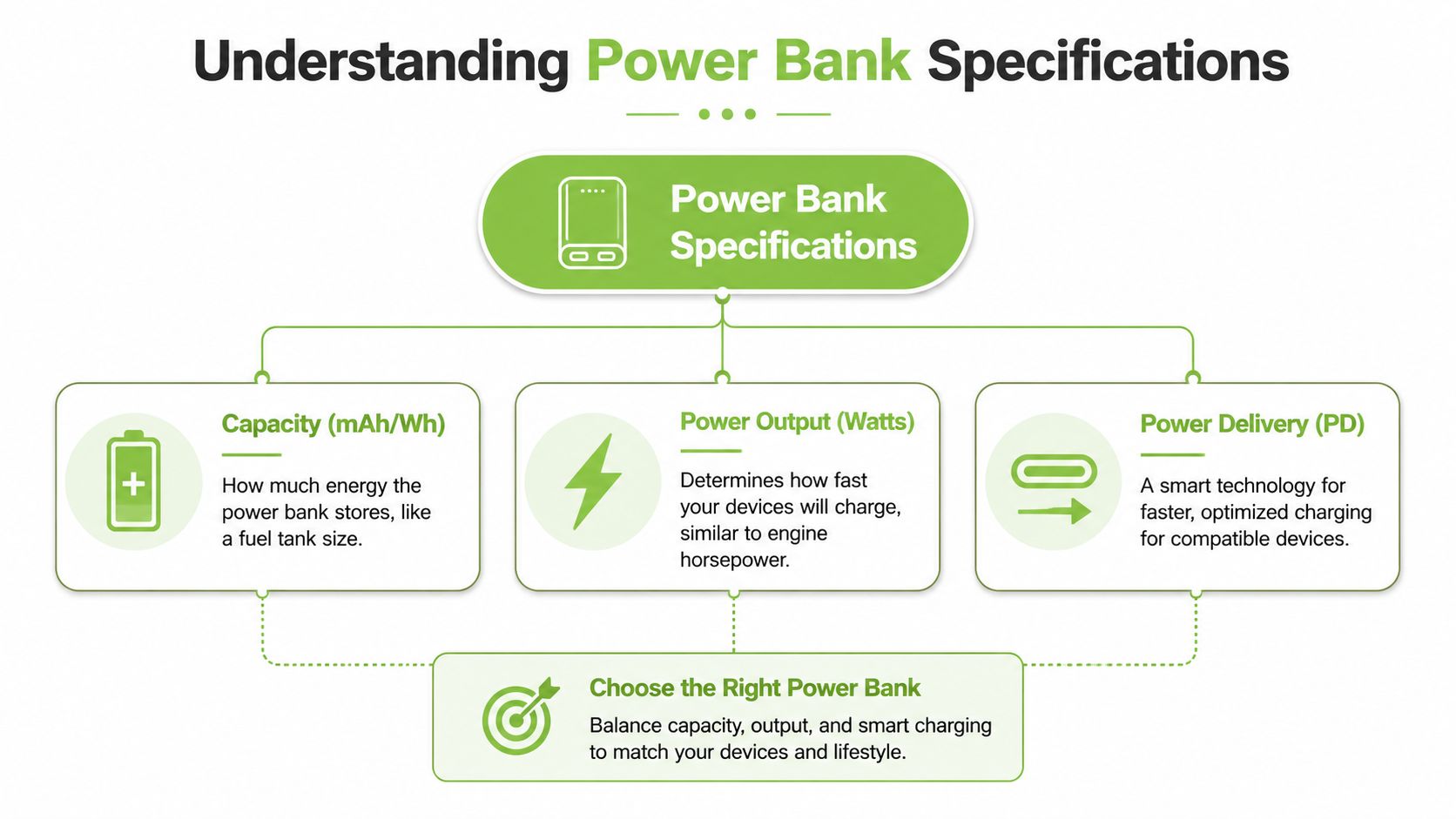
The labels on a laptop power bank can look more technical than they need to be. Four terms matter most: mAh, Wh, output watts, and USB-C PD. Once you understand what each one means, it becomes much easier to tell whether a model will suit your laptop, your commute, and even your flight plans out of Singapore.
If you want a broader primer on portable chargers before choosing a laptop model, this Singapore power bank guide is a useful starting point.
Capacity tells you how much energy is stored
You will usually see mAh first because it is large and easy to market. It stands for milliamp-hours. The problem is that mAh on its own does not give laptop buyers the clearest picture, especially when you are comparing products across different voltages.
For laptop use, Wh, or watt-hours, is the more practical unit. It measures total energy in a way that lines up better with how laptop batteries and airline limits are often described. This matters in Singapore because buyers are often balancing two questions at once: how long the power bank can run a laptop, and whether it stays within current travel rules for carry-on batteries.
Manufacturers often sell laptop-capable power banks across a wide range of sizes, from compact models for emergency top-ups to much larger units built for longer work sessions. The Anker laptop power bank guide gives a useful overview of those common capacity tiers and why larger batteries usually add both runtime and weight.
Output tells you whether your laptop can actually use that energy
Capacity is only half the story. A large battery with weak output can still disappoint.
Output is measured in watts, and this number tells you how much power the bank can deliver at a given moment. If capacity is the amount of food packed for the day, wattage is how quickly you are allowed to eat it. Your laptop may have plenty of energy available in theory, but if the power bank cannot send it fast enough, the battery can still drop during use.
Many laptop-ready power banks are sold in familiar steps such as 45W, 65W, and 100W. Those figures match common laptop charger ratings, so they are a useful shorthand when comparing options. Lower outputs can be fine for standby charging or very light tasks. Mid-range outputs suit many modern ultrabooks. Higher outputs are better for larger machines, creator laptops, and users who keep many apps running.
A simple rule helps here:
- Lower wattage works for lighter devices and occasional top-ups.
- Mid-range wattage suits many everyday USB-C laptops.
- Higher wattage makes more sense for larger or more demanding systems.
Practical rule: if your laptop usually ships with a higher-watt charger than the power bank can provide, charging may be slow, inconsistent, or limited to sleep mode.
USB-C Power Delivery is the charging standard that makes laptop charging possible
USB-C Power Delivery, usually written as USB-C PD, lets the laptop and charger agree on a suitable voltage and current. That agreement is what allows one USB-C port to charge a pair of earbuds, while another can power a laptop.
Buyers often encounter a common pitfall. A device can have a USB-C port without supporting strong PD output. A laptop can also have USB-C for data only, especially on older machines. That is why the letters PD matter more than the shape of the port.
Cables matter too. A cable with a low power rating can limit charging even if the power bank itself supports higher output. If you are using an older laptop, a business model with mixed port standards, or a Certified ReLoved unit, check the full chain: laptop input, power bank output, and cable rating.
Apple users who are checking charger type and expected power level can compare against this guide for your 15-inch Mac charger.
Read listings carefully, especially for older laptops and travel use
Product pages often promise “universal compatibility.” Treat that as a prompt to verify the details, not a guarantee.
Check these four points before you buy:
- Does your laptop accept charging through USB-C at all?
- What is the maximum PD output from the specific port you will use?
- Does that output drop when you charge a phone and laptop together?
- Is the included cable rated for the same wattage?
These checks matter even more in Singapore because many buyers are mixing newer USB-C laptops with older barrel-charge models, school devices, and refurbished systems that are still perfectly usable. A power bank can be well made and still be the wrong fit. Good buying decisions start with matching the specification sheet to the laptop you own.
Calculating Your Laptop's Power Needs
Your laptop battery hits 18% during a train ride across Singapore, and you have three hours of work left. Whether a power bank saves the day depends on two simple questions. Can it deliver enough power right now, and does it store enough energy to matter?
Start with your laptop charger. It is the clearest clue to what your laptop expects in normal use. Look for the wattage printed on the charger brick, such as 30W, 45W, 65W, or 100W.
Start with your original charger
Wattage is the charging speed ceiling, not a promise of constant draw. A laptop with a 65W charger may sip much less while you are writing notes in a café, then ask for far more when you open many tabs, join a video call, or render a file.
That is why charger wattage works like a safe baseline. If your laptop shipped with a 60W or 65W charger, choose a power bank that can meet that level from the port you will use. If the power bank only outputs 30W, the laptop may still charge during light tasks, but slowly, or only when the lid is closed.
For MacBook users, this guide for your 15-inch Mac charger is a useful reference for identifying the charger type and the power level your model was designed around.
Older laptops need one extra check. Some still charge only through a barrel connector, while others accept USB-C charging on certain versions but not others. That comes up often with business laptops, school devices, and Certified ReLoved models that are still in good working order. The model name alone is not enough. Check the charger label and the laptop specifications together.
Use watt-hours for a fair comparison
Output tells you how fast the power bank can charge. Watt-hours, or Wh, tell you how much energy it carries. You need both.
A simple way to picture it is this. Wattage is the size of the tap. Watt-hours are the amount of water in the tank. A wide tap with a tiny tank will not last long. A big tank with a weak tap may struggle to charge the laptop properly.
Use this checklist:
- Find your laptop battery size in Wh if the manufacturer lists it.
- Find the power bank capacity in Wh on the product page or label.
- Allow for some energy loss during charging, because conversion is never perfect.
- Compare output and capacity together, since either one can become the limiting factor.
If your laptop battery is 50Wh and your power bank is close to that range, do not expect a perfect one-to-one refill. In real life, some energy is lost as heat and voltage is converted along the way.
Example laptop power requirements
The table below is a practical planning tool, not a list of exact manufacturer specifications.
| Laptop Model Example | Charger Wattage | Recommended Power Bank Output | Typical Battery (Wh) |
|---|---|---|---|
| Thin-and-light student laptop | 30W | 30W or above | Small to medium |
| Mainstream business laptop | 60W | 60W or above | Medium |
| Performance laptop for creative work | 65W | 65W or above | Medium to large |
| Gaming laptop | Near 100W | Close to 100W | Large |
Match the power bank output to the charger first. Then check whether the capacity fits your day. A student moving between campus and home may only need a top-up buffer. A consultant working across meetings, co-working spaces, and Changi layovers will care much more about total stored energy.
Travel adds another layer for Singapore buyers. Airline limits are usually set in watt-hours, not the bigger mAh figure shown on retail listings. Before you buy a large-capacity model for flights, check both the battery label and your carrier's latest policy. If you travel often, this universal travel adapter guide for cabin-friendly charging setups can help you plan the rest of your kit around the same constraints.
The goal is not to buy the biggest power bank you can find. It is to choose one that matches your laptop, your workload, and how you move through the day.
Navigating Safety and Singapore Airline Rules
A laptop power bank stores a lot of energy in a compact shape. That makes safety paramount. The cheapest option with vague specifications can cost far more later if it overheats, charges unpredictably, or leaves you with a device you can't bring onto a flight.
Start by looking beyond capacity claims. Good safety design matters because you're often using the power bank near your laptop battery, in a backpack, or at an airport gate.
Buy for safety first
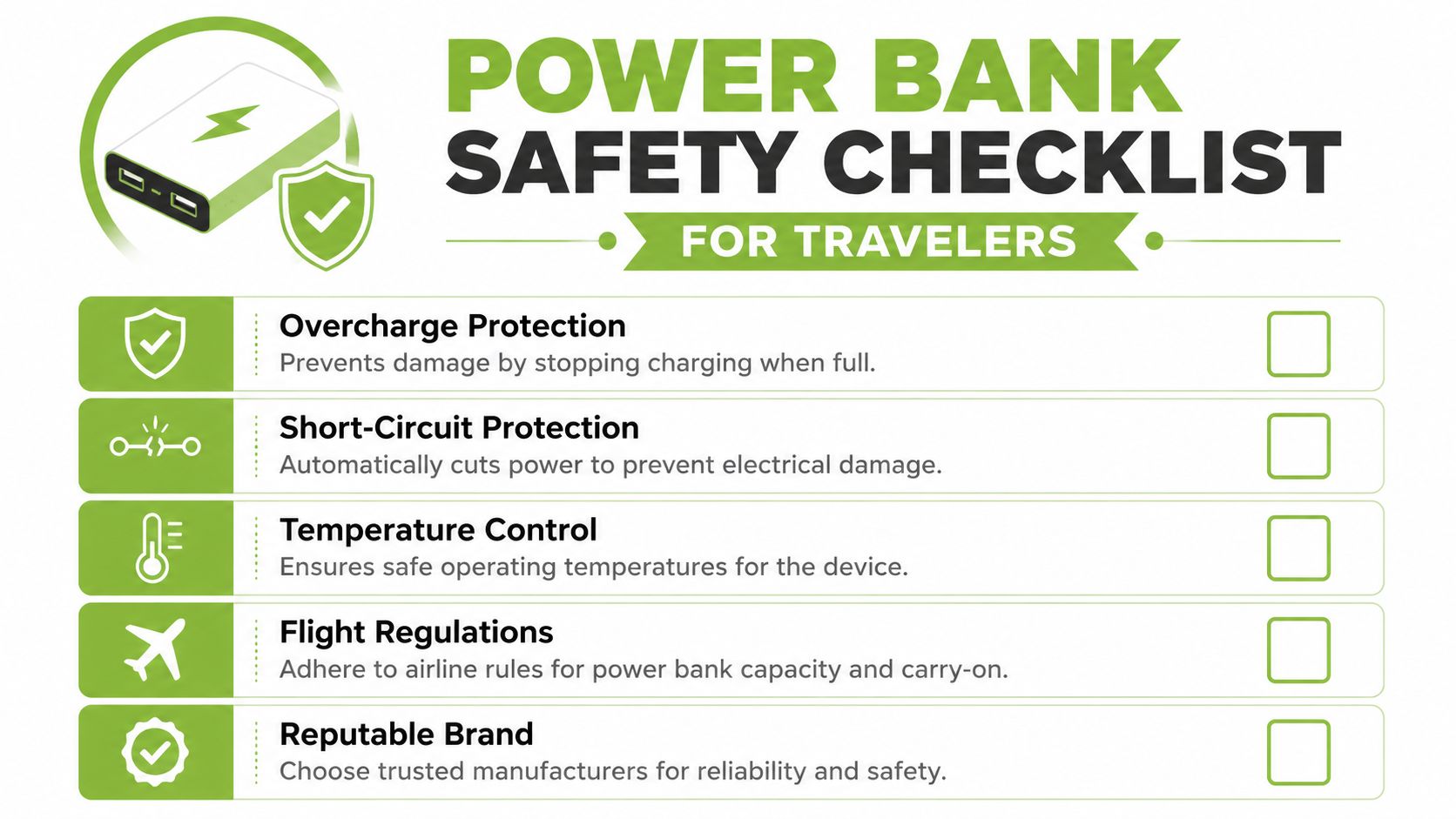
Check for these basics before you care about aesthetics or extra ports:
- Overcharge protection so the unit stops charging when appropriate.
- Short-circuit protection to reduce electrical risk.
- Temperature control to help manage heat during use.
- Clear manufacturer information so you know who made it and how it's supported.
- Honest labelling on output and capacity.
If you travel often, it also helps to organise your carry-on setup properly. A universal travel adapter guide can help you think through chargers, plug types, and what should stay in your cabin bag.
A safe power bank isn't just about protecting the battery pack. It also protects the laptop, cable, bag, and travel experience around it.
A quick visual overview can help if you're comparing features before a trip.
Know the flight rules before you pack
Singapore travellers need to pay close attention here. Starting 15 April 2026, passengers departing from Singapore will be limited to a maximum of two power banks per person, according to the Civil Aviation Authority of Singapore power bank restrictions notice. CAAS also states that any units exceeding this limit must be disposed of before the flight.
That changes how frequent travellers should shop. Many generic guides still encourage carrying several battery packs for extended travel, but that advice may not fit flights departing Singapore once the 2026 rule takes effect.
For practical packing, keep these points in mind:
- Count your units. Two means two.
- Check the capacity label before travel. Don't assume airport staff will interpret a vague listing in your favour.
- Keep them accessible in carry-on baggage. Don't bury them under clothes and cables.
- Avoid last-minute disposal by checking your setup the night before.
This is especially relevant for professionals and students who already carry a phone power bank and then add a laptop unit without thinking about the total number of packs.
Making Smart and Sustainable Buying Choices
Buying a laptop power bank is partly about charging, but it is also about getting more useful life from the laptop you already own.
A common Singapore example is easy to recognise. Your laptop works well in class, at a hot desk, or during admin tasks at home. The problem starts outside. Battery life drops during client visits, commuting, or long study sessions, so the whole device begins to feel unreliable even though its actual performance is still fine. In that situation, the right power bank can solve a mobility problem without forcing an early replacement.
Think in years of use, not just purchase price
A cheap power bank can cost more over time.
The reason is simple. If charging is inconsistent, you may end up replacing cables, carrying a backup charger, dealing with slower top-ups, or deciding your laptop is “no longer portable” when the underlying issue is poor external power support. Industry repair and resale trends suggest battery-related frustration often pushes users to retire otherwise usable laptops sooner than planned, especially once they lose confidence in using them away from a wall socket.
A smarter buying decision usually includes a few practical checks:
- Match the power bank to your laptop's charging method and wattage, so it can deliver stable charging instead of occasional top-ups.
- Buy for your real routine, whether that means campus use, Grab rides between meetings, or flights out of Singapore under stricter battery limits.
- Choose products with clear specifications and local after-sales support, so you know what you are getting and where to go if compatibility questions come up.
- Avoid overspending on output you will never use, especially if your laptop charges comfortably at a moderate USB-C PD level.
For SMEs, this has a direct operational benefit. A reliable power setup helps staff stay productive through site visits, presentations, and travel days, without forcing an immediate fleet refresh.
A power bank can help extend your laptop's usable life
A good power bank works like a spare fuel tank for a car. It does not fix every issue, but it can make a healthy machine practical again outside the office.
That matters for newer USB-C laptops and older models alike. Some recent laptops charge directly by USB-C PD, while older machines may need a suitable adapter or may not support power banks well at all. It also matters for professionally refurbished devices. If you use a refurbished model for cost or sustainability reasons, the right external power setup can make that choice more practical day to day, not just cheaper upfront.
According to myhalo's Certified ReLoved information, choosing a Certified ReLoved laptop instead of a new one avoids up to 247.5 kg CO₂e emissions per device. That gives the sustainability discussion real weight. Extending the service life of a laptop, especially one that has already been professionally assessed and restored, can reduce waste and stretch your budget at the same time.
A sensible setup often looks like this:
| Buying choice | What it helps with |
|---|---|
| Quality power bank | Keeps a usable laptop productive away from a wall socket |
| Good charging cable | Maintains charging speed and stability |
| Professionally assessed laptop | Reduces the risk of buying a device with hidden issues |
| Repair or battery support | Extends service life before replacement becomes necessary |
| Responsible recycling at end of life | Reduces unmanaged e-waste |
Cables matter more than many buyers expect. A strong power bank paired with a weak or poorly rated cable can still charge badly, which is why this fast charging cable guide is worth reviewing before you buy.
The best choice is the one that fits your laptop, your daily carry, and your travel pattern in Singapore. That may be a compact unit for a student with a USB-C ultrabook, or a higher-output model for a professional using an older, more power-hungry machine.
Your Laptop Power Bank Checklist and FAQs
By the time you're ready to buy, the decision should feel simpler. You're not trying to find the most powerful product in the market. You're trying to find the one that fits your laptop, your bag, your routine, and your travel needs.
A simple pre-buy checklist
Use this list before you click “buy”:
-
Check how your laptop charges
Confirm whether it supports USB-C charging or needs a different input type. -
Read your original charger label
Look for the wattage so you know the level your laptop expects. -
Confirm the power bank's USB-C PD output
Don't rely on “fast charge” wording alone. -
Review the capacity in context
Ask whether it's enough for a top-up, half-day, or full workday. -
Check cable suitability
A weak cable can reduce charging performance even with a good power bank. -
Think about travel use
If you fly often, choose a unit you can carry confidently under airline rules. -
Buy from a seller that gives clear specifications and support
That matters when you need help with compatibility or faults.
Common questions people ask
Can I use a power bank with a higher wattage than my laptop charger
Yes, in many cases you can. The important point is that the laptop draws the power it needs, provided the charging standard and negotiation are compatible. A higher maximum output doesn't force excess power into the laptop on its own.
What if my laptop doesn't have USB-C charging
Then a USB-C laptop power bank may not work directly. Some older laptops and lower-cost models use barrel or DC charging only. In those cases, compatibility becomes much more specific, and you should verify adapter support carefully before buying.
Can I charge my phone and laptop at the same time
Often yes, but check how the power bank splits output across ports. Some models reduce the wattage available to each device when more than one port is active. That can be fine for a phone, but it may slow laptop charging.
Why does a large-capacity power bank still charge my laptop slowly
Capacity and speed are different things. Capacity tells you how much energy is stored. Charging speed depends more on wattage output, USB-C PD support, and cable quality.
Is a laptop power bank worth it if I mostly work in the office
It still can be. The value comes from removing single points of failure. One forgotten charger, one occupied socket, or one long commute can be enough to disrupt a full afternoon.
Should students and SMEs buy differently
Usually, yes. Students often prioritise portability and value. SMEs may care more about standardising chargers across different users, reducing downtime, and supporting a mix of newer and legacy devices.
A good buying decision isn't about hype. It's about fit. When the specifications, charging standard, travel rules, and your daily routine all line up, a power bank for a laptop becomes one of the most useful accessories you can carry.
If you're comparing laptop accessories, replacement devices, or longer-term support options, myhalo is worth exploring as a technology lifecycle partner. Beyond retail, myhalo supports repair, reuse, Certified ReLoved and Certified Surplus devices, responsible recycling, and practical services such as RescueAdvise and mylo AI Assistant. With ISO 9001 Certified and ISO 27001 Certified processes, 30-point quality checks, and transparent grading and battery health disclosure, it's built for buyers who want reliable tech decisions, not just another transaction.