





Microsoft Surface Pro Repair in Singapore: A Practical Guide
Your Surface Pro slips off an MRT seat and lands screen-first. Or the Type Cover stops responding before an important presentation. Worse, the battery begins pushing against the chassis, turning a slim tablet into a repair decision you can't ignore.
In Singapore, Microsoft Surface Pro repair isn't a simple matter of finding the nearest laptop shop. The right route depends on the fault, your model's age, warranty status, data requirements, repair quote and realistic second-hand value. Microsoft's authorised channel offers controlled warranty servicing, while independent repair providers may offer more practical options for older or out-of-warranty devices.
This guide gives you a direct way to assess the problem, test the basics, compare repair routes and decide when a refurbished replacement makes more sense than another repair.
Table of Contents
- Why Surface Pro Owners in Singapore Hit a Repair Crossroads
- Common Surface Pro Faults and What They Look Like
- A Quick Self-Diagnostic Checklist Before You Book
- Repair or Replace How to Decide
- Microsoft Warranty Route Versus Independent Repair Shops
- Booking Your Surface Pro Repair with myhalo
- Extending the Life of Your Surface Pro and When to Upgrade
Why Surface Pro Owners in Singapore Hit a Repair Crossroads
A cracked display, a failing battery or an unreliable Type Cover can leave a Singapore Surface Pro owner with three practical choices: pay for repair, check Microsoft warranty eligibility, or replace the device. The difficult decision is rarely identifying the fault. It is judging whether the repair will restore dependable use at a sensible cost.
A Surface Pro combines tablet-style construction with laptop-like components. A fault that looks minor can involve a tightly integrated assembly, specialist parts and careful post-repair testing. That is why the same repair can make financial sense on one model and poor sense on another.
The screen is bonded to the device, so replacement is more demanding than swapping a conventional laptop panel. Surface models also use proprietary components, including storage that is not treated like a standard removable laptop drive. Compatible parts may be limited, and repair quality, data handling and testing deserve as much attention as the quoted part price.
Singapore's climate creates additional practical concerns. Humidity and dust can affect charging contacts and ports, while repeated heat exposure can increase battery stress. A stiff kickstand or hinge may start as an inconvenience, then become a structural problem if the device is forced open every day.
Beyond the invoice: judging true repair value
Assess a repair quote against the device's remaining working life, not the part price alone. Check whether the Surface Pro still receives the software support you need, whether its battery is likely to remain reliable after a screen repair, and whether the repairer provides a written warranty. For an SME, downtime and the risk of losing access to work data may matter more than the lowest quote.
Microsoft's Singapore guidance sets a controlled authorised route. Its service-centre information names JK Technology Pte Ltd and Hemmersbach Singapore Pte Ltd as authorised providers. Hemmersbach is identified for onsite repair, while JK Technology is identified as the Microsoft Surface Partner and Authorised Service Provider in Singapore. Microsoft's concierge guidance also states that hardware onsite repairs are not supported at the concierge drop-off point. Eligible devices generally proceed through drop-off, diagnosis and service rather than same-counter repair. Local provider information is available on JK Technology's Microsoft Authorised Service Provider page.
Practical rule: Repair a Surface Pro when the work restores dependable service for its remaining useful life. It isn't worthwhile because the device can technically be opened and repaired.
If the device is otherwise sound, a professionally checked replacement may be the better decision. A Certified ReLoved Surface Pro 7 can provide a practical exit from an uncertain repair cycle, provided its specifications and warranty suit your work.
Common Surface Pro Faults and What They Look Like
A Surface Pro that suddenly stops charging, registers random touches, or refuses to stay open usually gives you clues before any technician checks it. Identify the pattern first. You can then describe the fault accurately, avoid unrelated work, and judge whether the likely repair suits the device's remaining value.
Screen damage
Cracked glass is easy to spot, but display faults may begin with flickering, dead touch zones, coloured lines, dark patches, edge light bleed, or glass lifting from the frame. The image may remain clear while touch input fails, which requires a different repair from a completely dead display.
Older Surface Pro generations are more likely to face a repair-versus-replace decision because their residual value is lower. Newer models can still suffer impact damage. Do not press down on a lifting screen. Separation may worsen, and the lifted display can indicate battery swelling underneath.
Battery swelling and rapid drain
A swollen battery can push the screen or chassis outward. A kickstand that no longer sits flat, sudden shutdowns despite a charge reading, unusual heat during light use, and rapid drain after charging are further warning signs.
Stop using a device with a visible bulge or lifting display, and keep it away from heat. Battery replacement addresses a safety and reliability problem, not an appearance issue.
Type Cover and Surface Connect problems
Type Cover faults usually appear as intermittent typing, missed keystrokes, an unresponsive trackpad, or a keyboard that works only at a particular angle. Check whether the magnetic connector sits evenly and whether the cover remains attached securely.
Surface Connect faults can resemble battery failure. The charging light may stay off, charging may cut in and out, or the Surface Pro may recognise power only when the connector is held in one position. Dirt, cable damage, and connector wear can produce similar symptoms, so a technician should inspect the port before you approve a larger repair.
USB-C and charging port damage
A loose plug, charging that stops when the cable moves, a physically damaged port, or bent internal pins points to port damage. Do not force the connector or repeatedly insert it at an angle. USB-C carries power and data, so a damaged port can affect accessories as well as charging.
Kickstand stiffness and hinge problems
Cracking sounds, resistance at one point in the movement, a kickstand that drops under the device's weight, or an unstable viewing angle indicates mechanical wear. Surface Pro kickstands face regular stress in classrooms, offices, and travel bags, especially on uneven surfaces.
| Fault | Symptoms to Look For | Commonly Affected Models |
|---|---|---|
| Screen | Cracks, flicker, dead touch zones, lines, or lifted glass | All generations, especially devices with impact damage |
| Battery | Bulging chassis, lifting screen, rapid drain, or sudden shutdowns | Older and heavily used devices |
| Type Cover or Surface Connect | Intermittent typing, poor magnetic contact, or no charging light | Models using Type Cover and Surface Connect accessories |
| USB-C or charging port | Loose connection, intermittent charging, or bent pins | Models with frequent travel or cable strain |
| Kickstand or hinge | Cracking sounds, stiffness, or unstable viewing angle | Devices used heavily in mobile setups |
Local repair listings cover Surface Pro models from the original Surface Pro released in 2013 through the Pro 11 and newer Surface Pro 12-inch variants. One Singapore listing reports that many repairs take 2 to 3 hours, with same-day collection available for many models. It also lists express repair and diagnostics at S$98.10 inclusive of 9% GST. Use that figure as a local benchmark, then compare the confirmed quote with your model's age, condition, and residual value. The Microsoft Surface repair service listing provides the published details.
A Quick Self-Diagnostic Checklist Before You Book
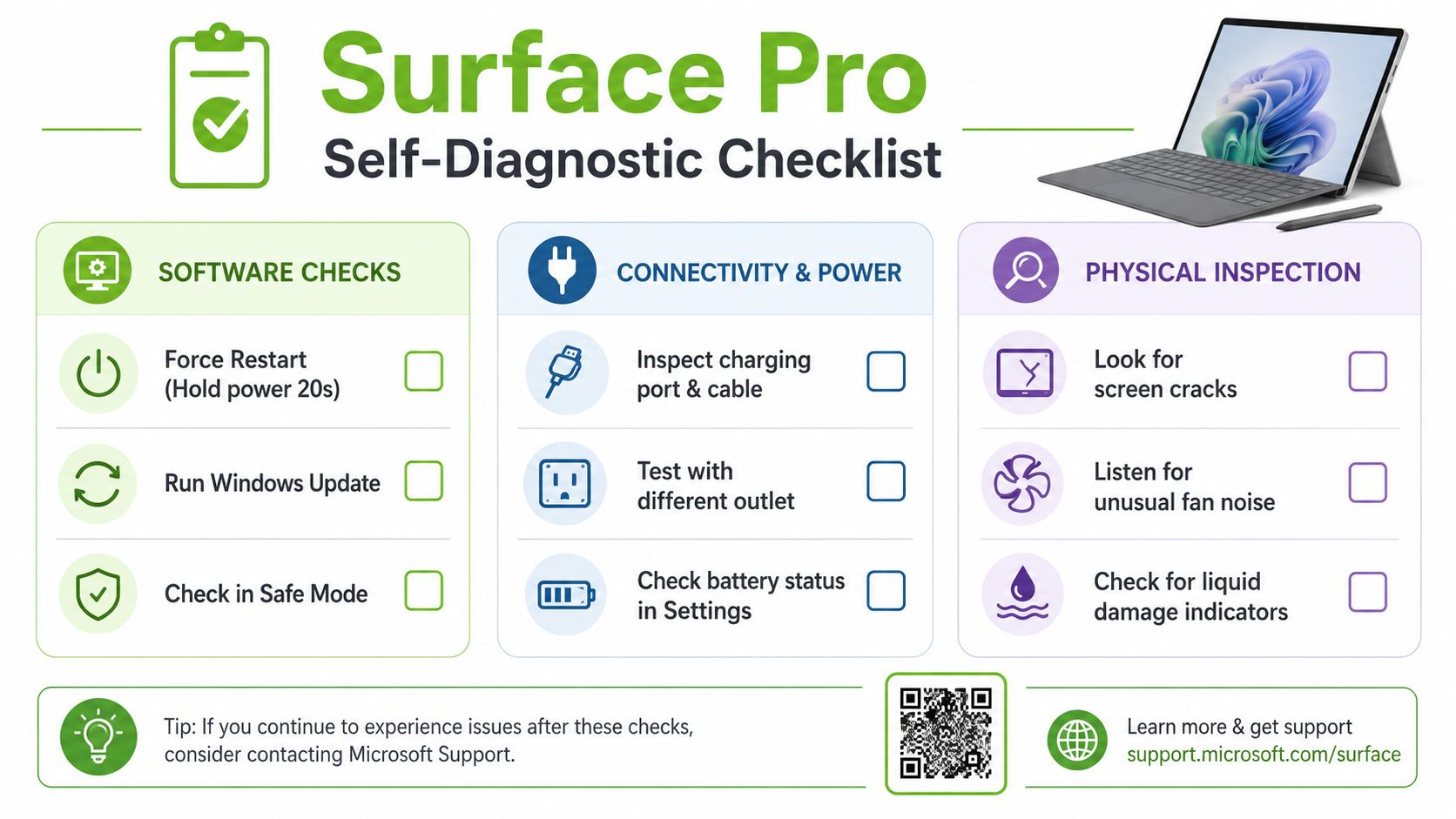
Spend a few minutes separating a software problem from a hardware fault. This can prevent an unnecessary screen or battery booking.
Software checks
- Force restart: Hold the power button for about 20 seconds, then release it and start the device again. This can clear a temporary system freeze, but it won't fix physical damage.
- Run Windows Update: Install pending Windows and firmware updates, then test the fault again. A touch, keyboard or charging issue that remains after updating is more likely to need hardware assessment.
- Use recovery tools carefully: Try Windows Recovery or Safe Mode if the device starts but behaves abnormally. Back up important files first, because recovery actions can affect settings or stored data.
-
Check the battery report: In Windows, use
powercfg /batteryreportfrom an administrator Command Prompt, then open the generated report. It can show whether capacity has declined sharply, although it doesn't identify every battery fault. - Run the Surface Diagnostic Toolkit: Use Microsoft's diagnostic tools to test supported components and record any error messages before you contact a repair provider.
Connectivity and physical checks
- Test another charger: Try a known-good Surface Connect charger and a compatible USB-C Power Delivery cable where your model supports USB-C charging. Test another wall outlet as well.
- Swap accessories: If possible, attach a known-good Type Cover and inspect the magnetic connector for dust or bent contacts.
- Inspect without forcing anything: Look for screen cracks, pressure points, a chassis bulge, liquid marks, loose ports or kickstand instability. Don't press a swollen area back into place.
This checklist helps identify the likely fault, but it can't rule out glued display assemblies, internal battery damage or board-level faults. Back up your data before handing over the device. Microsoft specifically instructs customers to create a backup before service because Surface servicing can involve replacement or deeper device handling, as stated in its Singapore Concierge support guidance.
Repair or Replace How to Decide
Use four tests before approving a repair: age, fault severity, cost and data needs. A repair quote on its own doesn't tell you whether the decision is sensible.
Start with the device's age and role
A Surface Pro older than five generations is usually a weak repair candidate if it also has battery wear, display damage or limited software support. A newer unit with a healthy battery and a single damaged component has a stronger case for repair.
The device's role matters too. A personal tablet used for browsing can tolerate a different risk level from a business device containing sensitive client files. A premium repair may be justified where continuity and controlled data handling matter, even if a cheaper replacement exists.
Compare the quote with realistic value
Local repair listings place common screen replacements at S$250 to S$295, while battery replacement starts at about S$195, as shown in this Singapore Microsoft Surface repair listing. Those are useful benchmarks, not universal quotes. The final price depends on model, part availability, damage and testing requirements.
A practical rule is to compare the repair quote with the device's current second-hand value. If the repair consumes roughly half of that value or more, replacement usually deserves serious consideration. This isn't a formal market formula, but it forces you to assess the device you own rather than the price you paid for it.
Score the decision
| Factor | Repair leans sensible | Replacement leans sensible |
|---|---|---|
| Age | Newer model with current software needs | Older than five generations with several faults |
| Fault | One isolated screen, battery or port issue | Swollen battery plus warped chassis, or board failure |
| Cost ratio | Quote is comfortably below current resale value | Quote approaches or exceeds roughly half of current resale value |
| Data needs | You need continuity and controlled data handling | Data is backed up and migration is straightforward |
| Future use | Performance still meets your workload | You need newer connectivity, battery life or applications |
Residual value changes the answer sharply. A Surface Pro 9 with a healthy battery may still justify repair after screen damage, while a Surface Pro 5 with the same damage may not. For a broader explanation of how inspected devices can fit into a replacement decision, see this guide to refurbished laptop computers.
Microsoft Warranty Route Versus Independent Repair Shops
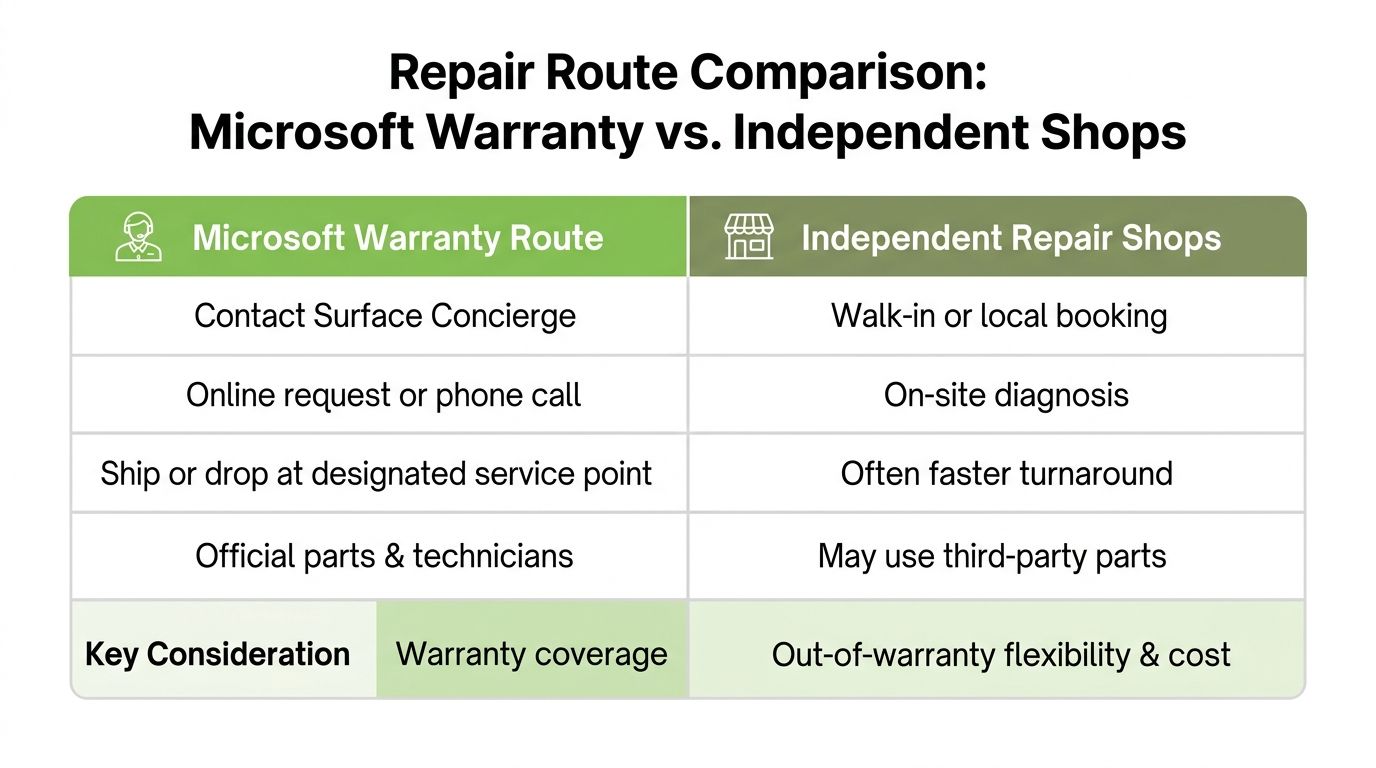
A Surface Pro that fails during its warranty period should go through Microsoft first. In Singapore, eligible in-warranty service can be handled by an authorised service provider. Microsoft's Concierge option supports drop-off and consultation, rather than onsite hardware repair. Review Microsoft's Surface warranty and support information for Singapore before choosing a shop.
Microsoft's Singapore guidance names JK Technology Pte Ltd and Hemmersbach Singapore Pte Ltd as authorised service providers. That route suits owners who prioritise original parts and warranty control. It may not suit anyone expecting an immediate repair at a convenient retail counter.
What independent repair changes
For an out-of-warranty Surface Pro, an independent provider can make more sense, particularly for a battery, screen, charging port or accessory fault. Ask which part will be installed, whether your data will remain intact, what testing is included and how long the workmanship warranty lasts. A lower quote is useful only if the repairer can explain the parts and testing clearly.
Microsoft's out-of-warranty guidance lists a SGD 69 Singapore out-of-warranty service fee. It also states that post-service coverage lasts 90 days or the remainder of the original warranty, whichever is greater. If the device is already outside its Limited Warranty, the service warranty is 90 days. Check the Microsoft out-of-warranty Surface service terms before approving the work.
Use this decision rule:
- Choose Microsoft's authorised route: The device remains in warranty, the fault appears covered, or original service control matters most.
- Choose an independent provider: The device is out of warranty, downtime matters, or Microsoft's quote makes replacement more attractive.
- Replace the device: The chassis is warped, several major faults are present, or the repair leaves little residual value.
For business owners, procurement records, data sensitivity and required turnaround can outweigh the headline repair price. Compare the authorised fee and independent quote with the device's current second-hand value, then choose the route that preserves enough value for its remaining use.
Booking Your Surface Pro Repair with myhalo
Start by selecting Microsoft Surface Pro repair on the myhalo website and choosing the exact model. The booking flow supports Surface Pro devices from Pro 5 through Pro 11, so don't describe the device only as “a Surface”. The model affects parts, compatibility, testing and the quote.
Describe the symptoms in plain language. State whether the screen is cracked or merely flickering, whether the battery is swollen, whether charging works through Surface Connect or USB-C, and whether the Type Cover has been tested separately. Upload a clear photograph if there is visible damage. A good photo won't replace diagnosis, but it can help identify obvious screen or chassis issues before drop-off.
What happens after booking
The stated workflow is:
- Submit the device details: Select the model and describe the fault through the guided form.
- Review the quote: A fixed-price quote is provided within one working day.
- Choose handover: Drop the Surface Pro at the Singapore service centre or arrange courier collection for an additional fee.
- Approve the repair: Standard repairs are completed in 3 to 5 working days. Same-day screen replacement is available for selected models booked before 10am.
- Collect and test: Check the display, touch response, charging, keyboard, cameras, Wi-Fi, kickstand and battery behaviour before leaving.
The repair service is described through myhalo's repair service page. Repairs carry a 90-day workmanship warranty, while replaced batteries include a separate six-month performance guarantee. Keep your backup current and remove sensitive accounts where possible before handover.
A repaired device can later enter a trade-in workflow. Functional units may be refurbished and resold as Certified ReLoved stock with a fresh warranty, while non-functional units can be directed towards responsible recycling. That makes repair, reuse and disposal part of one lifecycle decision instead of separate errands.
Extending the Life of Your Surface Pro and When to Upgrade
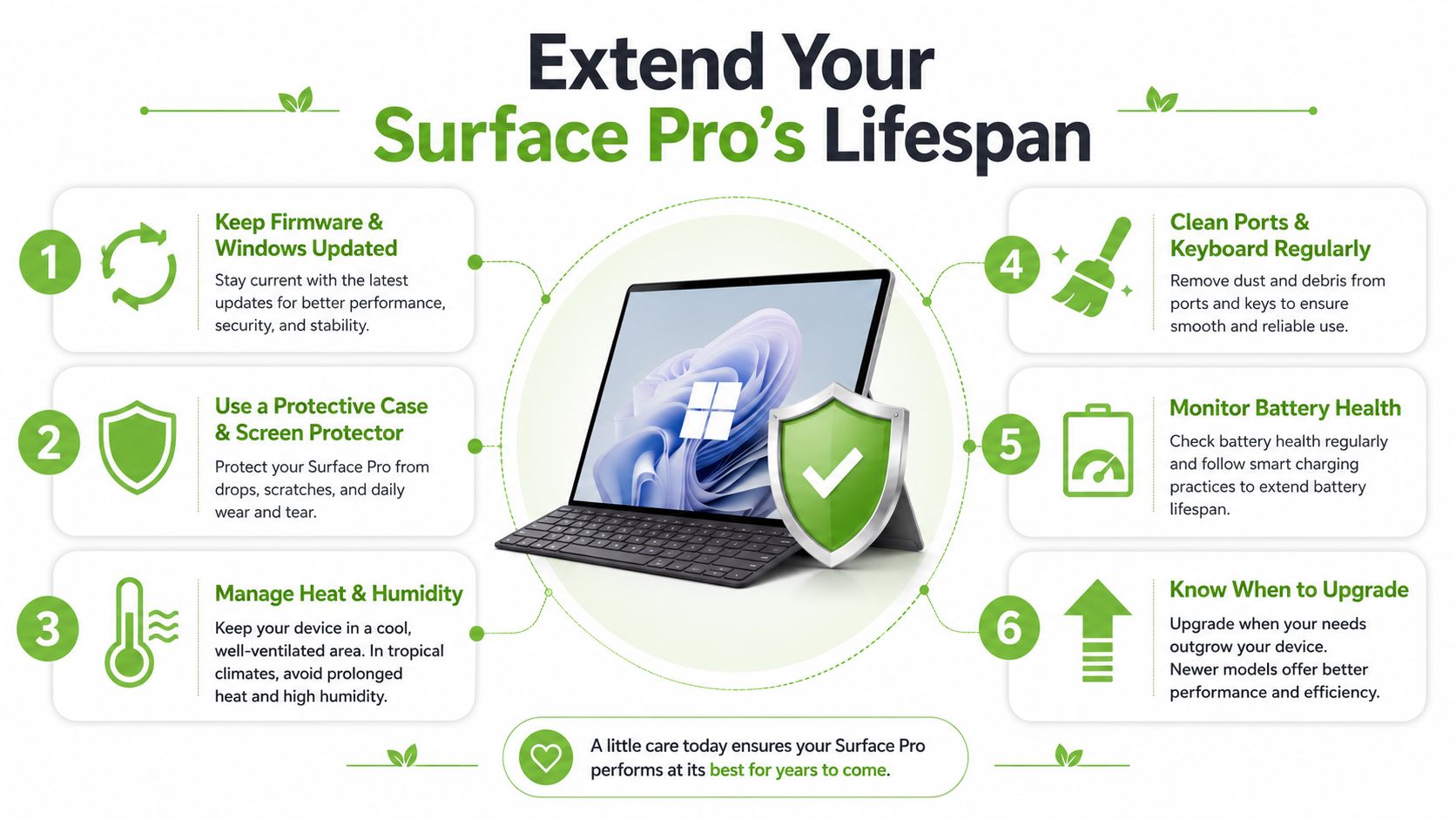
Repair works best as part of an ownership plan. Keep Windows and firmware updated, avoid repeatedly running the battery completely flat, use the original 65W charger where appropriate, clean Type Cover contacts gently and store the device away from excessive heat and humidity. A protective case and screen protector also reduce the chance that a single drop becomes a major display repair.
A good screen or battery replacement can add two to three years of usable life when the chassis, motherboard and performance remain sound. That can protect a business's existing setup, reduce migration work and make better use of hardware already in circulation.
Upgrade when the device is older than five years and showing several problems, when battery swelling keeps returning, when the chassis has warped, or when a motherboard fault pushes the quote close to the device's remaining value. In those cases, a professionally inspected Certified ReLoved Surface Pro or a Certified Surplus product may offer a more controlled replacement path.
myhalo's lifecycle approach also includes RescueAdvise, the mylo AI Assistant, ISO 9001 Certified processes, ISO 27001 Certified controls, 30-point quality checks, transparent device grading and battery health disclosure. Responsible reuse matters in Singapore, where the government estimate cited by the National Archives puts annual e-waste generation at about 60,000 tonnes, while reporting records more than 34,000 tonnes collected since 2021 under the Extended Producer Responsibility scheme, as detailed in this National Archives e-waste document.
The cheapest device is often the one you already own. The smarter choice balances repair, reuse, business continuity and timely upgrade.
If your Surface Pro has a cracked screen, swollen battery, charging fault or unreliable Type Cover, visit myhalo to request a model-specific repair assessment. You can also compare repair with Certified ReLoved or Certified Surplus replacement options, then choose reuse or responsible recycling when another repair no longer makes financial sense.