





MacBook Air M3: A Singapore Buyer's Guide for 2026
You're probably in one of two situations right now. You're standing in a shop comparing a MacBook Air M3 against older MacBook Air models, or you're at home with too many tabs open, trying to decide whether the latest Air is worth buying in Singapore.
That hesitation is reasonable. Apple launches create noise. Every refresh sounds essential. But most buyers don't need hype. They need a laptop that fits their work, lasts through daily commuting, and still makes financial sense when it's time to repair, resell, or upgrade.
That's where the MacBook Air M3 gets interesting. In Singapore, Apple sits in a market with a very strong installed base. A 2024 IMDA survey reported smartphone penetration of 97% among residents, and Apple was the leading smartphone brand by share among users in Singapore, which helps explain why Apple laptop upgrades matter more here than in many other markets (MacBook Air M3 market context). If you already use an iPhone, AirPods, or iCloud, the MacBook Air M3 isn't just another laptop choice. It's often the easiest one.
Still, the smartest purchase isn't automatically the newest model. It's the one that gives you the strongest total cost of ownership. That means looking at configuration, how long you'll keep it, what repairs might cost later, and what trade-in value you can recover when you move on.
Table of Contents
- Is the MacBook Air M3 the Right Laptop for You?
- What's New in the M3 Air and Why It Matters
- Real-World Performance for Singaporean Lifestyles
- Choosing Your Configuration and Model
- The Smartest Way to Buy a MacBook Air M3 in Singapore
- Owning Your Mac for the Long Haul with myhalo
- Frequently Asked Questions About the MacBook Air M3
Is the MacBook Air M3 the Right Laptop for You?
If you're a poly student replacing an old Windows laptop, a university student moving into the Apple ecosystem, or an office worker tired of carrying a heavier machine on the MRT, the MacBook Air M3 deserves a serious look. It's the kind of laptop that fits real life in Singapore. Light bag, limited desk space, café work, hot weather, and constant moving between home, school, and office.
The bigger question isn't whether the MacBook Air M3 is good. It is. The key question is whether it's the right Mac for the way you spend money and use devices.
Who should buy it
The MacBook Air M3 makes the most sense for people who want:
- One laptop for everything: lectures, admin work, web apps, video calls, media, and light creative work.
- A travel-friendly machine: something easy to carry daily without feeling underpowered.
- A low-friction Apple setup: AirDrop, iPhone sync, Notes, Safari tabs, Photos, and iCloud all work as expected.
If you're switching from Windows, don't overcomplicate the move. gifPaper's guide to Mac is useful because it focuses on the everyday adjustment, not fanboy nonsense.
The best laptop for most people isn't the most powerful one. It's the one they'll still enjoy using every day two years later.
Who should skip it
Don't buy the MacBook Air M3 just because it's new. Skip it if your workload is constantly pro-level and sustained, like heavy video production, specialist 3D work, or anything that keeps a machine pinned for long sessions. In that case, you should be looking harder at MacBook Pro territory or a different class of laptop entirely.
Also skip the instinct to overspend on upgrades you won't use. A lot of buyers in Singapore don't need a “maxed-out” laptop. They need a balanced one.
What's New in the M3 Air and Why It Matters
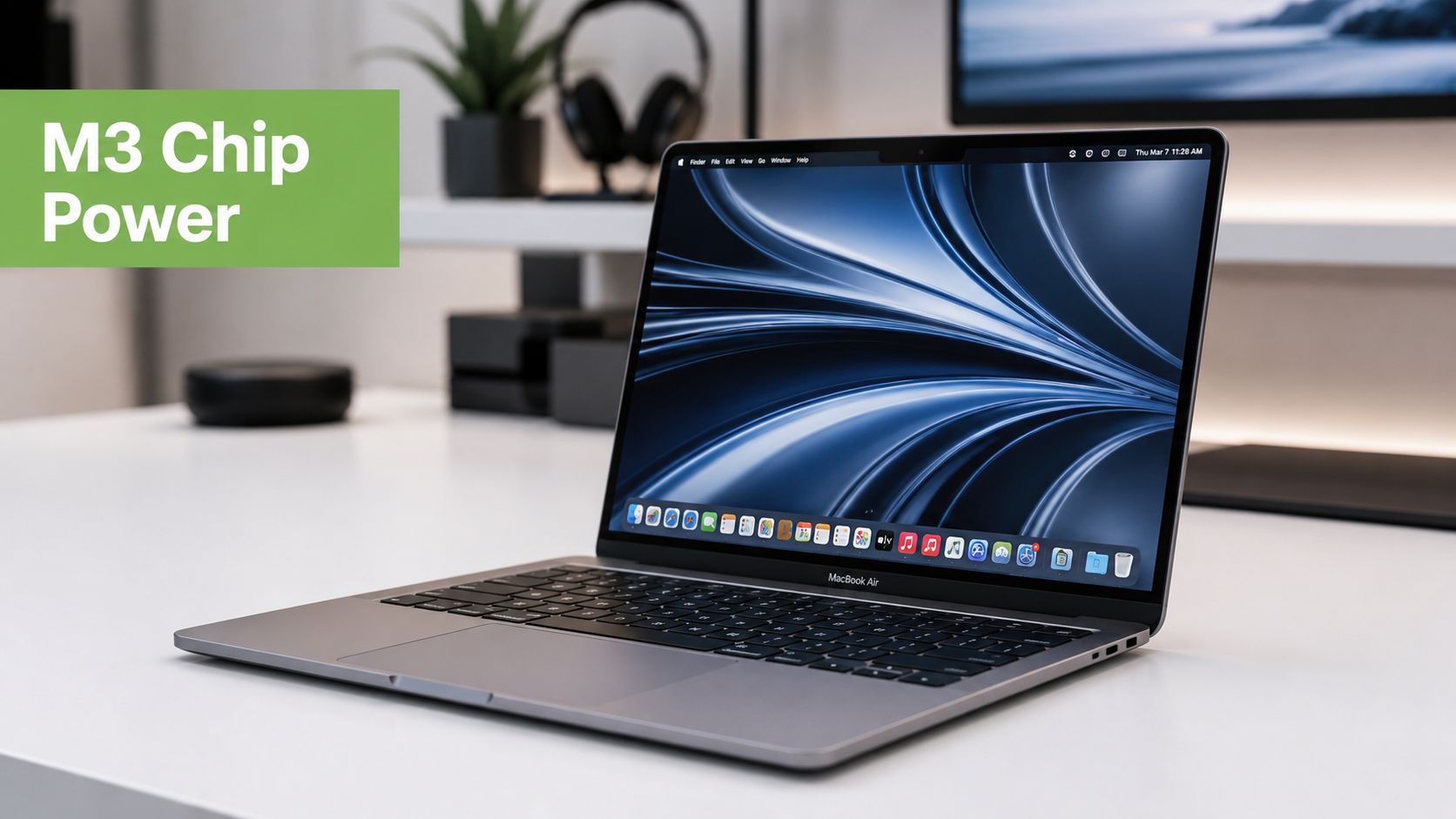
The MacBook Air M3 earns its place because the upgrade is practical. It gives you better day-to-day speed, stronger graphics headroom, and a base setup that stays useful longer. In Singapore, that last part matters because a laptop that ages well usually costs less to own over the full cycle, especially if you plan to trade in, repair, or keep it for years through myhalo.
The upgrades that matter
Apple's M3 chip gives the Air a better foundation for mixed everyday use. You feel it less in one dramatic moment and more in the small stuff that fills a normal day. App switching stays quick. Video calls, browser tabs, docs, spreadsheets, and music running together feel less cramped. The machine also has more graphics capability for light editing, design work, and visual-heavy apps.
Here's the plain-English takeaway.
- The CPU setup helps the laptop stay responsive: heavier tasks get handled without making basic work feel sluggish.
- The Neural Engine supports newer app features: tools like transcription, image cleanup, and smart search run better as more software uses on-device processing.
- The GPU improvement adds useful headroom: it matters more for creative workflows and visual apps than for gaming.
None of this turns the Air into a MacBook Pro. That is not the point. The point is that the M3 Air feels less like a thin laptop making compromises and more like a balanced machine you can rely on for a full ownership cycle.
Why the memory change is more significant than it appears
The bigger upgrade is the base memory. Apple moved the default configuration from 8 GB to 16 GB later in the product cycle, and that changes the value equation in a meaningful way.
This is the version of the MacBook Air M3 that is easier to recommend with a straight face.
For students, 16 GB means less chance of the laptop feeling tight once lecture recordings, research tabs, group project docs, and video calls pile up. For office users, it gives more breathing room across Slack, Teams, Chrome, spreadsheets, admin portals, and whatever else your company insists on keeping open. For long-term owners, it reduces the risk that memory becomes the first weak point.
Practical rule: If you plan to keep a Mac for four to six years, prioritise memory before cosmetic upgrades.
That matters for total cost of ownership. A better base spec can help you hold the laptop longer, avoid an early replacement, and preserve stronger trade-in value later. It also makes professionally refurbished units more attractive in Singapore, because a well-specced Air bought at the right price can be the smarter financial move than paying top dollar for a new one.
You are not paying for a chip name. You are paying for less waiting, less slowdown under load, and a Mac that still feels worth keeping.
Real-World Performance for Singaporean Lifestyles
The MacBook Air M3 makes the most sense when you stop treating it like a benchmark machine and start treating it like a Singapore life machine. It's built for movement first, then desk work second.

Apple's tech specs for Singapore list the 13.6-inch Liquid Retina display at 2560-by-1664 resolution, 500 nits brightness, and support for one billion colours. On supported configurations, the M3 platform also supports one external display with the lid open or two external displays in clamshell mode (Apple display and external display support details).
That last part is the quality-of-life upgrade. For a lot of users, it changes the MacBook Air from “great portable laptop” to “proper desk setup laptop”.
For students
If you're studying at NUS, NTU, SMU, a polytechnic, or just doing constant project work, the MacBook Air M3 fits the routine well. It's easy to carry to campus, fast enough for browser-heavy academic work, and the display is pleasant for long reading sessions, deck building, and editing documents.
The 500-nit panel and wide colour support matter more than people think. Not because every student is a designer, but because brighter, colour-rich displays are nicer when you're switching between lecture slides, PDFs, and creative work.
A practical setup looks like this:
- On the go: built-in display only, light charger in the bag
- At home: connect to a monitor, keyboard, and mouse
- During crunch periods: use external screens to keep research, writing, and references visible at once
For hybrid workers and SMEs
Thus, the MacBook Air M3 becomes a very smart buy. Singapore professionals often work in two modes. Portable during the day, desk-bound when it's time to concentrate.
The M3 Air is built for exactly that. It's what I'd call a portable-first, desktop-second machine. The internal screen handles mobile work. Then, when you dock it, support for dual external displays in clamshell mode cuts down on window switching and makes admin-heavy or communication-heavy jobs much less annoying.
If your workday jumps between meetings, spreadsheets, presentations, and chat apps, dual-monitor support matters more than chasing “Pro” branding.
This is especially useful for:
- Consultants and sales teams juggling calls, decks, and CRM tabs
- Operations staff who live in docs, messaging apps, and dashboards
- Small business owners running invoices, marketing, inventory notes, and customer communication from one laptop
A video overview can help if you want to see the machine in a more practical context before deciding.
For everyday users who just want a Mac that stays out of the way
Not everyone buying a MacBook Air M3 is trying to optimise a workflow. Some just want a laptop that feels clean, fast, and dependable.
For that crowd, the M3 Air is easy to like. It boots fast, handles the usual mess of tabs and apps better than older entry-level laptops, and doesn't ask much from you. If your day is email, web browsing, video streaming, family photos, online banking, and occasional editing, this is more laptop than you strictly need. That's not a bad thing. It means you've got room to grow into it.
Choosing Your Configuration and Model
The fastest way to waste money on a MacBook Air M3 is to buy the wrong configuration. Not the wrong Mac. The wrong setup.
My direct buying advice
Here's the short version.
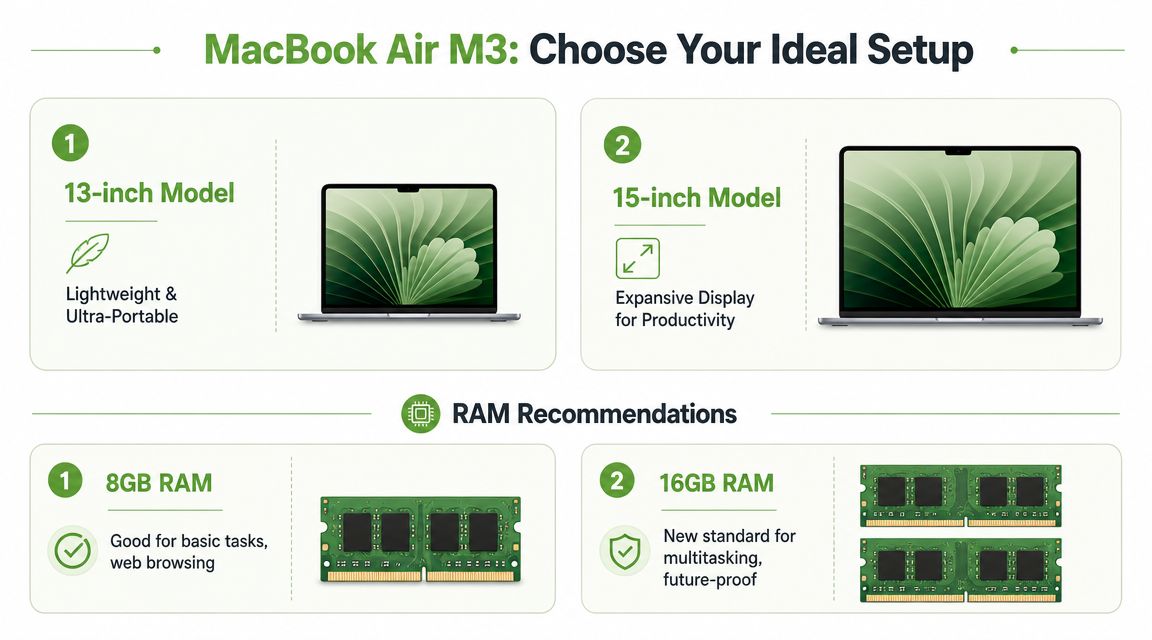
- Get the 13-inch model if you commute a lot, work in cafés, move between classrooms or meeting rooms, and care about bag weight.
- Get the 15-inch model if you rarely carry your laptop all day and want more screen space without needing an external monitor every time.
- Treat 16 GB RAM as the baseline for a long-term buy. Apple's shift to 16 GB as the default made this an easier call.
- Choose storage based on behaviour, not fantasy. If you mostly live in cloud storage and documents, lower storage is fine. If you keep lots of media, app files, or local project folders, buy more storage upfront.
Many users overestimate the amount of “power” they need and underestimate the value of choosing enough memory and enough usable storage.
MacBook Air M3 vs M2 vs M1 Key Differences for Buyers
The MacBook Air M3 is the cleanest buy if you want the newest Air and the most breathing room. But older Air models can still make sense, especially if you're value-led and don't need the latest features.
| Feature | MacBook Air M1 | MacBook Air M2 | MacBook Air M3 |
|---|---|---|---|
| Overall feel today | Still usable for basic tasks | Modern and balanced | Most future-ready of the three |
| Best for | Tight budgets and light use | General users who want a newer design | Buyers who want longer runway |
| External display flexibility | More limited | More limited than M3 | Better suited to desk-based multitasking |
| Value angle | Lowest entry cost if condition is good | Good middle ground | Strongest long-term configuration story |
| Who should choose it | Secondary device users | Most mainstream buyers on a budget | Students, professionals, and upgraders keeping it longer |
If you're comparing refurbished options across generations, this refurbished laptop buying guide is worth reading because it helps you think about condition, warranty, and practical buying criteria rather than just chip names.
Buy the M1 only if price is doing the heavy lifting. Buy the M2 if you want balance. Buy the M3 if you want to keep the machine longer and feel the least pressure to upgrade early.
The Smartest Way to Buy a MacBook Air M3 in Singapore
Most buyers focus too hard on the checkout price. That's a mistake. The smarter lens is ownership cost over time.
New vs professionally refurbished
A factory-sealed new MacBook Air M3 makes sense if you want the latest stock, the cleanest buying experience, and zero ambiguity about prior use. If you're the type who keeps a laptop for years and wants to start fresh, new is easy to justify.
A professionally refurbished unit is the more interesting value play. You give up the romance of breaking the seal, but you may get a meaningfully better ownership equation if the device has been properly checked, clearly graded, and backed by usable warranty support.
That matters more than people admit. Refurbished only works when the seller is transparent about condition, battery health standards, testing, and after-sales support. If those aren't clear, the “deal” can become expensive later.
What to care about more than the sticker price
When comparing sellers, look at these factors first:
- Warranty clarity: know how long you're covered and what the process looks like if something goes wrong.
- Quality control: a refurbished Mac should be checked systematically, not just wiped and relisted.
- Delivery and exchange terms: convenience matters when you need a laptop for school or work now, not next week.
- Upgrade path: if you'll trade in later, buy from a place that also supports the next step.
If trade-in is already on your mind, this guide to Apple trade-ins in Singapore helps frame the difference between simple disposal and getting usable value back when it's time to move on.
The sensible buyer doesn't ask only, “How much is this MacBook Air M3 today?” The better question is, “What will this choice cost me over the full time I own it?”
Owning Your Mac for the Long Haul with myhalo
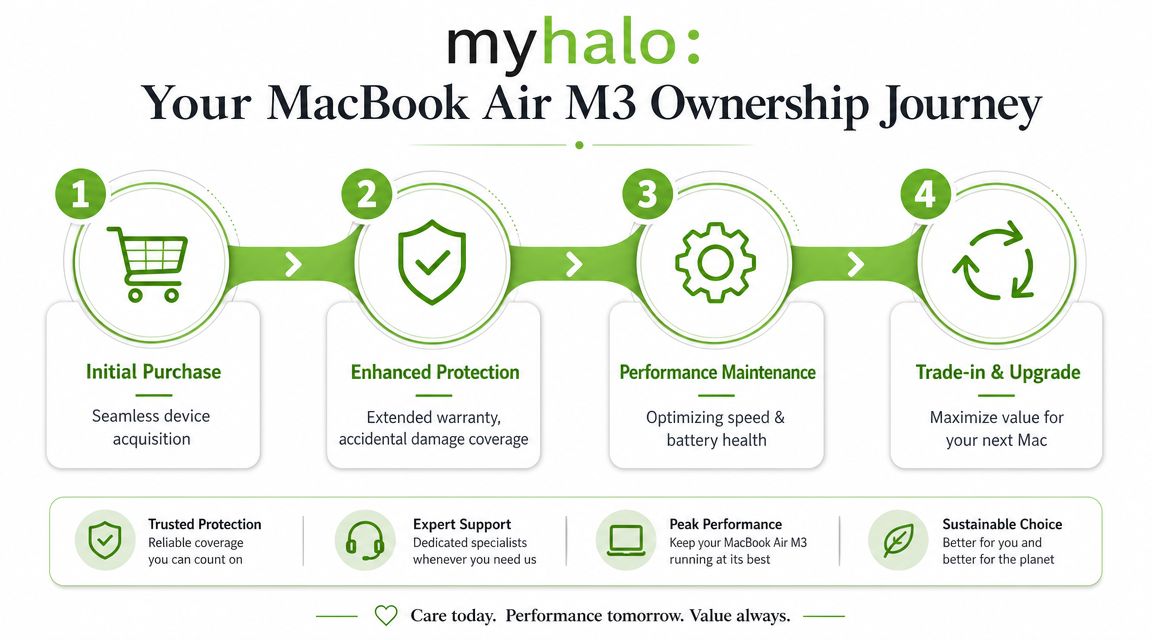
A MacBook Air M3 shouldn't be treated like a one-time purchase. It's an ownership cycle. Buy, protect, maintain, repair if needed, then trade in or pass it on while it still holds value.
Think in stages, not just checkout
A lot of people spend carefully at the start, then get careless later. They ignore battery wear, delay repairs too long, and only think about resale when the laptop's condition has already slipped.
A better approach is simpler:
- Buy the right spec early. That reduces the urge to replace too soon.
- Protect the machine while it still matters. Accidents are expensive when they happen outside support coverage.
- Maintain performance and battery health. Small issues become expensive ones when ignored.
- Trade in while the model is still desirable. Don't wait until the next owner sees it as old stock.
This is the part of the conversation where a retailer becomes more than a checkout page. myhalo handles new and professionally refurbished devices, trade-ins, repairs, migration help, and added care options, so the buying decision can be tied to the rest of the device's life instead of treated as a standalone sale.
Repairs and upgrades are part of the deal
Repairs matter because they affect the moment when ownership flips from “worth keeping” to “time to replace”. If your MacBook Air M3 gets a worn battery, that doesn't automatically mean it's time to buy another laptop. It means you should weigh a repair against the cost of upgrading too early.
If battery ageing is the issue, this MacBook battery replacement guide is a practical reference point because battery decline is one of the most common reasons owners think their laptop is “finished” when it often isn't.
A Mac loses value fastest when owners neglect small problems until they become deal-breakers.
That's why total cost of ownership matters. A smart Mac buyer in Singapore doesn't just ask whether the MacBook Air M3 is worth buying. They ask how to keep it useful, protect its condition, and exit at the right time.
Frequently Asked Questions About the MacBook Air M3
Is the MacBook Air M3 enough for casual gaming
Yes, for light gaming. Apple Silicon graphics have improved enough that the Air can handle titles like Minecraft, Stardew Valley, Football Manager, and some Apple Arcade games without turning into a hot, noisy machine.
Buy it for work, study, and daily use first. Treat gaming as a bonus. If you want to play demanding AAA titles regularly, get a gaming laptop or a MacBook Pro with active cooling instead.
Should you get an M3 Air or an older Pro model
Get the M3 Air unless your apps clearly need a Pro-class machine.
An older MacBook Pro can still make sense for sustained heavy workloads like long video exports, intensive coding setups, or specialised creative software. For everyone else, the Air is the better buy. It is lighter, newer, and usually the safer ownership decision in Singapore because you are starting with a fresher device that is easier to keep valuable over time.
That matters if you plan to trade in later instead of running the laptop into the ground.
Who is 16 GB of RAM for
16 GB is the right pick for students juggling browser tabs, office apps, Zoom, research tools, and occasional creative work. It also suits professionals handling spreadsheets, presentations, light photo editing, and everyday multitasking.
I would skip 8 GB if you want this laptop to last comfortably for years. 16 GB gives you more breathing room and makes the MacBook Air M3 a stronger long-term buy, especially if you want better resale or trade-in appeal later.
Is the 13-inch or 15-inch model better
Choose the 13-inch if your laptop goes everywhere with you. Lectures, client meetings, hot-desking, cafés, flights. The smaller size is easier to carry and easier to live with.
Choose the 15-inch if you spend long hours reading, writing, comparing documents, or working with split-screen apps. The extra display space improves comfort every day. It also reduces the urge to buy external accessories too quickly, which matters if you are watching total ownership cost.
Should students buy new or refurbished
Professionally refurbished is often the smarter call for students in Singapore.
The reason is simple. You lower the upfront cost without giving up the Mac experience that actually matters, battery life, build quality, portability, and strong day-to-day performance. The mistake is buying based on the lowest listing price instead of checking condition, warranty options, and seller support. A properly checked refurbished MacBook Air can be the more sensible financial decision, especially if you also want a clearer upgrade path later through trade-in.
How should you think about trade-in value
Think about exit value on day one.
A MacBook Air M3 is not just a purchase. It is an asset with a resale window. The configuration you choose, the condition you keep it in, and how long you hold it all affect what you can recover later. If you usually upgrade every few years, buy the spec you can justify, protect the laptop properly, and avoid waiting so long that the value drops harder than it should.
That is why the smart Singapore buyer looks past the sticker price and looks at the full ownership cycle.
If you're ready to compare MacBook Air options with a clearer total-cost mindset, browse myhalo and look at the full ownership picture, not just the price tag. The right MacBook Air M3 isn't just the one you can buy today. It's the one you can afford to keep, repair, and upgrade from sensibly later.