





Laptop Screen Repair Singapore: Your 2026 Guide
Your laptop falls off the sofa, the lid closes on a pen, or you open it one morning and the display starts flickering for no obvious reason. Now the screen is black, striped, or cracked, and you're stuck trying to decide fast. Can this be repaired, should it be repaired, and can you trust a shop with both the hardware and the data inside it?
That's the stress point with laptop screen repair in Singapore. The problem usually isn't just the screen. It's the interruption to work, classes, files, logins, and everything else tied to that machine. It's also the money question. In many cases, the screen is the single biggest repair cost, so the smarter decision isn't always “fix it immediately”. Sometimes repair is sensible. Sometimes replacing the laptop with a warranty-backed refurbished unit is the cleaner move.
Table of Contents
Your Laptop Screen is Broken Now What?
The first mistake people make is panicking and forcing the laptop through another restart, another lid close, another charger swap. If the panel is already cracked or the image is glitching, repeated use can make diagnosis harder. A hairline crack can spread. A loose cable can worsen with hinge movement.
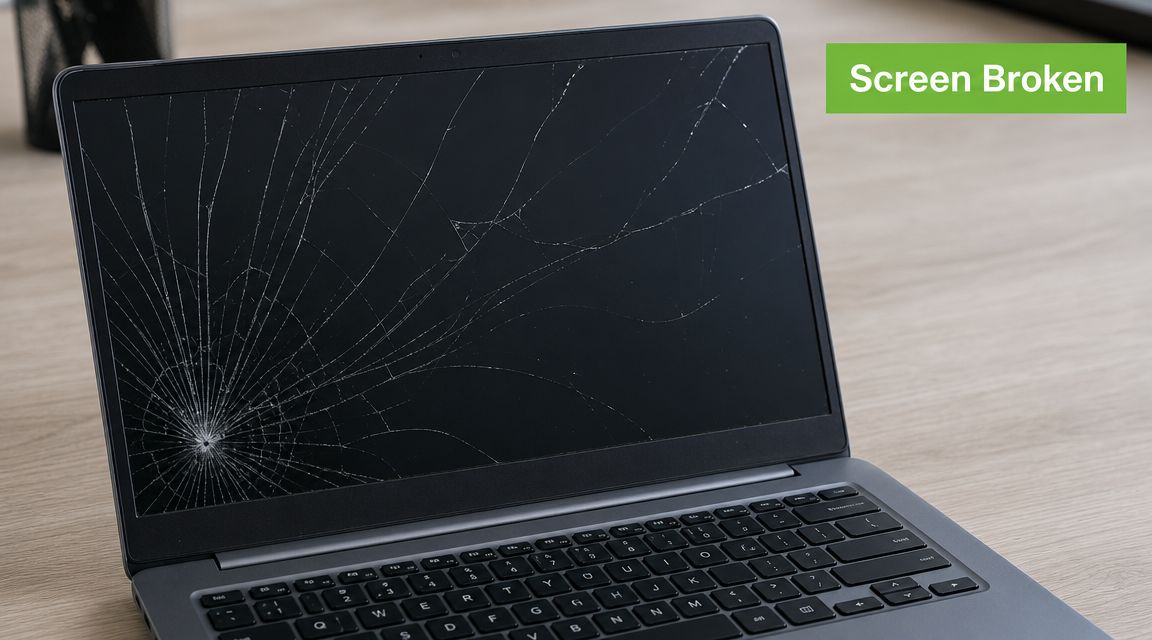
Start with three practical moves.
- Power it down fully. Don't leave a damaged display running while you troubleshoot.
- Back up your data if you still can. If the machine works through an external display, copy what matters before booking repair.
- Check warranty status. If the laptop is still under manufacturer coverage or an extended plan, that affects whether you should open it or send it to an authorised channel. If you need help with that first step, this HP warranty check in Singapore guide is a useful reference point.
A broken display doesn't always mean a full screen replacement. That's where many owners spend money too quickly. Some laptops need a complete display assembly. Others only need a cable reseat, a backlight-related component, or a specific panel swap. The difference matters because it affects both cost and turnaround.
A calm first response usually saves money. Shut it down, stop pressing on the lid, and verify the fault before any repair starts.
The next useful question isn't “Which shop is cheapest?” It's “What exactly failed?” Once you know whether the issue is the panel, the cable, the touch layer, or something deeper on the board, the repair decision becomes much clearer.
How to Diagnose the Real Screen Problem
The fastest way to avoid a wrong repair is to test whether the laptop can still output a clean image elsewhere. That single check separates many true screen faults from more serious board-level problems.
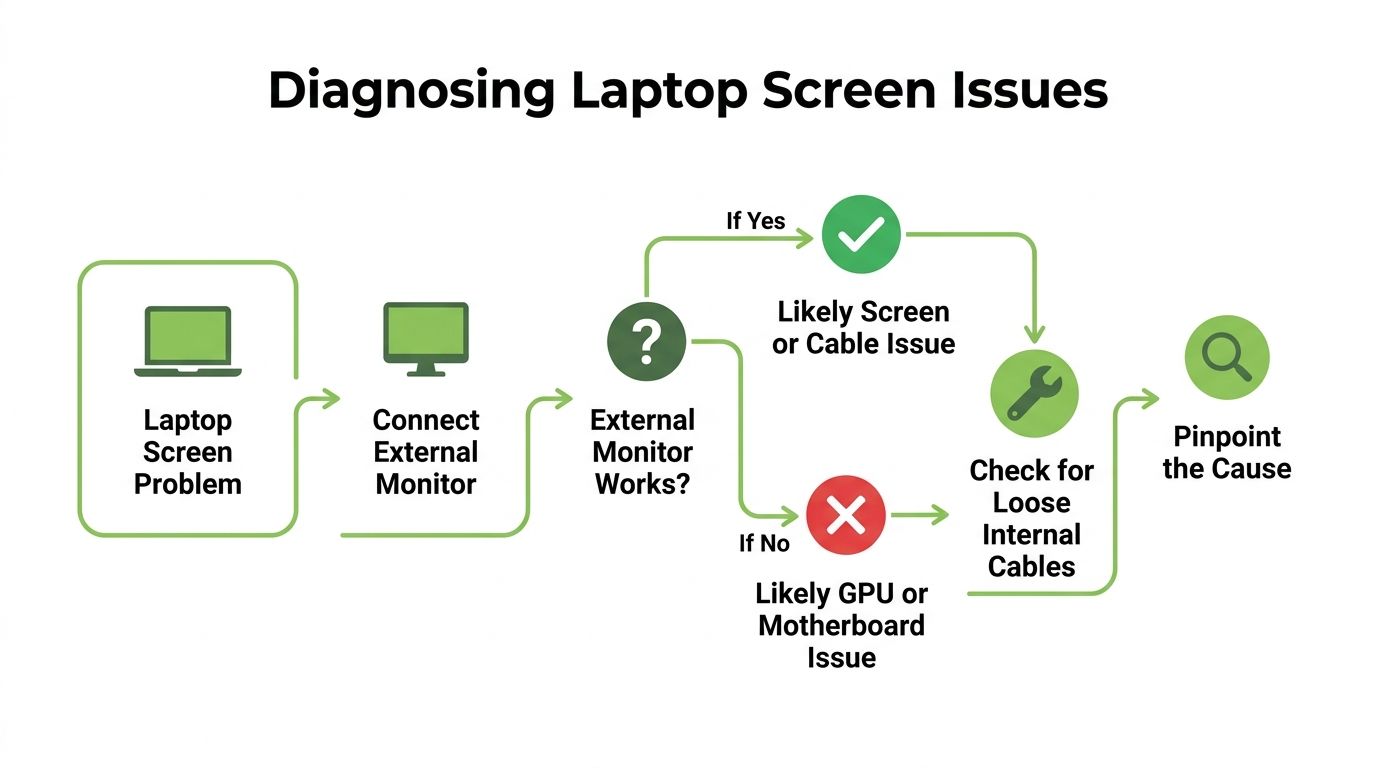
Start with the external monitor test
A reliable operator check is to connect the laptop to an external monitor before opening the chassis. Lenovo Singapore notes that this helps distinguish panel or display-cable faults from GPU or motherboard faults, which prevents unnecessary screen replacement. The same guide also notes that if the display cable is damaged, reseating or replacement is often the lowest-risk intervention, while cracked panels generally require full module replacement, and repairs can range from replacing the entire display assembly to swapping smaller components such as inverters or backlights. It also states the repair process can take from a few minutes to several hours depending on the model and fault type, as outlined in Lenovo Singapore's laptop screen repair guide.
If the external monitor works normally, your laptop is still generating video. That usually points to the laptop display system itself. If the external monitor shows the same corruption or shows nothing at all, the problem may sit deeper than the screen.
Match the symptom to the likely fault
Certain symptoms usually point in a clearer direction:
-
Visible crack or ink-like blotch on the screen
That's usually panel damage. Pressure damage spreads over time, so replacement is more realistic than repair. -
Screen is black, but external monitor works
This often suggests a panel, backlight, or display-cable issue. -
Image flickers when you move the lid
Hinge movement changing the symptom often points to a cable issue. -
Touch works but image is broken, or image works but touch doesn't
On touchscreen models, the display and digitiser may fail separately.
Practical rule: If moving the lid changes the fault, suspect the cable path before blaming the whole panel.
What not to do during home diagnosis
People often turn a manageable fault into a bigger one by trying to “just check inside” with the wrong tools. Avoid that unless you already know the panel type, bezel method, cable position, and battery isolation sequence for your exact model.
Keep home diagnosis non-invasive:
- Use an HDMI or USB-C display output first
- Check whether the laptop still boots
- Listen for startup sounds or keyboard backlight behaviour
- Don't pry the bezel while the battery is connected
That simple process gives you enough information to decide whether you're dealing with a straightforward laptop screen repair Singapore job or a more expensive board-level issue.
DIY Repair Versus Professional Service
Once you've confirmed it's a screen-side fault, the choice begins. Buy the part and try the replacement yourself, or pay a shop to handle it.
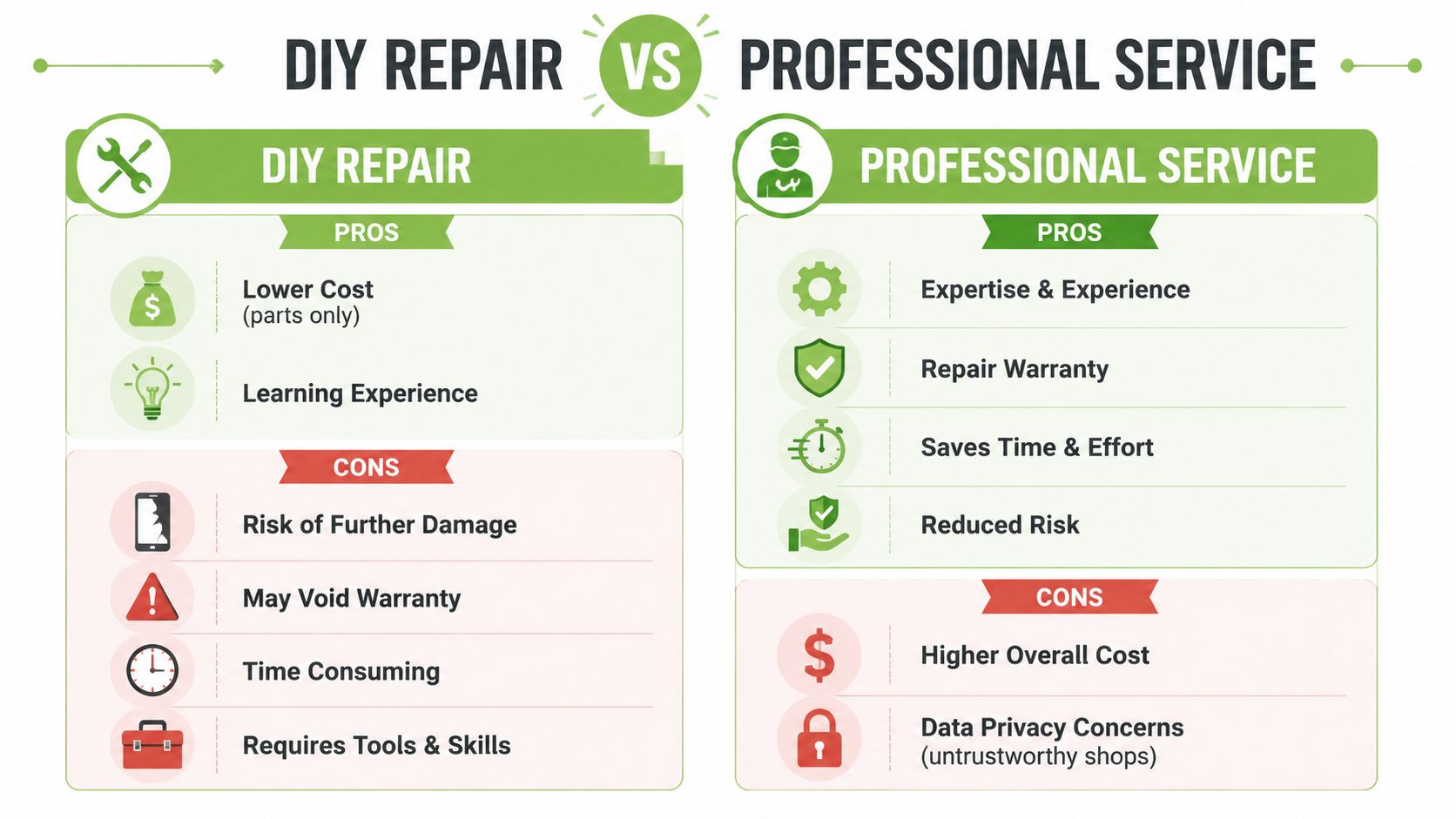
DIY works best when the laptop is older, the owner is comfortable opening electronics, and a mistake won't create a major financial problem. Professional repair makes more sense when the device is still valuable, the panel is uncommon, or the owner needs a predictable result.
Where DIY makes sense
There are valid reasons to do it yourself.
- You only pay for parts. Labour is the main thing you avoid.
- You control the pace. Useful if you're repairing a spare machine.
- You learn the hardware. Some owners enjoy the process and already have the tools.
But screen repairs punish small mistakes. Ordering the wrong connector type, damaging the bezel clips, creasing the display cable, or fitting an incompatible panel can leave you worse off than where you started. Thin-bezel ultrabooks, touch models, and premium laptops are especially unforgiving.
Why professional repair often wins
A good technician reduces the uncertainty. They check compatibility, inspect the hinge area, test the cable, isolate the battery properly, and verify the new panel before full reassembly.
That doesn't mean every shop is automatically safe. Professional service only pays off if the shop is organised, transparent, and disciplined with customer data. For business owners managing team laptops, this is the same thinking behind using structured support instead of ad hoc fixes. If you want a broader view of why support processes matter once devices affect operations, this overview of proactive IT helpdesk is useful.
Here's the practical comparison needed:
| Option | Works well when | Main risk |
|---|---|---|
| DIY repair | Older laptop, common panel, experienced owner | Wrong part or accidental internal damage |
| Professional service | Newer device, touch panel, work laptop, urgent need | Choosing an untrustworthy shop |
| Replace instead of repair | Older, low-value laptop with other ageing parts | Spending money on a machine already near end of useful life |
If the laptop still has strong battery life, enough performance for your work, and no other obvious issues, screen repair is often sensible. If the screen is only one of several ageing problems, don't force it.
One factual note matters here. A repair provider in Singapore may be one option if you want a service point rather than a DIY route. myhalo handles laptop repairs, including screen-related work, through its service operations. That's useful if your priority is a managed intake process rather than sourcing parts yourself.
Choosing a Trustworthy Repair Shop in Singapore
Singapore has no shortage of places that say they can replace a laptop screen. The hard part is filtering out the shops that are vague, rushed, or careless with customer devices.

That caution isn't paranoia. CNA reported that the number of phone and computer repair companies in Singapore grew from about 460 to about 1,020 over the past 14 years, and in the same investigation 12 of 40 devices sent to shops were snooped on during repair, including nine laptops. CNA also noted that unauthorised access to computer material can carry penalties under Singapore's Computer Misuse Act, with up to 2 years' jail and/or S$5,000 for a first offence, rising to 10 years and S$50,000 if the access is used to commit an offence, according to CNA's report on device snooping in repair shops.
That's why a screen repair decision isn't just about glass and pixels. It's also about custody of the laptop.
What to ask before you hand over the laptop
A decent shop should answer these questions clearly, without dancing around them:
- What exactly is included in the quote? You want one all-in figure before work starts, not a cheap teaser followed by add-ons.
- Is the part original-spec, OEM-grade, or aftermarket? If they can't explain the difference, they probably can't defend the quote either.
- What's the warranty on the part and labour? A shop that won't stand behind the repair is telling you something.
- What's the likely turnaround if the part isn't in stock? Common models move faster than unusual ones.
- How do you handle customer data? This matters even if the repair sounds simple.
One practical sign of a better operator is clear intake discipline. They'll document the fault, record the cosmetic condition, explain risks, and tell you whether your password is needed. For many screen jobs, full access to your personal files shouldn't be necessary.
Why data handling matters as much as the repair itself
Before you drop off the device, do your side of the job properly.
- Back up important files
- Log out of sensitive apps where possible
- Remove stored browser sessions if the machine is still usable
- Ask whether testing can be done with a temporary account
For readers comparing different types of electronics repair providers, this broader look at mobile phone repair in Singapore is useful because the same trust checks apply across devices.
A short visual explainer can also help if you want to see how repair intake and service discipline should look in practice.
The strongest repair shops don't just sound professional. They make the process feel controlled from the first message, and that usually shows up in cleaner communication, fewer surprises, and better handling of both the device and the customer.
Understanding Repair Costs and Turnaround Times
Those asking about laptop screen repair in Singapore are trying to answer one thing. Is the quote fair, or am I about to overpay for a laptop that's already halfway out the door?
A local repair provider lists LCD screen replacement at S$158 to S$386 for non-touch panels and S$286 to S$390 for touch panels. A Singapore repair guide also says laptop screen repairs typically range from S$150 to S$300 depending on screen type, model, and complexity. The same local context notes that repair-versus-replace economics matter because screen replacement can approach the cost of an entry-level refurbished device, and laptop screen repairs can differ because some jobs involve full assemblies while others involve smaller components, as summarised in this Singapore laptop repair pricing reference.
What usually changes the quote
The same fault can carry a very different price depending on the machine.
-
Touch versus non-touch
Touch models usually cost more because the display stack is more complex. -
Mainstream versus premium laptop
Thin premium machines often use more integrated parts and trickier construction. -
Common model versus uncommon model
Easy-to-source panels move faster. Rare panels can slow the job and narrow part options. -
Panel-only fault versus assembly-level replacement
Some repairs are simpler than they first appear. Others require more than just the visible screen.
If you're trying to compare repair spending across device categories, Finchum Fixes IT's computer repair cost analysis is a helpful outside reference for understanding how labour, parts availability, and device class affect pricing logic more broadly.
Estimated Laptop Screen Repair Costs in Singapore 2026
| Laptop Type | Estimated Cost Range (SGD) | Estimated Turnaround Time |
|---|---|---|
| Standard non-touch laptop | S$158 to S$386 | A few minutes to several hours for the repair process, depending on model and fault |
| Touchscreen laptop | S$286 to S$390 | A few minutes to several hours for the repair process, depending on model and fault |
| Typical market estimate across common jobs | S$150 to S$300 | Varies based on parts availability and repair complexity |
The reason turnaround can vary so much is simple. The physical replacement itself may be straightforward, but sourcing the exact panel, confirming compatibility, and testing the machine properly often determines the actual wait.
Don't evaluate a quote in isolation. Compare it against the laptop's current value, age, battery condition, and whether a refurbished replacement would leave you in a stronger position.
If you're weighing repair costs against other screen-related service decisions, this guide on repairing an iPhone screen is a useful contrast because it shows how replacement economics differ across device types.
Frequently Asked Questions on Screen Repairs
When is repair no longer worth it
Repair stops making sense when the laptop is old enough, slow enough, or worn enough that the screen is only one of several likely expenses. A Singapore repair guide points out that many local services still don't help consumers quantify when a repair is no longer financially rational compared with a warranty-backed refurbished alternative, even though that comparison matters for total cost of ownership and reducing e-waste, as noted in this repair-versus-replace discussion for Singapore.
A practical rule is to look beyond the screen. If the battery is weak, the keyboard is failing, storage is nearly full, and performance already frustrates you, a screen repair may only delay a larger replacement decision.
Will third-party repair affect warranty
It can, depending on the brand, device age, and what kind of coverage is still active. That's why checking warranty status before authorising any third-party work is important. If the machine is out of warranty, this matters less. If it's still covered, get clarity first.
How do you protect the new screen
Most repeat screen damage comes from habits, not bad luck.
- Use a sleeve or padded compartment when carrying the laptop in a backpack.
- Don't leave objects on the keyboard before closing the lid. Pens and charging cables are common culprits.
- Open the lid from the centre instead of one corner, which reduces twisting stress.
- Avoid pressure on the top cover when the laptop is packed tightly.
If the repaired laptop still meets your needs, keeping it in service is usually the lower-waste move. If it doesn't, a warranty-backed refurbished replacement often gives you a cleaner ownership path than pouring more money into an ageing machine.
If you're stuck between repairing a damaged laptop and replacing it with something more sensible, myhalo is one place to compare both paths. You can look at repair support alongside warranty-backed refurbished laptops, which makes it easier to decide based on total cost, device condition, and how long you realistically need the machine to last.