





Best Laptop Cover Singapore: Your 2026 Buying Guide
You've probably just bought a laptop, or you're trying to keep your current one in good shape for a few more years. Maybe it's a new machine for work, a school laptop that's going into a backpack every day, or a refurbished model you chose because you care more about value than hype. Either way, the question shows up fast. Do you really need a laptop cover, and if you do, what kind makes sense in Singapore?
A lot of people treat this as a style purchase. That's usually the wrong starting point. A laptop cover is part of lifecycle protection. It helps your device survive the MRT commute, office bag friction, sudden rain, classroom desk bumps, and all the boring daily wear that slowly ruins corners, zips, ports, and lids. If you want your laptop to last, hold resale value, or stay presentable enough for trade-in, your cover matters earlier than often realized.
Table of Contents
- Why a Laptop Cover Is Your First Smart Accessory
- The Four Main Types of Laptop Covers Explained
- Getting the Perfect Fit How to Size Your Laptop Cover
- Choosing Materials and Features for Singapore's Climate
- Smart Buying Where to Find Laptop Covers in Singapore
- Sustainability and Long-Term Device Care
- Frequently Asked Questions About Laptop Covers
Why a Laptop Cover Is Your First Smart Accessory
The first accessory one should buy isn't a mouse, stand, or dongle. It's protection.
That's especially true in Singapore, where a laptop often moves through several environments in one day. Home, train, bus, school, office, café, meeting room, then back into a bag again. A bare laptop can survive that routine for a while, but the scratches, dents, pressure marks, and moisture exposure add up.
The demand for protective accessories reflects that reality. The Asia Pacific laptop sleeves market was valued at USD 426.56 million in 2024 and is projected to grow at a 9.0% CAGR, according to Asia Pacific laptop sleeves market data. That doesn't tell you which sleeve to buy, but it does confirm this isn't a niche concern. People across the region are actively spending to protect laptops used in hybrid work, study, and daily commuting.
Why this matters beyond scratches
A laptop cover does three jobs if you choose properly:
- It reduces cosmetic wear: Scratched lids and scuffed corners don't stop a laptop from working, but they do hurt resale and trade-in appeal.
- It limits transit damage: A device that shifts around inside a bag takes repeated knocks at the edges and corners.
- It supports longer ownership: The easier your laptop is to carry safely, the more likely you are to keep using it well instead of replacing it early.
Practical rule: Buy the cover as if you plan to keep the laptop for years, not weeks.
That mindset matters even more if you own a refurbished laptop. With refurbished tech, the whole point is extending useful life and getting better value from hardware that still has plenty to give. A decent cover is one of the cheapest ways to support that.
What works and what doesn't
What works is simple. Match the protection to your actual routine.
If your laptop mostly sits on a desk and only travels occasionally, a slim sleeve may be enough. If you carry it daily in a crowded backpack and get caught in rain, minimal protection usually isn't enough. The wrong cover often fails in ordinary ways. Weak zips, thin foam, too much internal space, or a stylish shell that looks good online but does very little when your bag hits the floor.
A laptop cover isn't a glamorous purchase. It's the first maintenance decision.
The Four Main Types of Laptop Covers Explained
The laptop cover singapore market gets confusing because people use one phrase to describe very different products. A sleeve is not the same thing as a hardshell. A skin is not protection in the same way a folio case is protection.
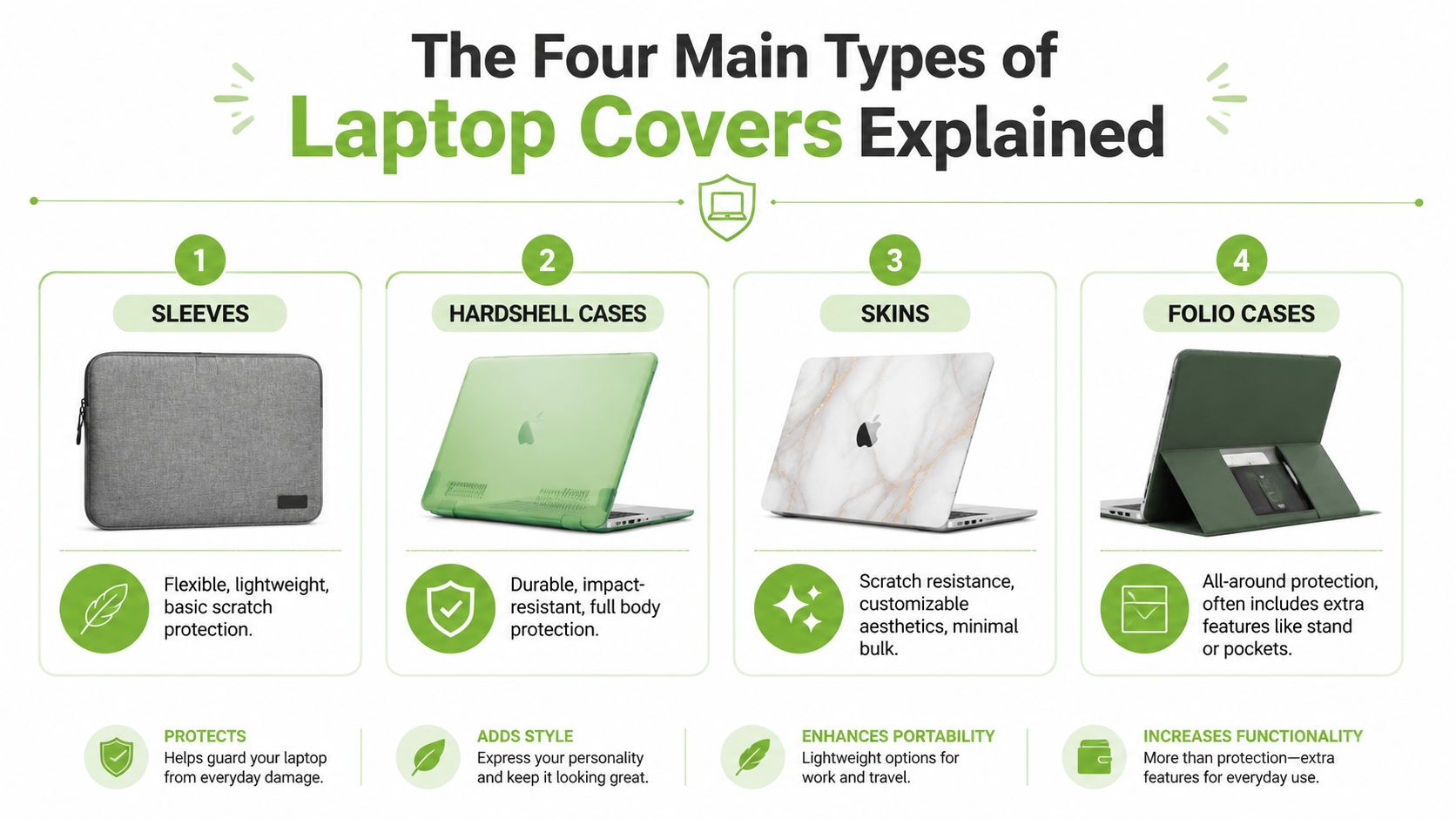
Laptop Cover Types at a Glance
| Cover Type | Primary Use | Protection Level | Best For |
|---|---|---|---|
| Sleeve | Transit protection inside another bag | Moderate | Students, office commuters, general use |
| Hardshell case | Always-on exterior protection | Moderate for scratches and bumps | People who want constant lid and base coverage |
| Skin | Surface scratch protection and looks | Low | Users who care about appearance and light scuff prevention |
| Folio case | Carry-and-work convenience | Moderate | Meetings, light travel, users who want pockets or stand functions |
Sleeves
A sleeve is the most common answer, and for good reason. It's flexible, easy to carry, and usually the most practical option for people who already use a backpack or tote.
A good sleeve protects during transit. That means it handles scratch prevention, some bump absorption, and bag-to-device friction. It does not turn your laptop into something drop-proof. If you toss a sleeved laptop into a packed bag with chargers, bottles, and hard edges, the sleeve can only do so much.
Best for people who want straightforward protection without bulk. If you also carry tablets, the logic is similar to choosing covers for the iPad. Fit, padding, and how you carry the device matter more than branding.
Hardshell cases
A hardshell case snaps directly onto the laptop. It stays on all the time, so it protects the exterior against surface scratches, table scuffs, and some minor knocks.
This is useful if you often place your laptop on shared desks, café tables, or rough surfaces. It's also handy for users who hate seeing wear around corners and edges. But hardshell cases have limits. They don't cushion the laptop the way a padded sleeve does during transport, and poor-quality shells can crack, fit badly, or interfere with ventilation if they're badly designed.
Best for users who want always-on scratch protection, especially on premium-looking devices they want to keep tidy.
Skins
Skins are the lightest option and the most misunderstood. They're mainly decorative with a little surface protection.
They can stop light scratches on the lid or palm rest area, and they let you personalise the look without adding much thickness. But if you drop your bag, a skin won't save the corners. If your laptop rubs against a charger in a backpack, a skin won't absorb impact. This is the option for appearance first, not protection first.
A skin changes how your laptop looks. It barely changes how well it survives transit.
Best for people who want custom style and almost zero added bulk.
Folio cases
Folio cases sit somewhere between a sleeve and a small carry case. Some open like a book, some add pockets for documents or chargers, and some can double as a work surface or stand.
They suit professionals who carry light and want an organised, cleaner setup for meetings. They can be more polished than a basic sleeve, but they're also more niche. A bulky folio that looks smart on paper can become annoying if you already carry a larger bag or need fast access during a commute.
Best for people who want a more structured carry option and don't overload their bag.
Getting the Perfect Fit How to Size Your Laptop Cover
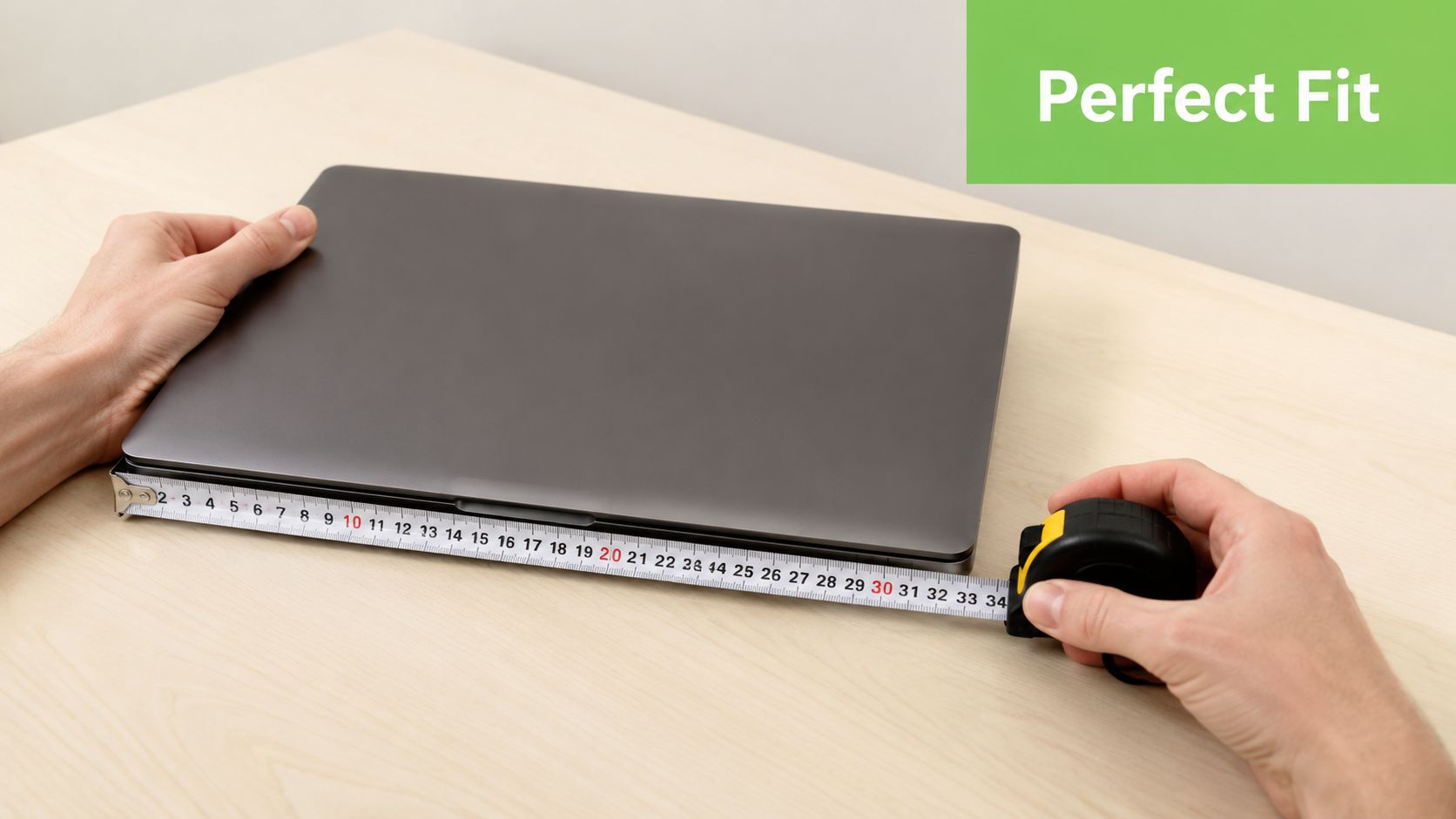
The biggest sizing mistake is buying by screen size alone. “13-inch” sounds precise, but it isn't.
Different laptops with the same screen class can have different bezels, different thickness, different corner shapes, and very different overall footprints. A loose fit means movement. Movement is what lets corners take the hit when your bag gets knocked.
Why screen size is not enough
One Singapore listing for a 13-inch laptop sleeve gives internal dimensions of 33.0 x 2.7 x 23.2 cm, as shown on this 13-inch laptop sleeve product specification. That tells you far more than “fits 13-inch laptops”.
If your laptop is smaller than that in a meaningful way, it may slide inside. If it's slightly thicker or wider, the sleeve may close badly, strain the zip, or compress the corners too tightly. A snug fit is what you want. Not a squeeze, but not a floating fit either.
A simple sizing method that works
Use this checklist before you buy:
- Find your laptop's exact dimensions: Look up the length, width, and thickness from the device specifications.
- Compare against the internal compartment size: Ignore outer dimensions unless you're checking bag fit.
- Allow only small clearance: Enough for the zip to close cleanly, not enough for the laptop to shift around.
- Check shape, not just numbers: Rounded corners and tapered designs can affect fit.
- Watch for accessories: If you plan to keep a slim shell on the laptop, size for that too.
A useful way to think about it is shoe fit. If there's too much space, your foot moves. If your laptop moves inside a sleeve, impact gets transferred badly.
Here's a quick visual guide if you want a simple walk-through before comparing product specs:
Size check: Internal dimensions matter more than the product label on the front page.
What a bad fit looks like in daily use
You don't need a dramatic drop for poor fit to become a problem. Most wear happens through repetition.
- Loose sleeves: The laptop shifts when you set your bag down.
- Overtight sleeves: Zips scrape edges and corners.
- Wrong thickness allowance: Pressure builds on the lid or hinge area.
- Misleading “universal fit” claims: They often mean compromise fit.
If you're choosing a laptop cover in Singapore for school or work, sizing properly is one of the few decisions that directly affects protection every single day.
Choosing Materials and Features for Singapore's Climate
Material choice is not a small detail in Singapore. It's the difference between a cover that merely looks nice and one that suits the climate.
Heat, humidity, indoor-outdoor transitions, and sudden rain all push laptop covers harder than a dry, mild environment would. A fashionable fabric with weak structure may still look good in product photos, but daily commuting exposes the weak points quickly.
Outer fabric matters more than people think
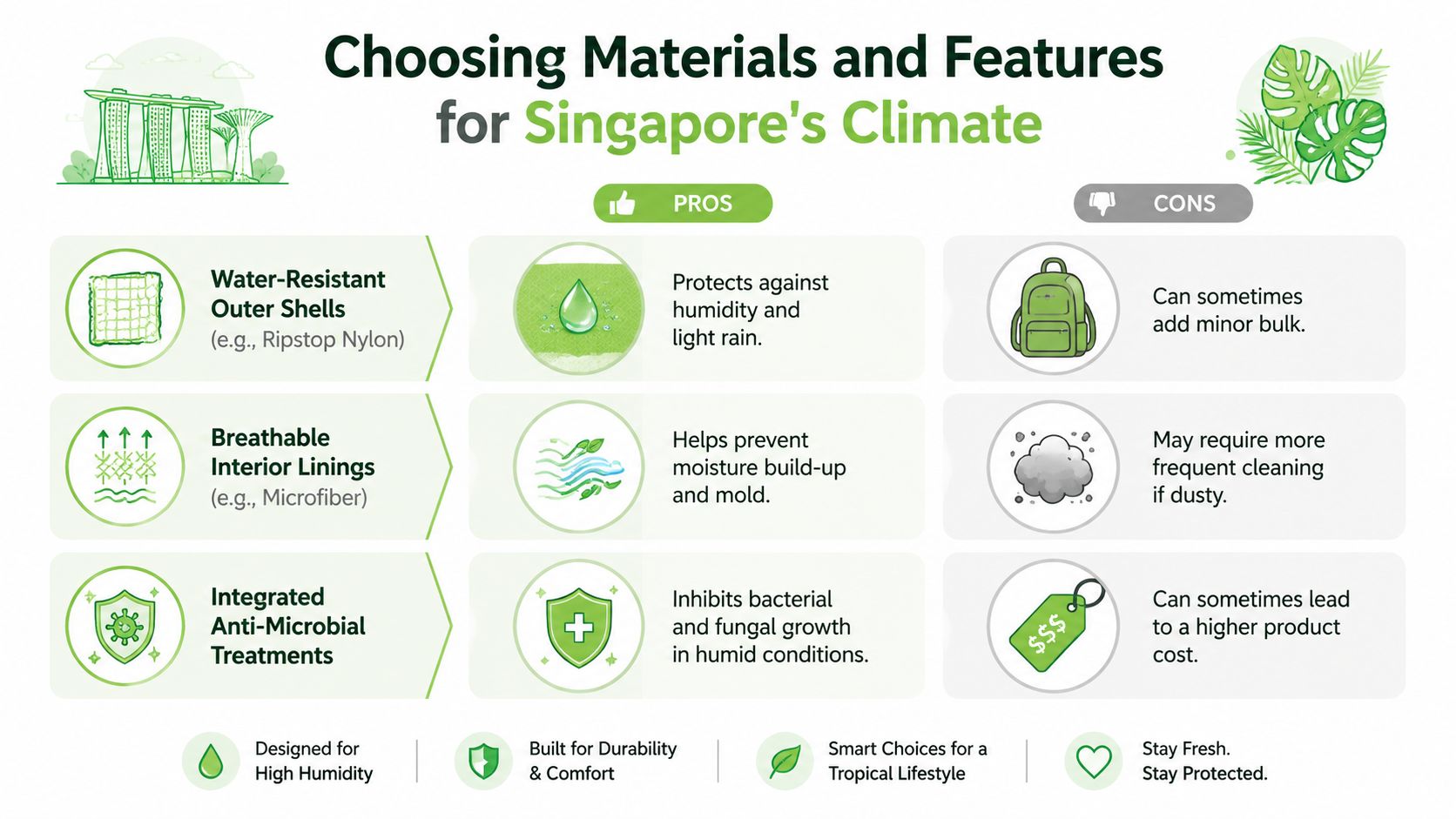
For local use, prioritise water-repellent or water-resistant outer materials. Singapore listings commonly mention shells such as recycled ripstop nylon, and that matters because the outer layer is your first defence against light rain, splashes, and damp bag interiors.
Ripstop-style fabrics are useful because they resist tearing better than softer, purely cosmetic finishes. They also tend to handle repeated friction better when you slide the sleeve in and out of a backpack every day.
If your commute includes walking between stations, crossing roads in wet weather, or carrying your laptop in an open tote, skip absorbent-feeling outer fabrics unless they're backed by a proper protective layer.
Padding is where cheap covers give up
One of the clearest practical comparisons in local product specs is 5 mm EPE foam versus 10 mm high-density EVA, noted in this Singapore sleeve material specification. EVA generally offers better impact damping and better shape retention than thinner EPE.
That doesn't mean every thick sleeve is automatically good. It means you should care what the padding is, not just whether the product page says “shockproof”.
What tends to work:
- High-density padding: Better for repeated commuting and bag drops.
- Structured shape retention: Helps the sleeve keep protecting instead of collapsing over time.
- Soft interior lining: Reduces micro-scratches on aluminium lids and edges.
What often disappoints:
- Thin foam marketed as premium: It feels soft in hand but does little under compression.
- Overly fluffy interiors without structure: Comfortable touch, weak real protection.
- Cheap zip tracks: They fail early and can scratch the laptop if poorly finished.
The shell stops light moisture. The padding manages impact. You need both.
Features worth paying for
Not every extra feature deserves your money, but some do.
- Quality zip design: Look for a smooth zip with covered edges or guarded seams near the laptop opening.
- Corner reinforcement: Corners are common impact points during transit.
- Tight stitching: Loose threads and weak seams show up early on cheaper sleeves.
- Low-absorption interior: Helpful in humid conditions where trapped moisture becomes a nuisance.
For a laptop cover singapore buyers use every weekday, the best material choice usually isn't the slimmest or the prettiest one. It's the one that balances water resistance, protective padding, and daily durability without turning your bag into a brick.
Smart Buying Where to Find Laptop Covers in Singapore
Once you know what fit and materials to look for, buying gets easier. You're no longer shopping by colour first.
A useful local question is whether a slim sleeve is enough for your routine, or whether you need a more protective carry setup. That gap in advice matters because many retail pages still focus on style, while Singapore users often need fit-for-climate protection that matches rain exposure and commute pattern, as noted in this laptop backpack market discussion on commute needs.
What each buying channel is good at
Electronics chains are good if you want to handle the item in person. You can inspect padding, zip feel, internal lining, and actual thickness. The downside is that range may be narrower than what you'll see online.
IT malls and accessory shops are useful if you want more variety and don't mind doing your own filtering. You'll often find everything from basic neoprene sleeves to branded hard cases. The trade-off is inconsistency. Some products are solid, some are all marketing.
Online marketplaces give you the widest selection and fastest price comparison. They're convenient, but they also make it easy to buy the wrong size or a cover with vague specs and misleading photos.
One local option in the mix is myhalo accessories collection, especially if you're pairing protection with a new or refurbished device and want to browse within the same ecosystem.

How to buy online without guessing
If you're ordering online, don't treat every sleeve listing as interchangeable. Read it like a hardware purchase.
- Check internal dimensions: If the seller only lists “fits 13-inch”, move on.
- Read material wording carefully: “Water-resistant” and “soft lining” are more useful than empty buzzwords.
- Look at opening design: A bad zip path can be more annoying than mediocre padding.
- Review product photos for structure: Flat, limp sleeves usually provide less support than shaped ones.
- Check return terms: Important if fit is close or your laptop has an uncommon footprint.
Buy for your commute, not for the product thumbnail.
A better way to think about value
The cheapest cover can be perfectly fine if it fits well, uses decent materials, and matches a low-risk routine. The expensive one isn't automatically better just because it carries a premium logo.
For students and office workers, value usually comes from matching the protection level to the actual use case. A slim sleeve for desk-to-car movement. A padded sleeve inside a backpack for train commuting. A more sturdy bag if your daily route includes weather exposure and heavier carry loads.
That's where most buyers get it wrong. They shop by brand tier first, then try to justify the product after.
Sustainability and Long-Term Device Care
If you care about sustainability, don't stop at buying a refurbished or longer-lasting laptop. Protecting it properly is part of the same mindset.
A cover helps keep the machine usable, presentable, and easier to resell, trade in, or hand down. Cosmetic condition isn't everything, but it does affect whether a device feels worth keeping in circulation.
Protection and resale go together
There's a useful contrarian question in this category. Do you get better value from a cheaper cover plus a repair or protection plan, rather than paying for a premium branded cover? That question matters for lifecycle thinking, especially for students and SME users, as discussed in this laptop bag market analysis with lifecycle framing.
That's the right lens. A cover should support the bigger goal of extending the device's useful life.
If resale or trade-in is part of your ownership plan, cosmetic care matters from day one. Lid scratches, dented corners, worn edges, and pressure marks don't just affect appearance. They also shape how buyers judge the device.
For anyone already thinking ahead, it helps to understand how laptop trade-in works in Singapore before the device is old and worn out.
A sensible ownership mindset
You don't need to overbuy to be responsible. You do need to be deliberate.
- Choose protection that matches risk: Daily commuting needs more than occasional home use.
- Clean the cover itself: Dirt and trapped grit inside a sleeve can scratch the laptop you're trying to protect.
- Replace worn covers before failure: A broken zip or flattened padding is a sign, not a minor annoyance.
- Store the laptop dry: A damp sleeve is still a problem even if the fabric is marketed as water-resistant.
A laptop cover is a small object, but it supports a bigger habit. Use the device carefully. Maintain it. Repair it when sensible. Keep it in circulation longer. That's a practical sustainability mindset, not a slogan.
Frequently Asked Questions About Laptop Covers
Do I need a laptop cover if I already use a backpack?
Usually yes. A backpack protects the carry system. A laptop cover protects the laptop inside it.
Many backpacks have laptop compartments, but the padding quality varies a lot. If your bag gets packed with chargers, bottles, notebooks, and other hard items, a sleeve adds a useful layer between the laptop and everything else.
Can a hardshell case replace a sleeve?
Not always. A hardshell helps with surface scratches and minor bumps while the laptop is in use. A sleeve is often better for transport cushioning.
If you commute daily, the better setup can be a hardshell for constant exterior protection plus a padded bag or sleeve for transit. If you rarely move the laptop, a hardshell alone may be enough.
Will a third-party cover void my warranty?
In normal use, a cover itself usually shouldn't be the issue. What matters is whether it causes damage or interferes with the device.
Avoid covers that block vents, force the hinge, strain the lid, or fit so tightly that they create pressure points. If a product is badly designed, that's where trouble starts.
How often should I clean a laptop sleeve?
Clean it whenever you notice dust, grit, or damp build-up. The inside matters as much as the outside.
Shake out loose debris first. For fabric sleeves, use gentle cleaning methods based on the care label if one exists. Make sure the sleeve is fully dry before the laptop goes back in.
Is a skin enough protection for students?
Usually no. A skin is mainly for looks and light scratch resistance.
Students tend to move laptops around a lot. Bags get crowded, tables are shared, and commutes are less controlled. A properly fitted padded sleeve is usually the safer baseline.
If you're choosing a laptop cover in Singapore with long-term value in mind, start with fit, climate-suitable materials, and how you carry your device. That's the same practical mindset behind myhalo: helping people get more life, more value, and less waste out of the tech they use every day.