





HDMI to VGA Plug: A Practical Singapore Buying Guide
You arrive at a meeting room in Tampines with a new ultraportable laptop, ready for a client presentation. The ceiling-mounted projector powers on, but its only video input is the familiar blue VGA socket. Your laptop has HDMI or USB-C, and there isn't a compatible port in sight.
This situation remains common in Singapore offices, schools, tuition centres and community facilities. An HDMI to VGA plug can keep a perfectly usable projector or monitor working, but only if you choose the right type. The decision isn't about finding the cheapest dongle. You need to understand signal conversion, resolution, audio, cable length and whether adapting the old display makes better sense than replacing it.
Table of Contents
- Why a New Laptop Still Meets an Old Projector
- How HDMI and VGA Actually Talk to Each Other
- Active Converters vs Simple Plug Adapters
- Resolution and Refresh Rate Realities
- Audio, One-Way Use and Cable Length Tips
- Adapt, Replace or Recycle in Singapore
- Choosing the Right HDMI to VGA Plug
Why a New Laptop Still Meets an Old Projector
The blue VGA connector in that meeting room may look outdated, but it often belongs to equipment that still does its job. A projector used for slides, spreadsheets or classroom notes doesn't become unusable merely because a newer laptop has moved to HDMI or USB-C.
Singapore's device ecosystem contains both generations at once. Local listings show HDMI-to-VGA products supporting common office and presentation formats, while VGA projectors, monitors and PCs remain part of older installed AV systems. The adapter is therefore a bridge between a modern source and a legacy display, not a solution for upgrading image quality.
A small business might use a newer laptop with a refurbished VGA monitor at a reception desk. A school may have projectors installed before HDMI became standard on laptops. A training room may rely on a ceiling-mounted display that is expensive or disruptive to replace even though its VGA input still works.
Practical rule: If the old display is bright enough, reliable and suitable for the room, adapting it can be a sensible lifecycle decision.
The first check is the direction of the connection. You need HDMI from the laptop or media player into VGA on the projector or monitor. A VGA-to-HDMI cable is a different product and won't perform the reverse conversion.
A buyer replacing an older laptop may also benefit from understanding the broader trade-off between modern ports and older equipment. myhalo's guide to affordable laptops in Singapore is useful context when comparing a newer device with the displays already available in your workplace.
The practical payoff is straightforward. Choose a genuine active converter, confirm the display's supported timing and plan for separate audio if needed. You can then extend the useful life of existing AV equipment instead of treating every port mismatch as a reason to discard a working projector.
How HDMI and VGA Actually Talk to Each Other
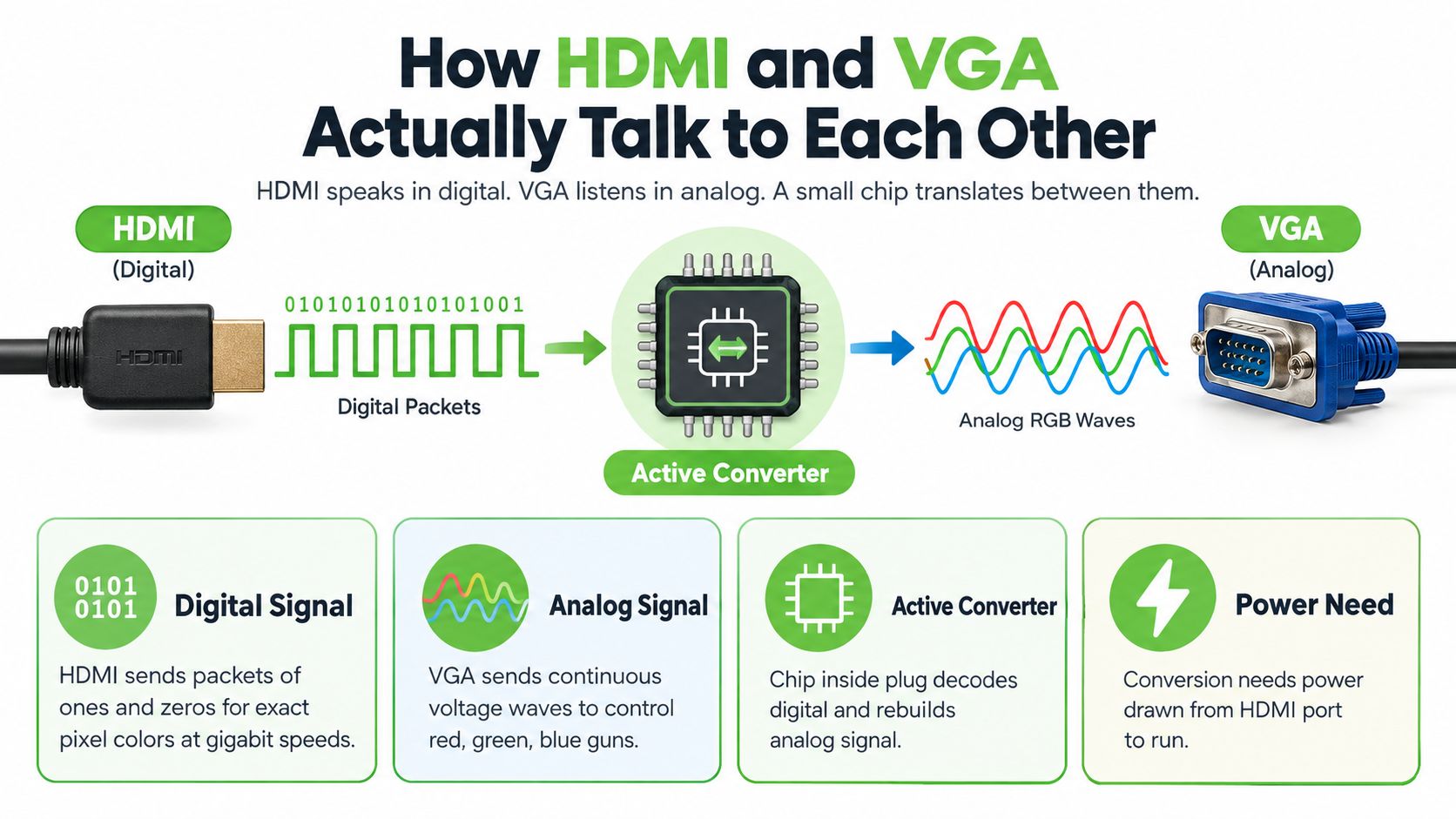
Think of HDMI and VGA as two people speaking different languages. HDMI sends a digital description of each image, using ones and zeros to define pixel colours and timing. VGA sends changing electrical voltages that directly represent red, green and blue across the screen.
A simple pin adapter can change the shape of a connector, but it can't translate those languages. Connecting HDMI pins to VGA pins without conversion is like handing a document written in one language to a reader who only understands another. The plug may fit, but the display won't receive a usable picture.
The translator inside the plug
A working HDMI-to-VGA product contains an active converter chip. It receives the HDMI signal, decodes the digital video, and reconstructs an analogue RGB signal for the VGA display. A digital-to-analogue converter, or DAC, handles the output stage.
Singapore distributor specifications for comparable adapters list HDMI input bandwidth of 1.65 Gbps per channel, 6.75 Gbps total, along with a 10-bit DAC on the VGA side. Those figures describe the conversion circuitry rather than a guarantee that every connected display will show the same resolution. The adapter still has a maximum output mode, and the projector must support that timing.
You can find the relevant hardware detail in the Singapore HDMI-to-VGA adapter specifications. The important buying lesson is that the product must explicitly describe HDMI input and VGA output conversion. A listing that only says “adapter cable” without explaining active conversion deserves caution.
Where the power comes from
The converter chip needs power. Some compact adapters draw enough through the HDMI connection for ordinary laptop and presentation use. Others include a USB lead because the source port may not provide sufficient power, particularly in more demanding installations or when additional features are built in.
Don't judge a product by its size alone. A slim plug can contain the necessary electronics, while a larger model may add USB power, an audio output or other circuitry. The product description should make the power arrangement clear.
For a visual explanation, this HDMI-to-VGA signal conversion video can help you see the difference between changing a connector and translating a signal.
Active Converters vs Simple Plug Adapters
The first real buying decision is whether the product performs active conversion. A passive item may only rearrange pins, while an active HDMI-to-VGA converter contains electronics that translate digital HDMI into analogue VGA.
Singapore listings commonly describe working products as plug and play, with HDMI input for a laptop or media player and VGA output for a monitor or projector. Some are compact, with a short cable and a VGA socket. Others are powered units with a USB lead and, in some designs, a 3.5mm audio output.
Compare the two designs
| Feature | Passive Plug Adapter | Active Powered Converter |
|---|---|---|
| Signal handling | Changes connector wiring only | Converts digital HDMI to analogue VGA |
| Compatibility | Generally unsuitable for HDMI-to-VGA conversion | Designed for HDMI source to VGA display |
| Power | No conversion electronics | Draws power from HDMI or an external USB lead |
| Audio | No audio conversion | May provide a separate 3.5mm output |
| Best use | Only where the source and display already use compatible signalling | Laptops, projectors and monitors using different signal types |
| Buying confidence | A vague “adapter cable” description is a warning sign | Listing states active conversion and supported output modes |
A compact active plug is usually the cleanest choice for a fixed office desk or a presentation kit that stays close to the laptop. Look for an HDMI connector on the source side and a VGA socket on the display side, then check whether the adapter states support for 1080p.
A powered converter suits a less predictable setup. The USB lead can provide more stable power, and a 3.5mm audio jack can send sound to separate speakers. This matters in a classroom where the image goes to a projector but the sound must travel through an amplifier or ceiling speaker system.
Don't let price decide the technology
Local retail listings show prices from about SGD 5.24 to SGD 45.68, depending on brand, features and seller, as documented by Singapore HDMI-to-VGA retail listings. A low price doesn't automatically mean failure, and a higher price doesn't automatically guarantee a perfect result. Price differences can reflect active electronics, audio extraction, casing, cable construction, warranty and business-oriented supply.
For an SME buying several units, written specifications and replacement support may matter more than saving a small amount on each adapter. For occasional home use, a compact active converter may be enough. In both cases, avoid a product that never clearly states that it converts HDMI digital input to VGA analogue output.
Resolution and Refresh Rate Realities
A laptop may offer a sharp modern signal while an older projector accepts only a narrower range. An HDMI-to-VGA converter can bridge that gap, but it cannot give the projector capabilities its panel does not have. Locally sold adapters are commonly rated around 1920 × 1080 at 60 Hz, while some professional models support up to 1920 × 1200, according to RS Singapore video converter specifications.
The display's native resolution remains the practical limit. A projector with a native 1024 × 768 panel may accept a higher input and scale it, or reject that mode and require the laptop to output a compatible setting. Check the projector manual or test the actual unit before a presentation.
What the image looks like
VGA is analogue, so fine detail can soften across the converter and cable path. Large presentation slides usually remain usable, while small spreadsheet text may look less crisp than it does through a modern HDMI display. A 4K laptop source also cannot stay 4K. The converter or laptop must reduce it to a supported VGA mode, and the older projector may reduce it again.
| Source Resolution | Converter Output | Typical VGA Display Result | Best Use Case |
|---|---|---|---|
| 1920 × 1080 | 1080p at 60 Hz where supported | Full HD input, scaled or displayed by the projector | Modern office presentation |
| 1920 × 1200 | Up to 1920 × 1200 on suitable professional equipment | Depends on display timing and panel | Business monitors with compatible support |
| 2560 × 1440 | Downscaled by the converter or source | Lower-resolution image | General slides and video |
| 3840 × 2160 | Downscaled, not preserved as 4K | Older VGA-compatible mode | Basic presentation output |
| 1024 × 768 or 1280 × 1024 | Common legacy timing | Often a natural fit for older projectors and LCDs | Classrooms and older office systems |
Test the actual room
A BenQ projector in a Tampines tuition centre may accept 1080p at 60 Hz cleanly, while an older Mitsubishi projector in a Jurong school may settle at its native 1024 × 768 mode. The laptop's maximum output therefore matters less than the projector's supported timing.
Before presenting, connect the complete chain in the actual room. Choose a supported display mode, inspect small text, and change the refresh rate to check whether the projector loses sync. Reusing that older display can also extend its working life and keep usable equipment out of Singapore's growing e-waste stream. For procurement, read the converter's stated output modes rather than relying on a generic “HD” label.
Audio, One-Way Use and Cable Length Tips
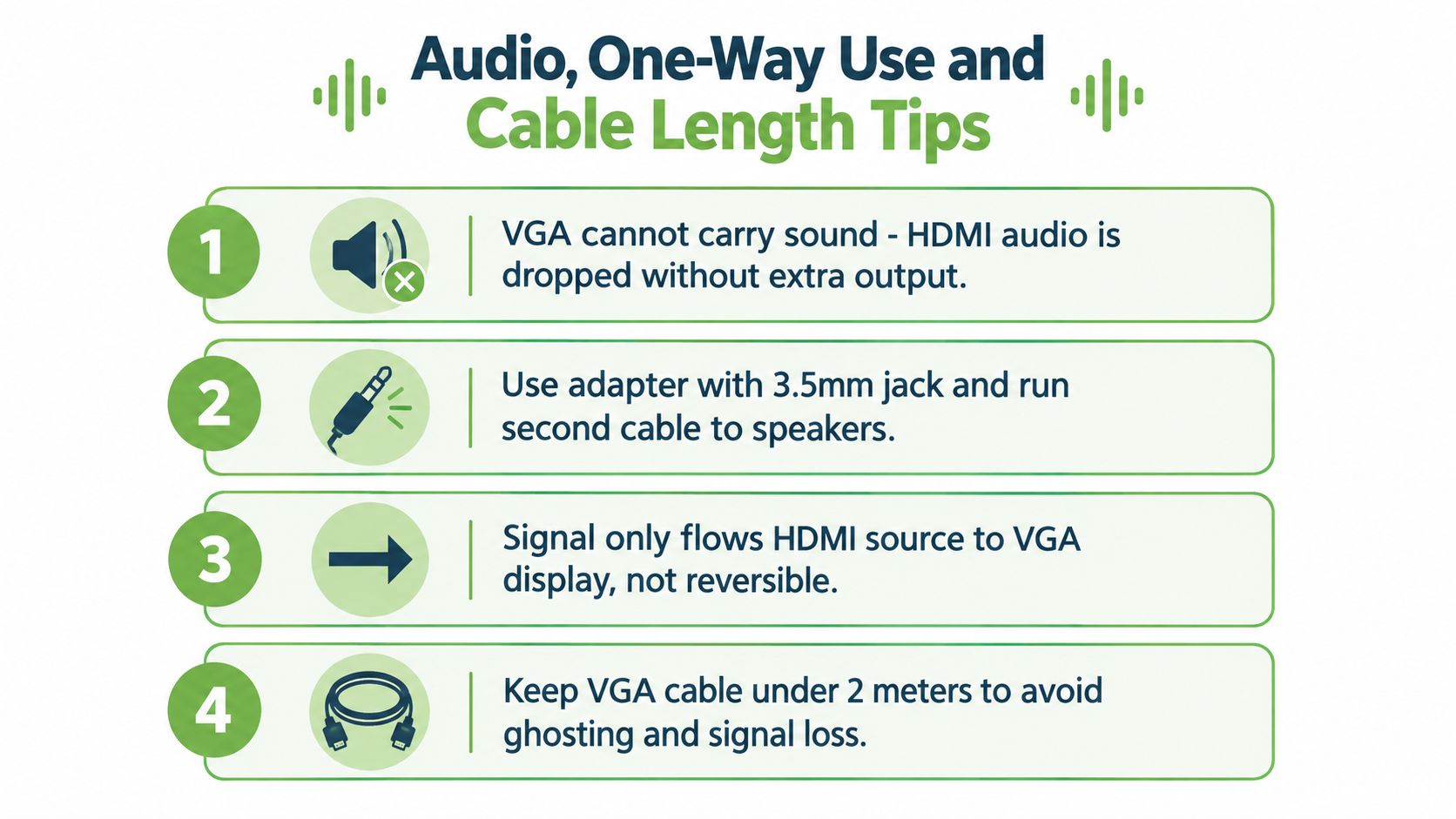
VGA carries video only. HDMI can include audio, but an ordinary HDMI-to-VGA plug won't deliver that sound through the VGA cable. If the converter doesn't include a separate audio output, the projector may show the picture while your audience hears nothing.
Some active converters add a 3.5mm audio jack. You then run a second cable from the adapter to powered speakers, an amplifier or the room's audio system. This arrangement is common in classrooms and meeting rooms, but it adds another connection to test.
Check the direction before buying
These products are normally one-way converters. The signal travels from an HDMI source, such as a laptop, to a VGA display, such as a projector or monitor. A VGA computer output connected to an HDMI monitor needs a different converter, because the direction and electronics are reversed.
The UGREEN Singapore HDMI-to-VGA converter listing explicitly describes this one-way limitation. Read that detail before ordering, especially if the equipment list contains both old and new displays.
Keep the signal path practical
VGA performance depends on the full chain, including the adapter, VGA cable, connectors and display input. Long analogue runs can introduce softness, ghosting or loss of sync. A short cable is preferable for a desk, while a longer presentation installation should use a suitable shielded cable and careful routing.
Singapore retail products come in different connector forms and lengths, including 150mm, 250mm and 1.829m options, with some carrying CE, FCC and RoHS markings, as shown in RS Singapore HDMI-to-VGA cable listings. Choose enough length to reach comfortably, but don't coil unnecessary cable behind a false ceiling.
Test the laptop, converter, VGA cable, projector and audio cable together. For a laptop setup that also needs a dependable HDMI source cable, the Coteci 8K HDMI cable bundle may be relevant for the HDMI portion of the chain, but it won't remove the need for an active HDMI-to-VGA converter.
Adapt, Replace or Recycle in Singapore
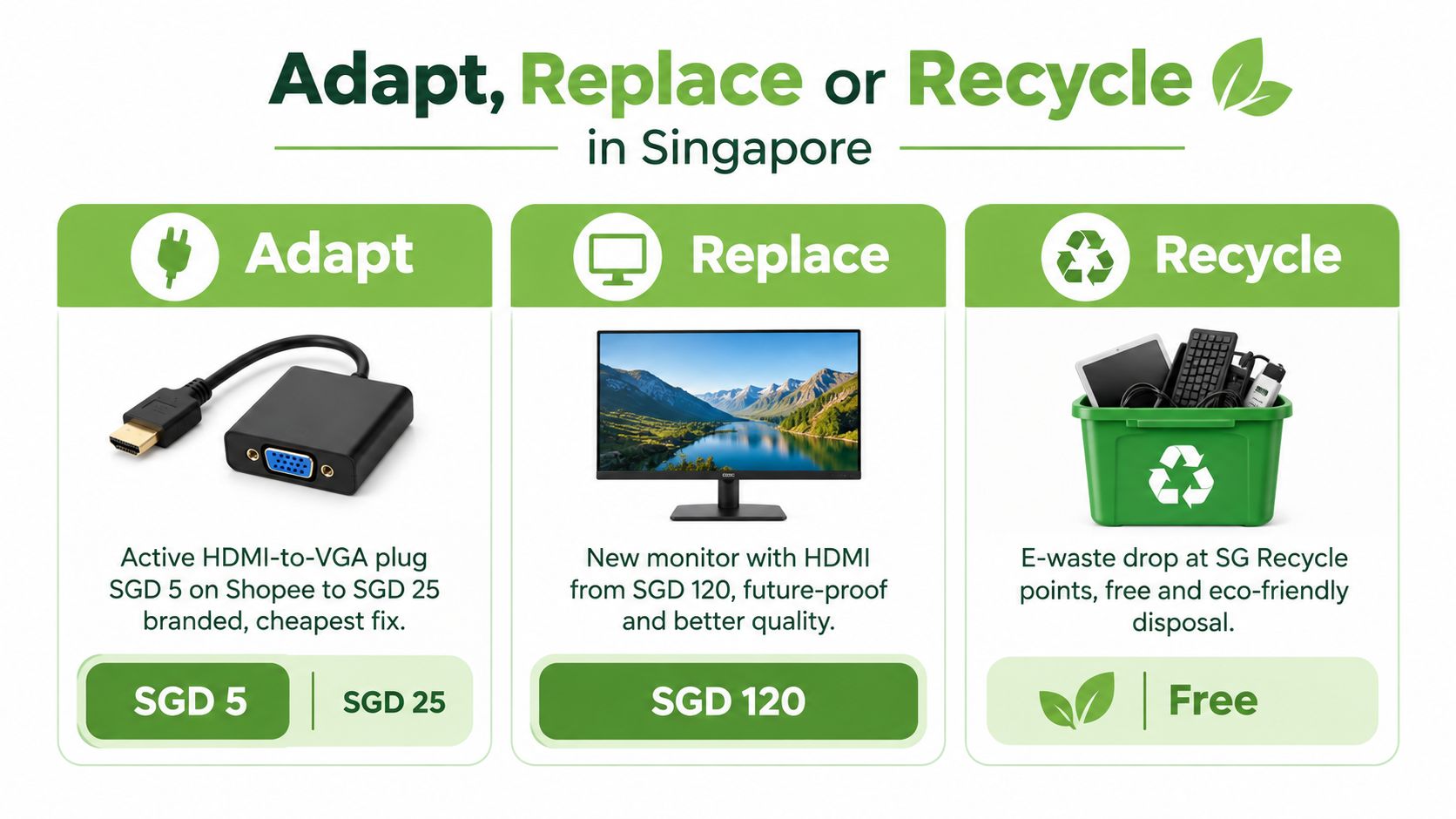
A laptop may be new while the projector in a meeting room still works well. If the image is readable, startup is dependable and the room suits its audience, an active HDMI-to-VGA converter can keep that projector in service. The plug then becomes more than a connection accessory. It becomes a practical way to reuse working equipment instead of replacing it automatically.
Poor brightness, repeated faults or a failed lamp that no longer makes financial sense to repair change the decision. A replacement may offer better value when the display no longer supports the work.
Singapore produces about 60,000 tonnes of e-waste a year, and ICT equipment is among the collected categories, according to The Straits Times' report on Singapore e-waste collection. The report also states that collection reached nearly 10,000 tonnes in 2025 alone, 60% higher than the same period a year earlier. Reusing a serviceable projector helps an organisation manage its equipment lifecycle while reducing the need to add another working display to that waste stream.
A lifecycle decision for the workplace
Keeping suitable equipment in use can avoid immediate replacement spending, installation work and disruption to a familiar room setup. It also gives an SME time to plan a staged AV upgrade rather than replacing every component at once.
Replacement makes sense when users need sharper text, current wireless features, dependable audio integration or direct support for newer resolutions. Include downtime, mounting, cabling and staff time in the comparison, not only the product-page price.
Resource-smart choice: Adapt equipment that still meets its purpose. Replace equipment that no longer supports the work. Recycle what cannot be repaired or reused.
When a monitor reaches retirement, Reworx Recycling's monitor recycling resource explains practical next steps. Singapore's planned expansion of e-waste collection points, including community centres by mid-2026, should make responsible disposal more accessible.
For organisations, this approach supports planned procurement. Extending a device's useful life creates time to budget, source replacements and schedule installation without sudden pressure. myhalo's lifecycle approach includes repair, reuse, Certified ReLoved devices, Certified Surplus products and responsible recycling, following the same adapt, maintain and retire sequence.
Choosing the Right HDMI to VGA Plug
Start with the display, not the shop shelf. Find the projector or monitor model, check its native resolution and note whether it accepts 60 Hz, 50 Hz or an older VESA timing. Then check the laptop's physical output. A full-size HDMI port, Mini HDMI port, DisplayPort or USB-C connection may require a different first-stage adapter before the HDMI-to-VGA conversion.
Use this shop-counter checklist
- Active conversion: Confirm that the product converts HDMI digital input to VGA analogue output. A connector reshaper isn't enough.
- Resolution: Look for an explicit output claim such as 1920 × 1080 at 60 Hz, then compare it with the display's supported modes.
- Power: Check whether the adapter runs from HDMI power or needs a USB lead. Powered models are useful when the source or installation is demanding.
- Audio: Choose a model with a 3.5mm output if the projector setup needs separate speakers or an amplifier.
- Build and support: Review connector construction, cable length, shielding, written compatibility and warranty terms.
Some product listings mention chip families such as AG6200 or RTD2166. That can be a useful clue that the unit contains genuine conversion hardware, but a chip name alone isn't proof of compatibility. Ask the seller for the supported input and output timings, power requirements and audio behaviour.
Match the plug to the work
For a simple office presentation, a compact active converter may be sufficient. For a trade-show setup running throughout the day, a self-powered unit can offer a more controlled installation. For a laptop with USB-C, a hub that combines HDMI, VGA, USB and power delivery may reduce the number of separate pieces, provided the laptop supports video over USB-C.
For example, the Lenovo USB-C travel hub with HDMI and VGA is the type of multi-port accessory to consider when the source device uses USB-C and the user needs more than one display connection option.
A reliable purchase is the one that fits the complete workflow. Confirm the source, display, power, sound and cable path before checkout. That small amount of planning can prevent a blank projector screen, an unusable audio connection and an unnecessary replacement of equipment that still has useful life.
myhalo helps Singapore customers extend device lifecycles through repair, reuse, Certified ReLoved and Certified Surplus products, transparent grading, battery health disclosure and responsible recycling. If you need help choosing an adapter or a compatible laptop and hub setup, visit myhalo for practical technology options and lifecycle support.