





Device Trade In Guide: Get Best Value in Singapore
That old phone in your drawer still has a job to do. Maybe it was your daily device two years ago, maybe it’s a backup laptop you kept “just in case”, or maybe it’s a tablet with a cracked corner that nobody uses anymore.
A proper device trade in turns that forgotten tech into something useful again. You recover value, someone else gets a working device at a more accessible price, and one less gadget sits around ageing into waste. In Singapore, where people upgrade quickly and storage space is always tight, that matters more than most of us realise.
Giving Your Old Device a New Purpose
A lot of trade-ins start the same way. You open a drawer looking for a cable, see an old phone, and think, “I should do something with this.” That instinct is right. Leaving devices unused is easy, but it’s rarely the smartest option.
Singapore generates approximately 60,000 tonnes of e-waste annually, and only 6% was formally recycled in 2022, according to the National Environment Agency’s e-waste management overview. That’s why device trade in programmes matter. They help extend the life of phones, tablets, and laptops that still have value, whether through reuse, refurbishment, or responsible parts recovery.
Why trading in beats leaving a device unused
A device sitting idle loses value over time. Battery health drops, software support changes, and newer models push resale prices down. If you already know you won’t use it again, waiting usually doesn’t help.
Trade-in also solves a practical problem. Consumers typically want to avoid the hassle of photographing listings, replying to lowball offers, arranging meetups, and worrying about scams. They just want a fair assessment, a clear process, and confidence that their personal data won’t follow the device.
Here’s the bigger picture:
- You recover value instead of letting the device depreciate in a drawer.
- You reduce waste by keeping usable electronics in circulation longer.
- You help the circular economy by making refurbished devices more available to students, families, and small businesses.
- You simplify your upgrade because your old device becomes part of the budget for the next one.
Practical rule: If a device still powers on, charges, and has no major activation lock issues, it’s usually worth checking its trade-in value before deciding to recycle it.
Trade-in is about more than cash
Getting credit or payment matters. But the more useful way to think about device trade in is this. You’re moving a device from “unused” to “usable” with less friction.
That’s especially relevant for phones and laptops, because these are the devices people replace most often. A clean, functional pre-owned iPhone, Samsung Galaxy, MacBook, or Windows laptop can still serve someone well for school, work, or travel. Even older units with cosmetic wear may still have a path forward if the hardware is sound.
The strongest trade-in experiences are the ones that feel clear from start to finish. You know what affects value, you know how the device is assessed, and you know what happens after you hand it over. That transparency is what separates a smooth trade-in from one that feels vague or disappointing.
Your Pre-Trade-In Preparation Checklist
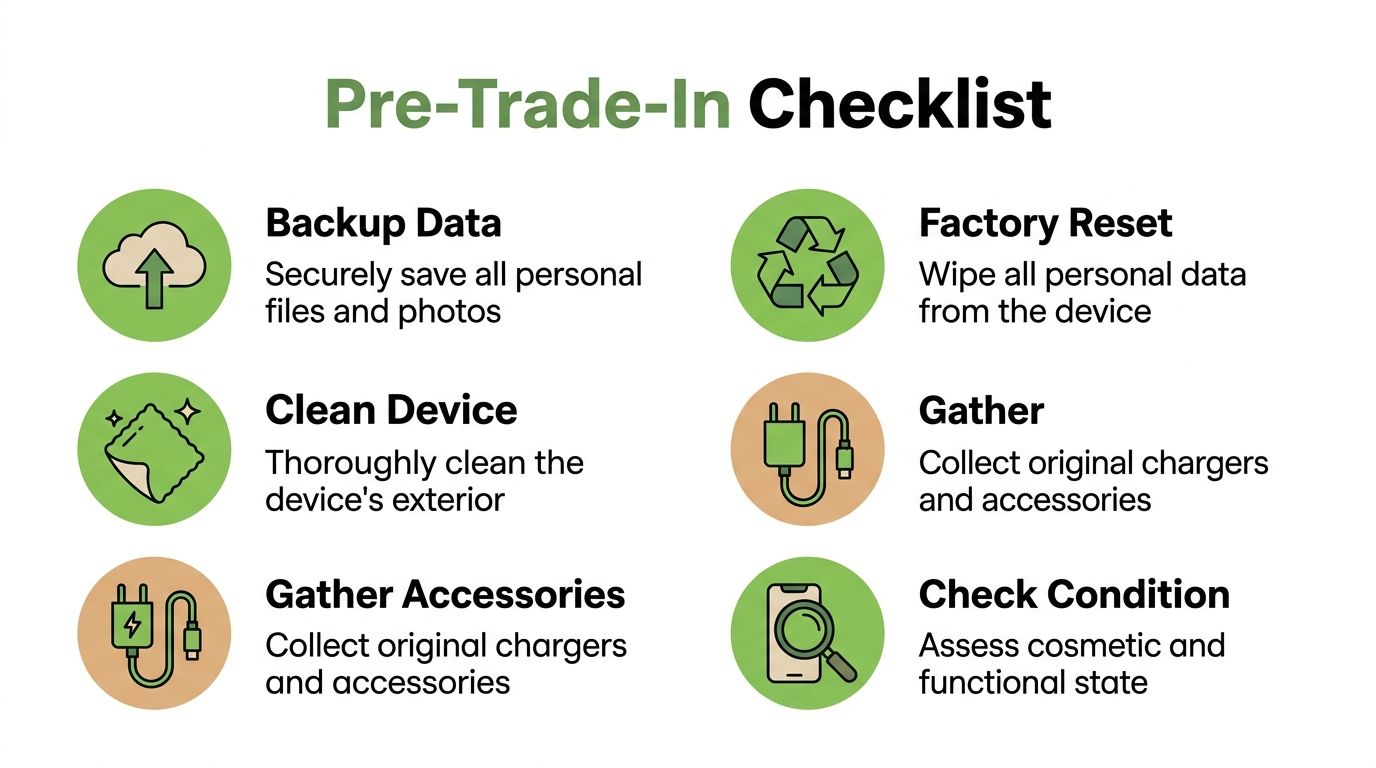
Preparation changes the whole experience. It protects your privacy, avoids delays at assessment, and helps the device present better during valuation. Most trade-in problems come from skipped basics, not from the actual hardware.
This quick routine works for phones, tablets, and laptops.
Back up everything first
Before you reset anything, make sure your photos, chats, notes, documents, and app data are safe.
For iPhone and iPad users, a full iCloud backup is the usual starting point. If storage is tight, backing up to a Mac or PC works too. For Android users, check Google account sync, Google Photos, and any brand-specific backup service your phone uses. Laptop owners should copy important folders to cloud storage or an external drive.
Check these before moving on:
- Photos and videos are visible in your cloud account or external backup.
- Contacts and calendars have synced properly.
- Messaging apps have exported or backed up conversations where needed.
- Authenticator apps have been transferred, because these are easy to forget.
A factory reset without a proper backup is the mistake people regret most.
Remove all account locks
This step matters just as much as deleting your files. If a device is still linked to your iCloud, Google, Samsung, or Microsoft account, it may trigger activation lock or account verification later. That can reduce value or stop the trade-in entirely.
On phones and tablets, sign out fully before reset. On laptops, sign out of Find My, Microsoft account syncing, and any device management profile if it was used for work or school.
Focus on these:
- Apple devices. Turn off Find My, then sign out of iCloud.
- Android devices. Remove the main Google account and any manufacturer account.
- Windows laptops. Sign out of BitLocker-linked Microsoft account features if relevant, and remove company enrolment.
- MacBooks. Sign out of Apple ID, disable Find My Mac, and deauthorise linked services if needed.
If you’re unsure about laptop preparation, this guide on how to sell a used laptop in Singapore is a helpful reference before you bring it in.
A reset clears your files. It doesn’t always remove account locks. Treat those as two separate jobs.
Wipe the device properly
Once your backup is confirmed and accounts are removed, perform a full factory reset. Don’t just delete photos and apps manually. A complete reset is cleaner, safer, and easier to verify during intake.
For phones, charge the battery before starting so the reset doesn’t fail halfway through. For laptops, connect to power during the wipe. After reset, stop at the setup screen rather than signing in again.
If you’re packing a device for transport, especially a laptop or tablet, wrap it well so it doesn’t pick up new scratches on the way. A small sheet of bubble wrap for electronics packing can make a real difference if the device is going into a backpack, courier bag, or storage box.
Clean it and gather the extras
A dirty device looks more worn than it really is. Dust in speaker grilles, fingerprints on screens, and grime around camera rings can affect first impressions during inspection.
Do a simple clean:
- Use a microfibre cloth for the display and casing.
- Clear dust gently from ports and edges.
- Remove old stickers or labels if they peel off cleanly.
- Bring the charger or box if you still have them, especially for newer premium devices.
You don’t need to make it look brand new. You just want the condition to be easy to assess without dirt hiding the details.
Decoding Device Value and Making the Right Choice
You walk into the shop with a phone that still works well, then the quote comes back lower than expected. In most cases, the gap comes down to how the device is graded, what can be resold with confidence, and how much risk the buyer is taking on after intake.
Model and storage matter, but they are only the starting point. Final value usually comes from a mix of cosmetic condition, hardware performance, battery health, account status, repair history, and current demand for that exact model.
What assessors actually look at
A proper trade-in assessment has two parts. One is how the device looks. The other is how reliably it works.
Cosmetic checks usually include:
- scratches on the display
- dents, chips, or bends on the frame
- cracks or heavy wear on the back
- scuffs around buttons, ports, and camera rings
Functional checks usually include:
- charging and cable connection
- touchscreen response
- battery condition during normal use
- camera, speaker, and microphone performance
- Face ID, Touch ID, fingerprint reader, or similar security features
- Wi-Fi, Bluetooth, and mobile signal performance
At myhalo, customers can review the device condition grading criteria for mobile trade-ins before assessment. That matters because a clear grading system removes guesswork. You can see how a light scratch differs from cracked glass, and why a fully working device with honest wear may still hold solid value.
That transparency also helps with decision-making. Some devices are worth trading in as-is. Others may be better sold privately if they are unusual, upgraded, or likely to attract a niche buyer.
Why quotes can feel inconsistent
The frustration usually starts when two places give very different numbers for the same device and neither explains the difference clearly.
In practice, the quote often changes because of resale risk. A phone with replaced parts, weak battery performance, intermittent charging, or failed biometrics can cost more to test, repair, or warranty. Older Android models and Windows laptops also tend to move differently from recent iPhones or MacBooks, so market demand affects pricing more sharply.
If a quote drops after inspection, the reason should be specific. Screen burn-in, non-original display, swollen battery, failed camera stabilisation, or housing damage are all concrete explanations. “Condition issue” by itself is not enough.
myhalo’s process is built around that point. The grade should match visible and testable findings, and the outcome should be explained in plain language so you know what affected the number.
Trade-in or private sale
Private sale can produce a better price, but only in the right cases. It usually works best for newer flagship devices, rare configurations, or products with strong buyer demand and complete accessories.
Trade-in suits a different priority. It gives you a defined process, less back-and-forth, and fewer risks around meetups, payment disputes, and post-sale complaints.
| Factor | Trade-In with myhalo | Selling Privately |
|---|---|---|
| Potential price | Usually more predictable, based on model and assessed condition | Sometimes higher, if the right buyer appears |
| Speed | Faster, with structured testing and payment | Slower, with listings, chats, and negotiation |
| Convenience | Low effort after the device is ready | More admin from start to finish |
| Safety | Lower risk through a formal handover process | Higher risk of scams, no-shows, or disputes |
| Price certainty | Clear once inspection is completed | Final price often shifts during negotiation |
| Best for | People who want a fair, explained outcome without much hassle | People willing to spend time for the highest possible sale price |
The right choice depends on what you value most
If your device is nearly new, includes the full box set, and sits in a category buyers actively search for, a private sale may be worth the extra effort.
If your goal is to save time, avoid uncertainty, and get a quote tied to a visible grading standard and warranty-aware intake process, trade-in is often the better call. That is especially true for devices with ordinary wear, older batteries, small faults, or models that attract heavy bargaining in resale marketplaces.
A good trade-in should not feel mysterious. You should know how the grade was reached, what reduced the value if anything did, and what happens next once the device is accepted. That clarity is what makes the decision easier.
How to Maximise Your Trade-In Payout
You walk in with a phone you have used for two or three years, expecting a rough guess. The final value usually comes down to a few practical details. Get those right, and the payout is often better than people expect.
The biggest gains usually come from timing, condition, and accuracy. None of that is complicated, but each one affects how a device is graded and whether it can move quickly into refurbishment or resale. At myhalo, that matters because the quote is tied to what we can verify, test, and stand behind.
Trade in while the model still has momentum
Trade-in values are usually strongest before a major product launch. Once a new iPhone, Galaxy, or laptop range is announced, more owners of the previous generation start selling. More supply often means softer offers.
Recent flagship devices are the most sensitive to timing because they lose value faster in the first phase after launch. Older models still benefit from earlier action, but the difference is usually smaller. If you already know you plan to upgrade, trading in before the rush often works better than waiting until everyone else has the same idea.
If you are comparing upgrade timing for Apple devices, this guide on trading in an iPhone in Singapore gives a useful model-by-model starting point.
Present the device well, but spend carefully
A clean device helps the inspection go faster and reduces avoidable doubt about how it was cared for. Wipe the screen, remove the case, and clear dust from ports and speaker grilles. Small presentation details do not change a heavily used device into a high-grade one, but they do help the condition speak for itself.
Accessories can add value in the right cases. They matter more for premium devices, tablets with styluses, and laptops where the correct charger is part of normal use.
Bring these if you still have them:
- Original charger or cable in usable condition
- Retail box with matching label
- Keyboard or stylus for tablets and hybrid devices
- Power adapter for laptops, especially if the wattage is specific to the model
Do not buy extras just to improve the quote. In most cases, the cost of replacing missing accessories is higher than the extra trade-in value you would get back.
Repair only when the numbers make sense
Many owners assume they should fix every flaw first. That is not always the best move.
A repair is more likely to be worth considering if it restores basic function or moves the device into a better grading band. Examples include a screen so damaged it affects testing, a faulty charging port, or a swollen battery that creates a safety issue. Those problems can limit what happens to the device after trade-in, which affects the offer.
Cosmetic repairs are a different story. If the device is already several generations old, or if wear shows up in multiple areas, spending on appearance alone often gives a weak return. Ask for the likely difference between trading in as-is and trading in after repair. If the gap is small, keep the money and trade it in as it stands.
Describe condition the way it will be inspected
This is the part that prevents disappointment. A device described as "mint" but showing deep scratches, battery warnings, non-genuine parts, or an account lock will not hold its initial estimate.
Accurate details lead to a more stable quote and a faster handover. They also make transparent grading possible. At myhalo, the goal is not to catch customers out. It is to match the device to a fair condition band based on what is physically present and what the diagnostics confirm. That makes the outcome easier to explain and easier for you to trust.
The best payouts usually come from simple habits. Trade in before the market gets crowded, bring the accessories that still matter, skip repairs with poor payoff, and describe the device exactly as it is.
The Simple and Transparent myhalo Process
Customers don’t mind inspection. What they dislike is uncertainty. They want to know how the quote works, what gets checked, and where the device goes after handover.
That concern is common in Singapore. Surveys show 62% of Singaporean consumers worry their traded-in devices might still end up in landfills, which is why clear refurbishment and resale pathways matter, as discussed in this report on e-waste concerns in Singapore.
What the journey looks like
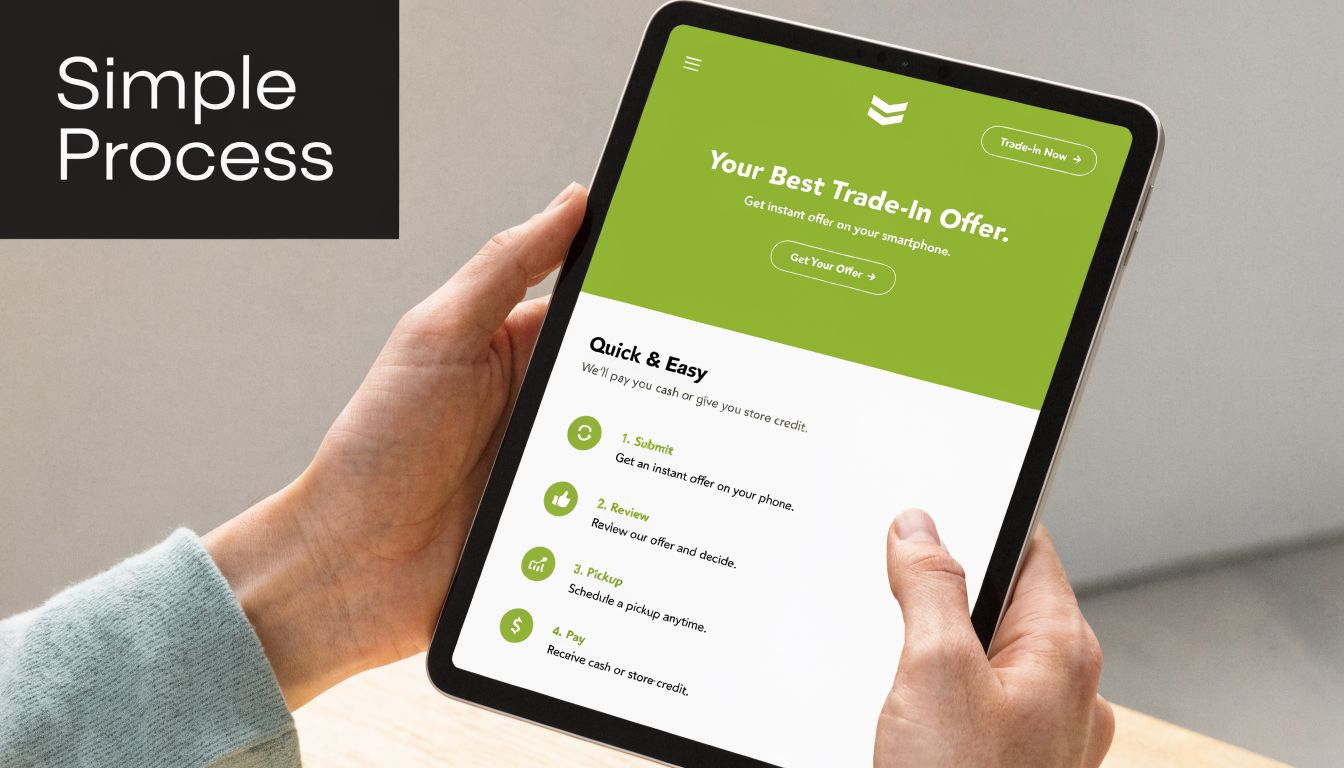
The process is straightforward when it’s handled properly.
-
Get a quote
Start with the device model, storage, and condition details. A quick estimate gives you a working number before you commit. -
Lock the price
If the service offers a short price-lock window, that protects you from sudden market movement while you prepare the device and arrange drop-off. -
Bring it in or send details remotely
Some customers prefer an in-store handover because they can ask questions on the spot. Others prefer to handle the first step over WhatsApp and visit only when they’re ready. -
Inspection and diagnostics
The quote is confirmed against the device's actual condition. Cosmetic wear, battery state, display quality, camera performance, connectivity, and account-lock status all matter. -
Final offer and payment
If the assessed condition matches the declared condition, the offer should stay aligned with the initial quote. If not, the adjustment should be explained clearly.
What a transparent assessment should include
The strongest trade-in systems don’t hide behind broad labels like “fair” or “used”. They define the categories and inspect consistently.
For example, the categories used in many structured refurbishment programmes often separate devices into tiers such as:
- As-New, for devices with minimal visible wear
- ReLoved Premium, Excellent, or Value, for fully functional devices with increasing levels of cosmetic wear
- ReEco, for units that still work properly but show more obvious use
That matters because customers can tie the quote to a standard instead of relying on guesswork. The same goes for diagnostics. A proper intake process should check the hardware thoroughly, not just power the device on and glance at the screen.
What happens after the trade-in
This is the part customers ask about most in-store. If the device is still suitable for reuse, it should move through testing, grading, cleaning, and resale preparation. If it isn’t suitable for resale, usable parts may be recovered and the remainder handled through responsible downstream channels.
myhalo’s published process states that devices go through an ISO 9001:2015-certified workflow with 30 quality checks, followed by grading into categories such as As-New, ReLoved, or ReEco, and selected refurbished units are sold with warranty coverage and a 14-day exchange policy. That level of detail is useful because it shows the pathway after handover instead of leaving customers to guess.
The trust-building part of device trade in isn’t the quote. It’s knowing the quote, the inspection, and the aftercare all connect.
A clear process also helps with edge cases. If a battery is weaker than expected, if the frame has hidden impact damage, or if a previous repair affects resale, the customer gets a specific reason. That’s much easier to accept than a vague deduction.
Your Next Steps for a Smart Device Trade-In
A good device trade in should feel simple. Back up your data, remove your accounts, clean the device, and get it assessed against a clear standard. That gives you the best shot at a smooth handover and a fair outcome.
The practical benefits are easy to see. You recover value from tech you’re no longer using, avoid the drag of private selling, and give the device a realistic second life instead of letting it sit forgotten. That’s good for your wallet, your storage space, and the wider reuse cycle.
If you prefer face-to-face advice, bring your phone, tablet, or laptop to the Bugis Junction store for an in-person evaluation. If convenience matters more, start with a WhatsApp quote and sort out the details before you head down.
If you’re ready to turn an unused device into value, start with myhalo. You can visit the Bugis Junction store for an in-person assessment or reach out on WhatsApp to get the trade-in process moving quickly.