





Data Migration Best Practices for Trade-In and Refurbishment
Old phones, laptops, and a POS terminal stack up fast when a cutover is coming due. Customer records still have to move cleanly, inventory cannot disappear, and the refurbished devices leaving your workshop still need to act like dependable business tools. Data migration best practices keep that transfer from turning into broken files, stalled sales, delayed support follow-up, and lost trust.
For SMEs and refurbishment teams in Singapore, migration is rarely a neat one-time copy. Devices come back for trade-in, data has to be wiped or moved, accounts need to be re-linked, and new hardware must fit into the same operating rhythm without downtime turning into lost orders. Singapore's digital environment raises the standard for that work, with public-sector modernisation already mainstream and households widely connected online, which means cutover planning has to hold up under real operational pressure as noted in Singapore's digital transformation guidance.
A controlled, documented process is the safest path. Inventory what exists, decide what needs to move, test the migration on realistic data, validate the outputs, and keep rollback options live until the new setup settles. That approach works for a retail system move and for a refurbished laptop handover, because the risk is the same. One bad transfer can interrupt service, complicate compliance, and leave teams guessing about what was lost or left behind.
Table of Contents
- Understanding Data Migration Best Practices
- Planning and Discovery Process
- PreMigration Checklist Essentials
- Backup Strategies and Rollback Planning
- PlatformSpecific Transfer Steps
- Data Validation Integrity Checks
- Security Compliance Performance and Tools
- Actionable Tips for TradeIns and Next Steps
Understanding Data Migration Best Practices
A small retailer that is replacing checkout tablets and warehouse laptops should not treat migration like dragging files from one folder to another. Customer histories, inventory records, warranty notes, and device ownership details all depend on each other, and one missed mapping can leave staff unable to find the right record when a customer calls. In refurbishment workflows, the same pressure shows up in a different form. A device may need to be wiped, reconfigured, and reissued quickly, while its repair logs, component swaps, and user data still need to stay tied together so the asset keeps its value and warranty history.
Data migration best practices start with a simple rule, protect the business process first, then move the data. That means knowing which records keep daily operations running, which ones are stale, and which systems must stay live while the transfer happens. SMEs often move in stages for that reason, because a phased cutover reduces the risk of stopping sales, support, or device turnaround work at the same time as reflected in digitalisation guidance since 2017.
What actually makes migration hard
The hard part is usually not the copy itself. It is the mix of formats, permissions, versions, and human handoffs. A refurbished device may need local files, cloud sign-ins, app settings, and user profiles aligned at the same time, while a retailer still needs the source system available for operations until the new stack has been trusted.
Practical rule: if a record affects billing, inventory, warranty, or customer service, treat it as operational data, not paperwork.
That is why a disciplined migration playbook usually includes inventorying data assets, profiling source systems, planning backups, testing cutover steps, and validating outputs before decommissioning the old environment. In a refurbishment context, that same discipline separates what stays on the outgoing device, what must be retained, and what should be securely removed. ISO-backed processes, documented checks, and repeatable handoffs matter because the cost of uncertainty is usually a lost transaction or a support escalation, not just an IT inconvenience.
Planning and Discovery Process
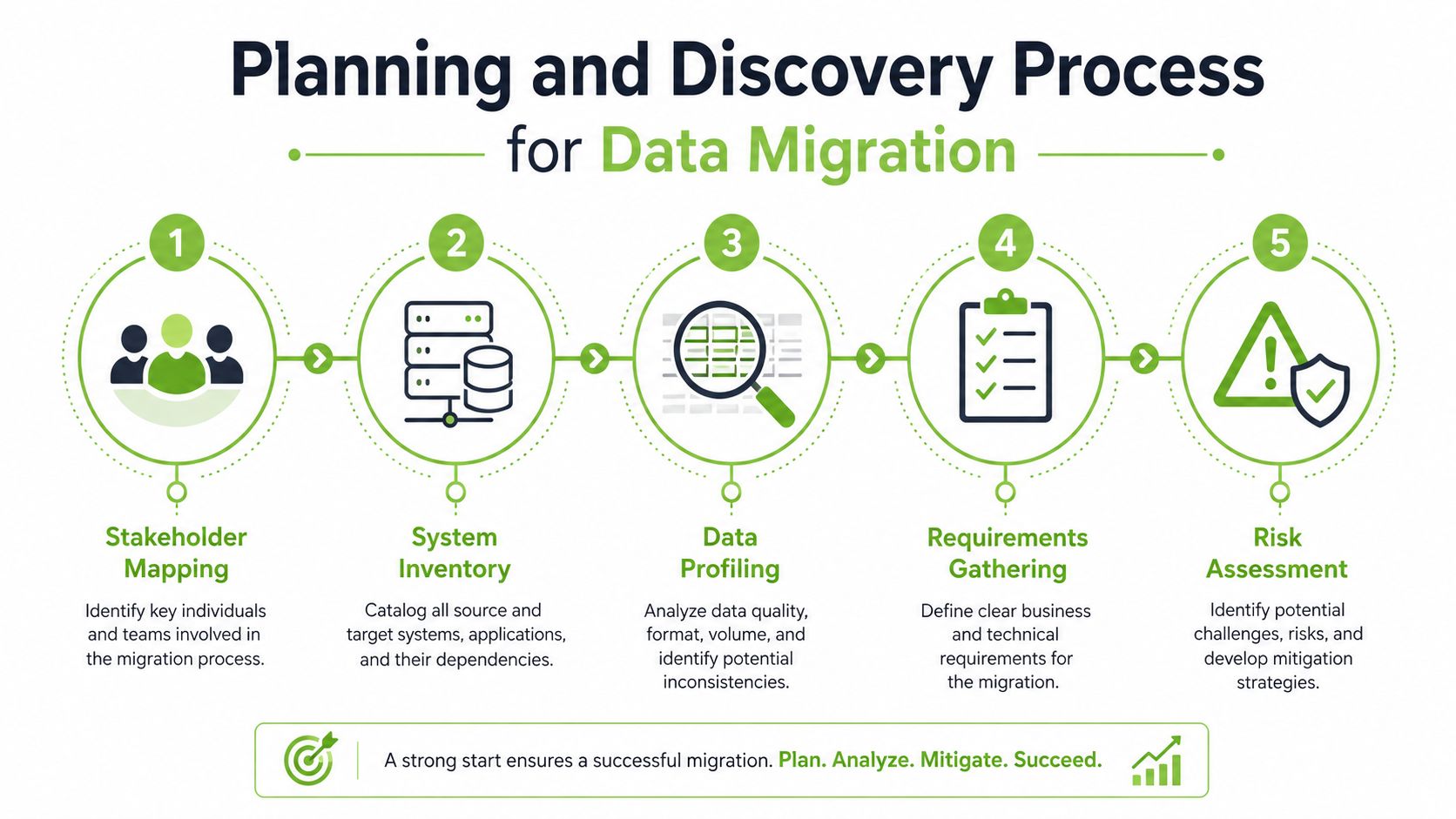
A migration usually goes wrong before the first file moves. The team starts with a tool, skips the business map, and only later discovers that one customer list feeds sales, support, and warranty work at the same time. In Singapore, public bodies have been pushing digital change across their services, which is a reminder that inventory, ownership, and phased validation are now normal parts of serious migration work, not extra polish.
Build the inventory before you build the migration
Start by listing every system touched by the change, even if it only holds a small slice of data. For SMEs, that often includes accounting, POS, CRM, HR, inventory, email archives, and the device management layer. For refurbishment teams, add serial tracking, diagnostic logs, wipe status, grading notes, and handover records.
A practical inventory template should capture:
- Owner and business purpose: who depends on the data and why it matters.
- Source and target location: where the data lives now and where it needs to land.
- Format and structure: spreadsheets, databases, app exports, or device-level files.
- Volume and freshness: how much exists and how often it changes.
- Risk flags: sensitive records, duplicate datasets, or dependencies on old software.
Perfection is not the goal on day one. The goal is to spot the awkward cases early, such as customer contact data stored in three places or warranty notes buried in a technician's export. If those links are mapped before the move, the team can decide whether to migrate, archive, or leave a dataset behind for now.
Get the right people in the room
Discovery also means naming the people who will be accountable when something breaks. Business owners know which records matter most, IT knows the system constraints, and operations knows when the store cannot afford downtime. A migration goes badly when those groups speak only after the data has already moved.
Use the planning session to define field mappings, confirmation rules, and acceptable cutover windows. If a retail system cannot tolerate a long outage, a staged approach usually makes more sense. If a refurbishment queue depends on live device status updates, the team needs to know exactly which state changes will continue during transfer and which ones can wait.
The best migration plans are boring on paper because every awkward dependency was named before the cutover date.
The same staged mindset shows up in SMEs that move in phases rather than all at once. That fits situations where different functions adopt digital tools at different speeds, and it keeps one weak workflow from holding up the rest. If devices and data are being moved together, the hardware change and the data change can fail independently, so the handoff plan has to cover both.
For teams comparing migration planning with a trade-in workflow, the safest next step is to align the data inventory with the device disposition path. A clear reference like this guide to selling used laptops in Singapore helps frame what gets retained, wiped, or passed on during refurbishment.
PreMigration Checklist Essentials
A migration goes wrong fastest in the ordinary places. Access that was never approved, a destination that runs out of room, a battery that drops during a refurb handoff, or a source export that was never tested on the target OS can stop the cutover before anyone notices a bigger problem.
Check the operational basics first
Start with the items that can halt work immediately. Source and target accounts should be approved and documented, the destination should have enough capacity for the incoming data, and everyone involved should understand the downtime window. If a device is being refurbished at the same time, battery condition, storage health, and wipe-readiness should all be part of the pre-check.
Use a checklist that includes:
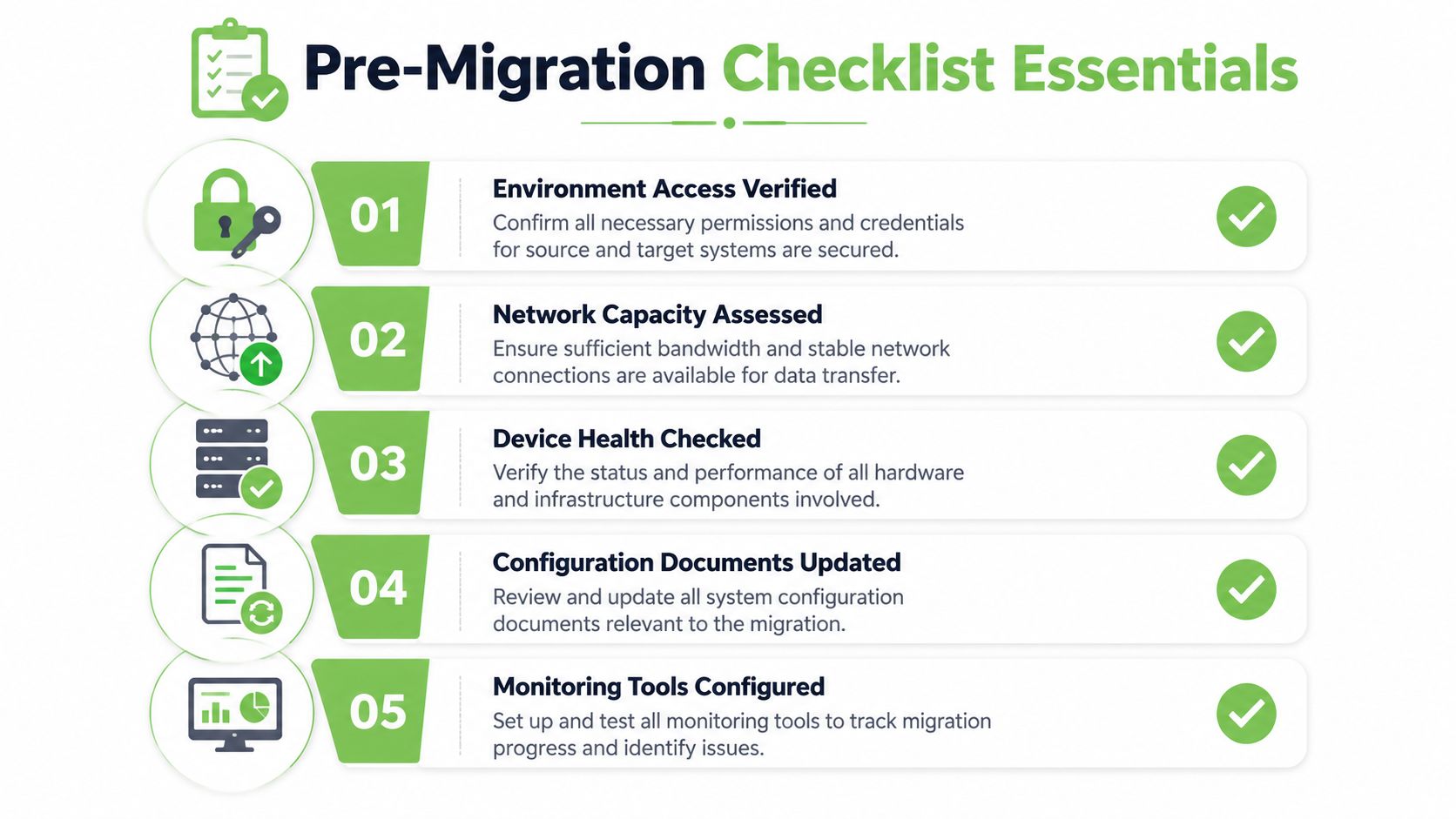
- Environment access verified: confirm credentials and permissions for both sides.
- Network capacity assessed: make sure transfers won't choke a busy line.
- Device health checked: test the hardware before data begins moving.
- Configuration documents updated: record any changes to app or device settings.
- Monitoring tools configured: verify logs, alerts, and status views before launch.
These checks are simple, but they prevent avoidable failures. A migration team that discovers a locked admin account after cutover is already behind, and a refurbishment operation that ships a device before checking the battery or storage has created a support problem for the next user.
Treat documentation like part of the system
Documentation is the handover mechanism. Keep a current record of versions, passwords handled through approved methods, target settings, and any exceptions discovered during testing. If a device or workstation is leaving one team and entering another, the next person needs enough context to repeat the setup without guessing.
Useful habit: write the rollback steps at the same time you write the cutover steps. If they're harder to find later, they won't get used.
Consistent checks, verified records, and controlled handoffs reduce confusion when a device returns to service or moves into another life cycle stage. Singapore SMEs often need that structure because staged digital adoption means one system may be live while another is still being introduced, so the handover itself becomes part of business continuity.
For teams handling device resale as part of the broader migration cycle, connect the technical checklist with the business disposition path. A useful reference point is this guide on selling used laptops in Singapore, because the data side and the trade-in side usually meet at the same handover desk.
Backup Strategies and Rollback Planning
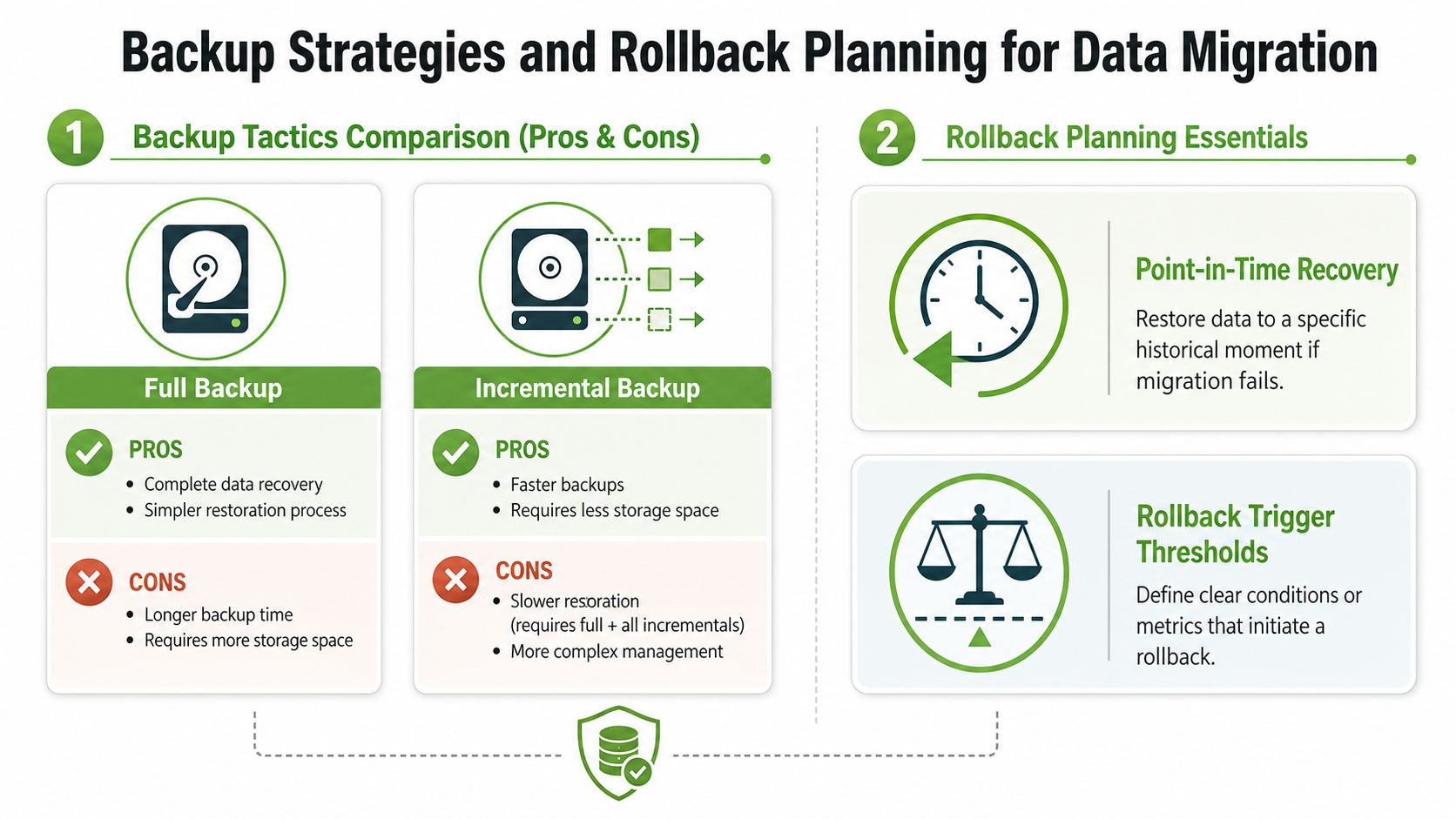
A migration without a tested recovery path is a gamble, not a project. Backups are the safety net, but rollback planning is what keeps the business from freezing when a mapping error or sync issue appears after cutover. A sound runbook should say exactly when to restore, who makes that call, and what evidence triggers the decision.
Choose the backup method that matches the risk
Full backups are simple to understand and simple to restore, which makes them useful when the environment is small or the cutover is high stakes. Incremental backups move faster and use less storage, but restoration becomes more involved because you need the base backup plus the later changes. The right choice depends on your tolerance for restore complexity versus your need for speed.
A refurbishment team can apply the same logic when preparing a device for reuse. If a transfer is expected to be straightforward but the device still contains critical records, a full backup before wipe gives you a cleaner recovery option. If data changes are frequent and the environment is already synchronised in stages, incremental capture may fit better.
Make rollback a living plan
Rollback planning should include point-in-time recovery, a threshold for aborting the migration, and a current backup copy that's been tested. Don't wait until an issue appears to figure out whether the source system can be restored cleanly. The team should know what error rate, reconciliation gap, or user complaint pattern means the migration stops.
A phased cutover with automated checkpoints, a full production-volume dry run, and a tested rollback plan is the safer model because validation happens at multiple gates rather than only at the end as recommended in migration guidance. That matters in refurbishment workflows too, because device state and business data can drift if the process only checks the final output.
If you're working on a swap where the old machine must remain usable until the new one is proven, keep both systems available long enough to verify the handover. If the customer profile, app settings, or device state don't reconcile after transfer, the rollback path should restore the last known good state without forcing support staff to rebuild everything manually.
PlatformSpecific Transfer Steps
Different platforms fail in different ways, so the transfer method has to match the device family. A Windows laptop used by a sales team won't migrate like an iPhone used for field work, and a refurbished macOS machine has different profile issues from an Android handset that was tied to multiple accounts. The most common error is using the wrong tool for the job and then blaming the data.
iOS and macOS
For iPhone and iPad moves, iCloud and Apple Configurator are the usual starting points when accounts and device enrolment need to be preserved. The trick is to confirm what lives in the cloud already and what still sits locally on the old unit. Profile mismatches often show up when the new device is signed into the wrong Apple ID or when app-specific data wasn't synced before the handover.
macOS migrations work best when the source and target are clearly identified and the user account structure is mapped first. Migration Assistant can help with user profiles and settings, while Terminal-based tools such as rsync are better suited for controlled file transfer where the folder structure matters. Check permissions before running anything at scale, because a failed file copy on a refurbished Mac usually turns into a long support call later.
Android and Windows
Android migrations often need a mix of migration apps and Android Debug Bridge for teams that are comfortable with device-level control. Focus on contacts, photos, app data, and account restoration, but don't assume every app behaves the same way after a device change. Some settings live in the app, some live in the account, and some stay on the old handset if the sync wasn't complete.
Windows is still the place where Robocopy and PowerShell earn their keep. Robocopy handles structured file movement well, while scripts can automate repetitive checks and preserve consistent folder logic. Watch for permissions, locked files, and user profile clutter, because those are the things that break a clean migration even when the raw copy looks fine.
Practical rule: if the tool can copy the file but can't prove the setting came across correctly, keep testing.
Handle email, contacts, and app settings separately
Treat mail archives, contacts, and settings as different migration objects. Email often needs a different export path from documents, contacts may be tied to account sync, and app settings can disappear if the application version changes between source and target. In a trade-in flow, the safest pattern is to verify each object type independently rather than assuming one “successful” transfer covers everything.
If the device is leaving service and entering a resale pipeline, that distinction matters even more. The technical migration and the disposition workflow should not be mixed into a single unreviewed step. Teams that separate them are much less likely to miss a critical record or leave a user with half-restored access on day one.
Data Validation Integrity Checks
Copying data is the easy part. Proving that the data is correct is where good migration work earns its keep. In a refurbishment workflow, that proof matters because the moved device might go straight back into circulation, and an error discovered after dispatch is usually more expensive than an error caught in staging.
Validate by rule, not by feel
Start with row counts, checksums, and referential integrity checks. If source and target record counts differ, don't dismiss it as a harmless mismatch. If customer IDs no longer point to valid warranty records, the migration has broken a real business relationship, not just a spreadsheet.
Use a validation script or checklist that compares:
- Counts: source versus target totals for each dataset.
- Nulls and anomalies: missing fields, duplicates, or impossible values.
- Relationships: linked records that still point to the right parent entries.
- Spot checks: a small sample of real records reviewed by an operator.
Sampling is useful, but it shouldn't be your only control. A sample can confirm that a transfer looks sensible, yet still miss a transformation bug that affects a large batch. That's why the counts and integrity rules need to run automatically, not only as a manual audit.
Reconcile business records with device records
A refurbished device workflow gives a clear example. If a customer device transfer includes warranty data, the customer ID on the new system must match the serial-linked record from the old one. If the device returns for service later, staff need a clean chain from the physical unit to the commercial history.
When the validation rules are well designed, they catch the awkward issues before the device ships. That may be a missing contact record, a duplicated serial number, or a profile that didn't finish syncing. The goal is not just to prove that the data moved, but to prove that the business can still act on it correctly.
Security Compliance Performance and Tools
Migration tools are not interchangeable. Security, compliance, and operational fit matter as much as raw speed. A small business moving customer and device data needs enough control to protect records, enough auditability to explain what changed, and enough performance to keep the cutover from spilling into business hours. The best tool is usually the one that fits the workflow cleanly, not the one with the longest feature list.
Compare tools by control, not hype
| Tool | Key Features | Average Cost |
|---|---|---|
| AWS Database Migration Service | Managed migration, replication support, broad database compatibility | Usage-based, varies by workload |
| Google Cloud Dataflow | Stream and batch processing, pipeline orchestration, managed scaling | Usage-based, varies by processing demand |
| Open-source ETL options | Flexible scripting, custom transformations, lower licence overhead | Usually lower upfront licence cost, higher in-house effort |
The table is a starting point, not a verdict. Managed platforms can reduce operational burden, while open-source stacks can make sense when the team already has strong engineering capability and clear governance. The test is whether the tool matches the sensitivity of the data, the amount of transformation required, and the level of audit logging you need.
A refurbishment team can feel that difference quickly. If a trade-in workflow has to carry customer identity, device history, and warranty detail into a new system, the migration tool has to protect the chain of custody as it moves those records. A tool built for speed alone can miss the operational checks that matter when a used phone is being reissued or repaired, which is why a team should also look at the handoff process in guidance for selling a used iPhone in Singapore and make sure the migration controls fit the same workflow.
Measure what matters during cutover
Throughput, latency, and error rate are the practical migration metrics that show whether the system is coping. If throughput drops, the window stretches. If latency rises, users feel it. If error counts climb, the cutover needs closer scrutiny before the old system is retired.
A phased migration with incremental loads and replication for continuous sync is usually the more conservative choice when downtime tolerance is low, and guidance also recommends scale testing at production volume to confirm performance and functional equivalence as noted in migration process guidance. That benchmark matters for SMEs and refurbishment teams because a handover is only safe when the target behaves like the source under real load, including the customer and device records that support service, returns, and resale.
Security still has to sit inside that performance plan. Encryption, access control, audit logging, and monitored handoffs should be in place before the first live record moves. If your migration path touches customer data, the team should be able to explain who accessed it, when, and why, without digging through a mess of ad hoc notes.
Actionable Tips for TradeIns and Next Steps
The smartest migration plan often moves less data, not more. Prioritising records by business criticality and deferring low-value data can cut legacy storage costs by up to 30% without disrupting operations according to migration planning guidance. That's a useful mindset for trade-in and refurbishment work too, because not every old file or stale profile deserves a spot in the new environment.
Make the cutover cleaner by trimming the load
Before you migrate, decide which records need to move now, which can be archived, and which should be left behind until a later phase. Old test data, duplicate exports, and inactive records often create more risk than value. In a retail or device-refurbishment setting, that selective approach also makes it easier to keep support teams focused on the information that directly affects customers.
Day-forward handling matters just as much. New orders, repairs, warranty changes, and device status updates can happen while the migration is still running, so you need a clear rule for how those live transactions are captured until the target system is fully trusted. Incremental sync or parallel handling keeps the two sides aligned without forcing a hard stop on operations.
Use the lifecycle workflow, not just the transfer job
A trade-in or refurbishment process works best when the data handover, device check, and reissue path are treated as one controlled workflow. That's where support tools and human review both matter, because a technician can confirm the physical device state while the migration log confirms the digital state. The same discipline also helps when teams later decide whether a unit should be repaired, reused, or retired.
If you want a practical reference for the trade-in side of that handover, this Singapore trade-in guide is a useful companion. It sits well beside the technical checklist because migration success doesn't end at the copy, it ends when the device is ready for its next use with the right records in place.
For teams building a longer-term lifecycle process, the best next step is to formalise the migration checklist, archive rules, and validation gates into a repeatable SOP. That's the point where data migration stops being a fire drill and becomes a reliable operating pattern that supports reuse, resale, and business continuity.
A CTA for myhalo.