





Best Laptop for Digital Marketing in 2026: A Buyer’s Guide
You're on the train with a laptop open on your knees, three client campaigns waiting, and another Zoom call starting in ten minutes. One browser tab holds Meta Ads, another has Google Ads, Canva is open in the background, and your Sheets file is already lagging. In Singapore, that's a normal workday for a digital marketer, so choosing the best laptop for digital marketing is really about choosing a machine that can keep up with cloud tools, meetings, and commutes without becoming a daily annoyance.
Table of Contents
- What a Digital Marketer Actually Does on a Laptop
- Critical Specs That Matter for Marketing Work
- Windows, macOS or ChromeOS for Marketers
- Choosing the Right Spec Bundle by Use Case and Budget
- Why a Certified ReLoved Laptop Is a Smart Choice
- Buying and Owning a Laptop in Singapore
- Putting It All Together and Choosing with Confidence
What a Digital Marketer Actually Does on a Laptop
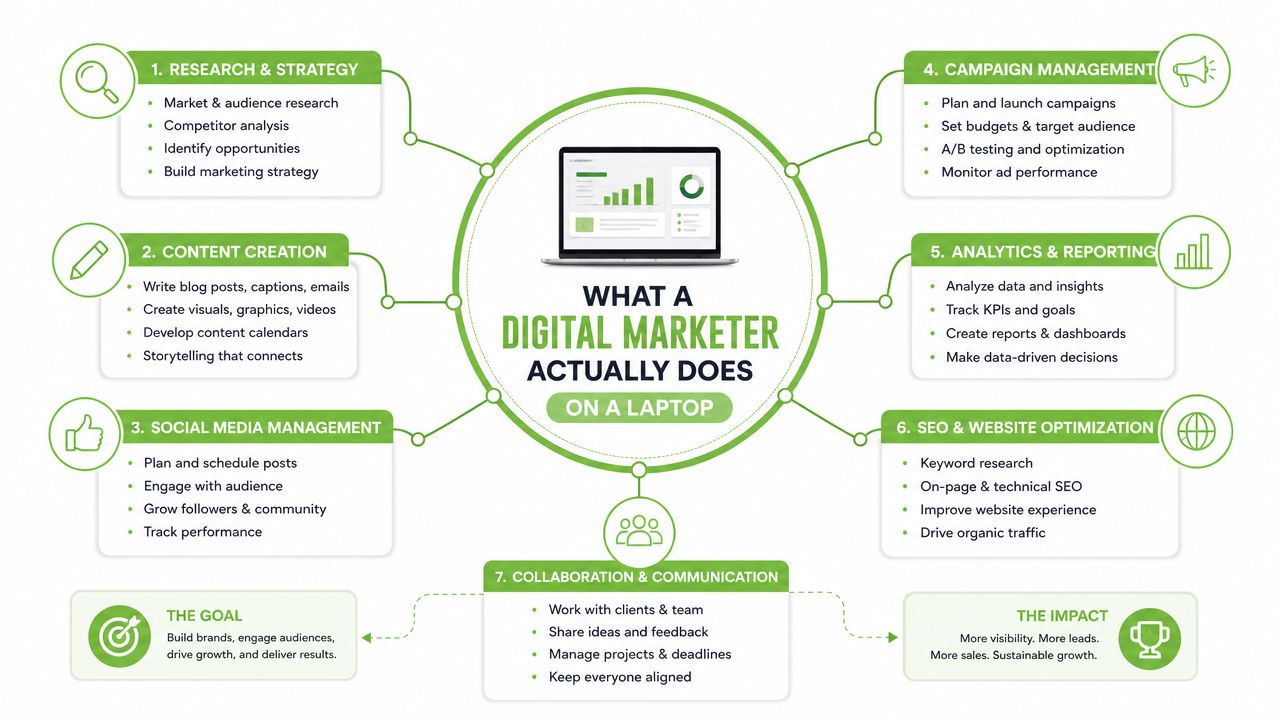
A Singapore marketer's laptop rarely gets used for one thing at a time. It's the place where campaign managers jump between ad platforms, where content teams draft copy and tweak visuals, and where client calls happen while a report is still syncing in the cloud. IMDA's Annual Survey on Infocomm and Media in the Private Sector found that 99.1% of businesses with 10 or more workers used the Internet in 2023, 97.4% used email, 95.2% used cloud computing, and 88.0% used at least one form of digital marketing in 2023, which tells you the work is built around constant online multitasking rather than offline editing alone. That is why a laptop for this job needs stable performance, not just light weight.
A normal day tells you more than a spec sheet
A practical day might start with a browser packed with tabs for Meta Ads, Google Ads, TikTok Ads and LinkedIn Campaign Manager. By mid-morning, the same person may be in Canva or Adobe Express, then in a Zoom or Google Meet call from a coworking space, then exporting a report into Google Sheets or Looker Studio before commuting on the MRT. If that sounds familiar, the machine has to handle many browser tabs, live dashboards, video calls, and asset files without stuttering.
That is why marketers should think in terms of workflow, not hype. Fast storage matters because campaign files, brand assets and exports need to open quickly. A good screen matters because creative review is part of the job, and colour that looks wrong on the laptop can mean a bad ad goes live.
Practical rule: if your laptop can't keep Chrome, Canva, and a video call open at once without slowing down, it's already under-specced for marketing work.
For a broader view of how tool stacks vary by agency size, compare agency marketing software and then match the laptop to the software you use. The point is simple, the laptop should support the workday you already have, not a fictional one where you only ever have one app open.
Critical Specs That Matter for Marketing Work
A laptop for marketing work should earn its place through daily use, not through a flashy spec list. CPU, RAM, SSD, display, battery, and ports only make sense once you match them to the mix of browser tabs, ad platforms, meetings, and file work that fills a Singapore marketer's day. Someone who spends time in cloud tools and client calls needs a different balance from someone who mainly drafts emails in one window.
CPU and RAM keep the laptop responsive
The CPU does the heavy lifting when several apps are open together. For marketing, a modern Intel Core i5/i7, AMD Ryzen 5/7, or Apple M-series chip is a sensible starting point, because entry-level processors can feel fine during light work and then slow down once you open a dashboard, a design tool, and a video call at the same time. RAM is the short-term workspace, so 16GB RAM is the safer baseline for the multitasking marketers do every day.
Simple way to read RAM: if you regularly keep many tabs open, RAM is what separates smooth switching from waiting for the laptop to catch up.
Storage, display, battery and ports shape the daily experience
Storage is not just about how much fits on the drive, it is also about speed. An SSD starts the laptop faster and opens files faster than older hard drives, which matters when you move between reports, presentation decks, and creative assets. A 512GB SSD is a practical minimum for many marketers because campaign folders, media exports, and local files fill space sooner than people expect.
Display quality is another place where marketing laptops differ from basic office machines. A Full HD IPS screen is the baseline to look for, with good brightness and colour accuracy helping when you review visuals, landing pages, and ad creatives. In Singapore, battery life matters just as much, because meetings, cafés, client visits, and MRT rides often mean you will not be near a charger. Ports matter too, especially if you need USB-C charging, HDMI for presentations, or stable Bluetooth for peripherals.
A laptop can look strong on paper and still feel awkward in real use if the screen is dim, the battery drains quickly, or the ports do not match your kit.
For buyers who want a practical starting point, a recent buying guide for marketers recommends 16GB RAM, a 512GB SSD, an Intel Core i5/i7 or AMD Ryzen 5/7-class processor, a Full HD display with at least 300 nits, and 8+ hours of battery life in its digital marketing laptop guidance. That mix is not flashy, but it fits the work.
Windows, macOS or ChromeOS for Marketers
The operating system shapes what you can run, how easily you can share files, and how long the laptop stays useful. For marketers, this is less about loyalty and more about software fit. A platform that matches your stack will save time every week, and a mismatch will cost you more than the sticker price.
Windows suits the widest range of workflows
Windows is usually the broadest choice because it works across a large mix of business tools, SEO platforms, and budget hardware. If you move between legacy company systems, external drives, client files, and mixed software environments, Windows tends to cause the fewest surprises. It also gives you a wider spread of price points, which helps when you're balancing performance against budget.
macOS works well for creative-heavy users
macOS makes sense for marketers who spend a lot of time in design and media tools, or who already use other Apple devices. It often pairs strong battery life with a very smooth laptop experience, which is useful for people who work from cafés, meetings, and co-working spaces. The resale side can also matter for long-term ownership, especially if the laptop will be traded in later.
ChromeOS fits browser-first users
ChromeOS is the simplest option if your work lives almost entirely in the browser. It is lightweight, easy to manage, and can be good for staff whose tasks are mainly email, web-based campaign tools, and document editing. It's less compelling if you regularly edit heavier creative files or need broader software compatibility.
The cleanest decision tree is this. If your stack is broad and mixed, go Windows. If your work is creative-heavy and you want a smooth battery-friendly machine, consider macOS. If your work is mostly browser-based and your budget is tight, ChromeOS can be enough.
A recent digital marketing laptop guide also notes that Windows 11 or macOS are suitable operating systems, while a beginner-friendly baseline can start at 8GB RAM, 256GB or 512GB SSD, and a Full HD screen, with 16GB RAM, a 512GB SSD, and Wi‑Fi 6 being the safer long-session choice for lighter and stronger configurations. That lines up with the trade-off buyers face: lighter use can get by with less, but a work machine should have more headroom.
Choosing the Right Spec Bundle by Use Case and Budget
The right laptop is usually not the most expensive one, it's the one that matches the kind of marketing work you do. A solo freelancer editing social posts has different needs from an agency lead juggling multiple dashboards, and both have different needs from someone cutting video and handling larger asset libraries. The safest way to buy is to pick a tier first, then compare devices inside it.
A three-tier guide
| Tier | CPU class | RAM | Storage | Display | Battery |
|---|---|---|---|---|---|
| Entry | Modern i5, Ryzen 5 or equivalent | 16GB if possible, 8GB only for lighter work | 512GB SSD if budget allows | Full HD IPS | 8 hours or more if you travel often |
| Mid | Core i5/i7, Ryzen 5/7 or Apple M-series | 16GB | 512GB SSD | Full HD IPS with good brightness | All-day use is the target |
| Pro | Higher-end i7, Ryzen 7 or Apple M-series higher tier | 32GB can help | 1TB SSD is useful for heavy files | Colour-accurate display, OLED or high-quality IPS | Strong battery plus fast charging |
For an entry buyer, the useful question is not “what's the most powerful laptop here?” but “can this handle browser tabs, Canva, reports, and calls without getting in the way?” If the answer is yes, you don't need to overspend. Mid-tier machines make more sense for marketers who live in dashboards, multiple documents, and frequent client work, because 16GB RAM and a 512GB SSD remove a lot of friction.
The pro tier is for people who regularly edit video, work with motion graphics, or carry larger libraries of media and analytics files. That is where 32GB RAM and 1TB storage start to feel worthwhile. If you're not touching those workloads, a mid-tier laptop is usually the smarter buy.
Best-value mindset: buy the spec bundle that matches your worst busy day, not your quietest one.
If you want a practical starting point for lower-cost options in Singapore, this local guide on affordable laptops is useful context for comparing entry-level and work-ready configurations. It's better to compare by workload than by marketing labels like “student”, “business” or “creator”, because those words don't tell you much about actual multitasking capacity.
Why a Certified ReLoved Laptop Is a Smart Choice
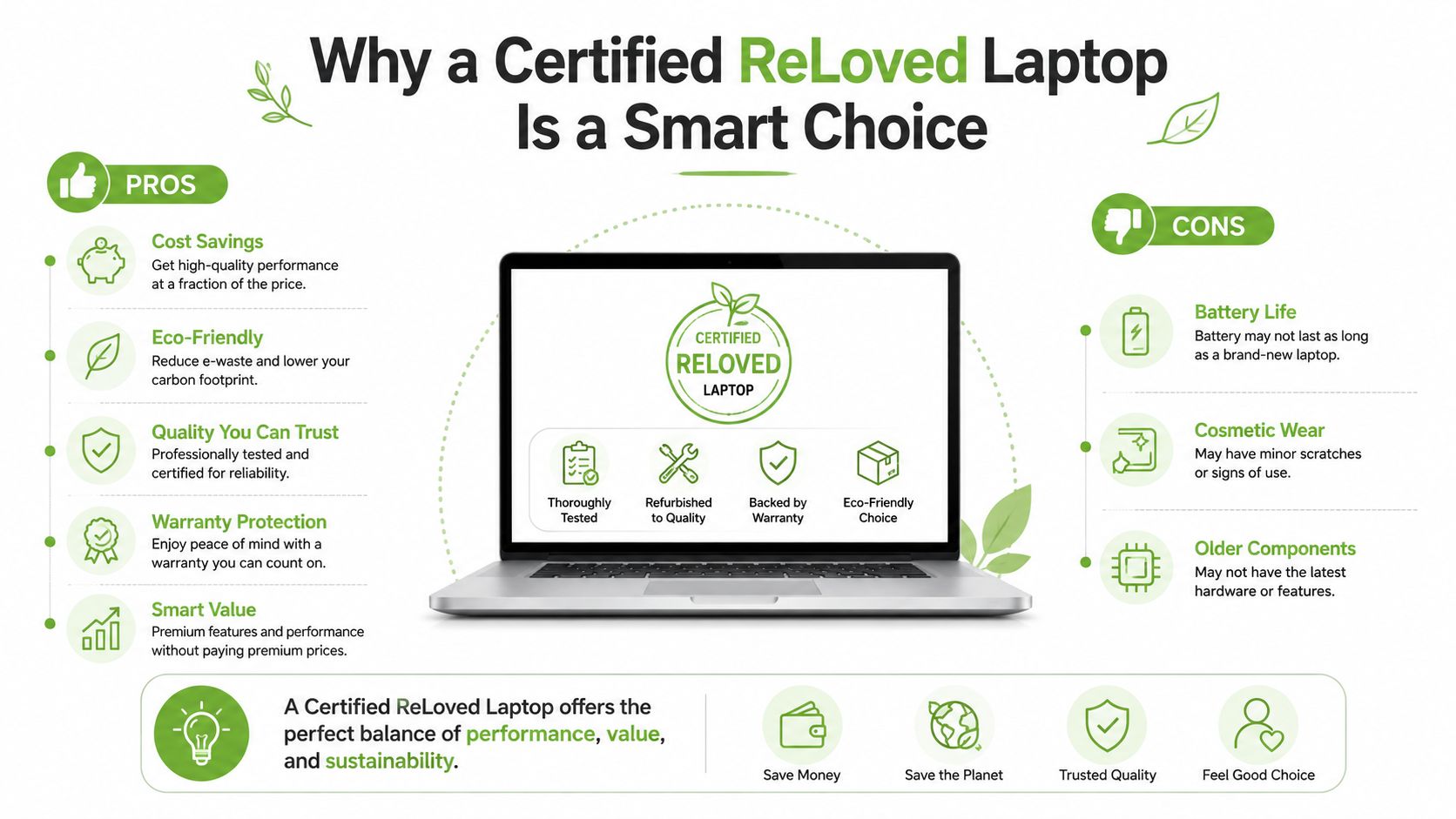
A refurbished laptop is not a compromise by default. If the device has been properly checked, graded and supported, it can be a sensible way to get stronger hardware without paying for a brand-new shell. That matters in Singapore, where many buyers want better screens, faster SSDs and more battery life, but still need to watch total cost.
What buyers worry about, and what actually matters
The common concerns are easy to understand, battery health, cosmetic wear, warranty coverage and software compatibility. Those are the right questions to ask. What matters is whether the seller is transparent about the device's condition and whether the unit has gone through meaningful checks rather than a superficial wipe-down.
myhalo's Certified ReLoved and related graded options are relevant here because they sit inside a lifecycle model, not a one-time sale model. The company also describes 30-point quality checks, ISO 9001 Certified and ISO 27001 Certified processes, and transparent device grading and battery health disclosure, which are exactly the kinds of details buyers should look for when judging second-life hardware. If you're choosing between new and refurbished for marketing work, that transparency can reduce uncertainty.
How grading helps you choose
A clear grading system gives you a better picture of what you're buying. As-New is the closest to a new-device experience. Premium, Excellent and Value grades reflect different levels of cosmetic wear, while ReEco is fully functional but may show more visible use. For marketing teams, that kind of classification makes it easier to match a laptop to the job and the budget.
The practical gain is simple. You can prioritise a stronger CPU, more RAM and a better display without stretching into a pricier brand-new model. That's especially useful for SMEs equipping multiple staff, where reliability and lifecycle planning matter as much as initial purchase cost.
If you're comparing refurbished routes, myhalo's refurbished laptop guide is a useful reference for how graded devices are positioned in Singapore. The larger point is not that refurbished is always the answer, it's that a well-documented second-life laptop can be a rational business purchase.
Buying and Owning a Laptop in Singapore
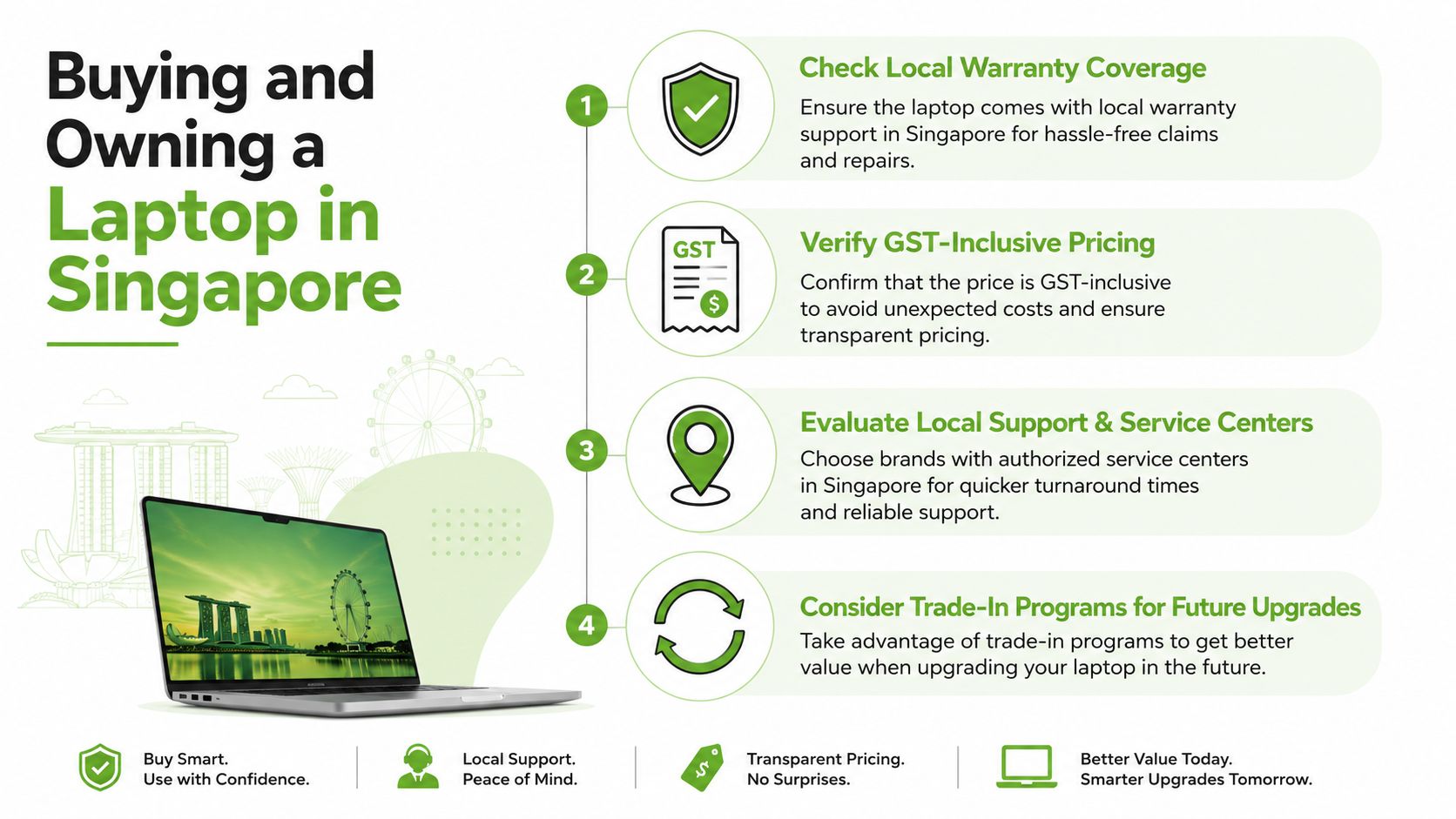
A good purchase can still become a poor deal if the after-sales support is weak. In Singapore, the buying experience matters because a laptop for marketing often becomes a daily work tool, not a casual home device. You want clear support, simple exchange terms, and a plan for what happens after the first year or two of use.
Questions to ask before you pay
Start with local warranty coverage. Then check whether the price is GST-inclusive, whether there's a 14-day exchange window, and whether instalment or refund options are available. A physical store can be useful if you want to try the keyboard, screen and weight before deciding, while online buying can be faster if you already know the spec you need.
The ownership side matters just as much. Trade-ins, buyback options, repair support, data migration and extended protection can all lower the actual cost of ownership over time. That is why lifecycle planning is a smart business habit, not just a consumer perk. If a laptop can be repaired, reused, or traded in later, it tends to stay useful for longer and keeps more value inside your budget.
When you're comparing support models, it's also worth looking at service resources such as WearView if you want a broader sense of how wear, condition and ongoing use are framed in device buying. The main takeaway stays the same, buy the machine as part of a lifecycle, not as a one-off object.
Ownership rule: the cheapest laptop on day one can become the most expensive one if repair, replacement, or trade-in options are poor.
myhalo's model includes repair services, data and device migration, trade-ins, myhalo e‑Xtender for proactive maintenance, and myhalo Protect for accidental damage, liquid protection and extended warranty. Those services matter because they help a laptop stay productive longer, which is useful for SMEs and for anyone who depends on one portable workstation every day.
Putting It All Together and Choosing with Confidence
The right laptop for digital marketing is the one that fits your working day, not the one with the loudest label. If you spend most of your time in browser tabs, ad platforms, design tools and video calls, start with 16GB RAM and a 512GB SSD, then make battery life and display quality essential. From there, choose the operating system that matches your software stack and the ownership model that fits how long you plan to keep the device.
A short checklist helps more than endless comparison charts. Confirm the CPU class, RAM, SSD size, screen quality and battery expectation. Ask about warranty, exchange terms, repair options and trade-in support. Then think ahead to what happens when the laptop reaches the end of its first life, because a device that can be reused or responsibly recycled is usually a smarter business asset.
For a broader view of laptop reliability in business settings, this guide on reliable business laptops is a useful companion read. Once you've compared specs with your actual workload, the decision gets much easier.
If you want help choosing a laptop that fits your marketing workflow and your budget, visit myhalo for new, Certified ReLoved, and Certified Surplus options, plus repair, trade-in, and lifecycle support in Singapore. The right device should do more than work today, it should stay useful, support your team, and hold value for the next stage too.